



A Mock Court Hearing From Roll Call to Readback With Speechmatics
Run a complete fictional footbridge hearing with Martel stenomasks, two witnesses, exhibits, a recess, a disputed readback, and four separate scores.
Set the Martel Dragon USB Stenomask on your desk with its cable beside the Windows 11 laptop you intend to use. The goal of this setup is quite concrete. By the end, you should be able to open a short recording of your masked voice, hear yourself count clearly through twenty, and find a different sentence that you dictated into a fresh Speechmatics practice job in your court reporting software. Use invented material. A few minutes spent identifying what each application received can answer questions that an entire afternoon of watching words appear might leave open.
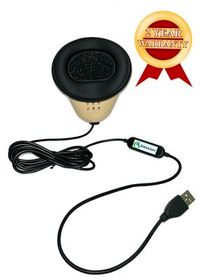
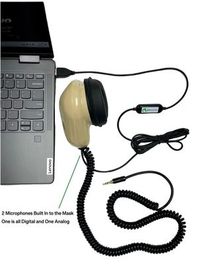
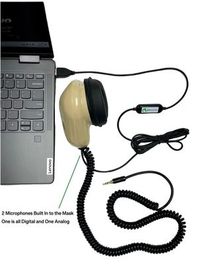
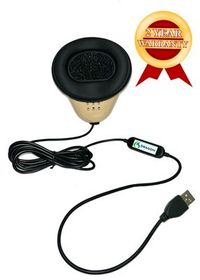
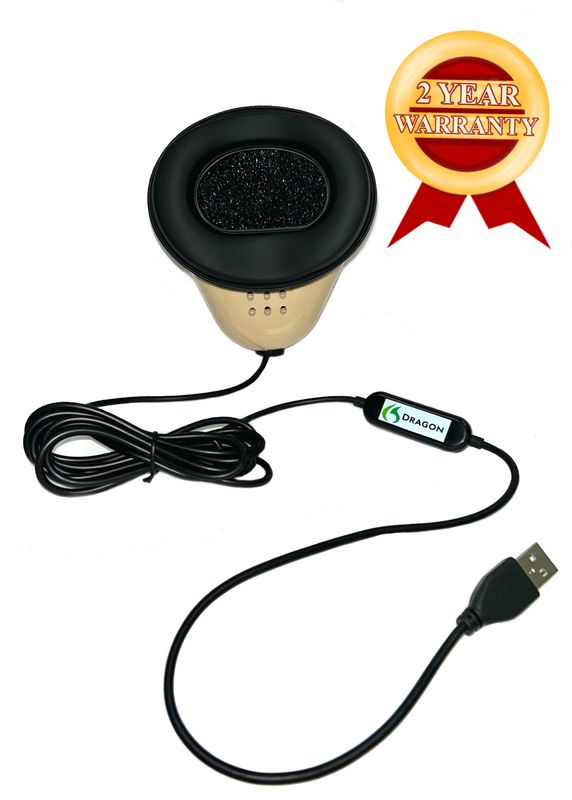
Martel equips the Dragon USB Stenomask with a built-in sound card. Its cable gives the computer a direct USB microphone connection. For this route you can plug the mask into a compatible USB port without fitting an external analog microphone adapter in between. The mask provides the sound of your dictation. Your chosen recording program is responsible for saving a recording, and your publisher-supported computer-aided transcription software, usually called CAT software, manages the reporting job. Give each of those parts its own turn in the first setup. Martel Dragon USB Stenomask specifications.
Picture a reporter unpacking a new laptop on Monday evening. Her school has provided the name of the CAT edition and confirmed how she can access Speechmatics. Her Martel mask is already familiar. What she still needs to learn about this computer is what Windows calls the mask, where she can listen to a fresh recording and how she can identify today’s test in her own CAT software. She can answer all three in one sitting without using a student's name, an actual case or a recording from yesterday. That is the assignment this guide walks through.
Choose a quiet practice space where it is appropriate to play a recording through the laptop speakers. Place the computer where you can reach the keyboard and see the input names while holding your personal mask in its usual position. Keep a small sheet of paper by the computer. Write a heading for the recording you are about to make. Leave space for the physical connection, the name Windows displays, the words you used to identify the sample and the name of the CAT practice job. This short note will let you reconstruct the session a week later.
Find the USB connector at the end of your personal mask’s cable. Trace it back to the mask itself. Do this before placing the cable alongside a headset, power cord or USB hub. It is easy to remember that a desk had a microphone connected while forgetting which microphone it was. On your note, describe the connection in words you would understand when talking with a trainer. “Dragon USB mask, plugged into the port beside the charging cable” is more useful than “microphone connected.” A photograph of your own setup can supplement that description if you find port positions difficult to remember.
Martel also offers the Double Dragon 2, which has a USB microphone connection and a second, independent microphone connection ending in a 3.5 mm plug. That model serves a reporter who wants another destination, such as a compatible recorder, for the reporter’s own voice. If the model in front of you is the single Dragon USB, follow that one cable to the computer and check that path today. Allow the equipment you actually own to determine what goes on your desk. A second file can only be expected from a destination you have set up to record. Martel Double Dragon 2 connections.
Connect the USB plug using the arrangement you plan to check first. A direct compatible port makes a straightforward starting point because it leaves one physical connection to describe. If your computer requires a compatible adapter or you routinely use a dock, record that arrangement as it actually exists. Label a borrowed classroom dock by desk or location so that you can recognize the configuration in your notes later. When you eventually compare two arrangements, keep the original note and create a second entry rather than replacing the first entry from memory.
Identify the playback device separately. Today’s first listening session uses speakers in your private practice space. Set their volume to a comfortable level and use a known sound to confirm you can hear them. Then return to the microphone work. The volume at which you listen and the level at which a microphone records are two different settings. If an unrelated audio file is very quiet on playback too, sorting out the listening volume first saves you from increasing the microphone input merely to compensate for quiet speakers.
The strength of this little setup lies in being able to describe it in a single complete sentence. Try writing one now. “My own Dragon mask is connected on the left, and I will listen to the completed take through the laptop speakers.” Later you can append the Windows input label and the sample’s name. If a support conversation becomes necessary, a person who has never seen your computer will already understand both ends of the test. There is no need to send a photograph or recording of a real proceeding to establish those basic facts.
Microsoft’s Windows 11 instructions place microphone testing in Settings under System and then Sound. Find the Input area and open the properties for the microphone you want to test. Windows offers a test that you can start while speaking, stop when you finish and play back. The same input settings include an input volume control. Write the listed device name exactly as you see it. A manufacturer’s retail product name and the wording in a computer’s device list need not be identical for you to identify the device by a practical test. Microsoft’s microphone test.
If several devices are listed, take a moment to read all the labels. A laptop can have its own microphone, and other connected audio equipment can add choices. Merely seeing one item with the word “microphone” gives you very little information. Choose the entry you believe belongs to the mask and make a short spoken sample. Use something distinctive, such as “North reading table, check one.” Hold the mask as you ordinarily would to dictate. Speak at your working level and release the test using the control Microsoft describes. Play that exact take to hear your words.
If your input list leaves the identity uncertain, do the identification exercise with recording stopped and with your practice work saved. Observe the list with the USB mask connected. Disconnect that mask, look for a change, then reconnect it and look again. Record what actually happened. If other equipment supplies identically named entries, the change in the list can give you a candidate. Repeat the spoken test on the reconnected route. Hearing your own marked sentence through a deliberately selected input gives you more to go on than a label or an illuminated meter alone.
Pay attention to the words at both ends of the sample. In “North reading table, check one,” listen for the start of “North” and the end of “one.” Does the sound seem close to the microphone? Can you understand the same phrase twice at a moderate speaker volume? If you make an adjustment, describe what you changed. Record another sample and choose a new final word, such as “two,” so you can tell it apart from the first. When the difference is useful, write the new setting down in your own terms.
Microphone access in Windows is also documented by Microsoft. On Windows 11 the relevant privacy controls are under Privacy & security and then Microphone. A desktop application and an app with its own entry can be represented differently on that page. If the intended app cannot use an input that worked in the Windows test, look up the access controls for that kind of application and the account you are using. On a managed school or office computer, the person responsible for that computer can explain which settings are available to you. Return to the same short phrase once the appropriate access is in place. Microsoft’s microphone permissions guide.
Leave the Windows test with a finding you could defend. For example, “I selected the item displayed as USB Audio Device, said ‘North reading table, check two’ into my mask and heard that phrase clearly on playback.” Avoid inventing a universal device label or copying somebody else’s input volume. Your example might show a different name and a different comfortable setting. The purpose of the note is to help you recover your verified configuration later. If the result is still uncertain, label it as uncertain and repeat the identification step before building a CAT exercise around it.
Microsoft describes recording and stopping a take in the Windows Sound Recorder app. Open Sound Recorder on your Windows 11 laptop. Before starting, check the microphone choice if your version displays an input selector. Match it to the device you identified in the previous step. If the application follows an available system choice in your setup, note the choice you verified in Windows and confirm it by listening to what Sound Recorder actually saves. Keep this first recording separate from any later CAT job. You will use it as a small piece of evidence you can play on demand. Microsoft Sound Recorder help.
Take a breath, start recording, then speak the marker “Personal Dragon mask, counting take one.” Count aloud from one through twenty at a comfortable pace. Leave a little space between the numbers while using your normal reporting voice. At the end say, “Finished at the north reading table.” Stop the recording and give it an identifiable name using the options your app provides. Actual clock times are optional for this drill. The spoken ending and the name you assign are the details that will identify this take among several short files on a busy practice afternoon.
Set the mask down and play the saved take through the speakers you already checked. Listen first without looking at your notes. Can you tell where the counting begins, can you recover all twenty numbers in sequence, and can you hear the full final marker? Now listen again and deliberately attend to the middle. Thirteen through nineteen contain similar sounds. Did you say fifteen clearly enough to distinguish it from sixteen? Did you hurry past eighteen? Hearing what you actually did is more informative than remembering what you intended to do when you pressed Record.
A count is useful because the reference is obvious, there are short and long words, and the result is easy to explain to another listener. It is also a predictable sequence. Someone who starts at one can often guess the next item from context even if the sound is faint. Add one fresh sentence after the count when you need a more demanding saved sample. Try “The book cart had two silver handles and a blue strap.” Later ask a practice partner to identify the color without first telling them the sentence. Keep the original count and the extra sentence clearly marked.
Listen from a consistent seated position while comparing takes. If you turn the speakers up between numbers or carry the laptop across a room, the listening comparison becomes harder to interpret. You can adjust the playback volume for comfort, then replay the original and the new sample at that same volume. Record a simple description such as “I heard all twenty numbers at my usual playback volume, and the word strap was clear.” In a later support request that sentence communicates an actual observation. “The mic is great” tells the reader much less about what you checked.
If the saved sample contains room sound and a distant version of your voice, revisit the selected input and make another marked file. If there is a file with the correct name and a moving counter but you hear nothing through the selected speakers, try the known playback sound again before changing microphone controls. If the correct input records a clear sentence and the numbers sound rushed, try one slower count with all equipment unchanged. The three situations point to different follow-up actions. A single recommendation to raise every volume control would obscure the distinctions you can already hear.
Advantage Software describes EclipseVox as supporting Dragon Professional and Speechmatics Enhanced. Its public information distinguishes cloud and local Speechmatics options, and its version table describes the supported local hardware arrangement. Use the instructions for your installed EclipseVox version and recognition option when opening your practice job. The name Dragon on a Martel mask identifies hardware. The recognition engine chosen in EclipseVox is a separate choice. It is entirely reasonable to verify your mask audio today even if you are still waiting for the details of the software arrangement you intend to use. Advantage Software’s EclipseVox description · Advantage Software’s supported options.
Stenograph describes on-device Speechmatics integration for CATalyst VP. If you use that software, establish the supported workflow, edition, access and installation requirements with Stenograph for your own system. Its public announcement describes the integration. A screen command for another product or an older Dragon-based workflow should not be treated as an instruction for your particular Speechmatics installation. Once you know which setup your publisher supports, make a new practice job there and record the name of that job beside the Windows and Sound Recorder findings. Stenograph’s CATalyst VP announcement.
Retain your normal working environment as a point of reference. Open the practice job, identify the input through the controls documented for that setup and write down its displayed label when available. Make a fresh spoken marker. Today’s CAT marker could be “CAT practice at the south returns desk.” This changes both the place and the purpose from the saved count at the north reading table. If you hear the northern marker later while checking a question about the CAT job, you will know that you have opened the earlier recording.
Start with one short statement. Say, “The second cart arrived at twelve minutes past nine.” Look at the output after the sentence is complete. Can you locate the cart number and the time? Save an untouched practice rough before fixing anything. If your configured reporting workflow includes a recording you intend to review, make and save that recording as directed by your CAT publisher. Return to the sentence in the rough and to its associated audio if available. Keep the language you use for the two findings precise. Reading a sentence in a job and hearing it on playback establish different facts.
Try a two-turn exchange using the reporting commands and conventions you already learned for that system. The question is “Which cart held the east branch books?” The answer is “The cart with the short wooden handle.” Listen for the words and inspect the speaker change separately. A complete spoken answer that appears on the question line calls for attention to how speakers were identified. A correctly labeled answer missing “short” benefits from comparing the spoken audio with the text. Neither observation requires you to change a properly identified Windows microphone while you are still learning what the result shows.
Martel’s VOX Elite 32 GB and 64 GB laptop listings describe preparation for court reporting along with help setting up a stenomask and transferring files. When planning a Martel setup appointment, bring your specific mask model and your CAT product and version. Explain that you would like to identify the microphone in Windows, play a saved take through the speakers and complete a practice job using the option your CAT publisher supports. Those are concrete purchase and setup requirements. For a local EclipseVox plan, include Advantage Software’s specified Boost Box or qualifying computer arrangement in the discussion. Martel VOX Elite 32 GB package · Martel VOX Elite 64 GB package.
We handcraft our Dragon USB and Double Dragon 2 stenomasks in limited quantities. If a batch sells out, there may be a waiting list.
The following exchange is an original practice exercise. The people, library, routes and times are invented. A partner can read the question and answer lines while you repeat them into your own mask, or you can make a source recording of both parts beforehand. Choose one approach and record it on your setup sheet. If you practice alone, set aside the written reference while you dictate from the source recording. That gives you a fair opportunity to discover whether a detail made it from the exchange into your dictation.
Question. When you came to the returns desk that morning, which cart was already inside? Answer. The narrow wooden cart was beside the map case. The blue cart had been left on the other side of the door. I knew the wooden cart was ours because one handle was shorter than the other. The delivery person pointed to the short handle when he asked where to put the new labels. I asked him to put them on the ledge until I could check the branch name.
Question. Where was the printed list that you used to check the branch name? Answer. The list was folded inside a clear sleeve attached to the front of the wooden cart. The first page named the east branch. The folded page underneath named the north branch. I checked the first page, then unfolded the second one. The folded page was a return schedule from the day before. I left both pages in the sleeve and wrote the word east on a slip of scrap paper for the delivery person.
Question. What were you able to read on the blue cart from where you stood? Answer. I could read the number fourteen, written in black on a white card. I could see a second card lower down. I could not read the writing on that card from the doorway. I walked around the map case after the delivery person had gone. By then the blue cart had been rolled toward the children’s room. I did not see who moved it.
Question. What time did you write on your own handover sheet? Answer. I wrote nine twelve beside the entry for the wooden cart. I later added nine twenty beside the entry for the blue cart. Those times came from the clock on my desk. The delivery person gave me a slip with a printed time of nine ten. That slip stayed with the wooden cart. If you look at the handover sheet now, you will see my initials next to nine twelve and a small star beside nine twenty.
Question. Which entry did you change after lunch? Answer. I added the initial of the person who received the schedule. I did not change either arrival time. The initial was P for Petra. She took the schedule to the east branch. She left the folded page on my desk because it belonged in the old returns book. The old book has a dark red cover. The current book has a green cloth cover with one corner folded back.
Question. Where did the new labels end up? Answer. I found them on the ledge at the end of the morning. There were sixteen white labels and six pale yellow ones. Two white labels had come loose at the corner, so I laid them flat under the green returns book. The rest stayed in a small paper bag on the ledge. I wrote the count on the outside of the bag after I put the loose labels away. I wrote fourteen white labels and six yellow labels for what remained in the bag.
Question. Does the number on the bag identify the blue cart? Answer. No. The blue cart was marked fourteen before I counted the labels. The number on the bag referred to the fourteen white labels left inside. I remember both numbers because I almost put the bag on the blue cart. The short handle on the wooden cart reminded me to put it with the east branch materials. I set it beside the printed slip and left the wooden cart there for Petra.
Question. Please look at the photograph marked Library One. What can you identify? Answer. I can identify the map case, the ledge and the white card on the blue cart. The wooden handle is out of the picture. I recognize the ledge because of a little square where the paint has worn away. I could not tell from this photograph whether the two loose labels were still under the green book. I can describe what I did with them from memory.
If your goal today is initial setup, one completed section of the exchange is enough for the first CAT sample. Reporters trying to carry the setup through a more realistic exercise can work the whole passage in a second job. Use the same microphone route for both and give the two jobs different names. Stop each job in the manner documented for your software. Reopen the short one before reviewing the longer one. This checks whether your naming convention helps you locate the right material after the session has ended.
Look first at the two descriptions of the carts. The wooden cart has a short handle, the blue cart has a white card, and the number on that card is fourteen. A listener who hears only the number could assume it belongs to the bag of labels. Ask your practice partner to find the earliest mention of fourteen in the rough and read the full sentence. Now locate its second meaning near the end. What you want to observe is whether the transcript makes it straightforward to distinguish an identifier attached to an object from a count of items in a bag.
For the times, make three small entries on your page. Write the event in words before you write the number. The wooden cart handover entry was nine twelve. The blue cart handover entry was nine twenty. The printed slip showed nine ten. If all three numbers are present, read the questions around them. A properly recognized time can still look attached to the wrong event if a speaker change or paragraph is misplaced. Review the relevant audio before marking a recognition difference. Count word changes, time associations and speaker changes separately in your learning notes.
The words “could not read” and “did not see” limit what the fictional witness knew. On the first replay, listen for the whole clause in each case. On the second, follow the saved rough word for word. If you omitted a short word in your own dictation, locate the same turn in the original script. Then practice repeating a new limiting phrase, such as “I could not read the bottom line.” A correction you make because you missed a spoken detail belongs in your technique notes. A difference between clear mask audio and the text belongs in your job review notes.
The label count offers a different test. Sixteen white labels were found and two were put under the book, leaving fourteen in the bag. Six yellow labels stayed in the bag. The arithmetic is a way for the reader of this fictional exercise to understand the example. In a practice transcript, preserve the numbers actually spoken at each point. Resist the urge to replace the witness’s first count with the final count to make them look alike. A good setup produces a record you can listen back to and use to check the witness’s sequence as given.
Finally, find what the witness could identify from the photograph. The answer mentions the map case, the ledge and the white card. The wooden handle is outside the picture. Consider what a request for readback might sound like. A partner can ask, “Please find the answer about what could be seen in the picture.” Find the whole exchange, then use your listening notes to check whether it was captured clearly. If you keep returning to the wrong line, improve the job’s organization or practice locating the turn before you assume the USB connection influenced that search.
In one invented setup session, a reporter hears a distant count in Sound Recorder. A partner’s chair squeak near the laptop is louder than several numbers. The useful next action is to identify the chosen input again and make a new spoken marker. When the reporter selects the mask’s verified entry and hears the close count, both recordings become useful examples. Label the first one as the unintended source and the second one as the working mask route. You have learned the sound of a selection difference without needing to change how you speak.
In a second session the count sounds close and distinct, and the speaker marker in the CAT rough contains the right place and time. The setup question now is how the software represents the time in this particular job. Nine twelve might appear in numerals according to formatting choices. Verify that the represented time is correct, then use the style expected for your class or work when editing. If you mark the time as a hardware problem because it was rendered in numerals, the equipment notes will send your next training session in the wrong direction.
Consider a third reporter who opens the intended job, speaks a clear question and sees no new words. The same reporter has an identifiable saved count in Sound Recorder. Save what you have and verify the supported recognition workflow for that installation. Check the selected destination and whether the job is ready for input as the publisher describes. A successful independent recording narrows what you need to explain to support. You can state that the Windows recording application received the mask on the same laptop and identify the first step for which you still need an answer.
Use working pace as another measured observation. In a fictional timing exercise a reporter completes a ninety-word passage in forty-five seconds, then takes another forty-five seconds to check the essential details. That works out to 120 spoken words per minute and ninety seconds for the passage plus review. Suppose the same reporter’s next comparable passage takes forty seconds to speak and seventy seconds to check. The reporter finished speaking sooner on the second take, while the first led to a checked practice copy sooner. Those are illustrative numbers only. Measure your own speaking time and review time, and keep the clean mask recording behind the observation.
What the Dragon USB contributes to that exercise is a direct microphone path you can deliberately identify and reuse. Holding your mask comfortably and working at a pace that preserves names, quantities and short qualifications gives the recognizer usable words to process. If a reporter wants to compare two rates, it makes sense to keep the selected microphone, connection and listening method consistent. Then any differences are worth investigating. No microphone specification establishes what score a particular reporter, laptop, CAT release and passage will achieve on a future assignment.
Compare the name and cable arrangement on your own mask with Martel’s product photograph and description. A single direct USB microphone route is the arrangement described for the Dragon USB. If your mask also has an independent 3.5 mm lead, compare it with the Double Dragon 2 listing before deciding what should appear on the desk. Write the model you actually found on your equipment note so a future setup starts with the right instructions.
It provides the USB audio path Martel describes for the Dragon mask. In practice, you can connect the compatible USB plug to the computer and look for the resulting microphone input. Responsibility for starting a recording remains with the application you choose. To demonstrate the difference to a student, let the student point first to the physical input and then to the recording they deliberately started, stopped and reopened.
Identify the personal mask and cable you will use, then note the exact laptop and any desk dock in that route. Keep the mask personal to its owner. Read the input names on that machine before relying on a previous session’s selection. A sentence including the desk location makes a good spoken marker. It gives your independent recording a detail that distinguishes it from a take you made on your own desk at home.
A listening check depends on being able to hear the playback you selected. Playing an existing harmless sound at a comfortable volume gives you a point of comparison. If you later open a quiet counting sample, you can see whether another file still sounds normal. That information helps you choose between checking the recording input and investigating where playback is going. It also lets you compare two takes at the same listening level.
With the job closed and recording stopped, compare the list before and after disconnecting only your mask. Reconnect it and note which entry appeared. Then select that entry, record a distinctive sentence into the mask and listen to it. If the names remain ambiguous, keep a note of the connection and the observed behavior. A specific sequence you can repeat is more valuable than assigning a confident product name to an unknown input.
Write the selected device name, the identifying phrase and what you heard when you played the test back. Use Sound Recorder for the separate counting take that you want to recognize and reopen later. This avoids relying on the properties screen as an archive of your practice work. A date, an identifiable spoken ending and a saved count give you a compact reference for later equipment discussions.
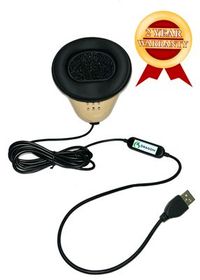
Set up your Dragon USB Stenomask on Windows 11, play a twenty-count recording, and check a fresh Speechmatics court reporting job with practice testimony.
Use the tools on your machine to make and listen to a recording at your usual dictation level. Microsoft documents testing and adjusting the selected input, but a single reading copied from another reporter cannot establish the sound of your own take. The result you need is intelligible words from the intended source. If two settings sound different, save a marked sample of each before deciding which one deserves another practice session.
Use the Windows microphone permissions appropriate to the app and the account you are using. On managed equipment, involve the person responsible for that account when necessary. Once the app has the access required for the practice exercise, start a new take with a new spoken marker. A previous file or an earlier access message cannot tell you what the app received after the permission was available.
The purpose of the exercise is to identify the sound of your spoken voice on playback. Count audibly into your own mask at your regular reporting level and listen afterward. A meter can respond to movement or other sound in the room. A saved count lets you check the source, the words and the beginning and end of the take. It also gives a trainer something specific to discuss without using anyone’s actual testimony.
Check when you started recording, how you began the spoken marker and whether you opened the intended take. In a new test, start the recording, establish your normal working position and say a different opening marker before counting. Compare the first words in both files. Record your observation without assuming the equipment clipped them. The sequence of actions and the full playback help you distinguish a late start from a repeatable audio difference.
Replay the full phrase and listen to the surrounding words at the same speaker volume. Then say a new sentence at your ordinary level containing the word in a different position. If a specific consonant remains unclear while nearby words are distinct, return to the phrase as spoken and compare it with the source. If the entire sample is difficult to hear, revisit the input selection, recording level and playback destination in order.
A familiar number sequence gives the listener many clues about what should come next. An unfamiliar sentence tests details that cannot be predicted so easily. Keep the count as your first check and use the second sentence to examine names, descriptive words and word endings in context. When you repeat the sentence, keep the setup constant and change only the aspect you intend to practice, such as the space before the final word.
Write the name and version actually installed on the laptop, along with the publisher’s name for the recognition option available to you. Identify the hardware on a separate line. If you later speak to your school or the software publisher, that note is more informative than describing the equipment as a “Dragon setup.” The same spoken phrase can be tested on different configurations only when you can identify which combination produced each result.
Include the hardware name if it helps, but add a distinguishing job subject or spoken marker. Three files called Dragon test are difficult to distinguish after several practice runs. A name such as “Library carts, south desk, first CAT take” describes what you will actually hear or read. Keep the Sound Recorder count under a different identifiable name, because it answers a different setup question from the CAT job.
Preserve a working copy of the initial result under the procedures you use for practice jobs. Then find one detail you want to verify, such as the time printed on the slip. Compare your saved output with the original practice material and with your dictation recording if your setup captured one. After editing, you can explain what changed and why. A correction made from memory alone is hard to evaluate as evidence about the microphone.
Use a speaker change you already know in the specific CAT software you are training with. Choose two simple turns and a different object for each answer. If you have not yet learned the publisher-supported method for a speaker change, finish the word-capture exercise as a short statement and save that result. Then give speaker identification its own practice session with the material or trainer for your installed edition.
It gives you a reason to listen for what the witness could see and what the witness could read. The upper card showed fourteen. The witness saw a lower card and could not read its writing from the doorway. A transcript that merely mentions two cards can miss that distinction. Locate both sentences in your saved rough and verify the limits the witness actually placed on the observation.
Ask the partner to listen for the entire opening marker and the word you placed at the end. For a more demanding test, add an unfamiliar item color or position and ask the partner to identify it from playback. Your partner can help evaluate a recording without using your personal mask. Keep the listening exercise on the invented material and retain the reference for checking the answer afterward.
The fictional witness identified nine ten as the printed time on the slip. Nine twelve belonged to the handover entry for the wooden cart, and nine twenty to the blue cart entry. In the rough, find each association by reading the surrounding question and answer. If a time was represented in numerals instead of words, first check the value and its meaning, then attend to the presentation required for your practice copy.
Write that you verified the text in the practice job and that your separately saved count came from Sound Recorder. Add the recording functions you intend to configure or learn from your CAT publisher. This lets you use the material you genuinely have. It also avoids accidentally describing a recording of numbers from one program as a recording of the library testimony you dictated into another.
A reporter who wants to feed a compatible independent recorder can use the Double Dragon 2’s separate analog microphone connection alongside its USB computer path. That purchase decision follows from needing another destination for personal dictation. For a one-input computer setup, the Dragon USB already provides the direct path described here. Base the choice on the recordings your work calls for and how you intend to listen to each afterward.
The purpose of the stenomask in this exercise is to pick up the reporter speaking into it. Plan a separate suitable room microphone and recording arrangement when the aim is to preserve the original participants’ voices. In your practice notes use wording such as “my repetition of the question.” That tells an editor exactly which sound is available and why the voice on the mask recording belongs to the reporter.
Complete the direct-port practice first and retain the saved count. End the practice job before rearranging equipment, connect the mask through the intended dock and verify the selected input again. Make the next take with a clearly different closing marker. Play the two at the same listening volume. You can now describe a repeatable difference or a satisfactory result for both arrangements without guessing which file came from which connection.
Begin with the technique and working level you ordinarily use. That gives you familiar material for comparison with earlier recordings. If you also want to test delivery, choose that as a separate exercise after confirming the new microphone route. Keep the physical connection constant and compare passages that ask similar things of your voice. This approach makes a change in phrasing or pace easier to interpret when you listen later.
Bring the exact VOX laptop package you are discussing, the model of your own mask and the CAT product and version you use. Describe whether you need a separate recorder for your own dictation. A short invented practice job and a descriptive filename make useful setup examples. Ask to leave the appointment knowing which input produced your saved recording and where to reopen the newly created practice job.
Start with a practice job you know from the previous computer and, if applicable, an associated recording whose words you recognize. Then make a completely new recording and job on the prepared laptop. The first comparison checks whether your familiar material is accessible. The new sample checks present capture with the actual mask connected. Keeping those findings separate makes it easier to explain a transfer question or a hardware setup question to the right person.
Look for the unique phrase you spoke for this session and a second meaningful detail, such as a cart color or printed time. If you opened a recording, listen for the assigned opening or ending rather than trusting its position in a list. When those details match, add the confirmed filename to your note. A timestamp alone can be less memorable than an identifiable line you just dictated at the south desk.
Give the personal mask model, actual Windows input name, physical connection and app or CAT release involved. Identify the last step that produced a clear, repeatable result. For example, say you can reopen a complete count in Sound Recorder but need help starting a Speechmatics practice job on the installed edition. Use your fictional sample to describe the difference. That is enough context to direct attention to the next unverified handoff.
Choose an interval that makes sense in your training and compare like tasks. Record the length of the passage, the time you spoke and the time required to verify the material. Mark meaningful differences such as a missing negative or a changed time separately. A single fast take can be encouraging, while several unfamiliar samples give you more to discuss with your instructor. Preserve the settings from each session so those observations remain interpretable.
Show another person the actual USB route, identify the input Windows tested, play your count through the selected speakers and reopen your distinctly named CAT practice job. Find one question and answer from the invented inquiry and explain what evidence you used to check them. You now have a documented setup you can repeat and a specific starting point for your next lesson, whether that meeting concerns laptop preparation, recognition settings or dictation technique.