
A Mock Court Hearing From Roll Call to Readback With Speechmatics
Run a complete fictional footbridge hearing with Martel stenomasks, two witnesses, exhibits, a recess, a disputed readback, and four separate scores.
Suppose your equipment sheet says “Speechmatics” and you want to start practicing on a Martel VOX laptop. There are three names worth finding before you order anything. One identifies the reporting application that will hold your job. Another identifies the recognition model that application supports. A third identifies the release of the reporting application you will actually open. A school can give everyone in a class the same microphone exercise while two sections use different software releases. The term printed beside the exercise can be accurate and still leave a buying question open.
For a voice writer using EclipseVox, Advantage Software specifically names Speechmatics Enhanced. The publisher also gives a release-by-release answer about where recognition can run. For a voice writer using CATalyst VP, Stenograph describes an on-device Speechmatics integration. A reporter can use those facts to ask a much more productive question than “Which Speechmatics should I buy?” Start with the software you are licensed to use. Ask which release and recognition arrangement your school or office will support for the work in front of you. Advantage EclipseVox Advantage version and Boost tables Stenograph on-device announcement
Ready to choose your equipment? Use the Martel VOX laptop and Speechmatics buying checklist
Speechmatics lists four models for its Batch and Realtime transcription services: Enhanced, Standard, Melia 1 and Oak 1. The company describes Enhanced as its accuracy-oriented choice for single-language work, including legal transcription. Standard emphasizes processing speed. Melia 1 is designed for multilingual speech, and Oak 1 is specialized for healthcare audio. These are models in the developer’s transcription catalog. Its separate Agent STT service has its own model, Linden 1. A reporter buying an integrated CAT setup has a second, more specific reference to consult: the reporting software publisher’s description of what it has built into its product. Speechmatics models Advantage EclipseVox
Consider a student who reads about Standard and thinks the name means the starting edition for a first-semester class. Nothing about the word “Standard” establishes the class curriculum. A clearer way to read the documentation is to put two headings on a page. Under “What Speechmatics offers,” list the model names. Under “What my class uses,” write the CAT publisher’s name, release and documented model. When the instructor confirms EclipseVox with Speechmatics Enhanced, place Enhanced in the second column. Leave the other three names in the catalog column. You now know where each term came from and which one belongs on your equipment request.
Another reader might see “Realtime” in a model table and assume that this names a separate version of the laptop software. Speechmatics uses realtime to describe recognition of a stream of speech as it arrives. For batch processing, it describes submitting a recorded file and receiving the result after processing. Those two tasks can begin with exactly the same spoken passage. They nevertheless give your course instructor different things to evaluate. One assignment might ask you to follow your text as you dictate. Another might ask you to review a previously recorded sample. Specify the actual assignment when you ask which setup you need. Speechmatics transcription modes
Advantage Software lists local Speechmatics for Eclipse 10 and 11. For Eclipse 12 it lists both local and cloud Speechmatics. Its EclipseVox page names Enhanced as the supported Speechmatics model. Those details answer separate questions. “Enhanced” describes the model. “Eclipse 12” identifies the reporting release. “Local” and “cloud” identify the supported processing choices for that release. A complete answer for one fictional class could therefore read “EclipseVox, Eclipse 12, Speechmatics Enhanced, cloud option.” Another class using the same release could specify local processing. Advantage EclipseVox Advantage version and Boost tables
Imagine an instructor writing a first-day exercise for two evening sections. Both sections will dictate the same imaginary exchange about a missing museum ticket. Both will save a practice job and return to the ticket number during readback. One section uses a local arrangement already set up in the lab. The other uses a supported cloud option in Eclipse 12. The passage and the expected transcript may be identical. The information students need before attending is different. The first group needs to know which local equipment the lab supplies and whether students bring anything beyond their own laptop and mask. The second needs the approved access arrangements and a practice location appropriate for the class.
Advantage Software specifies a Boost Box or a supported computer purchased from Advantage Software for local Speechmatics. This matters when comparing an existing reporter workstation with a newly quoted one. A memory figure tells you how much memory a particular Martel laptop includes. The publisher’s hardware statement tells you what it supports for local recognition. Keep a line for each on the quote. If a separate local unit is proposed, write who supplies it, the exact model or generation, and who will confirm the combination with your release of Eclipse. That extra line costs nothing to add and can settle an important question before your setup appointment. Advantage version and Boost tables Advantage Boost Box requirements
Stenograph describes recognition running on the reporter’s computer as part of its Speechmatics integration for CATalyst VP. The company’s public getting-started guide also documents a Dragon-based setup. In that guide, Stenograph identifies CATalyst VP 21 or later and Dragon Professional 16 for the Dragon voice features it describes. These two pages are useful for different points in a transition. One identifies the Speechmatics integration the publisher announced. The other explains the Dragon workflow a reporter may already use. Quote the page that addresses the particular question you are asking. Stenograph on-device announcement Stenograph VP getting-started guide
For example, an experienced reporter may have a familiar CATalyst VP job and a Dragon vocabulary containing the spoken forms of names used in practice. The reporter wants to know what happens to those resources during a move. A productive first step is to inventory them. Write down one invented name recognized by the current speech engine, one speaker label produced by a Personal VoiceCommands entry, and one formatting preference you want to preserve. Stenograph explains the distinct roles of the Dragon vocabulary and the Personal VoiceCommands dictionary in its Dragon workflow. That gives you a documented way to describe the starting point when you ask how the intended Speechmatics build handles each item. Stenograph VP getting-started guide
A useful request might read, “I use CATalyst VP and want to practice with the on-device Speechmatics integration described by Stenograph. Which released build and license apply to my account? Where are the setup and transfer instructions for that build?” Keep the reply with your setup worksheet. If a source gives you only the integration announcement, you can confidently describe what was announced while reserving the installation instructions for a source that actually documents the installation. A future reader should be able to retrace your answer without having access to your private account.
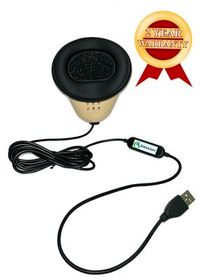
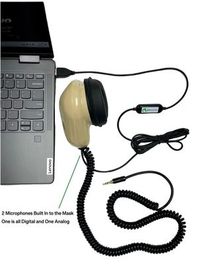
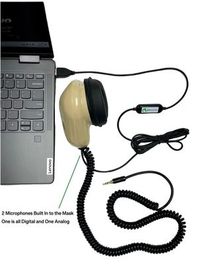
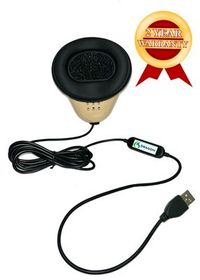
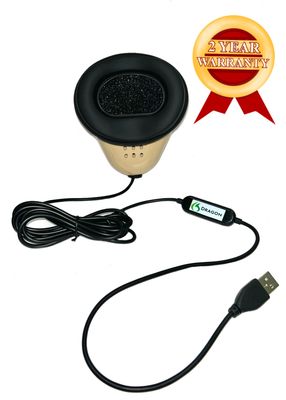
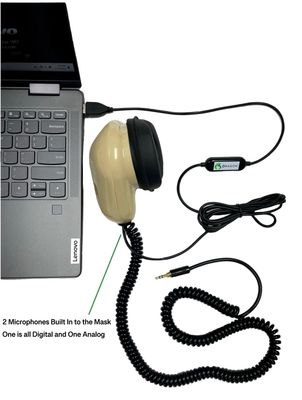
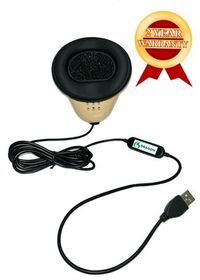
The microphone supplies the words your recognition software receives. With the Martel Dragon USB Stenomask, the built-in sound card provides a direct USB microphone path. Choose this model for a VOX laptop that needs a single mask input. With the Double Dragon 2, the USB microphone can feed the laptop while a second microphone in the mask feeds a compatible recorder through its 3.5 mm output. Both microphones capture your dictation. Listening to the separate recording can help you pinpoint the name, number or short word you want to review.
A useful speed check records two times. Time your reading of a short reference passage, then time how long you spend correcting the rough. Save the first output before editing it. If the prepared script has 100 words and you read it in one minute, your delivery rate is 100 words per minute. To check recognition accuracy, line up the saved words with the script and mark added, missing and substituted words. Check speaker labels and formatting separately. Repeat at the pace you use in class or at work. Your own samples are the evidence for how well the mask, software, voice and laptop work together.
We handcraft our Dragon USB and Double Dragon 2 stenomasks in limited quantities. If a batch sells out, there may be a waiting list.
Check Dragon USB Stenomask availability · Check Double Dragon 2 availability
For this exercise, prepare a ticket, a pencil and one sheet of paper. Put a fictional ticket number and an invented surname on the ticket. Write the expected sentence before you begin. One possibility is “Ms. Lorne returned ticket seventeen to the green envelope.” Circle the two details you plan to inspect, Lorne and seventeen. The point is to have an agreed reference that you can recognize in both sound and text. Use your own Martel mask, and work in an authorized practice job with fictional material.
If you use the Dragon USB Stenomask, identify the USB input on the reporting computer. If you use a Double Dragon 2, give its USB connection and its independent 3.5 mm connection separate entries on your sheet. When the analog lead is part of your planned setup, name the compatible recorder or input that receives it. An MM-ST1 has two analog 3.5 mm outputs. In that arrangement, name the receiving input or adapter for each lead you intend to use. The three mask names tell you how to trace your voice through the equipment. They do not substitute for the CAT release or model name recorded at the top of the sheet. Martel Dragon USB Stenomask Martel Double Dragon 2 Stenomask Martel MM-ST1 Stenomask
First, make a local practice recording from the selected mask input and listen back. Say your fictional sentence at your usual practice level. Write the two details you actually heard. Next, use the confirmed recognition option in your training job and dictate the sentence again. Save the practice job, reopen it, and locate the passage about the green envelope. Write the result next to your first observation. If you have also connected a compatible independent recorder, play that saved file and identify the wording from the same take. These are three different observations. Keeping each on its own line gives a teacher or support specialist a sensible place to begin. Microsoft microphone test
Suppose the saved mask audio clearly contains “ticket seventeen” and the typed result says “ticket seventy.” That observation gives you an original, repeatable example to discuss with the person helping with recognition. Suppose instead that the saved mask file contains the instructor speaking from across the desk while your own voice is distant. Now the observation points you toward the selected input and its physical connection. Neither observation establishes an accuracy rate for a model. Each is useful because it narrows a specific question for one configuration. Keep the dated practice sheet. It can help you decide whether a later change involves the mask, the software arrangement, or the stage at which you reviewed the result.
Draw six rows on an index card. Give them these labels: reporting application, installed release, recognition model, processing location, input, and saved result. Across the top write the date and whether this is your existing setup or the one you plan to use. Make two cards if you are changing engines. Put the facts you have observed on the existing card and the facts you have confirmed with the publisher or school on the proposed card. A blank on the proposed card gives you a useful question. Writing the answer you expect in that blank can make a later conversation more confusing.
In the first row, copy the application name from the reporting software you actually open. On the next line, put the release shown by your own installation or confirmed by the person who supplies it. Be as precise as the source allows. If the school has given only a major release, write that and leave room for the installed build when you have the laptop. A student might have an equipment sheet that says Eclipse 12 while the reporting program on a previous computer is an earlier release. Both numbers belong in the record, each next to the computer or assignment it describes.
In the recognition row, name the engine as the publisher describes it. If your previous card says Dragon Professional and your new card says Speechmatics Enhanced in EclipseVox, you have identified a meaningful change. In the processing row, enter where the selected recognition work occurs under the confirmed arrangement. If you do not yet have that answer for a planned purchase, write the name of the person who can confirm it. This keeps a purchasing question separate from one you can settle by recording a sample yourself. A clear recording can demonstrate a working microphone input even before the class provides recognition access.
For the input row, use words you can act on in a classroom. “My Dragon USB connected directly to my VOX laptop” tells you which physical path to inspect. After setup, add the input name shown in Windows for that particular connection. For a Double Dragon 2 with an independent recorder, add another line describing the second lead and its destination. At another desk you can read the line, follow the cable and compare the actual connection. A note that merely says “two microphones” leaves you to reconstruct what the two signals were meant to accomplish. Martel Dragon USB Stenomask Martel Double Dragon 2 Stenomask Microsoft microphone test
For the final row, name the thing you expect to open afterward. Perhaps it is an Eclipse practice job containing a corrected passage. Perhaps it is a CATalyst practice transcript and the associated audio your configuration was set up to capture. Perhaps your assignment also calls for a separate recording of your own masked dictation. Give the outputs different names. Someone checking a saved training file a week later should be able to answer which voice is in it, which application saved it and which exercise it belongs to. Test your card by asking a colleague to find a fictional line using only what you wrote.
Make three paper slips headed witness, reporter and reviewer. On the witness slip write an invented answer about an everyday object. Try “The bronze key was inside drawer fourteen.” On the reporter slip write the conventions your instructor expects you to use when repeating that answer into your mask. On the reviewer slip write two questions: which drawer was named, and which object was inside it? The three slips turn a software demonstration into a reporting exercise. You can explain what you are trying to produce even if another person handles the initial configuration.
Ask a volunteer to read the witness slip at a comfortable pace. Repeat the answer in the manner taught in your own course. Your mask captures what you say. If you are also capturing authorized room audio with a separate input, that path serves a different purpose. Label both before starting. The fact that your practice text contains “bronze key” tells the reviewer what reached the text. The separate room and mask samples, when included and available, let you examine what each speaker actually said. Comparing those sources gives a stronger explanation for an unexpected word than guessing from the text alone.
Now change one property of the example. Have the volunteer say “drawer forty” instead of “drawer fourteen.” Keep the object, speaker position and chosen software arrangement the same. Put the second take in a separately named practice job or a clearly identified position in the exercise. During review, a reader should be able to find both answers without being told which one happened first. This is an exercise in traceability as much as speech recognition. If the reader finds only the first answer, first establish that the second take was saved and that you are reviewing its intended destination.
On the third run, practice a correction. The volunteer says “brass key,” and the reporter repeats that wording into the mask. Afterward, enter a deliberate editorial correction in the manner taught for your application. Keep the correction choice separate from the recognition test. A word changed by a reviewer after the session should be identified as an edit when you compare the training results. Otherwise someone evaluating the recognition route can mistakenly assign credit or blame for a change made several minutes later. A short note saying who changed which practice word is enough for this exercise.
Finish by giving the reviewer only the job name and the questions on the reviewer slip. Ask the reviewer to find the relevant passage and respond. If your training includes playback, ask what the reviewer heard at that position as well. A successful demonstration can now be described in plain language. The words reached the intended job, the job reopened, the correct drawer could be found, and the reviewer could explain which sources were used. That tells you substantially more about readiness for class than a screenshot showing one line of text.
A comparison begins by choosing the decision it will inform. A student deciding whether to join a particular class needs to demonstrate the workflow the teacher will use. A working reporter considering a change may care about how long it takes to locate and correct an unfamiliar surname. An instructor might want to see whether students can distinguish the mask input from the room recording. These are different questions. Select one as the main question for the session. Write it at the top of the page before you look at any results.
Choose a passage that tests that question. For names, write a short invented witness list and two sentences that distinguish similar surnames. For numbers, write a paragraph with a room number, a quantity and an exhibit number, each plainly described. For a readback exercise, prepare several turns so there is enough material to search and review. Save a clean copy of the passage as your reference. Once you have started, resist the temptation to keep revising difficult words. If a phrase proves ambiguous even to a human reader, note it and prepare a different reference for a later comparison.
Keep the parts you intend to hold constant visible on the version cards. Where practical, use the same personally owned mask, speaking position and reference passage. Write down the reporting release, the recognition route and any preparation that differs. If you use a trained personal vocabulary in one workflow and a first-session vocabulary in another, identify that difference. Both observations may be valuable. They answer a question about your current working routine and your initial experience with the proposed routine. They are a limited basis for making broad claims about either recognition model.
Give each result a short, observable description. “The surname appeared correctly on the first pass” is one. “The expected words appeared but the speaker label needed a manual edit” is another. “I heard the intended words on the independent recorder and located a different practice job on the laptop” identifies a separate issue. These entries guide different follow-up questions. Reserve a final column for what you want to try next. That lets you keep the original observation intact instead of editing it into your latest explanation.
For anyone counting discrepancies, define the counting rules before dictation. Decide how you will treat written numbers versus spelled-out numbers, punctuation supplied by your reporting conventions, and initials with or without periods. Mark additions, omitted words and substitutions separately if those distinctions matter to the question. A small class exercise can reveal a recurring name that needs attention. It cannot establish a dependable performance percentage for every reporter, accent, courtroom or software configuration. Speechmatics publishes its own benchmarking guidance for readers who need a formal approach to word error rate. Speechmatics accuracy benchmarking
Start with the last step you can actually confirm. If the expected file is present and plays, note the words you hear. If the words are visible in a practice job, note which job is open. If a publisher or school account reports that access is pending, record the time and wording of the message without copying private account details into your notes. These facts narrow the next test. A description such as “Speechmatics failed after lunch” leaves a helper to discover which application, input, account and output were involved before the helper can address the question.
Consider a fictional practice session in which the reporter hears a clean local sample and sees text appear in a document, yet the class job is empty. Ask the reporter to identify the document in which the distinctive phrase appeared. Then establish the destination the course expected. Repeat with a different invented phrase and keep the intended job visible. The outcome may point to application focus, an insertion location, an unfinished save or another part of the reporting workflow. There is no need to decide among those explanations before collecting a reproducible observation.
In a second case, the reporter can open the intended job, but no clear voice is heard in the local sample. Begin with the physical mask connection and selected input, using the Windows microphone test if appropriate. If the sample changes when a different input is deliberately selected, record the names of both. Once the intended saved input contains the reporter’s words, repeat the short job exercise. This sequence gives the helper two useful facts: which input was receiving the sound and whether the reporting setup then received the expected result. Microsoft microphone test
In a third case, the local file plays clearly and the application gives a specific access or service message during a cloud practice session. Keep that message with the configured Eclipse release and the selected recognition route. Ask the responsible account or software provider which check applies to that installation. A personal account question can be settled privately without putting credentials, account numbers or real proceedings into a support example. If a different session later works, note the change you made and which symptoms cleared. One successful retry can be recorded without drawing conclusions about the cause.
In a fourth case, both mask recordings contain clear speech and the saved job contains the expected words, but the review position plays a different part of the training conversation. Write down the exact sentence the reviewer selected and what was heard. Check which audio source was associated with the practice job and which file the reviewer actually played. Consult the reporting publisher’s playback instructions for the edition in use. A test of transcript navigation asks something different from a test of the recognition model. Keeping them separate makes the support question easier for the right person to answer. Stenograph audio playback
A reporter moving from Dragon may have years of choices invested in a vocabulary. Start with a small inventory of the choices you actually use. Take a fictional street, a personal name and a repeated phrase. Imagine that your practice assignment involves Keswicke Lane, a witness named Alina Kess and the phrase “request for admission.” For each item, write what you say, what you expect the rough to display, and what the finished transcript should contain. Those three entries give a trainer enough detail to discuss the work you want to carry forward. They also give you a fair way to judge the answer during a demonstration.
Consider the difference between “Kess” and “counsel for Kess.” You may simply want a consistent spelling of the surname wherever it occurs. Alternatively, you may be using a spoken cue to produce an entire appearance line, complete with a title and punctuation. The first request concerns the rendering of a word. The second involves a larger reporting convention. A salesperson who hears only “I need my dictionary” might understand the first request and overlook the second. Bring an example of each, stripped of client information. Ask the person demonstrating the receiving application to show where they would make each change and how they would check the saved result.
Put your list to work in connected speech. Read “Ms. Kess identified the building on Keswicke Lane.” Later read “Was the request for admission addressed to Ms. Kess?” Look for the same spelling in two contexts. Next, open a new fictional job and use the name once more. Record whether the choice appears in the second job and whether that is the behavior you want. A case-specific spelling can be exactly right for one proceeding. A frequently used firm name may be a good candidate for broader reuse. The person configuring the application needs to know which result you expect before deciding where an entry belongs.
If you are offered a transfer service, ask for the names of the source and destination, the kinds of entries it covers, and one demonstration using invented material. Record what you can reproduce on your own laptop afterward. Until the publisher documents a transfer for the particular releases involved, budget time to recreate and test your most important entries. Someone who can correctly dictate the names, assign the proper speakers and reopen a usable job has learned far more about a transition than someone who has simply been told that a list was copied. Advantage’s EclipseVox description and Stenograph’s Dragon-specific getting-started material give you two starting points for questions about those particular applications. Advantage EclipseVox Stenograph VP getting-started guide
Picture a student who practices in a classroom on Tuesday and at a desk at home on Thursday. Her school lists Eclipse version 11 and Speechmatics. Advantage Software’s published table identifies the local option for that release and specifies designated hardware for local recognition. Knowing the release answers the first question. A second question matters just as much for this student. Which part of the approved local setup will actually be available at home on Thursday? A successful classroom exercise demonstrates what the student could do at the classroom desk. A packing list and a second practice session can establish what she can do at home. Advantage version and Boost tables
Draw a simple plan for each desk. Put the computer that opens the reporting job at the center. Write the name of the microphone that supplies the reporter’s voice on the left. Below the computer, identify the hardware the publisher specifies for recognition. On the right, identify the location where the practice job will be saved and where you will listen to the result. If an instructor or technician has already assembled one station, ask them to point out each item while you label the plan. Two USB connectors that look alike can serve different purposes. Labeling their destinations makes the drawing usable by someone who did not assemble the station.
Use the drawing to plan the first session away from class. Which items travel with the student? Which remain at school? Who can confirm the student’s access on the second computer, if a second computer is involved? Ask the publisher or the school which parts of its particular arrangement require a connection for sign-in, activation or another service. The word “local” answers a question about where recognition is performed. It does not by itself document every detail of account access, job storage or how a school distributes practice material. Write the answers beside the relevant items so an unfamiliar desk does not turn several independent questions into a single mystery.
End the exercise by sitting down at the second desk with a new practice job. Speak one exchange, save the work, close it and reopen it from the location on your drawing. Ask the student to identify the local arrangement in their own words and say which item they would bring to a support appointment. If a necessary component stays at school, finding that out before the first home assignment gives the coordinator time to plan the next session. When you compare Martel laptop packages, have that two-desk drawing available so the discussion covers both the computer you intend to buy and the publisher’s stated conditions for the recognition arrangement you intend to use. Martel VOX Laptops category Advantage version and Boost tables
Advantage Software lists both local and cloud choices for Eclipse version 12. Suppose the school has selected the cloud choice and supplied its setup directions. A worthwhile rehearsal begins before anyone dictates. Choose an invented exchange with a clear beginning and ending. Write down the job name, where you are working, the release you opened and the recognition choice the instructor identified. Ask the instructor what normal readiness looks like on that installation. A description of the actual screen in the room is more useful later than a generic Internet illustration of a different speech product. Advantage version and Boost tables
For the exercise, use two numbered exhibits in separate questions. For example, “Which page of Exhibit Twelve shows the north entrance?” can be followed by “The north entrance is on page four.” Give yourself a deliberate pause before the next question about Exhibit Thirteen. Your partner can note the time at each question and mark the last complete exchange visible on screen. If the practice session runs normally, you have established an ordinary comparison sample. You also know the two specific points where you could resume a supervised exercise if your instructor asks you to practice the school’s procedure for an interruption.
If a genuine interruption happens during practice, record what you can observe without guessing at the cause. Did the words stop appearing after “north entrance”? Did the laptop still show incoming microphone activity? Could you see the earlier question in the job when you returned to it? Did the person reading the exercise continue while you were asking the instructor for help? Those observations describe different parts of the event. Follow the publisher’s or instructor’s directions for that installation. Whether an application buffers, retries or restores particular material is a product-specific question. The last thing you remember seeing on screen is an observation you can verify against saved practice material.
Afterward, write a two-sentence account someone else could act on. For example, “I saw the full answer about Exhibit Twelve before we paused. When I reopened the practice job, I found that answer and the question about Exhibit Thirteen, and I could not find the second answer.” That description helps a trainer decide what to inspect next. It also gives the student a concrete place to begin reviewing the saved job. A vague statement that the program “lost the hearing” would have omitted the most useful details. Use fictitious exercises to rehearse these steps and follow the applicable procedures for any real proceeding.
See which Speechmatics options Advantage Software and Stenograph document for voice writers, then trace a practice job from your Martel stenomask to your VOX laptop.
Invite a second person to review a short mock exchange without first showing them your script. Give the speaker two deliberately similar amounts, such as fourteen hundred dollars and fourteen thousand dollars, in different answers. Ask your reader to write down the amount requested and the amount approved. Include a follow-up question that changes the date from June fifteenth to June sixteenth. A reader who can correctly tell you who changed the date and which amount was approved has extracted the substance of the exchange. The exercise gives you an especially useful way to examine a rough that looked convincing while the words were arriving.
Now let the second reader see the original script. Mark the first place where their understanding departed from what you intended. The numeral might be correct while the speaker assignment puts it in the mouth of the wrong person. The witness might have corrected an earlier statement, and both versions of the amount properly belong in the transcript. A missing question mark might lead the reader to interpret an attorney’s question as a witness’s assertion. Treat each observation as a separate editorial question. Ask what the reporter spoke into the mask, what the application displayed, what the saved job retained and what the reader understood. You are learning where to look when two accounts of the same practice exchange differ.
Make one change to the mock exercise and read it again. This time have the witness spell a surname immediately after giving the amount. Put the spelling in your reference script along with the dollar amount, and have your reader find both in the saved job. If the words are accurate and the reader still struggles, examine the way turns and corrections appear on the page. If the layout makes sense but the name differs, return to the microphone sample and the spelled letters. This small exercise helps someone moving from Dragon keep familiar editorial judgment while learning a different recognition arrangement.
When you complete the review, give the second reader a copy of the fictional exchange in the format you normally use for practice. Ask them to identify the job, find the revised date and describe how they would communicate a correction back to you. Write down the steps that actually worked in your reporting application. Include the relevant release on the note. This is a more useful description of your working configuration than the engine name alone. It accounts for the person who has to use the result after recognition has finished, and it gives the next person helping you a short, repeatable sample.
Imagine you coordinate a voice-writing class and a new student sends a screenshot of an equipment list with the single word “Speechmatics” circled. Answer the student in the order they will actually use the equipment. Give the exact reporting application and class release. Identify the recognition arrangement taught in that section. Say who supplies software access and where the student receives the class setup instructions. Give the first assignment a name. A student who knows that the goal is to save and reopen a thirty-second practice exchange can tell when the first lesson is complete.
Add a sentence about the student’s personal mask. Ask the student to identify the Martel model they own and describe what they will plug into the laptop. Someone with the Double Dragon 2 who also plans to practice with a separate recorder can list that recorder as a second destination. Someone using the Dragon USB Stenomask can concentrate on the laptop path for the first lesson. Martel’s own product descriptions are the appropriate references for these physical connections. Use an image of the same model as the one named on the student’s sheet so the student can match the cable they are holding to the item you describe. Martel Double Dragon 2 Stenomask Martel Dragon USB Stenomask
For the first assignment, have the student identify themselves using a made-up practice name, dictate the date from a supplied script and read a single question and answer. Ask them to bring back the name under which they saved the job and one observation about what they heard or saw. If a student can find their microphone in Windows but cannot begin the class exercise, the instructor can focus on the application and access details. If the microphone does not appear as expected, the student can begin with the connection and a Windows microphone test. That division makes the next conversation concrete even when the student does not yet know the software vocabulary. Microsoft microphone test
For a mixed class, prepare a separate assignment sheet for each supported configuration. Give the sheets plain names, such as the reporting application followed by the class section, and print the release in the first paragraph. A single document that alternates between two products can leave a beginner following a correct instruction on the wrong screen. If a midterm update changes the class setup, keep the original exercise text and revise the directions around it. The instructor can then demonstrate the change using words everyone already knows, and students can compare the outcome with a saved example from an earlier week.
A setup record becomes most valuable the second time you use it. Suppose you replace your personal mask with another Martel model while keeping the same laptop, reporting application and recognition option. Revisit the part of the exercise affected by that change. Identify the connection, confirm the selected microphone, record a short sample and listen. Then dictate the familiar question and answer in the reporting application. The Windows recording gives you one point of comparison and the saved job gives you another. Write the date and the mask model beside both observations so you can tell the new sample from the older one. Microsoft microphone test Martel Dragon USB Stenomask Martel Double Dragon 2 Stenomask
A reporting application update calls for a different emphasis. Record the exact release shown after installation, reopen a fictional job saved before the change, and create a fresh fictional job. Compare what you can do with each. Can you locate your working material, start the assigned recognition workflow and deliver the review copy you expect? If your publisher has changed the route it documents for the release you are considering, verify your entitlement and hardware requirements directly with that publisher before the move. In particular, a capability shown for Eclipse version 12 does not automatically describe an installation that still runs version 11. Advantage version and Boost tables
A change of location introduces another set of practical questions. You may plug into a different port, listen through different speakers or work from a different account. Begin by identifying what physically changed, then use the same exercise you used at the first location. Record where you heard playback and where you found the saved job. If the new location is a school lab, ask who is responsible for storing or removing practice work on that computer. That answer belongs to the school’s procedures. A model name printed on the course outline will not tell you where the next student or instructor expects a job to be stored.
There is also a useful stopping point. Once you have confirmed the release, verified the route, heard your own voice and reopened a usable practice job, record that outcome and return to the work you bought the setup to perform. Keep one small fictional exchange for future comparisons. Choose a sample you can read naturally and a saved result that you understand well enough to explain to a colleague. When you speak to Martel about a laptop or mask, bring the sample description, the software publisher’s current requirements and the name of the application you actually use. That gives the equipment discussion a clear purpose and preserves your own experience as the starting point. Martel VOX Laptops category
If you have only one minute with an instructor or setup specialist, read back the arrangement in a full sentence. For example, a student might say, “Our class uses Eclipse version eleven, and my instructor has identified the local Speechmatics option. I know which equipment is available in the classroom and I need to confirm what I can use at home.” A CATalyst VP user might say, “I read Stenograph’s on-device announcement and I want to verify which build and access apply to my installation.” Each statement gives the other person something specific to confirm. Leave the conversation with the release written down, the name of the person who can confirm access and the practice assignment you will run first. Those details answer the buying question in a way you can use at your own desk. Advantage version and Boost tables Stenograph on-device announcement
This article is for educational purposes only.