



A Mock Court Hearing From Roll Call to Readback With Speechmatics
Run a complete fictional footbridge hearing with Martel stenomasks, two witnesses, exhibits, a recess, a disputed readback, and four separate scores.
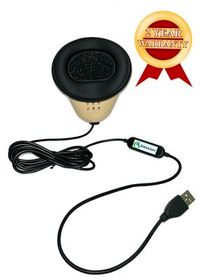
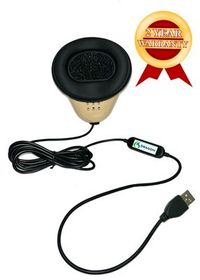
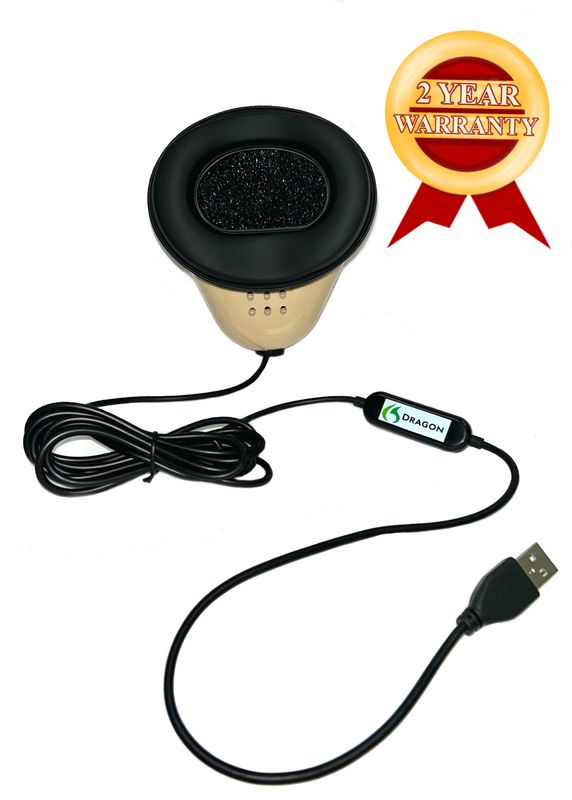
Keep your Martel Dragon USB Stenomask in your equipment plan while you evaluate Speechmatics. Martel describes the Dragon USB as a microphone with its own sound card and a direct USB connection to the computer. The word Dragon on the mask tells you which Martel product is on your desk. The installed recognition software determines how a supported CAT workflow turns the sound into words. A change of recognition software is a good occasion to verify that relationship with your own equipment. A familiar mask that passes the checks in your new workflow can continue to serve you. Martel’s Dragon USB specifications.
Begin with a narrower question than “Will everything work?” Ask whether you can connect this particular mask, select its input in Windows 11, hear a sentence you just recorded, and then dictate a different sentence into a practice job using the recognition option your CAT publisher supports. Those observations cover four separate parts of the decision. They also give you something useful to discuss if the last step still needs work. You can tell your trainer where sound arrived, where text appeared, and which step you have yet to demonstrate.
Imagine a reporter who wants to change recognition software between two terms at school. The reporter already knows how to hold a personal mask comfortably through a reading. The USB cable reaches the usual seat without a stretch. There is a familiar rough from the previous term that the instructor has discussed with the reporter. Those are assets. A well-designed transition uses them to answer new questions one at a time. The reporter can first establish how the present mask sounds, then learn the new recognition workflow, and finally decide whether the next assignment calls for another recording destination.
A microphone check belongs to the person who will use the equipment. Use your own mask and make a sample at your own working level. A classmate can read a practice question from across the table while you dictate into your personal mask. The classmate can also check the printed reference after you finish. This keeps the measurement attached to your voice and your position and gives a second listener a specific job. When more than one reporter practices, each person uses a personal mask and labels the resulting files under a separate practice session.
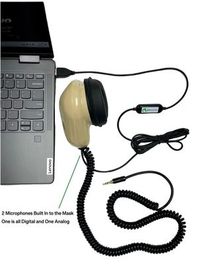
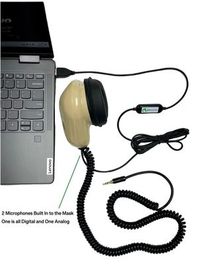
Set the mask on the desk and follow the cable with your hand. A look at the connector tells you more about its intended destination than a photograph cropped tightly around the front of the mask. The Martel Dragon USB provides a single direct USB microphone path. The Double Dragon 2 can also feed a recorder through its separate 3.5 mm lead. The sound in that second feed is still your own dictation. Which cables you connect depends on which devices you want receiving that voice. Martel Double Dragon 2 connections.
If your mask has a USB connection and you normally dictate straight to your laptop, write down the port you used for your last successful practice. Describe the port in a way you can recognize from your chair. “Left side, closer to the hinge” is more useful at the desk than a guess about the technical name of a connector. If a hub is part of your actual setup, include it in the description. A drawing of that arrangement makes it possible to repeat the old setup deliberately before evaluating the new one.
If your mask also has a 3.5 mm plug, identify where that plug goes. Does it lead to a recorder input that accepts a microphone? Does the recorder make a file you can play? A jack that physically accepts the plug could have another purpose, including playback through headphones. Read the destination device’s label and its maker’s instructions. Use a short recording you can identify by ear to confirm the choice. On the connection drawing, an arrow ending at a recorder file is more informative than an arrow ending at a round jack.
Martel’s MM-ST1 has a different arrangement consisting of two 3.5 mm connections. Include this option if the mask in your hand has two analog plugs. Match its outputs to suitable inputs, including an appropriate interface where the computer requires one. If a computer input receives sound through an adapter, record the name Windows uses for that adapter. Buying a new recognition application cannot identify what is at the other end of an analog cable. Tracing the cable and testing the received signal will. Martel MM-ST1 connections.
Give each line of your drawing a purpose. One line might read, “My voice goes to the laptop so the practice job can recognize my words.” A second might read, “My voice goes to the portable recorder so I can review my dictation there.” If you need to hear the original speakers as well, put their room microphone on its own line. The two microphones in a Double Dragon are located with the reporter. A separate room recording covers a different listening position and a different review question.
Write down your requirements before beginning the trial. One reporter needs a single mask input for a weekly CAT class. Another wants to use the same USB route in CAT and keep dictation on a second recorder. A third wants to set up at two desks without spending the opening minutes of each session searching for a microphone. Each reporter could own a working mask, yet need different evidence before calling the change complete. The test should reflect a recognizable day in the reporter’s own practice.
Make your first requirement observable. “Good sound” can become “I can hear the complete first and last words of my ten-line reading when I play the saved mask file.” “Fast” can become “I recorded how long the reading took and how long I spent checking the rough.” “Ready for the CAT class” can become “I opened a new practice job, dictated a question and an answer, saved it, closed it, and found the answer after reopening it.” Now you have results to record, rather than impressions to recall later.
Use one distinctive line as a marker for each destination. Suppose your Windows recording ends with “practice tray, red wheel,” your new CAT job ends with “practice tray, blue wheel,” and the recorder check begins with “recorder take, green wheel.” If the files have similar names or creation times, the words still identify them. If you have two simultaneous mask recordings, dictate a shared marker into the mask and identify which device you opened on playback. That distinction matters because the same spoken marker can legitimately appear in both files.
A finished evaluation includes reopening the work. Reading the screen immediately after dictating feels reassuring, but the next day you will want the saved results. Close the practice job using the normal method for the installed program. Open it again and find the question about the red or blue wheel. If a recording is part of your requirement, play it from its saved location. A session that passes when you reopen it gives you a reference you can bring into a future setup appointment without having to recreate the first test from memory.
Microsoft documents a microphone test in the Sound settings in Windows 11. Connect the USB mask, open Settings, choose System and then Sound, and identify the intended device under Input. Open the properties for that microphone and use the test there. Start the test, speak normally into your mask, stop and listen using the playback option. Mark down the device name as Windows displays it, including any generic USB wording. This name is more useful when comparing settings on your own screen than a name someone else remembers from a different laptop. Microsoft’s Windows microphone test.
Use a line that has a beginning you can easily miss and an ending you can easily recognize. Try “At the north window, I counted four trays before the bell.” Speak as you would in a lesson, with the mask positioned for ordinary use. Listen for “at,” the location, the number and the final word. If you hear all four, write that observation in your notes. A moving level indicator showed that some sound reached the input. The recording lets you answer a more demanding question about the actual words that the device received.
If the input name could describe several devices, make two short, deliberately different recordings. Choose the mask and record a close, ordinary sentence. Then choose the laptop microphone and make another recording from your regular seated position. Label them individually and restore the intended mask selection. Listen for the difference in voice distance and the presence of a partner speaking from the other side of the table. Avoid striking the microphone, pulling on cables, or shouting to create an impressive display. Normal working speech tells you more about how the setup will serve you.
When Windows hears the mask and an intended application still needs access, Microsoft’s Windows microphone-permission guidance identifies the controls for microphone access, for apps, and for desktop apps. Check the setting applicable to the software you are actually using. On a school-managed computer, note what the screen shows and follow the school’s process for changes that require its assistance. Keeping a short record of the Windows result saves an instructor or support person from starting the conversation with a question you already answered. Microsoft microphone access settings.
The Windows test is a useful stopping point if you are waiting for your new CAT setup. You can already identify the mask model, trace the cable, recognize the correct input and demonstrate spoken audio on the computer. Save the note with your equipment list. Mark the CAT recognition trial as pending until the appropriate software and access are available. This tells you exactly what you have demonstrated with the current mask and gives you a clear starting place when you can open the new workflow.
Advantage Software’s public version table identifies Speechmatics as a recognition option in EclipseVox. It lists local Speechmatics for Eclipse 10 and 11 and local or cloud Speechmatics for Eclipse 12. For recognition on local equipment, Advantage names its Boost Box and computers bought from the publisher that meet its requirements. Read the entry for the version you actually have and discuss the relevant access and equipment with the publisher. Use that information to plan the recognition portion of the setup alongside the microphone check you have already performed. Advantage Software’s Speechmatics options.
Stenograph’s public announcement describes on-device Speechmatics integration in CATalyst VP. Its getting-started material also describes a CATalyst VP workflow that uses Dragon. If you are moving between the two, identify your installed edition and version and ask Stenograph which procedure and access apply. The announcement is a source for how the publisher describes the integration. The Dragon instructions are a source for that particular Dragon workflow. Use the instructions for the configuration you intend to test before drawing conclusions about the microphone. Stenograph’s on-device announcement · Stenograph’s Dragon setup guide.
Once that publisher-supported setup is available, create a practice job with an unmistakable name. Use an invented speaker and a new sentence, such as “The marker on the right is labeled North Quay Practice.” Speak into the mask at the same level you used in the Windows test. Watch where the text appears, then save the job and find the phrase again. Include the name of the job in your notes. A screenshot of a selected microphone and a saved job containing your new phrase answer different questions. Keeping both observations gives a better account of the transition.
Separate the identity of the input from the exact spelling of “quay.” A rough might correctly capture your entire sentence and render the sound as “key.” First determine that the text responded to the sentence you just spoke into the mask. Then compare spelling against the word you intended and examine how your supported workflow handles practice vocabulary. Deciding that a microphone needs replacement because two English words sound alike would overlook the distinction you can actually hear. A fresh sentence around each meaning makes a more informative second trial.
Write down whether you changed one component or several. If you moved to a new laptop, selected a new CAT edition and started a different recognition engine at the same time, a successful practice job demonstrates the assembled configuration. It does not isolate which component contributed most to a change in speed or spelling. If you need to isolate the microphone, give it a separate Windows recording test on each compatible setup. If you need to evaluate the entire reporting process, document all the pieces and judge the complete saved result.
The Martel VOX Elite 32 GB and 64 GB laptop listings describe voice-writing preparation, stenomask setup assistance and help with file transfer. When you bring your existing mask to that discussion, take the model, connector, Windows input name and a small practice result you can reopen. Explain which applications are used together in a normal session and which files you want to review after a move. A support appointment can then address the work you do with the prepared computer as well as the specifications on the product page. VOX Elite 32 GB setup services · VOX Elite 64 GB setup services.
A reporter who needs one computer microphone path can start by evaluating the existing Dragon USB with the proposed VOX configuration. A reporter who wants an independent recording of mask dictation on a compatible recorder can consider the Double Dragon 2. The added recorder path answers a new requirement even when the existing mask performs well for its current purpose. Before placing an order, check what the exact laptop package includes, the accessories you already own and the hardware specified by the CAT publisher for your recognition choice. This helps the conversation stay focused on what you will connect at your desk.
Bring a sample that you personally understand. For example, take a fictional question whose intended answer contains the name of a street, a count and an explicit correction. Keep the source line with your practice recording and rough. If a transferred file opens during the appointment, you can verify that it contains the expected material. Then make a new file on the prepared machine and speak a different line into your mask. You have now checked both the transfer and the working input, with a clear way to tell which result came from which part of the visit.
We handcraft our Dragon USB and Double Dragon 2 stenomasks in limited quantities. If a batch sells out, there may be a waiting list.
The following rehearsal uses an invented shipment to a small reading room. No part describes an actual witness or a product test conducted by Martel. The exercise is designed to help you decide whether to continue using a personal mask. It includes sound-alike words, speaker changes, self-corrections, a short pause and an independent recorder option. Choose the parts that match your real setup. Keep a reference copy on paper or a second screen so you can compare the saved rough after you finish dictating.
Before the reader starts, make a connection note in complete sentences. Identify your mask and the input you selected. Say whether you intend to keep mask dictation on a separate recorder. Put the reference face down during the first pass if a partner can read to you. Count the number of roles in the scene and identify who can ask questions. If you are practicing alone, record yourself reading the source earlier in the day. Play that source from an identifiable device while you repeat into the mask, so you can distinguish source playback from your own captured voice.
Question. What did you see when the first cart reached the entrance to the North Quay reading room? Answer. I saw the cart on its side of the painted line. There was a red wheel at each front corner and a dark wheel at each back corner. I had heard that the cart had a loose wheel, so I stood near the door to watch it come in. I did not see any wheel come off. I heard a small metal object land on the floor after the person pushing the cart had already stopped.
Question. Did you identify the object from the sound? Answer. No. I walked over and picked it up. It was a brass key with a little paper tag. When I say key, I mean the object you put in a lock. The tag said North Quay, which is the name of the reading room. Our sign spells the second word Q, U, A, Y. The tag was folded around the ring, and the letter at the end was the first one I could see.
Question. How many trays were on the cart when you first looked inside? Answer. I counted four trays on the right and three on the left. A moment later somebody pulled out a shallow drawer below the handle. I would describe that piece as a drawer. It did not look like the seven trays I had already counted. Question. Did somebody add an eighth tray after the cart stopped? Answer. I did not see anyone add a tray. I saw somebody open the drawer.
Reader. We will pause here before asking about the delivery note. Please take a natural breath and wait for the next question. Question. Where did you put the brass key? Answer. At first I set it on the desk beside the open register. Then I took a pencil from the cup and wrote down the words from its tag. I slipped the key into a paper bag and left the bag by the register. I did not put the key inside the register.
Question. Can you read the initials on the delivery note? Answer. I see E and N on the first line. I would like to correct something I said when we talked earlier. I described the second letter as M because the ink spread onto the next square. Looking at this copy, I can see two strokes connected by a diagonal line. I read it as N. Question. Did you write either initial? Answer. I wrote the note about the tag. I did not write either initial on the delivery note.
Question. Did every wheel remain on the floor when the cart crossed the entrance? Answer. From my position I could see the two front wheels. I could tell they were red and that they were turning. I could not say whether all four wheels touched the floor at every moment. Question. What do you remember about the person at the handle? Answer. The person wore a jacket with a square pocket and called out the name of the reading room as the cart stopped. I do not remember hearing a first or last name.
Stop and save before discussing the odd spellings. Put the original draft beside the reference and find your answer about the key. Can a reader tell that the brass key is an object and North Quay is a place? If your rough spells both in the same way, listen for the explicit spelled letters. That part of the recording may give you everything needed to edit the place name. If you discover that the letters never appeared in your dictation, practice listening for a spoken spelling and conveying it in full before drawing an equipment conclusion.
Next take one pass focused entirely on relationships among the numbers and objects. The witness reported two red front wheels, four trays on the right, three on the left and one separate drawer. Find each item and note the noun attached to the count. A rough with all the digits present can still change the testimony by attaching a number to wheels instead of trays. On your mask audio, listen to the last word of each phrase. If it is audible, you have useful evidence about the original microphone input even when you want to improve the final text.
At the pause, identify the first word the partner spoke on resuming and the first word you delivered. When you listen back, include a little speech before the pause so you can locate the boundary. If the first word in the saved rough differs, check the matching passage in the computer recording. If you also used a Double Dragon 2 with a recorder, listen to that file independently. A difference you can identify in both recordings suggests a different next investigation from a difference found only in the rough. Write down what you heard before proposing a cause.
Use the corrected initial to practice an editor’s decision. Both the earlier M and the new N belong in the witness’s explanation. Find the whole answer before correcting any individual characters. If your practice reference uses individual capital letters and the rough displays words sounding like those letters, mark that as a written-form question. If an entire part of the correction disappeared, mark the missing content separately. Those observations tell you what to revisit in the CAT workflow while preserving the evidence that the microphone captured the rest of the answer.
Finally, put away the source and ask for a readback. Have the partner request the passage about the bag and the register without saying the exact wording. Find the relevant question in your reopened job and begin far enough back for the witness’s answer to make sense. Try the same request from the saved audio if your practice includes it. The speed of finding the passage and the accuracy of the selected words tell you how the setup serves the task you will actually perform. Record those observations beside the input test, using words a trainer can follow.
Imagine that the USB microphone selection, Windows sample and new practice job all passed, yet you want a separate file of your dictation on a recorder. Your note could read, “The current Dragon USB serves the single laptop input. I want a second physical microphone feed for a compatible recorder during the next assignment.” If the plan changes, this note explains why you considered the Double Dragon 2. It also preserves the result of the successful trial with the original mask. Somebody reading it later can distinguish an added recording requirement from the original microphone assessment.
A different sample might show clear words in Windows and an empty test job. The next question concerns the new application, its selected input, recognition access and the actions required to start the practice job. Keep the working USB connection in place while checking those items with the CAT publisher. Record what the screen actually showed before and after you followed the correct procedure. If the newly selected configuration produces the practice phrase, your old sample and new result together explain the transition. You have learned something specific without trying to remember which of several simultaneous changes solved the problem.
Another sample might capture every phrase in the room and only a distant version of your dictation. Review the input name and deliberately compare the mask with the laptop microphone again. If the mask recording then sounds close and identifiable, keep that file as the reference for normal working distance. If both recordings sound similar, describe how you made each and which source was selected. A person helping you can suggest a further check from those details. A general note saying “both had sound” would leave the most important part of the comparison unanswered.
If the trial goes well at home, take the connection drawing to the classroom or second desk. Reconnect your personal equipment in the way you intend to use it there. Make a fresh file with a distinctive introduction that names the location as a practice location. A different seat, port or set of connected accessories can change the list of inputs you see. Keep the same fictional sentences for the first desk-to-desk comparison. Then try an unfamiliar answer to see whether the equipment remains comfortable when you need to concentrate on listening as well as speaking.
Keep the measurements modest and specific. If you want to compare two readings, record the number of words in the reference, elapsed reading time, correction time and the location of consequential differences. An omitted “not” in an answer about the initial has a different editorial consequence from an alternative but understandable written form of a number. Record both, with enough context to show why they matter. After several varied readings you can describe how you perform with a particular mask, software configuration and pace. That statement is more informative for your buying decision than a percentage borrowed from another person’s setup.
An overnight break is a useful test of how much you can reproduce from your notes. Put the equipment away the same way you usually store it, then set it up again the next day. Follow the written connection description without opening yesterday’s job. Start with a new practice recording and say the name of today’s exercise into your mask. If you can identify the right input and find the new recording without referring to the older audio, the connection note is doing its job. If you have to guess which port or input you meant, revise the note while you are looking at both.
Use another brief exchange about the cart with a different meaning. Have the reader ask, “Did the brass key arrive before or after the empty cart?” Let the witness answer, “The empty cart arrived first. I picked up the key after the person at the handle stopped.” Dictate the exchange at your normal working pace. Check the order of events and the words that express that order. Then use your older job to find the sentence about the paper tag. You have tested both new input and retrieval of earlier work without relying on the same sentence for both tasks.
Consider what a substitute instructor could understand from the two days of evidence. A note saying that the second day felt smoother gives the instructor little to examine. A note saying that you selected the same USB input, found the correct practice job, captured both questions, and reduced the time spent locating the readback gives four concrete starting points. If you timed the search, add what marked the start and end of that timing. The point of a second day is to see whether the arrangement can be used again under recognizable conditions.
If you practice with a separate recorder, test the ordinary act of setting it down at the end of the session. Stop the file, note its displayed name, and later locate it from the recorder’s file list using its documented controls. Listen to the second-day question about the empty cart. Once you can identify the file from its own recorded words, write down how it differs from the computer-side material. That last step gives a practical meaning to the choice between one microphone destination and two. It also tells you exactly what to bring to a discussion of your next Martel setup.
Begin with the Martel mask you own. If it provides the expected audio to Windows and your publisher-supported Speechmatics practice job works with that input, you have a practical reason to keep using it. Write down the tested configuration. If you later need a second recorder feed or a different computer connection, evaluate that new requirement on its own merits.
On Martel’s product page it identifies the model of the stenomask. In a discussion of recognition software, Dragon can refer to the program that processes dictation. When speaking to support, use the complete names of the hardware and software. This allows somebody to understand that you are keeping a particular microphone and changing the application responsible for recognition.
Start with the plugs and any order record or model information you have. Describe both cable ends and the receiving device you have actually used. Compare those details with Martel’s published model information. If the model remains uncertain, bring a photo of your own mask and connectors to a Martel equipment discussion before relying on specifications from a similar-looking product.
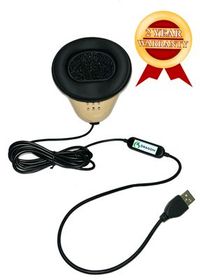
Test your existing Martel Dragon USB or Double Dragon 2 stenomask in Windows 11 and your supported Speechmatics CAT workflow before choosing equipment.
The file proves that the recording application received something. Listen to it for an identifiable phrase you spoke into the mask and consider where your voice sounds closest. Compare a deliberately labeled laptop microphone sample if the identity is uncertain. A device name, a recognizable phrase and matching playback together make a much stronger identification than a new filename alone.
Copy the displayed name into your notes and add the physical port and model beside it. Identify it by recording and playback. If similar USB devices are attached, follow one cable at a time and repeat a short test after selecting the intended input. A generic name can still be a perfectly usable label once you connect it with evidence from your own desk.
Choose a line with a short first word, a specific place and an unmistakable ending. Say it at your normal working level while holding the mask as you expect to during a session. A phrase such as “At the north entrance, the red wheel crossed the line” gives you several points to recognize when you listen, including the opening sound after a quiet moment.
The first test answers whether the selected microphone received sound. The second asks whether your reporting application produced text from new dictation in a supported setup. Use a different sentence so you can tell today’s CAT work from a recording made earlier. Save it under a practice name and reopen it before marking the application portion of the trial complete.
You can establish the model, the connector route and the result of a Windows microphone recording. Save that evidence and ask the CAT publisher which recognition setup applies to your edition and license. Until you can use that setup, describe the result as a successful Windows audio check. This wording lets a trainer pick up the evaluation at the correct point.
Identify whether the recorder jack accepts a microphone and whether the recorder is using it as the source. Consult the recorder manufacturer’s operating information for its model. Make a new file, speak an identifying line, stop, save and listen on the recorder. A result from the laptop side cannot establish what reached the separate recorder input.
When your purpose is to establish the computer path, focus on that path and make a saved sample through it. Put the second microphone on the drawing as an available route to a compatible destination. If the independent recording matters to your assignment, test that connection and play its saved file before treating both routes as ready.
Expect mask dictation, because the second microphone is in the mask with you. In the library-cart exercise this means you can hear yourself repeating the witness’s answer about the drawer. If your goal is hearing the witness in the room, plan and identify that room source separately. Tell a reviewer what perspective each file represents before asking for feedback.
Ask what each microphone connects to. Martel’s Double Dragon 2 supplies USB and 3.5 mm connections, while the MM-ST1 supplies two 3.5 mm connections. Keep the exact product name beside the connection diagram. The expression “dual microphone” on its own leaves open which device can receive each output and whether a computer interface is part of the arrangement.
Begin with the supported configuration for your CAT software and recognition option, then describe your working applications and physical connections to Martel. Memory and storage make more sense in that conversation when you can name the jobs you run and the files you need to retain. Include the personal mask you plan to keep among the equipment to check during setup.
Read Advantage Software’s published requirements for the local Speechmatics option and the relevant Eclipse release. Advantage lists two local equipment choices. Ask about the Boost Box and about eligible computers sold directly by Advantage. Explain how the Martel laptop will fit into the proposed arrangement and identify which equipment carries out the recognition work before shopping for a replacement computer.
Stenograph describes on-device Speechmatics integration in CATalyst VP. Give Stenograph your actual installed version and ask what is available for it, how to access the supported workflow and what hardware is required. Keep the response with your version note. Then use your own practice job to confirm that your existing mask supplies recognizable input in that configuration.
Spelling helps you judge the result, but one correctly spelled word is a small sample. Use several phrases that include clear sounds, a spelled name and a short first word after a pause. For an ambiguous sound such as key or quay, preserve the surrounding sentence and any spelled letters. Those details help distinguish hearing the sound from choosing its written form.
A new passage asks you to listen, hold the thought and repeat it into the mask as you would during reporting practice. Reading memorized material can make a trial feel unusually easy. Use familiar material once to verify connections, then let a partner choose unfamiliar lines with the same kinds of dates, numbers or speaker changes you actually need to manage.
Make a note of the change or capture a source recording when your exercise permits it. The immediate reference for your repetition is what the partner actually said. If the page says “three trays” and the reader says “two trays,” an output of “two trays” accurately reflects that utterance. Reconcile such differences before attributing results to hardware or recognition software.
Yes. Count the words in the intended passage, measure the time used to speak it and convert that time to minutes. Divide the word count by those minutes to calculate your reading pace. Record what you corrected afterward and how long the review took. Reading pace measures your delivery, while the time needed for a checked copy describes another part of the work.
Compare the spoken words first, then check how the practice workflow handles your punctuation and formatting. Look up the method for your installed CAT product before changing a microphone setting. If the words are audible and the intended boundary can be located in the rough, that information points to a specific lesson about the production of a readable transcript.
Reopening helps you locate the work and verify a recognizable passage in the saved material. It is also an opportunity to try a short readback without relying on the screen you were watching during dictation. If the job includes linked audio, find the corresponding part using the supported procedure for the installed product and note where the files are kept.
Have each reporter complete the exercise using a personal mask. Swap the fictional reference and scoring notes, or let one person read while the other dictates and then exchange roles with their own equipment. The person checking the rough can listen to permitted practice material and flag the specific word, turn or file location that needs a second listen.
Say which device was selected, where the mask was held, how the saved sample compares with a deliberate laptop-microphone sample, and which words you can hear. Include whether the room reader or your dictating voice seems more prominent. This combination of observations is easier to work from than general descriptions of quality because another person can attempt the same comparison.
Sometimes a school or employer provides a new computer and a new application together. In that case test the complete setup and say exactly what you tested. When investigating a particular difference, go back to a short exercise and change one identifiable condition at a time where feasible. This helps connect an observed improvement to a particular action you can repeat.
Look for advantages you can actually observe. You may be able to reconnect your equipment in the same way, maintain a comfortable position while listening, and recognize the sound of your own dictation during playback. Measure setup or review time if that matters to you. Keep these personal results alongside the published specifications when evaluating whether an equipment change serves a particular need.
Practice a short turn while you listen and keep the mask in its ordinary working position as you repeat. Mark the place where you moved and listen to the entire phrase around it. Try a more comfortable arrangement of seat, notes and cable for a second reading. Use the result to set up your desk before a longer class exercise.
Mark each file with the desk or location used for that session. Carry the same personal mask and a known short reference to both desks. At each location, record the selected microphone name and identify where the sound and text were saved. If the configurations differ, write those differences beside the results instead of assuming that only the room changed.
Include the mask model, cable route, displayed Windows input, CAT product and version, supported recognition arrangement and a description of one fictional test. Say what you heard in Windows, what you saw in the new job and what happened after saving. A short passage that can be repeated on demand lets the person helping you focus on the step that remains uncertain.
The current mask can serve as your starting point for testing. If you discover that an independent recorder feed is important or decide to order another personal mask, Martel’s limited production makes current availability relevant to your timing. Check the page for the particular model you want before planning a class or an appointment around the arrival of another unit.
Write a sentence tied to actual evidence. For example, “I kept my Dragon USB for the classroom laptop after hearing the test recording and reopening a supported CAT practice job containing today’s reading-room passage.” If you need the Double Dragon 2 for a second dictation destination, add that requirement. The next person helping with your setup can now understand both your decision and the reason for it.