



A Mock Court Hearing From Roll Call to Readback With Speechmatics
Run a complete fictional footbridge hearing with Martel stenomasks, two witnesses, exhibits, a recess, a disputed readback, and four separate scores.
Before your next Zoom practice call, finish three sentences. “When I address the meeting, the other participant should hear me through this microphone.” “When the participant answers, I should hear them through this speaker or these headphones.” “When I repeat that answer into my Martel stenomask, my CAT job should receive this input.” Those are separate paths with separate listeners. The right equipment choice follows from those three destinations. A moving meter, a headset plugged into the computer and a line of text on screen are clues. Hearing the intended voice at each destination is a check.
Imagine a remote practice inquiry about a railway waiting room. Your partner, playing a station attendant, says there is a red timetable above the bench. You hear the partner through your selected listening device and repeat the answer into your stenomask. Later you address the meeting in your ordinary speaking voice to request the spelling of a fictional station name. The partner should be able to tell you exactly what they heard during that request and whether they also heard your private practice dictation. Your saved CAT rough can tell you what entered the reporting job. These observations answer different questions.
This guide uses the Zoom Workplace desktop app on Windows 11 and a CAT setup whose publisher supports the recognition option you intend to use. The fictional names, test exchanges and example findings exist for practice. Arrange a willing participant in a separate room or location before using them. Follow the meeting host’s and assignment’s requirements for speaking, microphone use, recording, storage and access on an actual proceeding. The rehearsal can be run using an observer’s written account of what they heard. A Zoom meeting recording is unnecessary for most of the checks below.
A shopping question such as “Which microphone is best for Zoom and Speechmatics?” becomes more practical when you name each task. A reporter may need a personal mask input for dictation, an ordinary speaking microphone available when addressing the meeting and a listening device suited to hearing remote speech. A reporter who also needs an independent recording of personal dictation has another destination to plan. Write those roles down before choosing an item. A single item with more than one connector may be designed for two recording paths carrying the same voice.
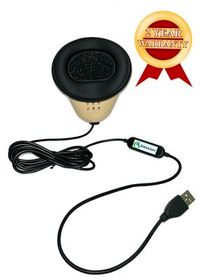
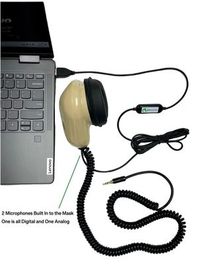
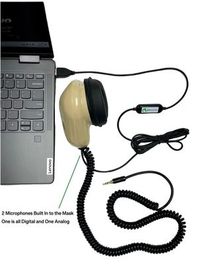
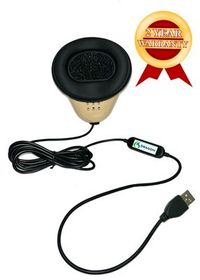
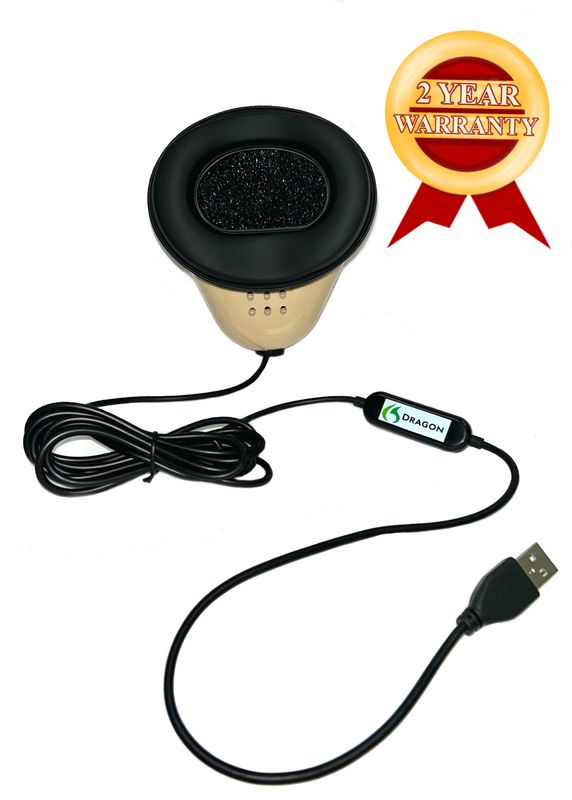
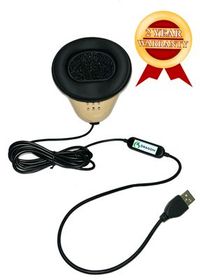
Martel’s Dragon USB Stenomask has a built-in USB sound card for its wired computer connection. Its primary source is the voice spoken into the mask. The Martel Double Dragon 2 includes a USB microphone path to the computer and another microphone with a 3.5 mm connection for a compatible second destination. Both microphones serve the reporter speaking into the mask. Choosing the Double Dragon 2 is a way to plan a second recording of personal dictation. For an ordinary spoken address to the online meeting, choose and test a microphone appropriate to that separate task. Martel Dragon USB Stenomask connection · Martel Double Dragon 2 microphone connections.
Follow the cable from your own mask to the VOX laptop and write where it ends. If you use the Double Dragon 2 with a recorder, follow the other connector all the way to its actual receiving input. Label the paths by purpose, such as “mask to computer for recognition” and “mask to recorder for a second dictation file.” A name like “mic two” tells you little once several USB devices are nearby. A destination makes the label useful when someone else is helping you set up or when you return to the desk after moving your equipment.
Now identify the microphone you intend to use when you speak to the meeting. Depending on the equipment you actually have, it may be a headset microphone, a suitable dedicated microphone or a laptop microphone whose performance you have checked at your working position. Give it a different label from the mask microphone. If one headset supplies both a microphone and headphones, write its incoming and outgoing jobs on separate lines. A headset can let you hear your partner perfectly while a different microphone supplies the words that Zoom transmits.
Choose the listening destination with the reporter’s task in mind. You need to hear original speech clearly enough to repeat the words faithfully and identify when someone starts a new turn. Run a short speech test at a comfortable level. Ask your partner to include a quiet ending and one easily confused pair such as “platform fourteen” and “platform forty.” The task is to identify both values in context. A test tone can confirm that the selected speaker produces sound, but a spoken exchange tells you whether you can follow the particular kind of material you plan to report.
Microsoft describes microphone testing under Settings, System, Sound in Windows 11. Select the intended input, open its properties, start a test, speak normally and play the sample after stopping it. Make one test from the mask and a separate one from the meeting microphone. Give each its own spoken phrase. Copy down the names Windows displays. A USB audio device can have a general label that differs from the retail name on its housing. Your notes should connect the name on the screen with the specific device you traced and heard. Microsoft’s Windows 11 microphone test.
Zoom’s desktop audio instructions describe separate speaker and microphone selections. In the app’s audio settings, test the chosen speaker with the test tone. Then use the microphone test, speak a short ordinary-voice phrase into your intended meeting microphone and listen to the replay. Zoom also explains how to choose a different speaker or microphone using the control beside Mute or Unmute during a meeting. Follow the controls shown for the version and permissions you actually have. Write down which microphone you selected for this practice call and what you heard on replay. Zoom’s microphone and speaker tests · Zoom Workplace audio settings.
Next confirm the input in your supported CAT practice workflow. Select or verify the personal stenomask input using the instructions from your CAT publisher. Speak a short distinctive phrase into the mask and save the practice rough. If your arrangement records corresponding mask audio, listen to that recording too. This is the place to establish whether CAT received your repetition. A successful Zoom microphone test only tells you about the Zoom selection you tested. Conversely, correct text in a saved rough cannot establish what a remote participant heard while the meeting microphone was open.
Put the three results side by side. The Windows checks identify the tested inputs. The Zoom speaker and microphone checks establish what the selected meeting endpoints did in that test. The saved CAT practice result establishes what reached the reporting job under its current configuration. If any result is unclear, use one new phrase and change only the selection you are investigating. Reading “brown suitcase” in an old rough while hearing “green lantern” in a new microphone sample can otherwise look like a routing difference when it is simply a mismatch of takes.
For the first line of the map write “remote station attendant to reporter.” The source is the participant’s speech in the fictional call. The intended destination is the listening device at your desk. Your evidence will be a spoken phrase that you can repeat accurately to the partner. The partner chooses the phrase without showing it to you. Use something like “north window, red timetable, second bench.” The combination is specific enough that you cannot fill it in from the subject of the exercise alone.
For the second line write “reporter addressing the meeting to remote station attendant.” The source is your ordinary speaking voice directed into the meeting microphone under the expected meeting conditions. The destination is the participant’s listening device. Their evidence should be a report of the words they heard. If you say “Please spell Tavin,” ask them to write down the request, including the unfamiliar name. A simple “I can hear something” is helpful as an initial response, but an exact phrase gives you a more useful basis for choosing and positioning the meeting microphone.
For the third line write “reporter’s masked repetition to CAT rough.” The source is your voice repeating what you heard, and the intended destination is the configured recognition input and job. Give the mask a phrase different from the direct-address phrase. Look for it in the saved rough, then compare it with your recorded dictation when available. If the rough correctly renders the train platform but the partner also hears your masked repetition, the recording path and the meeting path have produced two different results. Preserve the successful CAT observation while you investigate the outgoing meeting sound.
Add a fourth line only if there is an actual fourth destination. With a compatible recorder on the Double Dragon 2’s separate microphone path, make a practice recording and label it “reporter’s dictation.” If a different authorized arrangement captures original meeting audio, write down that distinct source and destination separately. A recording made from a microphone inside the mask does not become an independent meeting recording because the other participants’ words were repeated into it. Labeling by the original voice prevents confusion later if you hand the practice material to an editor.
A practical map has space for a result as well as a plan. Write the expected phrase on one line and the observed phrase on another. Write “opened and heard the saved file” only where someone actually did so. Write “participant reported hearing the request” where the evidence is a remote listener’s report. If a file was outside the exercise, leave it explicitly outside the exercise. Each entry should let another reporter point to a real observation and tell you how that observation was obtained.
Use a willing partner located away from the sound at your desk. Agree on a private practice meeting, the intended audio behavior and the words each person will record in their notes. Decide when the reporter will address the call and when the reporter will perform masked repetition. The partner should understand that their task is to report what they actually heard, including unexpected sound, without trying to fill in missing words. If your ordinary assignments use a different arrangement, adapt the rehearsal while keeping the observations tied to the specific setup you tested.
For round one the partner reads this invented line in their ordinary voice. “At Tavin Station the blue route boards hang above the north window.” You listen using your selected headphones or speaker. Repeat to the partner, in the direct-address portion of the test, which side of the station was named and what hangs there. Check the incoming path before interpreting any transcription result. If you hear “door” where the partner said “window,” noting that difference immediately prevents you from blaming recognition for a word you never heard correctly.
For round two the partner says, “The return train uses platform fourteen before noon.” With the meeting microphone in the state you intend during masked dictation, repeat that sentence into your own stenomask. The partner privately notes the sound they hear during the interval. Save the CAT rough and inspect the sentence. The partner’s result might be silence from your end, a faint room noise, recognizable masked dictation or a direct replay of their own voice. Ask for the specific observation rather than a general judgment about how well the rehearsal sounded.
For round three announce the change to direct address in the manner your rehearsal permits. Speak an ordinary sentence through the intended meeting microphone. “Please repeat the platform number and spell the station name.” The partner should be able to repeat the request and provide the answer. Note whether the opening word reached them, whether the station name was intelligible and which microphone was selected. Then return the meeting microphone to its intended working state and do another short mask sentence. This tests the transition between addressing the meeting and returning to dictation.
For round four introduce an explicit correction. The partner says, “I said platform fourteen. The printed timetable gives platform forty for the evening train.” Dictate the complete pair of statements into the mask and save the result. Check the two values separately and mark their relationship to morning or evening. A rough that contains fourteen and forty but attaches them to the wrong times of day has a meaning difference even if a search finds both numbers. The exercise tests listening, personal repetition and recognition in a small piece of material you can replay.
For round five add a short recess. The partner says, “We will continue with the timetable above the north window.” Stop or continue the practice recordings as intended for your arrangement and note what you did. Before the resumed exchange, check the meeting microphone state and the CAT source you plan to use. The partner begins, “After the break, the first departure is at six ten.” Verify the beginning of that incoming sentence, your mask rendition and its text. Then ask for an ordinary direct-address reply and have the partner confirm receiving it.
When you finish, compare your separate notes before making any changes. List the questions you could already answer. Could you hear the partner’s remote words? Could the partner hear your intended ordinary speech? Did the saved rough contain the separate masked repetition? Was there a corresponding personal dictation file if you intended to keep one? The answers may be yes to three and uncertain on the fourth. Name the remaining issue precisely and run a new miniature test for it. Keeping the successful observations saves time when several devices are connected.
Suppose the partner hears nothing when you address the meeting, but you can hear them clearly and the CAT rough contains your dictated practice lines. Begin with the sending direction of the Zoom call. Check that meeting audio is joined as intended, note the state of the meeting microphone and identify the device selected to transmit your speech. Use Zoom’s documented audio test on that microphone. Then ask the partner to report a new direct-address phrase. The working incoming sound and CAT text are valuable evidence. There is no reason to change those paths simply because the outgoing meeting microphone needs attention.
In another run the partner hears your direct speech but also hears your dictation while you are working inside the mask. There are several things worth distinguishing in a controlled practice session. Zoom may be using a different microphone from the one you thought was selected. The intended meeting microphone may be active and close enough to capture some of the sound near you. Another active device may be in the same practice room. Test one possibility at a time. State which microphone was selected, which meeting control was active and what specific words the partner could make out during that run.
If the partner hears their own speech returning, investigate the path from your receiving speaker back into a transmitting microphone. Zoom’s echo guidance identifies arrangements such as multiple active audio connections in one room or computers and speakers placed near each other. In a practice meeting, check which endpoints are active and whether a second device joined computer or telephone audio. Use the observations to isolate the source. An echo of the partner’s original words is different from the partner hearing your deliberate masked repetition a moment later. Have the partner describe which voice they hear returning. Zoom’s guide to meeting echo.
A fourth pattern is that Zoom behaves as intended in both directions while the saved rough contains words spoken across your desk instead of your masked repetition. Start with the CAT input and confirm it with a new local practice take. If appropriate, verify the intended mask input in Windows and compare it with a separately identified room or laptop microphone. A successful Zoom microphone replay does not establish which input the CAT application selected. Keep that known working Zoom setup in your map and examine the path that produced the unexpected text.
We handcraft our Dragon USB and Double Dragon 2 stenomasks in limited quantities. If a batch sells out, there may be a waiting list.
Martel’s VOX Elite 32 GB and 64 GB court reporter laptop listings describe stenomask setup assistance and help transferring CAT files. Bring the actual list of devices you expect to use at the same time. It might include your Dragon USB, your meeting headset, an approved room input, an external display and a separate recorder if you use a Double Dragon 2. Ask how the selected package handles the physical connections and the setup tasks on your list. Choose the publisher-supported recognition arrangement for your CAT release as part of that discussion. Martel VOX Elite 32 GB setup services · Martel VOX Elite 64 GB setup services.
Bring the two-person rehearsal to a setup appointment in a form you can repeat. Name one incoming phrase, one direct-address phrase and one mask phrase. Open a new practice job on the VOX laptop, then ask your partner to help verify all three paths. If you are transferring an older CAT job, open it separately and locate one known passage with its available audio. The old job checks access to transferred material. The fresh remote exercise tests the equipment and inputs connected today. Keep one copy of the map with the laptop for the next move or classroom session.
To evaluate speed and accuracy with your own mask, separate listening, dictation and correction. Time a short practice exchange if pace matters. Keep the remote reference, the words you actually repeated and the saved rough. If you heard “fourteen” but dictated “forty,” recording the difference points to listening or repetition practice. If you clearly dictated the intended value and the rough differs, the relevant question moves to recognition and formatting. If all the text is correct but changing between direct address and dictation takes too long, rehearse that physical and software transition as its own skill.
At the first fictional desk, the reporter listens on headphones and uses a headset microphone only to address the meeting. The personal Dragon USB feeds CAT. The reporter’s map does not include a separate mask recorder. Ask the remote participant to say one unfamiliar phrase with the headset in the reporter’s ordinary listening position, then ask the reporter to repeat a different phrase in ordinary direct address. Finally the reporter dictates the timetable correction. If the partner can hear the address and the rough shows the correction, the two microphone jobs are separately demonstrable. The choice is grounded in the tasks at that desk.
At the second desk, the reporter works in a classroom practice room with two other people contributing from the table. The remote participant should hear the tabletop speakers during the permitted parts of the meeting, while the reporter wants to use a personal mask for the CAT job. Put a separate line on the map for the meeting microphone that covers the nearby contributors. Have each person give a different one-line answer from their seat. Ask the remote partner which words were intelligible. Then let the reporter repeat one answer into the mask. The test now includes the intended local speakers as well as a remote voice.
At the third desk, the reporter uses a Double Dragon 2 and wants to save a personal dictation file on a compatible recorder in addition to the computer’s reporting work. The remote meeting still needs its own addressed voice and listening path. Have the recorder operator say the take name into the mask or have the reporter speak it while the compatible recorder runs, then reopen that saved recorder file. Check whether it contains the reporter’s rendition of the station name. The second physical output has a clear purpose at this desk. A need for a better remote listening level would call for a different conversation.
Try building a fourth map with one component deliberately unspecified. Suppose a shopping note says, “I need two microphones for Zoom.” Ask what the two microphones are intended to hear and who should receive each. The answer may be two people sharing a room, one person who needs separate meeting and mask inputs, or one reporter who wants two personal dictation destinations. Those answers lead to different physical arrangements even though the short shopping request sounds the same. Complete the map before ordering a cable or choosing a particular product for a task it was never asked to perform.
Practice reestablishing your own desk after a move. Photograph or write down the device names and physical connections used during the successful fictional meeting. Pack up as you normally would and set up again without consulting the notes first. Then compare the actual selections with the map and repeat a short phrase through every intended path. If you need to check a microphone label after reconnecting a device, add that to your personal setup routine. The result is a tested preparation method that belongs to your specific equipment.
Now use a different source phrase for a brief surprise check. Ask the remote actor to choose a color, a platform and a time and to combine them in one natural sentence. The reporter hears it, repeats it under the agreed mask arrangement and later addresses the meeting to clarify the time. With the partner’s permission, keep just the fictional words and observations required for the exercise. A successful run on unfamiliar material gives you more useful evidence than repeated success with a station script whose ending you have memorized.
Consider a practice partner who says, “I heard platform forty twice.” Ask the partner to describe the two voices and their timing before touching the settings. Suppose the first is the partner’s own speech, returned almost immediately through the call, while the second is the reporter distinctly repeating the same words in a different voice. Those observations raise two questions about sound arriving back at the far end. If the partner instead hears their own voice twice and never hears the reporter’s direct-address test, investigate the active meeting audio paths accordingly. The short description “heard it twice” cannot distinguish those situations on its own.
Now give the reporter a separate task. Open the saved rough and find the sentence where the evening train uses platform forty. Listen to the matching mask recording, if available, and identify whether the reporter said the number once, repeated it or corrected an earlier value. Compare that result with the partner’s account. A partner can hear an echo while the saved CAT rough has an entirely correct single occurrence. Treating the partner’s observation as evidence that CAT duplicated a word would turn a useful sound clue into an unrelated text diagnosis.
Write the outcome as three sentences suitable for the next rehearsal. The first might say that the incoming speech was clear through the headset. The second might say that the partner heard a return of their own voice while two local meeting endpoints were active. The third might say that the reporter’s corresponding mask file and saved rough contained the intended number once. The statements can coexist. They tell the next person which two paths already worked and which part of the room arrangement deserves a closer look. Use a new take after checking the active endpoints so that the findings belong to a definite configuration.
Select the microphone intended to send your permitted meeting speech to the participants. For many rehearsal setups that is an ordinary speaking microphone separate from the reporter’s mask. Verify the selected device using Zoom’s microphone replay and a willing remote partner. In CAT, identify the personal mask input through the supported reporting workflow. The correct answer comes from who should hear each voice. The fact that a microphone appears in a menu does not assign it a role.
Zoom’s built-in test can help identify the selected microphone and make your recorded test speech audible to you. A second person can report what came through a real practice call while you moved between direct address and masked dictation. That gives you evidence about the actual meeting state and listening environment. Ask for an exact phrase or a specific description of unexpected sound. A remote partner’s answer complements the local replay by observing the experience at the far end.
A headset with both functions can serve those two meeting roles when the setup recognizes and selects them appropriately. Verify the listening output and microphone input separately in Zoom. Keep the stenomask selected for the intended CAT role. A successful test tone in the headset establishes that sound reached the earpieces during the test. Hearing your ordinary speech on the microphone replay and receiving a partner’s confirmation establish something different about the headset’s microphone.
Incoming and outgoing meeting sound travel in different directions. Your chosen speaker or headphones may be working even when the intended meeting microphone is muted, unavailable or differently selected. Check the meeting-audio state, the selected microphone and its Zoom replay. Then use a fresh direct-address phrase. Preserve the listening setup that you have already confirmed. If your partner hears the new phrase clearly, you have isolated a change in the outbound path without disturbing the inbound one.
Choose a phrase different from anything you say in ordinary direct address. For instance, dictate “platform fourteen before noon” and reserve “please spell Tavin” for addressing the meeting. Ask the partner whether they can make out the mask phrase, hear a voice without intelligible words or hear nothing attributable to the reporter. A precise observation lets you evaluate the working arrangement you actually used. Avoid telling the partner in advance exactly which unexpected words you hope they will or will not hear.
Your headphones show what reached the listening output at your desk. To test what the remote participant receives during the rehearsal, obtain an observation from that participant at the far end. Deliberately compare the direct-address interval and the masked-dictation interval under the intended microphone states. Treat the result as a test of that particular configuration and environment. Recheck if you change the meeting microphone, add another active device or move equipment into a shared room.
Pair the displayed name with a physical route and a recognizable sample. Choose the input for a Windows test, speak a unique practice phrase from your usual mask position, stop and play it. Make a separately labeled comparison with the ordinary meeting microphone. Write the displayed names exactly as you see them. A label such as “USB Audio Device” may become meaningful in your notes once paired with a connection, position and verified saved phrase.
Check the actual controls and working result in each application. Zoom documents its own device choices for speakers and microphones. Your CAT configuration has its own publisher-supported setup procedure. Where an application follows a system default, identify that selection explicitly and check what sound it actually receives after reconnecting devices. A default label is a selection rule; a recorded phrase and a remote observation are evidence about the source used during a particular test.
Connect your personal mask and follow Microsoft’s microphone-test procedure for the input you intend to use. Speak in your normal working position. Use a phrase that is easy to distinguish from other recordings, then play it through the listening device you expect. Note the selected device name and what the file contained. Move to the CAT practice job after you have an identifiable audio result. That order lets you describe which stage you have already tested if questions remain.
That separate 3.5 mm path carries sound from another microphone inside the mask to a compatible receiver. It is useful when the reporter wants another destination for personal dictation. If the job calls for the remote audience to hear your ordinary speaking voice while you address the meeting, plan a microphone that hears that source. Check what the compatible recorder or other intended receiver actually recorded before assigning either connection a new role in your diagram.
It can demonstrate what reached its own selected input. If it is connected to the Double Dragon 2’s mask output, it principally provides a recording of the reporter’s dictation. The remote listener may have heard something different through the microphone selected in Zoom. To establish the remote experience for the rehearsal, ask the partner what specific words arrived and during which interval. Record that observation alongside the recorder result rather than using one as a substitute for the other.
Test the Windows inputs individually and use Zoom’s documented speaker and microphone checks. Create and reopen a short CAT practice job in which you dictate an identifiable sentence through your mask. Those actions can establish several local observations. Save the far-end confirmation for a two-person practice call when someone else can report what came through during ordinary speaking and masked repetition. Mark the outstanding remote check clearly so a successful local replay is not remembered as a completed remote verification.
A reporter often needs to switch from listening and repeating to asking a short clarification. A microphone that worked at setup may be in a different meeting state after a period of dictation. In rehearsal, make that transition deliberately. Ask the partner to report the first and last words of the direct request, then resume masked dictation and check CAT. This tests the actual sequence you will use, including returning to the intended reporting arrangement afterward.
Ask the remote partner to identify the first word they heard, then repeat a new direct-address sentence at an ordinary pace using the intended meeting microphone. Note the microphone state before speaking and how you transitioned into the request. Compare with a Zoom microphone replay on the same selected device. The findings might point to the meeting-state transition, a microphone choice or another part of the starting procedure. Keep that question separate from any missing word in the CAT mask rough.
Say who hears it, which voice is being repeated and when the return occurs relative to the original speech. List the active audio endpoints in the practice room and whether an additional telephone or computer joined audio. Zoom identifies multiple nearby active connections as one possible source of feedback. A remote person hearing their own sentence come back is a different observation from that person hearing you deliberately repeat their words into the mask. Ask the partner which of those they actually heard.
A tone shows that the selected output can reproduce the test sound. For a practice assessment of intelligibility, follow it with ordinary speech from a remote partner. Include an unfamiliar name, a number and a short first word after a pause. State which details you heard correctly before reading the reference. This gives you immediate evidence about the particular listening setup, the partner’s speech and the conditions during that call.
First confirm that the intended incoming voice reaches the new playback location at a comfortable level. Then repeat the remote check for what the meeting microphone sends. In a changed physical arrangement, sound from the speaker can become audible to nearby microphones. Ask the partner whether their own voice is returned or whether they hear your ordinary or masked speech at unexpected times. Keep the previous working map so you can compare the two arrangements using identifiable observations.
Use different phrases for the two candidate sources, choose the intended input and make a fresh practice job. For example, a person at the table can say “west clock” while you say “north timetable” into your mask. Listen to corresponding mask audio if available and inspect the saved rough for the distinctive phrases. Interpret the result in context because room sound can reach more than one microphone. Physical tracing, selected input and recognizable words together give a stronger identification.
Rehearse the actual sequence at your desk. Move from normal masked dictation to the position you use for direct address, deliver one complete request, then return to your ordinary mask position for a new sentence. Check both the remote response and the saved rough. Give each reporter their own mask and evaluate the fit and sound from their own practice setup. A position that works well for dictation does not by itself establish that a separate meeting microphone is hearing direct address clearly.
It means the word and attribution checks produced different results. Trace whether the remote statement was heard correctly, whether you repeated it clearly and how the supported CAT job represented the turn. The meeting microphone selection determines what you send into Zoom, while a speaker designation in your reporting job addresses a different task. Keep the good word-recognition result and make a separate short exchange specifically for testing speaker changes with your own software configuration.
Give each path its own task and an observer. The reporter repeats an unfamiliar phrase received from the partner to check incoming speech. The partner writes down an ordinary direct-address request to check outgoing speech. A saved rough and corresponding mask sample, when available, show what happened during dictation. Record the outcomes individually. A perfect response on the listening task should remain visible even if the direct-address microphone needs a different selection.
They preserve independent observations. If the reporter tells the remote partner precisely what they should have heard before asking for feedback, the partner may remember the suggestion instead of the actual sound. Have each person write the phrase or observation first, then compare. This is especially important where the partner heard only part of the masked repetition or a faint return of their own voice. The disagreement can be more useful than a quick agreement to “sounds good.”
If your setup and the assignment appropriately provide such a source, label who spoke in it. Compare the original utterance with what you repeated into the mask, then compare the corresponding dictation with the saved text. A difference between the original voice and the rough could arise before recognition if the reporter heard or repeated different words. In the fictional railway exercise, the partner’s written delivered sentence can also provide a reference for training without requiring a meeting recording.
Describe the exact simultaneous tasks. For example, you plan to hear a Zoom partner through a headset, speak to the meeting through the intended microphone, run a publisher-supported CAT and Speechmatics setup, and send your Dragon USB input to the reporting job. Ask Martel about the connections, included preparation and assistance for the chosen VOX package. Bring any separate local recognition hardware requirements identified by the publisher into the same conversation before choosing a configuration.
Decide whose voices the remote participant should hear, then test the selected meeting microphone from the actual seats. Have each local speaker use a different short phrase. The reporter’s personal mask still serves the reporting input, and each person who practices voice writing uses their own mask. If additional devices join the practice meeting in the same room, check which endpoints have active audio. Multiple nearby speakers and microphones can complicate what the remote observer hears.
Record the device names currently shown, the actual ports and connections used, and the results of a fresh remote and mask test. Include a distinctive take name so the earlier desk’s result cannot be mistaken for the current one. The room, nearby devices and selected outputs may differ even when the same laptop travels with you. A new verified map provides a reliable reference for that desk while preserving the earlier successful configuration for comparison.
Test the CAT path in its supported configuration. The Zoom control describes the meeting’s microphone state; the actual behavior of separate capture or recognition arrangements should be established with a fresh practice sample. During the intended muted meeting interval, dictate a new distinctive phrase and check the saved CAT result. Ask the partner independently about the outbound meeting sound. Those two observations answer the two relevant questions without relying on a single icon for both.
Name the Windows 11 computer, mask model, actual physical connections and displayed input names. Identify which selection Zoom showed and what its replay contained. Identify the supported CAT configuration, what you said into the mask and what appeared in the saved practice rough. Add the remote partner’s observed phrase if it addresses the problem. End with the exact routing question you would like the hardware provider or software publisher to help you answer.
Check the state and selections at the point where the change appears. Ask for a new incoming phrase, use a new direct-address request and dictate a separate masked sentence. If the equipment was reconnected or the meeting rejoined during the break, record that event. Preserve the result of the successful opening test. It gives you a known comparison while the new evidence identifies whether the changed behavior is in listening, meeting transmission or the separate reporting job.
You can name the selected meeting microphone, the listening output and the personal mask input, and you can demonstrate what each delivered during the same practice session. Your partner can describe the words received during direct address and their experience during masked dictation. Your saved rough and any intended mask recorder file reopen with identifiable phrases. If one task remains untested, state exactly which one. The completed map then describes observed behavior at each destination rather than a collection of device names.
Test the Zoom meeting microphone, your listening device, and the Martel stenomask input for CAT with a two-person Windows 11 court reporting rehearsal.