


A Mock Court Hearing From Roll Call to Readback With Speechmatics
Run a complete fictional footbridge hearing with Martel stenomasks, two witnesses, exhibits, a recess, a disputed readback, and four separate scores.
A court reporter choosing a speech recognition workflow usually has a practical question in mind. Can I use this option with the software and computer that I will take to my next class or assignment? A press release supplies part of the answer. A version number supplies another part. The remaining pieces may belong to a school, a license administrator, the software publisher or the equipment supplier. An efficient inquiry gives each person a question they can answer. This guide shows how to assemble the details, ask Stenograph about your CATalyst VP configuration and verify the reply with an invented job once you have access.
Stenograph identifies Speechmatics recognition built into CATalyst VP as an on-device integration. Speechmatics’ own announcement also describes processing on the reporter's device. Those statements identify the recognition product and the location the publishers describe for processing. For an individual configuration, get the supported release, entitlement, computer requirements and starting instructions from Stenograph. The information form on Stenograph’s announcement page is one place to start. Keep your initial message focused. Licensing help does not require a transcript of a real case or a sample containing a witness’s personal information. Stenograph’s integration announcement · Speechmatics’ announcement.
Use three headings on a sheet of paper. The first is “On my computer,” the second “Confirmed by the publisher” and the third “Demonstrated in practice.” Under the first, put what you can see without changing anything. Under the second, put only details the publisher has actually confirmed for you or documented for your configuration. Under the third, write what you successfully performed after following those instructions. This exercise makes it possible to have an honest answer at any stage. If you have confirmed your build and are waiting to establish access, your notes already tell you what to do next.
Consider two reporters attending the same demonstration. Both see a presenter dictate a short answer and display it in a CAT job. One uses a personal professional license and works on a single laptop. The other uses a teaching computer maintained by a school. The demonstration can be valuable to both reporters. Their next steps may differ because a person who can open software on the teaching computer may need the school administrator to authorize installation there. Write down who owns the license, who operates the device and who approves changes. Those are three roles even when one person fills all three.
Stenograph’s Solution Center directs users to Help and then About Case CATalyst to see the installed version and build. Open the application you actually use, display that information and copy the two values as shown. Include punctuation or a suffix that distinguishes similar entries. Some users habitually give a major number when asked for their version. For a feature-access inquiry, the full values let the publisher answer about the installation you have. If you have been testing on two machines, check both. A recent download on one computer tells you little about what is currently running on the other. Find the installed CATalyst version and build.
Give each computer a plain description that identifies it without disclosing a serial number publicly. “My reporting VOX laptop” and “the classroom workstation by the lectern” are good examples. Put the version and build beneath the matching description, add the date and close the information dialog. You can create this record without changing software or accepting an update. If you are examining a classroom device, follow the institution’s procedures. A line in your notebook saying “administrator will confirm this build” is more accurate than a number copied from a different machine.
Stenograph’s downloads page explains that access to CATalyst editions and associated features is governed by the Product Key Code after activation. It lists examples of the access levels. The download itself is shared across customers. Use that fact to plan your inquiry. A copy of the installer or a familiar program icon identifies a product family. To ask about a voice-writing capability, tell Stenograph which edition or feature entitlement you have and ask what is required for the announced Speechmatics workflow. Keep your actual Product Key Code in the secure process the publisher specifies for your account. How Stenograph describes product access.
It helps to distinguish installing, licensing, selecting and testing. Installing puts software on the intended machine according to the publisher's instructions. Licensing determines which access the publisher grants. Selecting is the act of choosing a supported workflow in the installed software. Testing is a brief demonstration that the expected result happens on the selected machine with your own equipment. Any two of those can occur on the same day. They remain different tasks with different evidence. A dated download receipt, a license confirmation, a picture of a selection and a saved practice job each answer a different question.
Begin with a precise subject line in your own notes, such as “Speechmatics access for my CATalyst VP build on Windows 11.” Under it place a short account of your situation. Here is an original sample for a reporter who owns the laptop. “I use CATalyst VP for voice writing. My reporting computer shows the version and build I have listed below. I currently dictate through my personal Martel Dragon USB Stenomask. Which CATalyst release and entitlement support on-device Speechmatics for my setup? Please point me to the installation and first-session instructions for that release.” Replace the details before using the wording.
A student can adapt the question by changing the ownership line. “My school manages the CAT license. I practice on my personal reporting laptop. Please identify what the school must confirm and whether there are separate steps for my own installation.” The important distinction is where the student will practice. An answer that describes the classroom installation may be correct and still leave the student unable to plan work on the personal machine. Give the person responding permission to answer each setup separately by naming both and describing who can make changes to each one.
A firm with two nearly identical laptops can ask for a written comparison. Identify them as training computer and reporting computer. Under each write the confirmed product edition, version, build and the broad hardware details Stenograph requests. Ask the publisher to identify which machine is supported for the desired practice and which needs another step. Keep the reply attached to that pair of descriptions. If the computers exchange places on a desk, change the description in your notes so it continues to point to the tested installation. A photograph of a desk is useful only while the arrangement still matches it.
Make your first request about access small enough for someone to route. A message that simultaneously asks about billing, placement of microphone cables, recognition accuracy, a class timetable, punctuation and a missing audio file gives the recipient several different jobs. Write each question on its own line in your notebook. Address licensing and supported build to Stenograph. Ask Martel about the equipment and setup services specified on your order. Ask the school which configuration is authorized for an assessment. Follow up with a sample recording only where it helps answer an actual question and where you can use it appropriately.
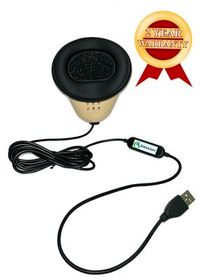
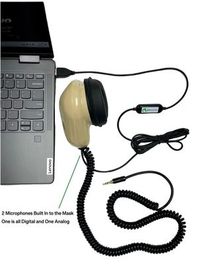
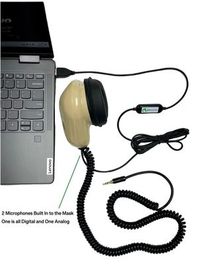
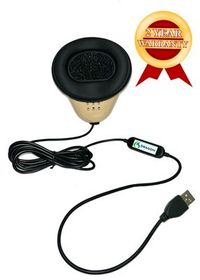
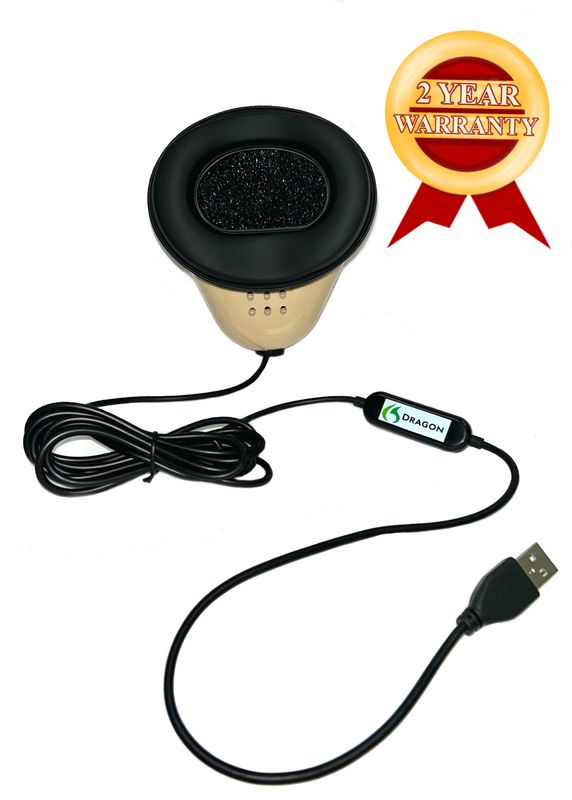
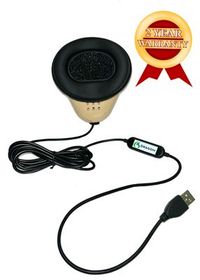
The Martel Dragon USB Stenomask is a microphone for a direct USB computer connection. The Double Dragon 2 has a USB microphone for the computer and an independent 3.5 mm microphone path for a compatible second device. In either case, record what reaches which destination. The word Dragon in the mask name identifies the Martel hardware. An access inquiry should separately name the recognition engine you are asking Stenograph about. This helps a support representative tell the difference between a person who owns a Dragon mask and a person who is asking about Dragon software. Martel’s stenomask connections compared.
For a computer decision, compare the Martel VOX Elite 32 GB and 64 GB packages against Stenograph’s confirmed requirements for the intended workflow. Martel lists Windows 11 Pro on both packages and describes file-transfer and stenomask setup assistance. If a publisher or instructor asks for additional details, take them from the description of the exact configuration or the machine in front of you. A memory figure is one piece of that description. Your normal work might also involve exhibits, a recording destination and a remote meeting. Mention those needs in the hardware discussion so the purchase has a clear purpose. See the Martel VOX Elite 32 GB · See the Martel VOX Elite 64 GB.
Use your own mask for any check of recognition pace. Place it in your usual working position and repeat the same short question twice using the confirmed microphone input. Keep the first unedited output, listen to the dictation and compare the words you intended with the words saved. Time the exercise if speed is part of the decision. Practical readiness depends on your ability to obtain accurate names and figures at the pace you will use and then recover them during review. A connected mask supplies an input for that exercise. The saved result documents your experience on that setup.
We handcraft our Dragon USB and Double Dragon 2 stenomasks in limited quantities. If a batch sells out, there may be a waiting list.
Imagine the software publisher has responded to a reporter named Morgan. This is a fictional example of how to read a reply, and no example here assigns a real access policy or a release number to Stenograph. The reply confirms the edition on the training computer and asks Morgan for the build on the reporting laptop. Morgan can immediately mark the edition question resolved. Morgan still needs to read the build from the reporting laptop. Considering the entire conversation resolved because a helpful reply arrived would skip the one piece of evidence the publisher actually requested.
In a second fictional situation, the publisher supplies instructions that apply after the reporter obtains the appropriate entitlement. The order is important. Write the condition first and the instruction second. Ask who at the school or firm can verify that the condition has been met. Keep working on the physical setup and practice material while that answer is pending. There is no reason to experiment with undocumented menu paths. You already have productive work to do, including labeling the personal mask, preparing a made-up test exchange and capturing a short sample from the intended input.
In a third situation, imagine that the reply confirms the installation and provides instructions for starting the new workflow. Read the steps once from beginning to end before acting on them. Mark which ones belong on the reporting laptop, which require an administrator and which simply tell you what the completed process will look like. Save the date or revision identification of the guidance. If a step mentions a command whose purpose is unclear, ask the publisher before altering an established setup. Your notes should describe the specific unclear step and the screen or result you expected at that point.
Sometimes the most useful reply is a question. “Which build is on the machine that will run the job?” narrows a broad conversation to a check you can actually perform. Answer with the verified value from the intended machine. Say if the computer is still on order and only a planned configuration is available. An answer about planned equipment can help you choose what to buy. A demonstration with the delivered computer gives you a different kind of evidence later. Date both entries and let each stand for what it demonstrates.
For a class exercise, assign three imaginary desks the names Cedar, Juniper and Willow. Cedar is a personal reporting laptop with an edition and build copied from its own About dialog. Juniper is the instructor's presentation computer. Its lesson notes refer to speech recognition, but the notes do not identify which engine powered last week's demonstration. Willow is a new computer described on an order sheet, with setup scheduled for a later appointment. Use two pencils in different colors. With one, write what is observed. With the other, write what someone must still confirm.
At Cedar, the reporter can already open a familiar CAT training job and hear a saved passage. That observation belongs next to the job name. The reporter also has an email confirming which edition they purchased. Put that fact next to the account description. Now ask what either piece proves about the new recognition option. Opening a saved job demonstrates access to that job on Cedar. The edition information identifies the purchase. Stenograph’s reply or release documentation for the actual configuration is the evidence needed for the Speechmatics access question. Word the question before moving to the next desk.
At Juniper, the instructor recalls seeing text arrive as a student spoke into a mask. Several people remember the exercise, yet none has the presenter’s version note. Ask the instructor whether the exercise used Dragon, Speechmatics or another documented source for the demonstration, and who can identify the installed build. The answer may be available within a minute. If it is still pending, enter “recognition route to confirm” in the appropriate box. That is more helpful for the next class than adopting the most frequently repeated guess in the room.
At Willow, the purchase paperwork states a memory configuration and a storage capacity. Those figures help the buyer identify the computer. They say nothing by themselves about which license will be assigned to it. The person coordinating setup can ask about the intended CAT installation, confirm the requirements with Stenograph and bring the personal mask and an authorized practice job to the appointment. Write the first demonstration as a future task. Once the computer is delivered, read its installed version and replace the planned entry with the observed one. Keep the purchase paperwork for its original purpose.
Have a colleague read a series of statements and assign them to one desk or more. “We heard the reporter's voice on playback” can apply to Cedar if the played material came from the reporter’s own recording. “We saw a presentation” belongs at Juniper. “We know the package we ordered” belongs at Willow. “Our own Speechmatics practice job reopened on this machine” belongs only at a desk where that particular result has been demonstrated. This exercise trains the habit that matters in a real transition. A convincing observation is valuable only when it answers the question you are asking.
When your publisher-confirmed setup is ready, use a short passage you can identify easily. The imaginary office in this exercise issues permits to put small benches in a public garden. Read the words of applicant and clerk as a partner exercise, or prepare a source recording in advance for solo practice. Hold your personal mask as you normally would. Before you begin, name the training job and the document in which you will save observations. Include a unique spoken marker so that you can identify today’s sample if another file shares a similar name.
Clerk. Please identify the drawing you brought to the counter. Applicant. I brought the drawing marked Linden Walk, bench three. My first drawing put the bench beside the drinking fountain. I moved it six feet toward the entrance before I came to this appointment. Clerk. Did the committee ask you to move the fountain? Applicant. No. The fountain stays where it is. The bench is the piece I moved on the drawing. Clerk. What time did you deliver the revised page? Applicant. I delivered it at two twenty. I returned at two forty to add my initials.
Clerk. What initials did you add to the page? Applicant. I wrote M, then J, then the letter P. On the first version I had signed with my full name. Clerk. How can we recognize the revised drawing without looking at the initials? Applicant. The original shows a line of four trees beside the path. The revision shows those same four trees and a small circle indicating a new sign. Clerk. Was the sign already in place? Applicant. The drawing proposes a sign. When I visited the path that morning, there was an empty post but no sign.
Read the job back in a different order from the order you dictated it. Ask for the time the applicant returned, the thing the applicant moved and what was actually on the path that morning. The answers are two forty, the bench on the drawing, and an empty post. If any is unclear, identify which recording and which copy you checked. These questions require meaning as well as text. A transcript that merely contains the words “sign,” “post” and “bench” has not yet demonstrated that those details landed in their proper relationships.
Close and reopen the practice job before entering “verified” in your notes. Find one reference by its surrounding words and one by the speaker who supplied it. If you intended to keep audio, play the file you are actually going to keep and listen past your opening marker. If this is the first exercise after a laptop move, run one more fresh session with a different spoken marker. The first job confirms the initial demonstration. The second shows whether you can reproduce the startup routine using the instructions and equipment you will have the next time.
A useful confirmation note has a narrow subject. For example, “Publisher confirmed the route for my personal training computer on the date below. I followed the supplied directions and completed the Linden Walk exercise.” Beneath it put the edition, installed build and equipment you actually used. If you change computers later, the prior note remains a record of the prior demonstration. Open a fresh page for the replacement. Carry over the list of questions and the reference exercise, then add the observations from the new machine. Someone reviewing the file can now distinguish past success from a current question.
Suppose the school changes classroom assignments halfway through a term. A student moves from Juniper to Cedar and brings a personal Dragon USB Stenomask. The instructor knows that yesterday’s exercise succeeded on Juniper. To prepare Cedar, identify its CAT installation, the license governing it and the workflow Stenograph supports there. Then repeat the small permitting-office exercise on Cedar. If the job captures the words but a room recording was expected as well, test that recording separately. In this example the physical move prompted a review of both access and equipment, each with a specific item to demonstrate.
Think also about a reporter handing duties over to an assistant who schedules appointments. The assistant needs to know who to contact, the general subject and whether the next action is a publisher inquiry, a Martel setup visit or a classroom practice. They do not need unrestricted access to the reporter’s license information to organize an appointment. An effective handoff could say, “Publisher has confirmed the supported installation. Next step is a VOX setup appointment with my mask and the fictional Linden Walk job. Please schedule enough time to create and reopen a test recording.” The receiver can act on that note without interpreting a technical claim.
When several people send helpful answers, retain the question beside each answer. A reply about whether a computer can run the existing Dragon configuration should stay next to that question, even if the message also mentions CATalyst VP. A reply about the announced Speechmatics integration should identify the release and circumstances to which it applies. If the two appear inconsistent, return to the exact question rather than combining fragments into a new procedure. Describe the apparent difference to the relevant publisher. A clear distinction between two workflows often resolves what first looked like conflicting advice.
One last exercise is worth doing with a colleague who has no role in choosing the software. Give the colleague four imaginary slips of paper. The first says a computer has been ordered. The second says which build was seen on a named laptop. The third says the publisher confirmed the intended configuration for the account. The fourth gives a fictional job name and the exact answer recovered from it. Ask the colleague to arrange them in the order in which they could support a purchasing or training decision. Several orders may be sensible because a buyer can seek requirements before purchasing. What matters is whether the colleague can describe what each slip proves. If two look interchangeable, rewrite the notes until the distinction is clear.
Next, remove the slip that mentions the named machine. Ask whether the remaining papers establish which computer actually ran the software. A delivery record and a successful test can refer to different units. Add one line connecting the test to the reporting computer. Now remove the job name and ask the colleague to find the exercise the following morning. They may be able to do it, but a distinctive job name and a memorable reference phrase make the task much easier. Use what the colleague actually needed to improve your own notes.
Finally, ask what would be safe to reuse in a public workshop. The fictional dialogue, sample questions, inventory headings and readback request are good candidates. A personal license code, a real account confirmation or a screenshot showing other private material belongs in its intended private setting. A workshop handout can demonstrate the whole reasoning process with a fictitious account and three named desks. Write the date and purpose on that handout. An ambitious student should be able to practice the process correctly without treating the fictional paperwork as a real authorization.
It identifies a collaboration with Speechmatics and describes speech recognition integrated into CATalyst VP that operates on the device. This gives you a specific product and source to cite when approaching Stenograph about your setup. Write the announcement’s title or save its address with your inquiry. Then ask about the release, entitlement and equipment for the machine you will use. The press announcement and the account-specific response serve different stages of your decision. Keeping both makes it easier to explain why you began the inquiry and how you resolved it.
Write each as the answer to a different question. Edition tells the publisher what product or level of access you are discussing. The displayed version and build identify the copy that is actually running. A person may accurately say “I have VP” while still needing to check the build. Another may know the build and be unsure which features their license carries. Fill in what you can demonstrate and ask the proper account holder for the missing information. These details together give a more useful picture than either one by itself.
Use the information dialog identified in Stenograph’s version guide. In Help, open About Case CATalyst and read the version and build. Record them in your private notes, including which computer you were using. Look for the information you came for before touching controls for updating or renewing access. You can return to the publisher’s directions for those actions when you know they apply to your situation. A checked version is a helpful starting point even if software installation is managed by someone else.
The complete value gives support a precise description of your starting point. Two users may both give the same major release in conversation while using different installed builds. A publisher can then decide whether the distinction matters for the question at hand. Record exactly what appears, and keep the leading or trailing digits that might look unimportant. If someone later asks whether the machine changed after an update, you will have a dated value to compare. It takes very little work to preserve that degree of precision at the beginning.
Identify the model or configuration on the order and tell the publisher that the installed software has yet to be verified on the delivered computer. Ask which configuration is supported for your planned workflow and who should complete installation. Prepare the made-up test material and label your intended microphone connections in advance. Once the laptop arrives, read the actual version, confirm the entitlement and run the short exercise. The original response can guide your purchase while the later demonstration records what happened on the unit you received.
Record that division of ownership at the beginning of the inquiry. Ask the school which software it authorizes for your coursework and who can confirm access for your personal installation. When asking Stenograph a technical question, make clear that the laptop belongs to you and the grant of software access is managed by the school. Bring the resulting requirements to Martel if you need equipment or setup assistance. This avoids asking one organization to answer another organization’s account or classroom-policy question.
Bring the product name, the broad purpose of your exercise, your displayable version and build, the type of microphone connection and an invented passage. Leave personal license identifiers and account records out of material distributed to classmates. A student can learn how to distinguish builds from two fictional entries marked “training workstation” and “personal laptop” without seeing anyone’s actual key. If a private account question arises, record whom to ask after the demonstration. Keeping the group example anonymous also makes it easy to reuse for future classes.
Describe what you bought or what the account administrator told you, then ask the publisher to confirm what that means for the integration. For example, say you operate a particular CAT edition on a named type of machine and would like to confirm which options apply to your account. A receipt may provide a purchase date and a product description. The current grant of access is something to verify through the relevant license process. Clear subject lines and specific questions make it easier to receive an answer that matches your situation.
Your activated Product Key Code determines access. Stenograph distributes the same CATalyst download across editions. Imagine that your classmate can begin a voice-writing exercise while you are still confirming your own options. Record the version and build from your own installation, then put the difference into a question for Stenograph. For example, “My installed build is the one shown on the attached version note. I use Dragon Professional with CATalyst VP. What does my license require to try the announced Speechmatics integration?” Keep the actual key in the secure account process.
Read the scope of the publisher’s instructions. The guide describes license renewal in the context of newly purchased features and gives examples. If your question concerns Speechmatics, ask how Stenograph handles access for your configuration. An example about another purchased feature does not establish a specific activation process for this integration. You can identify the version and prepare your inquiry while waiting for that answer. When the publisher gives directions that fit your case, keep those directions with your dated access notes and follow them in the stated order.
Read the opening passages and the recognition engine named in the requirements. Stenograph’s getting-started page describes using Dragon Professional with CATalyst VP. It can help a reporter document the setup they already use and name the voice-writing functions they want to preserve. Identify the engine each time you transfer a procedure into your notes. A Dragon startup instruction belongs with the Dragon setup it describes. For a confirmed Speechmatics route, use the publisher’s instructions for that specific route and installed release. The Dragon workflow in Stenograph’s getting-started guide.
Check your CATalyst VP version and build, ask Stenograph about Speechmatics access, and verify first use on a Martel VOX laptop with your own mask.
Checking access asks whether your edition, build and entitlement support a selected recognition route. Checking a microphone asks whether the intended input captures your dictation. You can make a clear sample from a personal stenomask before a license question is resolved. You can also have documented access and still need to select and test the correct input. Give the two questions separate lines. An affirmative answer to one then becomes real progress while the other is still being worked through.
Use the full hardware name and the connection in one sentence, then give the software details in a second sentence. “My microphone is a Martel Dragon USB Stenomask connected to my reporting laptop. My question concerns Speechmatics access in CATalyst VP.” If you currently use Dragon software, add its name separately as your existing workflow. A representative can then tell which item will supply the audio and which part of the reporting arrangement you wish to change. This simple wording also works well on school equipment forms.
It tells you how you can route the reporter’s dictation to compatible equipment. A USB connection can feed the computer, while the independent 3.5 mm microphone can supply a compatible second recording device. The CAT license and supported recognition workflow remain separate questions for the publisher. After access is confirmed, make distinct audio checks for the paths you intend to use. Save an identifiable sample on the computer and, when applicable, on the recorder. Write down where you actually heard each sample.
Include the specifications the publisher requests for the recognition configuration at issue, along with the product edition and installed build. When considering a VOX laptop, identify the exact proposed package and label it as proposed. For a delivered computer, get the details from that computer or its confirmed configuration. If your normal session also involves an exhibit, a remote meeting or an additional audio source, describe those needs concisely. The recipient can then distinguish the basic compatibility question from the broader discussion about how you plan to work.
Use an if-and-then sentence in your private notes. “If the administrator confirms the required access, then follow the publisher’s instructions for this installation.” Replace that imaginary wording with the actual condition and direction you receive. Put a name beside the person who can resolve the condition and a date beside any completed step. This technique keeps a helpful answer usable even when part of it depends on information another person must supply. Revisit the note after that person replies and identify exactly what can proceed.
Describe it as an observation about the demonstrated computer. Record what you actually saw or heard, the product named by the presenter and any version information the presenter supplied. Then ask what applies to your personal reporting installation. If the purpose of the demonstration was simply to introduce the integration, it may have met its goal without establishing anything about your account. A positive learning experience and an unanswered configuration question can coexist. Your completed personal practice job will eventually supply the missing local demonstration.
Prepare a fictional passage, a marker and a single readback question before arriving. Once the confirmed setup is ready, connect your personal mask, follow the publisher’s startup directions, dictate the passage and save the job. Ask the person assisting to request the answer about one time or one object. Reopen the job and locate that answer. If audio is part of your planned setup, play the intended file as well. The exercise is short enough to finish while still revealing whether you can repeat the process independently.
Ask for the change the applicant made before delivering the revised drawing. The applicant moved the bench six feet toward the entrance. The fountain stayed in place. A reader who searches only for “move” or “fountain” could point to the wrong item. Have the reporter read enough of the exchange to establish which object changed position. Then check it against the source. This is a direct test of whether the rough has preserved a relationship that a real reader would care about.
Start by acknowledging what you have demonstrated. The file contains your marker, so at least part of the intended sequence occurred. Identify whether the rest of the source was spoken, whether the recording continued and whether you opened the matching file. Write the last word you can hear and the last word in the associated rough. Then make a new short exercise with a different marker and a single complete exchange. Use your notes to decide whether the next question belongs to microphone setup, recording operation or the publisher’s workflow.
It gives you a reference for a particular observation. Add a fresh passage to test how you handle information you did not memorize during preparation. Ask a partner to describe an imaginary permit with an unfamiliar number and a change of destination. Listen and repeat using your ordinary mask position. Save and review the rough, the attribution and the answer to a spontaneous readback request. This makes the readiness discussion about actual tasks. The publisher’s access confirmation remains the separate evidence that the option is supported for your configuration.
Record the available selection and the job question separately. Revisit the starting instructions for your confirmed edition and use fictional material to demonstrate creation, closing and reopening. Include a unique phrase in the job and write its name on paper before you begin. After reopening, find the unique phrase and any intended audio. If you still need support, report the last point you could demonstrate. Seeing a setting and recovering a saved result are different milestones, and identifying the point reached gives support a concrete starting place.
Refer to your earlier question and the exact point the reply settled. Then ask one question about the remaining condition. For example, “The edition on my training laptop has now been confirmed. What first-session instructions apply to the build listed in my earlier message?” Add the original date and the broad device description so the recipient can connect the conversation. If the circumstances have changed, say what changed. This approach gives the publisher a clear subject and the context needed to respond without reading a new account of the entire purchase.
Give a factual status that separates what you can demonstrate from what still requires a reply. You might say that the installed edition and build are documented, the personal mask records a clear sample and Stenograph is being asked which supported Speechmatics procedure applies. If the supervisor needs a scheduling decision, identify which activity can take place now, such as a fictional dictation exercise on the established setup. An accurate status lets a supervisor plan around actual progress without confusing equipment readiness with software access.
Report the task, duration and checked details from your own sample. You could record the time taken to dictate the permitting-office exchange, whether the two spoken times were preserved and how long it took to find the answer about the empty post. Identify the mask, the setup and whether the passage was familiar. A result like that is meaningful to the person who will repeat the exercise. It does not turn one short drill into a general claim about recognition performance across all voices or installations.
Keep the earlier value and add a dated entry for the new version and build. Describe who confirmed the change and the publisher instructions used. Repeat one brief original check and save it as a new job. If the exercise behaves differently, you can now identify the two installations and two pieces of evidence under discussion. If it behaves as expected, your record shows when the new configuration was actually exercised. This small habit becomes especially useful when more than one computer is involved in a term or a firm.
The school or responsible assessment administrator can identify the equipment and software configuration it authorizes for that assessment. Stenograph can describe its software and supported access, and Martel can describe its own hardware and setup services. Ask each party the question it is positioned to answer. Keep the answers together under the name of the particular course or exercise. A technically supported configuration may still require a separate conversation about course delivery, and a school recommendation may still require checking the license on the computer you will actually use.
Send the invented questions, its reference answers and a short explanation of the task. Leave licensing information, screenshots of account details and real work files out of the example. The colleague can identify their own computer, personal mask and publisher-confirmed route on a fresh copy. Ask them to mark whether they could retrieve the revised drawing, the return time and the applicant's initials. The two of you can discuss the results without implying that a license or particular software option carries over from one reporter to another.
Save the title and location of the article the publisher says applies to your configuration and note the date you received that direction. Keep the earlier question so you remember what you were verifying. Read the new article in full and connect its scope to your own edition and build. If you follow it during a practice session, record which steps you demonstrated and your resulting job name. A future reader will then know whether a note was based on a product announcement, a general support page or instructions for your specific setup.
Say exactly what happened. You might say that Stenograph confirmed a supported Speechmatics route for your edition and build, that you followed its directions on the named laptop and that a fictional job captured and reopened as expected. If only the first part is complete, report only the first part. This wording is especially helpful to trainers and equipment buyers because it describes the evidence behind the statement. Keep the short practice job and your dated version note together so you can demonstrate the result when the next question comes.