



A Mock Court Hearing From Roll Call to Readback With Speechmatics
Run a complete fictional footbridge hearing with Martel stenomasks, two witnesses, exhibits, a recess, a disputed readback, and four separate scores.
Plan a Dragon-to-Speechmatics move in CATalyst VP. Confirm your release, test your Martel mask and VOX laptop, and review a fictional deposition.
Picture the first ten minutes of a deposition on your newly prepared reporting computer. Counsel has given two appearances, a witness has spelled a family name, and somebody has asked you to read the last question. What would you have to find on your screen or hear in your recordings to feel ready for that request? Write those things down before making a list of software settings. They give you a reason for each part of a move from Dragon to Speechmatics in Case CATalyst VP. They also let you recognize progress when a particular part is working well.
Stenograph describes an on-device Speechmatics integration for CATalyst VP. Speechmatics also identifies the integration in its own announcement. A reporter planning a move can use those publications to identify the product and who supplies the instructions for it. Confirm with Stenograph which release, license and computer configuration support the workflow you intend to use. Keep the answer with your plan. Then design a short reporting exercise around it. The walk-through here follows an invented deposition about a neighborhood greenhouse. All names, testimony, documents and hypothetical results in the exercise are fictional. Stenograph’s integration announcement · Speechmatics’ partnership announcement.
Stenograph's public getting-started article describes a Dragon Professional workflow in CATalyst VP. In that workflow it discusses Dragon vocabulary and a Personal VoiceCommands dictionary in CATalyst. The guide gives you useful names for parts of the setup you already know. Use it to describe your starting point. Use the instructions Stenograph provides for your confirmed Speechmatics installation when setting up the new route. That small distinction keeps an old instruction attached to the software it describes, even when the same person, microphone, computer and transcript layout appear in both sessions. Stenograph’s guide to the Dragon workflow.
Write the plan as a sequence of things you can demonstrate. Can you open your established training job? Can you identify the input that receives your mask? Can you capture an opening question and a complete answer in a second training job? Can you locate a particular passage again when a colleague asks for it by subject? Can you explain which version of the practice transcript you are holding? These questions are more valuable than a general impression that a new setup feels quick. Each one points to an action with an observable result.
Start at your own working desk. Identify the reporting computer and the CAT edition you ordinarily open. Stenograph explains that Help and then About Case CATalyst displays the installed version and build. Copy the version and build exactly into your private equipment notes. The dialog can also display a Product Key Code. Record the version information you need for the transition and keep the license identifier private. When asking a public question, a description of the edition and version is usually enough to explain what information you are seeking. Stenograph’s version and build instructions.
Next, describe your actual beginning-of-job routine, using verbs. For instance, “Connect my mask, connect the room input, start my authorized recognition workflow, start a practice translation, identify my first speaker.” Put a small circle next to any step that depends on Dragon specifically. Put a square next to one that describes a reporting result, such as putting a witness answer under the correct designation. The circled steps are candidates for new instructions. The squared results become acceptance exercises. The point of this little notation is to preserve the reason you did something without assuming the new software uses the same control to do it.
Collect a sample of your own work habits using invented material. Say a witness name you have made up for the exercise, an address on an imaginary street and one amount that includes cents. Include a byline, a switch to discussion involving a third speaker and a return to questioning. Save the rough before editing it. Record how you locate a passage and about how long you spend making the practice copy readable. If you keep audio as part of a training job, reopen it and listen. You now have an actual example to refer to when describing a difference later.
Choose a destination for the baseline you can identify the following day. A name such as “Greenhouse rehearsal, Dragon, first pass” tells a future reader more than “test two.” Write which folder holds the saved rough and which holds the text you corrected. If your backup procedure collects a group of files together, use the publisher's procedure and verify the working copy by opening it. In particular, check for the audio and personal files you want. A folder full of filenames is encouraging. Reopening the intended job and locating a known answer gives you a more specific result to write down.
Nuance explains that its custom-word export creates a word list for reuse in Dragon profiles. It also describes an XML option that carries defined properties for custom words. Treat a Dragon vocabulary export according to the purpose its publisher documents. A list can be especially helpful as a source of test words for a new system. If the new workflow offers an import, obtain its supported formats and steps from the publisher. A list of spellings is already valuable even when the next step is simply to build a short, private exercise around ten difficult names. Nuance’s guide to exporting custom words.
Prepare two short inventories. The equipment inventory includes your personal stenomask, the computer, an optional separate recorder, the computer connection for the mask and any room audio source you use. The work inventory includes the practice job, an expected speaker list, a reference copy of the exercise, your ordinary transcript layout and a small set of familiar reporting cues. If something cannot be recreated easily, decide how you will preserve it before changing anything. If something can be recreated in a minute, write the few instructions you will need. This keeps the inventory short enough to use.
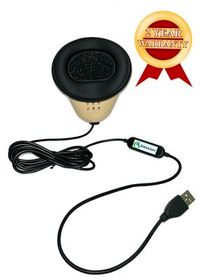
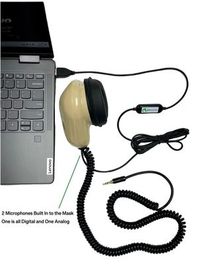
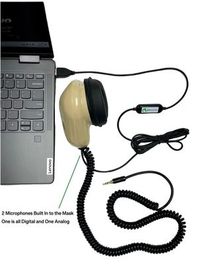
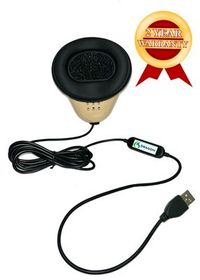
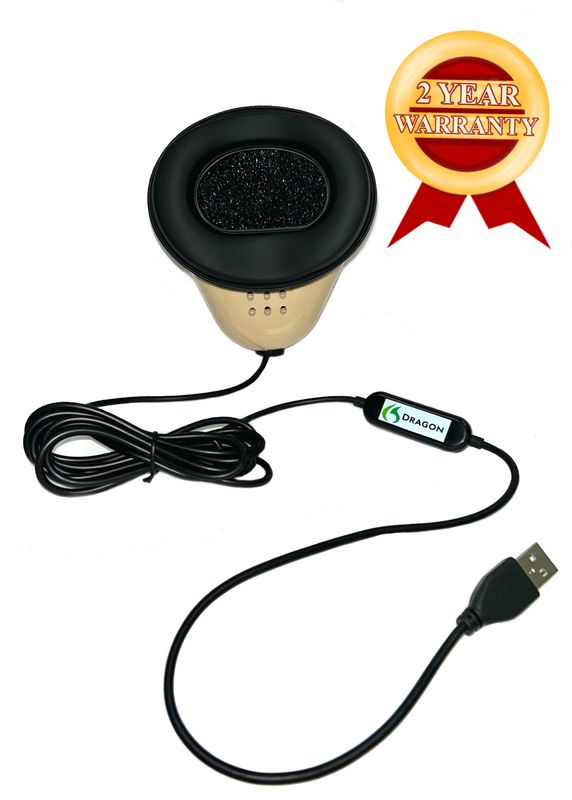
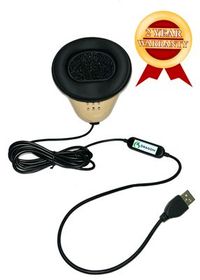
Martel's Dragon USB Stenomask provides one direct USB microphone path to a computer. The Double Dragon 2 provides a USB path and a second microphone with a 3.5 mm connection for a compatible destination. Both microphones in the Double Dragon 2 capture the reporter's own dictation. For a separate recording, connect a compatible recorder, select the intended input, make a file and play it. If you plan to review the original room speakers as well, put the room input on a separate line. These descriptions identify what a wire can carry. Your own saved sample shows which path you recorded. Compare Martel stenomask connections.
When reviewing a choice of laptop, write a sentence about the work it will do while the CAT job is open. You may have an exhibit open beside the transcript, a separate recording in progress or a remote meeting running as part of an assignment. Martel lists its VOX Elite 32 GB and 64 GB laptop packages for voice writers and describes assistance with setup and transferring files. Bring the confirmed Stenograph requirements, the names of the applications you actually use and the mask to that discussion. It is much easier to check an identifiable workflow together than to decide whether a vague description like “a busy day” fits a particular computer. Martel VOX Elite 32 GB package · Martel VOX Elite 64 GB package.
Speed matters when a question follows the previous answer closely. A familiar position for your own mask and a known input on the VOX laptop give you something repeatable to measure. In practice, time the reading, then time how long you need to correct and locate a requested answer. Note any words that change meaning, including a dropped negative or a shortened name. If you have the Double Dragon 2 and record a second dictation copy, listen to the specific phrase when comparing the two runs. Your written observations describe your pace and accuracy with the equipment you actually used.
We handcraft our Dragon USB and Double Dragon 2 stenomasks in limited quantities. If a batch sells out, there may be a waiting list.
Select a date for a rehearsal when you can stop halfway through without affecting a proceeding. Before that date, ask the publisher to confirm the software route for the edition and build you intend to run. Ask about any installation or license steps, the required equipment and the procedure to follow if you need the established workflow again. If you are moving to a new reporting computer at the same time, identify which task will be completed first. For example, retrieving a known training job on the new computer and capturing new dictation are two useful milestones you can demonstrate separately.
Give the rehearsal an opening condition and a closing condition. One opening condition might be “My known practice job opens, I can identify the reference recording and I have Stenograph’s instructions for my installed version.” A closing condition might be “I can recover a question, an answer, one speaker transition and the recording used to review them after closing and reopening my new job.” Add any requirements that matter to your own work. A reporter who depends on a separate dictation recorder needs a closing condition involving that recorder. A student can add the demonstration required by the instructor.
Assign a role to a colleague if someone will help. One person can read the script and hold the reference. The reporter can listen and repeat without seeing the answer key. Another person can time readback or simply write down which passages the reporter located. If you are alone, record yourself reading the fictional source before you plan to dictate it. Use a different spoken introduction on the source recording and on the dictation recording. Self-practice improves considerably when you can identify each file by listening to its beginning, even after moving it to another folder.
The fictional witness, Anwen Bell, helped coordinate deliveries to the Alder Street greenhouse. In the exercise, the word “bay” identifies a numbered growing area. A packing tag showed where an item was supposed to go. The receiving sheet showed where staff actually put it. There are two independent documents and two events worth tracing. Before anyone reads the dialogue, the reader should label a blank sheet “packing tag” and a second sheet “receiving sheet.” The reporter should know the exercise uses both documents while leaving the precise testimony to be heard naturally.
Question. Which morning did the first delivery reach the greenhouse? Answer. It reached our yard on Tuesday, the fourteenth. We had expected it on Monday afternoon. Question. Did you unload the truck when it reached the yard? Answer. I opened the west gate. Ben and Lila took the trays into the building. I could hear them working on the other side of the dividing wall. Question. Could you see which tray crossed the doorway first? Answer. From the gate I could see the north end of the truck. I could not see the doorway they were using.
Question. What document are you holding? Answer. This is the packing tag that came with the narrow tray. It says bay fourteen in the upper corner. Question. Did you write that number? Answer. I drew a ring around it before the driver left. I did not write the number underneath the ring. Question. What other mark did you make on the tag? Answer. A small star next to the description of the plants. The person who set the tag on my desk had already folded the bottom edge, so the star is above the fold.
Question. Please look at the other document. Answer. The receiving sheet has a date and two lines. The first line records twelve trays. The second says that two of those twelve were moved later that afternoon. Question. Where does it say the narrow tray was placed? Answer. It was placed in bay forty. The packing tag called for fourteen. On the receiving sheet, forty is written in letters, followed by my initial. Question. Why did you initial the receiving sheet? Answer. I counted the empty places left on the bench after the move.
Counsel. Before the next question, I would like to give the two sheets different exhibit names. The tag will be Exhibit C and the receiving sheet Exhibit C One. Chair. Please allow the witness to finish looking at the second page. Witness. Thank you. There is one detail I want to make clear. The move involved two trays that were already inside the greenhouse. A second set of twelve trays did not arrive. Counsel. Thank you. I will return to the tag. Question. How many trays arrived with the first truck? Answer. Twelve, including the two later moved.
Question. When did you see the narrow tray in bay forty? Answer. At about three fifteen. I did not see anyone carry it there. Question. Who had written forty on the receiving sheet? Answer. I recognized Lila's handwriting. I did not watch her write it. Question. Please spell Lila's family name for us. Answer. Veal, V, E, A, L. She uses a middle initial, K, on her work badge. Question. What does her badge show on the bottom line? Answer. Greenhouse coordinator. It was a different title the year before.
Question. How much did you record for the replacement tag? Answer. The charge for a set of tags was sixteen dollars and fifty cents. One tag cost a dollar and sixty five cents. The amount on the invoice is for a set. Question. Does the receiving sheet show a payment? Answer. It records the trays. The tag charge appears on an invoice the office sent me the next morning. Question. Do you have the invoice in front of you? Answer. Today I have the two exhibits and my work badge. The invoice stayed with the office coordinator.
Chair. We will pause briefly while counsel finds the photograph of the west gate. Counsel. I have found it. We can start again. Question. When you used the words “the west gate,” were you referring to the blue gate in this photograph? Answer. The blue gate is the east gate. The west gate is the one with the unpainted handle, at the far end of the picture. Question. Can you see the trays in this picture? Answer. I can make out the handle and a stack of empty pots. The trays are outside the part of the yard in the photograph.
Give the reader one more task without telling the reporter which question will come. Ask for the portion about who wrote on the receiving sheet. If the reporter locates only the note about an initial, ask for the witness's account of recognizing the handwriting. Then request the answer about the cost of one tag. A successful search for “sixteen” may find the price for a set and still miss the line you need. These readbacks test access to meaning after dictation, one of the most practical measures of a transition. Write what you located and how you recognized it.
Start with the first time the witness describes seeing something. She opened the west gate and heard activity beyond a dividing wall. She could see one end of the truck and could not see the doorway. On a review copy, mark each verb about a sense with a pencil or a highlight. If “hear” has become “see,” that is a change in the evidence within this exercise, even though the rest of the sentence may read smoothly. Check the original passage, the recorded dictation and the rough in that order. Record which point first shows the difference.
For the bay numbers, build a little reference in your own handwriting. The packing tag called for fourteen, the receiving sheet reported forty, and the witness placed her initial next to the written forty. A first rough containing the numbers 14 and 40 can still attach them to the wrong papers. Check the phrase on both sides of each number. Then ask a colleague to tell the story from the rough alone. If the colleague thinks the tag was altered to say forty, go back to the text and locate where that misunderstanding began.
For the tray count, pay attention to the word “including.” There was one delivery of twelve, and two of those twelve moved later that day. A reader who adds two and twelve can produce a confident but incorrect explanation of the imaginary event. Your job in the drill is to preserve what the witness actually said. Listen for the witness’s correction in the middle of the exchange, including the statement about a second set. Check whose paragraph contains the clarification. A perfectly rendered sentence attributed to counsel changes who supplied the testimony.
For the two prices, make separate marks for value and presentation. The full set cost sixteen dollars and fifty cents. The single tag cost one dollar and sixty-five cents. Read each amount in context even when its decimal places look plausible. The invoice is mentioned but was absent from the witness’s documents that day. Do not “correct” the receiving sheet by adding a price to it. You can check the recognition of amounts independently of how your normal transcript style renders them. That gives a far better comparison than counting every punctuation variation as a different dollar value.
Finish with the photograph. The speaker corrects the identification of a blue gate and locates the west gate by its handle. The picture shows empty pots. The witness distinguishes what can be seen in the picture from the location of trays elsewhere in the yard. Have your partner choose one of those details and ask for readback after you reopen the practice job. Save the response you found in your notes. A good rehearsal should show more than how to make text appear while the job is open. It should show how you will retrieve it later.
Suppose the reporter completes the greenhouse hearing and notices three differences. The initial rough calls the west gate the east gate once. It puts the witness’s correction about the trays under counsel’s name. It spells Veal correctly after the witness gives the letters. Treat those as three observations, each with its own next step. Listen to the source and mask audio around “west” to identify what the reporter heard and repeated. Review the transition from counsel to the witness around the tray correction. Keep the successful spelling as an example of how the reporter can verify a name when the speaker supplies letters.
Now imagine a second pass with the same equipment. The new software has been confirmed by Stenograph, the reporter has followed the supplied instructions and a fresh practice job is open. Reading the familiar dialogue again is a reasonable way to check an equipment path. A stronger test of whether you can handle unfamiliar details is to have your partner introduce an entirely new question. Ask the partner to name a shape on a sign and place it beside an object that has a different shape. Record the new answer, identify its speaker and find it again without seeing the reference. That new question complements the familiar hearing.
Include one planned restart in your rehearsal. Finish and close the practice session normally. Put the reference out of view. Begin a new short session using the instructions you intend to follow next time, and say a marker such as “second greenhouse session, curved handle.” Save and reopen it. This simple sequence tests a different task from maintaining an already open job. If you are confident capturing words but still consult your notes to start the second session, keep a brief startup card on the desk. Cross off an item once you can perform it reliably and still explain its purpose to somebody else.
Choose who will receive which observation. A publisher question about available speech recognition belongs with Stenograph. A question about connecting an independent recorder to your Double Dragon belongs in an equipment discussion with the recorder model and connection identified. A question about rendering the exhibit designation in your class belongs with your instructor or the person who sets the transcript style. Give each person enough background to understand the question. Your entire rehearsal folder rarely needs to accompany one question about one input or one classroom convention.
Put the most important comparison on one small card you can place next to the closed practice job. On the front, write the request a colleague might make: “Find the answer about the narrow tray and the different bay numbers.” On the back, write the information that would satisfy the request. The witness identifies what the packing tag called for and what the receiving sheet records, with the numbers tied to the proper documents. Try locating the exchange from the first rough the next morning. Then try from the reviewed copy. If one takes longer, note the search term or memorable phrase that made the difference. This everyday task reveals what your choice of words, formatting and file organization means to the person who will need the record after the screen is closed.
Once you have the card, ask someone else to use it. They can tell you whether the question contains enough information to find the passage without an explanation from you. If not, adjust the job label or clarify which fictional document is meant. You have just tested both the new desk and the usefulness of your handoff.
Write the result you need from the new setup in one complete sentence. For example, you want to dictate a fictional examination from your own mask, verify who gave the answer and reopen the job for readback later. Below it put the installed CAT edition and build, the recognition route you are using now, and the route Stenograph confirms for the planned practice. Dating this page lets you recognize your most recent information when two pages look almost identical. Add one name or department to contact when a question falls outside your own observations.
Tell the story of one short job you actually ran. Include what you connected, how you identified the right practice file, what you spoke, what appeared and how you verified it. If you used a familiar command, describe the intended result in ordinary words. “I put counsel’s comment on its own speaker paragraph” remains understandable to a reader who has never heard your personal cue. The description will help you recognize the corresponding result when your new supported workflow uses different steps. Keep detailed Dragon-specific directions on a separate page for your current arrangement.
Identify your CATalyst VP edition and installed version and ask which build, license and hardware support the announced on-device Speechmatics workflow for your situation. Include whether you already own a reporter laptop or are choosing one. If you are part of a school or office, explain who manages installation. The reply you need is one you can apply to a named configuration. A general confirmation that the publisher has announced an integration may answer a shopping question while leaving the practical installation question open. Write down the next step the publisher actually gives you.
Transcribe the version and build into a fresh note. Read the note once for any identifier you accidentally included. If you would like an image for your own use, prepare a crop that contains the version information you need before sharing an example. In a public exercise like the greenhouse deposition, there is no reason to use a real product key as a sample identifier. Invent an exhibit number or a tray number instead. If Stenograph needs account information for private service, use the channel Stenograph designates for that purpose.
Arrange the tasks around what you can verify separately. You might first open an existing training job on the VOX laptop, play its associated audio and check a familiar piece of formatting. Then use Stenograph’s directions for the confirmed recognition option to make a fresh job. If you must complete both during one appointment, keep those two demonstrations on the agenda. A problem locating an old audio file calls for different work from a problem creating new dictation. Two clearly named jobs help you and the person assisting distinguish the tasks.
Preserve an authorized practice example on which you can identify a few distinctive words. It should contain a spoken marker, a familiar speaker change and a sentence with a worthwhile detail to review. If you use two sources, preserve a short file from each and label their origins. You can then listen for a known phrase on the new laptop before testing fresh speech. A recording you cannot identify by ear is a weak reference even if the filename looks reassuring. Fictional testimony gives you freedom to share a limited example with a trainer.
Use as many as you can check carefully in one sitting. A workable opening set might contain a family name, a place, an unusual job title, a measurement and one term you often hear mispronounced. Put each in a sentence whose meaning you know. A list of hundreds may be worth preserving for later, yet a short list lets you find out whether a difficulty is in the spelling, the way you spoke the term or the surrounding context. Keep a blank line beside each entry for the result and the evidence.
Use it as a record of the entries you took time to collect and as a source for carefully chosen practice items. Nuance documents using exported custom words with Dragon profiles. For any proposed use in the new recognition arrangement, check the receiving publisher’s supported format and procedure. You can still put two words from your export into invented testimony today. One could appear in the witness’s initial answer and the other in a spelling exchange. That exercise gives immediate value to the list while preserving the original export for its documented use.
Use your personal mask on a known working connection so you can recognize the sound and the feel of ordinary dictation. Record the Martel model and destination. If you intend to keep the Dragon USB on a direct computer connection, put that into both practice descriptions. If you are buying the Double Dragon 2 for a second recording, make that a separate measurable change. Capture a file on the additional recorder and verify it. Comparing speech engines is easier when you can tell whether the microphone path stayed the same during both sessions.
It can answer a specific question about what you repeated into the mask. In the exercise, listen for whether you said “twelve, including the two later moved.” If you have a compatible recorder attached to the Double Dragon 2’s second path, play the relevant file and record the result. The answer to what the original witness said comes from the original source or an appropriate room recording. In an invented drill you have the reference as well. Use each source for the question it can actually answer, and label the conclusion accordingly.
List your intended connected equipment, the applications that will be open, your established CAT setup and the publisher’s requirements for your planned recognition route. Ask what the Martel package includes for stenomask setup and file transfer. Then specify one practice file that should be retrievable and one fresh recording you want to make. If you are deciding between VOX memory configurations, tell Martel what you do while a job is active. An ordinary day of desk work, described in detail, makes the discussion much more concrete than the phrase “I want it to be fast.”
Have the partner read conversationally and leave the reference out of your view. Ask for a natural separation when the character changes. The first pass can be steady enough for you to establish a baseline. A second pass can include an interruption or a correction if that matches the situations you need to practice. Ask the reader to mark any word they actually said differently from the written script. A reporter who correctly repeated an improvised word should get credit for hearing the actual source. The written reference can then be annotated accurately.
Write down the written number, the number actually spoken and the transcript result in three short entries. Imagine the script says “Exhibit C One” and the partner says “Exhibit C Two” aloud. If the rough shows the spoken C Two, the recognition and repetition preserved that part of the performance. A comparison against the untouched script would suggest a difference that originated with the reader. Keep the corrected reference with both takes. The next time you use the passage you can decide whether to repeat the original script or the performed version.
Choose one modest task for that minute, such as a complete question, a one-sentence answer and a return to the examiner. Put a distinctive word into the answer so you can identify the file by listening. Note whether you could start the confirmed workflow from your own instructions, whether the opening words appeared and whether the answer received the intended label. A single successful minute is a useful observation about startup. A longer conversation and a reopened job address other questions you can schedule later in the rehearsal.
Write the action you expect before speaking the cue. For example, a cue should place the next fictional answer under the answer designation used in your practice layout. Check the displayed result, the saved result after reopening and the first words of the answer. If the cue appears literally in the text, describe exactly that. Compare with the current documentation for the workflow you tested. A statement about one cue in one configuration is easier for a trainer or publisher to act on than a broad verdict about all spoken commands.
Give credit for the recognized words and open a separate observation for attribution. The witness’s clarification about the two trays is a convenient example. It belongs to the witness even though counsel spoke just before the interruption. Listen to the source transition, check your dictation and compare the speaker paragraph. Then repeat a short exchange with a different topic and the same sequence of roles. This helps you decide whether the next practice should focus on identifying a voice, voicing your intended change or checking the resulting paragraph in the job.
Write the intended value and its unit before deciding how you prefer to print it. In the greenhouse exercise, one figure applies to a set and one to a single tag. If your rough renders the right value with a currency symbol and your reference spells the words out, record the value as preserved. Handle the presentation according to the style your work requires. If the decimal point gives a different value or the set price is attached to one tag, flag the change in meaning independently of typography.
Time a short, measurable task all the way through. Record how long it takes to dictate the reference, correct the rough and locate two requested passages. You can use a separate entry for each interval. A reporter who speaks faster during the initial take might spend longer finding two key corrections. Another might have a slower reading and a quicker review. Keeping the individual times and their sum gives you something you can compare later. Treat these as personal observations from the material, conditions and setup you actually used.
Knowing the ending helps you anticipate a change of speaker, an unusual surname or a correction about a gate. Familiar material is valuable for checking the same connection twice. A new exchange gives you evidence about hearing and processing details as they arrive. Ask your partner to invent a two-sentence account of a different delivery, using new objects and a new time. Keep the setup the same. When you review the result, label the original reading “familiar” and the new reading “unseen” so a future comparison takes that difference into account.
Choose a reference point near the beginning and another after the fictional recess. Find the associated questions and the correct speakers. If the session included audio, identify the source being played and compare a recognizable phrase. Also check the version of the rough you opened. A clean edited copy and a first-pass copy may share all but one part of a filename. Put a line in your notes about the exact question you located and which recording you heard. That makes the evidence more useful than a generic check mark beside “saved.”
Give the edition, version, build and confirmed recognition route. Describe one action you took in a fictional practice job, the exact result you expected and what appeared instead. Include whether a similar action works in your established workflow, identifying that workflow by name. If the question is about a spoken cue, include the intended formatting action and where the surrounding words went. A short report built around one example gives support a definite question to answer. Use a private publisher channel when the request involves your account.
Describe the mask model, the connector you used, the destination and the sample that demonstrates the question. If the computer recording is clear and the separate recorder file is quiet, say which one you heard and how you produced each. When the question concerns laptop setup, identify the VOX package and which test job you have already opened. With that description in hand, a conversation can begin at the relevant connector, setting or file. There is no need to retell a long software history to identify an analog recorder input.
Ask the reader to alternate a question, an answer and a request from a third party. Have the third speaker ask something short enough to sound like a continuation of the testimony, such as “Will you leave that sheet there?” Repeat each speaker’s words and identify the point at which you resumed the original examination. During review, look at the line before and after the interruption. A neatly formatted separate sentence may still belong to the wrong person. Make your next test depend on the transition you actually found difficult.
Return to the complete sentence in the source recording and then the complete sentence in the mask recording. Context may reveal which sound you need to listen for, but use it as a cue for listening rather than as proof that the word was spoken. Mark the point as uncertain if the available recording does not settle it. For the next test, give yourself a newly invented sentence with the same type of short word in a different position. It can help you identify a repeatable pattern in your delivery.
Give the job an unmistakable practice name and identify the copy the scopist should open. List any permitted companion audio, which voice it contains and one phrase the scopist can find to check the match. Ask a small number of specific questions, such as whether the witness’s clarification is on her own paragraph. Invite the scopist to record what they observed before making a correction. The resulting note tells you which work came from recognition, which came from your own editing and which improved during the handoff.
Keep the software assignment on the plan and work on things that have value with either route. Create a fictional reference, record your current practice baseline, check that the mask reaches the intended computer and organize files you want to preserve. Ask Stenograph for the outstanding information using your installed edition and build. If you work against a school deadline, report the confirmed facts and the particular item you are waiting for. You can prepare for a productive new session without guessing at a setting or changing a working installation.
Stenograph uses on-device to describe where the announced Speechmatics recognition operates. Trace your other actions individually when you need to know where a job or recording goes. Saving locally, copying a rehearsal to a removable drive, sending a permitted excerpt to a colleague and choosing a connected service are distinct actions. In the practice exercise, draw a line from each saved file to the place where you actually open it. For a real assignment, use the file-handling arrangements authorized for that work and ask the relevant publisher about specific features. Stenograph’s explanation of on-device recognition.
Make a decision that fits the evidence you collected. If you opened both jobs, captured the script and could play the mask audio, record those three completed tasks. If you still need to check a speaker change or a particular recording destination, name that item precisely and plan a short repeated exercise. A good outcome may be a focused question you can now answer in a few minutes with help. Reserve decisions about using the new setup for a real proceeding for the requirements and professional judgment that apply to your work.
Reuse the fictional dialogue, the short answer key and the questions about retrieving a saved job. Let each person fill in their own edition, access confirmation, personal mask and actual destinations. Two users of the same exercise may have different voice cues or different requirements for audio. Have each describe what they heard and saw on their own setup. In a group discussion, compare how the observations were gathered before comparing the results. That makes the exercise about dependable reporting practice across several desks without sharing anyone’s personal mask.
Keep the publisher’s instructions for your confirmed configuration, a concise picture of your connections, a known good practice job and a note pointing to a passage you can retrieve. Include the date of the last successful check, the name of the personal mask and where each intended recording was saved. Store account details separately from the example you might share. When a future update, laptop replacement or classroom exercise raises a question, this small collection gives you a known starting point and an achievable task to demonstrate again.