


A Mock Court Hearing From Roll Call to Readback With Speechmatics
Run a complete fictional footbridge hearing with Martel stenomasks, two witnesses, exhibits, a recess, a disputed readback, and four separate scores.
A voice writer planning local speech recognition needs to identify which equipment will process the words spoken into the mask. The reporter also needs to know where to open the resulting rough and find an answer for readback. The device performing recognition and the computer running the computer-aided transcription (CAT) software may be the same or separate, depending on the arrangement available to you. Write down what your actual setup uses. The purpose of this guide is to take that equipment from an empty practice desk to a saved transcript with a line that another person can recover.
Local recognition describes processing speech on equipment at your reporting location. It does not tell you which laptop, accessory, connection or software configuration can do that job in your situation. Begin with a familiar practice installation if you have access to one. Ask the person who set it up to identify what performs recognition and where the text goes. Then follow one sample phrase through the intended microphone and into a newly saved practice job. Record the machine names and the files you actually opened. Use that evidence to prepare a shopping list or to discuss a proposed replacement.
Picture a reporter who owns a Martel VOX laptop and likes where her USB mask connects. She wants to retain the laptop as the computer where she reads and edits the job. Before treating any new accessory as necessary, she writes down what happens on the present desk. Can she already dictate into a practice job? Can she confirm where the speech is processed? Which file can a reviewer open? If the processing role is still open, she records that question separately. A precise question gives her laptop and mask discussion with Martel a practical starting point.
This guide follows a desk from the empty table to a saved, reviewed fictional practice job. The technical product descriptions come from manufacturer pages linked below. The floor plans, sample questions, equipment notes and worked review results are educational examples. Use them to decide what to confirm with each supplier and to build a rehearsal that resembles your work. Give each reporter a personal mask, and use invented practice content when other people are helping with a test.
Begin with the words that will enter the microphone. Write “my dictation” on one side of a sheet and “selected computer microphone input” on the other. Connect them with a line labeled with your actual personal mask and connector. Under that line write the name of the CAT job you intend to create. Next to the job, identify the device confirmed for local recognition in this arrangement. Keep a separate line for every destination where you expect to hear sound after the trial. The finished drawing should name physical items you can point to and practice files you can open.
If the reporting computer and the processing device are separate, trace their connection as well as the microphone connection. Use the actual labels at both ends to describe it. Then draw the power supply for each item that requires one. Note which cables stay on the desk and which travel in your bag. The cord that reaches the room’s network may have a different destination from a lead between two pieces of your own equipment. Identify the endpoints before giving a cable a job on the drawing.
If a single computer performs both recognition and reporting, draw that computer once and label its two roles. Keep the audio destinations on the sheet as separate entries. You might have one recording of your mask dictation on the laptop and a second on a portable recorder. There may also be an independently arranged recording of the room. Point to the actual file that goes with each description during a short rehearsal. The picture is complete when somebody using it can tell what goes into the mask, what turns it into text and what can be heard afterward.
Finish the drawing by giving each file a destination. Where will you find the first rough before editorial changes? Where will you find a recording of your own voice? Where will you find a recording of the people in the room if your assignment includes one? The local processor’s job is speech recognition. The existence of the device does not tell you which source an application recorded or where a usable recording was saved. Start, stop, save and play a short practice file at each intended destination to answer the recording questions.
Set out the equipment you expect to use together before judging how much space the new item will need. Place your personal stenomask where you normally hold it, the laptop where you can view the rough, and any recorder where its controls are accessible during a break. Draw in any separate device that your local arrangement actually uses. Give each cable enough space to reach its intended input without lying across the area where you write notes. Take a photograph of this arrangement for your own equipment sheet if that helps you reassemble it at another desk.
Begin a port inventory with the computer you actually expect to carry, including its usual accessories. Some reporters use an external display and a separate keyboard at home, a small adapter at school and a different setup during remote practice. For each arrangement, write down which connectors are already occupied. If you intend to use an adapter for Ethernet, identify where that adapter connects and whether something else normally uses that location. A clear desk photograph for your own notes can be more useful than guessing the layout from the model name printed on a sales invoice.
Give unfamiliar accessories their own entry in your notes. Rather than recording “short lead,” identify the device and socket at each end. Include a model or readable label when different adapters look alike. Repeat a short phrase with the equipment arranged for normal reporting. A replacement cord can appear to fit at first glance and still leave you with an unanswered question about the input the computer selected. Keep the last successful sample and the completed drawing together so you can compare a future setup with the one that produced a usable rough.
Think about packing up after a long class. Can you tell the cable for a separate device from the cable that normally remains in the room? Can you take the personal mask away without disturbing equipment owned by someone else? Rehearse the pack-up only with equipment you may handle. Attach a simple label such as “my recorder microphone input” to a travel lead where you can read it. At your next practice desk, set up from those labels alone. Make a note of anything you had to return for before you could dictate the first new line.
A model name and an impressive specification leave several practical questions open. Describe what the reporting computer will do while local recognition is active. You may be viewing the rough, playing a permitted reference, using a second display and keeping your usual notes open at the same time. Put those tasks into your buying inquiry. Ask about the precise configuration proposed for the recognition work and what must be connected to the VOX laptop if the two roles are separate. Write down which answer applies to the laptop, the microphone input or the processing equipment.
Choose one acceptance test for each item you might add to the desk. For a replacement reporting computer, retrieve a marked answer in a transferred practice file. For an input accessory, record a fresh phrase through the mask and play it from the destination you intended. For a proposed recognition arrangement, dictate a new exchange and find the answer in the saved rough. Keep the wording of each test with the item on your list. A demonstration of one item can be valuable while leaving a different part of the purchase to verify.
Martel’s VOX Elite 32 GB and 64 GB laptop packages include assistance with stenomask setup and file transfer. Use that discussion to address the reporting computer, your personal microphone connection and the work you intend to move. Bring the names of an authorized practice job and matching audio you expect to reopen. If your proposed local arrangement uses separate equipment, describe the specific connection it needs. Ask Martel to help you review the physical arrangement for the VOX package under consideration and identify what you will check with the complete equipment at your own desk. Martel VOX Elite 32 GB details · Martel VOX Elite 64 GB details.
Here is a fictional purchasing inquiry. “I want to keep my personal USB stenomask and edit a saved CAT job on the reporting laptop. I also use a larger display at the office. My first practice with the proposed local recognition setup will include saving a fresh rough, finding a witness’s correction and reopening a short dictation recording. Can we identify what will perform recognition, where each of my existing devices connects and what additional part, if any, is needed for that setup?” The message gives a recipient something specific to match to a proposed item.
For a conversation about the reporting laptop itself, change the emphasis. “I’m comparing the Martel VOX Elite packages and have a familiar practice job to transfer. I use a second display while editing, and I sometimes take the laptop to a smaller desk. My personal Dragon USB Stenomask should be available as a microphone in the new practice session. I would like to retrieve a known answer from the old file and then dictate one new exchange.” It is much easier to verify a prepared laptop when you describe exactly what you would like to see and hear.
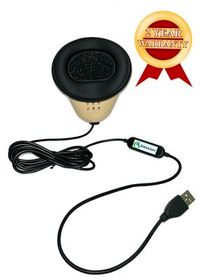
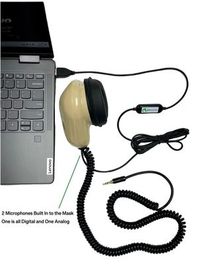
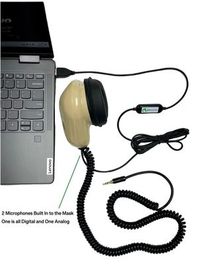
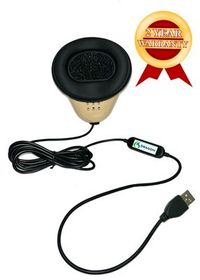
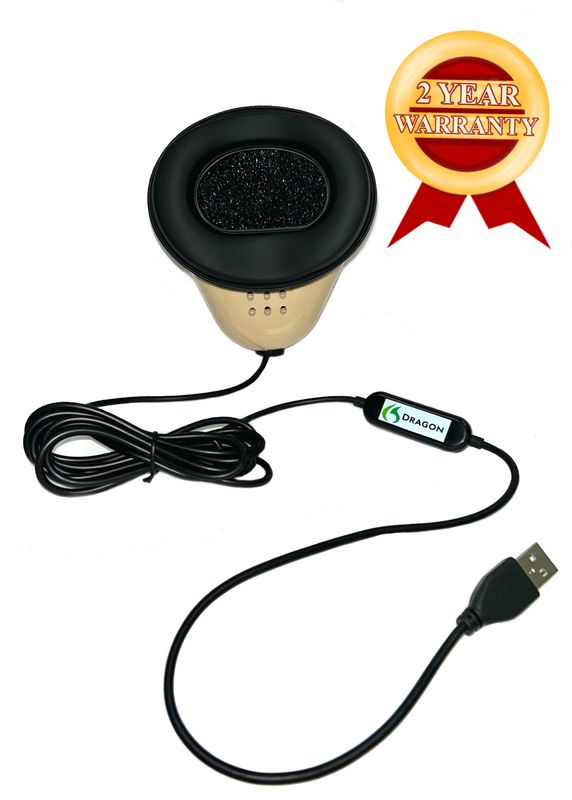
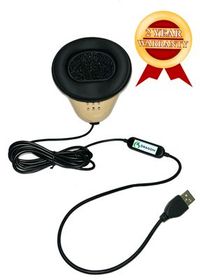
The Martel Dragon USB Stenomask sends your dictation to a computer over USB through its built-in sound card. It fits a plan in which one direct mask connection goes to the reporting computer. The Martel Double Dragon 2 adds a separate microphone with a 3.5 mm output for a compatible second device alongside the USB microphone path. The two microphones receive the reporter’s own spoken dictation. For the original voices in the room, plan a separate appropriate room source and recording arrangement whenever that is part of the permitted work. Martel Dragon USB Stenomask specifications · Martel Double Dragon 2 specifications.
Choose the mask and the recognition arrangement for the different work each performs. A separate device, if the local setup uses one, is part of the plan for processing speech. The second microphone on a Double Dragon 2 provides an additional destination for your dictation when a compatible recorder is connected. It can be helpful to put those two purchase questions on separate lines. A clear recorder file will tell you what you said, and a freshly saved rough will tell you what text arrived in the job. Keep both observations with the corresponding equipment.
Try a sound marker with both a soft beginning and a clearly articulated ending. “The small map is folded twice” works for this purpose. Use your normal mask position and speaking level, save the brief recording and listen before drawing conclusions. If the final word is easy to hear but the first word is difficult, repeat with a fresh sentence after a comfortable pause. When you later compare speed and accuracy, use the recorded words you actually spoke and the untouched CAT text. Your own samples make it possible to decide whether input, delivery or text interpretation deserves attention.
A buyer sometimes asks which mask is faster. Start with the endpoint that matters to your work. The Dragon USB gives you a direct computer path to configure and verify. The Double Dragon 2 can give you a separate copy of your dictation on a compatible recorder, which can be useful when checking a name or a disputed short word. Time a normal reading and the subsequent review on your actual setup. Good purchasing evidence might be that a second recording made one difficult name easier to confirm. That is a concrete benefit you can explain without assigning an unsupported speed figure to a microphone.
We handcraft our Dragon USB and Double Dragon 2 stenomasks in limited quantities. If a batch sells out, there may be a waiting list.
The first fictional desk belongs to Iris, who already uses a Martel VOX laptop and a personal Dragon USB mask. She wants to learn whether her proposed local recognition arrangement fits the desk where she reads a second display. Iris records the laptop model, marks which connections are occupied and writes down the equipment meant to perform recognition. She draws a line for each actual connection and measures the working space the items will have together. If an accessory is still a proposal, she marks it as such until she can test the working combination.
Iris chooses a short practice job as her acceptance test. A partner will read a description of a folding map from a fictional archive. Iris will revoice it, identify two speakers and save the rough on the reporting laptop. She has chosen the single USB mask because that is the dictation destination she wants for this trial. She expects to hear the words in the practice recording she intentionally makes on the computer. She writes down those expectations before ordering the local equipment. This is a plan for proving the new arrangement can perform her work, rather than a request for the largest specification number.
The second fictional desk belongs to Gavin, who carries his equipment from home to two offices. He wants his dictation on a standalone recorder as well as in his computer workflow. His list therefore includes the Double Dragon 2, a compatible recorder input and a file he can identify on the recorder. He is also planning for local recognition. When he changes the recorder, he tests the second dictation path again. When he changes what processes his speech, he dictates a new line into the reporting job. The two tests tell him different things about his equipment.
Gavin rehearses the pack-up as carefully as the first connection. He closes and reopens a practice job, stops and saves the separate recording, and listens to the final spoken line before disconnecting devices. He puts the travel leads and any adapter he actually used in a labeled compartment and leaves himself a card naming the file he just checked. At the next office, he records a line with a different marker. If the second file turns out to contain the first office’s marker, the name on the card helps him identify the mix-up while the original practice is still available.
The third desk is shared for demonstrations. Each reporter brings a personal mask and authorized practice material. Mae needs to record which reporting computer is active and which destination receives each person’s dictation. She asks for the equipment identities and labels the seat, job and microphone on a practice sheet. When a second laptop is available for looking up the reference passage, she identifies it as the reference computer. That leaves each reporting result tied to the equipment that actually produced it. A person entering the room halfway through can now identify the right machine for a new spoken test.
Mae wants to know whether the exercise can be repeated after the desk changes hands. She hands the next reporter a blank practice card and asks them to identify their own mask input, say an individual marker and create a new job. Then another person asks for a line from that new recording. The second reporter should be able to supply their own result without accidentally opening the first reporter’s files. A card with the seat, device names, job and spoken marker tells the group whose equipment and whose work a given observation describes.
The next exercise gives the hardware a real reporting task. Imagine an archive conservator explaining a damaged folding map. All names and materials are invented. A partner may read the questions and answers while you revoice them, or you can record the source in advance and play it back as you practice. Begin with a unique spoken marker that identifies this particular hardware rehearsal. If you use a standalone recorder, start and identify its file separately. Save the initial rough before opening a copy for corrections.
Question. What did you receive from Harbor Lane Archive? Answer. I received one folded map and two photographs of its cover. The map shows a footbridge crossing a narrow channel. In the photographs, the caption calls it Miller Bridge. The map itself has the name Milner Bridge, with the letter N between the L and the E. I copied both spellings onto my intake sheet because they came from different sources. I have no independent information about which spelling the town uses today.
Question. How was the map folded? Answer. The first fold ran north to south through the channel. The second ran across the printed scale near the bottom. The paper was thinner at the crossing of the two folds. When I opened the map, I supported that crossing with my left hand. My assistant supported the outside edge with a piece of clean card. Neither of us put a pencil mark at the crossing. The blue mark in the photograph was already present when we received the package.
Question. Who took the photograph marked Item Eight D? Answer. Jules Aven took the photograph of the cover after the package arrived. The photograph marked Eight D is an earlier photograph that came with the map. I can identify the handwriting on the note attached to it, but I cannot identify the photographer. The handwriting belongs to Teri Sol. I met her at the archive when she signed the delivery sheet. She handed me a sealed packet containing the map and the two photographs.
Question. You measured the height of the channel drawing at twelve inches. Is that correct? Answer. I measured the full drawing at twelve inches across. The channel at the printed footbridge was one and a quarter inches across on the paper. These are measurements on the map. I am offering no measurement of the real channel or the real footbridge. The scale printed below the drawing is partly obscured by the second fold, which is another reason I recorded only what I could measure on the page.
Question. Did the two photographs match when you set them side by side? Answer. They showed the same cover at different angles. In one photograph the title was partly beneath a ribbon. In the other, the end of the ribbon had been lifted. The photograph Jules took later shows my hand holding the ribbon up. I would distinguish his picture from the two pictures that came inside the packet. There are three pictures if you count his. There were two when I received the packet.
Question. What did the archive ask you to send back? Answer. It asked for a condition note and an image of the crossing folds. I prepared the note that afternoon and took the requested image the next morning. Let me be exact about who sent it. I gave the image to Jules, and he sent it with the note after he confirmed the mailing address. We returned the folded map in person later that week. The electronic message did not include a photograph of the cover.
Now take the role of a colleague evaluating the equipment you assembled. Ask for the part of the rough explaining the bridge spelling. The witness preserved Miller on the photographs and Milner on the map. In the mask audio, listen for the letter and the names of the two sources. In the rough, look for both spellings and enough context to identify which person actually knew what. If you used a separate recorder, find that passage on the recorder too. Write down the names of the successful files. That is stronger evidence of a functional setup than an illuminated light on an external device.
Check the count of photographs next. The delivery held two, Jules’s later picture made three, and the requested image of the folding lines was yet another activity. A reviewer should be able to distinguish the quantity in the package from the later work. If your sound and text preserve the distinctions, mark the practice task complete. If a detail is missing, keep the originals and decide where to investigate. A clear separate mask recording may tell you that your dictation contained the word “earlier.” A missing word on both mask recordings may direct your next rehearsal toward how you listened and repeated the answer.
Finish by moving the equipment, if relocation is part of the intended work. Use a second desk where you are permitted to set up. Connect the same identified components, start a fresh practice job and dictate a different question about the map. Save and reopen that job before declaring the traveling arrangement ready. Carry only the practice files you are permitted to move. If one accessory is easy to forget, update the packing note with the task it serves. “Adapter used between reporting laptop and local processor” will be clearer during pack-up than an unexplained reference to a black cable.
Identify the particular device your working arrangement uses for recognition. If this is the same computer where you open the rough, label both roles on that computer. If a separate device processes the speech, label it and trace its connection to the reporting setup. Add what establishes that identification. You might have a setup description and a fresh practice completed with the equipment listed there. The goal is an inventory another reporter can understand without guessing that the nearest device to the mask is the one doing recognition.
Give the exact laptop model, which connectors are occupied during ordinary use, what the proposed accessory would connect to, and which result you expect afterward. State where the CAT job and the recorded dictation need to be available. If you use a dock, include its model or a clear picture of its labeled ports. Include a simple proposed check, such as reopening a transferred job and hearing the last line recorded through the mask. That gives the person helping you both a physical question and a reporting result to verify.
Describe the specific dock or adapter and how it attaches to your computer. Trace the connection you intend to use all the way to the intended device. With the dock connected as you would use it during reporting, identify the mask input and make a short recording. Then create and reopen a fresh practice rough. If your normal setup changes when the dock comes away, make a second card for the travel arrangement. A port available on one desk may be occupied or absent at the other.
Identify the exact model and its existing configuration. Ask whether it can perform the recognition role in the arrangement you intend to use and what other equipment that arrangement needs. Describe the actual reporting tasks you want to run at the same time. If a demonstration is available, use a short fictional answer that includes a correction and reopen the resulting rough. A seller’s description, a colleague’s experience and a trial on the particular machine each answer different parts of the buying question. Keep the evidence attached to the equipment it describes.
Follow each cable visually to its endpoints when the equipment is available to you. One might supply the desk’s network connection, while another might link two devices used in a particular working arrangement. The connector alone cannot tell you which job a cable performs at that desk. Write both endpoints next to the line on your drawing and record which cable stays at the venue. At an unfamiliar desk, ask the person responsible before disconnecting anything to test a theory about its purpose.
Name the last successful job performed with the equipment as assembled. A helpful note could say, “The USB mask produced a recording labeled bridge morning. The CAT rough contains the new line about the second fold and reopens on the reporting laptop.” Include which parts have been tested together and which have yet to be introduced. If a replacement adapter is due later, leave a space for its first trial. The next reporter can see immediately which observation they can rely on and which one they need to make.
Compare the specifications with the exact job you intend to run. For local recognition you need to identify which equipment can perform that role in the proposed setup. For reporting you need an accessible microphone, somewhere to display the rough and a way to reopen the saved work. For your recording plan, check the devices you actually intend to use. If the proposed computer is meant to cover several roles, ask about running them together and test a fictional exchange under those conditions before treating the desk as ready.
Describe your ordinary working session rather than trying to infer the whole answer from a memory figure. Tell Martel which CAT product you use, whether a second display is common, which meetings or documents you keep open and which devices attach to the laptop. Identify any confirmed external local processor separately. Ask about the precise VOX Elite package proposed for you and the setup assistance included. That conversation addresses a reporter’s daily work and a real set of connections.
Choose a fictional or otherwise authorized practice job containing a distinctive answer and an associated recording you can identify. Note the exact question or a memorable phrase before transferring the job. After transfer, open it on the prepared computer and retrieve the same passage. Then create a separate new job on the new setup. The first exercise checks the transfer. The second checks current capture and processing. Having different names for the jobs prevents yesterday’s successful recording from being mistaken for today’s test.
Martel describes a direct USB microphone connection and a built-in sound card for the Dragon USB Stenomask. With the intended input selected, make a saved recording and listen for a phrase you deliberately spoke. That checks the mask-to-computer audio path. To check recognition, create a new practice rough and look for a different distinctive phrase. Write down the device or arrangement confirmed for recognition separately. A practical software question is easier to investigate when you can first identify the input and play an example of the reporter’s actual words.
Select the Double Dragon 2 when a second independent microphone path suits the way you review work. Its USB microphone can feed the computer while the other microphone supplies a compatible recorder through the 3.5 mm connection. Check the recorder input and play its own saved file. A reporter may value that separate recording when reviewing what they dictated during a difficult exchange. Keep its filename with the rough and document the recognition arrangement independently, whether it uses one computer on the desk or separate equipment.
Open the new CAT rough and find the words you actually dictated during the same trial. Check which spoken marker identifies the computer input and whether you used the equipment proposed for this setup. Return to the separate recorder and confirm that its file includes a late sentence as well as the beginning. If the laptop rough and recorder carry different markers, review their timing and filenames before drawing a conclusion about recognition. You now have evidence about two distinct destinations and a way to tell which files belong together.
For a voice-writing equipment acceptance exercise, use the microphone and reporting workflow you actually intend to use. A room source may be appropriate for a separate authorized recording of the original speakers. Your personal mask supplies your repeated dictation. Swapping sources during a local recognition test changes the words and sound the system receives. Document any separate experiment explicitly so that a question about processing hardware is not inadvertently based on a different job and a different microphone.
Name both endpoints in words that you or a colleague will understand when the desk is dismantled. A label such as “mask to portable recorder” can be read without remembering which color of tape you used. A cable for a second device can carry that device’s model or desk label and the port into which it connects. Keep your own assembled-desk photograph beside the written inventory. At the next practice, try to set up again from those two records and note what still required guesswork.
Open exactly the file you plan to hand over and listen to an unmistakable line. If it is a mask recording, the voice will be yours revoicing the testimony. If a permitted room recording is available separately, its voices and perspective are different. Name the source in the handoff and include the correct practice job. An external local recognition device does not decide what a recipient receives. The files you actually package, identify and verify determine the result of the handoff.
Choose a high-consequence distinction and confirm it across the sources you deliberately captured. The map and photographs use different spellings of the bridge. The witness knew one person’s handwriting while being unable to identify the photographer of a particular image. Either detail tests whether the words and context survived. A passing result includes the source phrase, the words you repeated, what appeared in the rough and the correct answer you could retrieve afterward. One illuminated device cannot supply that evidence.
Make each list describe a complete working arrangement. Identify the reporting laptop, the equipment proposed for local recognition, any physical link between them, the personal mask and the desired recording destinations. Mark equipment you already own and the specific task each new item would perform. Compare the same set of tasks on both lists. An offer for the laptop alone and another for a separate processing device answer different purchasing questions. A short acceptance exercise for each list makes its coverage easier to discuss with Martel.
Prepare a fictional reference passage, identify an existing practice job for transfer and record a short sample through your personal mask on your present working system. Make a list of the details your acceptance test must preserve. In the map exercise, those include two spellings and two different measurements. Set the local recognition result aside as an open field until you can perform the supported trial. This lets you use preparation time productively while keeping the status of the hardware decision clear.
Begin with the practice job and a phrase you have never used before. Record the phrase through the intended mask if your setup permits it and listen for the words. Check where the new rough is supposed to appear and whether any part of that phrase reached it. Identify the equipment you actually connected and the input you selected. If the phrase exists only on an independent recorder, record that as an audio result. A follow-up question can now start at the first step for which you have no confirming observation.
Use a familiar fixed phrase to check that the intended devices are connected, then add unfamiliar material to test actual reporting work. In the map exercise you may soon memorize which photo Jules took. Change the final question or ask a partner to provide a different fictional identifier for a second pass. Record that the material changed. Retaining a fixed equipment marker and a fresh reporting challenge gives both continuity and a meaningful test of current performance.
Give each participant a short window to connect their personal mask and use the desk assigned for practice. Ask them to speak a unique session marker before completing the fictional map exchange. Each person records the reporting computer, the selected input, the arranged recognition equipment and the job name. Invite a different person to request one answer, then ask the reporter to find it in their own saved file. Keep the individual results labeled when discussing the group’s work so an observation from one seat is never credited to another installation.
It proves only the scope of the check you performed. A two-minute sample can establish that a particular sound and text path worked during that sample. A longer rehearsal, including breaks, saving and reopening, can answer further questions about your routine. Choose a duration representative of the work you want to practice, use authorized fictional material and note interruptions or configuration changes. Keep the short acceptance trial separate so that you can still reproduce the basic connection quickly.
Identify the two events you timed, the method you used and the equipment present. For example, you might time from completing a spoken phrase to seeing its final word in the practice job, then separately time how long it takes you to find the answer for readback. Neither interval alone measures every component of the setup. Note whether you used a manual timer and whether another activity interrupted the reading. These details help a trainer interpret an observation about a particular trial.
Pack the equipment exactly as you would for the new room and reassemble it at a second work surface. Include the adapter or connection specified for the local processor, the personal mask and the recorder only if it is part of the plan. Start a fresh fictional trial after reconnecting. Write down anything you needed to fetch from the old desk. This is a straightforward way to discover which item actually belongs in the travel bag before the first class or assignment.
A sentence after a planned pause tests a real transition in reporting work. Speak a complete new question, save the result and listen for its opening word. Confirm that the first word appears under the intended speaker in the rough. If you use a separate dictation recording, check that file too. Keep observations about audio capture and text timing in different fields. A good practical setup should let you determine which result needs further rehearsal when the two observations differ.
Include a small acceptance exercise that directly tests the reason for each purchase. If you need a second dictation path, demonstrate two separately saved recordings that contain the same identifying words. If the purchase addresses local recognition, use the planned arrangement to produce a fresh CAT job and retrieve an answer from it. If you are buying a prepared reporting laptop, reopen an authorized transferred example and a new job made on the laptop. One observed result per purchasing objective makes the list easier to use when the equipment arrives.
Compare the answer with the equipment sheet you prepared. Does it identify the machine, the intended recording or processing role, the connectors already occupied and the particular item you asked about? Can you perform the proposed check at your desk? If the response describes only a general class of equipment, give one concrete example of what you need the item to do. Keep a dated account of the reply with the actual first successful practice. The combination is more useful than leaving a model name with no explanation of how it was used.
Identify the home workstation and the role you want it to perform. A computer may be suitable for editing practice transcripts, listening to audio or displaying the witness’s reference and still require separate confirmation before you plan on using it for local recognition. Ask about the exact arrangement and the equipment already installed. If a practical test is available, include both new speech and an ordinary edit or readback. Record those results beside the intended role. That gives a strong workstation a fair evaluation for the task you need.
For the acceptance exercise, start it before the first identifying line and keep it running until after a distinctive closing line. Stop, save and play both portions on the recorder itself. If your planned workflow includes copying the file to the laptop, verify the copy as well. Name the source and the session in your notes. A recording containing only a few seconds of successful input does not demonstrate that the entire fictional examination was captured.
It should identify the laptop used for the reporting job and the equipment confirmed for local recognition in the proposed setup. Include each connection that must travel and where every planned recording will be saved. Name the Martel mask you intend to use and the reason for choosing one or two dictation destinations. Finish with the date and the short practice job you plan to reopen. A colleague reading the decision can now trace the purchase from the individual items to a specific piece of reporting work.
Set aside the first fully checked practice job as a reference. Place a one-page description beside it naming each component and the date the test was completed. Identify the particular passage you recovered, such as the statement distinguishing an earlier delivery photograph from the one Jules took. A useful reference also identifies the unedited rough and any separate dictation recording saved through the mask. When you move the equipment or change your working setup, this small package gives you an example of what the original arrangement could do.
After the next change, add one more note rather than rewriting history. You might have obtained a different adapter, brought the laptop to another room or arranged a longer practice session. Name the change and repeat the part of the exercise it affects. If you replaced a recorder, test playback on the recorder. If you moved the CAT files, open the transferred practice job. If you changed the local processing arrangement, confirm support for the new configuration and make a fresh job using it. Each activity checks the thing you actually changed.
Keep the confirmed roles visible when the equipment arrives. The Martel VOX laptop can serve as the reporter’s working computer. The Dragon USB and Double Dragon 2 offer different connection arrangements for your own dictation. Identify the equipment doing recognition in your actual setup and test its role separately from the microphone and file transfer. Then ask for a new answer from the folding-map job. A second person who can find that answer using your notes has checked something an unopened package could never show.
Plan a desk for local speech recognition. Trace input from a Martel stenomask, check your VOX laptop setup and practice readback with archive testimony.