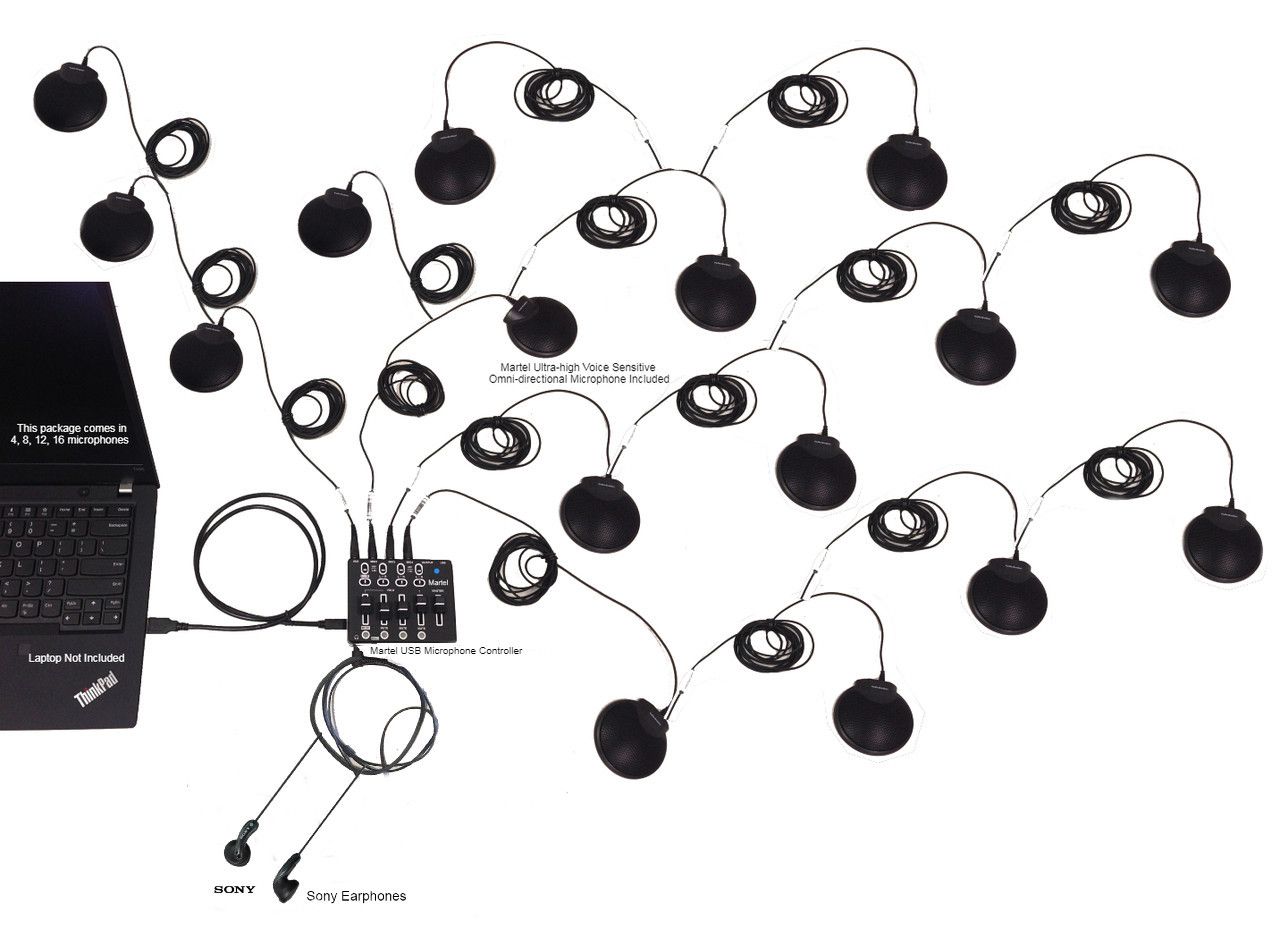
Martel gallery image of the 16-microphone system. See the product page for the supplied configuration.
A meeting recorder and a USB conference microphone system solve different problems. A recorder preserves audio for later use. A USB microphone system supplies live microphone audio to a computer, where an application can use it for a meeting or another supported task. Either can be valuable, and some organizations need both.
The right choice depends on the result you need during the meeting and the record you need afterward. If remote colleagues cannot hear the people around your table, start with the live microphone path. If nobody is joining remotely and the priority is a dependable audio file, start with the recording workflow. If you need both, specify and test both paths.
This guide compares those jobs, explains how Zoom and Microsoft Teams recording fits into the decision, and shows where Martel’s Zoom multiple microphone systems belong. It concentrates on choosing the right capture architecture rather than on transcription station features. The scenarios are original illustrations, not customer case studies.
Ask what must happen while people are speaking. Do people in another location need to hear and participate? Must someone in the room hear remote guests? Does a facilitator need to bring several local voices into one online meeting? Those are live communication requirements.
Then ask what must exist afterward. Is the output an audio reference, a meeting video, a transcript draft, approved minutes, or another deliverable? Who will retrieve it, and what device or service will they use? Those are recording and review requirements.
Write the answers separately. “We need to record hybrid meetings” combines several decisions into a short phrase. It leaves unanswered how local people reach the meeting, how remote people reach the room, where a recording is created, and who checks it. A product title cannot answer all those questions.
A useful statement is: “Ten people in a room must be heard by remote attendees through one meeting computer. After the meeting, an assistant needs the complete conversation in a file they can review.” That statement identifies live input, room output, recording, and handoff as distinct tasks.
Once those tasks are visible, the purchasing decision becomes easier. You can evaluate each item against a required outcome instead of assuming that any product with “meeting” in its name supplies the entire workflow.
Understand what each component actually does
Microphones, recorders, meeting applications, and playback tools can appear in the same setup, but their roles remain different. A microphone turns nearby sound into an electrical or digital signal. A recorder writes received audio to storage. A meeting application sends and receives conversation through a network. Playback and transcription tools help someone use a recording afterward.
Component
Primary job
What still needs a separate answer
USB conference microphone system
Supply microphone audio to a computer
Recording software, room listening, file handling
Standalone meeting recorder
Save audio received through its supported inputs
Live online meeting connection and remote audio capture
Zoom or Teams
Carry an online meeting and provide enabled platform features
Treat this table as a functional distinction, not a compatibility claim about every product. Some devices combine functions, but a combined function must be documented and demonstrated for the exact model.
For example, a device with a USB connector might use it for power, file transfer, computer audio, or several purposes. The connector shape does not establish which functions are available. Ask what the proposed connection does in the intended operating mode and verify it before relying on it.
Choose by the meeting’s dominant requirement
If your everyday problem is that online participants hear only the person sitting beside the laptop, a distributed USB microphone arrangement is a relevant starting point. The immediate requirement is getting local speech into the meeting application from the necessary positions.
If everyone is in the room and the main task is preserving discussion for later review, a standalone recording arrangement may be the more direct starting point. You still need suitable microphones and a plan for transferring or accessing the recording, but you may not need to start an online meeting simply to create a file.
If both live participation and later review are essential, compare a complete computer meeting and recording workflow with any proposed separate recording path. Do not buy a second device merely because “backup” sounds reassuring. First establish what the second device will receive and what failure it is intended to address.
An organization may reasonably use different arrangements for different meeting types. A small internal interview, a hybrid board session, and a large in person workshop do not necessarily need identical workflows. Standardize the parts that staff can repeat while allowing the capture method to follow the actual task.
The most economical choice is the one that meets the required outcomes with manageable operating effort. That conclusion requires a practical trial, not simply a comparison of microphone counts or recording duration claims.
Map the first path: an in person meeting recorded locally
In a straightforward in person recording workflow, local voices reach microphones, the supported connections deliver audio to the recorder, and the recorder saves it. Afterward, someone verifies and hands off the file or recording media using the approved process.
This arrangement can be attractive when the organization wants a dedicated recording task with a clearly assigned operator. The operator checks the recorder’s status and remaining capacity according to the model’s instructions, starts the recording, and confirms the result afterward.
However, a standalone recorder should not be assumed to serve as a USB microphone for an online meeting. Some products may offer computer audio modes; others may not. If that capability matters, ask for the exact documented mode and a demonstration with the intended computer and meeting application.
Likewise, microphones must match the recorder’s supported inputs and supplied configuration. A USB microphone package intended for a computer should not be treated as automatically interchangeable with an analog recorder microphone input. Ask the supplier to specify every connection rather than collecting adapters by trial and error.
For a purely local recording project, define a simple acceptance exercise: make a short meeting recording, stop it normally, reopen it, and have the eventual reviewer listen. The result should prove the complete local capture workflow before staff depend on it for important business.
Map the second path: a room joining an online meeting
In a computer meeting workflow, local speech reaches the selected microphone input, and Zoom or Teams sends that input to the other participants. Remote voices return through the application and leave through the selected speaker output. The microphone and speaker selections are separate decisions.
A USB conference microphone system belongs on the input side. Its practical value is giving staff a planned arrangement for local speaking positions instead of expecting every participant to speak toward the laptop. That input is then available to the supported meeting application when correctly selected.
The return side still needs to be designed. How will people in the room hear a remote participant? Where will the output device be placed? Can the chair understand a quiet remote question from the usual seat? Answer those questions through a listening test with the actual room arrangement.
Then test a complete exchange. The remote person asks a question, a local participant answers from a position away from the computer, and another local participant adds a short clarification. Both ends should understand the sequence without a staff member moving the laptop between speakers.
A successful online conversation does not prove a recording has been created. If the organization needs a record, add an approved recording method and verify its output as another stage of the workflow.
Map the third path: a hybrid meeting with a saved record
A hybrid meeting with recording contains two related but distinct outcomes. People must participate successfully while the meeting happens, and the required conversation must appear in the saved record. One outcome can succeed while the other fails.
For example, remote attendees might hear local speakers clearly while recording was never started. Or the room might hear a remote guest while a separate recorder receives only local microphones. Neither problem is solved by adding a generic statement that the system “records meetings.”
Create a source checklist for the record:
Required source
Live participants hear it?
Final recording contains it?
Chair or facilitator
Test
Test
Local participants at the far end
Test
Test
Presenter away from the main table
Test
Test
Remote participant
Test in the room
Test in the saved file
Presentation sound, if required
Test deliberately
Test deliberately
Use a short scripted exercise that includes every required source. Mark each row only after listening to the relevant output. A recording indicator is evidence that recording is active, but it is not evidence that every source is present at the expected quality.
This source checklist is especially important when the proposed arrangement uses more than one capture device. It forces the team to identify which device receives what rather than treating all equipment in the room as if it shares the same audio automatically.
Where Martel’s USB multiple microphone systems fit
Martel offers four, eight, twelve, and sixteen microphone configurations for its Zoom multiple microphone product family. The systems are intended to connect multiple local microphones to a meeting computer through USB, with Zoom and Microsoft Teams listed among the applications. Review the current product collection and confirm the proposed computer configuration with Martel.
Their relevant role in this comparison is local meeting input. A room that needs several distributed speaking positions can discuss a configuration with Martel rather than choosing solely by the number of people around the table.
How should we organize our larger set of speaking positions?
These are planning prompts, not coverage promises. Send a room sketch, identify the meeting computer, and describe how the room hears remote guests. Confirm the included components and any additional requirements for the complete workflow.
Do not infer standalone file recording, separate tracks for every microphone, or integrated room loudspeakers from the microphone count. Those capabilities require their own documented answers for the actual equipment and software configuration.
Choose the microphone arrangement by position
A room can contain twelve people but only six closely grouped speaking areas. Another room with six people may have widely separated positions and a presenter who moves toward a display. Headcount alone does not explain the microphone problem.
List the places from which speech must be captured. Include a facilitator, seated participants, presenters, staff, and any public comment position. For each place, describe ordinary behavior: reading notes, facing a display, turning to another participant, or speaking quietly.
Then consider the furniture and objects that share those spaces. A microphone placement should coexist with laptops, papers, name plates, and writing areas. If staff repeatedly move a microphone out of the way, the theoretical layout is not the working layout.
Discuss this inventory with the supplier and test the proposed arrangement using realistic speech. Ask a remote listener to write down a short phrase or number from each position. Compare the result with what was spoken. This gives the selection process a concrete intelligibility check rather than relying on a broad impression that audio is present.
If the layout changes regularly, choose a repeatable setup plan for each common format. The same equipment can require a different arrangement for a horseshoe, a straight table, or a presenter focused session. Record those arrangements so staff do not reinvent them before every meeting.
Understand Zoom computer recording
Zoom’s computer recording feature saves meeting material on the recording computer. Its current instructions list desktop support for Windows, macOS, and Linux and explain that the host records or grants recording permission. After the meeting, the recording is converted into accessible files. See Zoom’s computer recording instructions.
This makes a supported microphone input one part of a computer based recording workflow. The microphone system supplies local audio; Zoom’s recording function creates the meeting files. Those are different responsibilities and should appear separately in the operator’s instructions.
Leave time for the normal completion process after the meeting. Zoom warns that interrupting conversion can damage the recording and recommends a local drive for the default recording location rather than a cloud syncing, external, or network destination. Follow the official guidance for the installed version and verify the completed files before distributing them.
For acceptance testing, start with a harmless short meeting. Include local and remote voices, end the session normally, locate the resulting audio, and play it on the reviewer’s computer. This demonstrates the actual route from live conversation to a usable file.
Do not equate a successful microphone test with a successful computer recording. The first confirms an input; the second requires permissions, an active recording process, completed file creation, and a verified handoff.
Understand Zoom cloud recording
Zoom separates computer recording from cloud recording. Its recording overview describes computer files stored locally and cloud recordings stored through Zoom. Cloud recording availability depends on the account and enabled features, so verify the organization’s setup before choosing it as the required recording method.
A cloud workflow changes who retrieves the record and where they look. It can also change the handoff from “find the file on this computer” to “locate the recording under the correct account and provide approved access.” Staff should know which workflow applies to a particular meeting.
Define the recording owner in advance. If one employee schedules the meeting and another prepares the written record, test how the second person obtains the material. Do not wait until the next morning to discover that the expected person cannot access it.
Cloud recording also does not remove the need to test the room input. A recording service can only preserve the meeting audio it receives. If a local voice never reaches the meeting correctly, moving the storage location does not repair that missing speech.
For your trial, retrieve the completed cloud recording through the approved account, review all required sources, and confirm the organization’s access and retention process. Let policy and administrative requirements determine the approved storage routine rather than treating a convenient link as the whole recordkeeping plan.
Understand Teams recording and access
Microsoft Teams recording is an application and account feature, not a function supplied by a USB microphone package. Microsoft’s recording guide describes recording permissions, meeting controls, and storage in OneDrive for work or school and SharePoint. The available options depend on licensing, organization policy, and meeting roles.
Verify that the intended operator can start the required recording before the real meeting. Current Microsoft instructions also describe choosing what to record, including an audio only option where available. Follow the controls presented in your organization’s environment rather than assuming every account has an identical menu.
Make file access part of the acceptance test. The person who conducts the meeting and the person who reviews the record may have different permissions. An external participant’s ability to join the live meeting does not by itself demonstrate access to the resulting recording.
Create a short sample with a local speaker, another local speaker away from the computer, and a remote participant. End the session, allow processing, and have the designated reviewer locate and play the result through the approved route.
If a control is unavailable, involve the responsible administrator while planning the workflow. Buying a different microphone will not necessarily change an account policy or a meeting role restriction. Diagnose the stage that is actually preventing the required result.
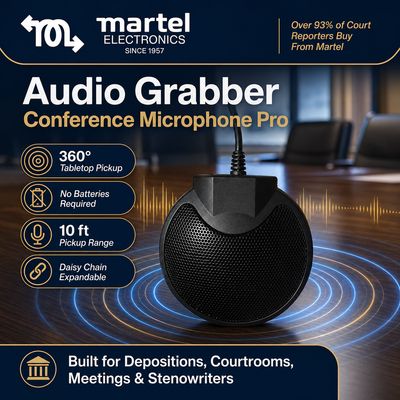
A closer look at Martel’s Audio Grabber tabletop microphone. Microphone placement and the complete connection path should be checked for your room.
Test application input and output separately
Zoom and Teams both provide microphone and speaker selections. Use those controls to verify that the meeting application is receiving the intended USB input and sending sound to the approved output. Official instructions are available for Zoom audio testing and Teams device settings.
The distinction matters because a computer can recognize several devices. A built in microphone, a headset, and a USB system may all be available. Seeing the USB system connected does not prove the application selected it. Likewise, correct microphone input does not prove that remote speech is leaving through the expected speaker.
Use a test from away from the computer. If the test is spoken directly beside the laptop, an incorrect built in microphone can produce a misleadingly acceptable result. Ask someone at the planned far position to speak while the operator watches the selected input and a remote person listens.
Write down the device names as they appear on the actual computer. If those names change after a hardware or software change, update the instructions following another test. A useful operator guide combines recognizable controls with the required outcome: all planned local positions reach the meeting, and remote speech reaches the room.
Test processing with several local voices
Meeting applications may process audio to address background noise or emphasize a speaker. A setting suited to one person wearing a headset should be evaluated before it is used for a room with several intended speakers.
Microsoft’s voice isolation documentation describes a feature designed around a person’s voice profile and removal of other voices. That distinction matters when several people intentionally share one computer input. The organization should test and approve settings for that use rather than copying an individual user’s preferences.
Run a simple multi speaker exercise. One person speaks a sentence, a quieter person at another position answers, and the first person resumes. Ask a remote listener whether either voice disappears, fades, or sounds difficult to understand. Then repeat with ordinary pauses and with a person turning toward a display.
If there is a problem, change one relevant setting or placement variable at a time. Repeat the same passage and keep notes. Avoid a blanket rule that every processing feature must always be disabled; the goal is an understood and verified configuration for the actual room.
Record the approved settings with the layout. Recheck them after a substantial application update, a replacement computer, or an unexplained change in what remote listeners hear.
A separate recorder needs a defined remote audio route
One of the most important purchasing questions is whether a separate recorder will capture remote participants. A recorder receiving local microphones does not automatically receive the application’s incoming audio. Someone must specify an appropriate route if both sides of a hybrid conversation belong in that recording.
Ask a precise question: “In this exact arrangement, what connection delivers the remote participant’s voice to the recorder?” The answer should identify the equipment, supported output and input, required settings, and any limitations. Ask for a demonstration with a real remote participant.
Do not improvise by assuming that placing a recorder near a room speaker is an equivalent substitute for a documented audio path. Such an arrangement has to be tested on its own terms, including whether both local and remote speech remain understandable. The final recording, rather than the physical proximity of the devices, is the evidence.
Similarly, do not assume that splitting or adapting a computer connection will work merely because plugs fit. Signal type, operating mode, and the device’s documented capabilities matter. Have the supplier specify the intended configuration.
If the organization chooses the meeting platform as the primary recording method and a recorder as an additional source, document exactly which material the additional source contains. A clear limited backup can be useful. An undefined backup can create false confidence and confusion during later review.
Decide what “backup” is supposed to protect
A backup plan should name a failure. Are you concerned about forgetting to start the platform recording, losing the meeting computer, interruption to the network connection, missing remote voices, or difficulty accessing the completed file? These are different problems.
A second recording process may address some of them and leave others untouched. For example, two recordings dependent on the same selected computer input share that input as a dependency. A recorder capturing only local speech may preserve local discussion while still lacking remote contributions. Describe those limits plainly.
Use a worksheet with four columns: failure being addressed, primary dependency, alternate source, and material the alternate source actually preserves. Fill it out before buying additional equipment. If the team cannot explain the last column, it is not yet a finished backup plan.
Then rehearse an ordinary failure response without using sensitive meeting content. Stop one test recording and confirm that the alternate contains what the plan says it contains. Check who knows the alternate exists and how it will be retrieved.
A backup also adds work: starting it, checking it, stopping it, naming the result, and deciding how it will be handled. Include that work in the operator’s routine. Additional devices should earn their place through a defined purpose and a verified result.
Do not confuse microphones, participants, and tracks
A microphone is a physical source. An online participant is a connection to the meeting. A recording track or channel is a saved audio structure. Those are related concepts, but they are not interchangeable.
If several people in a room speak through one meeting computer, the platform may receive their combined room input as one participant’s audio. A feature that creates files by online participant does not automatically separate every physical microphone or person in that room.
Zoom documents an option for separate participant audio files in computer recordings. The important word is participant. Do not treat that option as evidence that a multiple microphone room package creates independently selectable files for each microphone.
If isolated microphone review is a requirement, ask the supplier and software administrator to demonstrate it using the exact proposed configuration. Have two local speakers identify their positions, speak in turn, and then inspect what can actually be selected in the completed files.
For many meeting workflows, an intelligible combined room recording may meet the requirement. For others, separate source control may be essential. Decide which you need before purchasing. A larger microphone count can provide more placement choices without answering the separate track question, and a stereo file name alone does not explain how sources were routed into it.
If the missing piece is getting several local voices into an online meeting, discuss a Martel multiple microphone configuration using your room map. Keep recording, room listening, and any separate source requirements visible in the same conversation.
Separate recording from transcription and minutes
Recording preserves audio. Transcription turns speech into written words. Minutes organize a meeting record according to the organization’s purpose and rules. These are different stages, and none should be silently assumed to occur because a microphone or recorder was purchased.
A playback tool may help a person listen repeatedly and type. An automated transcription service may create a draft. Either approach still depends on usable source audio, supported file handling, and a review process appropriate to the intended document.
Decide what the eventual reviewer needs. A person preparing action notes may care most about clear decisions and assignments. Someone checking a quotation may need to return to the exact passage. A person preparing formal minutes follows the organization’s requirements for what to include and how to approve it.
Do not use transcription output as the only audio acceptance test. A draft can mishear a name, combine speakers, or omit an uncertain passage. Listen to the original recording when checking an important point. If the original speech is absent, later software cannot verify what was never captured.
For a detailed examination of playback arrangements, Martel’s meeting recorder and transcriber package guide covers that later stage. Keep this purchasing decision focused first on how the necessary conversation reaches a live meeting and a usable saved record.
Specify file handoff before the first important meeting
A recording is useful only if the right person can locate and use it. Define the handoff before the meeting rather than asking the operator to remember a file location afterward.
Record the meeting title, date, capture method, expected location, responsible owner, and intended reviewer. If the result is a platform link, test the reviewer’s access. If it is a copied file, test that file on the actual review computer. Do not assume an operator’s ability to play it proves that everyone else can.
Use the organization’s approved naming and access practices. Distinguish the original recording from any edited working copy or text draft. If the meeting contains separate segments, record their order so the reviewer does not overlook a later file.
A short handoff note should identify known interruptions or unresolved audio problems. This is not an invitation to guess at missing speech. It gives the reviewer context for checking the source and following the organization’s procedure when material is unclear.
Notice, permission, access, retention, and distribution requirements should come from the responsible organization and its advisers. A product comparison cannot establish a universal rule for every meeting. Build those requirements into the workflow and ensure staff know who owns the decisions.
Finally, rehearse the handoff with an ordinary test file. It is much easier to correct an access problem when no deadline or sensitive meeting record is involved.
Use a complete buying worksheet
A buying worksheet should expose the whole workflow rather than rewarding whichever proposal lists the most features. Fill in the following questions for each option being considered.
Decision
Write a specific answer
Live participation
Who joins remotely, and how do they hear the room?
Local positions
Where must people speak without moving equipment?
Room listening
How does the room hear incoming participants?
Primary recording
Which device or application creates the record?
Required sources
Which local, remote, and presentation sources must be saved?
Alternate recording
What failure does it address, and what does it preserve?
Operator
Who starts, monitors, and ends each process?
Review handoff
Who retrieves the result, and where do they review it?
Acceptance evidence
Which completed sample proves the required behavior?
Add a list of items that remain unresolved. Assign each an owner and a due date before the trial. A question such as “Will the remote guest be in the separate recorder file?” should stay visible until someone has listened to a sample that answers it.
Compare proposals against the same completed worksheet. Otherwise, a dedicated recorder arrangement and a USB meeting arrangement may appear to compete while actually delivering different outcomes. Fair comparison begins with an agreed definition of the job.
Illustrative choice: a hybrid committee
Imagine a committee with eight local members and two remote advisers. The local participants can hear the advisers through an existing room output, but the advisers hear only people close to the laptop. An assistant also needs a recording for later action notes.
The immediate gap is local input to the online meeting. The committee maps speaking positions and discusses a Martel USB multiple microphone arrangement. It tests the selected package with the room’s actual furniture and asks a remote adviser to hear questions from every required position.
The committee then tests the recording separately. The operator starts the approved platform method, captures an exchange involving both advisers and several local members, and retrieves the completed result. The assistant opens it through the intended review workflow and confirms that the necessary voices are present.
In this example, buying a standalone recorder first would not automatically fix the live conversation. The microphone input needed attention. Conversely, solving the input did not remove the need to establish recording permissions and file access.
The final operating sheet therefore has separate lines for device selection, room listening, recording start, and postmeeting verification. That structure follows the actual work and gives a substitute operator a clearer task than a single instruction to “set up the meeting system.”
Illustrative choice: an in person planning session
Consider an organization that holds a monthly planning session with everyone physically present. No remote participation is required. A staff member reviews the discussion afterward to prepare an internal action list. The room layout is consistent, and equipment must be removed at the end.
Here, a dedicated recording workflow may be the more direct starting point. The team defines the required speaking positions, asks for a suitable recorder and microphone configuration, and tests the result in the actual room. It verifies the file handoff to the staff member who prepares the action list.
The team does not require an online meeting merely because other departments use one. It evaluates the simpler local capture job on its own merits. The acceptance test still includes quiet speech, short exchanges, and the eventual review computer or playback arrangement.
Later, if the meeting adds remote participants, the team reopens the requirements. It needs a live microphone path to the meeting application, a return path into the room, and a decision about capturing remote voices. The existing recorder may remain useful, but its role must be redefined and tested.
The lesson is to choose for the current workflow while documenting what would change if the meeting format evolves. A clear scope supports future planning without making unsupported promises about equipment that has not been tested in a new role.
Meeting-room illustration from Martel’s gallery. It illustrates distributed microphone placement; it is not a measured coverage plan or an exact package inventory.
Run a twenty minute proof of concept
Before committing the workflow to an important meeting, conduct a short complete rehearsal. The exact duration can vary; the essential feature is that it reaches the final output rather than stopping at connection.
Start with the intended room arrangement and meeting computer. Connect the proposed microphones using the documented setup. Select the intended application input and output. Have a remote tester join if remote participation is part of the requirement.
Read a brief passage from every local position. Include a number, a name, and a short question and answer. Ask the remote tester to speak. If presentation sound is required, include a small permitted test sample and verify it deliberately rather than assuming it follows speech.
Start every recording method the plan requires. End the session normally, complete any processing, and retrieve the results. Have the designated reviewer play the files or links on the equipment they will actually use.
Record three findings: what worked, what failed, and what remains untested. Adjust one problem at a time and repeat the relevant section. If a required source is missing from a recording, trace its route instead of changing unrelated settings.
Finish by asking a substitute operator to explain the workflow back to the team. If the explanation is unclear, improve the instructions while the trial is fresh. The proof of concept should establish both technical function and practical repeatability.
Questions to ask before you order
Can a USB conference microphone system record by itself?
Do not assume it can. Verify whether the exact product has standalone storage and recording controls. For Martel’s USB multiple microphone workflow discussed here, plan the recording through a separately specified application or supported capture arrangement. Confirm the complete configuration with Martel.
Can a meeting recorder replace a USB microphone for Zoom or Teams?
Only if that exact recorder supports the required computer audio function and works in the proposed configuration. A USB connection used for transferring files is not evidence of a live microphone mode. Ask for documentation and a practical test.
Will a separate recorder automatically capture online participants?
No automatic route should be assumed. Identify what delivers incoming remote audio to the recorder, then listen to a completed sample. A local microphone recording and a complete hybrid conversation record are different requirements.
Does a larger microphone package provide more recording tracks?
Microphone quantity does not establish track quantity. Ask what the computer receives and what the saved file lets the reviewer select independently. Test any requirement for separate source review before ordering.
Should we buy both kinds of equipment?
Buy both when each has a defined role that the organization needs and can operate. Explain what each captures, how staff verify it, and how the outputs are handled. Additional equipment without a clear role adds work without proving that a missing requirement is solved.
Is an automated transcript a replacement for checking the recording?
A transcript draft is a review aid, not proof that every source was captured accurately. Check important details against the original audio and follow the organization’s approval process for the final document.
Build the complete path you need
Choose a meeting recorder when the priority is a dedicated audio capture workflow. Choose a USB conference microphone arrangement when the immediate task is getting multiple local voices into a computer meeting. Where both outcomes matter, specify the live conversation and saved record separately, then prove that they work together.
For Zoom or Teams rooms that need distributed local microphones, explore Martel’s multiple microphone systems. Bring your speaking position list, meeting computer details, listening arrangement, and recording requirements. The right package is the starting point for a verified workflow that carries the conversation to the people who need it, during the meeting and afterward.
Martel gallery image of the 16-microphone system. See the product page for the supplied configuration.
Martel Electronics | 7 hours ago
Meeting Recorder or USB Conference Microphone System: Which Do You Need?
Compare meeting recorders and USB conference microphone systems. Plan Zoom and Teams inputs, remote audio, recording files, and the right Martel workflow.