TIME IS RUNNING OUT FOR 2026 TAX WRITE-OFFS

Why Do the Main and Backup Courtroom Recordings Drift Out of Sync?

Learn why main and backup courtroom recordings drift out of sync. Compare spoken markers, calculate elapsed offsets, and help your scopist locate the same answer.
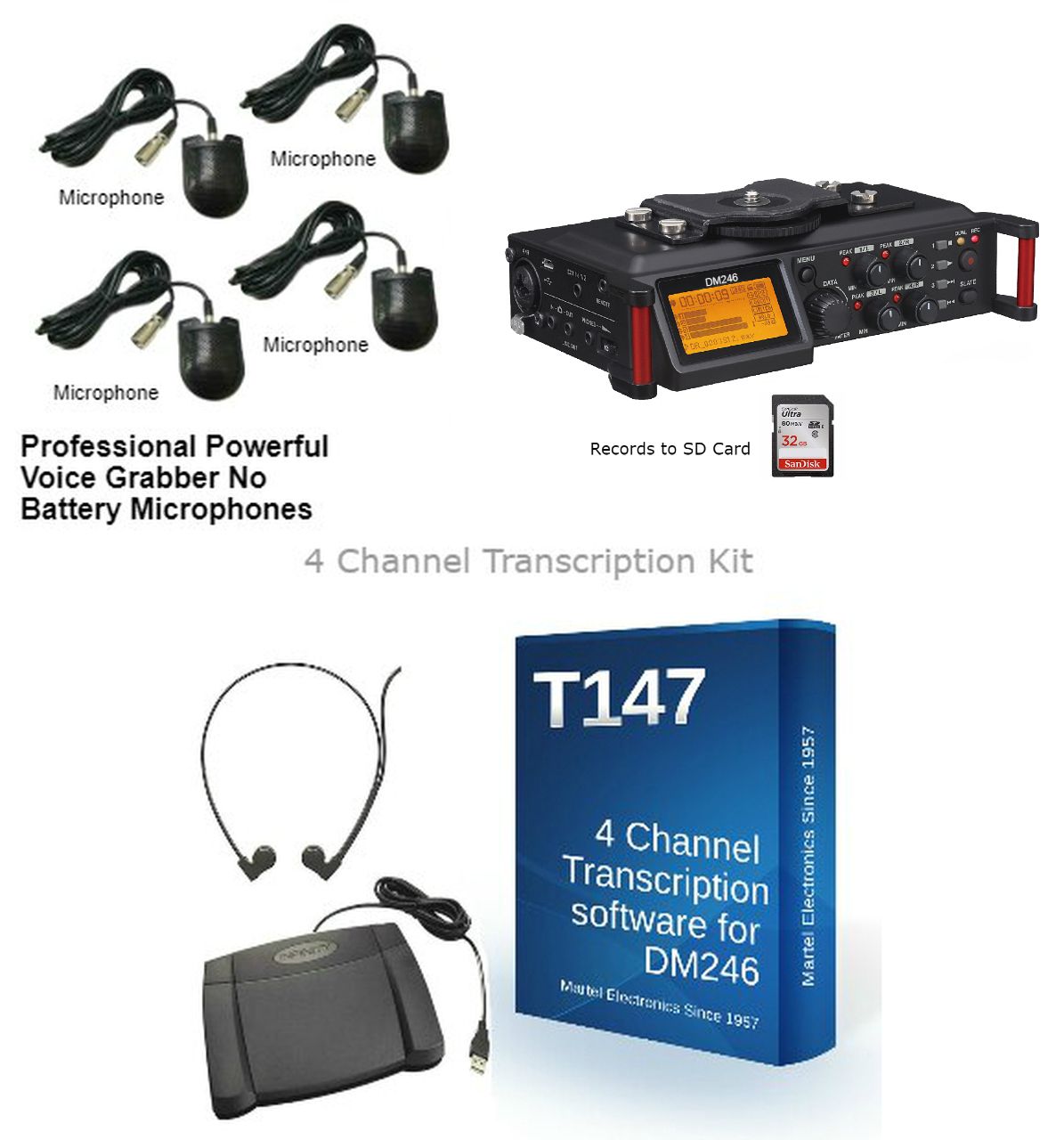
DM246 recorder, four wired microphones, T147 transcription software, foot pedal and headset
Martel DM246 Four Omnidirectional Microphone and Transcription Package. View Martel’s product details for SKU 1583.

Two independent courtroom recordings can begin at different moments and count elapsed audio time at slightly different rates. A late start gives a repeatable offset. A rate difference makes the gap between corresponding words grow or shrink as the session goes on. An abrupt jump deserves a different investigation, such as a pause, a file boundary or a change in the audio path. You can tell these patterns apart by finding the same spoken event near the beginning, middle and end of both files and writing down its elapsed position in each. For a reporter, the practical question is often where to find the missing consonant from a particular answer in the backup. That takes less equipment than a laboratory clock comparison. Keep the original recordings intact and compare working copies at normal playback speed. Martel’s DM246 package can provide multiple microphone channels for the primary room recording, while the Court Reporter 5000 can supply a separately captured backup. This guide gives you a way to describe the relationship between those two recordings without assuming which device kept the truer time.

View the Martel DM246 four-microphone recording system.

Four meanings of “time” at the reporter’s desk

The wall clock tells you when an event happened during the day. A file creation or modification date gives an item a place in a computer’s history. The elapsed position in a recording tells you how far into that file a sound appears. A timestamp in a transcript or review application may refer to still another timeline. At the close of a long hearing all four can seem interchangeable because they refer to the same afternoon. The numbers you need for a drift check are the elapsed positions of the same audible event in two identified files.

Imagine that a reporter started a backup recorder while setting out exhibits, then started the primary system at the call to order. The backup may be several minutes into its file when the primary has just started. Searching both at elapsed ten minutes will land on different sentences even if their recording clocks keep precisely the same pace. First find the call to order in each saved file. The difference in those two positions gives you a starting offset you can carry forward for the next comparison.

Now picture the same comparison at the end of the hearing. If the difference at adjournment is very close to the difference at the call to order, a single offset may be adequate for finding material in that continuous block. If the gap changes gradually at intermediate points, the two elapsed timelines have diverged. Both files can contain the complete words in the correct order while placing them at slightly different elapsed times. Finding that pattern gives the scopist better search information than a warning that one recorder “ran late.”

In a third situation the reporter stops one machine during lunch while the other continues to run. The time difference just after lunch changes by roughly the length of the unmatched interval. Subtracting the first marker of the morning from the last marker of the afternoon would make that discontinuity look like a large rate difference. Mark the lunch boundary first and compare events within the continuous morning and afternoon blocks. The organization of the hearing is evidence about what the numbers mean.

Why equal sample-rate labels can still produce different timelines

A digital recorder represents sound as a sequence of samples. Its internal timing determines when samples are taken. When you see a nominal sample rate such as 48 kHz, the label describes the intended number of samples per second. On two independently running recorders, setting the same nominal rate does not give both units one physical clock. A small relative timing difference can accumulate during a long recording. At ordinary listening speed both files can sound natural, yet their elapsed positions for the same last answer can differ measurably.

Microsoft’s technical documentation on clock synchronization describes the distinction between a reference clock and a sample clock and the need to account for drift between physical clocks. The same underlying distinction helps explain the field observation here. It does not diagnose either of your particular recorders or specify how much difference you should expect. That requires evidence from the actual files, the selected signal paths and the duration you measured. Two elapsed readings from one speech event cannot tell you that either clock is defective.

A pair of recorders can also preserve the same original voice through different paths. The primary system might receive an amplified room feed while the backup microphone listens to a loudspeaker. Sound traveling through the electronics and the room can arrive at the two recording inputs at different moments. Where seats and equipment stay fixed, that difference may look like a nearly constant offset. When a speaker moves or a remote participant is heard through a different system, the delay in one path may change even though both recording clocks keep exactly the same pace.

The common rates 44.1 kHz and 48 kHz provide another useful distinction. A player that interprets each correctly can play a correctly labeled file at its intended speed. Seeing two different nominal rates in the file properties is therefore insufficient evidence of drift. An incorrectly interpreted sample rate can produce a much more obvious speed or pitch discrepancy, which deserves its own investigation. Put aside that possibility until you have compared direct working copies, identified both formats, and heard what the unconverted sources actually do at normal speed.

Choose sound landmarks a second listener can find

Look for a short, uncommon phrase that both microphones heard clearly. “The cobalt tag is number forty-two” is much better for practice than “yes.” It gives the listener a distinctive sequence of consonants and a recognizable number. Identify one precise point within the phrase, such as the beginning of “tag,” and use that same point for both files. If one person marks the start of the first word and another marks the end of the entire sentence, their measurements can disagree by more than the drift they are trying to identify.

Handwritten notes help when the hearing includes many similar exchanges. Write a short description beside each candidate anchor, such as “green folder after lunch” or “spelled surname following exhibit eleven.” Later, confirm the wording on both saved recordings. A transcript phrase can guide the search but may omit a pause or normalize spoken wording. The fact that two transcript lines look the same does not identify the same sound with the precision needed to compare clocks. Listen to the words immediately before and after each landmark.

Use the same speaker and microphone paths whenever you are testing for clock drift. During a live job you may have to choose naturally occurring statements by different speakers. Document those changes. A bench announcement recorded through a wired feed and a remote witness heard through a loudspeaker can have different delays. When your goal is to check the equipment after the assignment, a single stationary reader and the same room microphone path through the entire rehearsal make the timing pattern easier to interpret.

One useful discipline is to mark an event independently twice. Close the file, reopen the same working copy, find the distinctive words again and note your position. If the two measurements differ by three tenths of a second, a reported tenth of a second of drift needs a finer method. A player may show only whole seconds, and a simple seek bar may display a rounded location. Keep that limitation beside your results. Writing down more decimal places than the player shows makes an uncertain observation look precise.

Run a mock hearing with two independent recording paths

Choose an ordinary setup that resembles your actual room. If you use the Martel DM246 four-microphone package as the main recorder, pick one named channel for this comparison and make a note of its physical microphone position. Put the Court Reporter 5000 backup where it normally sits. Confirm which source feeds each unit and keep those sources steady for the rehearsal. Give both systems enough power and available media for the intended duration. Use an empty room and fictional words so you can repeat the experiment freely.

Start the two machines in the order you usually use them. Exact simultaneous button presses are unnecessary. Once both are actually recording, have a reader say “Opening marker, copper folder, tag forty-two,” leaving a short pause first so the onset stands out. Choose in advance which word you will mark, such as “tag.” Note the physical time only as a convenience for locating the passage later. What you will compare are the two elapsed positions of that word in the recorded files.

Add two or three later phrases. At roughly half an hour, use “Middle marker, canvas folder, tag sixty-three.” At the next interval use “Late marker, linen folder, tag eighty-four.” Before ending, include “Closing marker, paper folder, tag ninety-five.” An exact half hour between spoken remarks is optional. The actual interval measured on one saved file supplies the denominator if you later calculate a relative rate. Distinctive wording at each marker will prevent a missing or repeated reading from being paired with the wrong one.

Allow a short tail after the final phrase, finish both recordings using the appropriate procedure, and copy the complete set before conducting the comparison. Record the names and channel identifiers of the files you selected. If a recorder created a new file during the run, include each piece and document where its elapsed counter restarts. Use your saved copies for all the timing observations and leave the job originals in their own location. Reopen a few seconds before each phrase to confirm its identity before writing a number.
Calculate one offset, then see whether it changes

Pick a sign convention and write it across the top of the worksheet. Here the difference is backup elapsed time minus main elapsed time. A positive value means the landmark appears farther into the backup file. That says nothing about which person spoke first, and a positive number by itself does not say a recorder is running fast. It merely tells a listener looking at the main file to move later in the backup timeline to find this event. Using a declared sign convention avoids a surprisingly common handoff error.

The numbers in the table are fictional and deliberately regular so the arithmetic is easy to inspect. Imagine that “tag forty-two” begins at ten seconds in the main recording and twelve seconds in the backup. The initial offset is two seconds. At the sixty-minute landmark the offset is two seconds and eighteen hundredths. Subtract the initial two seconds before estimating any rate difference. If you treat the complete two seconds and eighteen hundredths as drift, you count the starting offset as though it had accumulated over the session.

In this example the marker on the main file spans exactly 3,600 seconds from the opening to the late landmark. The change in offset over that interval is 0.180 seconds. Dividing 0.180 by 3,600 gives 0.00005, or fifty parts per million after multiplying by one million. In plain language the backup’s elapsed position pulls ahead of the main file’s elapsed position by the example equivalent of 0.18 seconds per hour. This is a relative comparison between those two fictional timelines. It supplies neither a product specification nor an absolute measure of either device.

For most transcript work the more useful result is the offset nearest the words under review. If you are looking for a witness answer close to the late landmark, try moving about 2.18 seconds later in the backup than the elapsed position you read from the main. Listen to several words of context, since an answer could straddle a pause or correction. A calculation gets you to a neighborhood. The actual spoken exchange confirms you have reached the right sentence.

Fictional spoken cueMain elapsed (h:mm:ss.sss)Backup elapsed (h:mm:ss.sss)Backup minus main
Copper folder, tag forty-two0:00:10.0000:00:12.000+2.000 seconds
Canvas folder, tag sixty-three0:30:10.0000:30:12.090+2.090 seconds
Linen folder, tag eighty-four1:00:10.0001:00:12.180+2.180 seconds
Paper folder, tag ninety-five1:30:10.0001:30:12.270+2.270 seconds

Distinguish steady change from interruptions and moving sources

A steady pattern is a series of offsets that change by about the same amount for comparable elapsed intervals. For example, small changes continuing in the same direction across three evenly spaced landmarks warrant investigating relative clock rates. The pattern is stronger if the microphone paths, speaker and measurement method stayed constant. It is weaker if the first anchor came from the bench, the next from a video call and the last from a witness speaking into the ceiling system. Those conditions change what reaches each recorder.

An abrupt step suggests a different investigation. Imagine that each of the first three landmarks differs by about two seconds, and the first one after a recess differs by twelve seconds. If the remainder hold near twelve seconds, look closely at the ten-second transition. Did one machine stop, did a program change files, or did one source drop out and come back? Listen on both sides of that boundary. Keep a separate offset for the later block if there is no evidence that a single uninterrupted rate connects the two.

Silence inside a recording also deserves separate treatment. A file can continue counting time while its microphone is disconnected, a muted room feed remains silent, or the witness waits. That changes what you hear without necessarily shortening the timeline. A pause that stops writing audio samples can affect the relationship between the timelines. Listen to the room tone, the words before the gap and the first identifiable event after it. A quiet waveform alone cannot tell you which condition occurred.

If differences wander around zero or change sign randomly, examine the precision of the landmarks and the playback display before reporting a drift rate. Try a clearer syllable from the same stationary speaker. Write down the range of positions you get by repeating the measurement. A variation that fits within your own repeatability may be too small to characterize. The practical decision could simply be to search by the nearest clearly identified statement whenever you switch from the main recording to its backup.

Keep microphone channels and split files straight

The Martel DM246 package with four omnidirectional microphones, SKU 1583, is useful when the reporter needs more than one listening position. Martel explains that enabling four channels in the unit’s mono configuration produces a separate WAV file for each enabled channel. Start your comparison by selecting one channel clearly hearing the chosen landmarks, such as the microphone closest to the same test reader throughout the exercise. Comparing a main channel from one recording device with its backup on another is the relevant independent-clock question here.

Two files bearing different channel names can belong to the same multi-input recording. Their different microphone distances or room reflections can make a consonant look less distinct in one channel, even when both files belong to the same session. If your bench channel has a crisp onset for the opening words but your far-table channel has a broad reflection on the final words, that change alone can affect the marked position. Keep the same channel when comparing the beginning and end, or document why you had to switch.

Martel’s listing also describes the DM246 beginning a new file at its size limit during a long session. A new file can restart the displayed elapsed time from zero even if the session continued. Do not compare an afternoon position measured from the start of a later file with a backup position measured from the start of the morning and call the result clock drift. Identify the file boundary and select a common event a little after it. This creates a new reference for the segment you are actually reviewing.

When the segment name or boundary is unclear, listen to the final exchange in the earlier part and the first exchange in the next. Note the words surrounding the transition and find those same words in the independent backup. If the beginning of the second main file has sufficient shared speech, you can build its own offset map without assuming anything about the exact length of the preceding file. This is often faster and more reliable than reconstructing a long combined elapsed timeline from rounded file durations.

Give a scopist directions that work on the files they receive

A practical handoff identifies the source file, the destination file, a shared phrase and the offset in the correct direction. An example note might say, “For the question about the canvas folder, open main channel two and the backup morning file. On the backup, look about two seconds later than the displayed position in the main. Listen for the words ‘tag sixty-three.’” If a second segment begins after lunch, give it its own starting phrase and filenames. The person receiving the notes then has both an approximate time and audible evidence.

It helps to distinguish navigation notes from observations about the sound. “The backup reaches the folder answer at the position listed below” describes where to look. “The backup contains the consonant masked by a chair scrape on the near microphone” describes what you heard. Write the second statement only after listening. In a live workflow, finding the corresponding sentence is the first task. Assessing exactly what the witness or attorney said still requires its own review of the surrounding exchange and the reporter’s notes.

On a working copy, a player or review application may offer a timeline offset or an editable project marker. Name the file used and save the mapping in the review project or a separate note. If someone later opens the untouched source by itself, their player may show a different elapsed number from the adjusted project. A note saying “the number shown here belongs to the adjusted working timeline” prevents an otherwise careful listener from searching at the wrong location.

A simple offset list may be all a reporter needs to finish a transcript review. Combining, retiming or exporting audio produces a different file with a different relationship to the originals. If your organization needs an aligned derivative for an authorized purpose, retain the original inputs, document the method used and verify the landmarks again in the derivative. Give the derivative its own unmistakable name. The descriptions on the Martel product pages do not establish that a particular court reporting application can automatically align independent recordings.

Choose a room recorder and backup by their jobs

If the main problem is that a seat cannot be heard well in a combined room recording, the DM246 four-microphone package puts several capture positions at your disposal. Review its product photographs, input layout and recording configuration against the rooms you cover. Separate channels can make it easier to select a useful perspective later. They do not guarantee isolated voices, particularly when participants speak across the table or the same loudspeaker is heard at several microphone locations. Compare actual saved words before deciding which channel is clearest.

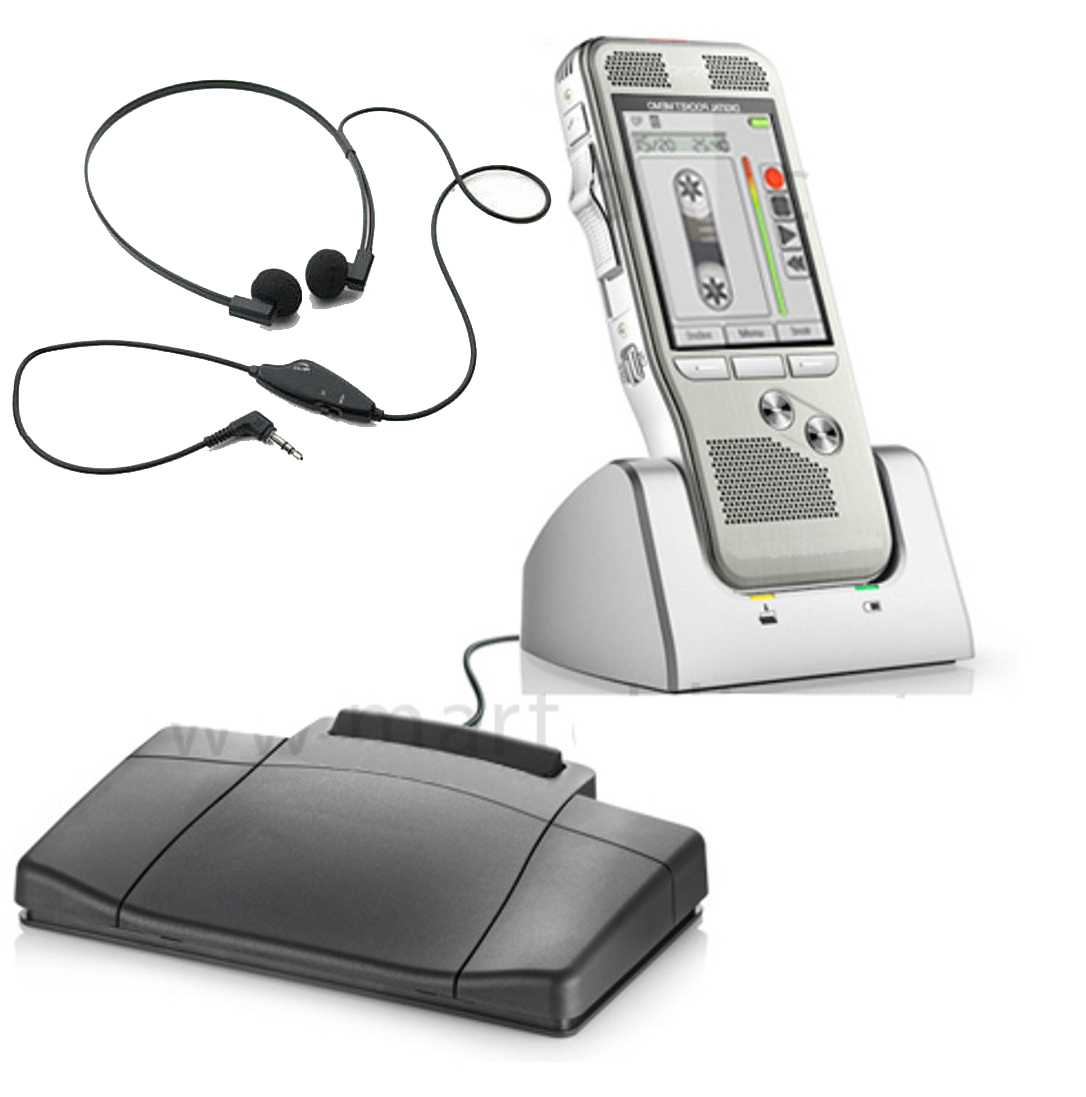
The Court Reporter 5000 Recorder and Transcriber, SKU 1491, serves a different purpose in this pairing. It can provide an independent backup recording and a supported review workflow through the package’s cradle and foot pedal. Martel also lists compatible external microphone and line-input options. Decide whether your second path should listen to the room from a separate position or receive a supported outside feed. If both devices depend on the same muted source, a second storage device alone will not give you an independent version of the missing speech.

Before buying equipment for a workflow that requires common hardware clocking or an external synchronization input, ask about the exact capability for the model and configuration you plan to use. Multiple microphones, date and time tracking, WAV recording and a transcription pedal each solve other problems. None alone establishes that two independent recorders are locked to the same sampling reference. Describe your use case to Martel by stating the session length, sources, channel count and how precisely a reviewer needs to find a passage later.

30 questions and answers

1. How can I tell if my backup simply started early?

Find a distinctive word in the first few minutes, another in the middle and one near the end of a continuous session. Calculate backup elapsed time minus main elapsed time for each. If the results stay about the same within your ability to locate the words, an early or late start is a plausible explanation. Record the common offset and use it to locate a fourth phrase as a practical check.

2. Does setting the two recorders to the same time of day fix drift?

Matching the date and wall-clock time can help you identify files from the same hearing. It does not establish that the two audio sampling clocks run together. A file can have the correct morning date and still place a final spoken marker a little farther into its elapsed timeline than the other recorder does. Inspect common sound events to answer the elapsed-time question, and record wall-clock corrections separately.

3. If my backup position grows larger, which recorder is wrong?

With only two recordings you can measure their relative relationship. The device used as your reference for the calculations need not be the more accurate clock. A growing positive backup-minus-main difference means the chosen event is increasingly later in the backup’s elapsed timeline. Establishing which device is closer to an independent timing standard would require a suitable reference and appropriately controlled measurements.

4. What is the smallest timing difference a court reporter needs to correct?

The practical requirement depends on the task and the resolution of your evidence. Locating a ten-second answer from review notes often tolerates a much larger uncertainty than lining up the first consonant of a word on two tracks played together. Decide what the recipient needs to find and how precisely the player can display the position. Compare that requirement with your measured range before spending time on a finer adjustment.

5. Do MP3 and WAV recordings automatically drift because they use different formats?

The file extensions alone do not establish a rate difference. Martel lists MP3 and WAV workflows for the Court Reporter 5000, while the DM246 package describes WAV recording. Use direct working copies played at normal speed, identify the same spoken events, and inspect the actual change in their elapsed differences. Pay particular attention to any conversion or trimming between the recorder’s saved source and the version you are comparing.

6. How many sound markers do I really need?

Two markers tell you that the difference between those two points changed. A middle marker gives you a way to look for steady growth or one sudden step, and another marker near a suspected interruption can localize that step. On a multi-part hearing, choose a fresh set for each continuous segment. More markers are useful when they are clear enough to locate and distributed across the part of the recording you need.

7. Is clapping once at the beginning and once at the end a good practice method?

In an empty practice room, a clear shared sound can supply a recognizable onset. Add distinctive spoken identifiers so you can tell which event you are hearing, and keep the source position steady relative to both microphones. A handclap in a reflective room can produce several peaks or overload a nearby microphone. Pick the direct arrival consistently and choose a spoken alternative if the onset is ambiguous.

8. What if the witness moves between the two landmarks?

Write down where the witness was for each event and the channels or sources you used. A changed distance to one microphone, stronger room reflections or a shift from local speech to amplified sound can move the apparent onset you mark. Try another pair of landmarks from a stationary speaker within the same block. If that comparison is steadier, the moving-speaker pair is weaker evidence about clock drift.

9. Can I use the opening and closing gavel sounds from actual work?

Use naturally existing landmarks only where available and appropriate to the recording under review. A gavel strike can be distinctive, but multiple strikes, echoes or different signal paths can make the matching point uncertain. Check surrounding words to distinguish the events and inspect a third landmark from inside the session. For future equipment testing, a recorded fictional script in an empty room gives you complete control of the source and wording.

10. Does a two-second offset mean the backup missed the first two seconds of testimony?

No conclusion about missing content follows from the sign alone. If the backup started first, it can reach the same opening statement at a later position in its own file because it contains extra material before that statement. Listen to both files from the beginning, identify their first common words and inspect the sound immediately before them. This establishes what the two devices actually captured around the opening.

11. Why does the discrepancy suddenly change at recess?

Look for a pause, stop, restart, new filename or source change on either system. A recess can also change which participant speaks first afterward and where they sit, so identify an unmistakable shared word in comparable conditions. If subsequent offsets stay near a new value, keep a new reference for the post-recess block. Do not average the whole morning and afternoon into a single drift figure.

12. What if one recorder was paused for a private conversation?

Identify the exact permitted recording segment you need to review and consider each continuous section separately. A pause can cause the later file position to exclude an interval still present in another recording. Use the first clearly shared event after the resumption to build the new reference. Respect the established handling directions for the material in each file and give reviewers navigation notes only for the authorized portion.

13. Is a missing word the same as a clock problem?

A sampling-rate difference changes the relationship between elapsed positions over time. A word missing from one channel may instead reflect a muted input, an obstructed microphone, a source change or an interrupted recording. Listen to shared events immediately before and after the word. If their offsets stay similar, turn your attention toward the input path and what sound was present during that short interval.

14. Can four DM246 channels drift independently like four separate recorders?

The package’s four separate channel files in the documented mono configuration come from one multi-input recording device. That is a different arrangement from two standalone units running independently. Microphone placement, acoustics and how clearly each channel captures an onset can still change your measurement. Choose one main channel for the external-backup comparison and retain the other channels for listening to individual seats or checking ambiguous words.

15. What if a file split appears between my beginning and ending markers?

Identify which segment contains each marker and whether the review tool restarts elapsed time at the split. Keep each source segment with its original name. Find a shared event near the start of the later segment and build a local timing reference to the corresponding backup file. Carrying the displayed position from the previous file across the split without accounting for its duration can produce an enormous apparent timing error.

16. Can two files from different folders actually be the same audio?

Yes. A second file may be a copy or an export of the original source. Check how it was made and which physical device captured its sound. Consider whether a computer captured the recorder’s feed or the reporter simply duplicated a saved file. Identical content can serve as a storage backup, while diagnosing drift between two hardware recorders specifically requires recordings made through genuinely separate capture paths.

17. Could changing the playback-speed control make two tracks sound out of sync?

Yes. Check that both players are set to their normal playback speed before listening to the same exchange together. An adjustment in the review player can change the wall-clock time it takes you to hear the answer, while the saved original remains unchanged. Open the direct source copies and compare positions of identified words. Log any review settings that intentionally change speed or automatically rewind after a pedal release.

18. Why does my player show only whole seconds?

Some review interfaces emphasize convenient navigation rather than subsecond measurement. With whole-second positions, collect several distinct markers over a sufficiently long span and state the limited precision. If you need a finer comparison, use an authorized tool that displays fractional elapsed positions or sample positions on working copies. Even there, a clear and reproducible word onset is essential. More digits on the screen cannot repair an ambiguous anchor.

19. Can I use the audio waveform to match two files by sight alone?

Listen first, identify the same exchange and then examine the corresponding region in each waveform. Two common short pauses or two similar consonants may look remarkably alike on a long overview. When one microphone is far away or the signal is compressed, the same sound can have a different shape. Verify the surrounding words and use the same recognizable edge before logging each displayed position.

20. How does an online witness change the comparison?

A recorder connected to a remote-audio feed and a recorder hearing the room loudspeaker may encounter different delays through the meeting and playback paths. Delays that change during the call can mimic an evolving offset. Compare locally spoken landmarks from the same room path where you can, and record the remote landmarks separately. Avoid attributing a change seen only on remote speech to the recorder’s oscillator.

21. What should I do if the backup and main have no clearly shared passage?

Identify the nearest segment where both do preserve recognizable common words and use that as a boundary for your conclusions. The missing shared evidence limits how confidently you can map other parts. A written job note, speaker turn or approximate time of day can help you search, but a guess based on those clues is still a guess. Report the search range plainly and leave unsupported precision out of the handoff.

22. Can the words in the transcript serve as accurate synchronization points?

They help you find the region of interest. Then listen to both recordings and choose a precisely identifiable sound within that exchange. The transcript may omit a speaking pause, contain corrected wording or group fragments differently from the sound. A page-and-line reference alone therefore does not specify a subsecond audio event. Give the reviewer both the transcript location and the distinctive spoken phrase used for the comparison.

23. What if the exported audio from my CAT system starts at the first word?

An export may omit room sound that preceded the selected region. Document how the exported file was made and retain the source from which it was derived. A constant offset between the export and a recorder file can result from a different starting boundary. Choose multiple common words farther into the same continuous passage before deciding whether the elapsed relationship changes after that initial difference.

24. Do word clock and timecode describe the same capability?

A common sample clock concerns the timing at which digital audio samples are taken. A time reference or timecode can identify positions or starting times within a workflow. The presence of a date field, a file timestamp or a labeled timecode feature alone does not prove the relationship between two sampling clocks. Ask the manufacturer about the exact implementation when a purchase depends on a shared timing reference.

25. What does a negative backup-minus-main offset mean in my note?

The shared landmark occurs earlier in the backup’s own file than in the main file. If the main shows the event at twenty minutes and the backup at nineteen minutes fifty-seven seconds, that offset is minus three seconds. A reviewer starting from the main position should look earlier in the backup. Write the arithmetic convention in words so someone working in the opposite direction can reverse it correctly.

26. Why did the sign of the offset reverse near the end?

The backup may have started later and accumulated a relative rate difference that crossed zero, or a change between segments or sources may have altered the relationship. Examine the intermediate landmarks. A smooth trend crossing zero calls for a different investigation from an abrupt shift at a file boundary. Confirm the sign was calculated in the same order on every row before attributing the reversal to the equipment.

27. Does a shorter final file mean that a recorder ran slowly?

File duration includes everything captured before the first and after the last common spoken event. One reporter may have started late or stopped early. A pause, trim, split or different export selection can also change the length. Compare the interval between two identified, common landmarks inside continuous segments instead of subtracting the total finished durations. That comparison removes unrelated starts and tails from the rate estimate.

28. Will moving a file to another Windows 11 computer change the recorded timing?

A direct file copy preserves the stored audio data when copied correctly. The destination player’s displayed precision, starting position, review-speed setting or interpretation of an exported file can still differ. Compare the copied item’s name and size first, then locate the same anchor at normal speed in both players. Distinguish a different presentation of the file from a change to the audio bytes themselves.

29. Can I hand a scopist just the calculated parts-per-million figure?

A rate figure by itself omits the starting offset, direction, file identities and any pauses. A listener looking for one difficult answer usually needs a clearly identified backup file, an approximate destination time and several words to confirm the location. Include a local anchor near the answer. Add the measured rate only if it helps the reviewer cover a wider continuous range and your measurements support that estimate.

30. What should an equipment buyer bring to a Martel consultation about long hearings?

Describe your expected session length, how many seats need microphones, whether the backup receives room sound or a feed, and what the reviewer must do with the files. Mention whether approximate search by spoken landmarks is sufficient or the workflow requires a documented shared clock. The DM246 and Court Reporter 5000 pages let you compare the capture and review jobs each package covers before asking about a specific connection or timing requirement.

Martel equipment and related guides

Martel DM246 Four Omnidirectional Microphone and Transcription Package · SKU 1583

Court Reporter 5000 in its dock, wired earpieces and transcription foot pedal
Court Reporter 5000 Recorder and Transcriber. View Martel’s product details for SKU 1491.

Court Reporter 5000 Recorder and Transcriber · SKU 1491