TIME IS RUNNING OUT FOR 2026 TAX WRITE-OFFS

Where Should the Deposition Microphone Go When a Witness Is on Speakerphone?

Choose a deposition microphone position for a witness on speakerphone and local counsel. Compare saved samples and check Martel Audio Grabber writer compatibility.
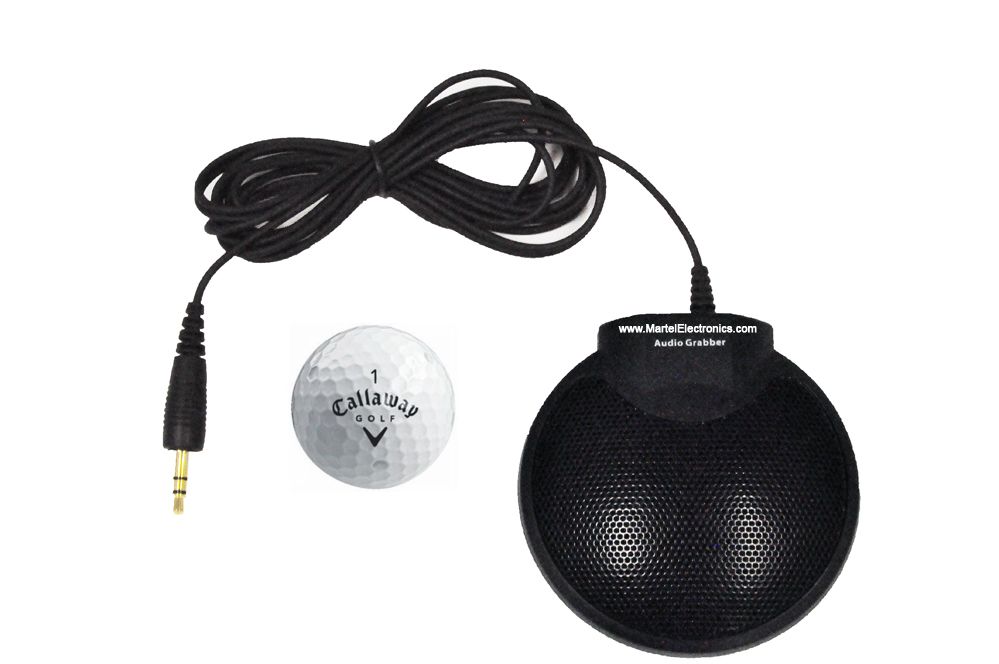
Audio Grabber microphone and 3.5 mm plug beside a golf ball for scale
Audio Grabber battery-free court reporter microphone. View Martel’s product details for SKU 310.

A witness on speakerphone has a seat at the deposition table, even if that seat holds only a telephone. The voice your writer microphone can capture comes from the phone’s loudspeaker. Counsel’s question comes from a different place. Start with the microphone on a stable, clear part of the table between the working loudspeaker and the local questioner. Move it a little toward the source that was harder to understand on a saved practice recording. Stop when someone listening at an ordinary playback level can identify the important words from both people.

There is no distance that accounts for every telephone, voice, table and writer input. A phone sitting flat above a speaker opening can sound different from the same phone on its stand. A lawyer who turns to read from a binder can change the balance without moving a chair. For remote court reporting with a witness on speakerphone, a short fictional exchange gives you a repeatable way to choose your microphone position before the first question. It also explains when another microphone, or a different way of obtaining the caller’s sound, would answer a problem that moving one microphone has left unresolved.

Check Audio Grabber compatibility with your steno writer.

Find the three microphones and speakers that actually matter

Picture a narrow deposition room with an attorney at one end and a speakerphone on the table within reach of the person handling the call. For audio purposes, that telephone performs two jobs. Its loudspeaker delivers the witness’s answers to the room. Its built-in microphone sends counsel’s voice back to the witness. The court reporter’s microphone performs a third job. It delivers sound to the writer or other equipment selected for the reporter’s recording. Drawing those three jobs on a sheet of paper takes less time than troubleshooting a mic someone moved in the wrong direction.

Ask the caller to say an ordinary sentence while someone in the room listens near the phone. Identify where the sound comes out. Some devices play from one edge, others from a grille in the base, and a room installation may deliver the call through a separate speaker. Use the actual sound location as your starting point. Keep a stand, pad, cable wrap or open folder clear of that opening. Follow the phone’s normal placement instructions. You can move the reporter’s microphone to accommodate a working telephone without disturbing the call controls.

Now have local counsel ask a question facing the position they will actually use. Ask the caller to repeat a detail from the question. Listen to that same detail later on the writer recording. Those answers give you different information. A caller who heard the question accurately has demonstrated that the telephone transmitted it. An editor who heard the question on the writer file has demonstrated that the reporter’s recording picked it up. It is possible to succeed on one of those checks and fail on the other.

Consider an example. The caller hears “delivery to Oak Street” and answers with the correct town. At the reporter’s seat, the fan behind counsel masks the end of the street name. The caller's response tells you the telephone connection worked. It does little to tell you whether the writer captured “Oak” clearly. During rehearsal, replay just the question. If “Oak” becomes clear when counsel faces the table mic and speaks at the same level, the seating or microphone arrangement deserves attention.

Keep the return route in view when someone suggests placing the phone next to the speaker from a second meeting computer. Two devices playing or sending the same conversation in a room can introduce an audible repeat. Zoom identifies simultaneous telephone and computer audio, and multiple active devices in a room, as possible causes of meeting echo. If the phone is handling the call and the laptop is present for documents, agree with the meeting operator which device handles the room conversation. The operator can change the call setup while you preserve the writer’s separate recording route.

Choose a first position that survives ordinary table use

Begin when the room looks like the room that will be used. Put the witness phone on its usual stand or on the table according to its instructions. Put the near attorney’s chair in place, with a pad where the attorney expects to write. Open an unmarked practice folder where an exhibit binder might sit. Take the reporter’s own seat. A perfect sound during setup has limited value if the first person to sit down pushes the microphone underneath a binder or lays a jacket over the phone.

Set the mic in an open area on the working line between counsel and the phone. Leave a visible gap between the mic and the phone body. Placing one directly on the other can transmit button presses or table vibrations and may interfere with access to call controls. Keep both items away from the writing hand, the hinge of the binder and any cable that is likely to be pulled across the table. A reporter should be able to reconnect the mic during an agreed break without asking someone to lift a stack of documents.

A placement description should mean something when you return. “Near the witness” names a person who is in another building. “At the phone end of the center seam, outside counsel’s open folder” describes an actual spot. Use a harmless paper marker during practice if the room allows. Record a second marker for the telephone position. That second marker makes it possible to reset the two devices independently after someone uses the room for lunch.

Do one short recording from that first spot at a comfortable phone volume for the remote voice. Ask the local reader to use a conversational level. Recruit someone who tends to speak quietly if that reflects the participants you expect. We are trying to preserve the ends of ordinary answers. Asking everyone to project toward the mic can make almost any spot seem acceptable in rehearsal. A court reporter needs to hear the small correction at the end of an address as well as the clear greeting at the start.

Hold playback loudness steady while judging positions. It is easy to turn up a quiet answer without noticing that the attorney’s next question becomes difficult to listen to. Pick a comfortable setting for the recording as a whole, then write down what each person said. Note the words that needed a second listen. Make your next microphone move toward the person for whom those extra listens were consistently necessary. The reason for the move belongs on the setup note alongside its direction.

If the loudspeaker is difficult to locate, play the permitted practice call on its usual speakerphone setting and listen from the table. Rotating the phone in someone’s hand can change the direction of the opening, so place it back in its working position before taking another sample. A phone that is audible only while held beside the ear may still be using its earpiece. Confirm its speakerphone control with the person responsible for the call.

Compare two positions using a witness and a local attorney

Give both readers a simple job. Local counsel says a detail that belongs only to the question. The caller says a different detail that belongs only to the answer. If both read the same list, listeners can fill in unclear words from memory. Separate cards make it easier to discover which voice reaches the writer microphone reliably. Start the practice recording before the readers begin and preserve a little quiet at the end so you can hear the room between exchanges.

For position A, leave the mic in the clear spot you chose. A nearby reader might ask, “Did the package for Mara Dene leave from the north desk on Friday?” A caller might answer, “Louis Perrin signed for it at the south desk on Thursday.” Those are invented practice lines. Place the name, desk and day on separate lines of an answer sheet. Ask a listener to write down whatever is audible before consulting the sheet. For spelling-sensitive names, have the reader spell the surname once as part of the rehearsal and score the letters separately from the listener’s estimate of the spelling.

Save that trial under a name whose meaning will be obvious after lunch. Record the distance or table landmark if useful, the telephone’s position, and which person was facing the documents. Move only the reporter microphone toward the weaker person for position B. If you also raise the speakerphone volume, ask counsel to turn around or switch to another input, an improvement becomes difficult to explain. When you later decide what to put on the permanent card for the room, you want to know which change earned its place.

Use the same questions for your first comparison. Ask both readers to speak in their usual voices again without emphasizing anything they missed on the first recording. If the caller spells a name twice in the second version, mark that change. It might make position B appear better for a reason that has nothing to do with the microphone. A small note saves a longer investigation later.

Then use a new exchange to confirm your preferred position. Try, “Was the red tag tied to carton fifteen or carton fifty?” followed by, “The tag tied to carton fifty was green.” Have the local reader pause after the question. Have the caller answer once. Ask another listener to write down the two numbers they heard in the question and the number and color in the answer. Keep your own comparison sheet as a room setup aid. The exercise measures a particular configuration through words whose answers are known.

Write observations plainly. “Position A took three listens for the caller’s surname, and the local question was clear on the first play” helps you decide what to try next. A score such as “audio eight out of ten” hides which voice needed help. If neither position allowed the listener to identify the remote surname, check whether the live phone speech at the table contained the necessary syllables. A mic placed perfectly beside a loudspeaker can capture only the sound that loudspeaker produces.

What the listener hearsWhere to check nextWhat to repeat
Phone witness clear, local attorney faintMove the mic toward counsel’s working seatA question read while looking down at an exhibit
Local attorney clear, caller faint on writerListen beside the phone, then check the mic positionA remote name and a short correction
Remote word already missing at the phoneHave the operator check the call sourceA caller’s answer after a full pause
Two versions of the same answerIdentify any second meeting speaker in the roomA local question followed by a single remote answer

Work through quiet answers, harsh speaker sound and missing first words

Start with the easiest comparison available. During a practice call, listen with your own ears to the phone at a comfortable distance. Did the word sound clean there? Play the saved writer recording. Does the same word sound rough, thin, faint or broken in exactly the same part? Record both observations. A soft witness voice on a loud telephone and a loud witness voice on an overwhelmed recording input can create quite different problems. Calling both “bad audio” gives the next reporter little to work with.

If the caller already sounds broken at the table, let the caller finish the rehearsal sentence, then ask for it once more. Give the call operator the exact observation. “The first syllable of the fictional surname vanished before the sound reached this room” is more useful than asking them to fix the reporter mic. The operator may investigate the caller’s device, call quality or the selected telephone setting. While they do so, check the local question on the writer to establish whether a separate room pickup problem also exists.

If the phone sounds ordinary but the writer file makes it scratchy at the ends of louder answers, choose another mic position before changing several controls. A small movement away from the speaker outlet can change the sound level reaching the mic. Make a second practice recording and compare it at the same playback level. Use your writer’s documented input control only when that device provides one. Keep the local counsel sample in the check, because a lower recording level that helps the loudspeaker may make counsel harder to understand.

Give turn-taking its own trial. Ask the caller to count “one, two, three, four,” and have a nearby reader wait until the caller finishes before asking for a street name. Then, in a second fictional take, have the local reader begin as the caller reaches “three.” Some telephone or meeting setups behave differently while both ends are speaking. If the missing syllable is already absent from the sound at the phone, a second room mic cannot restore it. A brief pause between the readers on the next rehearsal is a useful comparison. Keep participation and clarification during the actual deposition within the usual reporting procedure.

A room can also conceal a word that the phone delivered intact. Paper moving beside the mic may cover consonants that were audible beside the loudspeaker. A nearby air vent may make similar sounds across the whole recording. Save a few seconds of the empty practice room with the same controls and listen at a normal level. If the interference appears even between sentences, shift the mic away from its source. If it appears only when counsel handles a folder, add a clear document lane and repeat the same exchange with the folder in use.

Adapt the arrangement to the table you have

At a small round table, the natural middle is sometimes the busiest spot. The phone display faces the call operator, the attorney has a folder open opposite it, and the reporter has a writer on the remaining clear edge. Try a microphone position on the quiet side of the line between attorney and loudspeaker. Work through the caller’s answer while another person turns a page in the ordinary place. A clear patch of table can matter more than an exact midpoint.

At a long table, draw the seats that will actually speak. A chair near the entrance may belong to a silent observer. A person halfway down the table may ask frequent follow-up questions. Ask a second local reader to work from that chair. If the recorder captures the caller and near counsel but misses the second reader at every sensible one-mic position, you have a reason to review wider microphone coverage. Document which seat failed and the words a listener lost. That makes a discussion about buying another microphone concrete.

A raised phone stand can help people see the controls, but the change also moves the sound source. Place the stand as it will be used and avoid pressing the microphone against its foot. If counsel rotates the stand so the display is visible, check the direction of the speaker openings again. A stand with a deep front lip may partially cover an opening on one device while leaving another device clear. Inspect the actual phone and stand together.

For a meeting room with a permanently installed ceiling or wall loudspeaker, treat the active loudspeaker as the witness’s sound location. A control pad on the table can look like a telephone while producing no witness sound itself. Do the test from the reporter’s usable seat and compare locations that counsel will permit. If the system operator can identify a separately available, authorized audio feed, discuss that option with them. Check the output type and the recording equipment it would connect to before considering a cable. The room microphone approach remains a useful reference when evaluating what that other source actually carries.

A hard wall close behind the phone may give the remote voice a splashy or hollow sound. Move the microphone to an unobstructed nearby spot and repeat the same short answer. If the caller still sounds hollow at the phone itself, change the phone’s location only with the operator’s agreement and run another trial. Keep the desk clear of improvised covers or nesting materials that can block a microphone, speaker or ventilation opening. A tabletop sketch with the speaker direction marked can help you reproduce a workable arrangement in a room you visit infrequently.

Connect the Audio Grabber to the equipment that saves the recording

Martel’s Audio Grabber, SKU 310, is a battery-free room microphone. Martel identifies compatible Luminex and NexGen steno writers and describes use with suitable recording equipment or mixers that supply the required microphone power. Start with the exact name of the device that will hold the recording. If you intend to use a writer, find its microphone input and check the writer model against the product details. The writer and the phone have separate jobs, and this microphone belongs on the reporter’s recording side.

The product page excludes a direct computer connection for this model. A laptop headset socket, a speaker outlet on a telephone and a microphone input on a compatible writer can look similar enough to encourage guesswork. Read the port label. Check the manufacturer’s documentation for the receiving device and any required microphone power. A plug fitting mechanically is only one piece of the connection. If you need a Windows USB input, ask Martel for its court reporter microphones designed to connect directly to the computer.

Make a local microphone test before adding the telephone. An assistant speaks near the proposed mic position while the writer is recording a practice job. Save the file and listen for the sentence. Then bring in the speakerphone and run the two-reader trial. If the first file already fails, the telephone will only add another unknown. Check the selected input, the connection and the writer recording procedure. A working phone call cannot establish that a writer opened an audio file.

If you intend to add another Audio Grabber, inspect Martel’s connection information for your writer or mixer and the exact arrangement you are considering. Products that allow more than one microphone still require a listening check with the complete setup connected. Start with the seat that failed your first test. Put the additional coverage where that person speaks, and record turns from each person. Then include a phrase heard by both microphones and judge whether the combined recording remains comfortable and intelligible.

When contacting Martel about a purchase, provide the writer model, a clear picture of the input legend, and a simple description of the room. “I need the caller on the table phone and two attorneys at opposite ends in my writer audio” gives the sales specialist enough context to consider the Audio Grabber and any compatible additional coverage. The product photograph linked in this guide shows the microphone and connector. Use it to identify the item, then compare the product details with your equipment. Check current package contents and optional accessories on the product page at purchase time.

Carry a working position through exhibits, recess and a change of counsel

Give the call operator and the local questioner a concise description of the working setup. A useful request is, “Please keep that space between the speaker opening and the green folder clear.” The request identifies the space that matters and leaves the table usable. Asking participants to work around unexplained equipment encourages someone to move it just far enough to make room for a document. Show where a binder can go without touching the microphone cable.

When an exhibit appears, listen for a change tied to its handling. A board that stands upright may separate the local questioner from the microphone. A thick binder placed flat over the phone may muffle the remote witness. A participant who picks up the phone to read a message may turn the loudspeaker away. These situations suggest different corrections. If the obstruction is visible, describe what moved and work with the operator during an appropriate opening. A witness who was clear immediately before the board went up deserves a geometry check before an equipment replacement.

After a recess, confirm the telephone is back in its working position and is using the same sound output. Someone may have switched it from speakerphone to a handset for a private conversation. Check the microphone connection on the writer and the device’s actual recording state as part of your usual return procedure. A live call on a restored loudspeaker and a paused writer can sound completely normal to the reporter’s ears. Each piece of equipment needs its own confirmation.

If another lawyer takes over the questioning, give the new seat a quick practical check when the workflow permits. A person who sits sideways to look at a screen sends their voice in a different direction from someone reading directly toward the table. An agency’s room diagram can list two established positions for the reporter microphone under two common seating layouts. The diagram should tell the next reporter which seats were tested and where the telephone was placed. An empty dot labeled “mic here” cannot convey those details.

Keep your setup documentation focused on equipment. A photograph of your own demonstration table can include a blank folder, a disconnected practice phone, the mic and marked seating positions. Remove names, open jobs, meeting codes and paper with case information from the frame. For a shared room, a rough overhead sketch may do the same job with less effort. Record the date and the phone model if you know it, because a different device may put its speaker in a different place.

Decide what a successful rehearsal sounds like

A successful trial gives you a usable record of each person at the same comfortable playback level. It should preserve a short witness answer after a long local question, a quiet correction after a confident statement, and the identifying details in a spelled surname or a number. Choose two or three details appropriate to the job and ask a listener who did not read the answer card to transcribe them. That listener supplies a more demanding check than someone who already knows the words by heart.

Separate recognition of speech from identification of a speaker. A single room microphone can capture words from several directions while leaving two similar voices hard to distinguish on playback. The reporter’s notes about who spoke and the participants’ established identification practices serve a different purpose from microphone placement. In a practice trial, have the two readers introduce their roles once and then use different material. Ask the listener to identify the question and answer, and to mark uncertainty wherever a voice changed too quickly to follow.

If both placements are weak, decide whether changing the room arrangement addresses the observation. The caller is indistinct at the phone itself, or the caller is clear there and absent from the writer, or the caller is clear in the writer and distant counsel is missing. Those three observations lead to three different conversations. The first involves the call operator. The second involves the microphone and recording route. The third involves local seat coverage. Precise descriptions can spare you a purchase that would leave the original problem untouched.

For a reporter with a compatible writer who wants a compact room pickup for a phone witness, SKU 310 is worth comparing with the needs described on your setup card. Keep a record of the working table landmarks with your equipment list. At the next assignment, use the card to establish a first spot and run a fresh short listening check. The actual witness phone, local speaking positions and receiving equipment decide whether last month’s placement works today.

30 questions and answers

1. Can I use a tape measure to find the microphone spot before the call?

Yes, a measurement helps you reproduce a position you have already heard. First record both people and choose the position on the evidence of their words. Then measure from a fixed edge of the table and record how the phone is oriented. Measuring from a phone that people move would change your reference every time.

2. What if I have only one minute to rehearse?

Save one question from the nearest attorney and one short answer from the caller, each containing a different number or name. Play back the parts that carry those details. Spend the available minute on both sources. A beautifully recorded ten-second introduction from counsel leaves the caller entirely untested.

3. Should I put the microphone against a phone’s speaker grille?

Leave room around the grille and place the microphone on its own stable surface. Contact between the two bodies can bring button presses and knocks into the recording. Start where the caller and local voices are both accessible. Approach the speaker opening only as far as the saved comparison justifies.

4. Could the orientation of a phone case matter?

Inspect the case with the phone in its working position. A flap, stand or edge can sit in front of a sound opening. Have the operator restore the normal arrangement, then repeat the caller’s practice phrase. Follow the owner’s preference when handling their equipment and document the orientation you actually tested.

5. Should the lawyer’s chair point directly at the microphone?

Test the normal working posture first. A questioner who reads from an exhibit may turn toward it for almost every substantive question. If those lines sound faint, try a microphone spot that works while they read. A staged pose that nobody uses after setup will lead you to the wrong location.

6. Can everyone hearing the phone tell me my writer is recording?

Their observation confirms that the loudspeaker is playing. The writer can be paused, using another input or saving to a different job while the room hears the caller perfectly. Save a short file with two different voices and reopen it using the same route you expect to use for review.

7. Who should speak first in the two-person test?

Let the attorney ask the first question if that reproduces the intended sequence. Then include a caller who starts an answer after a few seconds of silence. The second exchange makes it easier to hear a lost opening syllable. Keep the order the same when comparing two placements.

8. What is a good short phrase for testing a quiet caller?

Ask for an invented sentence such as “My second stop was Pine Gate, unit nine.” It carries a place and a number in a natural response. Have the person use an everyday voice. Distinctive material gives a listener something more useful to write down than a sequence of repeated hellos.

9. How can I check an initial without asking the caller to shout?

Have the rehearsal caller say a fictional name naturally, then spell the middle initial as they ordinarily would. Listen for the letter itself and its position within the name. If the sound is missing beside the phone, involve the call operator before working on the reporter’s microphone placement.

10. Will raising the phone volume always make remote testimony easier to capture?

A volume change can help a quiet speaker, but listen to the resulting sound at the table. A setting that makes the phone harsh or covers local counsel’s first words may make the recording harder to use. Change one setting, save the same practice exchange and compare the identifying details.

11. How do I test the attorney and caller speaking at the same time?

Agree on a fictional question and answer with no sensitive information. In a second take, cue the attorney to start one word before the caller finishes. Write down the last remote word and first local word from the file. Observe whether either was already missing from the sound heard beside the phone.

12. Is the speakerphone mute button a writer mute switch?

Treat them as separate controls. A telephone mute commonly controls what its remote party receives, while the reporter’s writer follows its own input and recording settings. Rehearse the precise controls on your devices before relying on them. The people responsible for the call and the recording should each know their own indicator.

13. What if the witness changes from a handset to a headset?

Check what changed at your end. A different remote device may change the sound arriving from the phone on your table, although the room's physical arrangement stayed the same. Evaluate an ordinary spoken answer. If the caller already sounds faint at the loudspeaker, tell the call operator what you heard there.

14. Why do I hear a second version of the same sentence?

Inventory which devices in the room play and send call audio. A phone and another meeting connection can both reproduce the same voice, sometimes with an audible delay. Ask the operator to verify the designated room connection during practice. Then replay a new file from the writer to see whether the second voice persists.

15. Can a video meeting window stay open for the exhibit display?

The room operator can arrange document or video display separately from the device handling conversation when the meeting setup supports it. Confirm on the practice call which unit is handling room audio. Local people may need the display throughout the deposition even if the telephone remains their only working call speaker.

16. Is a headphone on the reporter’s laptop enough for a phone-only witness?

A headphone plays the sound routed to that laptop. If the witness is reaching the room through a standalone telephone, a separate laptop may have no electronic copy of that voice. Check the route feeding the writer. The room microphone can hear the phone when its loudspeaker is audible nearby.

17. Can I connect the Audio Grabber straight to my USB laptop?

Martel specifies SKU 310 for compatible writer and recording connections and excludes direct computer use. If your buying requirement is a Windows USB microphone, tell Martel the laptop port and recording program you use. Select an appropriate computer microphone for that job and keep the writer-input requirement separate on the order.

18. Does the Audio Grabber need its own battery?

SKU 310 is sold as battery-free. It relies on a suitable receiving input and the microphone power specified for that connection. Identify the writer, recorder or mixer model when ordering. In rehearsal, save a spoken line through that exact input to confirm your complete setup is working.

19. Can my telephone’s headphone jack supply the microphone power?

Check the equipment documentation before connecting any cable. A headphone output is intended to send sound toward a listening device. The Audio Grabber in this arrangement sends microphone sound to suitable recording equipment. Use a verified recording input for it and leave the phone playing the witness into the room.

20. How do I decide whether a second Audio Grabber is worth buying?

Identify a particular seat whose speech remains unclear after trying plausible one-mic positions. Have a second local reader ask a normal question from that seat. Ask Martel about compatible expansion for your writer or mixer, then test the full arrangement with both local readers and the caller before using it on an assignment.

21. What if counsel brings in a new conference phone halfway through setup?

Write down the new device and locate its actual speaker opening. A microphone position based on the old phone’s speaker direction may place the new one behind an obstruction. Run one fictional exchange with the phone in its normal configuration. Preserve the established writer connection unless the new observations justify changing it.

22. Why is a table tap clear when a caller’s name is indistinct?

A tap gives the microphone loud vibration or sound nearby. A surname comes through the phone, across the table, and into the recorder. Test speech from the appropriate position and listen for its quiet syllables. A crisp tap cannot tell you whether the telephone conveyed the letters of a particular name.

23. Can a water bottle beside the telephone affect the trial?

Look at where the bottle sits relative to the loudspeaker opening and the microphone. It may obstruct the opening or make contact noise when someone reaches for it. Repeat a short phrase with the bottle in a safer, agreed spot. Keep liquids away from the microphone, cables and writer.

24. What should I do if a remote whisper disappears during an exhibit?

Determine whether the whisper was audible in the room before it reached the reporter mic. Check for an exhibit blocking the speaker and for a change in the caller’s connection. Follow the normal clarification procedure for the proceeding. Moving a mic afterward can improve later pickup without recovering an already missing word.

25. How should I share placement instructions with a relief reporter?

Give them a small diagram showing the telephone speaker opening, the local questioner’s seat, the mic input on the writer and the working microphone position. Include a short sample they can use for a permitted check. A verified description of both sides helps them spot a changed room layout independently.

26. What is the quickest check after a recess when the table looks identical?

Confirm the phone is on the intended loudspeaker, the writer mic is connected, and the writer has returned to the intended recording state. Listen for local and remote voices as the authorized workflow permits. Someone can take a private handset call or pause a recorder without moving any visible chairs.

27. How should I label the recordings used to compare positions?

Use disposable names tied to the room or exercise, such as “Oak practice, phone end” and “Oak practice, counsel end.” Record which take used which position in a separate short note. Keep client names out of the practice files and retain or discard them according to your organization’s normal practice policy.

28. Should I send an entire deposition when asking Martel about the microphone?

A demonstration with fictional speech can illustrate most placement and connection questions. Provide the model, input label, phone position, local seat and exact symptom. Follow your organization’s procedures before sharing any client material. A short reproducible example gives the specialist clearer information than an unexplained lengthy recording.

29. Can I use the product photograph to plan where the mic will fit?

Use Martel’s SKU 310 photograph to recognize the body and connector. Compare it with the space outside counsel’s folder and the physical route back to the writer. The photograph can inform your packing and setup decisions. The voices on a saved practice file will determine the final position.

30. What should I write down if neither position works?

Capture three observations separately. Could you understand the caller beside the phone? Could you understand local counsel at the table? Which details did the writer file lose? Add the device models and microphone input. Those observations distinguish a call-source problem from a recording-connection or room-coverage problem with very little paperwork.

Martel equipment and related guides

Audio Grabber battery-free court reporter microphone · SKU 310

This article is for educational purposes only.