Dictation Systems for Multiple Attorneys Sharing a Secretary
Plan dictation for multiple attorneys sharing a secretary: compatible recorders, author identification, priorities, workload, corrections and software checks.
Plan front-roadway and rear-compartment camera coverage, then verify framing, simultaneous recording and the saved event.
Published · Martel Electronics
A front and rear police car camera system should be evaluated as two recording jobs with a shared vehicle workflow. The forward view documents the area ahead of the patrol vehicle; a rear-compartment view addresses a different space. Before buying or accepting equipment, the department should define what each view must show and verify that both appear in the saved event when required. Seeing a camera image on a monitor is an intermediate observation, not the complete recording result.
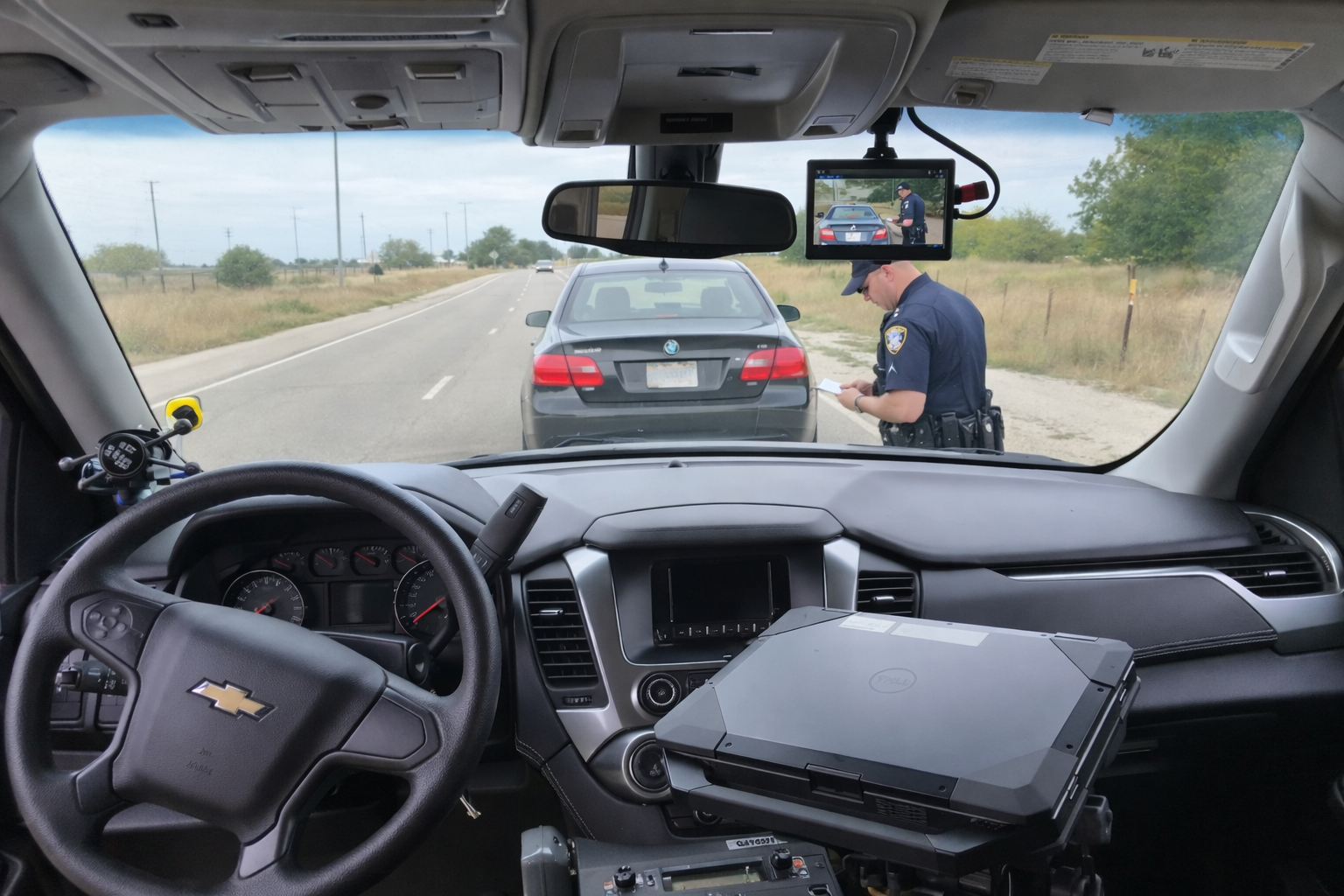
The word rear can describe different positions. A camera aimed into a passenger or transport compartment is different from an exterior camera showing the roadway behind the vehicle. State which area the agency means. Use a simple drawing or written description in the evaluation plan so a package is not accepted on the basis of an ambiguous label. Confirm the exact views and included hardware in the current product description and written quote.
The Martel DC7 police car camera system is described as a dedicated setup with front and rear-cage coverage. The MDP6 police dash cam package has a portable camera role and should not be assumed to supply an equivalent two-camera arrangement. The DC7 versus MDP6 guide explains that distinction in the wider equipment comparison.
List the areas the department expects each camera to record. Include the partition, headrests, seats, normal equipment mounts and typical occupant positions in the evaluation. A camera can be unobstructed in an empty vehicle yet lose part of a required view when equipment or occupants are present. Use safe staged testing to identify those limits before the view becomes an accepted configuration.
Record which areas remain outside each view. The purpose is to describe the installation honestly, not to suggest that every blind spot can be eliminated by changing one angle. Have the installer demonstrate proposed positions and save a representative recording before final acceptance. Keep the resulting clips and the accepted position description with the vehicle record so later inspections have a meaningful reference.
A wider picture may include more surroundings while giving less image area to a particular subject. A tighter view may show more detail in one area while leaving another area outside the frame. Decide which task matters in each camera position and inspect the original recording accordingly. Do not judge a view solely by how much of the cabin or roadway is visible on a small monitor.
Use a consistent staged scene to compare proposed angles. Note the approximate subject positions and what the saved clip actually shows. Ask a second reviewer to describe the visible boundaries without being told what the installer intended. If their description differs from the requirement, the agency has a specific issue to resolve. Keep that unresolved item on the acceptance worksheet rather than treating an installed camera as automatic completion.
The forward and interior cameras may encounter different lighting at the same time. A roadway scene can include headlights or bright backgrounds while the compartment remains darker. Evaluate the views individually and together. Ask which low-light features belong to each camera, and do not carry an unverified capability from one model or viewpoint into another. Review representative saved clips instead of relying only on a general night-recording claim.
Check for reflections, obstructions and changes caused by the normal vehicle setup. Use approved test conditions and the equipment-care instructions. The police dash camera night-recording guide explains how to distinguish brightness from useful motion detail. A clear stationary view does not by itself establish the quality of a moving scene.
If the department requires both views for an event, ask the installer to demonstrate that requirement explicitly. Create a non-evidence test with an identifiable staged action in each view. Retrieve the event and open every required camera recording. Confirm the beginning and end of the relevant material. A display mode that switches between cameras should not be treated as proof of the recorder’s saved-view behavior.
Audio needs a separate check. Identify whether sound comes from an officer wireless microphone, a compartment microphone or another confirmed source. Ask how reviewers identify or select the relevant track. Capture a brief test phrase from each expected position and listen to the saved result on the review computer. Do not assume that adding a camera also adds a microphone or that all microphones are included in every package.
Reviewers need a reliable way to distinguish the front view from the compartment view after transfer. During acceptance, record the names, labels or other identifiers the system actually uses. Test whether those identifiers remain understandable when a second authorized reviewer opens the event. If the export contains several files or folders, keep their structure intact until the agency’s handling process establishes how the components relate.
Do not rename or discard source components simply because two files appear to show the same time range. They may represent different camera views, audio or accompanying information. Use a documented working-copy process if staff need a different review arrangement. The police camera video export guide provides a more detailed completeness and handoff checklist.
Storage planning must include all streams the department intends to save. A sample from one camera is not a reliable estimate for a multi-camera installation. Record a representative event, total the resulting file sizes and keep the recording conditions with the estimate. If settings or the number of saved views change, measure the new configuration rather than assuming the workload stays constant.
Receiving and review time also matter. Ask staff to locate the full event, identify each required view and confirm the associated audio. Record any extra steps or missing information. A system that records the intended angles still needs a workable process for retrieving them. Use the local storage guide when planning capacity, backups and the agency roles responsible for exceptions.
Add camera-position checks to the appropriate equipment inspection routine. A changed mount, replacement partition, new laptop arrangement or repaired vehicle may alter coverage. Record the change and repeat the affected staged test. Keep a known working reference clip so staff can distinguish a changed view from an assumption about how the vehicle has always been configured.
Ask operators to report a blocked or shifted view through the agency’s defined route. Physical adjustments should follow the equipment instructions and authorized installation procedure. A quick unrecorded change may improve one part of the image while creating a different problem. The installation planning guide connects mounting decisions with a documented acceptance process.
Not necessarily. One may record a transport compartment while the other shows an exterior area behind the vehicle. State the required location and recording task clearly. Confirm the exact purpose of every camera included in the proposed package.
Verify the actual model and configuration. Demonstrate the required simultaneous recording behavior and inspect the exported event. Do not infer it solely from the presence of two cameras or a selectable live view.
Ask which microphone supplies the sound and whether it is included, connected and recorded in the selected configuration. Use a staged spoken test in the intended position. Camera coverage and microphone coverage are separate requirements.
No single viewpoint establishes complete coverage. A body camera moves with its wearer and may supply different context, but its position and recording state still matter. Read the body-camera versus in-car-video comparison when planning complementary recording roles.
Browse the Police camera category, identify the required vehicle views and use the buyer’s guide to prepare the evaluation. Request a quote that describes the required angles and audio without relying on an ambiguous front-and-rear label.
Use an approved staged exercise to show the compartment with its normal seats, partition and equipment. Record the intended coverage boundaries in writing. Ask the reviewer to identify which portions of the scene are visible and which are obscured, then compare that description with the department’s requirement. Check the relevant audio source separately and retain the original test set.
Repeat the affected view after any authorized repositioning, keeping the same test conditions where practical. If the configuration is accepted, keep the result with the vehicle record and note the limits observed. This gives staff a reference for later checks after seat, partition or mounting work. It also prevents a different exterior rearward camera from being treated as an equivalent replacement without a new coverage evaluation. The accepted result should describe what the department demonstrated, rather than relying on the general label “rear camera.”
