MARTEL ELECTRONICS · NOVEMBER 12, 2026
Martel MM-18 Stenomask Upgrade Guide: Dragon or Double Dragon 2?
An MM-18 upgrade is worth planning when your required connection changes. Choose Martel Dragon when you want a direct USB microphone route to a compatible computer. Consider Double Dragon 2 when that computer route must be accompanied by a separate 3.5mm mask microphone output for another compatible device. Keep a working MM-18 in the discussion when its existing single analog connection still meets your needs.
This guide is for the voice writer who already owns an MM-18 and wants to make a deliberate next purchase. It explains what changes in the equipment arrangement, what may remain useful, what to confirm before ordering, and how to introduce the new mask without losing track of the setup that previously worked. Product photographs come from Martel's own catalog. The planning examples are illustrative; they are not customer testimonials or reported test results.
Start with the job the upgrade must accomplish
Write one sentence describing the practical change you need. Perhaps your next computer arrangement calls for direct USB audio. Perhaps you want your spoken voice to reach a computer and a separate recorder. Perhaps the current system has become difficult to reconnect consistently because its components are poorly identified. Each situation deserves a different purchasing conversation. A model name becomes useful after the required result is clear.
For an MM-18 owner, the central distinction is between the mask's analog output and the direct digital computer route provided by the Dragon models. The MM-18 supplies one 3.5mm microphone connection. Dragon supplies a direct USB connection. Double Dragon 2 combines USB with a separate 3.5mm microphone output. Those are concrete differences you can use to plan a system. They do not establish a universal recognition percentage, guarantee a particular software result, or replace a check of the receiving equipment.
Give the purchase a specific acceptance condition. Instead of writing “better setup,” write “the selected mask reaches the approved computer input without the external analog microphone interface currently used for that route.” If you need a separate writer recording, add “the second mask output reaches the identified recorder, which saves an intelligible file.” These statements explain what the purchase is intended to change and how you will know that the new arrangement is ready.
An upgrade can also be unnecessary. A stable MM-18 arrangement that meets the job's requirements does not become unsuitable simply because another model exists. First establish whether the limitation belongs to the connection, a receiving device, a worn component, input selection, or the work you now need to do. This makes the order more precise and gives Martel a useful starting point when reviewing your equipment list.
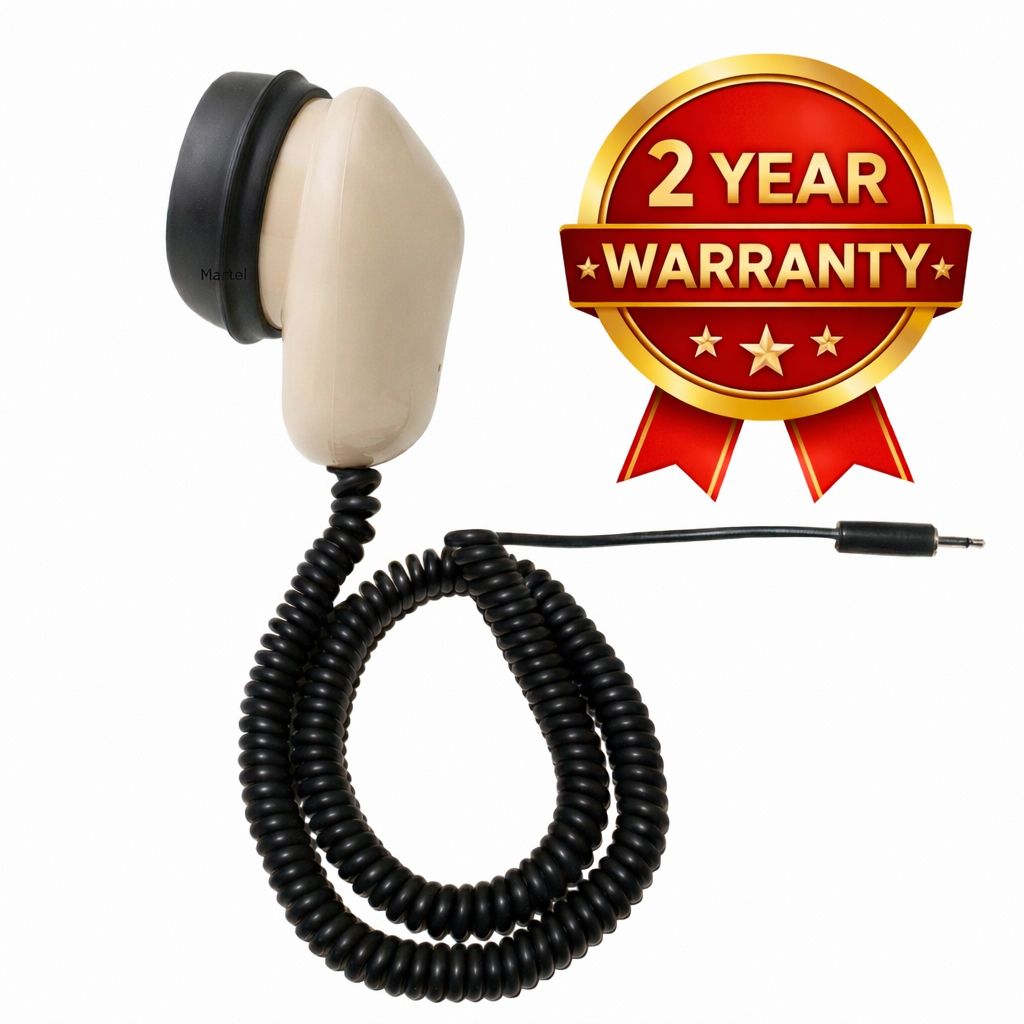
MM-18 vs. Dragon vs. Double Dragon 2: compare the connections
| Model | Published connection arrangement | Question for an MM-18 owner |
|---|---|---|
| MM-18 | One 3.5mm microphone output | Does the current compatible input still meet the required work? |
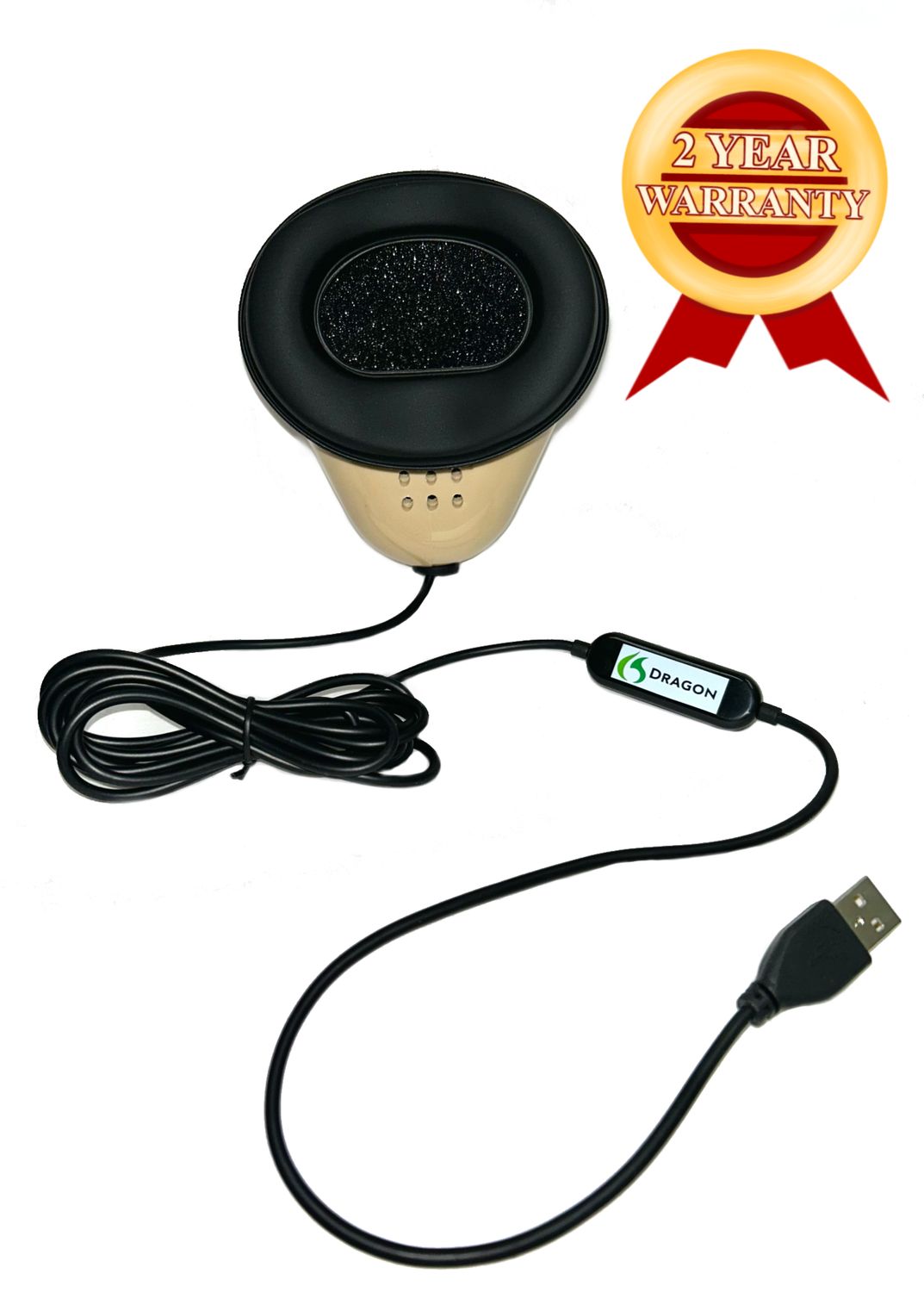
| Dragon Stenomask | Direct USB microphone connection | Is one direct computer microphone route the complete requirement? |
| Double Dragon 2 | USB plus a separate 3.5mm microphone output | Does another compatible destination need its own mask microphone output? |
Read the connection column before the price column on a product page. A microphone that lacks a required output will not become the appropriate purchase because its price is attractive. Equally, a second output should have an identified purpose. Buying a connection without knowing where it will go leaves the important part of the equipment plan unfinished.
The MM-18's 3.5mm plug is also described as 1/8 inch. That physical size does not establish that every similarly sized socket accepts the mask. A headphone output, a combined headset socket, and a suitable microphone input can involve different requirements. Preserve the exact model details of any interface that makes your existing arrangement work. “Small plug adapter” is too vague to use as a purchasing specification.
Dragon and Double Dragon 2 have a direct USB computer path, so that particular path does not require the external analog-to-USB microphone interface used in some MM-18 arrangements. You still need an appropriate computer connection and supported application setup. A physical USB adapter or dock, where necessary, is a separate component to identify and confirm. The direct USB microphone does not make every port arrangement or software version interchangeable.
Double Dragon 2's additional output serves the voice spoken into the mask. It is not a substitute for recording other people in a room. If your assignment requires both your repeated speech and participant audio, plan those sources separately. The existing Martel mask and room microphone guide explains that distinction in greater detail.
Make a useful record of your current MM-18 system
Before unplugging anything, record the complete route from your MM-18 to the application you use. Include the mask, any microphone interface, the computer port, the selected input, and the application version. If a recorder is involved, identify its input and settings separately. A photograph of the desk is helpful, but a written list explains details that may not be visible in a photograph.
Give each item a practical status: working and required, working but optional, uncertain, or due for replacement. Keep uncertainty visible. A cable that occasionally loses contact should not automatically become the foundation of the next arrangement merely because you already own it. At the same time, an established computer, recorder, or support accessory may remain useful after its role has been verified.
Save a short, ordinary practice recording from the present arrangement and note how it was made. Use material you are free to record, rather than confidential work. The purpose is to preserve a reference for the transition. This sample is not a laboratory comparison, a certification result, or proof that another mask will produce the same outcome. It is a record of what your current system actually does.
Record any application instructions that were necessary to achieve that result. You may need to select a microphone inside the operating system and again within the working application. A visible sound meter in one location does not establish that the intended program is using that input. Describe the successful route in words that another person could follow without guessing which similarly named device you selected.
A compact equipment record
- Current mask: MM-18, with the connector and any identifying label recorded.
- Receiving equipment: exact computer, recorder, or microphone interface model.
- Connection route: each component between the mask and the receiving input.
- Applications: installed names and versions, with their selected microphone input.
- Saved reference: a non-confidential practice file and the date it was recorded.
- Required change: the new connection or recording destination the purchase must provide.
- Unresolved items: anything that needs confirmation before the order is placed.
Keep this record with the purchase notes. It reduces the chance of ordering an unnecessary component and makes later support more efficient. When a question arises, you can explain that the current MM-18 reaches a particular computer through a particular interface, rather than starting again with a general description of a microphone problem.
Moving from MM-18 to Dragon: plan one direct computer route
The Dragon Stenomask is a logical model to investigate when the intended destination is a compatible computer and you want direct USB microphone audio. Begin by drawing the proposed route: voice into Dragon, supported USB connection to the computer, selected input in the working application. Mark any physical adapter needed for the computer's actual port. Do not assume that every item used with the MM-18 remains part of this new route.
For example, an external microphone interface used to accept the MM-18's analog plug may no longer be needed for the Dragon USB input. That does not mean the interface must be discarded. It may remain part of a separately documented MM-18 arrangement. Keeping the two routes clearly labeled is more useful than leaving every old component attached and later trying to determine which microphone a program selected.
Before ordering, check the current Dragon product listing for the connection supplied, package contents, availability, and any delivery notice. Martel's listing may carry production or back-order information that matters to a scheduled changeover. Arrange the purchase around confirmed availability rather than treating the date of an article or a catalog photograph as a shipping promise.
Ask whether your exact computer and working application are appropriate for the proposed setup. A successful connection on another person's machine is useful background, but it does not verify your combination. Include the computer model, available port, and application version in the question. If a school or employer specifies the equipment, obtain its approval before replacing the required arrangement.
Review Dragon, a direct USB stenomask for voice writing, for the current offer. Keep the purchasing decision tied to the direct USB arrangement you need. Changes in recognition, correction time, or comfort should be evaluated in your own supported workflow rather than promised solely from the change in connector. The Dragon vs. Double Dragon 2 model comparison provides additional context for those two Martel choices.
Moving from MM-18 to Double Dragon 2: plan two destinations
Double Dragon 2 deserves consideration when your purchase requirement includes direct USB computer audio and a separate analog mask microphone output. Write the destination of each output before ordering. The USB route may serve the computer's approved recognition or recording application. The 3.5mm route must have its own compatible receiving input, such as the input on an appropriate recorder. The complete arrangement needs both destinations to be identified.
This is more specific than wanting “a backup.” Define what the second destination is supposed to preserve. A separate recording of your repeated speech, a recording of people in the room, and an additional copy of an existing file are different things. The extra mask microphone output can be part of a separate writer-audio plan. It does not establish that room audio is captured, that a recorder is running, or that a saved file can be opened later.
Build the two routes as separate lines on the worksheet. For the USB line, list the computer connection and application input. For the analog line, list the receiving device, its microphone-input requirements, its recording controls, and the way you will review the saved file. If either line ends with a question mark, resolve that point before relying on the system for work.
The current Double Dragon 2 listing includes production and availability notices and, at the November 12, 2026 review, a one-per-customer limit. Read the live offer before ordering. If you are planning multiple units for an organization, use the Martel school purchasing guide and ask Martel to confirm quantity availability. An article should not be interpreted as an exception to a live product restriction.
The value of the additional route depends on how you operate it. Include start, stop, save, and playback checks in the changeover plan. Keep the recorder's power and storage requirements in view. A second microphone element is a hardware feature; a useful second recording is an operational result that you must confirm. The Double Dragon 2 product page provides the current ordering details.

Decide what you can keep, what changes, and what needs checking
Start with the actual equipment on your desk rather than a generic replacement package. The computer may remain suitable. A separate recorder may remain suitable. Your existing positioning accessory may still have a role. Each item earns its place by meeting the requirements of the proposed route, not simply by having worked somewhere in the previous system.
| Existing item | Possible role after the upgrade | What to verify |
|---|---|---|
| Working MM-18 | Retained practice or alternate arrangement | Its receiving input, condition, and complete connection plan |
| Analog microphone interface | May stay with the MM-18 rather than the new USB path | Which mask and application route actually requires it |
| Computer | Receives the selected Dragon model's USB audio | Ports, supported software, input selection, and required permissions |
| Separate recorder | Potential destination for Double Dragon 2's 3.5mm output | Exact microphone-input compatibility and saved-file operation |
| Stand or mouthpiece accessory | May remain useful for positioning or fit | Exact accessory compatibility and condition |
| Existing software configuration | May remain part of the approved workflow | The software's supported procedure for changing microphones |
A reusable item and an included item are different accounting categories. Something you already own may reduce what you need to order, but it is not part of the new product package. Likewise, a photograph can illustrate a possible setup without including every pictured object in the sale. Read the current listing and written order confirmation for the exact contents.
If you want to reuse an accessory, provide its model name when asking Martel about fit. Avoid promising compatibility from appearance alone. The Martel Hands-Free Flex Stand and SS4 Soft Seal mouthpiece have their own product information. Treat them as optional decisions unless your confirmed working arrangement requires them.
Build a purchase worksheet that explains every item
Use one row per component and four columns: already owned, included in the selected offer, required to purchase, and unresolved. This format reveals missing components without turning every accessory into a requirement. Put the selected mask in its own row. Add the computer connection, receiving device, software, and any required support items as separate rows.
For each purchase row, record the exact product name, quantity, current price or written quotation, and the date checked. Avoid using an old sale price as the basis for a future order. Include shipping and applicable order charges when comparing the amount you will actually pay. If a separate computer or recorder is part of the project, keep that cost visible rather than describing the mask price as the cost of the entire system.
Identify what the purchase will not include automatically. A microphone listing does not, by itself, grant a software license, supply a recorder, or establish that a computer has been configured. Check the specific package. A name associated with voice recognition can make these categories easy to blur, so write “hardware,” “software,” and “service” beside the appropriate items.
Record the planned order date separately from the date you need the system ready. Between delivery and working use, leave time to inspect the shipment, establish the new input, practice, and resolve any questions. The guide does not prescribe a universal number of days because availability, the receiving equipment, and your schedule differ. A confirmed delivery estimate and a realistic preparation window are more useful than a generic deadline.
An original example of a completed decision
Consider a hypothetical MM-18 owner whose approved workflow needs only one computer microphone input. The current analog interface works, but the owner wants the direct USB arrangement described on the Dragon listing. The purchase worksheet identifies Dragon as the mask under review, the existing computer as a component to verify, and the old interface as an item retained with the MM-18. No second recorder is added merely because another model offers another output.
Now change one requirement: the owner also needs a separate device to save writer audio. The worksheet must identify that recorder and its input. Double Dragon 2 becomes a relevant candidate because of its separate 3.5mm microphone route, provided the receiving combination is confirmed. This is an example of decision-making from requirements, not a test showing that one model produced a better transcript.
Introduce the new mask through a controlled changeover
Prepare the change during practice time. Keep your earlier equipment record available and avoid making several unrelated changes together. Replacing the mask, changing the computer, reinstalling the application, and adopting a new speaking method at the same time makes it difficult to understand a later result. If several changes are necessary, document their order and verify each stage before moving on.
First inspect the received model and included items against the order. Check the connector arrangement and identify any component that differs from what you expected. Retain the packaging and purchasing record while you resolve questions. Do not force a connector or improvise an unfamiliar chain of adapters because the desk is already arranged for the old equipment.
Next establish the supported computer connection and identify the microphone input. Follow the instructions for the installed operating system and applications. The relevant settings may differ by software version, so this guide does not invent a universal sequence of menu clicks. Record the actual input name you select and verify that it corresponds to the new mask route.
Make a short practice recording, save it, close the recording operation, and reopen the file for playback. Confirm that it contains your mask speech rather than an unintended built-in or room microphone. Then check the working recognition or reporting application using its supported procedure. Distinguish the presence of audio from the appearance of text, and distinguish both from a correctly saved work product.
For Double Dragon 2, perform the same saved-file check on the separate analog destination. Use a clearly labeled practice phrase so the recordings are easy to identify. Review each destination independently before testing the complete simultaneous workflow. Success on the computer route does not establish success on the recorder route, and the reverse is also true.
Keep a brief result log: connection used, selected input, application version, date, and what you observed. Write “saved writer audio replayed clearly” when that is what you verified. Do not turn a brief sample into an unsupported percentage or a claim that every future session will behave identically. If you want to evaluate recognition systematically, use the separate Martel recognition accuracy evaluation guide.
Create a one-page record of the finished upgrade
When the new arrangement is ready, replace the provisional purchase worksheet with a short operating record. Put the selected mask at the top, followed by its receiving destinations. Add the input name actually shown in each working application, the location where practice recordings are saved, and the date you last checked playback. Keep this record specific to the completed arrangement, rather than leaving several possible configurations mixed together.
For a Dragon setup, the record might have one microphone route and several application tasks. For Double Dragon 2, give the USB destination and analog destination their own entries. If a recorder has a removable storage card, include the approved way to identify and review its files. The record should make clear which file comes from which source without relying on someone remembering the order in which cables were connected.
Add a small change log. When a computer port, adapter, application version, or receiving device changes, write down what changed and repeat the relevant check. This is especially useful when a computer update coincides with a new symptom: the notes preserve the difference between the last verified arrangement and the present one. They do not predict failures, but they make a support conversation concrete.
Keep purchasing records separate from practice recordings. The order confirmation documents the equipment and terms; the operating record explains how your particular arrangement was verified. Neither document needs confidential proceeding material. If another person helps maintain the equipment, provide the connection and setup information that person needs while following your organization's rules for access to work files.
Finally, label any retained MM-18 equipment so it cannot be confused with the newly approved route. A bag or storage compartment containing a complete, identified alternate arrangement is easier to use than loose parts with similar plugs. Before returning to that arrangement, perform the same basic saved-file check that established it originally. The purpose is a controlled transition with clear records, rather than an accumulation of equipment whose current role is uncertain.
Resolve transition problems by naming the affected route
If the new input does not appear, describe the computer connection, any intervening component, and what the system displays. If an input appears but a recording is silent, identify the application and selected source. If the saved audio is present but recognized text is wrong, keep that distinction in your support notes. These observations point to different parts of the system and help avoid unnecessary replacement purchases.
If the old MM-18 arrangement still works, that observation can help you describe the transition, but it does not prove that the new mask is defective. The two routes can use different inputs, components, and software selections. Compare the documented arrangements without assuming they are electrically or operationally identical merely because both are microphones.
When only one Double Dragon 2 destination works, protect the working route while checking the other during practice. Identify the exact lead, receiving input, and saved file involved. A vague statement that “the second channel failed” leaves open whether the problem concerns a cable, an input choice, a recorder that did not start, or playback of the wrong file.
For fit or outside-sound questions, assess the intended speaking position rather than judging the mask from a loose handheld demonstration. The Martel sound leakage and fit guide provides a structured way to examine that separate issue. Keep sound containment, microphone audio, and recognized text as distinct observations.
Send Martel an order-ready equipment summary
A useful purchasing inquiry can be concise: “I currently use an MM-18 through this identified input. I am considering this Dragon model because I need this specific connection. My computer and application are these versions. The separate recorder, if required, is this exact model. Please confirm the necessary components and current availability.” Add the product links so the intended models are unambiguous.
Once the equipment plan is confirmed, order through the relevant Martel product page and retain the confirmation. Check current quantity restrictions, delivery notices, and the applicable warranty and return terms before committing to a time-sensitive change. A guide helps you prepare the decision; the actual offer and written order details establish what you are purchasing.
Choose the Martel route your work requires
Review the MM-18 3.5mm stenomask for a single compatible analog path. Upgrade from MM-18 to Dragon when your confirmed requirement is direct USB. Choose Double Dragon 2 for USB and a separate backup microphone output when both receiving routes are required and verified. For help confirming your proposed equipment, contact Martel about your steno mask upgrade or email stef@marteldigital.com.
25 questions and answers about upgrading an MM-18
1. What is the main reason to upgrade an MM-18 to Dragon?
The clearest hardware reason is a requirement for the Dragon's direct USB computer microphone route. Start by confirming that the computer and application support the proposed setup. An upgrade should solve an identified need, such as changing the connection arrangement, rather than rest on an assumption that every new mask will produce a particular recognition result.
2. When should I choose Double Dragon 2 instead?
Consider Double Dragon 2 when you need its USB computer route and a separate 3.5mm mask microphone output for another compatible destination. Name that second device and confirm its input before ordering. If the additional output has no defined purpose in your work, keep that fact in the model decision instead of treating more connections as an automatic requirement.
3. Do I have to replace a working MM-18?
No. If its single 3.5mm microphone route remains compatible, dependable in your own use, and sufficient for the task, replacement may not be necessary. Investigate the actual limitation first. A selected input, receiving device, or accessory can deserve attention independently of the mask. The goal is an appropriate purchase, including keeping equipment that still meets the requirement.
4. Is the MM-18 a USB stenomask?
The MM-18 itself has a 3.5mm analog microphone plug. Some computer arrangements use a suitable external microphone interface between that plug and USB, but the interface is a separate component. Dragon's direct USB path is a different arrangement. Record the full route when comparing them so an external component is not mistaken for a built-in mask connection.
5. Can I keep my existing computer?
Possibly, but confirm the exact computer, available connection, and installed applications before assuming it remains appropriate. A new microphone does not establish that every part of an older computer setup is supported. If the computer is suitable, retaining it may keep the project focused on the mask and necessary connection changes. Record that confirmation in the purchase worksheet.
6. Will I still need my analog microphone interface?
The Dragon models' direct USB computer path does not use the external analog microphone interface required by some MM-18 arrangements. That interface may remain useful with your retained MM-18 or another confirmed analog route. Keep its role clear and avoid leaving it in the new connection plan without a reason. Physical USB adapters, when needed, are a different question.
7. Does a USB-C socket automatically mean the mask will work?
No connector label alone verifies the complete setup. Check the actual computer port, the connection supplied with the selected mask, any necessary data-capable adaptation, and the application's microphone support. Provide those details to Martel before purchasing an additional component. Do not infer compatibility simply from a plug fitting or a product photograph showing a similar socket.
8. Can I reuse my handheld recorder with Double Dragon 2?
Only after confirming that the exact recorder and its microphone input are appropriate for the separate 3.5mm mask output. Include its model and input requirements in the purchasing inquiry. Then verify a saved recording after connection. A recorder that worked in one arrangement should not be assumed to work in every new arrangement without checking the changed route.
9. Does Double Dragon 2 record the room through its second microphone?
Its separate microphone outputs serve the voice spoken into the mask. Recording participants around a room requires its own audio plan. Label writer audio and room audio separately in the worksheet and in saved files. This avoids buying a second mask output for a task that actually requires appropriately placed room microphones and a suitable recording system.
10. Do two connected outputs guarantee two recordings?
No. Each receiving device must be compatible, correctly selected, operating, and saving the intended audio. Check both saved files independently, then verify the complete working arrangement. Two cables describe the physical setup; two useful recordings are results you establish through operation and review. Include recorder power, storage, and start controls in that review.
11. Does the mask purchase include speech-recognition software?
Do not assume that from the product name. Read the current listing and package contents to distinguish microphone hardware from software licenses, computers, recorders, and services. If a package includes software, identify the application and version explicitly. A clear order record prevents a microphone purchase from being mistaken for a complete licensed reporting system.
12. Should I create a new software profile when changing masks?
Follow the supported instructions for the exact application and version you use. There is no universal profile procedure appropriate to every program. Preserve any existing configuration using the software's documented backup process before changing it, and ask the software support provider or your instructor when the correct procedure is unclear. Record the microphone selection used for each practice check.
13. Will upgrading guarantee better recognition accuracy?
No universal result can be promised from a model change alone. Recognition depends on the complete audio route, application, configuration, speaking work, and material being recognized. Evaluate the new setup using consistent practice material and documented conditions. This article reports connection facts and planning procedures; it does not claim that an unpublished comparison test established an accuracy improvement.
14. What should I record before disconnecting the MM-18?
Record the mask route, receiving equipment, input selections, application version, and a short non-confidential practice sample. Include photographs of the connections if useful. These notes preserve what was working and make the new arrangement easier to compare. They also help Martel understand whether a later question concerns a changed connection, software selection, or another component.
15. Can I keep the MM-18 as an alternate setup?
A working MM-18 can remain part of a separately confirmed arrangement. Keep the required receiving input and accessories with its instructions, and verify that arrangement when you intend to use it. Storing a mask in a drawer does not establish a ready alternate system. The useful unit is the complete, identified equipment route you know how to operate.
16. Is a cable splitter the same as a second internal microphone?
No. Do not assume a splitter creates the independent microphone arrangement described for a dual-microphone mask. A splitter also raises separate questions about the connected equipment. If the work requires two receiving destinations, describe that requirement to Martel and choose a verified arrangement instead of improvising from the number of sockets you want to fill.
17. Can I reuse my Martel stand or mouthpiece?
Check the exact accessory and mask models, their condition, and their supported fit. An accessory may remain useful, but visual similarity is not enough to approve every combination. For a stand, also consider the desk, reach, cable slack, and the position you need. Optional accessories should solve an actual fit or positioning requirement in your setup.
18. What if my new mask appears in the computer but records silence?
Identify the selected input inside the actual recording application, the connection route, and the saved-file result. A device name appearing somewhere in the system does not prove that the working program is recording it. Use a non-confidential sample, note the symptom precisely, and consult the Martel troubleshooting guide or support with those details.
19. What if the recording is clear but the text is wrong?
Keep the recording and recognized text as separate observations. Confirm that the application used the intended input and follow its supported configuration and vocabulary guidance. Review the spoken content as well as the software output. Replacing another hardware component without identifying the source of the error can add cost while leaving the original problem unresolved.
20. Should I change masks immediately before an assignment?
Plan the change during a practice period that allows time for inspection, setup, saved-file checks, and questions. The appropriate preparation window depends on your equipment and schedule. A successful connection once is a useful first step, but readiness includes operating the complete required workflow and knowing how to respond if the expected input or recording is missing.
21. How do I compare the total cost of the two upgrade choices?
List the mask, required connection components, any separately needed recorder or computer, software, shipping, and applicable charges. Subtract nothing merely because a component appears in a photograph; mark it as included only when the offer says so. Compare the complete confirmed arrangements using current prices, rather than comparing two mask prices while leaving necessary equipment out.
22. Are all Dragon models available for immediate shipment?
Check the live listing and obtain confirmation when timing matters. Product pages can carry back-order, production, or delivery notices, and those conditions can change. This article does not promise immediate shipment. If you need the mask for a course or scheduled equipment change, communicate the required ready date and allow time to verify the received setup.
23. Can an organization order several Double Dragon 2 masks?
The listing reviewed on November 12, 2026 included a one-per-customer limit. An organization should ask Martel to confirm current quantity availability and any approved purchasing arrangement rather than assuming the limit can be bypassed. Do not divide an order to evade a stated restriction. Plan a classroom or departmental purchase around written confirmation.
24. What should I send Martel before placing an upgrade order?
Send the current MM-18 route, the proposed Dragon model, exact computer and recorder details, application versions, and the reason for the change. Add the required timing and any accessory you want to reuse. This lets Martel respond to a concrete equipment plan and helps distinguish required purchases from optional items or components you already own.
25. Where should I go next after choosing my upgrade?
Open the selected Martel product page, verify the current contents and availability, and resolve any remaining compatibility questions before ordering. Keep the order confirmation with the changeover worksheet. After delivery, inspect the equipment and verify the required saved recordings during practice. If you are purchasing for a school, continue with the dedicated school purchasing guide.
Product connection facts and photographs were checked against Martel's MM-18, Dragon, Double Dragon 2, and relevant accessory listings on November 12, 2026. Current listings control price, package contents, availability, and purchasing restrictions. The worksheets and scenarios in this article are original planning material, not measured performance results. Compare the full Martel stenomask range.