Dictation Systems for Multiple Attorneys Sharing a Secretary
Plan dictation for multiple attorneys sharing a secretary: compatible recorders, author identification, priorities, workload, corrections and software checks.
A plug that fits is only the first check. Match the microphone, input, signal level and power requirements, then confirm what your software actually records.
Browse Court Reporter Microphones
Choosing a court reporter microphone becomes easier when you start at the destination. Will the sound go into a laptop, a steno writer, a portable recorder or a mixer? Find the input on that device first, then select a microphone and connection designed to work with it.
USB, 3.5mm and XLR describe familiar connection types, but they do not guarantee interchangeable signals or software behavior. This guide explains the practical differences using microphones sold by Martel, with the more technical checks toward the bottom.

A USB microphone converts its microphone signal into digital audio before sending it through USB. The computer sees an audio input device. Select that device in your recording or CAT application; merely connecting the cable does not establish that the application has chosen it.
The Martel HGM-USB Elite microphone is a computer microphone option. Its current listing describes USB and USB-C connectivity through the supplied adapter, USB power and live headphone monitoring. Check the exact package and your computer’s ports when ordering.
USB-C names the connector shape, not every capability of the attached cable or adapter. Use a connection that supports data and the audio device. After connecting, verify the device name and record a saved sample in the program you will actually use.
A 3.5mm plug is also called a 1/8-inch plug. Similar-looking sockets may be microphone inputs, headphone outputs, combined headset sockets or line inputs. Read the label and device instructions. A headphone socket does not become a recording input when you attach a microphone.
Wiring also matters. TRS plugs have three conductive sections; TRRS plugs have four. A computer’s combined headset connection can require a different arrangement from a recorder’s dedicated microphone socket. An adapter must match both the wiring and the intended function.
For a writer-specific example, examine Martel’s Luminex Steno Writer Microphone Ultimate Edition Kit. Confirm the writer model and supported input instead of treating a writer microphone as a universal laptop microphone.
An XLR microphone usually connects to an appropriate recorder, mixer or audio interface. The interface can then send digital audio to a computer. That adds routing, gain and possibly power settings that need to be checked along with the microphone.
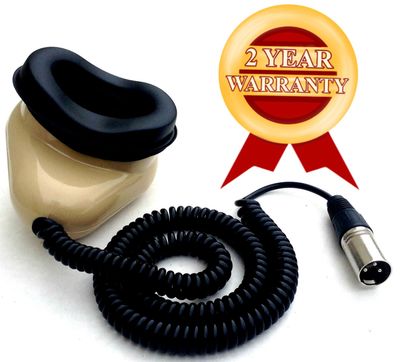
Martel’s MM-XLR stenomask is an example for a compatible XLR microphone path. It serves voice writing rather than replacing a room microphone. The DM246 V2 courtroom system represents a larger recording workflow; confirm its exact microphone package and channel setup.
| Connection | Typical destination | Main check |
|---|---|---|
| USB | Computer audio input | Device selection, data connection and software support |
| 3.5mm | Compatible microphone input | Socket function, wiring and microphone power |
| XLR | Compatible recorder, mixer or interface | Input type, gain and specified power requirements |
A passive plug adapter changes a physical connection or wiring; it does not automatically provide the electronics of a USB audio interface. Before buying adapters, write the entire path in order. If one step is unclear, identify the device model and input label before proceeding.
In Windows, Microsoft documents microphone input selection and a recorded test under System → Sound. Your CAT software may have its own input choice as well. Check both places when the computer detects the microphone but your reporting application records silence.
For hybrid work, test remote audio separately. A local microphone meter can move while the remote side is absent from the file. Use the recorder setup and backup guide to verify the saved recording and the backup path.
Mic versus line level: a microphone produces a much smaller signal than a typical line output. A mismatch can produce a weak recording or overload the input. Match a mixer feed to a supported line input using the correct cable and level settings.
Microphone power: some small microphones need plug-in power from a compatible input. Some XLR microphones require 48V phantom power. These are different systems. Apply only the power specified for the exact microphone and input; do not assume an adapter converts one into the other.
Monitoring: hearing sound through a direct headphone path confirms part of the setup. It does not necessarily prove that the recording application saved that sound. Playback of the saved file checks the complete recording route. Keep input gain and headphone listening volume separate when troubleshooting.
A simple plug adapter does not convert USB digital audio into the analog microphone signal a recorder expects. Choose a supported microphone path for that recorder.
No. Check whether the socket accepts microphone input, whether its wiring matches, and whether the microphone needs compatible power. A tested USB audio adapter may be appropriate for a supported analog microphone.
No. Microphone selection, placement, gain and routing still matter. XLR can be appropriate for an interface or mixer workflow, but the best connection is one that matches your equipment and captures the required voices.
You may be hearing a monitoring route that bypasses the recording application. Check the application’s selected input and recording state, then create and reopen a new test file.
Continue with the court reporter microphone buying guide and complete equipment checklist. Technical references: Focusrite signal-level guidance, phantom-power guidance, and Microsoft microphone testing.
