Transcription Kit Compatibility Checklist: Files, Pedals and Computer Setup
Choose and test a transcription kit using real recordings, current computer requirements, pedal controls, headset connections and acceptance checks.
Choose transcription headsets for legal secretaries. Compare fit, volume controls, mono and stereo playback, connectors and useful troubleshooting steps.
A transcription headset should make it comfortable to revisit a phrase, distinguish similar words and keep working without constantly adjusting the equipment. For a legal secretary, that involves more than choosing headphones with an appealing sound description. The connector, playback source, controls, fit and condition of the recording all affect the result.
Start with the device that plays the audio. A recorder dock, a computer headphone socket and a USB audio interface may require different connections. Then consider how long the headset will be worn and which controls the secretary needs within reach. This guide focuses on Martel’s transcription equipment and a practical way to test it before depending on it for daily work.
Dictation playback often involves short starts and stops, repeated names and occasional changes in speaking level. A headset that sounds pleasant for music is not automatically convenient for this pattern. The useful question is whether the listener can understand ordinary speech and operate the workstation comfortably.
Ask the secretary what is difficult about the present setup. Is the headset uncomfortable, is one side intermittent, is the volume inconvenient to reach, or is the source recording poor? Those problems call for different responses. Buying a new headset will not solve an unclear handoff or recover words that the recorder never captured.
Test with a representative but nonconfidential recording. Include an unfamiliar name, a date, a quiet phrase and a louder passage. Use the playback application and foot pedal that will be used every day. That complete test gives more useful information than listening to a few seconds of an unrelated demo.
Identify the playback output on the actual device. Record its connector type and the manufacturer’s supported headset arrangement. A small round socket may serve headphones, a microphone or a combined headset, so appearance alone is not enough. Check the device documentation or ask about the exact model.
A passive plug adapter changes a physical connection; it does not necessarily provide every electrical or channel function required. If a computer needs a suitable USB audio device, include that device explicitly in the plan. Avoid a chain of unexplained adapters that makes a simple playback problem difficult to diagnose.
For a no-PC dictation package, confirm the headset against the recorder or dock used for playback. For a computer package, test the selected output in the transcription application. A headset can be plugged in correctly while the computer continues sending sound to speakers or another connected device.
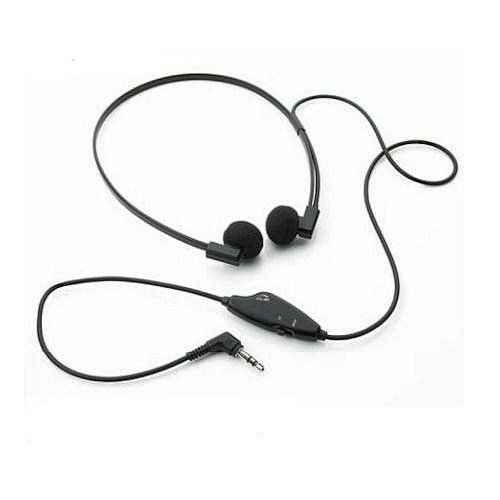
The Lanier MP555 Headset with Volume Control has a volume control and a mono/stereo switch. Those controls are useful features to evaluate when the listener works with different supported playback sources or wants a convenient way to adjust listening level. Confirm the complete connection rather than assuming the switch makes every device compatible.
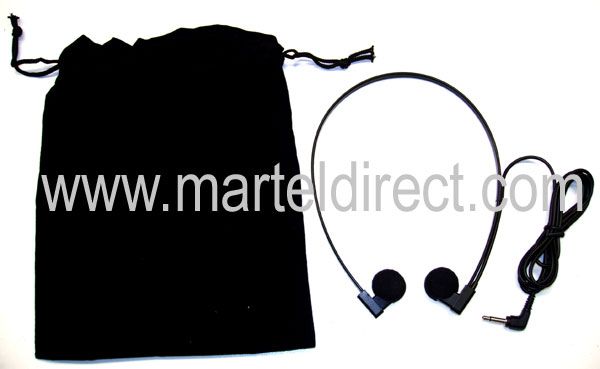
Martel also lists a Professional Transcription Headset in the style of the discontinued Sony MDRU10. Treat it as an alternative product, not an assurance that it is an original Sony unit or identical in every respect. Compare the current description, connector and fit before replacing a familiar older headset.
The Martel headset category includes other models and replacement cushions. Check the status and exact name of each listing, particularly where a product is described as discontinued. An item appearing in a category does not by itself establish that every variant is available for immediate delivery.
Mono audio uses one audio channel. Stereo uses two. The source recording, playback application and output hardware determine what reaches the headphones. Two earpieces do not prove that the recording contains two independently useful channels, and a stereo file does not necessarily assign a different speaker to each side.
When the recording contains different material in the left and right channels, the review workflow must preserve access to both. Do not casually change a setting that discards one side simply because it makes the louder speaker easier to hear. Confirm the file structure and the application’s channel controls first.
A mono/stereo switch should be tested with the intended equipment at a low, comfortable level. Listen for complete speech and balanced playback. If words disappear or one side behaves unexpectedly, check the output, wiring and supported switch position rather than assuming the source contains no audio there.
Wear the headset while sitting in the normal typing position. Check contact pressure, cable movement and whether the headset remains stable when looking between the screen and documents. If the user wears glasses, include them in the trial. Comfort is personal, so avoid selecting solely from another person’s preference.
Route the cable away from the keyboard, chair wheels and the edge of a moving drawer. Leave enough slack to turn naturally without pulling on the connector. If a volume control hangs from the cable, place it where it is accessible without dragging across the desk or striking the microphone used for other work.
Try a meaningful period of ordinary transcription, including pauses and replay. A lightweight feel during a brief fitting does not answer every question about a longer session. Note any recurring adjustment the listener makes. The aim is equipment that supports the work without demanding constant attention.
Start low and increase only as needed for comfortable understanding. Check the application volume, computer output and any headset control rather than raising one setting to compensate for another that is accidentally reduced. If the recording is unexpectedly faint, compare it with a known good file before deciding that the headset lacks sufficient output.
Playback speed can help with difficult material when the application supports it, but use it carefully. Slowing a phrase may make a sequence of words easier to examine; it does not guarantee that an unclear sound becomes certain. Return to normal speed when checking whether the wording makes sense in context.
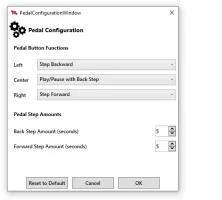
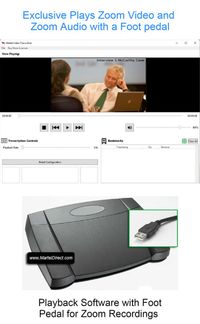
Pair the headset with a supported foot control so the typist can replay a phrase without repeatedly reaching for the mouse. Our transcription foot-pedal buyer’s guide covers the hardware choice, and the Infinity setup guide explains how to test commands while typing.
| Problem | First check | Useful comparison |
|---|---|---|
| No sound | Selected output, plug seating and volume | Play a known good file through the same application |
| Sound only on one side | Source channels, connector and supported mono/stereo setting | Test the headset with a known compatible source |
| Intermittent sound | Cable and connector condition | Observe whether normal cable movement changes the symptom |
| Speech remains unclear | Original recording quality | Compare another recording before replacing hardware |
If there is no sound, begin with ordinary onscreen playback. A foot pedal problem can make the file appear silent because playback never started. Confirm that the recording moves and that sound is routed to the intended output. Then inspect the connector and controls.
If one side is missing, do not immediately conclude that the headset is broken. The file may contain different channels, the plug may be incompletely seated or the output may require a different supported connection. Test with known compatible equipment and a known good recording to separate those possibilities.
If the cable is damaged or sound repeatedly cuts out during normal use, stop relying on that headset for important review until the issue is resolved. Keep a tested replacement if uninterrupted playback is essential to the office. A spare is useful only when its connection has also been checked.
A complete transcription kit can reduce the number of separate purchases. The All N One Transcription Kit includes a headset with its human-playback tools. Compare the current package contents before adding another headset to the order. A separately selected model may still be worthwhile for personal fit, but it should be an intentional choice.
Shared desks need a clear way to restore the expected output and control settings. A colleague may have used computer speakers, a USB device or a different headset during the previous session. Keep the working arrangement documented so the next typist does not spend time rediscovering which output is active.
Use replacement cushions specified for the headset and follow the applicable care instructions. A similar-looking cushion is not automatically the correct size or fit. Inspect the earpieces and cable periodically, and handle connectors by the plug rather than pulling the cable. Routine condition checks are more useful than waiting for failure during a deadline.
It should match the playback equipment, remain comfortable during normal work and make speech easy to review at a reasonable listening level. Convenient controls can help, but the complete workstation test matters more than a broad claim that one style is best for everyone.
Listening and typing do not inherently require a headset microphone. If the same workstation is used for meetings or dictation, evaluate that separate task and its input requirements. Do not assume a listening headset provides a recording microphone unless the product explicitly includes one.
It may make available detail easier to hear, but it cannot reliably recover speech that was missing or severely distorted. Check the original audio and recording technique. Preserve uncertainty in the review process rather than guessing words because the new headset sounds clearer.
Match the source material, playback output and supported headset arrangement. If a file contains different information in two channels, ensure that both remain available for review. A mono/stereo switch is a connection feature to test, not a guarantee that every source becomes interchangeable.
Do not assume so. Martel’s listing identifies an alternative to the discontinued model. Review the current product information and fit before purchasing. Product style, brand identity and exact performance are different questions.
Browse transcription kits alongside headsets and headphones. For an author-and-secretary purchase, read the legal dictation package guide so the recording and listening sides work together.