Courtroom Microphones: Choosing One Microphone or a Multi-Microphone System
Compare single and multiple courtroom microphones. Plan speaker coverage, recording inputs, mixed audio versus separate tracks, monitoring and setup tests.
Choose a transcription foot pedal that fits your software and computer. Compare USB controls, recorder-dock pedals, complete kits and practical buying checks.
A transcription foot pedal moves playback commands from the mouse to your feet, allowing your hands to stay on the keyboard. That sounds simple, but the right purchase depends on what the pedal will control. A USB pedal for computer software, a control for a recorder dock and a meeting mute pedal can look similar while doing different jobs.
Choose the playback application or recorder first, then select a supported control. This guide explains the questions that matter for legal secretaries, transcriptionists and court-reporting support staff. It also shows when an individual pedal makes sense and when a complete Martel transcription kit is the more straightforward starting point.
Write down the exact application name, edition and version used to play recordings. Include the computer’s operating system and whether the application runs locally, in a browser or through a remote desktop. “We use a Windows computer” is not enough information to confirm that a particular foot control will operate the program.
If audio plays through a standalone recorder or docking station, record those model numbers instead. A pedal designed for a supported dock may connect to that dock rather than to the secretary’s computer. The computer can still be used for typing, but it is not controlling the audio in that arrangement.
Finally, identify the job you want the pedal to do. Playing a saved recording, controlling a live meeting microphone and navigating specialized court-reporting audio are separate functions. A product that handles one should not be assumed to handle the others. Match the stated function before comparing price or the number of switches.
| Control type | Typical task | Compatibility question |
|---|---|---|
| Computer USB transcription pedal | Play, pause and navigate saved audio | Does this application edition recognize this pedal? |
| Recorder or dock foot control | Operate playback through matching recording equipment | Is this exact recorder and dock combination supported? |
| Specialized software control | Control a defined application workflow | Which application versions and setup steps apply? |
| Meeting mute/unmute control | Change microphone status in a supported meeting setup | Does it provide the required meeting action rather than audio-file navigation? |
Martel’s foot-pedal category includes several of these types. Read each product’s purpose carefully. For example, a control sold for a Philips recorder cradle addresses a different connection from a USB control intended for computer playback. A shared brand name is not proof that two controls are interchangeable.
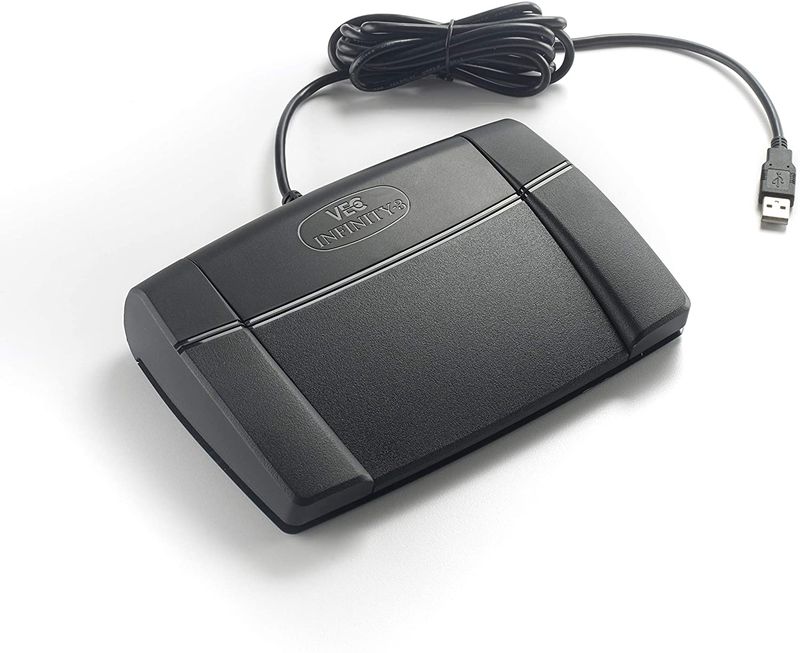
The Infinity IN-USB-3 Universal Foot Pedal provides three controls for supported computer transcription software. Martel lists play/pause, rewind and forward functions. The individual pedal listing states that software is not included, so a buyer who has no playback application should account for that missing part of the system.
The word “universal” does not mean every audio player accepts the pedal automatically. Treat it as a product name and verify your actual application. Ask whether support is built into the edition you own, whether a controller setup is needed and whether the pedal continues working while you type in another program.
If you already have a working transcription application and simply need a replacement control, an individual pedal can be appropriate. Test or confirm compatibility before retiring the old one. If you are starting from scratch, a matched kit can reduce the number of separate purchasing decisions.
The Martel All N One Transcription Kit combines playback software with a USB pedal and headset. It is an option for someone who needs the listening and control side of the workflow together. Compare its current requirements with the computer that will actually be used, including installation permissions and any software entitlement needed for an additional workstation.
A kit should still be checked against the recordings you receive. Standard audio files, video files and specialized multichannel court recordings are not necessarily the same playback task. Choose the appropriate kit for the source material. Avoid assuming that a basic audio-player package provides every feature of a dedicated courtroom transcription system.
Before ordering, send the equipment model and file-format information through Martel’s contact form if the combination is unclear. A focused question such as “Will this pedal control this software version while I type?” is more useful than asking whether the pedal works with computers in general.

The pedal should sit where the typist can operate it without stretching a leg or twisting the chair. Leave enough room for the chair base and the movement needed to reach each switch. Test the position with the actual desk, shoes and seating arrangement. A control that feels convenient for a few seconds may be awkward during a longer assignment.
Check whether the pedal remains in place on the floor surface. Route the cable so it does not pull the control away from the user or pass through chair wheels. Avoid attaching a cable under tension to a laptop at the edge of a desk. Good placement protects both the connection and the user’s ability to maintain a comfortable working position.
Ask the typist to perform several minutes of normal work rather than repeatedly pressing one switch. Include stopping at punctuation, rewinding to an unfamiliar name and moving forward after a review. The best control layout is one the user can operate reliably without looking down or interrupting typing.
Playback can operate as a toggle, where one press starts and another stops, or as a held action, where playback continues while the switch is pressed. Available modes depend on the application. Neither is automatically best for everyone. Test the mode the typist expects so an unexpected release or second press does not disrupt the rhythm of the work.
Distinguish rewind from automatic back-step. Rewind moves through an earlier portion of the recording while operated. Back-step usually replays a short preceding passage after a pause, if the application provides that feature. Too much back-step can repeat whole sentences unnecessarily; too little can make it hard to recover context. Adjust gradually using a sample assignment.
Record the final assignments in a short workstation note. This helps when a replacement pedal arrives or another secretary covers the desk. Use the application’s own control settings where supported instead of stacking several competing controller utilities. Multiple programs trying to interpret one pedal can make troubleshooting unnecessarily confusing.
Check the physical port and the software support separately. A USB adapter can change the connector shape without adding application compatibility. If a laptop has only USB-C ports, confirm that the proposed adapter supports the required data connection and the connected pedal. A charging-only arrangement will not establish control of the transcription application.
For remote desktops and virtual workstations, ask the administrator how USB devices are passed into the session. A pedal can be visible on the local computer while remaining unavailable to software running elsewhere. Verify the actual remote configuration rather than assuming a successful local test proves the whole workflow.
Also test the audio file independently. If the recording cannot play using the application’s onscreen controls, pedal troubleshooting is premature. Confirm file support, output selection and normal playback first. Then test the pedal’s recognition and assignments. Our Infinity USB setup and troubleshooting guide follows that sequence.
Save the software version, pedal model and successful settings with the workstation documentation. This is more useful than keeping only the purchase receipt. If an update later changes behavior, the office has a known working configuration to discuss with support.
No. The player needs a supported way to receive the pedal’s commands. Confirm the exact application and edition. USB recognition by the operating system is only one step; the transcription program must also interpret the controls correctly.
The Martel IN-USB-3 listing states that software is not included. If you need an application as well, compare the complete transcription kits. Check the current package contents rather than assuming that a pictured pedal and a kit are the same purchase.
Only when that exact combination is explicitly supported. Recorder docks may use their own foot-control arrangements. Compare model numbers and connections with the Philips cradle foot-control listing or the relevant product for your recorder.
It can make replay and navigation more convenient, but it does not understand or correct the words. Clear recordings, careful listening and a review process remain necessary. A foot control changes how the person operates playback, not the content of the saved audio.
Check the pedal and the playback software together for the exact operating-system version. A hardware listing mentioning Mac support does not mean a Windows-only software package runs on that computer. Confirm the complete proposed setup before ordering.
Choose a pedal when a compatible playback application and suitable headphones are already working. Consider a kit when those pieces are missing or need replacing together. Browse Martel transcription kits and the legal-secretary headset guide to complete the comparison.