How to Connect a Court Reporter Microphone and Headphones to One Laptop Jack
Use one combination socket for a separate court reporter microphone and listening headphones. Verify capture and playback independently in Windows 11.
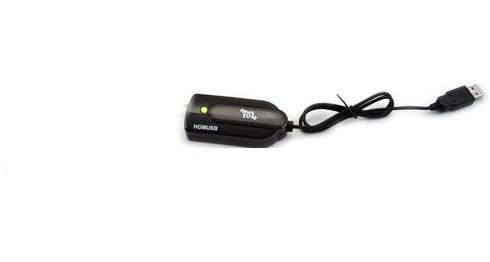
When a legal videographer offers you an audio feed, the most useful first question is, “Whose microphones will I receive?” A clear witness microphone is valuable, but you may also need the question that prompted an answer. Next establish how the signal will reach your laptop and whether your reporting software can save and replay it. The Martel Easy USB interface for a legal videographer’s mixer, SKU 2076, is designed to bring a compatible feed into a reporting laptop. This guide follows one practice exchange from the people speaking to the reporter who reopens the job and listens afterward.
Imagine a preparation room with two professionals setting up different equipment. The videographer has a microphone for the person answering questions and another audio source for the person asking them. The reporter has a Windows 11 laptop and a reporting application with a practice job open. Before either person reaches for a cable, the reporter describes the intended result in a sentence. “When I reopen this job, I need to hear the question, the answer and a spoken correction in their proper order.” That gives the videographer something concrete to demonstrate and gives the reporter something concrete to check.
Make a short list of the sources whose words matter to that particular setup. Use neutral desk names for practice, such as Maple and River. Identify the physical microphone the videographer expects to carry each speaker. Ask whether the proposed feed includes both microphones and whether any other source has to be included. If a remote participant will be heard through a separate meeting arrangement, put that participant on their own line. Hearing the participant in the room does not establish that the same sound reaches the offered mixer output. Arrange a separate authorized check for that path.
Ask the videographer which output is intended for you. The feed supplied to the reporter may be configured differently from what the videographer hears in headphones or saves with the camera. A microphone can be present in one mix and absent in another. The operator responsible for the mixer is best placed to identify the output and say what sources it carries. The reporter can then check the downstream result. If the two observations disagree, each person knows which part of the route they are in a position to investigate.
Set reasonable boundaries around the test. Use a fictional exchange in the preparation period while everyone understands it is a rehearsal. Choose an approved file location and a practice job clearly marked for training. An invented appointment time, a folder color and a correction give you plenty of detail to listen for. You can exercise the equipment without using a real witness statement, a prior client's recording or material from a live matter. Leave operational decisions about when the proceeding is recorded to the responsible people and the applicable procedures.
Think of the setup as a path with named endpoints. A microphone supplies sound to the videographer's equipment. The videographer selects an output carrying the agreed sources. A compatible connection carries that output to the interface. The interface connects to the laptop through USB. The recording application chooses the intended input and saves it in the practice job. A reviewer later opens that job and listens through a known working output. A failure at any one of these points can sound like silence to the person wearing the headphones.
Martel describes SKU 2076 as an interface for recording a live feed from a videographer's mixer on a laptop. The package description lists the interface, a cable and instructions. Those particulars are a starting point for preparation. They leave some details to confirm for the equipment in front of you. Ask for the endpoint and signal type the videographer intends to provide and for the connection supported by the exact Martel package. Photographs of connector ends, the mixer model and the output's printed label are useful when asking Martel which connection is appropriate.
Do not choose the connection solely because a plug fits into an opening. The purpose and level of the output, its supported connection and how the receiving device is intended to be used all matter. When the participants cannot identify the offered output, have the equipment operator identify it using the manufacturer's instructions before connecting the receiving equipment. There is no universal setting in this guide for mixer gain, an arbitrary output level or connector wiring. The number that matters during the rehearsal is the recorded detail a reviewer can actually recover after the equipment has been connected as intended.
The reporter and videographer may both use the word “cable” for different parts of the path. Be specific. “The cable from your agreed mixer output to my interface” identifies one connection. “The USB connection from the interface to my laptop” identifies another. Put the physical pieces on the table and ask the person packing the kit which ones travel with the reporter. A reporter who has only the USB-connected device in a case may still need confirmation of how the first connection will be made at the destination. Resolve that before the appointment.
If you are also deciding how to connect several microphones before offering a feed, see the Martel guide to microphone splitters and mixers. Once the source equipment is chosen, the reporter still needs to check what arrives in the saved job.
A single spoken count checks whether some sound gets through. It will not tell you whether multiple microphones are present if the same person reads every number from one position. Prepare a brief exchange instead. Give each source a word or number that the other speaker does not say. Write down who should speak, which microphone the videographer expects that person to use and what a reviewer should be able to identify. A handful of distinct cues is usually enough to separate a missing person from a missing beginning or ending.
For example, Maple can say, “The blue folder holds six pages.” River can reply, “I count nine pages in the green folder.” Maple can make a correction, and River can read the new total. Maple can finish with a word that does not appear elsewhere in the exchange. This example tests the identity of two voices, whether the reporter can hear a correction, and whether recording continued through the ending. There is no need to ask participants to perform a script they find awkward. Replace the words with equally harmless ones suited to the training group.
Give the reviewer only the portion of the sheet they need on the first listen. They should know they are listening for two sources, a number and an ending. If they also know every answer in advance, they may unintentionally supply a word the recording did not capture clearly. Have the reviewer identify the words first and check the answer key afterward. An entry such as “I heard nine and green, but the last word was uncertain” is much more useful than a checkmark beside “audio good.”
Choose a new identifying phrase each time you make an important change. “Run two, yellow card” distinguishes the second capture from the first even if the program assigns a similar default name. If you are working in a reporting job with synchronized audio, also put a short practice note near the exchange using the application's ordinary method. Later the reporter can see whether the expected audio is recoverable at that point in the saved job. Name the job, the run and the approximate position the reviewer used so the next person opens the same material.
Connect the confirmed equipment in the supported arrangement and have the operator supply the agreed practice feed. On the Windows 11 laptop, open Start, then Settings, System and Sound. Look under Input and identify the recording device the interface uses on that computer. The displayed name can depend on the computer and its configuration. Record the exact name you see. A familiar microphone name is not enough if the laptop also has a built-in microphone or another USB audio device. Select deliberately and make a fresh practice recording after any change.
For an initial check, use the input test offered in Windows sound settings or an empty practice recording in an approved application. Speak from the named source rather than from directly above the laptop. Listen for an identifying cue. If the laptop microphone remains a plausible source, ask the videographer to change which authorized practice cue is being sent through the offered output while a separate harmless sound remains in the room. Have the operator make that change on the training setup. A different result at the reporter's end helps identify the path. Restore the agreed sources before making the intended comparison.
Open the reporting software and check which recording input it will use for this practice job. Its settings may differ from the Windows default or from the choice used in a separate recorder application. Use the application's normal workflow to begin the training recording, complete the exchange, stop normally and save the job. If an application can display input activity, note whether it responds during the exchange. Then reopen the saved job and listen. A moving meter is a useful intermediate observation but leaves open which person was picked up and what the application saved.
Martel's product page mentions a green indicator in its description of use with audio synchronization programs. An indicator belongs on the setup sheet as an observation about the equipment. It cannot identify which microphones the videographer supplied or tell you whether a particular word survived in the saved job. If the device indicates activity and a voice is missing, give support both observations. They can be true at the same time. This distinction also prevents people from abandoning a functioning interface because one source was left out of the offered mix.
A silent pair of headphones can make a good recording appear empty. Before evaluating the newly received feed, play a harmless known-good recording through the output you intend to use for review. Identify a word near the end of the known file. If you hear it from the laptop speakers when you expected headphones, pause and correct the output choice using the training file. If you hear nothing anywhere, establish a working playback route before drawing conclusions about the mixer or USB input.
Now open the new practice recording without disturbing the upstream connection. Ask the listener to write down a detail from the first speaker, a detail from the second speaker and the final marker. Note whether each came through on the first listen or after a replay. If the listener is wearing headphones in the same room as the people performing the test, wait until the room is quiet before reviewing. Otherwise they may confuse speech they heard directly a moment ago with words they can recover from the file.
If the new file opens but one word sounds unclear, repeat the uncertain region and identify its approximate elapsed time. Compare the same passage on a second known playback route if available and authorized. The same unclear word in the same place on both gives the videographer and reporter a specific capture to investigate. If the problem changes with the listening device while the file stays the same, the review setup deserves attention first. Replacing a cable upstream will not change sound that has already been saved.
Treat the full handoff as successful only after confirming the conditions you actually need. A separate test recorder on the laptop might receive both microphones while the reporting software still records its built-in microphone. A reporting application might capture the exchange correctly while its synchronized playback is being checked at the wrong point in the job. Write each observation beside the relevant application and file. That detail keeps one successful demonstration from being mistaken for a completed check of every recording path on the desk.
We constructed three short desktop audio files for this guide. Each is twenty-seven seconds long and uses synthetic speech with five planned cue positions. The files were made on a computer from invented text. No videographer, mixer, USB interface or actual proceeding was involved in generating them. The exercise isolates something that is hard to demonstrate with product specifications. Recordings can have identical durations and plausible openings yet contain very different amounts of the conversation a reporter needs to hear.
| Approximate start | Role in the fictional exchange | What the cue contains |
|---|---|---|
| Two seconds | First desk | Maple desk has six folders |
| Seven seconds | Second desk | River desk has nine folders |
| Twelve seconds | First desk | Move two folders to Pine |
| Seventeen seconds | Second desk | Pine will now have five |
| Twenty-two seconds | First desk | Close the green binder |
In the complete reference, all five cues are present at their assigned times. In a second version we kept the first desk and omitted the second desk. The opening, central instruction and ending remain. A reviewer who inspected only the beginning and end of this file would have two reassuring observations and would still miss both omitted answers. That is why a check of each participating source belongs on the reporter's sheet. The fact that one person dominates the first moments of a proceeding is a poor reason to let only that person's voice stand in for the whole test.
In the third version we kept both desks' first exchanges and omitted only the closing cue. A reviewer who checked the opening question and the first answer would again get two positive results, this time from different sources. Listening close to the end uncovers a different problem. The file runs for the same twenty-seven seconds as the others. Its nominal duration does not tell the reviewer whether the required ending is actually there. File length can help locate a recording but is insufficient as a test of content.
We reopened the three generated files and checked the sample data in each of the five planned speech windows. The complete file had audio in five windows. The one-source file had audio in three. The file with the missing ending had audio in four. These checks confirm where the synthetic audio was placed in the files. They do not measure speech clarity or predict a result on a customer's equipment. A reviewer still has to identify the numbers and words in an actual recording. On a live room feed, background noise can make a meter move during a missing word.
To run your own version, use two consenting practice speakers and a cue sheet with five different lines. You can use the table as a starting point, but change the names and numbers for each trial. Make a capture through the actual reporting setup. Have a listener write down the details without seeing the full key. If a cue is missing, compare the observed pattern with the examples. Missing both second-desk cues points to a different question from losing only the final phrase. The exercise gives the team a way to choose the next observation without claiming it has already found the cause.
Suppose the reporter reopens the training job and hears the witness clearly but cannot recover either of the questioner's two cues. First verify that the reviewer is playing the practice run just completed. Read the opening marker aloud from the saved job. Next ask the videographer whether the questioner's microphone was present at the specific output assigned to the reporter during those two moments. A successful recording elsewhere in the videographer's system is helpful context, but the most relevant upstream observation is what the actual supplied output carried.
If the operator confirms that the second source was excluded from the feed during the first pass, document the finding in ordinary language and let the person responsible for the mixer make the agreed change. Run a fresh practice exchange with new words from both desks. Keep the source that previously worked on the cue sheet. Correcting one missing voice is only half the retest; you also want to know that the original voice still reaches the reporter. Save and reopen the second job or file under a distinct training label.
If the operator cannot yet establish whether the second source reached the output, keep the source status open. There is no need to raise every level, change laptop inputs and swap cables at once. Try an authorized short exchange in which the two desks take separate turns at known times. If the reporter's file still contains only one, the exact timing tells the operator when to inspect the proposed feed. The parties can then compare a specific observation on each side of the connection. A precise unanswered question is more valuable than a confident but unsupported diagnosis.
Partial speech presents a different puzzle. A listener may hear a speaker's voice but lose a corrected number when the two people talk over each other. Review the event in context. Did the corrected number disappear only during overlap, or was the same speaker unclear even while alone? Rehearse both conditions using harmless words. If the isolated cue is clear and the overlapped cue is uncertain, note both facts. Raising playback volume affects everything in the recorded mix, including the other voice. It cannot turn a single mixed recording into individually recorded sources.
A replacement reporter arriving after the equipment has been laid out needs a description that works without the first person's memory. Put the videographer's identified output, the receiving interface, the Windows input name and the practice job name on one note. Include how to find the exchange during playback and which words were actually recovered. “Both rehearsal voices and the final color were checked through the reporting application” tells the incoming person what has been established. Name any requested source that is still awaiting a test.
A change of laptop, a disconnected USB device or a new mixer output deserves a fresh short check. Aim the check at the part that changed and finish with a review of the saved practice job. If the same videographer supplies a different output for a new room, the earlier result establishes the old route. It says little about which sources the new output carries. If only the reviewer changes headphones, keep the existing working recording and verify the new listening route with a harmless reference before changing the capture arrangement.
At the end of the rehearsal, note what each person took back. The reporter's USB interface and the videographer's output cable may look like one connected piece on the desk yet belong to different kits. Record who supplies the connection at the next assignment and keep the setup card with the equipment it describes. For a purchase inquiry, send Martel the interface SKU, the identified mixer output, laptop model, software used and the exact result required. Those details make it possible to answer a compatibility question without reconstructing the entire rehearsal from a statement such as “we need better audio.”
For a final rehearsal, give the first desk a card that reads “six folders” and the second desk a card that corrects the number to “sixteen folders.” The first desk then confirms the correction and says where to place the folders. Give the independent listener three spaces to fill in. What did the first person say? Who corrected the count? Which count and destination did the closing instruction confirm? In a reporting workflow, a clear final number can be useful while the origin of the correction is still important. Capture enough of the exchange to distinguish those outcomes.
Here is one plausible set of practice notes. The reviewer writes “six” for the opening, marks the second line uncertain, and writes “sixteen at River” for the closing instruction. The final value was recoverable, but the reviewer did not independently establish who corrected the opener. Another reviewer might record the opening and the correction accurately but miss the destination at the end. Combining both notes into “passed because we heard sixteen” leaves the buyer with an incomplete picture of what was heard. Preserve the initial answers separately and identify the missing detail on each sheet.
To plan a useful second run, vary just the circumstance under investigation. If the uncertain line occurred while the speakers overlapped, ask them to repeat with separate turns and new numbers. If the uncertainty occurred throughout the second person's speech, ask the videographer to verify that source at the supplied output before changing how the reporter listens. If only the destination at the end is missing, allow an ordinary pause between the closing words and stopping the practice recording. Then check the reopened job again. Describe the result in terms of the cue that changed and the cue that stayed recoverable.
It provides a USB-connected receiving device for a compatible live audio feed from a videographer's mixer to a laptop. The videographer still supplies and selects the source. The reporter still chooses the input in the recording application and saves the practice job. The product listing describes an interface, a cable and instructions. Before ordering, identify the output the videographer plans to provide and ask Martel to confirm the connection for that output. That is more useful than giving only the name of the camera being used.
The product description also discusses receiving an appropriate direct feed from a courtroom microphone or audio system. In either setting, someone responsible for the source should identify the authorized feed and its connection. A reporter arriving with the interface alone cannot assume that a room provides access to its sound system. If a court or facility is involved, confirm availability through the responsible contact before planning around a direct feed. Use the permitted practice method at that location to establish what reaches the laptop.
A separate microphone hears acoustic sound at the reporter's chosen position. A direct feed receives the sources selected upstream by the mixer operator. That can put the reporter in a good position to hear a particular lapel microphone while leaving an unconnected room voice absent from the supplied mix. Define which speakers need to be heard and check each one. If the reporting workflow uses both a local microphone and a feed, verify how the actual software selects or records them before assuming both are saved.
Find out what the specific output supplies and what the receiving application can actually record. A combined mix can contain speech from several people without preserving separate editable tracks for each microphone. Hearing both training speakers in playback establishes that their voices are present in that file. It does not establish that they can be isolated individually. If separate tracks are a purchasing requirement, ask for a demonstration using distinct source markers and a saved job that shows how each track can be selected after reopening.
Ask for the mixer model, the label of the output offered to the reporter, the expected source or sources, the signal type and who provides the connection cable. Share the model of the Martel interface and the intended reporting laptop. If a particular speaker will participate remotely, ask how that audio is to reach the offered feed. Leave unanswered items visible on the setup note. A written question about an unknown connector can usually be resolved more reliably in advance than after everyone has begun setting up.
The photograph identifies the Martel interface and its USB connection. It does not document the connection panel or selected output on the videographer's equipment. Read the exact mixer output label with the operator and match it to the receiving equipment's instructions. If needed, share a photograph of that panel with Martel when asking about compatibility. Two systems that look similar on a desk can provide different outputs. The connection confirmed for one of them should be recorded with that system's model.
Bring the observation to the person responsible for the mixer. Give them a source, an approximate time or cue, and the identity of the output assigned to you. For example, tell them that both River cues were absent while all three Maple cues were present in the reopened reporting job. That lets the operator examine the source and output while the reporter keeps the receiving setup stable. Once a change has been agreed, record a new exchange and check both speakers again.
Ask exactly where the videographer heard that person. There may be a difference between headphones on the mixer, sound saved with video, and the specific feed sent to the reporter. First confirm both people are discussing the same training run and speaker. Have the operator verify the offered output while you capture a new identifying cue in your own job. If the observations still differ, the team has narrowed the investigation to a particular route and time rather than a general complaint about audio quality.
Use the device name shown by the actual laptop. The interface's catalog SKU identifies the Martel product for purchasing and support. An application's menu lists the recording devices presented by that computer's audio configuration. Those names need not match a product listing. Identify the device using harmless practice audio and record its displayed name on the kit card. If the same laptop also has an internal microphone, do a source-specific check to establish which input the application selected.
It proves activity at the point the meter represents. Room sound entering a built-in microphone can produce a convincing meter response while the direct feed is absent. Use a spoken cue associated with the supplied output, then verify the selected input and recover the cue from the saved job. A second speaker with a different marker improves the check further. Include a final cue before stopping so that a successful response at the beginning cannot conceal an incomplete recording.
A separate practice recording can answer a narrow diagnostic question. If the same agreed feed reaches a Windows recording but is absent from a new reporting job, examine the reporting application's input choice, access and recording settings. If the feed reaches neither, begin with the shared setup and the connection from the mixer. When the reporting job already passes the required test, a second program is optional. It becomes especially useful when two people disagree about where a failure starts.
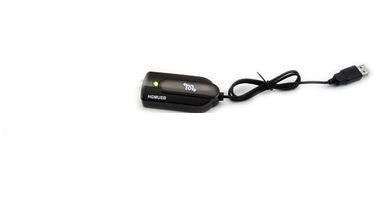
Identify the videographer’s supplied mixer output, record two practice speakers, and verify the exchange in a reopened reporting job.
Use the same file on a known playback route and focus on specific words. Ask a listener to identify a number and a correction without showing them the expected answer. Determine whether the difficulty occurs for both people, only one microphone, or only during simultaneous speech. Give that detail to the operator before making level changes. A loud combined signal can still contain a covered syllable. Raising playback level alone also raises the other sound already present in the recording.
Arrange an approved practice call from the intended remote arrangement. Give the remote speaker a unique cue no one in the room repeats. Check the cue at the supplied mixer output with the operator and then in the reporter's saved job. Keep local and remote results on separate rows of the sheet. Hearing the remote voice through a room speaker may let the laptop microphone pick it up indirectly, which is one reason to confirm the recording input and the intended feed explicitly.
Include a brief overlap in one practice pass and separate turns in another. Identify what the listener should recover, such as each speaker's final number. A missed word only in the overlap presents a different question from an entire speaker missing during separate turns. Ask whether the reported mix and recording configuration meet the actual review requirement. If a combined recording is all that is delivered, do not promise that a later reviewer can isolate each individual voice from that file.
The laptop can show what a selected recording input received and what the application saved. Identifying which physical microphone supplied a voice requires cooperation with the person operating the source equipment. Assign a different practice line to each intended microphone, have the operator identify its source and compare the supplied feed with those markers. Keep the operator's source note and the reporter's saved observations together. A voice that sounds close to a microphone provides a clue but is insufficient by itself to identify the worn equipment.
They can be used where they are supported and appropriate, but identify which device is driving them each time. Headphones connected at the videographer's station describe what can be heard at that point. The same headphones connected for playback at the reporter's station describe a different point. If the intention is to verify the saved reporting job, actually open that job and play its marker. Swapping the listener or moving the headphones does not replace identifying the source of playback.
There are several possibilities, including a change in the provided source, a recording stopped too early or a reviewer opening a different practice take. Use the distinctive opening marker to identify the file, then search for the new closing marker in that same saved job. Confirm the expected length and ask whether the supplied source continued through the closing words. Repeat with an ordinary pause before stopping. Give the new attempt its own spoken label so you can compare the two endings afterward.
Receiving sound and establishing a time relationship between two separate recordings are different requirements. Ask how the reporting application's audio is tied to the reporter's own notes, and identify any separate workflow used for comparing the video and the reporting job. A spoken rehearsal cue shared by both recordings can help identify the same training event during review. Its presence alone does not certify matching clocks, identical file start times or a guaranteed synchronization feature of the USB interface.
Identify the source microphones expected in the mix, the videographer's named output, the receiving interface, the laptop and the selected Windows and reporting-application inputs. Record the training job name and the source-specific cues a reviewer recovered. Add any approved source that was unavailable during the practice period. This gives the next reporter enough information to reproduce the setup and to distinguish a verified result from an unanswered question. Actual device names and a recovered word are especially helpful when several inputs have similar names.
Start with SKU 2076, the mixer output as identified by its operator, the laptop and reporting software, and a short description of what changed between runs. Say whether both voices reached the operator's intended output, whether Windows recorded the markers and whether the saved reporting job contained them. Mention the known-good playback route used to check. If an example is needed, use an approved fictional practice sample. Martel can then discuss the relevant connection or product question using the legal videographer mixer interface listing.