In this guide
- Choose the package for the receiving desk
- Agree on what the scopist will receive
- Make a short receiving-desk rehearsal
- Separate the source from the copy on a Windows 11 computer
- Give the scopist the right reference for time
- Work a two-part delivery from start to finish
- Test playback and foot control where the listener will sit
- Recover a missing part or a mistaken delivery
- Make the next assignment easier to receive
- Questions from reporters and scopists
Before you pack the recorder, ask your scopist one question. “When I leave with the Court Reporter 5000 this evening, what will you press tomorrow morning to hear the recording?” If the answer is a USB pedal at a Windows desk, the scopist needs a playable file at that desk. If the answer is a pedal attached to the recorder’s cradle, the recorder itself has to be there. The two answers change both the package you choose and what you need to check before the equipment leaves the room.
A scopist can usually tell you right away whether a file opens. A more revealing question is whether they can reach the last assigned passage, hear the distinguishing word and find their place again after stopping to type. This guide works backward from that moment. It covers how to choose a Court Reporter 5000 package, prepare an identifiable copy, and agree on exactly what the receiver will report back. The exercises use invented material so you can rehearse with your own equipment before a real assignment.
Choose the package for the receiving desk
Picture two desks. The reporter’s desk has to capture the job. The scopist’s desk has to play it when the reporter may already be working somewhere else. Draw a line between them. Write what actually travels along that line. It could be a recorder in a case, an audio file delivered through an approved system, or both. Once you name the item being sent, it becomes easier to tell which equipment belongs at each end.
| Martel package | The job it equips you for | The question to settle before buying |
|---|---|---|
| Court Reporter 5000 Recorder Only, SKU 1973 | Make a separate backup recording when you already have playback equipment. | Has the receiving desk opened a sample from this recorder with its existing player and controls? |
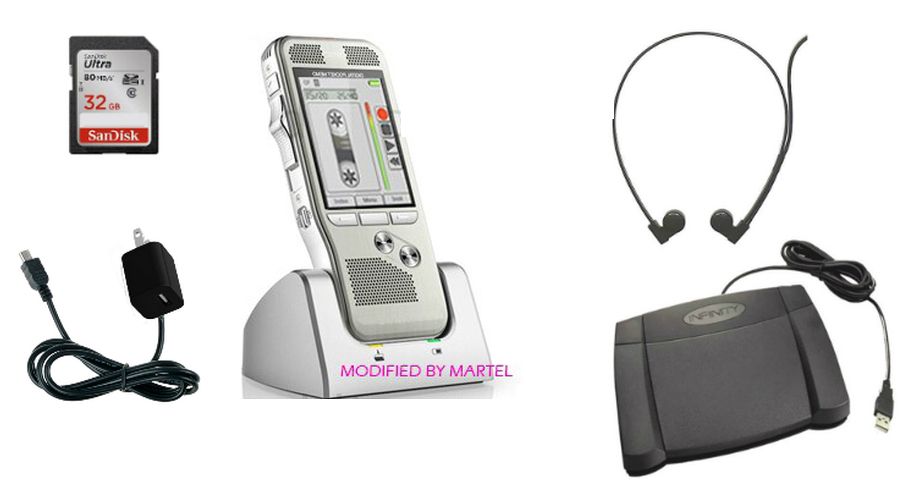
| Court Reporter 5000 Recorder and Transcriber, SKU 1491 | Review with the recorder, cradle, headset and pedal together. The basic playback workflow can run without a computer. | Will the recorder be available where the listener needs it, for the whole listening session? |
| Court Reporter 5000 Scopist Edition, SKU 1722 | Deliver an audio file for computer transcription. Martel lists the pedal, headset and software in its transcription kit. | Which computer will have that kit when the file arrives? |
| Court Reporter 5000 courtroom package, SKU 1669 | Put four battery-free Audio Grabber microphones around the room for recording and use foot control for review. | Does the receiving desk also have everything it needs to play the resulting file? |
Consider the reporter who reviews at home on Tuesday night and takes the recorder to a hearing on Wednesday. A cradle at home can be a convenient choice on Tuesday. On Wednesday a colleague at that same desk needs another way to listen. If an authorized copy opens on the colleague’s computer and the colleague can work with it, taking the recorder out of the building no longer interrupts that part of the job. You can test that condition with fifteen seconds of invented speech and the recorder safely put away.
Where you need extra coverage at the recording end, the four-microphone package addresses a different purchase decision. Four people sitting at different points around a table need audible speech from those positions. A scopist seated elsewhere needs an intelligible recording and a controllable player. Have someone speak from each intended place during rehearsal, then let the scopist describe what came through. A microphone count on the product page tells you how many external microphones the package supplies. Establish the channel layout of the delivered file separately before promising a particular type of review.
For a first equipment list, make two columns on a piece of paper. Put each physical item in the column for the desk where it will stay. Count the pedal once. Count the headset once. Draw the time the recorder leaves beside its entry. An item you have written at both desks for the same hour is the first part of the order to reconsider. This simple exercise also helps an agency use equipment it already owns. A verified receiving setup can make the recorder-only version a practical addition to the reporting side.
Agree on what the scopist will receive
Write a handoff note short enough to read on a busy afternoon. Include a job label both people recognize, the parts assigned, their order, their approximate running times, and the person who will answer a discrepancy. For an exercise, use a neutral label such as Fern. In actual work, follow the naming and delivery instructions for the assignment. A filename copied into an ordinary message can reveal a matter’s identity. A label both desks already understand often lets the note do its job with less information.
Add one sentence that says how the assignment ends. “Review Part B through the spoken words ‘second shelf’” tells the reader much more than “do the afternoon.” It gives the scopist an endpoint and gives the reporter a quick way to recognize a missing passage. For actual work a shared reference might be an approved time and a neutral description of a transition. The invented spoken phrases in this guide belong in practice audio. Follow the proceeding’s instructions for when recording or speaking is permitted during real work.
Decide who will keep the source, who receives a working copy and who confirms receipt. Those jobs may belong to two people or three. At a shared agency, one person may deliver while another listens the next day. Arrange for the playback result to get back to whoever holds the original. A delivery notification that reaches the office inbox solves only the transport part. It takes the person who actually opened the recording to tell you whether the assignment arrived in usable form.
Use the same words for the parts at both desks. If the reporter calls them “before break” and “after break,” put those words next to the actual filenames. If the scopist uses numbers, add the number alongside the label. Avoid silently renumbering files as a folder moves down the line. A note such as “Fern B, source 014, afternoon exercise” lets either person connect a later question to the same recording even after making a more readable working copy.
Make a short receiving-desk rehearsal
Use your own voice or a colleague who has agreed to record an exercise. Set a small object on the left side of a table and another on the right. Begin the first practice recording with “Fern A, left tray.” Give a middle instruction such as “put the blue tab under the map.” End with “Fern A, drawer closed.” Stop and save the recording using the normal recorder controls. Start a second file and use different words at all three positions. This provides more information than one long count to ten.
Give the listener only the assignment label and the expected order. Ask them to write the object from the middle of the first file and the ending of the second. A listener who replies “blue tab, drawer closed” heard two details but may have stayed in the first file. A listener who can identify both file endings and the requested middle object has demonstrated that they moved from one file to the other. Compare their response with your written reference after the exercise. No one needs to infer which person misheard a real name.
Finish the rehearsal on the device and in the program the scopist intends to use. A quick listen through the recorder speaker can catch an empty recording early. Opening the transferred copy in the selected program then tests something else. The program must recognize the file and it must send the sound to the headset the scopist will wear. Returning to the carton or to a different media player in the middle of this exercise makes it difficult to tell what the receiving setup can do on its own.
Change one detail for the second run. Let the reporter leave with the recorder, switch the receiving computer to a different authorized work location, or hand the second file to a different assigned listener. Pick only the change that reflects the intended job. If something fails after that one change, you have a concrete starting point for investigation. If you change the file type, the player and the pedal at once, even a successful exercise leaves you unsure which combination to repeat.
Separate the source from the copy on a Windows 11 computer
Start with a stopped, saved practice recording. Connect the recorder or its media using the transfer method documented for your equipment. Open File Explorer on the reporting computer with the Windows key and E. Use the navigation pane to find the location that actually contains the recording. Read the filename in that location and play enough of the practice clip to recognize it. A recent-files list can point to an older copy on the computer, even while the recorder is connected.
Turn on filename extensions if the ends of names are hidden. In File Explorer select View, then Show, then File name extensions. The ending allows you to distinguish Fern-A.mp3 from Fern-A.wav in a note or on screen. The Court Reporter 5000 listings specify MP3 and WAV recording. If the receiver has requested one of those formats, agree on it during the practice run. Changing the letters after the period changes the label a program sees. Creating audio in another format requires an actual recording setting or conversion.
Create an approved receiving folder for the exercise before you start copying. Select the intended source file, use Copy, open the destination and use Paste. Wait for the transfer to finish. Now go to the destination folder itself, select the file there and open it. Look at which folder is open when you do this. On a desk with two nearly identical File Explorer windows it is easy to open the good source a second time while an incomplete copy sits untouched in the other window.
Once the copied practice file is closed, disconnect the recorder or media using the normal safe removal procedure for that connection. Reopen the file from the computer’s destination folder. This small step answers a costly question. Can the new desk keep playing after the reporter takes the recorder away? If opening the file asks you to insert the old device, inspect the file type and location. A shortcut can retain the familiar name and icon while pointing back to audio that has already left the building.
Compare the file sizes in bytes when a simple copy is expected. In Windows you can right-click each file and open Properties. Compare Size rather than the space occupied on the disk. A difference gives you a reason to check whether you selected the same source and whether the transfer finished. An equal size is a useful comparison, but it cannot identify a wrongly selected recording of the same size. The spoken references and the size comparison answer different questions about the delivery.
Give the scopist the right reference for time
A time on the recorder’s clock and an elapsed time in a player mean different things. “At 2:15” could mean fifteen minutes past two in the afternoon or two minutes and fifteen seconds into the audio. Write the unit and the reference together. “Fern B, elapsed 02:15, just after the shelf is mentioned” directs the listener to a particular part of one recording. It also describes what to listen for if the two players display time a little differently.
Short files make this distinction easy to practice. Suppose Fern A runs 03:40 and Fern B runs 02:30. If someone combines those practice files with no inserted gap and in that order, an event at 00:35 inside B falls at 04:15 on the combined timeline. A scopist opening B separately should seek to 00:35. Give the recipient the time that matches the file you actually supplied. Adding the two durations yourself can be useful during rehearsal. A join, an edit or an added silence can change the arithmetic in an actual exported file.
Suppose instead that the scopist says the requested cue appears eight seconds earlier than your note. Listen for a second reference later in the same part. If both references show the same difference, check whether one person is using an edited lead-in or timing from first speech. If the difference widens, first verify that you are comparing the same file, that you both mean elapsed playback position and that the quoted times were read from the player. A single timing discrepancy gives you little basis for changing or re-exporting a source file.
Use words as well as numbers in a correction request. “The second mention of the blue tab in B, immediately before the drawer opens” survives a small display difference better than “somewhere after two minutes.” It also protects against a reviewer landing on the first of two similar phrases. Where sharing words from actual material is restricted, use the allowed reference and exchange detailed questions through the approved channel. The exercise can still teach a reporter how to give the listener an unambiguous place to start.