Receiving a legal videographer's feed is an interface question
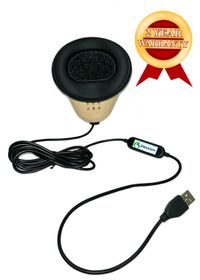
Martel's Easy USB interface is listed for receiving a feed from a legal videographer's mixer or another compatible audio system into a laptop. Its role is different from placing several new microphones around the room. It provides a computer connection for a source that already exists elsewhere in the audio arrangement.
Before an assignment, ask what the supplied feed contains. Does it include the required microphones? Is it a combined mix or a particular source? What connector and signal level will be supplied? Who controls its level and availability? These questions define the handoff between the source operator and the reporter's recording path.
Do not assume that a feed contains everything audible in the room. A source operator may be routing particular microphones or changing their mix during the work. Agree on the intended contents and verify them with a sample. If a separate room recording is also required, plan it explicitly rather than assuming the feed supplies a complete independent record.
Confirm the exact feed, cable and receiving computer arrangement with Martel. Broad product language should not be interpreted as permission to connect any electrical output to the interface. The supported signal and connection matter. Include the receiving application and selected device name in the setup notes.
Test the saved result on the reporter's computer. A source operator hearing a good mix at their own equipment does not establish that the receiving application selected the correct input or saved it correctly. Verify the handoff at both ends. Keep the responsibilities clear so that a later problem can be located in the source, connection, interface, application or file stage.
Choose multichannel recording when separation is required
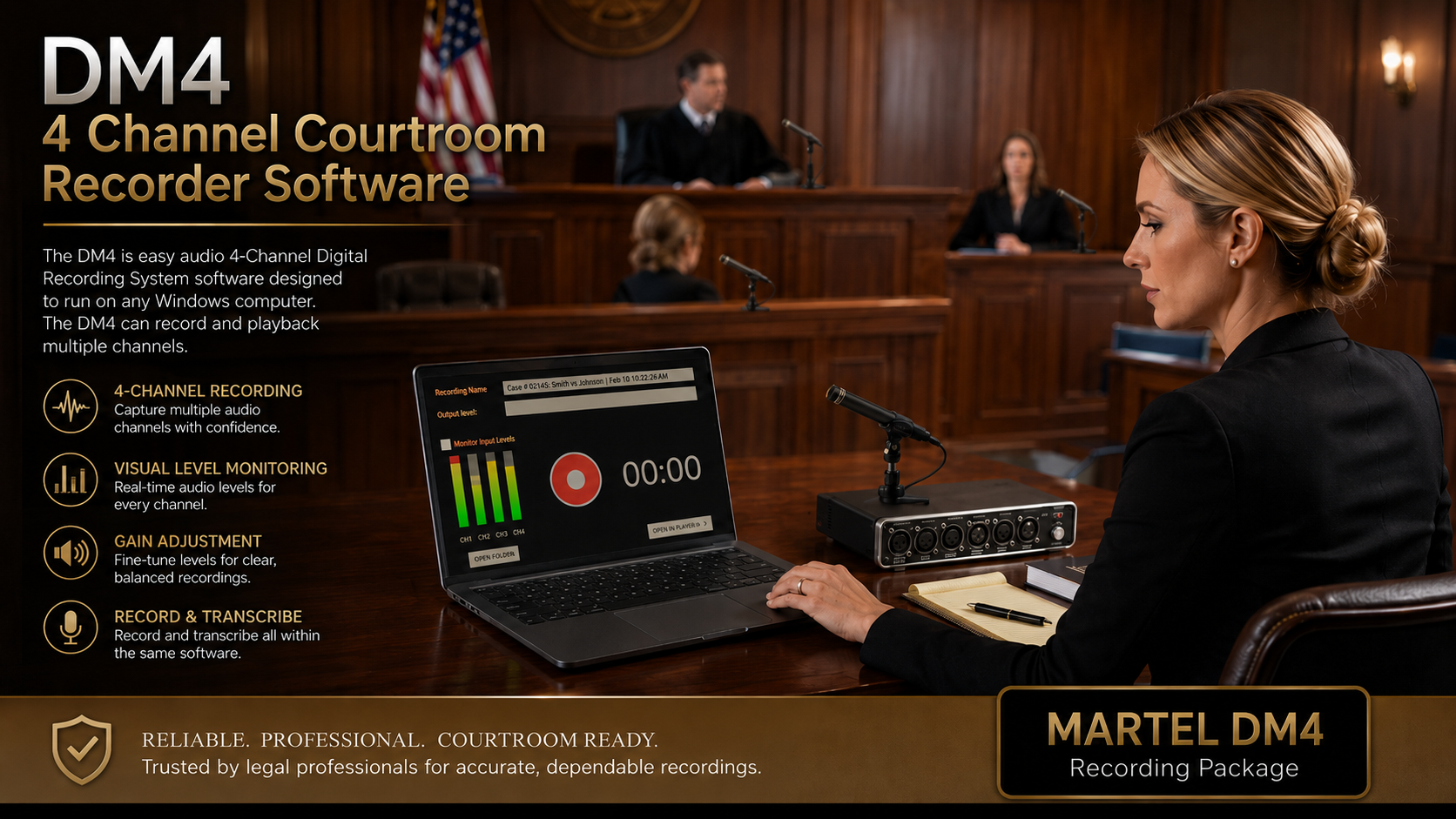
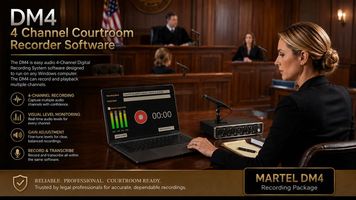
4 Channel Courtroom Recorder Software hardware - DM4 with 4 Microphones package. Martel’s DM4 product illustration. The computer shown is not included with the recording package.
If the reviewer must choose among separately saved microphone feeds, begin with that requirement. A mixer with several inputs does not establish it. The hardware must expose the needed channels, the recording software or device must save them as intended, and the review application must present them in a usable way.
Martel's DM4 arrangement is a separate purchasing path for computer-based four-channel courtroom recording. Its listed package includes a USB interface and recording software with microphones and accessories, while a compatible Windows computer is separate. Compare it with a mixer arrangement on the basis of the saved channel requirement, not only microphone count.
Create a test that distinguishes the channels. Speak from one planned microphone position at a time and identify the position aloud using test language. Save the recording, open it in the intended review software and select each required channel. Confirm that the map corresponds to the physical arrangement and describe any combined feeds.
Separate channels are still not automatic speaker identification. A microphone can hear several people and room sound, and people can move. Label the channel by its intended position or feed and record relevant changes. Do not promise that channel selection will remove every overlapping voice or recover speech that was not intelligibly captured.
When comparing quotes, include the review equipment and software needed to use the saved channels. A recording feature has limited practical value if the receiving reviewer cannot access it. The acceptance test should therefore end at the review workstation, with the actual files and the person who will use them.
A Y-shaped cable can mean several different things
The shape of a cable does not define its electrical function. A Y-shaped accessory might distribute a signal, separate left and right channels, adapt a headset connection or serve another specific wiring arrangement. Identify its intended direction and pin connections from the documentation. Do not select it only because it has the right number of plugs.
A stereo breakout is a useful example. It can separate the left and right connections of a compatible stereo source into their intended destinations. That is different from making two complete copies of one microphone feed. A buyer who confuses those jobs can end up with a missing channel or an unintended connection while every plug appears to fit.
Combining two active outputs is another distinct problem. Use a purpose-built, supported combining or mixing arrangement rather than assuming a simple cable is a suitable summing device. The Radial MIX 2:1 description illustrates a designed summing function and its stated conditions. It does not establish that any arbitrary cable or Martel accessory performs the same function.
When asking for help, describe both ends of the proposed cable. Include the source device and output label, the destination device and input label, and the required result. If a package includes a particular splitter or adapter, keep it identified with that package. A supplied accessory can be appropriate in its designed arrangement without being a universal solution for other equipment.
Test the complete connection after it is confirmed. Use a sample that identifies any left/right or separate-channel distinction you need to preserve. Listen to the saved result through the intended review software. Physical fit and a momentary sound check are not enough to establish that the routing matches the job.
Keep microphone power in the connection plan
Some microphones require a power source supplied by compatible equipment, while others use their own power arrangement or do not need the same kind of supply. The connector alone does not settle the requirement. Identify the exact microphone model and follow its instructions together with the receiving device's supported input specifications.
Low-voltage microphone bias and professional phantom power are different arrangements. Do not treat them as interchangeable because both are sometimes described casually as power for a microphone. A passive connector change does not establish that the correct power reaches the correct contacts. Ask Martel to confirm the complete microphone, adapter and input combination.
Splitting a microphone feed can introduce additional questions about which destination supplies power and which routes pass or isolate it. The answer depends on the splitter design. Do not enable supplies on several connected devices based on an assumption that more power improves pickup. Use the approved arrangement and document the designated supply.
For a mixer package, identify the power configuration for each supported microphone input and the mixer itself. Keep the supplied power accessories with the equipment and confirm any proposed replacement. A USB audio connection and a power requirement can coexist in different ways depending on the product, so follow the exact instructions rather than inferring behavior from another mixer.
The acceptance test should verify normal speech after the approved connections and settings are established. If the input is weak or absent, locate the cause methodically instead of experimenting with power settings. The equipment record should state what is connected, which supply is required and what configuration produced the accepted sample.
Two recording destinations still need two result checks
A supported arrangement can send audio to a computer and a separate recorder, but each destination has its own recording state, capacity and file handling. Verify that both are actually recording the intended signal. Two connected cables do not prove that two usable files exist.
Use a short identified sample during setup. Start the approved recording process at each destination, speak from the required positions, complete the sample and play back both saved results. Label the files so they cannot be confused. Confirm the expected duration and contents rather than checking only that a file was created.
Describe what the paths share. They may share microphones, a mixer, power or an operator action. A second recorder can provide useful protection against a particular recording-device problem while remaining dependent on shared upstream equipment. Avoid describing that arrangement as fully independent unless the actual design supports the claim.
Keep the primary and supplementary roles clear in the organization's procedures. Identify which source is used for the intended review and how differences or missing segments are handled. This guide does not decide which recording is authoritative for an assignment. It explains why the equipment plan should make those roles explicit.
At the handoff, verify the required copies according to the approved process. A second live recording and a later copied file are different forms of protection. Record when each exists and how it has been checked. The useful backup discussion names the failure it is intended to address and the limitations that remain shared.
Example: four microphones and one recording input
Consider a hypothetical reporter who wants microphones at four planned speaking areas but uses a recording destination with one suitable input arrangement. The immediate requirement is to combine or route those microphone sources into a compatible feed for the recorder. A mixer package may be relevant, but the exact microphones, output level and receiving input must be confirmed.
Begin with the room drawing. Mark each microphone and the people it is intended to serve. Identify where the mixer will sit and how the operator will access the controls and monitoring connection. Use supported cables and keep the microphone positions practical rather than clustering every microphone beside the recording device.
Ask what the saved recording will contain. If the feed is combined before entering the recorder, the reviewer should not expect four independently selectable microphone tracks from that destination. That may be acceptable for the intended task, or it may reveal that the actual requirement is a multichannel recording system instead.
Make a test from each speaking area, including a normal quiet response and a short overlap. Adjust the supported input controls and placement deliberately, then review the saved result. Do not judge the whole arrangement only from the loudest or closest speaker. Record the accepted settings and the limitations observed in the rehearsal.
The purchasing decision is now concrete. A suitable mixer arrangement may provide the needed combined feed and operator controls. If separate review channels are essential, compare a complete recording path that preserves them. The number of microphone sockets alone should not decide between those two requirements.
Example: one approved feed and two recorders
Consider a different hypothetical requirement: one approved audio feed must reach two recording destinations. This is a distribution problem. The appropriate solution depends on the source output, receiving inputs, power arrangement and any isolation requirement. A microphone splitter, a line-level distribution device and a mixer with suitable outputs are not automatically interchangeable.
Identify the source operator and the exact feed being offered. Ask what it contains and how its level is controlled. Then identify both receiving devices and their supported inputs. Give that complete information to the supplier when asking for a connection arrangement. Avoid describing the task only as “I need a splitter.”
Test the proposed arrangement with both destinations connected. Verify that the source remains suitable for its original purpose and that each receiver captures the intended signal. Use saved-file playback at both ends. If one destination changes or is disconnected, follow the equipment instructions for checking the remaining arrangement rather than assuming every splitter behaves identically.
Keep the source dependency visible. If the feed disappears upstream, both destinations may lose it. A second recording device does not recreate a source that is absent from the shared feed. If the assignment requires another independent capture path, describe and verify that separately.
Finish with a route diagram and a concise operating checklist. Include the source, supported distribution equipment, destination settings and the saved-sample check. That documentation makes the arrangement easier to restore and prevents a later user from substituting a cable with a different function because it looks similar.
Troubleshoot routing by the point where the signal changes
When sound is missing or wrong, trace the path in order: source, connection, mixer or interface, receiving input, application and saved file. Identify the last stage where the expected signal was verified and the first stage where it was not. This is more useful than replacing several components at once.
If a source is missing from a combined recording, check its microphone connection and supported input setting, then verify the mix supplied to the recorder. If all sources are present at the mixer but absent from the application, inspect the output connection and selected computer input. If live sound is present but the saved file is empty, investigate the recording state and destination rather than assuming the microphones failed.
If the result is distorted, distinguish capture overload from loud playback. Check the confirmed signal-level match and the relevant input and output settings. Lowering headphone volume can make distorted audio quieter without correcting the recorded problem. Use a fresh test after an approved adjustment.
If channels appear missing or combined unexpectedly, check the cable's function, hardware routing, software input configuration and saved-file structure. A stereo breakout used where a duplicate feed was required can create a different result from a supported splitter. The route diagram should make that difference visible.
Provide support with exact model numbers and a nonconfidential description of the symptom. Include the connection path, application, selected device and the checks already performed. Avoid broad statements such as “the mixer is incompatible” until the failed stage has been identified. A precise report helps resolve the actual problem while preserving the parts of the setup that already work.
Prepare a quote request that distinguishes the required functions
List the microphones and other sources by model, quantity and intended speaking position. List each recording destination and its input. State whether the saved result may be combined or must preserve separate channels. Include any need for headphone monitoring, a second recording destination or a feed from another operator.
Requirement
Question for the quote
Several microphones into one destination
Which supported mixer and microphone arrangement supplies the required feed?
One source to several destinations
Which distribution arrangement is appropriate for these exact signals and inputs?
Computer connection
Which interface and selected application input are required?
Separate recorded channels
How are the channels preserved and verified through review?
Monitoring
Which point in the path does the operator hear?
Ask for the included cables, power accessories and any required software to be stated explicitly. Confirm the selected package variation and any existing equipment proposed for reuse. A complete quote should explain the route without leaving the buyer to infer electrical compatibility from photographs.
Include the acceptance sample in the purchasing discussion. The supplied arrangement should demonstrate the required sources, destinations and review structure. Keep unresolved questions visible until that demonstration is complete. This gives the buyer a practical basis for choosing equipment and a record that helps with later support or replacement.
Stereo, mono and microphone count describe different things
A stereo recording has two audio channels, commonly identified as left and right. That description does not establish how many microphones contributed to them. Several microphones can be combined into two channels, one source can appear in both, or a supported arrangement can place different feeds on each side. The channel count and the source map must be read together.
For example, a hypothetical recording might place one table's combined microphones on the left and another table's combined microphones on the right. That would provide two recorded groups, not an isolated track for every microphone. A different hypothetical recording could put the same combined room feed on both sides. Both files might be described as stereo while offering different review choices.
Do not assume those examples describe the default behavior of a particular Martel mixer. Ask how the supplied configuration routes its inputs and verify the result. If the product has selectable routing controls, record the accepted positions and the reason for them. A later change can alter what the reviewer receives without changing the number of connected microphones.
Use test speech that identifies each intended source group. Open the saved file in software that can inspect or select the required channels and confirm the map. If the application combines channels for listening, establish how the reviewer can perform the needed check. This prevents a stereo file label from being mistaken for proof of the required separation.
Ask what the headphone signal actually proves
A headphone connection is useful only when its place in the signal path is understood. The operator might hear incoming microphones, a mixer's output, software monitoring or playback from a saved file. Those listening points answer different questions. Ask the supplier to identify the route for the exact device and settings.
Hearing microphones at a mixer can help establish that they reach that stage. It does not establish that the computer selected the mixer's USB input or that a separate recorder saved the analog output. Hearing a computer's live input can help with selection, but saved-file playback still checks the recording result. The distinction is especially important when one arrangement feeds multiple destinations.
Prepare a short monitoring note for the operator: “This headphone position checks this part of the route; these other checks confirm the recording destinations.” Keep it tied to the accepted configuration. If the monitoring source is selectable, identify the setting rather than assuming another user will recognize it from the sound alone.
During the acceptance exercise, compare live listening with the completed sample from each required destination. If the live sound is clear but one saved file is missing a source, investigate the downstream connection or recording setup. Do not automatically reposition every microphone when the source has already been verified at the mixer.
This approach makes monitoring a practical diagnostic tool. It also prevents a misleading assurance that hearing sound anywhere in the system proves every required recording exists. The final operating routine should cover both the live path and the saved result without asking the operator to infer one from the other.
Microphone splitter and mixer questions
Can a splitter combine microphones?
Do not assume it can. Distribution and combining are different functions, and a particular device must be used according to its design. Describe the sources and destination to the supplier and use a supported mixer or combining arrangement when that is the required job.
Does a four-input mixer record four separate tracks?
Not necessarily. Input count does not establish the channels delivered to the recorder or saved by the software. Confirm the complete route and inspect the actual recording in the intended review application. Choose a multichannel recording arrangement when separate review feeds are required.
Will a USB mixer accept any USB microphone?
No universal compatibility follows from the word USB. A USB connection to a computer can be an output/interface function rather than an input for another USB microphone. Confirm the supported microphone connections for the exact mixer and do not treat analog sockets or computer USB functions as interchangeable.
Does sending one mix to two recorders create an independent backup?
It creates two recording destinations when the supported arrangement is operating correctly. The paths can still share microphones, mixing equipment, power and other dependencies. Describe those shared elements and verify both saved results instead of assuming complete independence.
What should I buy for a videographer's feed?
Start by identifying the feed's contents, connector and signal level, then the receiving computer and application. Martel's Easy USB interface is a relevant product to discuss, but the exact connection must be confirmed. A saved sample on the receiving computer verifies the handoff.
What is the best first step?
Draw the sources, intermediate devices and recording destinations, and state whether the recorded channels must remain separate. Send that requirement with exact equipment models to Martel. A clear routing brief is more useful than choosing a splitter or mixer by name alone.
More questions about microphone routing
What is the difference between an input and an output?
An input receives a signal; an output sends one. Identify both ends before choosing a cable. Similar connector shapes do not establish direction, level or power compatibility, so include the exact device and socket names in the connection plan.
Is an audio interface always a mixer?
No. An interface provides specified connections or conversion functions; mixing depends on its design and software. Determine whether the required signals remain separate or are combined before they reach the saved recording.
Does a stereo output prove each microphone stays independent?
No. Several inputs may be mixed into the available output channels. Check the routing and saved result. Two output channels are not evidence that four microphone sources can later be selected independently.
Can a splitter make a quiet microphone louder?
Its primary job is distribution, not a guaranteed increase in level. Evaluate microphone placement, the supported input and gain separately. Ask about the specified splitter's effect on the connected paths rather than assuming it behaves like an amplifier.
Can I connect a line output directly to any microphone input?
Not without checking level and connection compatibility. Line and microphone inputs serve different signal ranges. Use a supported arrangement or appropriate interface, then verify that the recorded sample is clear and free of overload.
Why can a mixer sound clear in headphones but distorted in the recorder?
The monitored stage may differ from the recorder's input stage. Check output level, receiving-input compatibility and gain along the whole path. Replay a saved sample after adjustment; the mixer's headphone result alone does not verify the destination.
Who supplies phantom power when a microphone is split?
The approved arrangement depends on the splitter and connected equipment. Identify the intended supply path and follow the manufacturer's instructions. Do not enable supplies at several destinations based on connector appearance or an assumed universal wiring arrangement.
Does a passive adapter change mic level to line level?
A connector adapter does not automatically provide the required level conversion. Identify its specified function and the source and destination requirements. Ask for a complete connection recommendation rather than assembling an unverified chain of plugs that fit.
Can I feed the same mix to a computer and a separate recorder?
A supported distribution arrangement may provide that function. Confirm the available outputs and destination inputs, then test both saved results. Record which equipment the paths share so the limits of the backup arrangement remain clear.
Is a shared microphone a common point of failure?
Yes. Two destinations receiving one microphone still depend on that microphone and any shared upstream components. Decide what failures the backup needs to cover, then design and test the arrangement against those requirements.
Should channel labels describe the microphone or the person?
Use labels that support the actual workflow and can be maintained accurately. A physical position can remain stable while occupants change. Keep the connection map and authorized speaker notes consistent with what happened during the recording.
What should I ask before accepting a videographer's feed?
Identify the supplying output, level, connector, channel content and receiving device. Clarify who controls the feed and what happens if that equipment stops. Test the saved result using the proposed connection before relying on it.
Can software separate microphones after they have been mixed together?
A combined recording does not preserve independent source tracks simply because several microphones were used. Specialized processing may have limits and is not a substitute for the required capture arrangement. Preserve separate channels at recording time when the workflow needs them.
What should a routing diagram show?
Show each source, input, mixer or interface, output and recording destination. Include power responsibilities and shared components where relevant. Add the expected saved channels so the diagram describes both the wiring and the result that acceptance testing must confirm.
Explore equipment for this workflow
Microphone Splitter vs. Mixer: Plan the Right Court-Reporting Audio Path
By Martel Electronics · November 11, 2026
Identify the sources, destinations and channel separation you need before choosing a splitter, mixer or USB interface.
A splitter distributes; a mixer combines
A microphone splitter and a microphone mixer solve different routing problems. A splitter distributes a source to more than one compatible destination. A mixer accepts several sources and combines or routes them through its supported outputs. A USB interface provides a path between compatible audio equipment and a computer. Some products perform more than one of these jobs, which is why their actual connections matter more than the label on the box.
For a court reporter, the difference often appears in a practical question. Do you need several microphones to reach one recording input? Do you need one microphone or mix to reach two recording devices? Or do you need several inputs to remain separate in the saved recording? Those are three different requirements. The same inexpensive cable should not be assumed to solve all of them.
Start with the number of sources, the number of destinations and the separation required in the saved result. A source might be a microphone, a wireless receiver or an approved feed from another person's mixer. A destination might be a recorder input, computer interface or other supported recording equipment. Each boundary has a connector, signal type and power arrangement to verify.
This guide explains how those decisions relate to Martel's court-reporter mixer, microphone package, Easy USB interface and DM4 recording arrangement. It does not assume that every microphone or cable is compatible with every product. Use the exact model numbers and current documentation when asking Martel to confirm a complete configuration.
The most useful buying sentence describes the path: “We need these sources to reach these destinations, with this amount of separation in the saved files.” Once that sentence is clear, the roles of a splitter, mixer and interface become much easier to distinguish. You can then compare a complete recording arrangement instead of collecting adapters that happen to fit together physically.
Separate four audio-routing jobs
Job
Example path
What to verify
Distribute one source
One compatible microphone feed → supported splitter → two destinations
Signal compatibility, loading, isolation and the approved microphone-power path
Combine sources
Several compatible microphones → mixer → receiving recorder or computer input
Input controls, output level and what is combined before recording
Connect audio to a computer
Compatible analog feed → USB interface → selected application input
The accepted signal, required connection and application selection
Preserve separate feeds
Several inputs → multichannel recording arrangement → separately reviewable channels
The complete hardware, software and saved-file channel structure
A product can occupy more than one box in that table. A mixer may include USB audio connectivity, for example. That combination is convenient, but it does not by itself establish how many independent channels reach the computer. Read the supported routing and verify the saved result through the software you intend to use.
Similarly, several physical outputs may carry the same mix rather than different microphone feeds. That can be useful when two recorders need the same combined audio. It is different from keeping each microphone separate for later review. Ask what each output contains and whether changing an input control affects all of those destinations.
Use a simple drawing for your proposed arrangement. Put the source names on the left, processing or connection devices in the middle, and recording destinations on the right. Draw a separate review stage below. Label anything that is mixed, converted or shared. The drawing should explain what the operator and reviewer will actually receive.
Do not infer electrical suitability from the drawing alone. It is a planning aid, not a wiring specification. The supplier should confirm the exact connections, supported cables and power requirements. The operator should then verify the route with a saved nonconfidential sample before relying on it for work.
Understand what a microphone splitter does
A purpose-built microphone splitter is intended to distribute a microphone source to multiple destinations under its stated conditions. Designs differ. Some provide a direct path and isolated outputs, and the allowed microphone-power route depends on the product. The Radial JS3 description illustrates this distribution role; it is technical background, not a claim that this device is included with a Martel package.
That role is different from combining several microphones. Reversing a cable or using a product backward does not automatically turn it into a suitable mixer. A device designed for a particular signal arrangement should be used according to its instructions. When the task changes from distributing one source to combining sources, reassess the required equipment.
A splitter also does not make the source independent. If two recorders receive the same microphone through shared upstream equipment, they share that part of the path. The arrangement may protect against some recording-device problems, but it does not eliminate a microphone or shared-connection failure. Describe the actual dependencies when discussing a backup plan.
For a court-reporting quote, identify the source that needs to be distributed and the exact receiving inputs. Include any power supplied by those inputs. Ask the supplier to specify an approved arrangement rather than selecting a generic Y cable from its appearance. A correct solution depends on the whole connection, not only the number of sockets.
Test both destinations with the intended equipment connected. Record a short sample, identify the resulting files and play them back separately. Confirm that the required signal is present at each destination and that the operating procedure is clear. A live indication at one recorder does not establish the result at the other.
Understand what a mixer does before counting tracks
A mixer accepts several supported inputs and provides controls or routing for the resulting output. In a speech-recording arrangement, it can let the operator balance microphones serving different speaking areas before their audio reaches the recorder. The exact controls and outputs depend on the model. A mixer may be active or passive and may include other functions, so confirm the product rather than assuming one universal design.
Once sources are combined into the same recorded channel, the original separate electrical feeds are no longer available as independent tracks in that recording. A reviewer can listen again or use supported playback tools, but should not expect those tools to recreate microphone feeds that were not saved separately. This is why the required review structure belongs in the purchase brief.
A four-input mixer and a four-channel recording system are not interchangeable descriptions. Four inputs describe where sources enter a device. Four separately recorded channels describe the saved result. Some equipment can support both roles, but that capability needs to be demonstrated through the intended computer or recorder and review software.
For a courtroom or deposition room, make a microphone-to-output map. If several table microphones are combined before reaching a recording input, label that combined feed honestly. If the requirement is to review a witness-position feed separately from a table feed, confirm how the proposed system preserves that distinction from input through saved playback.
A mixer is useful when its control and routing functions match the job. It is not a promise that distant speech, overlapping conversation or room noise will disappear. Microphone placement remains important, and the accepted mix should be checked using ordinary speech from the required positions. The equipment decision should account for both capture quality and the structure of the saved recording.
Where Martel's court-reporter mixer fits
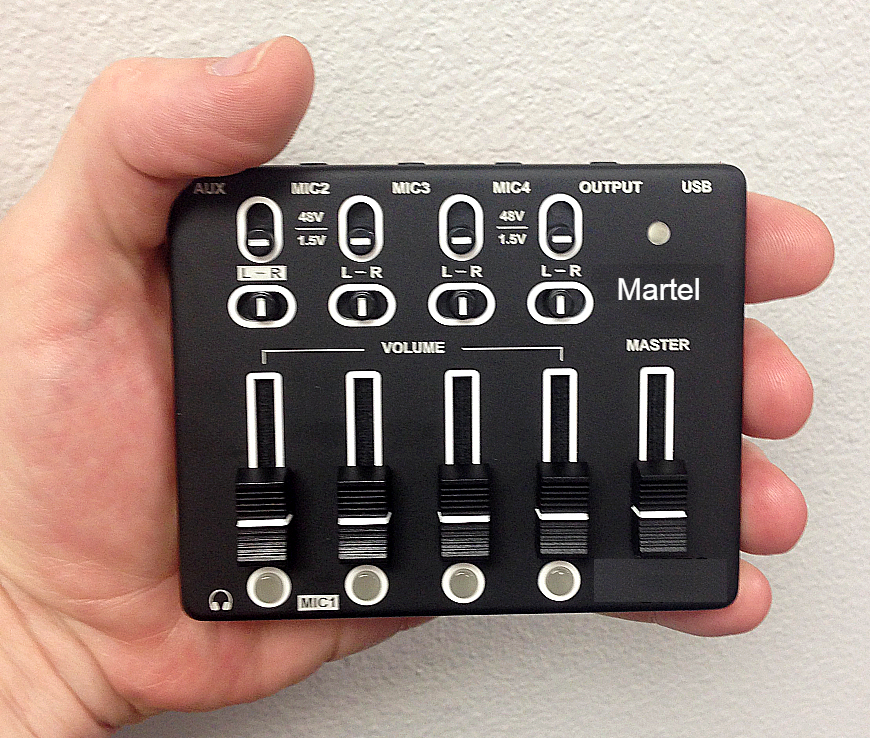
Ultimate Court Reporter Microphone Mixer. Product image from Martel’s store; see the listing for current package contents.
Martel's Ultimate Court Reporter Microphone Mixer listing describes four microphone inputs, USB audio connectivity, an analog output for a compatible recorder or other supported device, and headphone monitoring. Martel describes its recorder-facing arrangement as modified for microphone-level use. These details make it relevant when a reporter needs several compatible microphones and a practical connection to recording equipment.
Confirm the exact microphone models, input wiring and power requirements with Martel. A general statement that a mixer accepts different microphone types should not be expanded into a promise that every microphone connects directly. In particular, an analog input, a USB microphone and an XLR microphone with a specific power requirement represent different connection questions.
The listed USB and analog outputs may be useful when the proposed workflow needs a computer and another compatible recording destination. Ask what signal each output carries, what controls affect it and how the receiving devices should be configured. Do not treat two outputs as proof of two independent capture paths or four isolated tracks.
Compare the mixer-only listing with the microphone package, SKU 12. The package includes microphones and associated equipment, while the separate mixer listing serves buyers with a different equipment inventory. Confirm the currently selected package variation and written contents. A picture of several microphones should not substitute for the actual selected quantity.
For acceptance, connect the complete quoted arrangement and record each planned speaking position. Review the saved files on the intended playback system, then check the operator's monitoring path. Keep a record of the input settings, destination selections and supplied connection accessories. This makes the mixer's role understandable and gives support a clear starting point if the arrangement changes later.
Match microphone level and line level
Signal level is an electrical compatibility issue, separate from connector shape. Microphone-level signals are generally much smaller than line-level signals. A line-level feed connected to an unsuitable microphone input can overload it, while a microphone connected to an unsuitable line input can be too weak. Shure's microphone-versus-line-level explanation describes this distinction.
Ask the source operator or supplier what the output actually supplies. Then ask what the receiving input accepts. A label such as “audio out” or a familiar 3.5 mm socket is not enough information. The required arrangement may include an appropriate interface, attenuation or another supported connection, but the exact solution should be specified for the equipment involved.
Keep an output's function separate from its size. A headphone output is intended to drive a listening load and should not be treated automatically as the right feed for a recorder. A microphone input may also provide power for compatible microphones. These details are reasons to confirm the complete path before connecting devices, not to experiment with arbitrary adapters.
Use a nonconfidential saved test after the approved connection is made. Listen for intelligibility and distortion and check the receiving device's relevant indicators. Set levels according to the supplied instructions. Lowering playback volume after a distorted recording does not repair the overloaded signal that was captured.
Record the accepted output and input settings in the configuration notes. If a videographer, venue system or recorder changes, verify those settings again. A cable that worked yesterday may connect to a different signal arrangement today. The useful habit is to identify the source and destination each time the equipment configuration changes.
Martel Electronics | 3 hours ago
Microphone Splitter vs. Mixer: Plan the Right Court-Reporting Audio Path
Identify the sources, destinations and channel separation you need before choosing a splitter, mixer or USB interface.
First paragraph
Use this space to develop your idea and move the story forward. Add details, examples, or observations that make your point clearer. Keep each paragraph focused around one idea. Add more sections to build your story step by step.