TIME IS RUNNING OUT FOR 2026 TAX WRITE-OFFS

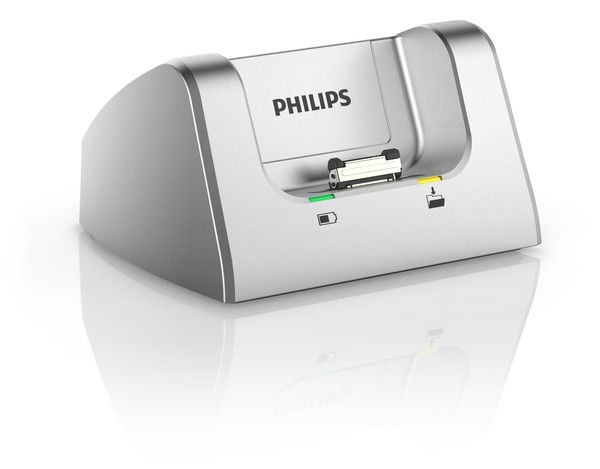
Silver Philips desktop docking cradle with an empty recorder slot and visible docking connector
The Philips docking cradle from Martel’s gallery. Label each workstation with its transfer destination so a colleague can check where the file went.
In this guide

You finish dictating at the main office, put the recorder in its cradle, and take it with you to the second office. Later your transcriptionist sees two files called Practice-012. The names match. The durations match. Which one contains your final correction? That is the problem to solve before you put a second docking station into daily use. The physical setup can be simple. The important part is making sure the person preparing the document can identify the right recording, open it, and hear the last instruction.

This guide is for an office using one Doctor & Lawyer Dictation Recorder with Thumb Slide Control in two locations. The recorder travels with the author. The compatible Philips docking cradle can stay at the workstation. We will label the two desks, follow a practice delivery, and check what the receiving person can establish. You can use the examples whether one employee works at both desks or an authorized colleague receives recordings for transcription.

For an office still choosing its recording equipment, the Martel guide to choosing a dictation recorder covers the initial purchase. The two-desk rehearsal begins once you know which recorder will travel.

Give each desk a job before giving it a cradle

Start with a map drawn in plain language. Write down where the recorder normally travels, which computer is at each stop, and where a person looks for work ready to transcribe. A desk can be a place to charge the recorder, a place to transfer dictation, a place to review received work, or some combination of those functions. If the intended job of the second desk is only to keep the recorder charged between appointments, say so. If the second desk must deliver urgent dictation independently of the first, write that instead. The equipment decision depends on the difference.

Consider an author who spends mornings at the Maple office and afternoons at River. A transcriptionist at Maple should see everything ready to type. River needs to handle afternoon material while the author is there. The objective is specific enough to test. A new afternoon practice file must become visible to the authorized recipient at Maple, and that person must be able to reopen it after the recorder leaves River. The presence of a second cradle helps with the physical connection at River. It does not by itself establish the delivery path from River to Maple.

A different office might deliberately use Maple as its only transfer point. The author records all day and returns there with the recorder. River is simply a convenient home for the unit between sessions. In that office, a second computer unexpectedly downloading files at River could create confusion. An assistant might see an item at River and assume it had reached the Maple worklist. Choose which of these arrangements you intend to support. Then inspect the software settings and observe actual behavior with fictional practice material at each location.

Write a short sentence for each desk that names a person and an outcome. “Maple receives finished recordings for Lee to type” is better than “main computer.” “River is a charging location until the afternoon handoff is tested” tells a relief employee exactly what that desk can currently be trusted to do. Update the notes when the test succeeds. Keep any client names, matter numbers and sensitive storage details out of publicly visible labels. A short neutral desk name is enough to distinguish the two pieces of hardware.

Match the recorder, cradle, computer and software
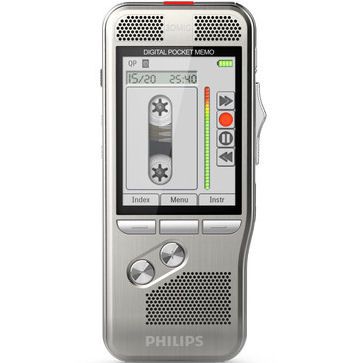
Front view of the silver Doctor & Lawyer Dictation Recorder with its thumb slide on the side
Doctor & Lawyer Dictation Recorder with Thumb Slide Control. When planning a second desk, identify which equipment travels with the author and which equipment stays at the workstation.

Start with the product name on your Martel order. If the recorder came as part of a package, use the packing list to identify the handheld and cradle separately. When the label is unclear, ask Martel to match a photo of the underside and connector before you order a second cradle. Existing equipment at one office may have been bought as a package while the item intended for the other desk is being ordered as a separate accessory. Confirm the contents of each chosen listing and identify which leads and power arrangements you will use at each location.

Keep four items on separate lines of the equipment note. Record the handheld that makes the dictation, the cradle that receives it, the computer used at that desk, and the software responsible for transferring or opening the recording. A complete line for the first office is no substitute for checking the second. Two apparently identical cradles can be attached to computers with different user accounts, destinations, readers or software configurations. A successful test at one desk establishes something about that whole setup only as it was tested.

Philips documents configurable download behavior for the recorder and SpeechExec software. Which recordings are selected and what happens after a computer sees the device can depend on the software setup. Before putting the same recorder on a second computer, identify who maintains that setup and what its current settings are intended to do. In particular, clarify whether a transfer changes the status or availability of the source recording. Use disposable practice files to learn the behavior before bringing a recorder containing work that exists in only one place.

Check the receiving side just as carefully as the author's side. Someone who can see a file in a list might still be unable to open its audio format in the intended playback application. The recorder listing describes several recording formats, including DSS-family formats and common audio formats. The training check should use the format that the office has chosen for ordinary work. A practice WAV opening in a general player does not verify that the same workstation can open every file produced in the recorder's other modes.

Name the working copy and the person responsible for it

A recording can exist on the recorder, in an author's download location, and in a transcription queue at the same time. A file in any of those places has a location. Only office practice determines which instance the transcriptionist should act on. Decide how the author designates work as ready and how the recipient knows whether an item has already been claimed. In a small office, a simple assignment note may be enough. A larger office may have an established job list with status and ownership fields. Use the mechanism already approved for the work.

For a rehearsal, put a harmless label on a practice item, such as Maple Delivery Twelve. Ask the author to say that label at the start and to give a distinctive instruction at the end. On the accompanying training note, identify the author, the desk used for delivery, the recipient and whether the item is ready or still in progress. Avoid using the displayed filename as the sole identifier. People can rename files, separate computers can generate similar names, and someone can accidentally open an older sample while demonstrating a new handoff.

Give the recipient one place to look first. If new assignments are supposed to arrive in a worklist, the recipient should actually use that worklist during the demonstration. Browsing to a temporary local copy while the author stands beside the computer answers a different question. It shows that someone can find a file with help. It leaves open whether the ordinary recipient can discover and open the assigned item the next day. Ask a colleague who did not set up the test to locate the work using the office's written instructions.

When an author changes a dictated instruction, identify how the corrected version will reach the recipient. A new correction file may have a different name. Two similar-looking files may also carry different endings. State which item supersedes which and whether the recipient has already begun typing. Keep that decision with the authorized person responsible for the assignment. A file's later modification time can help investigate what happened, but should not be the only evidence that an author has approved a change or withdrawn a prior instruction.

Prove the transfer at the first desk

At Maple, begin with an approved training account and a recorder containing only material suitable for the rehearsal. Make a short recording using the normal method and format the office expects the author to use. Start with a clearly spoken practice label. Dictate two or three pieces of information, leave a short pause, and finish with an instruction such as “place the blue folder at the front desk on Tuesday.” The ending gives the recipient something specific to recover that could not be guessed from the file name.

Before docking, play enough of the recording on the handheld to confirm the current sample exists. Record the start and ending cues on a separate answer key. Dock the device at Maple using the intended power and computer connection. Observe what the author normally sees next. Does a transfer require the author to open software, choose an item or take another action? Does the software report a destination or a work status? Record what this particular computer does, including any action the author actually took. Avoid filling gaps in the note with what someone remembers a previous computer doing.

Move to the intended receiving account and locate the new practice item. Open it in the playback software the recipient will actually use. Ask for the final day and location before showing the answer key. Stop playback, close the item normally and reopen it. If the recorder is normally removed after the completed transfer, follow the supported removal procedure and check that the intended received copy can still be opened. That last observation helps distinguish an accessible destination copy from playback that still depends on the connected handheld.

Mark the Maple test with the actual observations. “New item appeared in the Maple training worklist. Lee opened it after the device was removed and identified Tuesday and front desk” is a practical result. “Dock works” leaves all of those details unstated. If the test stops before the recipient can open the item, identify the last confirmed step. It is quite reasonable for an equipment test to establish that the recorder was recognized while leaving a recipient-permission or playback question for the person responsible for software.

Repeat at the second desk with a different instruction

Bring the same recorder to River, but make a new harmless sample. Use a different destination or day and a label that identifies the River trial. Keep the intended recording format and recipient the same unless you are deliberately testing a different requirement. Changing the desk, recorder, file type and receiving account all at once makes a failed handoff hard to interpret. Beginning with one known recorder and a new identifiable message lets you ask a cleaner question about the second desk.

Before putting the recorder in the River cradle, ask the person responsible for that computer to identify its intended download destination. If it is configured for an automatic action, use the approved test material and let the ordinary action occur. If the site expects a manual action, have the author perform it without additional shortcuts. Record the observed destination and which account was signed in. A local folder with the same display name at both desks can still represent two separate local locations. A shared location must be established by the office's actual setup and permissions.

Now ask the Maple recipient to find the River sample without the author's assistance. Have the recipient say the opening label and closing instruction aloud. If the recipient can recover only Maple's earlier Tuesday message, the test has already revealed something useful. The recipient has working playback and an older item is available there. The arrival of River's new item remains unverified. No amount of replaying the Tuesday message will establish where the River file went. Return to the River destination and compare the two records of the handoff.

If both desks intentionally maintain separate local queues, use a separate delivery procedure approved by the office to move a training copy to the recipient. Record which person initiates that step and how the recipient acknowledges it. If both are intended to submit into the same central workflow, investigate why the item is visible at one station but absent from the other. The physical cradle should not be blamed before checking whether both computers are looking at the same authorized destination and whether the recipient can open the new item there.

Compare three practice files that look alike in a file list

For this guide we made two synthetic spoken recordings and one exact copy on a computer. We used ordinary PCM WAV files so that the exercise could focus on identifying content. These are desktop training examples. We generated these files on a computer. They demonstrate how to compare deliveries and do not measure hardware performance. No customer dictation was used. The first two files carry the same filename in different desk folders. Each lasts sixteen seconds and contains 512,044 bytes. Those are properties of the files created for the example, not specifications of the recorder or its download system.
Practice locationVisible filenameOpening and middleClosing instruction
Desk APractice-012.wavMaple delivery, twelve blue foldersDeliver them on Tuesday
Desk BPractice-012.wavMaple delivery, twelve blue foldersCorrection. Deliver them on Thursday
ReviewMaple-received.wavMaple delivery, twelve blue foldersDeliver them on Tuesday

The first and second recordings start with the same words. A person who opens each file, hears “Practice delivery to Maple desk” and closes the player has two plausible confirmations of the wrong thing. They have established that both items concern the same fictional delivery. They have not established which day the author specified. Even the middle sentence about twelve blue folders is identical. The distinguishing instruction comes at the end. The file list alone conceals that difference because the two desk items have the same name, size and duration.

The Review file poses the opposite problem. It has a different filename from either desk file, yet it is a byte-for-byte copy of the Desk A recording. We verified that result by reading the files and comparing their SHA-256 digests. The two Tuesday files matched; the Thursday correction had a different digest. A digest can be useful to someone doing an exact copy comparison. It cannot tell a transcriptionist which version an author approved, and ordinary conversion into a different audio format can change the bytes. Routine users can do this rehearsal with spoken markers and an explicit assignment note.

Give a colleague the three descriptions in the first two columns and ask which item they would type if the author said, “Use my correction.” The columns do not contain enough information. Let them hear the endings and check the author's assignment note. A recipient who recovered Thursday can now identify the files that do and do not contain that spoken instruction. If the purported review copy still says Tuesday, it cannot stand in for the correction. That is a content observation the author and recipient can resolve without guessing from a modification time.

Repeat the reasoning with a different office policy. Suppose the author has not released the correction yet and Tuesday remains the authorized instruction. The existence of the Thursday audio is still a fact. The intended working item changes because the authorization has changed. A purchasing team evaluating a second cradle should care about both facts. The equipment has to deliver a playable file. The office also needs a reliable way to tell the person typing which playable file has been assigned. Two successful downloads do not resolve a disagreement about release status.

Track incomplete delivery without sending a second assignment by mistake

Imagine River reports a completed transfer but Lee cannot find the file at Maple. First ask Lee whether another item with a similar name is visible and what it says at the end. Next ask River which user was signed in and where the software reported sending the test item. Compare the exact training label and time of the handoff. If the file is in a River-only folder, the original transfer may have succeeded locally. The unresolved step is delivery to Maple. Repeating the original transfer without revisiting the destination can simply create more local copies.

If River can see the exact assignment in the intended shared queue but Maple cannot, ask the person responsible for the software to verify the authorized user's access and view. A filter or a status can affect what the recipient sees, and visibility alone does not establish playback rights. On a training item, have the recipient open it, recover the ending and close it normally. If they can read the assignment but cannot play it, keep that observation distinct from a missing file. You have moved the investigation from discovery to playback.

A staff member might try to help by delivering the same file through a second approved route. Before doing that, agree on a single working assignment and tell the recipient which route to use. If two staff members have already started separate documents, identify which person is responsible for reconciling their work under office procedures. Neither the possession of a recorder nor the ability to download an audio file automatically assigns authorship of the resulting document. A short status entry can prevent two people doing the same transcription more reliably than buying another accessory.

Preserve the source recording and the test notes until the required receiving checks have passed under the office's procedures. A missing shared item is a poor reason to remove the recording from a device or clear a queue in the hope of forcing a new download. Leave any deletion, retention or recovery decision to the authorized owner of that workflow. For troubleshooting, it is usually more informative to create a new harmless marker, record the observed destination and compare it with the failed attempt than to disturb the only existing copy of work someone may still need.

Decide what to buy for the second location

If the first desk works and the second is still being planned, identify the smallest complete arrangement that will meet its actual purpose. For a charging station, confirm the appropriate cradle, power arrangement and supported use. For a transfer station, also identify the computer connection, software, user access and destination. For a transcription desk, identify the playback application and any accessories that the recipient actually needs. One piece of equipment can participate in more than one arrangement, but its purchase cannot automatically fill a missing software or workflow requirement.

Write a simple acceptance sentence for the quote. An example for two offices is “One author will use the same thumb-slide recorder at either desk, and the assigned transcriptionist must be able to reopen the latest released practice dictation without the recorder present.” An example for one office with a spare cradle is “The second cradle must let the same supported setup resume at the backup desk after we follow our approved software setup.” Send Martel the product name on your order, the two planned locations and the result you need to demonstrate. That turns a vague request for another dock into a concrete equipment question.

Hand the two desks to someone who did not install them

A useful last rehearsal takes place when the person who set up the software can stay silent. Give a relief author the recorder, the two desk notes and a fictional instruction card. Have a different person act as recipient. Let the author choose which desk to use and ask them to explain where the recipient should look for the resulting item. The explanation is part of the test. If the author has to ask which computer was supposed to do the download, that is a gap in the office instructions even if every component works perfectly.

Next, with the author's knowledge, give the recipient an older harmless training file with a similar name alongside the newly assigned one. Keep the two originals separate. Have the recipient explain what distinguishes today's released work from the earlier item. Listen for evidence about the actual assignment and the words in the recording. “This one was at the top of my list” is a useful account of how they found it, but it is weak evidence of why it is correct. A release note together with a matching spoken correction makes a stronger handoff.

Close the rehearsal by asking each person for one unresolved question. The author might have demonstrated both cradles but still need to know who transfers afternoon work when Maple closes. The recipient might have opened the file successfully but be uncertain where to report a correction after transcription starts. Write the question beside the role that can answer it. Keep equipment questions with the exact Martel product and software questions with the named installation. The next purchase or training session can then address the actual gap discovered by the people who will use the setup.

Customer questions about one dictation recorder and two docking stations

1. Can I carry the same dictation recorder between two offices without buying a second recorder?

A second recorder is unnecessary simply to have a physical place to dock the same compatible handheld at each location. The more important question is what each location must do. Identify whether it serves charging, transfer, transcription or a combination. Then verify the power, computer, software and destination required for that role. If an author must dictate at one office while somebody elsewhere needs the physical recorder at precisely the same time, that is a different requirement. A second cradle cannot put one handheld in two places at once.

2. Which Martel listings should I use for an order?

Identify the Doctor & Lawyer Dictation Recorder with Thumb Slide Control by its Martel product name, then match it to the docking cradle on your order. Confirm the contents of the selected package and report which parts you already have at the first office. Ask specifically about the components required at the second. A price or photograph for a recorder package should not be treated as a list of everything needed to equip a separate computer, license a second software installation or grant a second person access to dictation.

3. Does putting the recorder in a cradle prove that the dictation was downloaded?

It establishes where the recorder is sitting. Depending on the supported setup, the desk might charge the device, present it to a computer or initiate a configured transfer. To verify a download, find the intended new practice item at the stated destination and recover its spoken ending. Then follow the ordinary supported removal procedure and check that the recipient can reopen the destination copy if independent access is required. These observations distinguish a physical docking event from a successful handoff to a particular person.

4. Can each desk have a folder called Dictation and still hold different files?

Yes. A folder name alone does not establish that the two computers are using the same storage location. Each can have a local folder named Dictation. The desk might also show a friendly worklist name that hides the difference from an ordinary user. Ask the person responsible for the setup to confirm the approved destination on both computers. Test it using a new harmless recording from River and an independent check by the Maple recipient. The spoken ending makes the new item distinguishable from an older file.

5. How can I test a second dock if my recorder holds important unfinished work?

Arrange an authorized practice setup where learning the transfer behavior cannot disturb unfinished dictation. Find out whether the software moves, marks, converts or otherwise processes files when it sees the recorder. Have the responsible person preserve existing work according to office procedure before making changes. If a suitable test device or approved empty setup is available, use it for the first rehearsal. A valuable recording with no verified second copy is a poor choice for learning what an unfamiliar computer does automatically.

6. Why might an item download at Maple but not appear when I dock again at River?

One possibility is that the software treats a previously handled item differently from a new one. Another is that River is looking at a different destination or is configured for a different selection of recordings. The office needs an observation that distinguishes those cases. Create a new River-only practice message with a different ending, confirm it on the handheld, then observe the transfer at River. Record what happens for the fresh item before trying to force another download of an earlier recording.

7. How do we know whether both computers need dictation software?

Map the work each computer must do. A desk used for transfer through a configured dictation workflow needs the supported software and access for that workflow. A workstation used only to play received assignments may have a different software requirement. A station used only for charging has another purpose again. Describe both roles to the person responsible for licensing and support. Having a working installation at one office is insufficient evidence about installation rights, user permissions or software requirements at a second.

8. Can two people transcribe from the same received recording?

Whether they can technically open it depends on the software, storage setup and permissions. Whether both should act on it is an assignment decision. If one person is doing the initial transcription and another is reviewing it later, specify the order and the working document for each step. If two people can see a new item at once, agree how one claims it. A shared recording with unclear ownership can create two independent drafts even when the equipment transfers every byte successfully.

9. What should we put in a recording to identify a correction?

Use an opening label, the original value where appropriate, the corrected value, and a clear closing instruction. In a practice exercise an author might say, “Maple training correction. Replace Tuesday with Thursday. Deliver the twelve blue folders on Thursday.” Ask the recipient to repeat the final day and acknowledge that the corrected file is the one assigned. An author can make the correction obvious in the audio while still needing to tell the recipient which assignment supersedes the earlier one. Do both parts of the handoff.

10. Why are matching filenames, sizes and durations insufficient?

Different spoken content can occupy the same amount of digital space. In the prepared desk exercise the Tuesday and Thursday files have the same name, the same sixteen-second length and the same byte count. Their endings differ because the contents in the final speech interval differ. The recipient who checks the final instruction will detect that difference. Conversely, a renamed file can contain exactly the same bytes as an older one. Use file properties to narrow a search, then verify content and assignment before choosing the working copy.

11. Should an ordinary transcriptionist calculate a file digest to accept a job?

Usually a spoken marker, an assigned work item and a successful reopen provide more direct answers to the recipient's daily questions. A digest helps with a narrower technical question, whether two files expected to be exact copies have identical bytes. It does not say which file the author authorized and it cannot identify a spoken date for the listener. If an approved transfer process converts audio, expect a byte comparison to behave differently and check the appropriate output format and audible content instead.

12. How do I tell whether a file is playing directly from the recorder?

Start by identifying the location or worklist entry opened by the player. The presence of the recorder can make more than one copy accessible at the same time. After the transfer has completed and you have followed the supported device-removal procedure, have the recipient reopen the supposedly received practice item using the ordinary destination. Recover the ending again. That check is more informative than leaving the handheld docked and hearing audio once. Note the account and destination that remained usable after the device was removed.

Martel Electronics | 10 hours ago

Using the Doctor & Lawyer Dictation Recorder at Two Desks

Use one thumb-slide dictation recorder at two desks. Trace a practice recording from its docking cradle to the transcriptionist and identify the final corrected file.

13. Can the afternoon desk be used just to charge the recorder?

Treat that as a specific equipment requirement and confirm the supported power arrangement for the cradle at that location. Also identify whether a connected computer would perform any automatic download or other action when it sees the handheld. If the intention is to leave all transfers to the main desk, tell the person configuring the equipment. During the practice run, check what actually happens at the afternoon desk and whether the new training item can still follow the intended handoff on return to the main office.

14. Do we need the same recording format at both desks?

The practical requirement is that the file travel through the agreed workflow and be playable by the intended recipient. Using one office-approved format can simplify training, but the equipment and software choices should follow the requirements of the work. Verify the exact format selected on the recorder, whether the transfer software performs conversion, and what format the recipient actually opens. A successful WAV exercise at two desks provides useful evidence about those particular files. Test the normal dictation format separately before relying on the setup for it.

15. What if a file appears in the recipient's list but its audio will not open?

The new visible assignment establishes that at least some identifying information reached the recipient. Now check the selected item, the account's access to the underlying recording and the player's support for that file format. Try an approved known-good practice file of the same format on the same station. If the known file opens and the new one does not, give support both identities and the observed error. If neither opens, investigate the shared playback setup before repeating the transfer from the recorder.

16. What if the author can hear the correction but the transcriptionist hears the old instruction?

Ask each person to identify the file, its location and the exact ending they hear. The author may be listening on the recorder or at River while the recipient opens an older Maple assignment. Acknowledge the difference before creating more copies. Verify which version the author intends to release, deliver it through the approved route and have the recipient repeat the updated instruction. Keep the status of the earlier work visible so that somebody who has already begun typing knows how to proceed.

17. How can we rehearse a network interruption between desks?

Use the office's approved testing procedure and fictional material. A simple rehearsal can simulate an unavailable destination by asking what the author and recipient do when only a local training copy can be observed. There is no need to disconnect an active office network. Record who keeps the source, who determines whether delivery succeeded and who acknowledges the received item when the approved route becomes available. End the drill by checking for two assignments created by a retry. One successful receipt should correspond to the intended amount of work.

18. Can we tell from the time shown on the computer which recording came last?

Time information can help investigate a delivery, especially when a job list contains several similarly named items. First identify what each displayed time represents. It might indicate recording, copying, import or a later change. The two computers can also display time differently. In a correction dispute, listen for the instruction itself and use the author's assignment note. Keep the timestamps as supporting details. The recipient should not have to choose between Tuesday and Thursday solely by comparing two numbers in a file list.

19. What should a relief employee test after a computer is replaced?

Use the known recorder and cradle with a fresh training message and the replacement computer's intended software and account. Confirm the recognized device, the download action, the destination, the ability to reopen the file and the recipient's recovery of the final marker. Check whether a status change at the new desk is visible where work is assigned. Restore the ordinary equipment note with the names and choices actually observed on the replacement. The old desk's success is a useful comparison, but it does not verify the new installation.

20. Which result should we send Martel when asking about another cradle?

Give the recorder name on your Martel order, the existing desk's purpose, the intended second desk's purpose, and the last step you can verify. For example, say that the recorder appears on the computer at the second desk but the recipient cannot find the new item in the intended queue. If the question is simply what to order, say whether the second location needs charging, computer transfer or both and identify the components already available there. Use the Martel docking cradle listing to identify the accessory precisely.

Martel Electronics