TIME IS RUNNING OUT FOR 2026 TAX WRITE-OFFS

Using and upgrading your dictation system
By Martel Electronics · Published October 28, 2026 · 13 minute read

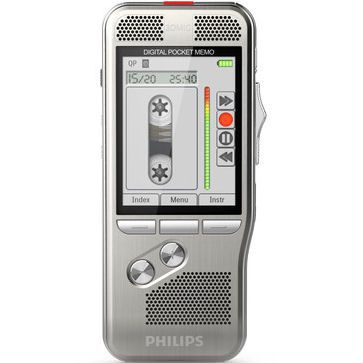
Philips DPM8000 front view from Martel SKU 1550
Martel catalog photograph. Philips DPM8000 front view from Martel SKU 1550. See the linked product page for the current supplied configuration.

Insert, overwrite and append describe three different ways to change a recording. Knowing which action you need is only the first step. Your recorder must support that action in the recording mode you actually use, and the recipient must be able to play the resulting file.

This guide explains the differences with an original practice example and a repeatable acceptance checklist. The Philips DPM8000 series is used as a documented model-specific example. The exercises are proposed checks, not claims that Martel performed a timed or laboratory test.

What do insert, overwrite and append mean?

In the Philips DPM8000 series documentation, insert adds speech at the current position while preserving the existing recording. Overwrite records over audio at the selected position. Append adds speech at the end. Those operations solve different revision problems.

Three editing actions, illustrated conceptually
ActionIntended changeWhat to check afterward
InsertAdd a missing phrase between two existing passages.The new phrase is present and the original following passage remains.
OverwriteReplace recorded speech starting at a chosen position.The replacement is complete and no needed neighboring words were lost.
AppendAdd a further instruction after the existing recording.The original ending remains and the new instruction follows it.

Do not choose by the label alone. Think about the finished audio you want the typist to hear. Adding something in the middle, replacing a mistaken passage and continuing at the end are different outcomes.

Use the recording format to check the feature claim

Philips specifies insert editing for DSS/DSS Pro on the DPM8000 series. It lists overwrite and append for DSS/DSS Pro, MP3 and PCM. This is a concrete reason to check the selected format rather than assuming every feature works in every mode.

Philips DPM8000-series editing support listed by the manufacturer
Recording formatInsertOverwriteAppend
DSS / DSS ProListedListedListed
MP3Not listedListedListed
PCMNot listedListedListed

See the Philips DPM8000 recorder at Martel for the current offering. A format that suits one person's editing preferences still needs to suit the typist's playback setup. Use our DSS, DS2, MP3 and WAV guide when choosing that handoff.

The separate Dictaphone Machine package, SKU 1843-2, describes a shared-recorder workflow. Do not assume it has the DPM8000 feature matrix above: confirm the supplied recorder model and its supported editing modes when selecting the package. A slide control describes a control arrangement; it does not by itself answer every editing question.

A short practice dictation that exposes the difference

Use a fresh test recording with no client information. Speak three clearly separated sentences: “Prepare the cover letter. Include the enclosure list. Save the draft for review.” Pause briefly between sentences so you can find each boundary during playback.

This script gives you a beginning, a middle and an ending that are easy to recognize. Use a fresh baseline recording for each exercise rather than carrying the results of one exercise into the next. Record the recorder model, active format and chosen edit mode on a simple worksheet.

The purpose is not to prove that you can operate the controls quickly. It is to prove that the final audio says what you intended and that the receiving person hears the same result. Once those checks pass, practice can focus on convenience.

Exercise one: add a missing instruction with insert

Imagine that you want the typist to add a reference number after the first sentence. Your intended final sequence is the original opening, then “Use reference seven four two,” then the enclosure instruction, then the original closing sentence.

On a model and format that support insert, use its instructions to locate the intended boundary and select the correct editing action. Record the missing phrase. Then listen from before the boundary through the sentence after it. Do not stop the check immediately after hearing the new words.

Mark the exercise complete only when the new instruction is in the correct position and both neighboring passages are understandable. If the resulting speech is awkwardly joined, repeat the exercise on a fresh sample with a clearer gap. Finding a clean edit point is part of the skill.

When comparing equipment, ask the person who normally dictates to perform this exercise. Someone who adds qualifying phrases while composing may care much more about this action than someone who records a complete draft without revisiting earlier sentences.

Exercise two: replace a passage with overwrite

Return to the original practice script. This time suppose the middle instruction is wrong. The desired replacement is “Include the revised enclosure list.” The challenge is not merely starting the replacement; it is preserving the material that should follow it.

Use the model's documented controls to position the recording and choose overwrite. Make the change on the disposable sample. Listen to the opening, the replacement and the closing. Pay particular attention to where the replacement ends.

A longer spoken replacement needs more recording time than a shorter one. That is why the acceptance check should include the following sentence rather than just the edited phrase. Overwrite is an audio operation, not an instruction to a text editor that understands sentence boundaries.

If a correction is difficult to place cleanly, consider re-dictating the complete short passage or recording a clearly identified correction for the typist, according to your office's process. Do not keep experimenting on the only copy of an important recording. Establish the method on test material first.

Exercise three: continue at the end with append

Start again with the original sample and add “Send the draft to me before circulation” after its ending. The intended result is an additional instruction, not a replacement for a sentence already recorded.

Follow the model's instructions for its append action and check the complete ending afterward. Confirm that the original closing is still present, followed by the new instruction in an understandable order. Note how the recorder indicates the selected action so that the author recognizes it next time.

An appended correction also needs clear wording. If you say “Change that number,” the recipient may not know which number you meant. Identify the passage and state the intended replacement unambiguously. A well-organized correction reduces the need for the typist to interpret your intent.

Keep control operation separate from edit behavior

A familiar thumb switch can make starting, stopping and reviewing comfortable. The edit mode determines what recording again does to the existing audio. During a demonstration, ask to see both: how the author navigates and how the active editing action is identified.

A useful purchase question is “Show me how to add a sentence in the middle, in the format my secretary will use.” That is more precise than asking whether a recorder has editing. Also ask what happens after stopping, changing files or starting a new job. Verify the actual configured device rather than assuming its previous mode remains selected.

Do not apply one model's menu sequence, display icon or indicator color to another. If a guide does not name your exact device, treat it as an explanation of the concept and use the supplied manual for the operating steps.

Finish the test at the transcription station

A correction is not fully checked when it sounds right on the recorder alone. Send or hand over the edited sample through the actual process you intend to use. Ask the typist to locate it, play the edited area and control playback using the proposed pedal or other controls.

Have the typist write the final intended wording without seeing your answer first. Then compare the result with your worksheet. This distinguishes an understandable instruction from one that sounded obvious only to its author.

For a no-PC arrangement, test the intended recorder, dock and foot control together. For a computer arrangement, record the application version, operating system and pedal model used. If the author changes format later, repeat the receiving test. A successful test in one format does not establish every other combination.

Martel Electronics | 9 hours ago

Dictation Corrections: Insert, Overwrite and Append

Learn the three correction actions, see a documented DPM8000 example, and test the recording and handoff without assuming every format edits the same way.

A repeatable acceptance checklist

  1. Identify the device. Record its exact model and the package SKU. They answer different questions: which recorder performs the edit, and which items the purchase supplies.
  2. Record the configuration. Note the audio format, quality setting where relevant, and editing action. Check the manual for that combination.
  3. Create disposable practice material. Use recognizable beginning, middle and ending passages with no confidential information.
  4. Test one change at a time. Use a new baseline for insert, overwrite and append so the outcomes remain easy to interpret.
  5. Listen across each boundary. Check speech before and after the change, including the final ending.
  6. Hand over the actual file or device. Follow the intended office route rather than demonstrating on a different player.
  7. Test the recipient's controls. Verify that the typist can repeat the changed passage and produce the intended wording.
  8. Record the outcome. Mark each action passed, unsupported in this configuration, or needing clarification. Keep the settings with the result.

This checklist is useful during a demonstration, after setup and after a change to recording format or receiving software. It gives the office a repeatable decision method without pretending that a paper specification proves every part of its workflow.

Choose equipment around the revisions you actually make

List your common changes before comparing prices. Do you frequently insert qualifying language into the middle of a letter? Replace dates or amounts? Add instructions at the end? Or mainly record fresh short jobs? Bring an example of each routine to the equipment discussion.

Next, connect the editing requirement to the handoff. The recorder must support the desired action, and the secretary must receive an accessible result. That combination is more useful than collecting features that will never be used together.

Finally, compare the complete purchase using our dictaphone system cost guide. Include the receiving station and any required software. For offices considering physical recorder handoff, compare the one- and two-recorder arrangements before deciding.

Write down the intended result before changing the audio

For a practice test, create a small answer sheet with three parts: the original wording, the requested change and the final wording the typist should produce. This prevents a successful button press from being mistaken for a successful correction. The result matters more than the motion used to create it.

For example, suppose your original instruction is “Use reference seven four two,” but the final reference should be seven four three. The expected document should contain the new reference once, without an unresolved alternative. Decide whether the exercise replaces the audio, adds a correction instruction or starts a fresh job. Those are distinct methods with different listening demands.

The same practice helps when a number becomes longer. Replacing “five” with “one hundred and five” is not merely a spelling change. In an audio workflow, the spoken replacement occupies time. Judge the result by listening through the whole passage and checking what remains around it.

Make separate practice files for separate questions

A single heavily edited test file can hide the reason for a failure. If an earlier exercise accidentally removed the closing sentence, a later append test may appear to be responsible. Use a new original script for each action and label the outcome on your worksheet.

Do the same when comparing formats. A successful DSS-mode exercise should have its own record; an MP3-mode exercise should have another. If the second format does not offer the required action, record that limitation rather than trying to force the same sequence of controls to work.

You can keep the test manageable by evaluating only the combinations your office expects to use. An author who requires insertion and a recipient who accepts the resulting format need a different decision from an author who only records short, complete notes. The goal is a dependable configuration, not a long list of rarely used settings.

When a correction seems unavailable, check the question in order

Start by confirming the selected file and the active recording format. Then check the exact model's instructions for the requested action. If the combination is unsupported, a different button sequence is not the solution. Decide whether to use a supported format or a different method of communicating the correction.

If the instructions say the action should be available, use a fresh disposable recording to narrow the problem. Write down what appears on the display and the sequence you attempted. Check relevant settings with the manual or support team. Do not infer that the microphone, memory card or pedal must be faulty solely because one editing action did not behave as expected.

When asking for help, provide the model, format, active mode and the point at which the behavior differed from the expected result. “The new phrase replaced the next sentence” is more useful than “editing does not work.” It describes an observable outcome that can be compared with the selected mode.

Distinguish recording, playback and document correction

There are three different places a change can happen. The author can revise the recording. The recipient can navigate the recording while listening. The person preparing the document can edit the text. A pedal that makes playback convenient does not necessarily give the typist the same recording-edit functions as the author.

Decide which stage should handle each kind of change. A missed word before handoff may be corrected in the recording. An instruction added after the typist has started may require a clearly identified revision message. A punctuation adjustment in the draft may be handled during document review. Assign the action so that both people do not unknowingly work from different instructions.

If automatic speech recognition is used, it introduces another output to check. Changing the source audio and changing the generated text are separate acts. Follow the particular application's documented process for generating or updating a draft, then review the actual final wording. Do not assume that an audio edit automatically updates a document already created elsewhere.

Make the handoff version unambiguous

A technically clean edit can still cause trouble if the typist receives an earlier version. Agree on when a recording becomes ready for transcription and how a later correction is identified. Use the naming or job-status tools that your actual workflow supports; do not depend on features that have not been confirmed.

For a simple manual process, the author can identify the job and state whether a later recording supplements or replaces the earlier instructions. The typist should be able to answer three questions: which job is this, which version is current, and what should happen to the earlier draft? The method can be simple, but the answers should be clear.

Do not silently revise an item after handoff and assume the other person will notice. If a change arrives after document preparation has begun, make the scope explicit. A revised reference number in one letter is different from a complete replacement for the recording. Review the finished document against the final instructions.

Plan an office demonstration around real habits

Ask the author to bring a short fictional example that reflects how they normally compose: perhaps a letter with one inserted qualification and one corrected date. Ask the typist to bring the corresponding expectations, such as being able to replay a few words without reaching away from the keyboard.

Run the demonstration with the same type of handoff proposed for daily work. For a shared-recorder package, physically move the recorder to the playback station. For a computer workflow, transfer the sample through the intended route. Observing only the handheld controls leaves the receiving half of the purchase unanswered.

Afterward, record the exact setup that worked and the points that need clarification. If the demonstration used a different software edition, pedal or recorder model from the quotation, resolve the difference before purchasing. A feature shown on one configuration does not establish the contents or behavior of another.

Turn a successful practice into a short operating note

Once the office has verified its configuration, write a brief note in the words the users actually use. Identify the chosen recording format, explain when each supported correction action is appropriate, and describe the handoff. Include the instruction to review the beginning and end of any revised passage.

Keep detailed button instructions tied to the exact model and manual. When equipment or software changes, repeat the relevant practice checks and update the note. This is especially useful when a temporary typist or a new author joins an established process: they can learn the tested routine without guessing how the previous person worked.

Common correction questions

Does a recorder that records MP3 necessarily insert into MP3?

No. Check the exact model and format. The DPM8000-series specification above lists insert for DSS/DSS Pro, while listing overwrite and append for MP3 as well. Treat recording support and editing support as separate checks.

Can I assume a digital recorder edits like my old tape machine?

No. Test the actions you use rather than relying on appearance. Positioning, mode selection and the result of recording over an existing passage need to be understood on the new device.

Is correcting audio the same as correcting a transcript?

No. These exercises concern recorded speech. Editing words in a document is a later action. Decide who is responsible for verifying that the finished document reflects the author's final instructions.

Which Martel option should I investigate?

Review the explicitly identified DPM8000 offering for the documented example in this guide. If your priority is a shared-recorder playback workflow, inspect the Dictaphone Machine package and confirm its supplied model and editing requirements. Browse Martel dictation recorders for the wider selection.

Original guidance by Martel Electronics. Product details checked October 28, 2026. Examples and suggested checks help you evaluate a workflow; they are not claims of completed laboratory testing. Confirm the current package, software version and required connections before ordering.

Martel Electronics