Dictation Systems for Multiple Attorneys Sharing a Secretary
Plan dictation for multiple attorneys sharing a secretary: compatible recorders, author identification, priorities, workload, corrections and software checks.
Compare Martel’s one-recorder and two-recorder no-PC legal dictation packages. Understand recorder and SD-card handoff, overlapping work, foot controls and practical setup checks before choosing.
No-PC dictation gives a law office a way to record and play spoken instructions without making a computer application responsible for the audio. The important buying choice is how the lawyer and secretary share access to that recording. One shared recorder and a two-recorder set create different working days, even when both avoid computer-based playback.
This guide focuses on Martel’s two no-PC legal packages. It explains the handoff, the limits of each arrangement and the checks that help an office choose confidently. For a comparison that also includes computer transcription bundles, start with our dictation recorder package buyer’s guide.
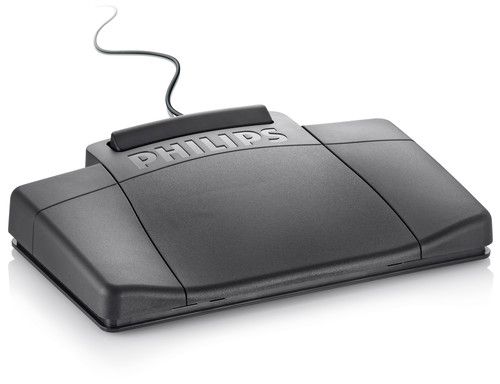
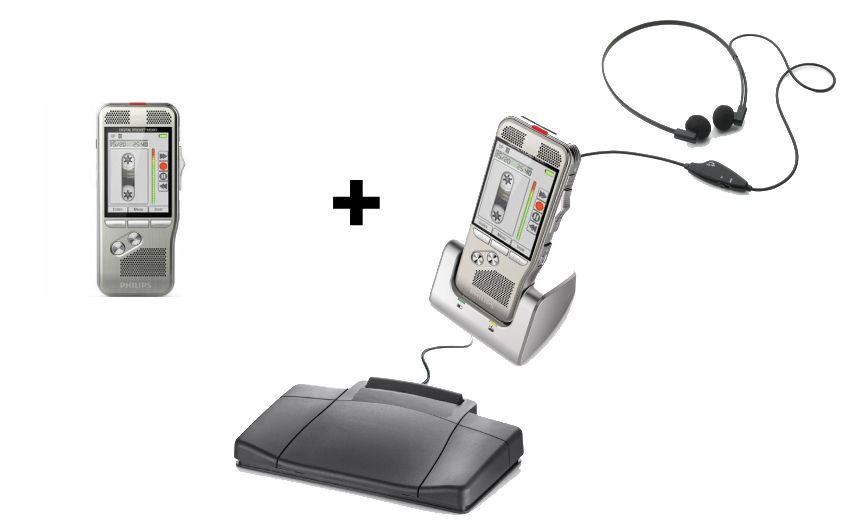
The recorder captures the lawyer’s voice, and the secretary listens through recorder-based playback equipment. A compatible dock, foot control and headphones allow the secretary to start, stop and navigate the audio while typing. There is no requirement to install computer playback software for that basic audio workflow.
The secretary may still type the document on a computer. “No PC” does not mean that the office stops using word processing, document management or its normal review process. It also does not mean that a recorder creates a finished transcript automatically. Recording, listening, typing and reviewing remain separate steps with identifiable owners.
A physical-media arrangement can be attractive when staff want a visible handoff and limited software setup. It still requires charging, compatible memory, careful storage and a plan for unfinished work. Choose it because those responsibilities suit the office, rather than assuming that an offline device needs no procedures.
Martel’s NO PC Law Office Digital Dictation Recorder & Transcriber in 1 is built around one recorder. The lawyer uses it to dictate. When the assignment is ready, the secretary receives the recorder and uses the package’s dock-based playback arrangement, foot control and headset.
This model makes the equipment path straightforward. The recorder moves with the work. Before handing it over, the lawyer should stop recording, identify the assignment and explain any special instructions. The secretary should confirm which recording to type before starting, especially if the device contains earlier jobs or an unfinished draft.
The central limitation is shared time. If the lawyer needs the recorder again, the secretary must release that same device. For an office that dictates in a morning block and types afterward, that may be perfectly workable. For an attorney who dictates short instructions between appointments, repeated requests for the recorder can interrupt both people.
Before ordering, try a simple scheduling exercise. Mark the periods when the lawyer normally records and when the secretary normally listens. If those periods overlap frequently, a one-unit arrangement needs an agreed pause-and-return routine or a different package. The relevant question is availability during real work, not merely the number of people in the office.
Martel’s NO PC Law Office Pro Dictation Machine Recorder and Transcriber Set provides separate recorder units for the author and secretary. The workflow uses an SD-card handoff, so the lawyer can retain an author recorder while delivered audio is played on the secretary’s unit.
Two units separate access to the machines. They do not let both people use the same physical card in different places at once. If the lawyer will continue recording after delivering a card, plan a rotation with compatible media. Confirm the package’s current card quantities and any additional card requirements instead of assuming that every possible rotation is supplied.
A useful card log records the card identifier, the author, the job reference, the handoff time and whether the card has been cleared for reuse. Use office-approved matter identifiers rather than putting unnecessary client information on an exposed label. A small, consistent log is more useful than relying on someone to recognize a card by its appearance.
| Question | One shared recorder | Two recorder units |
|---|---|---|
| What moves to the secretary? | The recorder containing the assignment | The card containing the assignment |
| Can the lawyer retain a recorder? | The shared unit is unavailable during secretary use | Yes, with suitable media available for the next job |
| What needs tracking? | Recorder possession and current job | Card possession, current job and reuse status |
| What should be tested? | Recorder handoff and dock playback | Card handoff, playback and continued author recording |
Example: A lawyer finishes a draft letter at 10:00, and the secretary begins typing it. At 10:15, the lawyer receives instructions for another matter. With one recorder, the office must decide whether to interrupt transcription and return the device. With two units, the lawyer can use the author recorder with available compatible media while the first card remains at the secretary’s desk.
That example is a planning exercise, not a measured productivity claim. The better package depends on how often this overlap occurs, how much interruption the staff can tolerate and whether they prefer tracking whole recorders or removable cards.
Do not change the meaning of “finished” halfway through the process. A lawyer finishing dictation is different from a secretary finishing a draft, and both are different from a reviewed document being ready for use. Those stages should have separate labels, even if the office tracks them on a simple paper sheet.
Use fictional dictation that includes a heading, a paragraph, a deliberate correction and a clear ending. Have the secretary operate play, rewind and forward with the supplied control while typing. Listen at a comfortable volume and check that the headphones are connected to the intended output. The test should include normal pauses and navigation, not just a few seconds of uninterrupted playback.
If foot control does not respond, check the specified dock, its power connection, the pedal connection and the recorder mode described in the supplied instructions. A computer USB foot pedal is not automatically interchangeable with a recorder-dock pedal. For the Philips docking arrangement, the manufacturer describes compatible accessories and operating modes in its PocketMemo user manual; use the instructions matching the actual unit supplied.
Also test the return path. Remove and reconnect equipment only as directed, then confirm that the next fictional assignment can be recorded and played. A workflow is ready when staff can repeat the whole cycle, including starting the following job, without guessing which card or recording belongs to whom.
Use memory cards supported by the actual recorder model. Card capacity, format and preparation requirements are device-specific; a card being physically small enough to fit does not establish compatibility. Do not format a working card simply because a computer or device offers to do so. Confirm its contents and the office’s retention decision first.
Keep power and data connections distinct. A docking station can have connections intended for different purposes, and a cable that supplies charging does not prove a computer transfer path is working. For a no-PC desk, verify the documented power arrangement and playback connections rather than treating a charging indicator as an audio test.
Learn how the recorder handles corrections before editing important dictation. Insert, overwrite and append behavior can depend on recording mode and format. Test them on disposable sample audio, then play the edited passage back. A correction that sounds right in the author’s memory may not be present in the saved recording.
Local audio remains subject to ordinary physical and access risks. A misplaced card, a recorder left in a bag or an assignment passed to the wrong desk can disrupt work. Decide where active cards are kept, who may access them and how completed material is handled under the office’s own policies. No-PC operation alone does not establish confidentiality or a backup.
If the office later needs electronic delivery or a centralized queue, evaluate a computer-based workflow as a separate project. Our computer dictation setup guide covers a lawyer-and-secretary installation, while the multiple-attorney guide addresses shared transcription capacity and author identification.
The no-PC packages are intended for recorder-based audio playback with the matching equipment. A computer may still be used to type and store the document. That is separate from using computer software to control the recording.
The two-unit Law Office Pro set separates the author and secretary recorders. Continued recording also requires suitable media in the author unit. Confirm card compatibility and the planned rotation; two machines do not duplicate the contents or availability of one physical card.
It can be if the lawyer and secretary use the recorder at different times. Estimate how often their audio work overlaps. A solo practice with frequent new dictation may benefit from separate devices even though only one lawyer is dictating.
No. Verify the exact dock and foot-control combination specified for the package. Computer pedals and recorder-dock controls serve different playback environments. A matching-looking connector is not a compatibility guarantee.
No. A recorder or card can still be lost, damaged or accidentally reused. Identify the authoritative recording and follow a deliberate retention and backup process suitable for the office. Confirm a usable copy before any approved deletion.
Recorder-based playback lets a person listen and type. Automatic speech recognition requires its own supported workflow and software; it should not be assumed to be included in a no-PC recording and playback package.
