TIME IS RUNNING OUT FOR 2026 TAX WRITE-OFFS

Buying guides and complete systems
By Martel Electronics · Published October 28, 2026 · 13 minute read

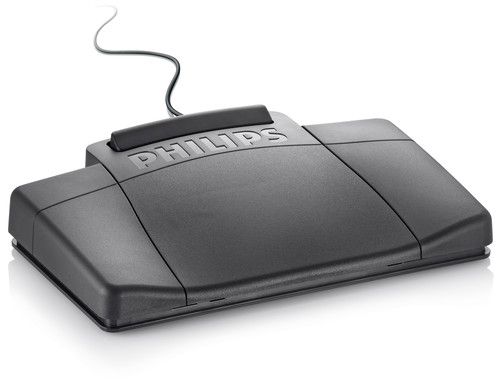
Three-way transcription foot pedal from the Martel Dictaphone Machine gallery
Martel catalog photograph. Three-way transcription foot pedal from the Martel Dictaphone Machine gallery. See the linked product page for the current supplied configuration.

A dictaphone budget should cover the whole route from spoken instructions to a finished document. Start with who records, who listens and types, and whether they need their equipment at the same time. Then compare a recorder purchase with a complete dictation and transcription package.

This guide uses Martel catalog prices checked on October 28, 2026. The examples are equipment purchase comparisons, not a promise of a particular saving or return on investment. Open each product page for its current price, package contents and availability.

How much does a dictaphone system cost?

The four Martel examples below were listed from $507.00 for an extra-recorder offering to $1,199.99 for a two-recorder no-PC set. They serve different jobs. A lower price is useful only when the purchase includes, or works with, everything your office needs.

Martel catalog examples checked October 28, 2026; prices in USD
OfferingListed priceWhat to compare
Lawyer Dictation Recorder ABA — Extra Recorder, SKU 320$507.00Recorder-side expansion; confirm the receiving transcription station already exists.
Lawyer Dictation Recorder + Secretary Transcriber, SKU 405$599.99Recorder with a computer transcription setup, including software, pedal and headset.
Dictaphone Machine, SKU 1843-2$699.99One recorder shared between dictation and dock-based, pedal-controlled playback.
NO PC Law Office Pro set, SKU 1847$1,199.99Two recorder units; recorded audio moves between them on an SD card.

These are listed item prices, not delivered totals. Add applicable tax, shipping and any separately required items when preparing a purchase request. Do not add a pedal, headset or dock twice if your chosen package already includes it.

Recorder price versus complete system price

A recorder captures the author's voice. The receiving station lets another person hear that recording, pause it, repeat a phrase and prepare the document. Some offices already have the receiving station. Others are starting from nothing. Those two buyers should not compare the same shopping list.

For an additional attorney joining an established workflow, a recorder-side purchase may be enough. Before ordering, give Martel the current recorder, playback software, pedal and computer details. Confirm that a sample from the proposed recorder opens at the existing station and that the secretary can control it. A familiar brand name or matching connector shape does not establish the whole chain.

For a new office, build the shopping list around both people. Record the author's equipment, the secretary's equipment and the handoff between them. Include the software edition and license when software is involved. A complete purchase should have a defined destination for the audio, not simply a place to store it.

The lawyer dictation package buyer's guide helps compare those workflow choices before you narrow the budget to a particular kit.

What the $699.99 Dictaphone Machine package buys

The Dictaphone Machine package lists a handheld recorder, three-way foot control, transcription headset, USB docking cradle, 16 GB SDHC card, micro-USB cable, carrying case and manual. Its described routine is physical: the author finishes dictating and hands the recorder to the secretary for playback at the dock.

That makes the scheduling question unusually important. With one shared recorder, the author and secretary are using the same device at different stages of the job. If dictation happens in a morning batch and transcription follows later, that arrangement may fit naturally. If the author repeatedly needs the recorder while the secretary is still listening, equipment availability becomes part of the buying decision.

Consider an example rather than a performance claim. An attorney dictates three letters before lunch and leaves the device with a secretary afterward. Now imagine the attorney needs to dictate a fourth letter immediately. Write down what your office would do at that moment. If the answer requires interrupting playback, a second station deserves consideration.

No-PC playback means the audio can be heard and controlled without a computer player. A person still listens and creates the text. The typist may use a computer for the document itself. Keep document preparation and audio playback as separate lines in your plan.

What changes when you pay for two recorder units?

At the checked prices, the $1,199.99 Law Office Pro set is $500.00 above the $699.99 Dictaphone Machine package. That is a difference between these two listed offers, not a quote for adding a second recorder to an existing purchase.

The Pro set describes separate author and playback units, with SD-card handoff. Having separate units addresses a different equipment-sharing problem. However, an office still needs a sensible media routine: who has the current card, which recording is ready, and what the author uses for the next job. Confirm the included card quantity and any additional compatible media before ordering.

Compare the extra purchase cost with the actual interruption you are trying to remove. If both people rarely need the recorder at once, the added capacity may sit unused. If they overlap throughout the day, separate units may suit the workflow better. Our one-recorder versus two-recorder guide develops that decision in detail.

Budget for the receiving computer only when your workflow needs it

A computer-based transcription package has several compatibility questions that a recorder-only price cannot answer. Record the operating system and version, the transcription application and edition, the pedal model, and the audio format you intend to use. Check these as one setup.

If an existing computer is suitable, you may not need to replace it. If a particular program or driver does not support that computer, the apparent saving from reusing it may disappear. Obtain the compatibility answer before allocating money to unrelated accessories. Reading a USB audio file and operating a foot pedal inside a transcription program are separate capabilities.

Ask which software rights are included: how many users or computers, whether activation is required, and whether any license has a term or renewal. Do not transfer subscription terms from another manufacturer's bundle to the Martel package in front of you. The current written package specification should settle the purchase.

A practical first-year budget worksheet

Use a simple equation: equipment and setup + required software or services + any planned additions = first-year purchase budget. Keep internal labor separate so it is visible rather than silently treating it as free.

Budget lineQuestion to answerHow to record it
Author stationHow many people must record independently?Quantity, selected product and included accessories.
Transcription stationHow many people must listen and type independently?Playback hardware or software, compatible pedal and headset.
Required computerCan the proposed software run on the existing machine?Reuse confirmed, replacement quoted, or no computer audio playback needed.
Licenses or servicesWhat rights and periods are included?Actual quote, renewal date if applicable, and responsible owner.
Media and sparesWhat must be available while other equipment is occupied?Only required, confirmed-compatible additions.
Setup and trainingWho proves the complete workflow works?Included support scope and any separate work.
Delivered totalWhat will checkout or the formal quote charge?Items, applicable tax and shipping shown separately.

Leave unconfirmed costs marked “quote required.” An honest incomplete line is more useful than an invented allowance that makes one option appear artificially cheap.

Count people and simultaneous work, not just desks

Three authors do not automatically require three transcription stations. One secretary may receive all their work. Conversely, one author may work with two typists on different schedules. Describe the people and the sequence of work before multiplying a package price.

For each author, note whether the recorder travels outside the office and whether another person needs access while it is away. For each typist, note whether the work is performed locally or remotely. Physical recorder or card handoff requires a practical route between people; a distant secretary changes that route.

Also decide who checks the finished document. Recording equipment does not remove the need to review names, figures, instructions and final wording. Keep this step in your process map even when the purchase includes software that produces an initial text draft.

Compare workflow value without inventing time savings

A useful comparison records the minutes your own office spends preparing, finding, transferring and correcting a sample job. Use ordinary, non-confidential practice material. Ask the author and typist to complete the same task with the proposed setup. Record interruptions as well as successful steps.

Do not turn a manufacturer's convenience claim into a promised number of hours saved. If you want a financial estimate, enter your own observed time difference, expected workload and internal labor cost. Label the assumptions. Repeat the sample if the first attempt mainly measured unfamiliarity with the controls.

A cheaper system that requires an unwanted handoff is not automatically a saving. A more expensive system with features no one uses is not automatically a better investment. The comparison should explain a particular office's choice.

Questions to settle before placing the order

  • What exact product and SKU are on the quote, and how many physical recorder units are supplied?
  • Which dock, pedal, headset, power accessories and media are included?
  • Who creates the text: a typist, separately specified software, or a service?
  • Which recording formats and correction functions fit the author's routine?
  • Does the complete receiving station support those recordings?
  • What support is included for setup, installation and training?
  • What is the current delivered total and which future charges, if any, are part of this particular choice?

Bring those answers together with the guide to insert, overwrite and append. A system should fit how the author revises speech as well as how the secretary receives it.

Four ways to calculate a purchase without confusing the packages

The following calculations use the checked catalog figures. They show how to build a worksheet; they do not establish that different packages supply identical equipment or that every proposed combination is compatible. Obtain a complete configuration quote before treating a combination as an order.

Case one: one author and an existing computer transcription station

The extra-recorder listing is $507.00. If the existing station has been confirmed compatible and no other purchase is necessary, $507.00 is the equipment starting point. The complete SKU 405 package is $599.99, a difference of $92.99. Decide whether the additional package contents are needed before paying either amount.

That difference does not mean an arbitrary pedal, headset and software bundle costs $92.99. It is the difference between two catalog offers. A package comparison should retain the product names and SKUs so that a purchasing colleague can see exactly what was compared.

Case two: a first complete setup for one author and one typist

The checked SKU 405 price is $599.99; the Dictaphone Machine price is $699.99. Their $100.00 price difference compares different audio workflows. If the computer setup requires a purchase or software change, add the actual quote. If the shared-recorder setup interrupts the author, record that limitation as well.

Do not automatically add the price of a new computer to the computer-based option. The office may already own a suitable one. Equally, do not assume an old machine is suitable simply because it has a USB port. Mark compatibility as confirmed only after the required software and controls have been checked.

Case three: separate no-PC recording and playback units

The two-unit SKU 1847 set is $1,199.99. Start the worksheet with that package, then list any required card circulation, storage or spare-equipment costs that are not included. Compare the operational result with one shared recorder rather than treating every second unit as redundant.

For context, two separately purchased $699.99 Dictaphone Machine packages total $1,399.98. That is $199.99 above the listed two-unit set. This arithmetic does not make them equivalent configurations: two complete packages may duplicate accessories, and the supplied models or contents need comparison. Request the configuration that matches your two-person workflow.

Case four: several authors and a shared typist

A provisional worksheet for one $599.99 package plus two $507.00 extra-recorder offerings totals $1,613.99. Label this “three-author configuration to confirm,” not “approved compatible system.” It illustrates the distinction between adding author equipment and buying additional complete stations.

Before choosing it, confirm that the receiving software, license and file process support the intended users. Check author identification, how urgent work is distinguished, and what happens when two authors submit jobs with similar names. More recorders create more incoming work; they do not automatically create more typing capacity.

Separate cash expenditure from staff time

Your purchase budget is one view of cost. Staff time is another. Put them on separate parts of the worksheet so that a hypothetical time saving does not masquerade as cash already saved. An existing employee's available time, paid overtime and a separately billed transcription service are different economic situations.

Here is an arithmetic illustration using deliberately hypothetical inputs: 12 jobs per working day, 20 working days per month and five minutes of avoidable handling per job equal 1,200 minutes, or 20 hours, per month. These figures are not Martel test results or typical customer outcomes. Replace all three inputs with observations from your office.

If the purchase changes only one minute of that handling, the same illustrative workload produces four hours, not 20. If the author still waits for review or the typist is already fully scheduled, faster transfer may not shorten total document turnaround. Measure the stage the equipment can actually affect.

For an internal financial worksheet, multiply observed time by the office's own relevant cost and state what that cost represents. Do not use a lawyer's billing rate as an automatic measure of savings. Recovered time becomes additional billed work only if the office can actually use and bill it that way.

Give recurring charges their own line

Separate the initial equipment price from any continuing software, storage or service arrangement you choose. Ask for the precise service name, billing interval, number of users, included period and renewal terms. If no additional service is required for the proposed configuration, record that conclusion against the named configuration.

A transcription package with a human typist is not the same purchase as automatic speech recognition. If you later add speech-to-text, obtain a separate quote and check its supported input, review process and data handling. Avoid comparing a hardware price with a subscription price without specifying the same period and outcome.

Likewise, a spare headset is a planned equipment addition rather than a subscription. A replacement battery is a possible maintenance item rather than an annual charge that must be invented for every buyer. List actual requirements and optional contingencies separately.

Use an acceptance job before expanding the purchase

Write one short, non-confidential practice job that contains a name, a number and an instruction changed during dictation. Have the intended author record and review it. Then use the real handoff and ask the typist to prepare a draft. Check the result against the intended wording.

Record whether the author can locate the file, whether the typist can control playback, and whether the equipment remains available when the next job begins. The exercise should also establish who marks a job complete and where the final audio is retained according to the office's process.

Use the result to decide what a second purchase would solve. If the trouble is an unfamiliar editing mode, another recorder is unlikely to help. If the trouble is that one device is needed at two desks at once, added equipment may address the specific bottleneck. If the receiving computer cannot run the software, resolve that compatibility question before increasing the number of authors.

What to put in a useful configuration request

A short factual request can prevent several rounds of guesswork. State the number of authors and typists, whether they are in the same location, existing equipment models, computer operating systems where applicable, and the preferred handoff. Include the correction actions the authors need and any requirement to keep audio playback off computers.

Then ask for one itemized configuration with quantities, included accessories, software rights, support scope and delivered pricing. If an alternative is proposed, ask which part of the workflow changes. That gives the person approving the purchase a clear choice rather than two unexplained totals.

Keep the accepted configuration beside the invoice and setup notes. When another attorney joins or a computer is replaced, the office can identify what already works and what requires a new compatibility check. A readable equipment record is part of making a sensible purchase last.

Recheck the budget when the workflow changes

A change in staffing can matter more than a change in recording volume. A secretary moving to another location, an additional author or a new receiving computer can alter the handoff and equipment requirements. Review those changes before repeating an old purchase order. Keep working accessories when compatibility is confirmed, and request only the additions needed for the revised process. The objective is a complete, supported arrangement for the people doing the work today.

Dictaphone cost questions

Is the cheapest recorder a complete dictation system?

Only if it already fits the rest of your workflow. Check the receiving equipment, format support and handoff. A recorder-side expansion purchase and a first complete office setup are different buying decisions.

Does a transcription pedal create text?

No. In the manual workflow discussed here, the pedal controls playback while a person listens and types. Automatic speech-to-text requires a separately specified capability; do not infer it from the word “transcriber.”

Are two similarly priced packages interchangeable?

No. Compare their contents and process. Software playback, dock-based playback and separate recorder stations can have different requirements even when the displayed prices are close.

Where should I begin?

Start with the Dictaphone Machine package if you want to evaluate a shared-recorder, no-PC audio workflow. Compare the other options in Martel's dictation equipment category, then check the complete author-to-typist process before choosing.

Original guidance by Martel Electronics. Product details checked October 28, 2026. Examples and suggested checks help you evaluate a workflow; they are not claims of completed laboratory testing. Confirm the current package, software version and required connections before ordering.

Martel Electronics

Martel Electronics | 10 hours ago

How Much Does a Law-Office Dictation System Cost?

Compare current Martel catalog examples and budget for the complete recording-to-document workflow, including one-recorder and two-recorder options.