HGM-2 Battery Microphone vs. HGMUSB: Choosing a Court Reporter Recording Path
Compare the Martel HGM-2 battery microphone and HGMUSB microphone. Choose a recording path, check inputs and power, and test the saved sound.
MARTEL EQUIPMENT GUIDES · POLICE VIDEO
A consumer dash cam can record a drive. A police department has a wider job: it needs a recording process that officers can use consistently, supervisors can review, and authorized staff can preserve when an incident matters. The difference is not a label on a box. It is the complete path from a patrol event to a usable file and the people and procedures around that path.
This guide is for a chief, sheriff, fleet manager, purchasing officer, or small agency comparing inexpensive retail cameras with equipment sold for patrol vehicles. It does not assume that every department needs the same system. A traffic unit with one vehicle, a rural agency with intermittent connectivity, and a larger fleet with regular station uploads will ask different questions. The aim is to make those questions explicit before a price comparison hides important work.
Martel sells two distinct in-car options: the DC7 police car camera system, a dedicated patrol-vehicle package with front and rear coverage, officer wireless audio, a DVR and standard MP4 exports, and the MDP6 police dash cam system, a portable camera package intended for use in and outside the vehicle, with officer audio and removable Micro SD recording. Both are offered without a required monthly cloud-storage contract. Check the current product pages and a written quote for the exact package and terms; the descriptions here explain the selection process, not a promise that every optional feature is included in every order.
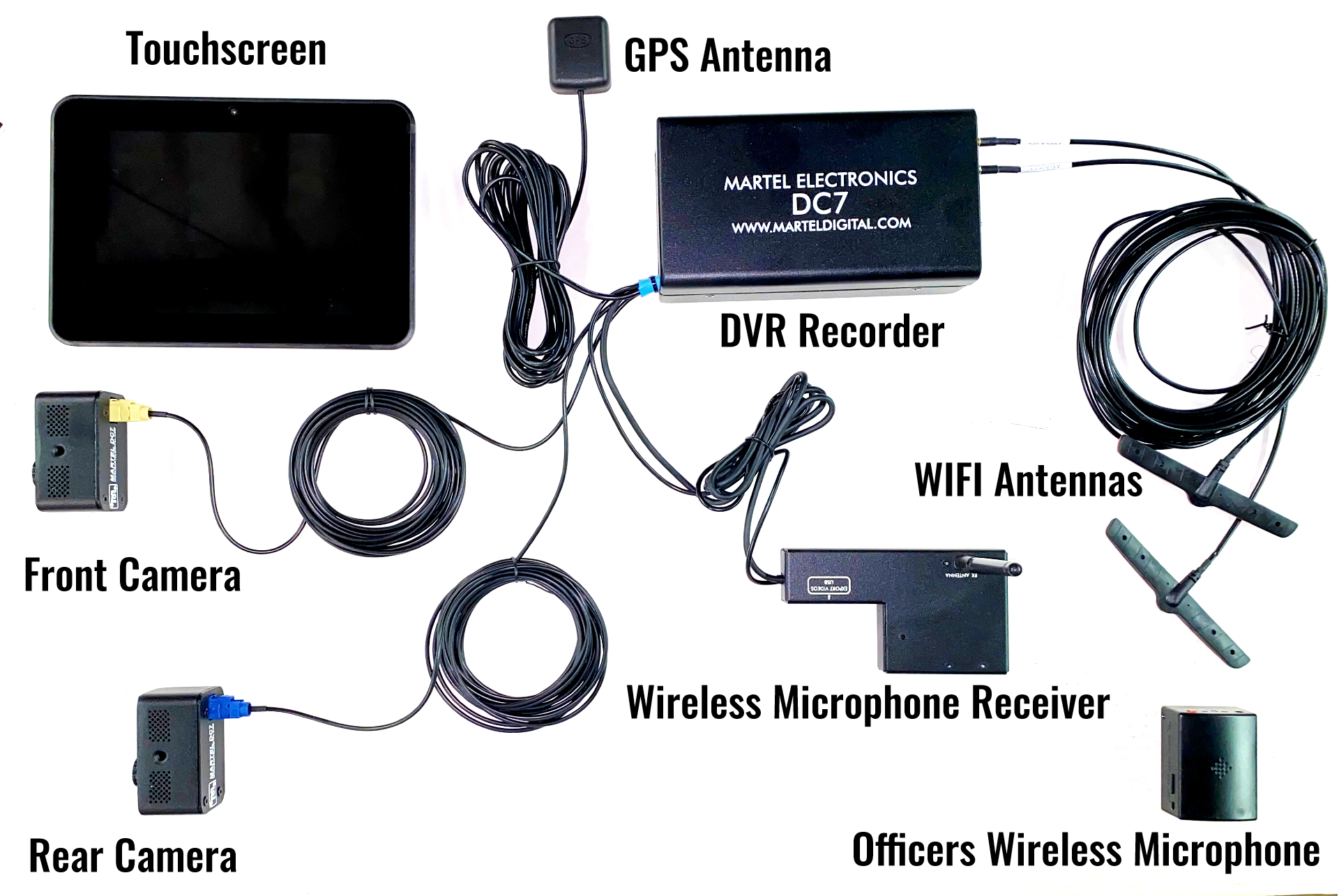
The DC7 is one Martel option when a department wants a dedicated patrol-vehicle system. View the current DC7 package and written-quote options.
Write down the events the department expects to capture. Traffic stops, transports, pursuits, collisions, calls outside the vehicle, and vehicle searches do not all happen in the same camera view. Then ask what starts recording, what audio is captured, how long the equipment remains usable during a shift, and how the resulting file reaches the people who need it. A device that records an excellent forward view may leave a rear seat or an officer away from the car outside its coverage. A portable camera may help at a scene while requiring a different routine for returning it to the vehicle.
The National Institute of Justice describes in-car and body-worn video as complementary perspectives: an in-car camera shows what is in the vehicle's view, while an officer-worn camera can document activity outside that view. That distinction is a useful antidote to the idea that one device covers every incident. A department's policy and its actual field workflow determine which views it needs. NIJ's body-worn camera primer discusses these different perspectives. A consumer dash cam may be a useful driving record for a private vehicle, but the agency should assess a proposed police system against the incidents it must handle, rather than against a consumer advertisement's resolution number alone.
Make a one-page incident map before meeting a vendor. For each common event, record the location of the patrol car, the officer, any passenger or detainee, and the likely direction of the important action. Note the times when a microphone is more important than the picture: a conversation beside the car, an officer speaking during a roadside stop, or words in the rear compartment. The map turns a vague request for “a police dash cam” into a testable description of coverage.
Do the same for people. Who notices that the camera is not recording? Who checks it at the beginning of a shift? Who takes a memory card or exports a clip? Who labels the file? Who decides whether a routine recording can be deleted under the department's retention schedule? A camera is a component in this system, and a department should assign the human steps before deployment. Bureau of Justice Assistance implementation guidance emphasizes involving patrol, supervisors, training, legal, investigations, evidence staff, and technology personnel when a video program is planned. Although much of that guidance addresses body-worn cameras, the cross-functional lesson also applies when a patrol video program changes the flow of evidence. BJA implementation guidance.
Ask for a recording made from the proposed vehicle position, not a promotional still. A forward-facing camera should be assessed from the driver's actual mounting location with the vehicle parked and moving as safely permitted. Look at the road, the approach to a stopped vehicle, the dashboard reflections, windshield obstructions, and the effect of an emergency-light bar at night. If the rear passenger area matters, test that view separately. A single lens aimed through the windshield cannot be treated as a rear-compartment camera merely because the video is sharp.
Martel's DC7 page describes front and rear patrol coverage. The MDP6 page describes a camera that can be used in the vehicle and removed for field recording. These are different operating models. An agency prioritizing a dedicated front-and-rear installation should inspect the DC7 package. An agency prioritizing a portable camera that can be carried to a scene should examine the MDP6 package. Ask Martel to demonstrate the exact kit being quoted and the views that kit produces in the department's vehicles.
Avoid assuming that “wide angle” solves all coverage gaps. A wider field may make a person appear smaller at a given distance. Optical zoom on a portable camera can help frame a stationary scene, but an officer should not be expected to operate zoom instead of handling the incident. Record a short sample from the positions that matter and have a supervisor review it on the equipment actually used for incident review. Identify blind spots in writing so the department's policy reflects them.
Video without intelligible audio can miss part of an encounter. A microphone inside the car may record the cabin well and a roadside conversation poorly. A wireless officer microphone can extend the capture path beyond the vehicle, but the department must verify the transmitter, receiver, battery routine, range in its actual environment, and whether the microphone is on when the event begins. Both Martel in-car product pages describe wireless officer audio; the exact components and operation should be checked in the current package description and in a hands-on test.
Run a practical audio test: say the same short phrase beside the driver's window, near the rear of the car, at the typical traffic-stop position, and inside the rear compartment if that use is in scope. Play the exported file through ordinary review equipment. Listen for missing first words, clipping, wind, clothing rub, and abrupt dropouts. Note where the system is not intended to record. A microphone claim is not a substitute for an intelligibility test in a real vehicle with the engine and ventilation running.
The officer's microphone is also an operational responsibility. Decide how it is issued, charged or supplied with batteries, worn, checked, replaced, and reported when faulty. A device that is left in a charger or has an untested battery will not capture an encounter just because the camera in the vehicle is working. A pre-shift test should check both a picture and a voice sample. For a broader routine, see Martel's police car camera pre-shift checklist.
An automatic trigger may be useful, but a department must document what it actually does. Ask whether the quoted system can respond to a light-bar signal, manual button, vehicle power state, or another event; confirm every connection during installation. The MDP6 product page describes a light-bar trigger cable, while the DC7 description discusses dedicated vehicle recording. Do not generalize an option from one package to the other. Request a demonstration of the exact activation path that will be installed.
Test what happens when an officer activates the trigger while driving, while stopped, and immediately after an event begins. Observe the indicator in daylight and darkness. Confirm what the officer should do if a trigger fails, and who is notified. If a system advertises pre-event recording, ask for its specific behavior and a sample file rather than assuming it includes every audio or video source during that interval. Martel has a separate guide to triggers and pre-event buffers that can be used alongside a vendor demonstration.
Write the manual fallback into training. Staff should know how to start and stop recording under policy, how to confirm it is running, and how to document a failure without changing or deleting an incident file. This is as important for a sophisticated system as it is for a simpler camera. A feature list helps procurement; a repeatable routine helps the shift.
Trace the actual path from vehicle to review station. Does the officer remove a card, transfer by USB, or rely on an optional station upload? Who checks that the transfer completed? Where is the original stored, and where does an authorized reviewer obtain a working copy? How are files named or associated with a case? A low equipment price can shift a large amount of labor to evidence staff if every transfer is improvised.
The DC7 page says it can export by USB and offers optional automatic wireless uploading to a station computer. The MDP6 page describes removable Micro SD recording. Those differences should be priced and tested as workflows. Wireless uploading is an optional DC7 upgrade, not a feature to assume in the base quote. A station upload still depends on the department's own computer, network, configuration, and procedures. Local storage avoids a required cloud subscription, but it does not create an evidence-management policy by itself.
For a pilot, use a small set of non-evidentiary test clips. Have the intended officer and evidence custodian complete the transfer without help from the salesperson, then have a supervisor find and play the file. Time each step. Record the failure cases: a full card, missed upload, unavailable station computer, wrong clock, corrupt file, or forgotten microphone. Ask how the department identifies and corrects each one. The Bureau of Justice Assistance notes that an agency storing video itself must provide the means to store, retrieve and share it while addressing evidence handling and chain of custody. BJA procurement and storage FAQ.
Ask for an example export from the quoted device and open it on the department's intended review computer. Confirm whether an extra player, codec, license, account, or conversion is required. Inspect the video and audio, not just the filename extension. Preserve the original according to agency policy; use copies for routine review or disclosure workflows when the policy calls for them.
Martel describes standard MP4 evidence files for DC7 and Micro SD recording for MDP6. MP4 is a container format, so the specific encoding and playback environment still deserve a test. Request a sample from the actual hardware, not an arbitrary MP4 prepared elsewhere. Confirm timestamps, audio channels, clip boundaries, and any metadata that reviewers need. A department using a case-management or evidence system should test its intake process too, because a file that opens in a media player may still need labels and access controls before staff can find it later.
The National Institute of Justice's Digital Evidence Policies and Procedures Manual is a useful primary reference for agencies developing evidence procedures. Local legal and records requirements differ; the department's counsel and records staff should set the applicable retention and disclosure rules. The buying article can help identify technical questions, but it cannot replace the agency's policy.
“No required monthly cloud fee” answers one budget question. It does not answer who maintains storage, controls permissions, backs up files, monitors capacity, and retrieves an older case. A local system gives the department a different operating burden from a hosted system. The choice should reflect staffing, storage capacity, records requirements, and the department's ability to maintain the chosen infrastructure.
Ask for a diagram showing where a file resides during recording, immediately after export, during supervisor review, and after long-term retention. Assign an owner to each location. Set up permission levels so routine users see what their work requires. Track exports and copies under agency procedure. If the department must produce a clip later, it needs a reliable way to search by incident, vehicle, officer, date, or case number. A folder of unlabeled files is not an evidence system, regardless of the camera brand.
Estimate storage with your own test recordings. Record typical patrol video at the actual settings for one or more shifts, measure file size per hour, and multiply by the expected hours and retention categories. Include backups and growth. Avoid using a vendor's “hours on a card” figure as a department-wide storage plan; it may reflect settings unlike those you intend to use. Martel's local police car camera storage guide can help frame this discussion.
An installed system has to work in the department's vehicles, not just on a tabletop. Check camera sight lines, cable routes, power, mounting, touchscreen location if supplied, radio and other equipment placement, rear-compartment geometry, and the path used by an officer to operate the controls. Fleet and installation staff should inspect a representative car before a multi-vehicle quote is finalized. Differences among sedan, SUV, transport, and specialty vehicles can change the labor and hardware required.
Plan a controlled installation and acceptance test. Photograph the intended mounting positions for departmental records, keep installation documents, and verify that the vehicle can be operated safely. Test with engine on and off, emergency lights on where applicable, and any other electrical loads relevant to the fleet. If a camera can be removed from the vehicle, as described for MDP6, verify the mounting and return-to-car routine. If the department chooses a dedicated front-and-rear layout, inspect both views after installation.
Do not infer that a consumer suction-cup mount, a power outlet, or a consumer app is acceptable for the department's operational and vehicle-safety requirements. The agency's fleet staff and installer should decide the installation method. Martel's police car camera installation guide covers the planning questions in more detail.
Daytime sample footage does not settle low-light performance. Test the actual vehicle after dark in conditions resembling patrol: roadway lights, headlights, flashing lights, a dark parking area, and reflected light through the windshield. Review both the live view and exported file. Do not judge only a paused image; motion can change the visibility of faces, plates, and surroundings. Document the limits honestly, because no camera guarantees readable detail in every lighting condition.
For audio, test HVAC and road noise as well as wind near the officer's microphone. For usability, check whether status indicators can be seen without distracting the driver. If a rear camera is included, test it during transport lighting. If a portable camera is intended for use outside the car, test the procedure for detaching and returning it safely and quickly. Repeat after an installer changes the mount or settings; a catalog specification cannot show every local environment.
The MDP6 product description identifies a Sony Exmor R low-light sensor and ZEISS optics. Those product-specific statements are reasons to ask for sample footage, not a reason to skip a field test. Martel's night recording guide provides a focused evaluation method.
Start with the equipment quote, then add installation, mounts or wiring not included, officer microphone upkeep, removable media or storage, station computer capacity, backup, staff time, support, replacement parts, training, and any optional upload feature. Ask which items are one-time and which recur. If a vendor requires a cloud or software contract, put the term and renewal cost next to the price of the camera. If the proposed system uses local storage, put the department's maintenance and backup costs next to its purchase price.
Current Martel product pages list DC7 at $3,999.99 and MDP6 at $1,999.99, with written quote options for qualifying government agencies. Prices and availability can change, so the article's comparison should always link to the live product pages rather than treat a quoted number as permanent. DC7's optional station wireless-upload path is separately priced on its product page. Ask for an itemized written quote that distinguishes base equipment, options, tax, installation if offered, and payment terms.
Neither a retail dash cam's low price nor a professional system's higher price establishes total value alone. Compare the jobs each can actually perform and the effort the department must contribute. A pilot can reveal whether the cheaper unit creates extra work or whether a more elaborate system has capabilities the agency will not use. Keep the evaluation grounded in local staffing and policy rather than a generic claim about every department.
An equipment choice succeeds only when staff can operate it reliably. Write a short pre-shift test, a recording procedure, an end-of-shift transfer procedure, a failure report, and a supervisor review routine. Train across shifts and vehicle types. Include a realistic scenario in which the officer cannot start recording in the expected way, and another in which a file does not transfer at the end of the shift. Ask the vendor which support tasks it handles and which the department handles.
During a pilot, measure how many attempted recordings produce usable files with the intended audio and time information. Track missing audio, wrong angles, battery issues, failed exports, and user confusion. Do not use a single successful demonstration as proof that the workflow is ready for the fleet. Repeat the test after training and record the improvements. That process will make the purchasing recommendation more defensible to supervisors and budget reviewers.
The department should decide what routine audit information it needs from its own system and procedures. Do not assume a camera provides access logs, chain-of-custody reports, or automatic retention controls unless the exact quoted package and evidence workflow demonstrate them. If the agency requires a particular function, put it in the written acceptance criteria before ordering.
The table below is a question set, not a claim that all consumer cameras lack a particular capability or that every police system includes it. Models vary. Fill the last two columns with evidence from an actual demonstration, a sample export, and the written quote. A blank cell means a requirement is still unresolved.
| Requirement to test | Why it matters to the department | Retail camera candidate | Quoted patrol system |
|---|---|---|---|
| Forward view from the installed patrol position | A sample filmed elsewhere does not show windshield reflections or the agency's mounting constraints. | Record a sample. | Record a sample. |
| Rear compartment or second view | Transport coverage may need a dedicated camera. | List actual camera and installation. | List actual camera and installation. |
| Officer audio away from the vehicle | In-car microphones may miss roadside speech. | Test the supplied audio path. | Test the supplied audio path. |
| Activation and visible status | Officers need to know when recording starts and whether it continues. | Demonstrate the exact controls. | Demonstrate the exact controls. |
| End-of-shift transfer | Evidence staff need a reliable route from the car to authorized storage. | Time a real transfer. | Time a real transfer. |
| Exported file playback | Review staff must open the delivered recording with its sound. | Open a sample export. | Open a sample export. |
| Storage ownership and recurring costs | The agency must budget for storage and maintenance. | Itemize all costs. | Itemize all costs. |
| Vehicle installation | Fleet safety and reliability depend on the actual mount, wiring, and power. | Inspect in a vehicle. | Inspect in a vehicle. |
| Support and replacement path | A camera failure should have an assigned response. | Write down who handles it. | Write down who handles it. |
Score each row as “meets requirement,” “requires an option or separate process,” or “not demonstrated.” Do not replace evidence with a numerical score alone. If the chosen system cannot satisfy a mandatory evidence or safety requirement, an attractive total score does not fix that gap. Conversely, a small agency should not pay for a feature it has no plan to operate. A useful decision record states which requirements are mandatory, which are desirable, and which are outside the first deployment.
Choose two representative vehicles rather than the newest, easiest car in the fleet. If the department uses both an SUV and a sedan, include both or document why one is enough. Assign a patrol officer, a supervisor, a fleet installer, and an evidence custodian to the test. Use test scenarios that do not involve actual evidentiary recordings unless the department's policy and counsel authorize that use. The purpose is to learn how the equipment behaves before a deployment decision.
First, make a baseline list of the vehicle equipment already installed. A windshield mount, mobile data terminal, radio, computer, emergency lighting, cage, and other systems can affect a camera's position and wiring. Take a daytime photo from the driver's seat showing the proposed camera location. Note whether the controls and screen are reachable and whether the installation obstructs a required view. Have fleet staff approve the proposed location before final mounting.
Second, record a controlled daytime scenario. Use a parked patrol car, a person standing at the common roadside positions, and a scripted sentence spoken at normal volume. Repeat with the rear compartment if the package is intended to record it. Record the moment the officer starts the system or activates the configured trigger. Afterward, export and play the entire clip, including the first and last seconds. Ask the reviewer to describe what can and cannot be seen or heard without telling them which unit produced the file.
Third, repeat after dark. Use a safe site with a mix of streetlights, dark areas, headlights, and emergency lights where their use is appropriate. Record movement as well as stationary scenes. Save the original settings used for the test. A pilot that changes exposure or microphone settings between candidates without documenting the changes is hard to interpret. If the system offers a relevant adjustment, test and record both settings rather than quietly selecting the best example.
Fourth, test the transfer twice. The first run can be observed by the vendor or installer; the second should be completed by the department's own staff using written instructions. Make a copy for authorized review while following the agency's rules for the original. Have the reviewer find the file by the intended identifier and play it on the actual department computer. Record the time needed and every step that required help. The best-looking footage is less valuable if staff cannot reliably retrieve it.
Fifth, run a failure scenario. Disconnect or leave out an officer microphone during a non-evidentiary test and see whether the operator notices before recording. Simulate unavailable station connectivity if wireless upload is part of the quote. Test a low or full storage condition under the vendor's instructions. Do not deliberately damage equipment or alter a real incident file. The purpose is to learn whether staff can recognize a problem and follow a safe fallback. A written response procedure is more useful than assuming failures never happen.
Finish the pilot with a one-page acceptance record signed or acknowledged by the responsible staff. List the hardware and software versions tested, vehicle types, camera positions, audio results, trigger results, export path, storage destination, training needs, unresolved issues, options required, and expected labor. A purchasing officer can then compare quotes using the same evidence. If the department later changes the proposed package, repeat the tests affected by that change.
The DC7 is the Martel option to investigate when the department's requirement is a dedicated installed patrol system with front and rear views and officer wireless audio. Its current listing describes a solid-state DVR, touchscreen, GPS antenna, standard MP4 evidence files, USB export, and an optional automatic wireless-upload route to a station computer. The optional route has its own one-time price in the listing. These details make DC7 a plausible candidate for a department that wants a local evidence path and a written government quote without a required monthly storage contract.
That is a starting point for an acceptance test, not a substitute for one. The department should confirm the physical contents of its exact package, whether installation is included, the vehicle-specific configuration, storage and backup responsibility, the chosen export method, the officer microphone routine, and any optional upload components. Ask to see a complete sample file from a DC7 installed in a vehicle like yours. The article's role is to help the department ask sharper questions and connect it to the current DC7 product page, where the current quote terms are presented.
If purchasing spans budget years, request a written quote that states the total equipment price and the amounts due in each year. The DC7 page currently describes a two-budget-year department payment schedule for qualifying government agencies with approved purchase-order terms. It explicitly says this is not a loan and adds no financing charges. Qualification and terms belong in the written quote and the agency's own approval process. A separate article in this series addresses that purchasing path in depth; it should not be confused with this equipment-selection guide.
The MDP6 is a different proposition. Martel describes a portable Sony HD camera package that can record in a patrol car and be removed for field video. Its current listing describes 1080p video, wireless officer audio, a remote camera control, removable Micro SD recording, and a light-bar trigger cable. It is positioned for departments that value a lower initial equipment cost and the ability to take the camera to a scene, while still avoiding a required monthly cloud-storage contract.
Portability creates a useful question and an operational question. At which incidents will the camera leave the car, and how will staff ensure it returns charged, mounted, aimed, and ready for the next patrol shift? Who secures the removable recording medium during transfer? Will the department's policy treat field video differently from installed vehicle video? The answers determine whether the portable feature saves work or creates a new gap. Do not assume the MDP6's single portable camera delivers the same rear-compartment view as a dedicated front-and-rear system; test each intended view.
Ask Martel for a quote that lists the included camera, mount, microphone components, recording media, trigger components, support, and any extra items needed for the agency's workflow. Then conduct the same sample recording and export test used for DC7 or another candidate. The right choice depends on what the department must capture and how it will staff the process, not on a general ranking of the two packages.
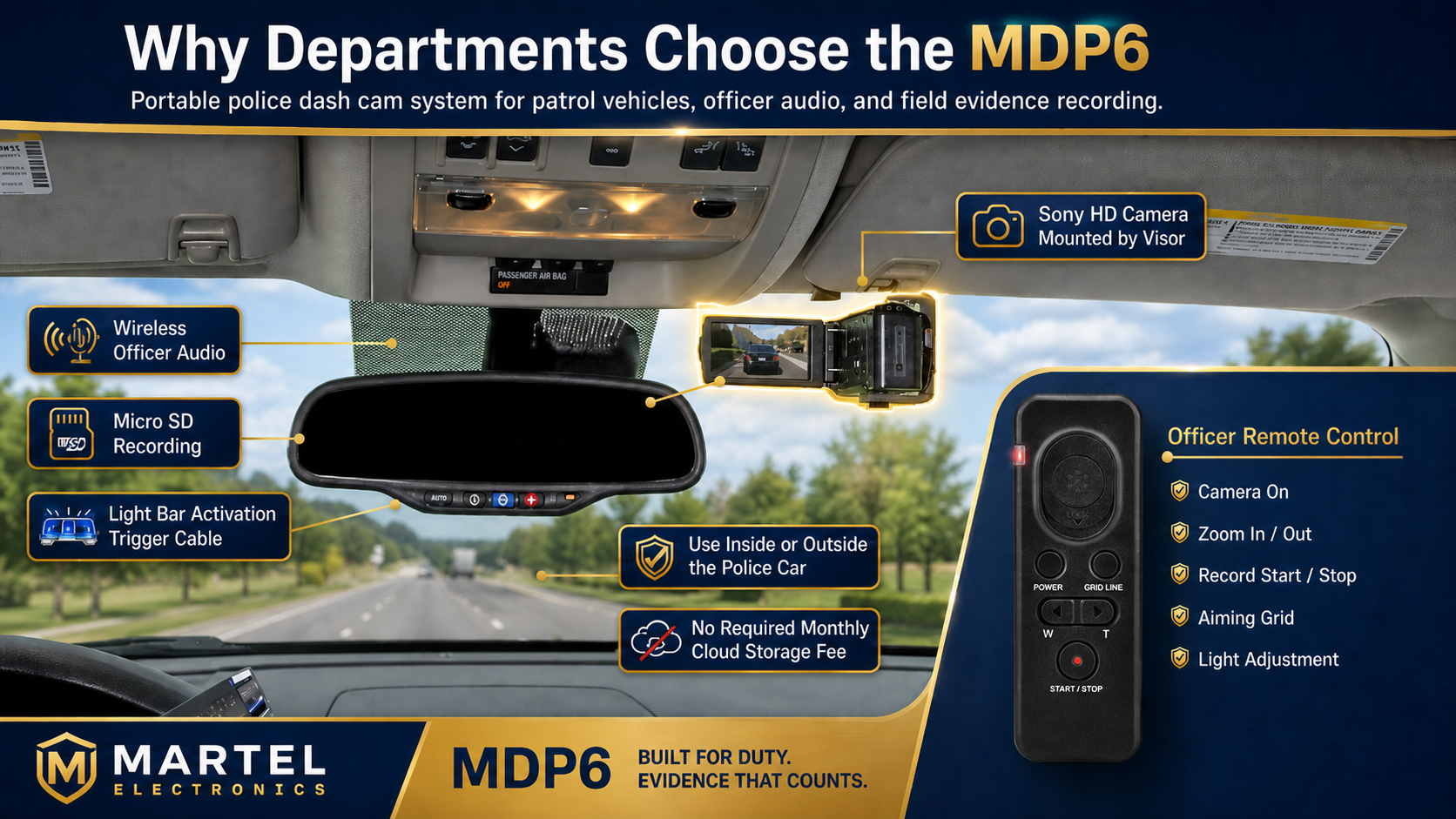
The MDP6 is Martel's portable in-car and field-video option. Review the current MDP6 package.
The person who will operate the equipment and the person who approves the purchase may receive very different explanations. Put the complete comparison in a short written request. State the number and types of vehicles, the required views, whether officer audio must work away from the vehicle, the activation method, how files will be exported, the intended storage destination, and who provides installation and training. Ask vendors to label included equipment and options separately and to identify any contract or recurring charge.
Request an example of the actual exported file and the instructions for playing and transferring it. Ask what happens if a microphone, storage device, cable, mount, or recorder fails and how quickly the department can obtain support. Ask whether the quoted features depend on optional components or on the department providing a computer, network, or storage system. An answer of “supported” is less useful than a written diagram of the connection and a demonstrated file path.
For a two-budget-year quote, have finance and purchasing review when obligations arise, how the purchase order will describe the equipment, and whether the agency's rules permit the offered terms. The vendor's offer cannot determine an agency's own procurement authority. Martel's government quote forms on the DC7 and MDP6 pages are a route to an itemized proposal, not an order placed by merely requesting a quote. Read the live terms before submitting a request.
Finally, specify the acceptance test. A quote can include a field for successful installed front and rear video if those views are required, a clear officer-audio sample at a defined position, a working activation path, an export that opens on an authorized department computer, and training materials. This makes final approval depend on the system doing the jobs for which it was bought. Keep the test realistic and coordinate with the agency's fleet, IT, evidence, and legal staff.
The answer depends on the department's requirements and the exact device. A consumer unit may create a forward-facing driving record, but that fact alone does not establish officer audio, rear-compartment coverage, approved installation, predictable activation, reliable evidence export, or a departmental review and retention process. Write the requirements first, then test a candidate against each one. An inexpensive camera might serve a narrow, non-evidentiary fleet purpose while failing a separate patrol-evidence requirement. Treat those as different buying decisions.
No single resolution figure can guarantee that an event is visible. Position, lighting, movement, lens field, focus, obstruction, compression, and the angle between camera and subject all affect what can be reviewed. Audio and file integrity matter too. Use a representative sample from the installed vehicle at the intended settings. Review the exported file at normal speed and with pauses, and record both useful detail and limitations. If a department needs a particular view, specify and test it rather than assuming a resolution label supplies it.
The two perspectives can complement each other. An officer-worn view changes as the officer moves; a vehicle camera shows the area within its installed view. An officer may be away from the car when an in-car camera cannot see the event, and an officer-worn unit may not show the same roadway or transport perspective. NIJ's primer discusses the complementary role. A department should map the incidents it intends to document and plan when each device is activated, how the recordings are associated, and who reviews them. See Martel's body cameras vs. in-car systems guide.
No required monthly cloud contract can reduce one class of recurring vendor charge, but the agency still needs storage media or computers, backups, maintenance, staff time, and an evidence procedure. A local file also needs an authorized path for review and any required disclosure. Estimate these costs from the department's test footage and staffing. Ask the vendor to itemize optional upload components, then compare the complete operating model with any hosted alternative under consideration. Do not equate “no monthly storage fee” with “no cost to manage video.”
They are designed for different work. DC7's listing describes a dedicated patrol installation with front and rear cameras, officer audio, a solid-state DVR, and an MP4 export route. MDP6's listing describes a portable in-car and field camera, wireless officer audio, removable Micro SD recording, and a light-bar trigger cable. A department should first decide which views and workflow it needs, then compare the written quote, included components, optional features, installation, and staff effort. Current prices belong on their live product pages and in a written quote, not in a timeless ranking.
Request an itemized written quote for the exact number of vehicles and the selected system. Include any optional uploading, installation arrangements, accessory needs, tax estimate, and payment terms. Ask for an example export and a demonstration of the required recording path. Have the relevant department staff sign off on the acceptance criteria. The police camera category shows the current Martel range; the DC7 and MDP6 pages provide the current package details and quote forms.
List the incidents most likely to produce useful video, the views needed for each, and the people who must retrieve the file. Separate mandatory requirements from preferences. A rural agency with one station and limited networking may place greater emphasis on a reliable manual export path; a fleet that returns to a staffed station may value an optional upload workflow. Both still need a test of actual audio, activation, and playback. Document the decision before comparing prices.
At least one representative vehicle is necessary, and two different vehicle configurations are more informative when the fleet varies. The purpose is to expose mounting, electrical, and cabin differences before the order covers the fleet. A first test in a single easy-to-install car cannot establish that the same cable run and rear view work in a transport vehicle or SUV. Write down what was tested and what remains untested.
Yes. Ask for a file made with the exact quoted system and settings. Open it on an authorized department computer, listen to the officer audio, inspect the time information, and practice the intended intake procedure. A demonstration played only on a vendor's computer does not prove that the agency can review its own files. Keep the test clip and the settings record with the procurement notes under departmental procedure.
If transport recording is a requirement, check whether the quoted system has a rear-facing camera, how it is positioned, and what the exported file shows in the department's actual vehicle. Test normal interior lighting and the conditions that occur at night. Ask which audio source records speech there. Do not infer rear coverage from the words “dash cam” or “wide angle.” The department should state the required view and verify it in a sample.
Martel's MDP6 listing describes that use, but the department must build a routine around it. The camera needs a secure vehicle mount, a procedure for removing it, a way to protect and transfer the recording, and a return-to-vehicle check. Test whether a second incident could occur while the unit is away from its mount. Portability is useful when it serves a defined field task and staff can restore the vehicle setup reliably.
Use ordinary speech in the locations where officers actually work, then review the exported recording. Test near the vehicle, farther down a typical traffic-stop path, and in an area with interference or obstructions if that reflects local conditions. Record the microphone's location on clothing, the vehicle's engine and HVAC state, and any dropout. A quoted wireless range is a starting point, not proof of intelligible audio at every scene.
The department should define a pre-shift audio check and a clear indication that staff can recognize before an incident. Train officers to report failures promptly and follow the agency's recording policy; do not try to recreate missing audio or silently alter an incident record. During the pilot, see whether the operator notices a disconnected or inactive microphone. This reveals whether training, indicators, or a different routine is needed.
Automatic activation can reduce missed starts, but the exact trigger must be demonstrated in the installed vehicle. Ask what happens if the light-bar signal, cable, power, or selected trigger fails. Officers should know the manual control and how to confirm that a recording is active. Policy still decides when recording is required. Do not assume one vendor's trigger behavior applies to every package or installation.
It is a system behavior that may retain footage from before a trigger, but duration, sources, and audio behavior differ among equipment. Ask the vendor to show a sample file from the quoted configuration and explain precisely what portion precedes activation. A pre-event claim does not excuse delayed manual activation or a missing microphone. Martel's separate trigger and pre-event guide addresses the concept in more detail.
Only if it solves a real transfer problem that the department can support. DC7 offers an optional route to a station computer, according to its current page. Verify the required network, computer, setup, one-time option price, and what happens when a vehicle returns outside coverage. A tested USB workflow may suit a small fleet; a station upload may reduce routine handling in another. Compare labor and reliability rather than treating wireless as automatically better.
For MDP6, the department should determine who handles the removable media, how a recording is copied, how the original and working copy are identified, and how a full or faulty card is detected. Use only media and procedures compatible with the quoted camera and agency policy. A removable card can be straightforward, but unsupervised card swaps and unlabeled files create preventable confusion. Demonstrate the complete transfer before deployment.
No. MP4 identifies a container, while codecs and metadata can vary. Ask for a sample DC7 export and test it in the actual review and intake applications the department uses. Confirm sound, image, duration, timestamps, and the steps required to attach a case identifier. If an extra conversion is needed, determine who performs it and how the original remains preserved under policy. Avoid promising universal compatibility from an extension alone.
Record representative footage at the intended settings, measure its size per hour, and multiply by expected recording hours across vehicles and retention categories. Add capacity for growth, backups, and working copies as the agency's policy requires. The result depends on actual bit rate, activity, and settings; an advertised card capacity cannot answer it alone. Have IT and records staff review the estimate and the backup and retrieval plan.
The department's evidence and access policy should assign that responsibility. Ask whether the proposed workflow can support the permission and audit needs set by the agency, but do not assume those controls exist in the camera itself. Officers, supervisors, investigators, prosecutors, and records staff may have different legitimate uses. The agency should document who can view, export, copy, retain, or release a file and how each action is recorded.
No piece of hardware replaces a documented evidence process. The agency must define how files are identified, preserved, transferred, accessed, copied, and disclosed. Technical features can support that work, but their presence must be verified in the exact system and workflow. Use a test file to practice the handoff and ask evidence staff where the record of each transfer is maintained. Consult the department's legal and records personnel for applicable rules.
Ask for the exact cameras, recorder, microphone components, mounts, cables, power connections, optional accessories, labor, vehicle types, training, and post-installation acceptance test. State whether an existing computer or network is supplied by the department. An itemized scope makes it easier to compare bids and prevents a useful feature from being assumed included when it is actually optional. Fleet staff should review mounting and wiring before procurement approval.
If both are part of the deployment, yes where practical. Windshield shape, dashboard equipment, rear-compartment layout, power routing, and mounting surfaces can differ. A change in camera height or angle can alter the roadway view and reflections. If a second vehicle is unavailable during the pilot, record that limitation and make its acceptance test part of installation. Do not generalize the first vehicle's result without checking the others.
Use the same safe route or test site, similar lighting, actual installed positions, and documented settings. Examine motion, headlights, emergency-light reflections, and the rear view if present. Review exported files on the same display. Do not rely on selected still frames or a vendor's footage from a different location. Note the conditions in which a person or detail cannot be identified, so staff understand the system's limits.
The precise checklist belongs to the department, but it should confirm that the installed camera is ready, the intended view is unobstructed, recording can be started and recognized, the officer microphone records a short intelligible sample, and storage or transfer warnings are addressed. Keep the test short enough to be performed consistently. A fault needs a documented reporting and fallback route. See the Martel pre-shift guide.
Include people responsible for patrol operation, supervision, vehicle installation, IT, evidence, records, legal review, training, and purchasing as appropriate to the agency's size. One person may hold several roles in a small department, but the work still exists. Each participant should review the requirement most relevant to them. A camera purchase approved without a plan for files, policy, and training can produce avoidable work after installation.
The DC7 and MDP6 product pages provide written quote forms and state that a quote request does not place an order. Use the form to specify quantity and purchasing requirements, then review the itemized response through the agency's normal process. Check the live page for the current terms and options. A quote can support budget discussion, but it does not replace a purchase order, contract review, or the agency's acceptance testing.
Martel's current DC7 and MDP6 pages describe a payment schedule for qualifying government agencies with approved purchase-order terms, showing the full equipment price and amounts due in this and the next budget year. They describe no financing charges and say the arrangement is not a loan. The agency must check whether its own procurement rules permit those terms. Request the exact written quote rather than extrapolating from a page's example amounts.
Treat that as a failed acceptance test for any use requiring officer audio. Check the exported file's audio track, playback device, microphone power and pairing, receiver, and the recording settings under the vendor's instructions. Do not delete the original test file while troubleshooting. Repeat the same scripted phrase after correcting the issue. If it recurs, document the vehicle, microphone, settings, and file so support can reproduce the problem.
Document the discrepancy in the test record and determine the approved correction and verification procedure before deployment. Compare the recorded time with a reliable reference during a non-evidentiary test, including after power loss or a settings change. The department's evidence policy should govern how an actual incident's time discrepancy is recorded; do not silently edit an original file to make it appear correct. Ask the vendor how the quoted system maintains its clock.
If neither passes a mandatory requirement, revise the specification or evaluate other options. For example, a required view, export path, installation condition, or access-control workflow may be unresolved. A product should not be represented as compliant because it is from a favored supplier. Give Martel the written requirement and ask whether the exact package or a documented option meets it. If it cannot be demonstrated, leave the requirement marked unmet.
The best choice is the one that records the required events, produces usable files through a tested workflow, fits the fleet, and can be operated and maintained by the people the agency actually has. Some departments will place the highest value on dedicated front and rear vehicle coverage. Others will value a portable camera that can leave the vehicle for field documentation. Both need clear officer audio, training, transfer, storage, and review procedures. A written pilot record makes these tradeoffs visible to command staff and purchasing rather than leaving them implicit in a price comparison.
Start with the Martel police camera category, then compare the DC7 dedicated in-car package and the MDP6 portable police dash camera against your own acceptance worksheet. Request a written quote for the configuration that passes the test. Keep the agency's legal, records, and procurement decisions with the responsible staff; equipment selection can support their work, but it cannot make those policy decisions for them.
The equipment descriptions and images in this article were checked against Martel's live DC7 and MDP6 product pages. The National Institute of Justice's body-worn camera primer informed the discussion of complementary vehicle and officer perspectives. The Bureau of Justice Assistance implementation guidance and BJA procurement and storage FAQ informed the cross-functional planning and local evidence workflow questions. The NIJ digital evidence policies manual is provided for departments developing their own procedures. The evaluation worksheet, pilot sequence, examples, and prose were written for Martel and are original.
A practical department checklist for comparing retail dash cams with dedicated police in-car video: patrol views, officer audio, activation, file export, local storage, installation, training, and the current Martel DC7 and MDP6 packages.
