How to Keep a Hearing Log for Electronic Court Recording
Practice marking speakers, exhibits, recesses and rulings in a court reporter’s hearing log. A fictional hearing shows how to find the exact question and answer across two recording files.
A useful hearing log lets a court reporter find a specific exchange while the person asking for it is still at the lectern. Give each significant event a recording identifier, a playback position and a brief description. Identify the speaker when you have a reliable basis for doing so. When a proceeding spans several recordings, identify the file in every entry that someone might need to look up on its own.
Suppose counsel asks for the answer immediately before an exhibit was offered. A marker reading “exhibit” sends you hunting through questions, offers and rulings. An entry reading “Ex. B offered by Vale after Rivera describes the south entrance” gives you an exhibit, a speaker, an event and a recognizable place in the testimony. Add the file and its playback position and you can retrieve the surrounding question as well as the answer. This guide shows how to make that kind of entry without falling behind the hearing.
Decide what the court expects the log to do
Start with the procedure for the assignment. Find out who operates the recorder, who can direct a pause or playback, which events need entries, and where the recording and its log go at the end. A reporter assigned to a single courtroom may know those answers there and encounter different instructions on a relief assignment across the hall. If a required field is missing from your usual template, use the court’s approved form or system for that room.
Requirements can be quite specific. Minnesota Judicial Council Policy 523 describes detailed log notes or tags date- and time-stamped to a digital recording, and addresses filing captured records. Michigan’s operating standards identify witnesses, changes of examination and exhibit information among the matters to log at trials and evidentiary hearings. Each gives a practical reason to check the governing procedure before choosing what to log. Minnesota Judicial Council Policy 523 · Michigan trial court technology standards
Keep the purposes of the different documents straight. A transcript may reproduce testimony under an established process. A log normally helps an authorized person navigate a recording, and a court may prescribe how that log is filed or treated. A private handoff for the next assigned operator can identify a pending technical check. Its status and handling depend on local instructions, too. A reporter’s personal label cannot decide what belongs in the official record or who may receive it.
For example, the hearing log could say “Rivera resumes after recess, file H17-B begins.” A handoff might say “For a request about the delivery route, begin with B at 03:26 and listen back through Vale’s question.” Those sentences have different jobs. If the court requires an event or problem in its official notes or incident process, enter it there. A reminder to a colleague cannot discharge that duty.
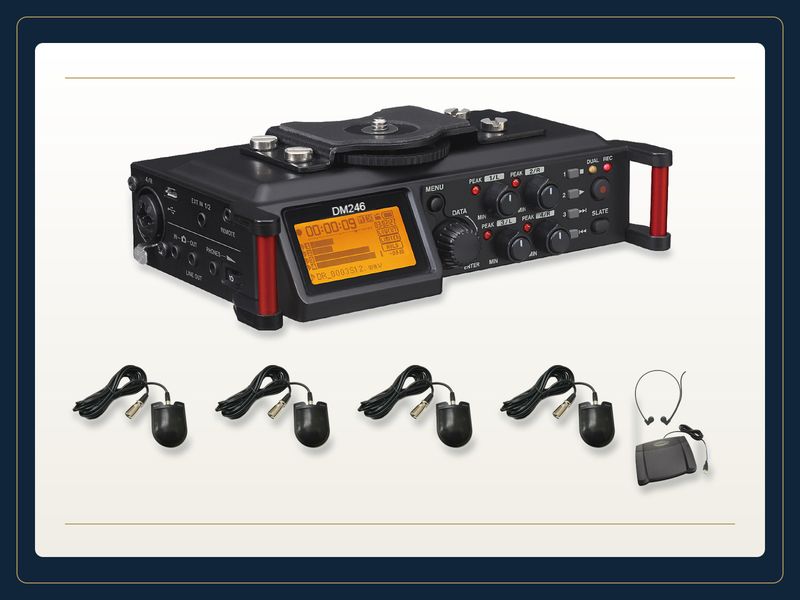
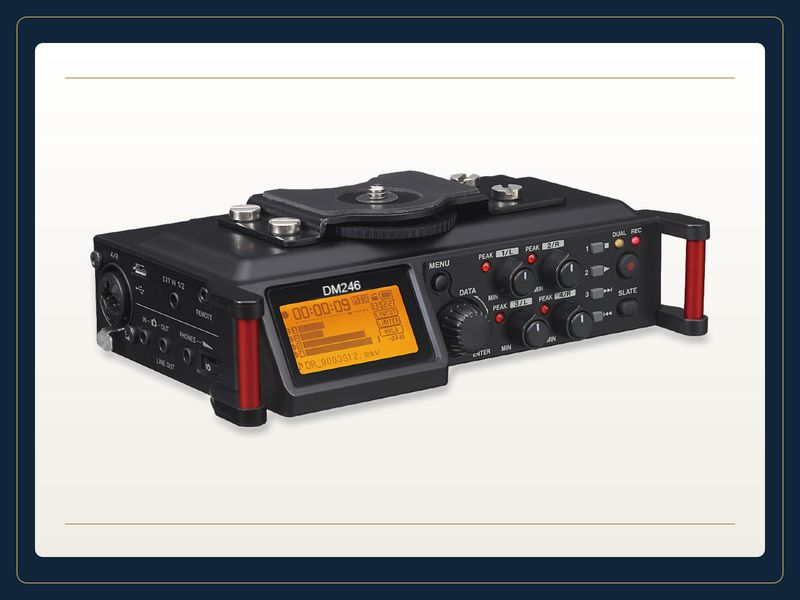
Martel equipment in this guide
Set up a header you can recognize at the end of a long calendar
Build the header from the court’s calendar and the case as called. Use the assigned case identifier, proceeding date, courtroom or location identifier, and the operator identifier the court requests. Add the judicial officer and participants using the authorized source available to you. If the calendar and the spoken introduction differ, follow the court’s identification and correction procedure. A familiar surname on the calendar alone may be a poor basis for identifying a substitute who appears that morning.
Reserve space for a list of recording segments. For each one, enter the exact identifier the authorized system displays and the first useful time reference. A short local label such as “B” can save typing during a busy hearing, provided the header maps B to one specific saved recording. If the identifier is system-generated, retain it exactly or use the system’s built-in association. A convenient nickname loses its value if nobody can resolve it once the hearing ends.
A compact list of speakers is useful for the same reason. A relief reporter should be able to expand “V” into the identified speaker. Distinguish a person from a role and from a microphone location. “Vale, appearing for applicant” identifies a person and role. “Left table” describes a location. A lawyer who stands at the witness rail remains the same speaker, even though the nearest microphone and the sound of the voice may change.
Leave unresolved identifications visible. If a second advocate appears without giving a name you can confirm, use the court’s permitted role label or uncertainty convention. Obtain clarification through the authorized route and document the resolution according to local practice. Guessing a spelling to finish the header quickly can turn a momentary uncertainty into the search term someone uses throughout preparation of the transcript.
Capture clock time and playback position deliberately
A wall clock answers “When did this happen?” A playback counter answers “Where in this file should I listen?” In a simple uninterrupted recording you can often reconstruct one from the other. A recess, file change, recorder restart or difference between clocks can break that relationship. Write both references when the approved system permits and the added information will help retrieval. Label the columns so that a reader never has to guess what 09:42 means.
Record the counter format in the header. In the worked example below, 00:03:26 means three minutes and twenty-six seconds from the beginning of the named file. A display of 03:26 might mean the same thing, but a report exported with a different convention could make it ambiguous. If the system inserts its own time-linked marker, use it as designed. A separately typed wall time can help identify a calendar event without superseding the marker.
Check the relationship at the start of the assignment. If an approved test recording begins at a displayed 08:51:12, speak a short neutral test phrase, mark it, and play the saved sample through the approved playback path. Check where the phrase actually begins. This tests your ability to retrieve an event, plus your understanding of the display. Use the designated testing procedure so the sample stays in the proper place.
When two counters disagree, first identify what each is counting. One display may show the selected clip’s elapsed time while another continues counting from a longer courtroom session. Keep the original displayed values, the selected file and any verified explanation. If local procedure calls for a discrepancy report, make it. Silently adjusting a series of markers because the difference looks constant makes later review much harder if a pause changes the difference halfway through.
Check the signal you will use to recognize speakers
Work through the positions used in the actual room. A test at the operator’s chair tells you little about a soft response at the witness position. Follow the approved routine for a short sample from each intended microphone or input. On a multichannel installation, establish which channel the saved sample reached. Michigan’s trial court technology standards include checking microphone signals and recording and replaying test material. Michigan trial court technology standards
A channel map is especially useful with shared speaking positions. You might have a bench input, a witness input and two table inputs. If several people speak at one table, that input supplies context about location. Identify the actual speaker from introductions, the exchange on the record or the court’s approved clarification procedure. Write down a changed seat or speaking position when it explains why a familiar voice now sounds different on playback.
For a court reporter evaluating a physical four-input setup, Martel lists four microphones and four separate recording channels in its DM246 package. That makes it possible to test each assigned position and see whether the playback workflow gives you the channel access your room needs. During evaluation, try a quiet answer from the witness position followed by a normal question from counsel. Retrieve both from the saved sample before deciding how the equipment fits your assignments. Martel DM246 four-microphone recording and transcription package
Choose a monitoring method that lets you hear the proceeding and carry out the court’s instructions. Confirm which source reaches your headphones or approved listening position. Hearing a microphone live and retrieving speech from a completed file answer different questions. Build a saved-sample check into preparation whenever the court’s procedure permits it, then continue the required monitoring during the session. Record problems and responses through the prescribed channels.
Log the moments that divide testimony into findable parts
Consider the requests people actually make. “Play the last answer before the recess.” “Where did the second witness begin?” “Which exhibit was on the screen when counsel asked about the loading door?” Each request crosses a boundary between events. Log enough of those boundaries to reconstruct the order. Good starting points include the case call, appearances, each witness, changes in examiner, exhibit activity, rulings, recesses, resumptions and the close. Use local requirements to complete that list.
Within a long examination, choose recognizable subject changes. “Rivera, direct, sequence of stops” gives someone a useful place to begin. A few minutes later, “Rivera, direct, identifies east entrance on diagram” narrows a different request. A line for every sentence can bury the turns that matter, while a single line for an hour-long witness can make retrieval impractical. Let the court’s requirements, the pace and the meaningful changes in testimony guide your detail.
Choose event verbs such as called, sworn, offered, ruling deferred, admitted, recessed or resumed. Apply each only when supported by what occurred and the court’s conventions. A document appearing on a display does not tell you how the court will rule on it. If you hear a number unclearly, mark the event with the verified speaker and subject and identify the uncertainty according to procedure. You still have a useful pointer for later verification.
When speech moves faster than typing, take the live marker first if your authorized system supports it. Add the shortest accurate cue you can manage while continuing to monitor. Expand an entry later only from an authorized, identifiable source and according to the correction procedure. Scanning a table of clear markers is usually faster than deciphering a paragraph typed during an objection while the bench was already ruling.
A fictional hearing log from call through adjournment
The following practice hearing, people, exhibits and recording identifiers are invented. A court reporter is following a short evidentiary hearing in training room C. Judicial Officer Arden presides. Vale appears for the applicant and Moss for the respondent. Witness Rivera describes a delivery route using a diagram and a route sheet. The training exercise uses two saved files and gives every row a clock time and a file-relative counter.
The fictional case identifier is Training H17. Segment H17-A starts at 09:12:00. The exercise assumes the operator acts on an express direction at recess and begins a second recording at resumption, under the practice room’s instructions. H17-B starts at 09:39:00 with its own elapsed counter. In an installation where the recording continues over a recess, the file list and elapsed positions would look different. Always follow the actual instruction for the room.
| Clock time | Recording | Elapsed | Event and retrieval cue |
|---|---|---|---|
| 09:12:00 | H17-A | 00:00:00 | Arden calls Training H17. |
| 09:12:38 | H17-A | 00:00:38 | Vale and Moss state appearances. |
| 09:14:06 | H17-A | 00:02:06 | Rivera sworn and gives name on the record. |
| 09:14:29 | H17-A | 00:02:29 | Vale begins direct examination, delivery sequence. |
| 09:18:10 | H17-A | 00:06:10 | Rivera describes the south entrance before diagram is displayed. |
| 09:19:02 | H17-A | 00:07:02 | Vale offers Ex. A, entrance diagram. |
| 09:20:11 | H17-A | 00:08:11 | Arden admits Ex. A. |
| 09:24:34 | H17-A | 00:12:34 | Vale presents Ex. B, route sheet. Moss objects when offered. |
| 09:25:18 | H17-A | 00:13:18 | Arden reserves ruling on Ex. B. |
| 09:29:20 | H17-A | 00:17:20 | Arden calls recess and gives recording direction. End of A. |
| 09:39:00 | H17-B | 00:00:00 | Arden resumes hearing. Rivera remains on stand. |
| 09:40:12 | H17-B | 00:01:12 | Arden admits Ex. B. |
| 09:41:46 | H17-B | 00:02:46 | Vale resumes direct, south entrance route. |
| 09:42:21 | H17-B | 00:03:21 | Vale asks which door Rivera reached after leaving the loading bay. |
| 09:42:26 | H17-B | 00:03:26 | Rivera answers, identifies east door on route sheet. |
| 09:45:18 | H17-B | 00:06:18 | Moss begins cross-examination, diagram orientation. |
| 09:49:37 | H17-B | 00:10:37 | Arden excuses Rivera. |
| 09:51:04 | H17-B | 00:12:04 | Arden adjourns. |
Notice how the route sheet has several searchable moments. A request for the objection takes you to H17-A. A request for the ruling admitting the same item takes you to H17-B. A request about the east door takes you to Rivera’s answer later in B. An exhibit number alone would lead you to all three places, so each entry also carries a verb and a brief description.
The morning also contains two different entrance references. In A, Rivera describes the south entrance before the diagram appears. In B, Vale asks which door came after the loading bay, and Rivera identifies the east door. Short subject cues preserve that distinction. If someone recalls only “the part about the door,” the log gives the reporter two specific possibilities to clarify without characterizing the evidence or guessing which exchange was intended.
Work a playback request from the question someone actually asks
Imagine Arden asks for “the question about leaving the loading bay and Rivera’s answer.” First identify the exchange from the description. Both the question and answer are in H17-B. Vale’s question starts at 00:03:21, followed by Rivera’s answer at 00:03:26. Looking only for “Rivera” would also return the oath, the first examination, the cross-examination and the point at which the witness was excused.
Open H17-B through the authorized playback process and verify that the selected file belongs to this case. If the workflow permits a private cue before courtroom playback, cue several seconds before 00:03:21 and confirm Vale’s lead-in. Establish where the answer ends by listening. The next logged event is cross-examination at 00:06:18, but that entry tells you when the examiner changed. It gives no evidence that Rivera’s answer lasted until then.
Direct the requested excerpt to the courtroom only under the court’s procedure. Know in advance how that room handles ongoing capture during playback and who operates each control. If a live recording is running, a mistaken change of mode could affect capture. Where the procedure calls for playback annotations, mark the playback event at its position in the ongoing proceeding and identify its source segment and original elapsed position separately.
There is a useful arithmetic check. Subtract the start of B, 09:39:00, from the question at 09:42:21 and you get three minutes and twenty-one seconds. Subtract the start of A instead and you get thirty minutes and twenty-one seconds, longer than the whole first segment. In a system with pauses or an offset, arithmetic may produce a plausible but inaccurate answer. The actual recording and a verified marker settle the location.
An authorized person might later ask for the exchange “where they discussed whether the route sheet could come in.” That is a different retrieval. Start with A at 00:12:34 for the offer and objection, then A at 00:13:18 for the reserved ruling. If the requested scope includes the eventual admission, it reaches B at 00:01:12. Keep the segment break visible when communicating those references so nobody mistakes separate events for a single continuous excerpt.
Handle overlapping voices, remote participants and interruptions
When voices overlap, mark the point promptly and capture whatever attribution you can support. For instance, “Moss begins objection while witness answering” says who started speaking and what had been happening. If you recognized only the onset of simultaneous speech, a neutral overlap marker is more reliable. A channel map can narrow a search on later playback, although people close to each other can be picked up by more than one microphone.
An interpreter adds another layer of retrieval. Use the court’s conventions to distinguish the witness from the interpreter, especially if the original speech and rendition follow one another quickly. Record the introduction or other authorized identification that establishes the roles. If someone requests the answer after a particular question, a marker at the beginning of the exchange helps an authorized reviewer find both the original speech and its rendition in the recorded order.
For a remote appearance, write a name or role you can establish from the hearing. A screen label may identify the meeting account or a room rather than the voice speaking. If a connection drops, log the observable event, any direction from the judicial officer, and the point where the participant is heard again. Avoid guessing what the remote person said during a gap. Follow the court’s intervention procedure if the ability to capture a participant is in doubt.
The same discipline works for physical interruptions. Suppose the witness moves from the stand to point at a chart and becomes hard to hear. Mark the change and follow the room’s approved method for alerting the presiding officer or designated staff. Document the response you actually observed, such as a direction to return to the microphone or repeat the answer. A bright input meter alone cannot tell you whether the particular words were intelligible.
Make relief coverage and end-of-session review work
A relief reporter needs a quick answer to three questions. Which proceeding and file are active? Who is speaking, and in what part of the hearing? Is there an open issue that affects coverage? At the handoff, use the authorized transfer procedure and create any required operator-change notation. Coordinate the actual change of responsibility so both people understand who is monitoring and making entries during the transition.
In the practice hearing, a private handoff immediately after the recess could read “Training H17, file B active, Rivera remains on the stand under direct. Exhibit B ruling reserved in A at 00:13:18. Monitor for ruling on resumption.” Once Arden admits the exhibit, the authorized hearing log needs its own event. Change the handoff through its proper workflow if it is still active. Do not leave a stale reminder as the only description of the result.
At close, reconcile the log against the authorized file list. In the example there are two entries in the list of recordings, and resumption is associated with B. Check that the date, case identifier, segment order, operator changes and significant closing events are where the assignment requires them. If a scheduled matter was never called, use the court’s prescribed calendar procedure. A reserved time slot alone is no basis for creating a hearing entry.
Use permitted saved playback checks to test the log’s usefulness. For Training H17, retrieve one anchor near the beginning of A, one near its close and one after B begins. Can you hear the expected exchange? Does the marker lead to the right case? If an entry links to the wrong segment, apply the authorized correction method and preserve the history the court requires. Routine end checks also give you a practical way to discover confusion about counters before someone urgently needs an excerpt.
Complete the court’s required transfer, storage and access steps using the authorized destination. An operator’s successful playback confirms that a selected file can be opened in that context. A completed handoff or storage entry answers a separate question about where the record went and who received responsibility. If the court requires an acknowledgment, check for that acknowledgment. Keep identifiers and unresolved issues available only through the prescribed work process.
Design a small lookup exercise for the next assignment
Use fictional testimony on a permitted practice system to improve your entries. Have a colleague use two file segments, a witness, an examiner and two short exhibit events. Give the colleague three retrieval requests without telling them which headings you chose. Ask them to point to the original question, the ruling, and the first spoken event after resumption using only the practice packet. The most revealing result is where a careful reader hesitates.
For example, imagine your colleague opens the right file but starts playback in the middle of an answer. Compare the phrasing of the request with your marker. If the request includes both question and answer, a marker at the beginning of the answer alone may require a backward search. You could add an adjacent question marker at a consequential exchange, or make the question’s subject the cue for the existing marker where the equipment supports it.
Try a different failure in the next practice run. Put two people with the same surname at different speaking positions. Use an unambiguous approved role or identifier at their introductions, then see whether a reader can follow an examiner change. Next, let one of them move to a different seat. If your log remains understandable without revising the person’s label, you have successfully kept identification and microphone position separate.
If you are choosing a recorder, take the same exercise to your evaluation. Use the proposed room setup to save two practice segments, locate a marker, and find a soft answer near a change of examiner. Compare how easily a second authorized operator can recover the specific passage. Martel’s courtroom recorder category gives a starting point for comparing options, and its DM246 guide describes a four-channel system for rooms that need separate inputs. Martel court reporter digital recorders · Martel DM246 courtroom recording system guide
Questions court reporters ask about hearing logs
1. What belongs in a useful electronic court recording log entry?
Enter the recording identifier, the position you can retrieve, and a concise description of what happened. Include a reliably identified speaker or role when it helps distinguish the exchange. For the practice file, “H17-B, 00:03:21, Vale asks which door came after the loading bay” gives another reporter enough information to find the exact question and recognize it when it plays.
2. How much testimony should I type into the log?
Use the detail your court requires and enough landmarks to distinguish nearby exchanges. During a long answer, a few distinctive words about the subject may serve better than a sentence you cannot finish while monitoring. Take care with quotation marks. A paraphrase of testimony can be an effective locator, but quotation marks can invite a reader to treat it as verbatim wording.
3. How should I handle two cases called within the same recording file?
Mark the actual transition in the recording and identify each case by its approved identifier. In the header or case list, cross-reference the portion belonging to each matter if your system and procedure permit. One file name may then appear under two different cases. A retrieval note needs the case and the segment position to distinguish the two calls.
4. What if two related calendar matters are heard together?
Follow the judicial officer’s directions and the court’s rules for linked matters. Record the identifiers as called and the announcement that establishes which matters are being addressed together. If the discussion later narrows to one, mark the change where you can verify it. A common surname, a single lawyer or a shared hearing date is insufficient to establish the relationship.
5. How do I log a speaker whose name was spelled quickly?
Keep the verified role, a marker for the introduction and an uncertainty flag in the form the court permits. Check the spelling through an approved source or request clarification through the designated person. Resolve any conflict according to the court’s procedure. That approach leaves you an audible reference even if the appearance sheet reflects a different lawyer from the one who actually appeared.
6. What if a witness gives a different name during testimony?
Mark the point where the witness gives or clarifies the name and follow the court’s naming convention. Preserve the link to earlier entries for the same witness. A relief reporter looking up the first identification needs to understand that the later label refers to the same person. Avoid speculating about why the names differ or adding identifying details outside the authorized record.
7. How can the log distinguish direct, cross and redirect examinations?
Mark the start of each identified change, with the witness and examiner. For example, “Rivera, cross by Moss, diagram orientation” can survive a long session and remain easy to retrieve. If an attorney briefly interjects and the same examiner continues, the speaker change alone does not establish that a new examination has begun. Follow the actual sequence and the court’s terminology.
8. How should I label an exhibit that is displayed before it is offered?
Record the display as an observable event using the description and identifier you can verify. Add a new marker when the offer is made and another for an express ruling. In a later lookup, the question may concern what was visible when the witness spoke, regardless of when the court ruled. Keeping those events separate lets the log answer both kinds of request.
9. How do I record an exhibit ruling that applies to only part of an item?
Mark the ruling and identify the portion using the court’s own terms as accurately as the approved notes allow. A page range or attachment identifier may help if stated clearly. Where a qualification is difficult to summarize, point to the ruling and use a neutral cue. The authorized reviewer can listen to the whole statement before relying on a description of its scope.
10. How do I note a recess when the recorder keeps running?
Log the recess and resumption as distinct events with positions in the continuing recording. Follow the court’s operating instructions during the interval. If the same file and time base continue, both markers belong to that file. If the equipment creates a new segment automatically while the hearing is recessed, record the relationship so the resumption can be found in the correct segment.
11. What if a recorder creates a new file in the middle of a witness’s answer?
Map the old and new segment identifiers and the best verifiable positions on either side. Note that the witness was answering when the boundary occurred. A file boundary alone cannot tell you whether any words are missing. If permitted, check the end of the first segment against the beginning of the next, and follow the incident process if continuity is in doubt.
12. How do I locate a question if I marked only its answer?
Open the correct file, verify the answer from your cue and use the approved playback controls to move earlier in small steps. Listen for the beginning of the question. Check whether an objection, a reformulation or an intervening answer changes which exchange was requested. When an authorized playback is requested, establish the scope before routing the sound to the courtroom.
13. What does a reporter do if a spoken time differs from a recorder timestamp?
Keep the two sources distinct. A witness saying “around nine” supplies testimony about a time. The recorder gives a position or time reference for when that testimony was captured. Even when the judicial officer announces the time, document any discrepancy using the court’s convention. Replacing a device marker with a spoken estimate can make the passage harder for the next person to find.
14. Can a paper hearing log still point accurately into a digital file?
Where the court permits paper, a clearly labeled file identifier and elapsed counter make a handwritten entry retrievable. Show the time convention prominently and repeat the segment when a new sheet begins. Number sheets and handle the originals as directed. Some courts require synchronized electronic entries in particular workflows, so confirm the accepted method before choosing paper for the assignment.
15. How should I choose abbreviations for a live courtroom log?
Start with approved local abbreviations and a short key identifying any assignment-specific labels. Test each proposed label against the real speaker list and common event types. A one-letter “R” could mean respondent, ruling or Rivera. A second letter or a distinct role tag costs little during entry and removes a source of confusion when someone reviews the file months later.
16. What should the log say if one microphone starts sounding faint?
Mark the time and the affected position or channel if known. Follow the court’s approved procedure for alerting the designated person and checking capture. Separate the observation from any later diagnosis. “Witness position faint during answer” records what you heard. A later, verified finding about a cable can go through the appropriate incident process without turning an early guess into a technical conclusion.
17. Can an isolated microphone channel establish who spoke?
It can indicate where the voice was prominent and help locate an exchange. Someone may lean toward a different microphone, speak while standing behind another person or be audible on several inputs. Use the introductions, context on the record and any permitted clarification to resolve the name. On an uncertain entry, a precise elapsed time remains valuable even while the identity is being checked.
18. How do I tag a witness pointing at a diagram without saying a location?
Mark the relevant question and answer and any words identifying the diagram. Follow local procedure if an authorized clarification is needed. A phrase such as “witness indicates on diagram” may describe the event if permitted. Avoid supplying your interpretation of the location pointed to. A verified exhibit identifier and position will help an authorized reviewer match the exchange with the proper exhibit.
19. How do I note an objection when people speak at once?
Make the marker at the overlap and identify the objector only to the extent supported by the record. Add the ruling as a separate event when it comes. If the grounds were not clear to you, use a neutral cue that leads back to the exchange. A precise tag for the start of the overlap is more useful than an inferred ground entered with apparent certainty.
20. What is the best cue for a remote witness who disconnects and returns?
Use one marker for the observed interruption and another for the confirmed return, together with any directions or repeated testimony you can identify. For example, “witness audio drops during route question” and “Rivera heard again, Vale repeats route question” tell the reviewer where to start. Follow the assignment’s requirements for documenting technical interruptions and making them known while corrective action is possible.
21. How should I log a new interpreter who takes over mid-examination?
Mark the substitution at the actual introduction or direction, identify both the continuing witness and the new interpreter under local naming conventions, and preserve the elapsed position. If the examination pauses for the substitution and a question is repeated, mark that restart as well. Those entries can explain a changed voice or a repeated question during an otherwise continuous examination.
22. How do I log the court playing an excerpt from an earlier hearing?
Mark when playback begins and ends in the current proceeding as local procedure directs. Record the source identification and excerpt location if they are announced or otherwise available through the approved process. Keep those source references distinct from the current recording’s clock and elapsed counter. A future reviewer may need either the earlier original or the later discussion about what was played.
23. What if an attorney asks me privately for a copy of the audio or log?
Use the access or records-request process established for the assignment. Explain how the requester can reach the designated office or responsible person when that is part of your role. A request for a copy raises different questions from locating a passage for an authorized courtroom playback. Having a file open at the reporting station does not establish who may receive it.
24. How should I handle restricted portions when building a hearing log?
Follow the court’s directions for recording, labeling, access and storage of that portion. Use the level of identifying detail the approved log permits. If the public-facing calendar and the restricted recording have different access controls, follow each workflow carefully. Ask the responsible court official how relief staff should identify the boundary when the ordinary subject cue would itself reveal restricted information.
25. What if a colleague relieves me between the offer and ruling on an exhibit?
Give the incoming operator the exhibit identifier, the source file and marker for the offer, and the fact that a ruling is still pending if that is what occurred. The incoming operator can then log the ruling when it happens. Use the court’s authorized operator-change entry and handoff process so it is clear who was covering the hearing at each point.
26. How can I correct a marker assigned to the wrong speaker?
Use the court’s correction process and retain the required history of the change. Document the basis for verification in the authorized place if required. Suppose a later introduction establishes that a second lawyer gave the earlier response. Check the relevant passages before updating the label. Preserve the original event’s elapsed position, which still points to the exchange even though the attribution changed.
27. What should I do when the log’s link opens an unrelated recording?
Record the affected case and marker through the designated incident or correction process. Compare the approved file identifier in the header with the file that actually opened. Determine whether one link or several are affected and verify any repair with an authorized playback check. Avoid renaming official files or shifting a sequence of links on the strength of a single mismatch.
28. Is there a fixed interval for adding markers during long testimony?
Use any interval the court prescribes. Otherwise, place markers at recognizable transitions and add useful subject cues in stretches where the same speaker continues. For example, successive entries might distinguish the loading sequence, the instructions Rivera received and the first stop. If a person seeking the middle topic has to listen from the oath, the current level of detail probably needs adjusting.
29. How can I tell whether the recording equipment supports my hearing-log workflow?
Test an approved sample from capture through retrieval. Create two segments, mark one identifiable question in each, close the session and ask an authorized colleague to find both from the saved material. Establish what the recorder stores, which references the log retains, and what an approved playback station can open. A device’s index-marker feature alone leaves the relationship to your court’s log untested.
30. What final spot check catches a log that looks complete but is hard to use?
Choose a question involving an exhibit and a segment change. Give a permitted reviewer only the case identifier and the ordinary-language request, such as “the point when the court admitted the route sheet after recess.” In the example, success means locating H17-B at 00:01:12 and recognizing Arden’s ruling. An entry for the earlier objection in A answers a different request.
Sources and equipment references
- Minnesota Judicial Council, Policy 523, Storage of Captured Records of Court Proceedings. See the policy statement and the definition of an audio recording for the relationship between the audio and its date- and time-stamped log.
- Michigan State Court Administrative Office, Michigan Trial Court Standards for Courtroom Technology. Section 1, chapter 3 covers operation, monitoring and log notes, including witness and examination changes.
- Martel Electronics, DM246 four-microphone recording and transcription package. The product listing identifies the included microphones, separate channels and playback kit.
This guide and its fictional hearing are for educational purposes and should be read alongside the procedures and directions that govern your court assignment.