Updated · By Martel Staff
By Martel Staff. Originally published March 29, 2023. Legacy model examples are retained for reference; current packages and compatibility may differ.
Buying the right dictation machine for your lawyers
Picking the right dictation recorder can be a blessing, but the process can be a curse. There are many choices. So what's the difference between the recorders? A digital dictation recorder can make dictation easier, but controls and editing features differ between models. So I'm going to take a moment to outline what you should be looking for when you need a digital dictation recorder. The most important thing to look for in a digital recorder is the question whether it's a pushbutton recorder or does it have a slide control. Professional dictation recorders with the appropriate editing features let you rewind, edit and insert your dictation, correcting your mistakes as you go. This is a key factor for doctors, lawyers and insurance people because they can quickly rewind and record over the errors. Many inexpensive consumer recorders do not offer the same overwrite and insert editing features.
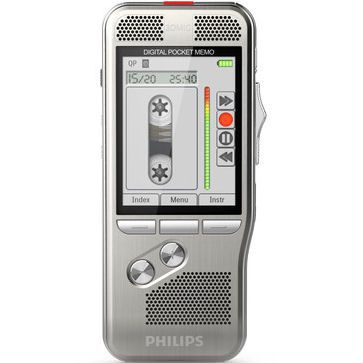
Yes the consumer dictation recorders can be cheaper, but limited editing can cost you time in daily use. For example, let's consider a lawyer’s dictation needs. Suppose he dictates for about two hours a day and makes 30 to 40 mistakes in the document. If his recorder lacks editing features, he cannot correct those errors directly in the recording. If an error happens 30 minutes into the dictation, he may need to record a separate correction or repeat part of the dictation. Turning dictation into a document efficiently is important to a law firm’s billable work. The last thing I want to touch on today is the software that comes with the digital recorder, it's immensely important. The original article used the Olympus professional dictation recorder the DS-7000 and the Philips digital dictation recorder DPM8000 as examples of systems with workflow software. For a current software comparison, OM SYSTEM offers ODMS R8 as a locally installed, one-time-license option alongside its separate ODMS Cloud service. Check which platform and user licenses your quoted recorder package includes. OM SYSTEM software options.
So what's workflow software? Compatible professional dictation recorders can use a docking station and workflow software connected to a compatible computer. With supported equipment and configured workflow software, docking can recharge the battery and send files through a network or by email to a secretary for transcription. The software can notify the secretary or transcriptionist that dictation is ready. Once transcription is done, a configured workflow can notify the lawyer or doctor that the document is ready. This finishes the loop on the document creation and now it is able to be billed or filed.
Digital dictation equipment for lawyers
A dedicated dictation recorder with familiar controls can help lawyers dictate while reviewing a letter or computer screen. Cloud-based dictation workflows can help law firms convert dictated files into text documents, depending on the software and services in use. Dictate on the go with a professional dictation machine from Martel. Advances in dictation technology allow quick and efficient dictation and transcription document creation. This has revolutionized how law firms process voice files. Dictation machines recording devices allow attorneys to dictate wherever they are in the world. Compatible dictation management software can route files into the firm’s configured workflow, either to a transcriptionist, supported speech recognition software, or a combination of both.
The original article also discussed Wi-Fi-enabled dictation using the Olympus DS-9500 as an example. Compatible wireless recorders can support sending dictation away from the office when the required network and workflow settings are available. Check the connectivity and software requirements for your chosen model.
Browse current legal dictation recorders and dictation and transcription packages to compare equipment for your office.
DSS and DSS Pro file formats
DSS, or Digital Speech Standard, is a compressed file format used for professional speech and dictation. DSS Pro uses the .ds2 extension and adds capabilities such as enhanced speech recording and supported encryption. These formats are not exclusive to Dragon. Check the recorder and transcription software for supported formats and editing features. OM System explains DSS and DSS Pro.
Recording format affects both editing and delivery. Philips specifies DPM8000 insert editing for DSS/DSS Pro, while overwrite and append also work with its MP3 and PCM modes. Match those choices to the typist’s supported formats before recording client work. Philips DPM8000 recording-format specifications.
Related Martel equipment
Common Questions and Answers
Should I choose controls or audio features first?
Start with the work you need to complete, then compare handling, correction functions and saved audio. Slide switches and buttons describe the controls; they do not establish every recording, editing or security feature.
Can I buy a recorder mentioned in an older guide?
Check the current product listing for availability and the exact package. Older model references can help explain a workflow but do not establish current stock, software support or accessory compatibility.
Is workflow software the same as speech recognition?
Workflow software can manage transfer, playback, identifiers and routing. Speech recognition converts supported audio into draft text. Confirm whether recognition is actually included in the specific product and license.
What is the most useful trial before ordering?
Record a short sample with a correction, transfer it through your intended process and have the typist open it with the planned software and pedal. Check the full equipment and license cost afterward.