Recording and preparing meeting minutes
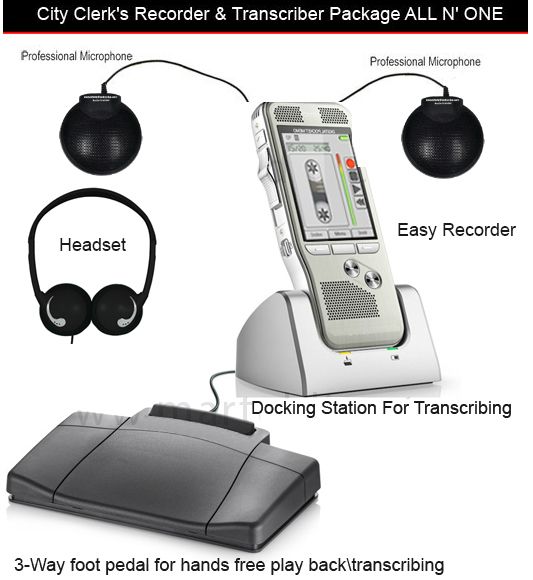
A recorder for meeting minutes should help the secretary verify what the group decided. It should capture the important speaking positions, save files that can be found afterward and support controlled playback. The recording is a reference for the work; it does not decide what belongs in the minutes or complete the organization's review and approval process.
Begin with that distinction when choosing equipment. A board, committee or city-clerk office may need brief decision minutes, detailed minutes or a separate transcript. Each organization determines its own requirements. This guide provides an original equipment and operating workflow, with illustrative examples and proposed checks that you can adapt to those requirements.
Separate the recording, working notes and approved minutes
Think of three related records. The audio preserves captured sound. Working notes help the preparer locate important passages and remember questions. Minutes present the information required by the organization's process. These records can support each other, but they are not interchangeable. A verbatim transcript is a fourth possible output, with different effort and review needs.
For example, a discussion may contain several proposed dates before the chair confirms a final deadline. Audio playback helps the secretary follow that sequence; the minutes may need the confirmed deadline and responsible person rather than every abandoned suggestion. Conversely, a requirement to record exact motion wording cannot be met reliably by an informal summary of what the preparer thinks was intended.
Agree on the document type before the meeting. Use your organization's approved template and rules for motions, votes, names and attachments. Confirm who resolves uncertain details. This prevents the equipment purchase from being treated as a substitute for a clear minute-taking procedure.
Assign recording and document responsibilities in advance
Identify the recording operator, minute preparer, reviewer and person responsible for storing the files. One person may hold several roles, but each task still needs an owner. A clerk who must answer questions and distribute papers cannot continuously inspect every audio connection. If the meeting is important enough to need dedicated monitoring, plan that staffing explicitly.
Decide how an audio problem will be raised. A useful operating agreement is that the operator can alert the chair when a speaker cannot be heard or when recording has stopped. The chair can then request a repetition or pause proceedings according to the organization's process. Without that agreement, an operator may notice the failure but feel unable to interrupt.
Also name a substitute. Give that person the setup sheet, recording controls and file-handoff instructions before they are needed. A short rehearsal is more useful than asking them to learn the system while participants are already waiting. Keep the room configuration and the document template together in the meeting preparation folder.
For an original handover exercise, ask the substitute operator to set up the package from the written sheet, record a short fictional agenda item and pass the files to the preparer. Include an announced change to a number or deadline. Have the preparer locate that change using only the handoff notes. This checks whether the instructions work for someone who did not create them.
Write down any point where the substitute had to ask for help. A cable label, a photograph of the accepted microphone positions or a clearer filename example may solve that problem. Repeat only the affected step after changing the instructions. Keep the exercise material clearly marked as a test so it cannot be mistaken for an actual committee record.
Create an agenda-based listening map
Prepare working notes with one row for each agenda item. Leave room for a recording reference and unresolved questions. This is an index to your source material, not the final minutes. Keep it concise enough to use while following discussion.
| Working-note field | Purpose | Illustrative entry |
|---|---|---|
| Agenda reference | Connect the note to the meeting packet. | Item 4: equipment replacement |
| File and elapsed time | Find the relevant audio later. | Part 01, approximately 00:38:20 |
| Decision or proposed wording | Identify what needs verification. | Final scope and spending limit to confirm |
| Follow-up responsibility | Identify an action to check. | Facilities team to obtain a revised quote |
| Question | Keep uncertainty visible. | Deadline changed during discussion? |
Use a format your substitute can understand. Avoid unexplained abbreviations that make sense only to the original note-taker. If the recorder begins another file, include that change in the log. An elapsed time without a file reference becomes ambiguous when several parts each begin at zero.
Choose equipment around the review method
There are two separate decisions: how to record the room and how the preparer will listen afterward. A convenient recording device can still be awkward for long review sessions if the user must repeatedly move a hand from the keyboard to tiny playback buttons. Foot control can make that repeated listening task easier when it is supported by the complete system.
The Martel City Clerk package, SKU 1579, lists two Audio Grabber microphones, a foot pedal, headset and docking equipment, with playback controlled through the recorder arrangement. This is a useful starting point when recorder-based listening fits the office. “No computer required” for that listening path does not mean that the machine writes the minutes.
The Ultimate Meeting Recorder Package, SKU 1814, instead includes a computer transcription kit for a compatible Windows system. Its four Voice Grabber microphones address room capture; its software, headset and USB pedal address reviewing the saved audio while typing. Compare these arrangements in the meeting recorder and transcriber package guide.
Match microphones to the people whose words matter
Map the chair, committee members, staff presenters and any public-comment position. Include people who routinely speak from a side desk or turn toward a projection screen. Those positions may be more important to your minutes than the center of the room. A recorder placed beside the secretary can capture typing more strongly than a distant decision.
Start with microphone positions near the relevant speaking zones, then test them. A published pickup distance is not a guarantee that every word will remain understandable in your room. Background noise, distance, speaker direction and room reflections all affect the result. More microphones provide more possible positions; they do not automatically separate voices into individual recorded tracks.
The Portable Board Meeting Recorder, SKU 1884, lists four microphones and a pedal/headset arrangement. Evaluate it against your actual seating plan. Use the long conference-table recording guide for a more detailed placement exercise, especially where the chair and quiet speakers are far apart.