By Martel Electronics · Published October 28, 2026 · 14 minute read
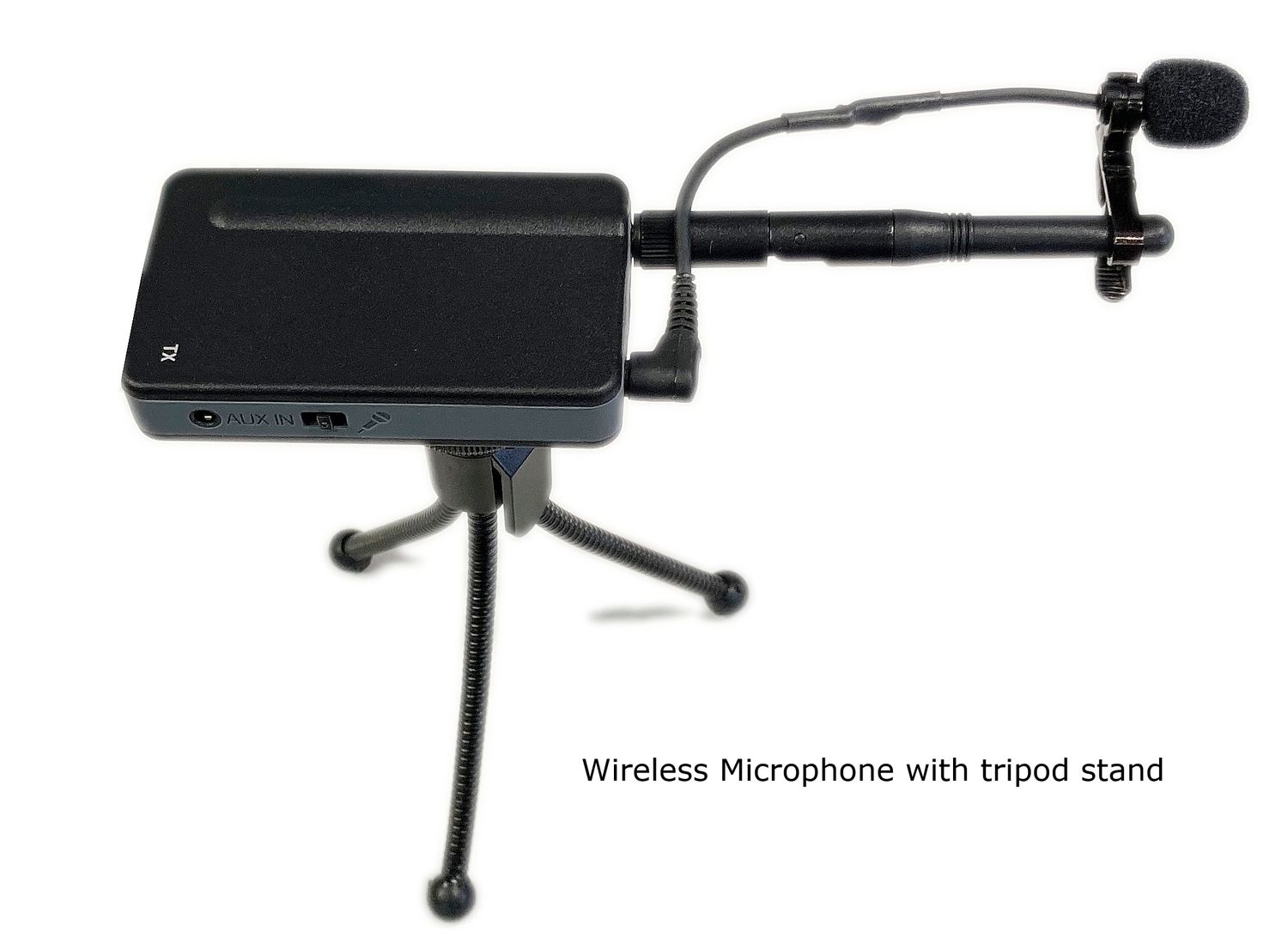
Wireless conference microphone on a small tripod, shown in Martel’s Easy Wireless Meeting Recorder catalog View the pictured Martel equipment.
Choosing wired or wireless conference microphones is a decision about the room, the people operating the system and the recording you need to keep. Wireless equipment can remove microphone cables from speaking positions. Wired equipment can reduce the number of battery-powered devices and radio links that require attention. Neither choice guarantees intelligible speech without appropriate placement and testing.
Begin with a seating sketch and the expected movement of speakers. Mark fixed seats, an audience question area, any presentation position and the location of the recorder. This makes the practical tradeoff visible before you compare product specifications.
This guide explains how to evaluate the connection method as part of a complete meeting system. For the broader purchase decision, read the meeting recorder buyer’s guide.
Separate the sound pickup from the wireless connection
A wireless microphone still has to hear the person speaking. The acoustic distance between the person and the microphone is one issue; the radio connection between the transmitter and receiver is another. A strong wireless link cannot restore words that were poorly captured at the microphone.
Likewise, a wired microphone can record an unclear distant voice even though the cable is connected correctly. The questions are separate: is the microphone positioned for intelligible speech, and does its signal reach the recorder reliably?
For an illustrative committee room, two tabletop wireless microphones might solve a cable-routing problem across a walkway. That does not establish that those two positions cover every seat. A larger wired package might provide more useful positions, but those microphones still need careful placement and a safe cable route.
Evaluate the microphone’s pickup pattern, position and connection method independently. “Omnidirectional” describes pickup around a microphone; “wireless” describes part of its signal path. They are not competing categories, and neither word is a substitute for a room test.
Compare the operating responsibilities
Decision
Wired conference microphones
Wireless conference microphones
Room preparation
Plan cable paths and connections
Plan microphone and receiver positions
Power routine
Check each component’s documented power requirements
Add transmitter charging or battery checks
Before recording
Inspect plugs, cables and pickup positions
Check link status, charge, pickup positions and working area
Changes during a meeting
Movement is constrained by cable routing
Movement must remain within the tested operating area
Troubleshooting
Trace the microphone, cable and recorder input
Trace those audio stages plus the transmitter-to-receiver link
Neither column means maintenance-free operation. The relevant question is which responsibilities your staff can perform consistently. A room used every day by the same trained operator may support a different arrangement from a portable kit passed among occasional users.
Write down the person who will prepare, monitor and pack away the equipment. If the proposed solution relies on charging devices, that responsibility needs an owner. If it relies on cables remaining installed, document what happens when the room is rearranged or cleaned.
Two Martel starting points to compare
The Ultimate Meeting Recorder Package, SKU 1814, provides four wired Voice Grabber microphones along with recording and computer transcription equipment. It is a useful comparison when several fixed pickup positions and a subsequent listen-and-type workflow are priorities.
The Easy Wireless Meeting Recorder, SKU 2030, lists two rechargeable conference microphones using a 2.4 GHz link and MP3 recording to an SD card. The microphone link does not require joining a Wi-Fi network. Confirm the current supplied configuration and operating instructions before ordering.
These packages differ in more than cable type: they have different microphone counts and included workflow components. Compare the complete bill of materials. Do not treat them as identical systems with a wireless option added, or assume the recording-only package includes the same transcription station.
Choose wired equipment when cable routes are practical
Wired microphones are worth considering for a table that stays in one position and has a manageable path to the recorder. A clear cable arrangement can be documented and repeated. The operator can identify each connection visually and follow the signal path when investigating a problem.
Before ordering, measure the actual route rather than the straight-line distance. A cable may need to follow the table edge, descend near a leg and continue to an equipment position. Leave appropriate slack at connectors without creating loops where people place their feet or move chairs.
Think about normal room changes. Does a folding table move after every meeting? Do staff bring in an extra section? Will the recorder be operated from the far end of the room? A layout that works only in the empty-room photograph may be difficult to repeat during a busy setup.
Use the supplied or specifically approved connection arrangement. Adding extensions, splitters or a different microphone can change the system’s electrical requirements. Verify compatibility before treating a physically fitting plug as an expansion plan.
Choose wireless equipment when placement flexibility has value
Wireless microphones are worth considering where cables would cross walking paths, where tables are frequently rearranged, or where a useful pickup position is difficult to reach by cable. The benefit should solve a real room problem rather than simply make the equipment look cleaner.
Document where the microphones may be placed and which areas have been tested. If a microphone is moved during the meeting, the operator needs to know whether that position remains suitable for both speech pickup and the wireless link.
For a portable meeting kit, assign each device an identifier and a place in the case. Include its charging accessories in the inventory. A room can appear ready even when one microphone was left charging elsewhere, so count the devices as part of setup and pack-down.
Wireless also changes the troubleshooting sequence. If speech disappears, check whether the microphone is muted, powered, linked and reaching the recorder. Avoid changing several settings simultaneously. A deliberate one-change-at-a-time process makes the cause easier to identify and the working configuration easier to restore.
Martel Electronics | 8 hours ago
Wired vs. Wireless Conference Microphones: How to Choose
Choose wired or wireless microphones around your room and operating routine. Compare placement, charging, signal connections and saved-audio checks with clear Martel package examples.
Check the radio environment without guessing from the label
Wireless systems use specific frequency bands and operating arrangements. Ask for the exact model and regional version rather than treating all wireless microphones as interchangeable. Confirm that the supplied system is appropriate for the location and intended use, including any applicable operating requirements.
A self-contained microphone link can operate without a Wi-Fi account or router connection while still using spectrum also occupied by other devices. “No Wi-Fi required” therefore does not mean “immune to interference.” Evaluate the equipment in the room with its normal technology operating.
Receiver and antenna placement matter. Follow the manufacturer’s instructions and avoid hiding receiving equipment behind obstacles simply to tidy the table. Where the design relies on a clear signal path, test that path with people seated, because an empty room is not the same operating environment.
Do not apply another product’s advertised range or channel count to the package you are considering. Test the actual microphones, receiver and intended positions together. A useful acceptance record identifies the equipment version, room arrangement and observed result, rather than claiming universal performance from one successful trial.
Build a charging and power routine
For rechargeable microphones, decide where they are charged, how staff identify readiness and what happens if one was not charged before the meeting. Confirm the charging method and any restrictions in the supplied instructions. Do not assume a device can operate while charging unless that behavior is documented.
Battery-life specifications are planning information, not a replacement for checking the devices in front of you. The session may include setup, testing, breaks and an unexpectedly long discussion. Base your routine on the complete period the microphone must remain available.
Also check the recorder and receiver. A charged microphone does not help if another essential part has lost power. When mains power is used, plan access to the approved adapters and avoid a setup that can be disconnected when someone charges a laptop.
Rehearse the normal shutdown and restart process before deployment. If power is interrupted, the operator should know which devices require attention and how to verify the next saved recording. Treat that as an operational exercise; do not assume an untested unit will recover automatically without a gap.
Match receiver outputs to recorder inputs
The wireless link ends at a receiver or integrated receiving stage, but the audio still has to enter the recorder correctly. Confirm the documented output level, input type and required cable arrangement. Some equipment provides selectable microphone or line-level connections; the correct choice depends on both devices.
A line-level source connected incorrectly to a microphone input can overload that input. A microphone-level source connected to an unsuitable line input may be too quiet. Turning the recorder gain to an extreme can hide the underlying mismatch without creating a dependable system.
Ask for a connection diagram for the exact package. Identify which controls belong to microphone sensitivity, receiver output and recorder input level, if those controls exist. Then follow the supplied setup procedure rather than assuming every visible volume control performs the same job.
Make a sample containing normal speech and a louder passage. Listen to the saved recording, not just the room or a live meter. If distortion remains when playback volume is reduced, investigate the recording path instead of simply lowering the headset volume.
Microphone placement still determines what you capture
Map the required voices before distributing microphones. Mark a chair’s normal speaking position, a presenter’s location and any audience question area. If someone routinely speaks while facing away from the table, include that behavior in the test.
Place microphones to improve the speech reaching them, while reducing avoidable noise nearby. Keep ordinary activity in mind: typing, paper handling, cups being set down and ventilation can all affect what the listener hears. A microphone placed conveniently beside the recorder may be poorly placed for the people at the far end.
More microphones are not automatically better. Additional open microphones can add room sound and background noise. Evaluate the combined recording rather than judging each microphone alone, and use only the number and arrangement the system supports.
For practical layout development, use the guide to recording a long conference table. Treat suggested positions as starting points to test, not coverage guarantees based solely on room dimensions or the number of seats.
Run a repeatable wired-versus-wireless comparison
This proposed acceptance exercise helps an organization compare suitable systems. It is not a published laboratory result, and it should not be interpreted as a promise that one connection method will win in every room.
Keep the task constant: use the same room, seating arrangement, speakers and review requirement.
Use normal conditions: include the usual computers, ventilation and meeting activities.
Identify each position: have participants state a seat identifier and an unfamiliar short phrase.
Test ordinary movement: include people turning toward a screen and any planned microphone relocation.
Rehearse interruptions: check mute, breaks, stop and restart using the documented controls.
Check the saved files: review both recordings on the actual listening station.
Record operating effort: note setup steps, unresolved faults and items required for pack-down.
Ask a listener who was not present to identify the phrases. That reduces the chance that knowledge of what was said makes an unclear recording seem acceptable. Keep the sample files and the seating map together so a later equipment change can be evaluated against the same job.
For hybrid meetings, test room audio and remote audio separately
A microphone package that records the local table does not necessarily capture remote participants from a conferencing application. Conversely, a remote participant hearing the room does not prove that the recorder is saving both sides.
Define the routing before the meeting: which microphone feeds the call, how remote voices return to the room and how each required source reaches the recording. Check the intended application and computer devices after connection, because selecting an input in one program does not demonstrate another program’s recording setup.
Include a remote participant in the rehearsal. Ask them to speak while the local room is quiet, then have a local person respond. Review the saved file and confirm that both sides are usable. Also ask the remote participant whether they hear an echo of their own voice.
The conference room microphone guide for Zoom and Teams addresses that wider arrangement. Choose wired or wireless room microphones within a verified routing plan, rather than expecting the connection method to solve hybrid audio by itself.
Plan a usable fallback and a clear handoff
Decide what the operator should do if a microphone becomes unavailable. A spare approved cable may help a wired configuration. A designated alternate pickup position may help another setup. The appropriate fallback depends on the equipment and the importance of the recording.
If a separate backup recorder is used, give it an intentional position and test its saved audio. Two recorders receiving the same failed upstream signal do not provide independent microphone coverage. A backup file should be evaluated for the task it is expected to support.
After recording, the next person needs organized files and an explanation of known interruptions. Note a mute error, a moved microphone or a restart rather than leaving the reviewer to infer what happened. Follow the organization’s procedures for access, retention and reuse of recording media.
If the meeting will be transcribed, verify the playback arrangement before buying the capture equipment. The meeting recorder and transcriber package guide explains the distinction between recorder-based listening, computer playback and optional speech-recognition services.
Use symptoms to choose the next check
A troubleshooting note is more useful when it names what changed and where the fault appears. Separate a missing voice, a noisy voice, intermittent audio and distorted audio. Each points to a different next check, and the saved recording should confirm whether the attempted correction helped.
Observed symptom
First comparison to make
One seating zone is consistently faint
Compare microphone position and speaking direction with a nearby clear zone.
One wireless source cuts in and out
Check its power, mute and link indicators, then its tested position relative to the receiver.
All voices are distorted
Check the shared receiver or mixer output, recorder input arrangement and recording level.
Live monitoring sounds present but a source is missing from the file
Check the recorder’s actual input selection and saved-file routing.
Remote callers are absent
Trace the remote-audio route separately from the local microphone path.
These are starting checks, not diagnoses. For example, a faint seat may also reflect an incorrect connection or microphone fault. Compare against a known working position, make one controlled change and repeat the same short phrase. Document the final working arrangement rather than leaving the system dependent on someone remembering which switch was moved.
Decide whether a mixed arrangement is justified
Some rooms have stable table seating and one location that changes frequently. An illustrative layout might use wired microphones for the fixed table and a wireless source for a movable presentation position. The reason to consider a mixed arrangement is that each connection method solves a specific placement problem.
That does not mean a wired and wireless package can simply be joined together. The recorder or mixer must accept the required sources, the signal levels must match and the saved audio must contain the intended result. Ask for a supported configuration rather than improvising a splitter to combine outputs.
Compare the mixed approach against a simpler alternative. Moving the recorder, changing a cable route or designating one audience speaking position may meet the requirement with fewer components. On the other hand, forcing a speaker into an unsuitable location just to avoid an extra connection may undermine the purpose of the recording.
Keep the final operating sheet short enough to use during setup. Include the actual microphone positions, required connections, power checks and a brief saved-audio test. If the arrangement is too complicated for the assigned operator to repeat, simplify it or provide appropriate setup assistance before relying on it.
Questions about wired and wireless conference microphones
Are wireless microphones always better for a large room?
No. Wireless can solve cable-routing problems, but room size alone does not determine microphone placement, useful coverage or radio performance. Compare a tested layout for the required speaking positions and the staff’s ability to operate it consistently.
Do wireless conference microphones need internet access?
That depends on the product. Martel’s SKU 2030 uses a self-contained microphone link that does not require a Wi-Fi network connection. Internet access for a separate meeting application is a different requirement. Confirm the complete system rather than generalizing from the word wireless.
Does wireless mean there are no cables anywhere?
Usually it means that a particular microphone signal travels without a cable to its receiver. Charging, recorder power and other audio connections may still use cables. Review the entire setup and the supplied accessories before deciding whether it suits your room.
Can I add any wireless microphone to my existing recorder?
Do not assume compatibility. Check the microphone and receiver combination, output level, recorder input, cables and supported expansion limits. Ask for a complete supported arrangement and a sample recording rather than relying on connector size alone.
Will several wireless microphones create separate tracks?
Not automatically. Radio channels, microphone inputs and saved audio tracks describe different parts of a system. Confirm whether the recorder preserves independent sources and whether the playback equipment can review them separately.
What should I test first if one microphone sounds poor?
First determine whether the problem is local to that microphone or affects the complete recording. Check its position, mute and power state, then follow the documented connection or wireless-link checks. Change one thing at a time and verify the result in a saved sample.
Choose the arrangement your team can repeat
Compare the current Martel conference recorder packages with a room sketch and a written recording requirement beside you. Prioritize clear speech from the required positions, a manageable power and connection routine, and a saved recording that reaches the right reviewer. The strongest choice is the setup your team can prepare, check and operate reliably at the next meeting as well as the first.
Original guidance by Martel Electronics. Product details checked October 28, 2026. Illustrative examples and suggested acceptance checks are not claims of completed laboratory testing. Confirm the supplied configuration, supported connections and software requirements for the package you order.