TIME IS RUNNING OUT FOR 2026 TAX WRITE-OFFS

Martel Electronics | 8 hours ago

Boundary, Gooseneck and Omnidirectional Microphones Explained

Understand which microphone terms describe mounting, pickup direction and compatibility, then use a practical room test to choose equipment for your meeting.

Microphones and room setup
By Martel Electronics · Published October 28, 2026 · 13 minute read

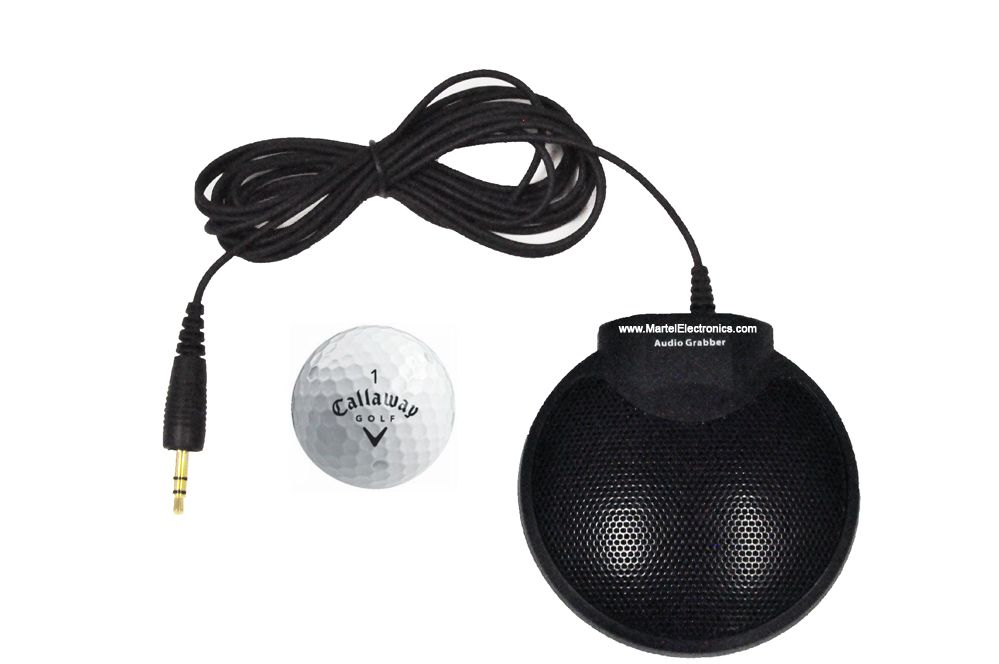
Martel Audio Grabber microphone with cable, 3.5 mm plug and a golf ball shown for size comparison
Martel Audio Grabber microphone with cable, 3.5 mm plug and a golf ball shown for size comparison View the pictured Martel equipment.

A conference microphone should match the people, the table and the equipment receiving its signal. Its appearance alone cannot tell you whether it will record a quiet speaker, work with your recorder or leave enough space for documents. The most useful comparison starts by separating three terms that describe different things.

Boundary describes an acoustic design intended to operate at a surface. Gooseneck describes an adjustable support that positions a microphone. Omnidirectional describes how a microphone responds to sound arriving from different directions. A microphone can therefore be both a boundary microphone and omnidirectional. A gooseneck can carry a directional capsule. These are overlapping characteristics, not three mutually exclusive product categories.

This guide explains what to check before buying, then gives you a practical way to compare a complete setup. For recorder selection, use the meeting recorder buyer’s guide alongside this microphone guide.

Compare the properties before comparing the products

Write three separate entries for each candidate: its physical design, its pickup pattern and its connection requirements. Add the intended speaking position. A specification such as “desktop microphone” leaves several of those questions unanswered.

TermWhat it tells youWhat still needs checking
Boundary microphoneThe capsule and housing are arranged for use close to a surface.Required mounting surface, pickup pattern, power and wiring.
Gooseneck microphoneA flexible neck allows the capsule to be positioned.Direction of pickup, useful reach, base stability and input compatibility.
Omnidirectional microphoneIt receives sound from around the microphone rather than favoring one main direction.Distance, room noise, frequency-dependent response and mounting.
Conference microphoneThe product is intended for a meeting application.All of the above, plus the recording or conferencing equipment it serves.

Do not turn a polar-pattern drawing into a room-size guarantee. Its outline describes relative response under measurement conditions, not a wall beyond which speech disappears. A speaker across a reflective room and a speaker nearby can both register on the meter while producing very different usable recordings.

What a boundary microphone does at the table

A true boundary design places its capsule very close to the intended reflecting surface. This manages the relationship between direct sound and the nearby surface reflection. It does not make the rest of the room acoustically disappear, and it does not make every tabletop microphone a boundary microphone.

Follow the specific mounting instructions. Raising a surface microphone on an improvised stand, surrounding it with a padded enclosure or putting it under a stack of documents changes the conditions for which it was designed. A low profile can be useful where sightlines matter, but it also makes the microphone easy to overlook.

Consider a committee that spreads maps over the entire table. The purchasing question is not simply whether a flat microphone looks tidy. Ask where a permanent clear area will remain when the maps arrive. Put a visible placement mark beside that area and include it on the setup sheet. If there is no reliable clear area, a different mounting approach may be more practical.

Check both airborne and contact noise during your trial. Read a sentence while another person moves a binder normally, then repeat with the binder farther away. This suggested comparison reveals a placement problem more usefully than a quiet-room demonstration with an empty table.

When a gooseneck arrangement makes sense

The adjustable neck can bring a capsule toward a defined speaking position without asking the entire person to move. This can suit a chairperson, clerk, witness position or fixed presentation seat. The advantage depends on people actually remaining in the intended area and on the capsule being oriented correctly.

Check the usable position while the seat is occupied. A neck that seems tall enough over an empty desk may point toward a chest after the speaker opens a laptop. Test sitting upright, reading down toward papers and turning toward the next participant. If the speech changes substantially, adjust the setup before deciding that the microphone needs more gain.

For a recurring board meeting, create a small position card: seat name, base location and the general orientation used during the successful test. Avoid a rule that everyone must bend the neck to the same angle. Different chair heights and document positions produce different mouth locations.

Ask whether the chosen base or mounting hardware is included. Confirm the cable path and how the assembly will be packed. A microphone that is excellent in a permanent chamber may be inconvenient for an employee setting up a portable table every Tuesday. Evaluate the person’s real setup routine, including storage, rather than judging only the installed appearance.

Where omnidirectional pickup helps, and where it needs care

Omnidirectional pickup can suit a small group around one microphone or several seating zones served by multiple microphones. It gives participants flexibility in where they sit around the device. It does not give equal loudness to people at unequal distances, and it cannot distinguish useful speech from unwanted sound solely because speech is more important.

At a shared table, the person directly beside a microphone may dominate a quiet participant farther away. A practical response is to reconsider the seating zones. Increasing overall gain can also increase the noise and room sound already present in the signal. Moving the pickup position can improve the underlying balance before any level adjustment.

Martel identifies the Voice Grabber microphones supplied in its Ultimate Meeting Recorder Package, SKU 1814, as omnidirectional. That description establishes their pickup pattern. It does not by itself establish that they use a boundary-layer capsule arrangement. Choose them according to the documented package and your room test, without assuming an unlisted design feature.

For a useful comparison, place one candidate at the proposed location and ask each participant to speak from a normal seated position. Keep the seating and test sentences consistent between candidates. Note the difficult positions instead of remembering only the clearest voice.

Directional microphones still need the right orientation

Directional patterns give greater sensitivity toward some directions and less toward others. That can help when a speaking location is predictable. The tradeoff is that someone outside the intended coverage angle may sound quieter or different. The correct direction is determined by the model’s instructions, not by which side happens to show a logo.

Compare the front, side and rear behavior with ordinary speech. Ask the same person to use the same sentence while maintaining approximately the same distance. This is a proposed acceptance check, not a laboratory polar-pattern measurement. Its purpose is to reveal whether the microphone behaves usefully in your particular arrangement.

Then run a realistic interruption: have the person look toward the screen while answering a question. If that is a frequent meeting behavior, the test belongs in the buying decision. Do not choose a microphone on the assumption that every speaker will stay facing forward for two hours.

Document where unwanted sound originates as well. A door, projector and supply-air grille may be in different directions. An attractive orientation for one noise source can be poor for another. Your final choice should preserve the necessary speakers while making manageable compromises with the room.

Check power, level and wiring as a complete chain

Separate the microphone’s power needs from its audio output. Some compact microphones use low-voltage plug-in power; other condenser systems require phantom power. Those supplies are not interchangeable. A mechanical adapter that changes the plug shape is not necessarily a power converter.

Signal level matters too. A microphone-level input and a line-level input expect different signal strengths. A mixer or wireless receiver may offer an output-level setting that must match the recorder. Do not solve distortion or very low recording level by buying successive adapters without checking what each socket is designed to receive.

Use this connection worksheet before ordering an extra microphone:

  • Write the exact microphone and receiving-device model or Martel SKU.
  • Identify the intended input, including its microphone or line setting.
  • Confirm the required power source and whether the receiving equipment supplies it.
  • Confirm the cable wiring and any approved adapter, splitter or interface.
  • Ask whether the proposed combination preserves the required channel arrangement.
  • Include cable lengths and any existing mixer in the request.

Martel lists the DM430 meeting microphone, SKU 2012, as a battery-free accessory for many of its meeting packages. Confirm the exact package match; “no battery” is not a universal compatibility specification. Keep an approved combination together in its case so a visually similar cable is not substituted later.

More microphones add positions, not automatically separate tracks

A four-microphone package may provide four physical pickup locations. Whether it records four independently adjustable tracks is a different question. The mixer, combining cables, recorder inputs, settings and file format determine what reaches the saved file.

This distinction matters after the meeting. If two microphones have already been combined into one recording channel, the person preparing minutes cannot necessarily turn down only one of them afterward. Request a description of the saved channel layout when that separation is important.

Multiple open microphones can also receive the same voice at different times and combine it unevenly across frequencies. That is the basis of comb filtering. The practical lesson is to use purposeful positions and to listen to the combined recording. Installing another microphone beside an existing one is not automatically an improvement.

For an illustrative purchasing comparison, ask one supplier for a simple combined recording and another for separate channels. Have the intended reviewer open both example files in the actual playback software. Test whether the extra controls make reviewing easier. Pay for separation when the workflow benefits from it, rather than treating a larger channel count as a universal quality score.

Use a short acceptance session before the important meeting

The following procedure is an original evaluation worksheet you can adapt. It is not a claim that Martel has tested every microphone in every room. Choose the recording device, software and seating layout you intend to use, then keep them unchanged while comparing one variable at a time.

  1. Draw the occupied layout. Mark actual chairs, screens, papers and speaking positions. Include anyone seated away from the main table.
  2. Record an identity check. Say which microphone, input and settings are in use. This keeps later samples from becoming indistinguishable.
  3. Test each seat. Use a short sentence containing a name, a number and an ordinary correction. Include a naturally quiet voice.
  4. Add normal activity. Turn pages, type briefly and operate the room equipment that will normally be running.
  5. Check the saved recording. Stop and finalize the test normally, reopen it and listen through the intended review setup.
  6. Change one thing. Move a microphone or adjust a setting, name the next sample and repeat the difficult positions.

Record the result as usable, needs a change or unsuitable for this arrangement. Include the reason: missed figures at seat six, paper noise near the clerk, or a weak remote participant. Those notes help another employee reproduce a good setup and explain a poor one.

A working live headphone feed proves that audio is reaching that monitoring point. It does not, by itself, prove that the recorder has saved the intended file. The separate playback step closes that gap.

Read the result instead of relying on a general impression

Give the reviewer a small scoring sheet with one line for each tested seat. Ask whether the name, number and correction were understandable without guessing. Record whether replay was needed and why. Do not turn the score into a claimed accuracy percentage for the microphone; it describes a particular sample under a particular arrangement.

For example, suppose a sample says, “Morgan revised item fourteen to forty.” The listener should identify the speaker’s name and both figures. If “fourteen” and “forty” are difficult to distinguish, write that down. A general comment such as “loud enough” can miss the very detail that a clerk needs to prepare an accurate record.

Have a second person review the difficult passage without seeing the expected sentence. Someone who already knows the answer can mentally fill in missing speech. That simple separation makes your comparison more meaningful without requiring expensive measurement equipment.

Keep the successful sample and its setup notes together. If the room changes later, repeat the same routine and compare the new sample with the earlier one. This creates a useful local reference for staff training. It does not establish performance in other rooms or allow a supplier to promise that a different meeting will sound identical.

Separate a placement problem from a connection problem

Before replacing equipment, describe the symptom precisely. “Bad audio” could mean a missing input, a distant speaker, a distorted signal or a file that was never saved. Those problems call for different checks. Use the following sequence during a practice session, with the volume kept comfortable.

Observed problemUseful first comparisonInformation to keep
One microphone has no apparent signal.Compare its documented connection and settings with a working, approved path.Microphone, cable, input and power setting.
Only distant seats are difficult.Repeat those seats with a different placement while keeping the equipment unchanged.Seat location and both sample filenames.
Speech becomes rough when someone speaks loudly.Check the receiving input and level arrangement before changing the room layout.Input type, level settings and whether the problem affects every microphone.
Live listening works but the saved file is incomplete.Check the recording controls, enabled sources and saved-file workflow.Recorder state, displayed filename and missing segment.

Make one change at a time and record its effect. If you move microphones, change adapters and alter software processing together, even a better result will be hard to reproduce. A short, orderly description also helps Martel support identify what information is missing before recommending another component.

Apply the comparison to three everyday meeting layouts

A small committee around a round table

Begin with a single clear pickup position and test every seat. If the participants are close enough for intelligible recordings, extra microphones may add packing and cabling without solving a problem. Keep the recorder accessible to its operator rather than placing all controls under the paperwork in the middle.

A long table with a quiet member at one end

Test distributed positions serving different parts of the table. An omnidirectional microphone may suit people seated on several sides of a zone; a dedicated speaking microphone may suit a fixed chairperson. Use the long conference table recording guide to plan the acceptance checks. Neither choice should be made solely from the number of chairs.

A hybrid meeting with room loudspeakers

Separate three jobs: collecting local voices, sending them to remote attendees and saving the complete meeting. A microphone can work well for one job while the routing for another is incomplete. Use the Zoom and Teams conference microphone guide to check the complete call, including what remote people hear.

Frequently asked questions about conference microphone types

Is a boundary microphone always omnidirectional?

No. Boundary construction and pickup pattern describe different properties. Boundary models can have different directional characteristics. Read the pattern specification as well as the mounting instructions. Buying by a flat housing alone does not establish which seats it will serve.

Is a gooseneck automatically better for meetings?

It can be a good choice for a fixed speaking position because the capsule can be placed deliberately. It may be less convenient when people change seats, share a crowded table or pack the equipment after every meeting. Evaluate the entire routine.

Does omnidirectional mean every voice will have the same volume?

No. The term concerns direction, not compensation for distance, speaking level or obstacles. A quiet person farther away still needs attention in your coverage test. Compare the most difficult seat with the clearest seat in the saved file.

Can I connect a new microphone with any adapter that fits?

No. Check power, signal level, wiring and the receiving input. Ask Martel to confirm the complete proposed connection. Keep the approved cable with the microphone and label it clearly if another cable in the kit looks similar.

Will eight microphones produce eight separate recordings?

Only if the complete recording system supports and is configured for that arrangement. Ask how the inputs are combined and what files are saved. Verify the answer with a sample file before relying on independent adjustment during transcription.

How do I choose between a simple package and a larger system?

Define the difficult seats, the room activity and the review task first. Then compare the Martel conference recording packages against those requirements. Your best package is the one that passes the practical checks with a routine your staff can repeat.

Prepare a clear equipment request

Send a seating sketch, the recorder or computer model, the intended file-review software and a description of the difficult voices. Explain whether the room has remote participants, loudspeakers or an existing sound system. Include whether you need portable equipment or a permanent installation.

Ask for a complete connection plan, not just a microphone name. The wired and wireless microphone comparison can help you decide how the equipment will reach each seat. A well-defined request gives Martel the information needed to match its products to the job and gives your team a practical checklist when the equipment arrives.

Original guidance by Martel Electronics. Product details checked October 28, 2026. Illustrative examples and suggested acceptance checks are not claims of completed laboratory testing. Confirm the supplied configuration, supported connections and software requirements for the package you order.

Martel Electronics