Buying recording equipment
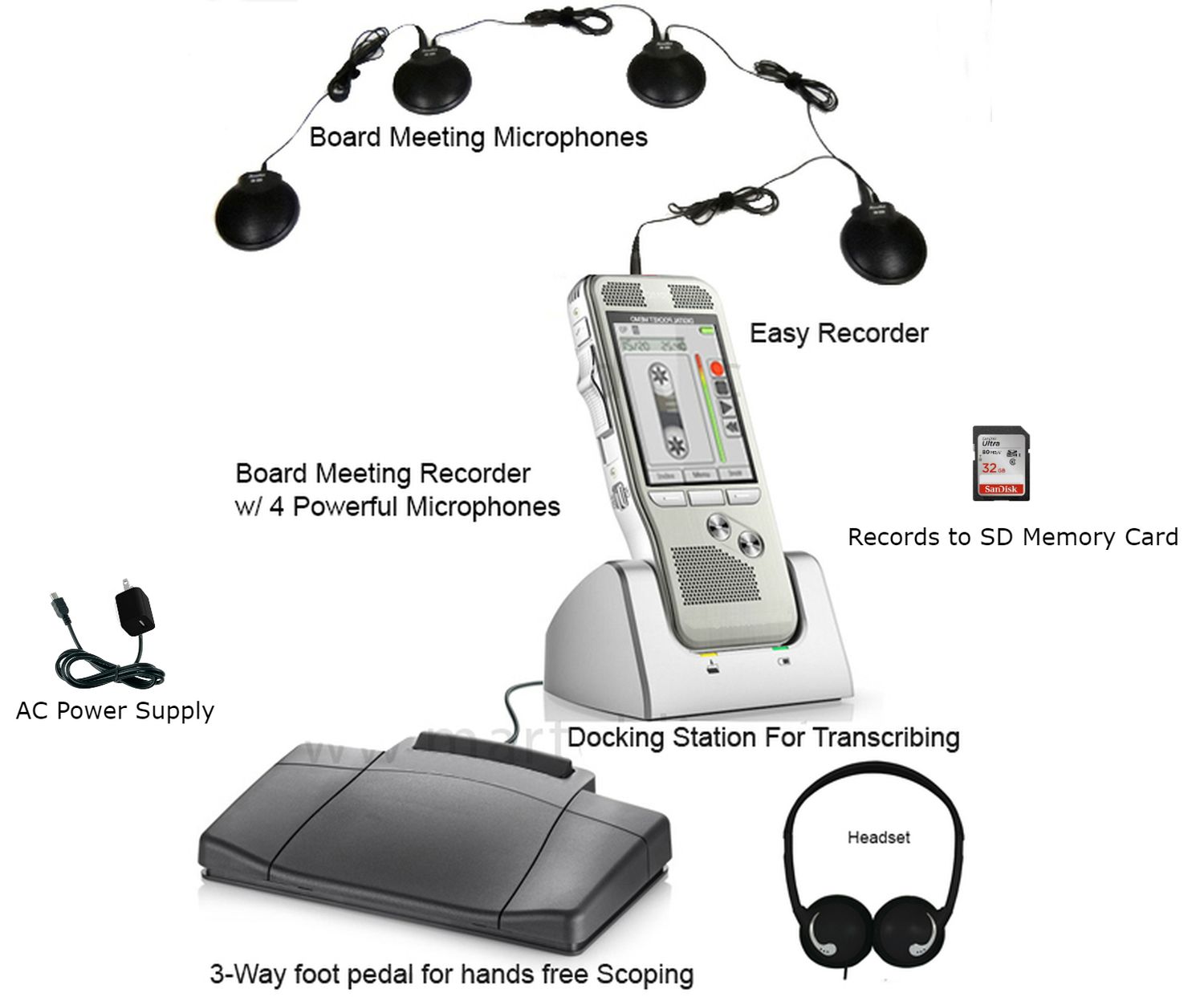
A useful meeting recorder must do three jobs: capture the people who matter, save a recording you can verify, and let the next person work with that recording. The best purchase is therefore a complete recording arrangement, not simply the recorder with the longest advertised running time. A modest system placed well can be more useful than a larger system deployed without a plan.
Start with your room, meeting procedure and finished document. Then select the recorder, microphones and playback equipment together. This guide explains those decisions and offers a practical acceptance exercise you can adapt before relying on a system. The examples are illustrative planning examples, not reports of laboratory tests or promises of performance in a particular room.
Define the job before choosing the equipment
Write one sentence describing what the recording will support. Examples include checking a disputed action item, preparing board minutes, producing a full transcript, or maintaining an authorized audio reference. These purposes share a need for understandable speech, but the work after the meeting differs. A clerk reviewing selected decisions needs quick navigation; someone transcribing every speaker needs comfortable, repeatable playback control.
Also decide who will operate the recorder. A dedicated operator can monitor audio and respond when someone changes seats. A secretary who must type notes, manage documents and greet visitors needs simpler controls and a setup that does not depend on constant adjustment. Include the substitute operator in the buying discussion. Equipment that only one person understands creates an avoidable staffing problem.
Use the Martel conference and meeting recorder category to compare complete packages once these requirements are written down. A product name alone does not establish that its controls, microphones or transcription arrangement match your job.
Prepare a room brief that describes actual speaking positions
A participant count is useful, but it is not a room plan. Twelve people seated closely around one table present a different task from twelve people spread between a dais, presentation position and public seating. Draw those positions on a simple plan. Mark the recorder operator, outlets, walking routes, screens and any person who routinely turns away while talking.
List the quietest expected speaker as well as the loudest. Note air conditioning, a projector, a nearby hallway and hard reflective surfaces. A microphone cannot distinguish an important quiet comment from unwanted noise merely because the comment matters to your organization. Getting a suitable microphone closer to the speaking area often matters more than raising the recording level.
Describe the room when occupied, not only when it is empty. Paper handling, laptop keyboards and chair movement are part of the real operating conditions. For a detailed placement workflow, continue with recording everyone around a long conference table. Keep your room brief with the purchase request so later changes can be compared with the original need.
Choose between a dedicated recorder and computer capture
A dedicated recorder gives the operator a device whose principal task is saving audio. A computer can combine recording with conferencing and document work, but its selected inputs, software permissions and application settings become part of the recording system. Neither approach should be accepted on the basis of its label. Trace where every voice enters, where it is saved and how you will check the result.
For an entirely in-person meeting, a recorder with appropriately positioned external microphones may provide a straightforward arrangement. For a hybrid meeting, room voices and remote voices originate in different places. A table microphone near a laptop speaker is not the same as a tested connection that captures the remote participants. Follow the actual supported configuration rather than assuming that any microphone or adapter will join the two paths.
Searches for a meeting recorder also bring up automatic note-taking services. Those services add another set of decisions: account permissions, processing location, export options and approval to use the service. Separate the audio-capture purchase from the decision to process audio into text. Martel's conference-room microphone guide for Zoom and Teams covers the live meeting side of that choice.
Compare packages by the work they let you complete
| Martel starting point | What to evaluate | Question before purchase |
|---|---|---|
| Basic Meeting Recorder, SKU 321 | A compact recorder with an external Audio Grabber microphone. | Does the proposed microphone position capture every required seat? |
| City Clerk package, SKU 1579 | Two Audio Grabber microphones and a recorder-based pedal/headset playback arrangement. | Will the same recorder be needed for playback and the next meeting? |
| Portable Board Meeting Recorder, SKU 1884 | Four microphones with pedal and headset listed in the package. | How will the microphones cover the actual seating zones? |
| Ultimate Meeting Recorder Package, SKU 1814 | Four Voice Grabber microphones and a Windows computer transcription kit. | Is the review computer ready for the supplied software and USB pedal? |
| DM430 eight-microphone package, SKU 1949 | More microphone positions and the cabling needed to deploy them. | Can the operator set up, check and pack all connections consistently? |
This is a workflow comparison, not a ranking from a controlled test. Confirm the current supplied recorder, accessories and supported connections with the individual product page. Packages change, and a familiar product photograph should not replace the written equipment list.
Separate microphone count from recorded track count
Four microphones can provide four pickup positions without producing four independently editable recordings. A system may combine several microphone signals before saving the file. A two-channel recording also does not necessarily mean that each participant or microphone has a separate track. Ask for an explanation of the recorded file structure, not only the number of microphones in the box.
This distinction matters when people speak at the same time. If their voices have already been combined, turning down one person later may be impossible without affecting the other. More microphones also do not automatically make a recording clearer. Unneeded open microphones can contribute room noise and additional versions of the same voice. Placement and the actual mixing arrangement need to be evaluated together.
For procurement, write the requirement as an outcome: “We need to review the chair separately from the public-comment position,” if that is truly necessary. Then confirm that the proposed recorder, connections and playback software support that outcome. Do not translate the requirement into “buy two microphones” and assume the rest follows.