Buying guides and complete systems
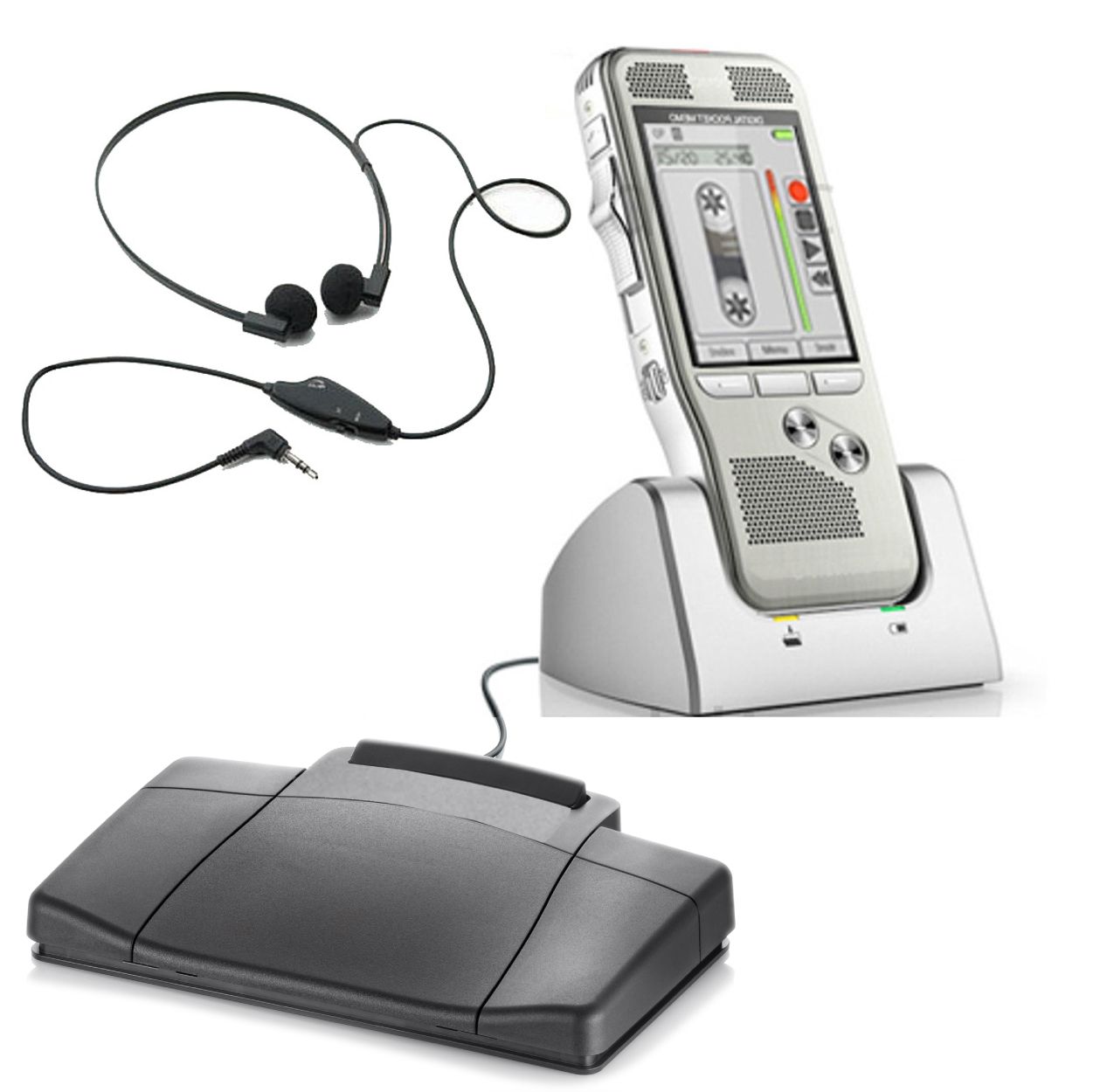
A dictaphone records spoken words so they can be reviewed or transcribed later. Buying the right one means choosing more than a handheld recorder: you also need a dependable way to correct the recording, deliver it, play it back and finish the document. For a law office, the best choice depends on both the person dictating and the person doing the transcription.
Martel offers a model called the Dictaphone Machine, SKU 1843-2. Its package combines a slide-control recorder with a desktop cradle, foot pedal and headset for a shared-recorder workflow. This guide explains where that arrangement fits, how it differs from computer transcription and what to check before buying any digital dictation system.
What is a dictaphone today?
People use the word dictaphone for several different things: an older tape-based dictating machine, a modern digital dictation recorder, or a complete recorder-and-transcriber arrangement. When shopping, turn the name into a concrete equipment question. Do you need a recorder for spoken notes, a package for a lawyer and secretary, or software that converts speech into editable text?
A dedicated digital recorder stores audio. A transcription player lets someone listen, pause, rewind and type. Speech-recognition software attempts to produce text from speech. These functions can be combined in a supported system, but they are not interchangeable. A foot pedal does not recognize words, and an audio file is not yet a finished letter.
That distinction matters especially when replacing an old machine. The familiar routine may have included a handheld recorder, a cassette, a separate desktop transcriber and a secretary. Replacing only the recorder can leave the other three steps unresolved. Write down the existing sequence before choosing the digital replacement.
Choose the recording-to-document workflow first
Record now and hand over the recorder
A single-recorder package can suit a lawyer who finishes dictation before the secretary begins transcription. The recorder travels to the playback station, where the secretary listens using the matched equipment. The same physical recorder is serving two people at different times. That can be straightforward, but the lawyer cannot keep that unit in hand while the secretary is using it.
Use separate recording and playback units
With a compatible two-unit arrangement, the lawyer retains a recorder while the secretary uses another unit for playback. Martel's NO PC Law Office Pro set, SKU 1847, describes this approach using SD-card handoff. Continued recording also requires suitable available recording media; two units alone do not remove the need to plan the card rotation.
Transfer recordings to computer playback software
A computer transcription package sends saved audio to a workstation running compatible playback software. The secretary controls the player with a supported pedal while typing into a separate document. Once receipt and playback have been checked, the recorder can be available for further work according to the office's file-retention process. The SKU 405 lawyer and secretary package is one Martel option to consider for this workflow.
Dictate into speech recognition
If the desired result is text appearing in an application, evaluate the microphone, software edition, operating system and target application together. This is a different purchase from a recorder-and-pedal playback package. You must also decide who corrects the text and checks names, dates, numbers and meaning before the document is used.
| Office requirement | Arrangement to consider | Key check |
|---|---|---|
| Record first, type later in the same office | Shared recorder with matched playback dock | Can the recorder remain with the secretary? |
| Keep recording while earlier work is typed | Separate units or confirmed computer-file playback | Can both people continue with the supplied equipment and media? |
| Secretary works elsewhere | Approved file-transfer and playback arrangement | Can the recipient open and control a real sample? |
| Generate an editable text draft | Compatible speech-recognition system | Who reviews the generated text? |
Where Martel's Dictaphone Machine fits
The Dictaphone Machine package is worth examining when the office wants physical dictation controls and recorder-based audio playback. The listed workflow is specific: the lawyer finishes recording, hands the recorder to the secretary, and the secretary places it in the desktop cradle to listen with the supplied foot control and headset.
The current package listing includes the recorder, a three-way foot pedal, transcription headset, USB docking cradle, 16 GB SDHC memory card, micro-USB cable, carrying case and manual. Confirm the current supplied configuration before ordering, particularly if you plan to mix it with equipment already in the office. The existence of a USB connection does not make every USB pedal or cable arrangement compatible.
Here, no-PC refers to controlling the audio without computer playback software. A secretary may still type the document on a computer. Recording, audio playback and word processing are separate jobs, and the equipment description should be read that way. This package should not be purchased on the assumption that it automatically types a transcript.
Think about a normal afternoon. If dictation is completed at noon and transcription begins afterward, passing one recorder may fit. If new instructions arrive continuously while the secretary is still working through earlier recordings, compare a separate playback unit or computer-based arrangement. Our one-recorder versus two-recorder guide develops that scheduling decision.
Evaluate the controls you will use every day
Recording capacity is easy to compare on a specification sheet. Daily control is harder to judge without following the actual sequence. Ask how to start a recording, stop without losing your place, replay the last sentence, locate a correction and make the final version clear to the typist. A control that feels convenient for a short note may feel different after repeated stop-and-review work.
Slide controls and push buttons can both be practical. What matters is whether the particular layout suits the user's hand and habits. Someone replacing a tape dictaphone may prefer a familiar slide-control action; another person may work comfortably with separate buttons. Avoid assuming that similar-looking controls provide identical editing functions.
Insert, overwrite and append describe different operations. Insert adds material at a selected position on equipment that supports it. Overwrite replaces existing audio. Append adds material at the end. Availability can depend on the recorder and recording mode. Before buying, ask for the exact supported functions rather than accepting the broad phrase digital editing.
A useful demonstration uses a disposable recording: dictate three sentences, correct the middle one, then play the complete file. Check that the intended first and last sentences remain. This is a suggested purchase check, not a claim that every recorder can perform every operation. If a particular correction method is unavailable, establish a clear spoken-correction routine instead.
Choose a file format the recipient can use
The best recording format is the one that works through the whole chain. A recording can sound clear on the handheld unit yet still create a problem if the secretary's software cannot open it or the intended edit mode is unavailable. Make the receiving workstation part of the purchase decision.
DSS, DS2, MP3 and WAV are common terms in dictation discussions, but a filename extension is only part of compatibility. The playback application, its version, the recording settings and any encryption settings can matter. Do not assume that a package supports a format simply because another recorder from the same brand does.
For a computer workflow, request or create a sample in the proposed format and use the actual receiving application. Listen at the beginning, middle and end. Test the pedal, speed control and navigation the secretary expects to use. If the office plans to use encrypted recordings, the sample must exercise that configured arrangement too.
Changing a filename from one extension to another is not audio conversion. Keep the original recording and use supported conversion software when a different format is required. Our dictation file-format guide explains the practical checks in more detail.
Buy the secretary's station as carefully as the recorder
The recording end attracts attention because it is the device the author holds. The playback end often determines whether the office can use the purchase effectively. A secretary needs a comfortable listening arrangement, reliable transport controls and a clear way to identify the next assignment. A recorder that captures excellent audio is still an incomplete solution if those steps are awkward.
List the headset connection, pedal model, playback software and operating system. A USB plug identifies a connection, not universal support. A pedal must work with the intended player, and the intended functions must be assigned correctly. A headset must connect to the device that actually produces the playback sound, which may be the computer or the dedicated playback unit.
For computer transcription, check whether the package includes the necessary software license and how an additional workstation is licensed. Confirm who installs the software and whether the office's IT rules permit it. For recorder-based playback, verify the exact dock, cable and foot-control arrangement supplied with that package.
Try a full assignment before calling the setup complete. The secretary should receive the recording, find the correct job, replay a difficult phrase, finish a short draft and return it for review. The lawyer and secretary setup guide provides a detailed computer-workflow checklist.