











Description
|
The Best Court Reporter Zoom Kit Just Got Even Better
Court Reporter Zoom Kit - Zoom Compatible Connection Recording Kit for Distance Recording. All IN ONE PACKAGE - Everything is included!Plug & Play No Software to Install! Get VIDEOGRAPHER QUALITY AUDIO! The easiest setup is using one computer for Zoom and a second computer for your CAT software, but this kit also works with phones, tablets, iPads, iMacs, Macs, PCs, writers, and backup recorders.
|

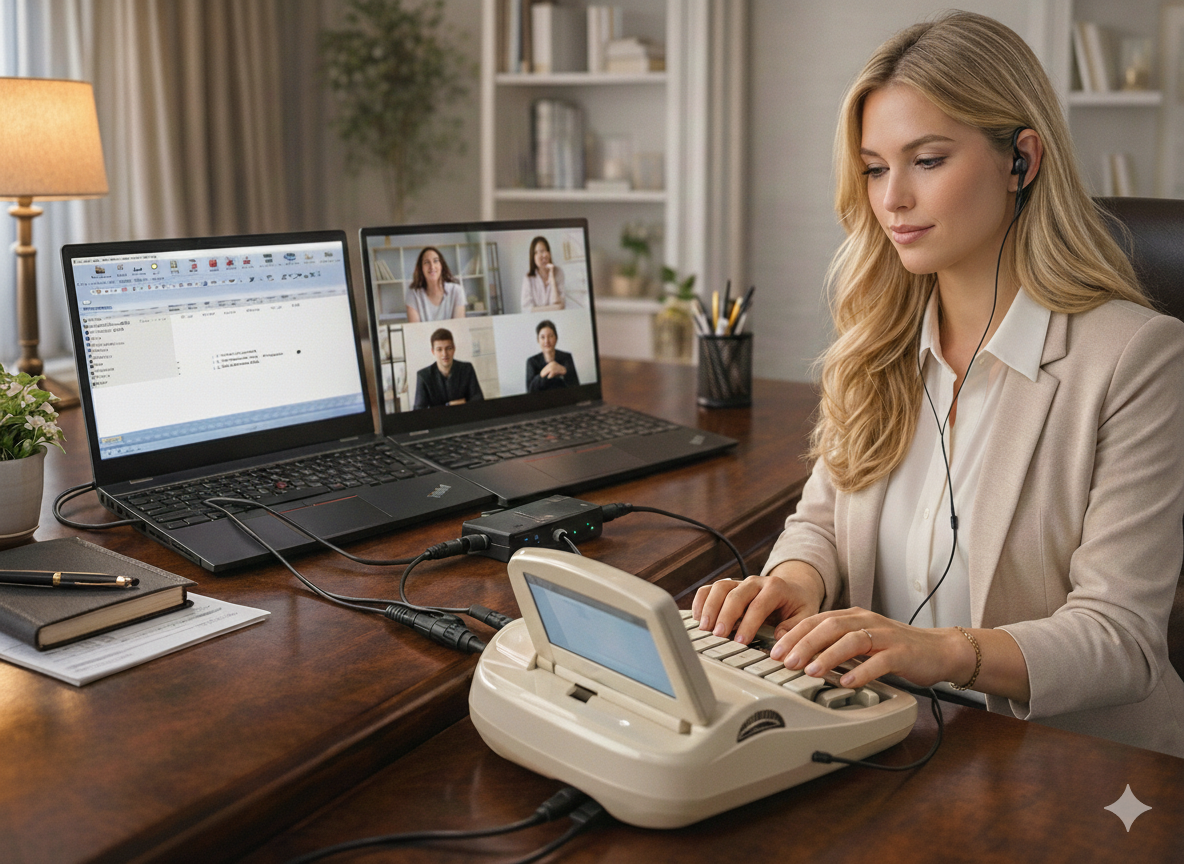
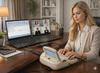
2-computer court reporter Zoom setup shown in use — one device for the meeting, one for CAT software.
|
|||||||||||
| Plug & Play
No software to install
|
All-In-One Package
Cables, headset, mic & adapters included
|
Setup Help
Help available when needed
|
Since 1957
Court reporting audio experts
|
Use Zoom on one device. Record clean audio into your CAT software on the other.
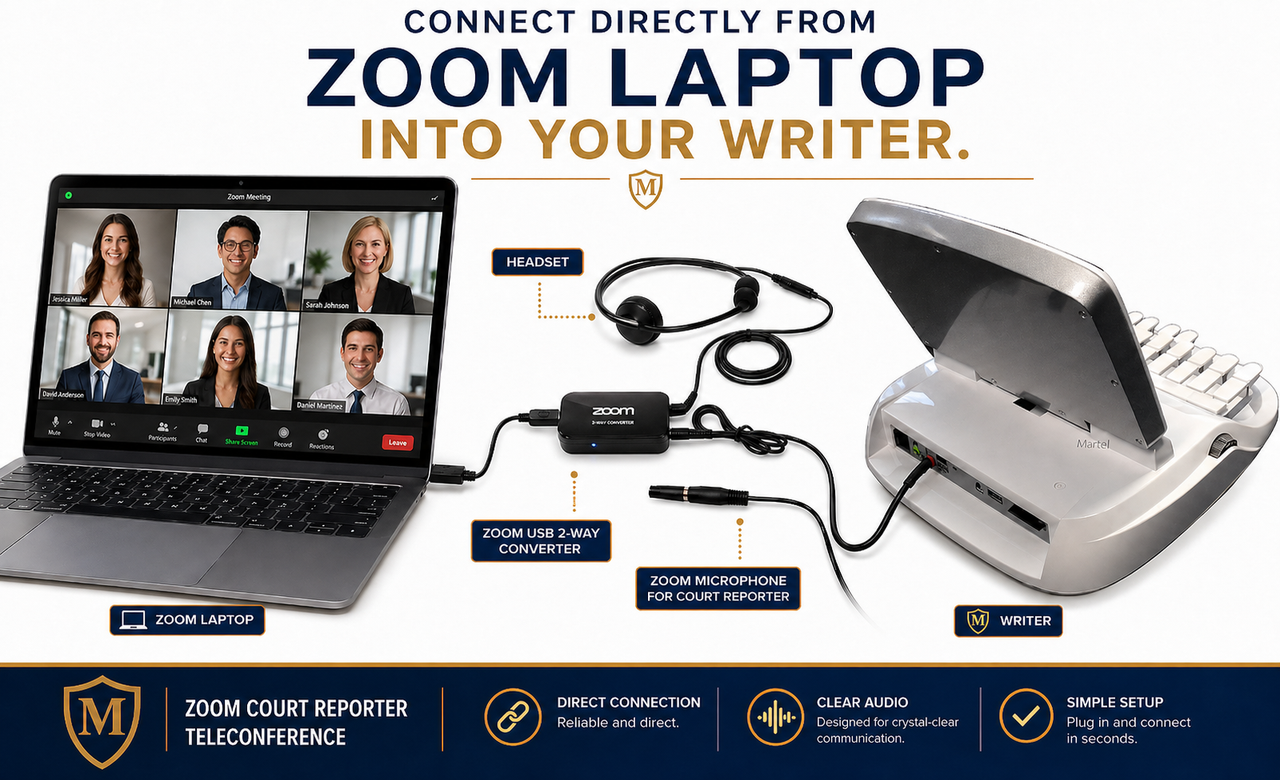
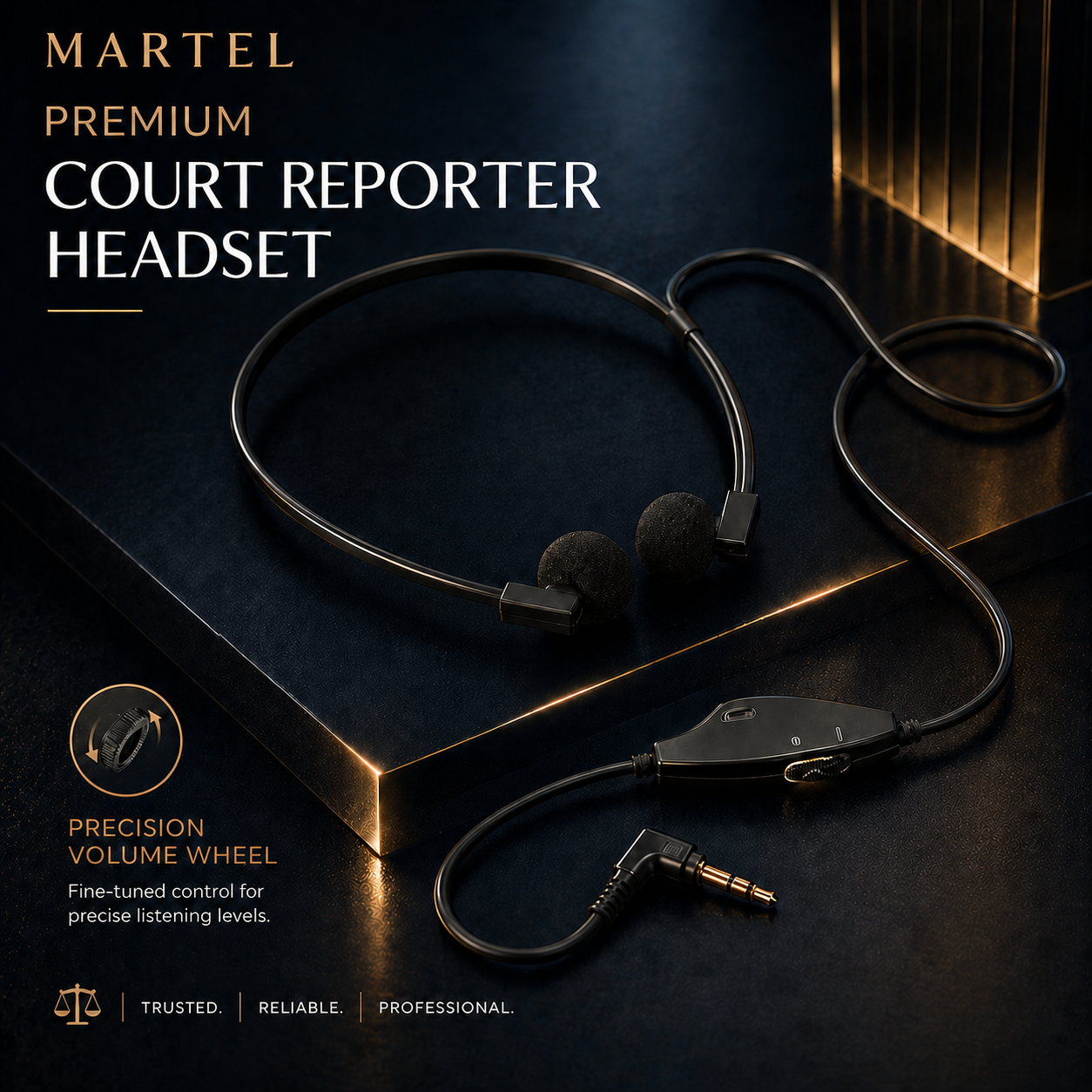
So what is the Zoom Compatible Court Reporter connection? It takes the audio out of your smartphone, laptop, or tablet and puts it clearly into court reporter Audiosync software. Included in the package is a microphone, it is used to talk in the meeting if you need to ask a question or give directions or swear people in. We provide a lightweight court reporter headset with volume control for listening. We make it easy and convenient to Zoom. Veritext Compatible. If you like the audio from a legal videographer's equipment, you will love the Martel Zoom kit. Now you can get Videographer quality audio from our Zoom Kit.
This kit is designed to make remote depositions and hearings easier to hear, easier to monitor, and easier to record — without guessing which cables, adapters, microphones, or settings you need.
|
1
Join ZoomUse your Zoom laptop, phone, tablet, iPad, Mac, iMac, or other meeting device. |
2
Connect the Martel KitThe kit routes the meeting audio cleanly and gives you headset monitoring and microphone support. |
3
Record Into CAT / WriterSend the audio into Case CATalyst, Eclipse, DigitalCAT, ProCAT, CART, your writer, or a backup recorder. |
|
Recommended setup
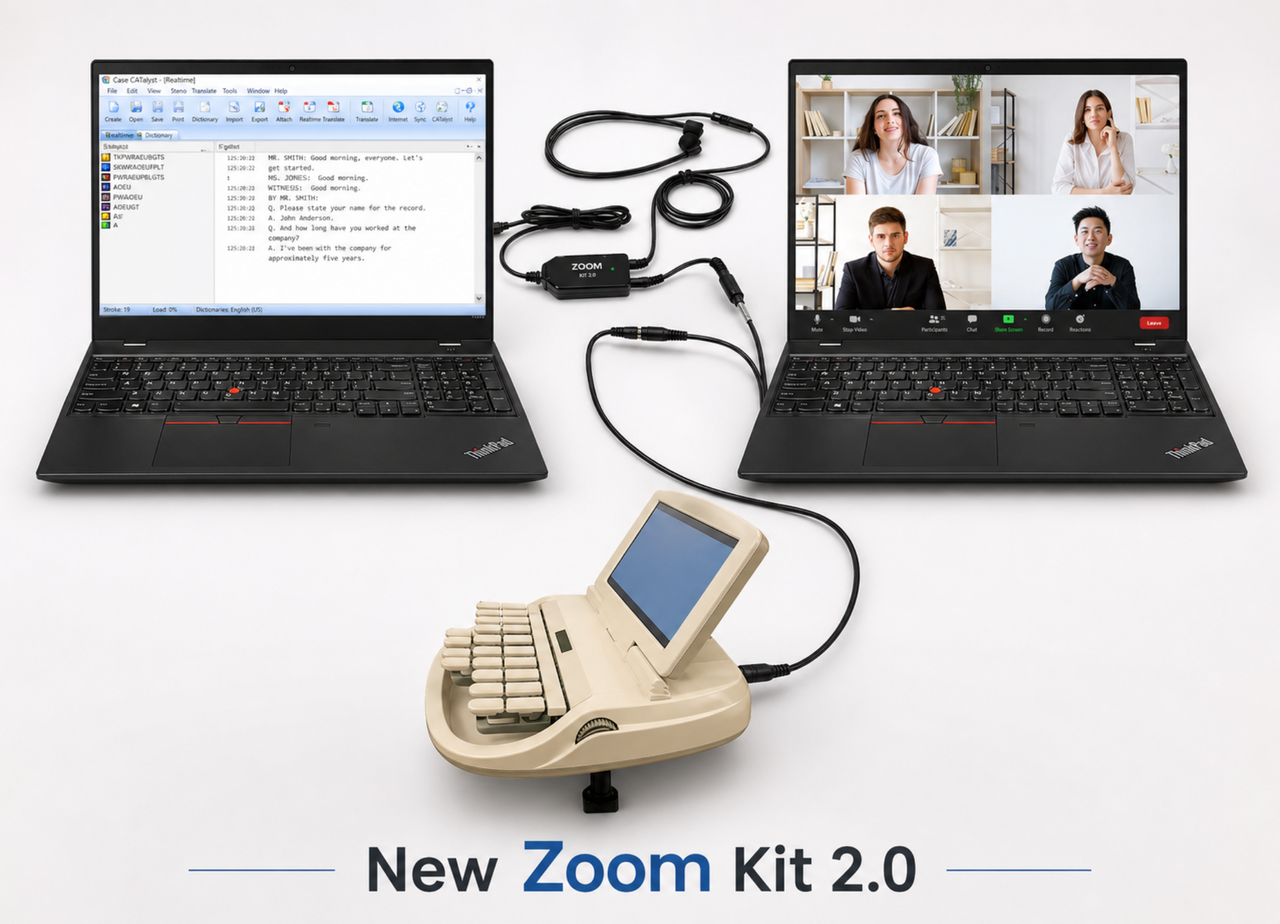
The easiest setup is 2 computers.We recommend the two-computer setup because it keeps your Zoom meeting and your CAT software separated. One computer handles the meeting. The other computer handles your transcript, CAT software, and AudioSync recording. ✓ Computer 1: Join the Zoom / remote proceeding. |
Works with almost any court reporter setupThe Martel Zoom Kit is not limited to one exact setup. It is designed for real court reporters who may use different devices depending on the job. Windows laptops Desktop PCs iPhones Android phones iPads Tablets iMacs / Macs Steno writers Backup recorders Voice writer workflows |
Court Reporter Zoom Kit Setup Options
Choose the setup that matches how you take Zoom jobs. Most court reporters use the two-computer setup because it is the easiest and cleanest, but the Martel Zoom Kit is flexible enough for phones, tablets, iPads, desktop computers, writers, backup recorders, and single-computer workflows when your equipment supports the correct audio input path.
|
Recommended / easiest
1. Two-Computer SetupZoom Laptop → Martel Zoom Kit → CAT Laptop
Best for court reporters who want the cleanest and easiest AudioSync workflow. One computer runs Zoom, and the second computer runs your CAT software, realtime, transcript, and audio recording. |
Tablet setup
2. iPad + CAT Laptop SetupiPad Zoom Meeting → Martel Zoom Kit → CAT Laptop
Good when you prefer joining Zoom from an iPad while your court reporter laptop stays focused on CAT software, realtime, and AudioSync recording. |
|
Phone setup
3. iPhone + CAT Laptop SetupiPhone Zoom Meeting → Martel Zoom Kit → CAT Laptop
Good for phone-based Zoom jobs when you want the meeting audio routed into your court reporter workflow instead of relying on laptop speaker pickup. |
Desktop setup
4. Desktop Computer + CAT Laptop SetupDesktop Zoom Meeting → Martel Zoom Kit → CAT Laptop
Good when your Zoom meeting is on a desktop computer and your CAT software is on a separate court reporter laptop. |
|
Compact setup
5. One-Computer SetupZoom + CAT Software on Same Computer
Can work for some users and workflows. The two-device setup is usually easier because Zoom and your CAT software stay separated, but this option helps customers who prefer a compact setup. |
Writer / recorder setup
6. Writer or Backup Recorder SetupZoom Device → Martel Zoom Kit → Writer or Recorder
Good for court reporters who want a writer or backup recorder audio path when their equipment supports the correct compatible audio input. |
Not sure which setup you need?
Start with the two-computer setup if you want the easiest path: one device for Zoom and one device for CAT software. The Martel Zoom Kit can also support phones, tablets, iPads, desktop computers, steno writers, voice writers, and backup recorders when the equipment has the correct compatible audio input path.
Videographer-quality Zoom audio without making your setup complicated.
Clearer AudioSyncGet clean remote meeting audio into your CAT software instead of relying on muffled laptop speaker pickup. |
No Settings GuessingAll plug-and-play. No software to install. No confusing driver setup for the buyer to figure out alone. |
Backup Recording OutputNew in the zoom kit a second cable output for backup recording, use your Steno Writer, Olympus Recorder, or any other recorder. |
|
Watch the setup concept
See how the Martel Court Reporter Zoom Kit works.The Martel Zoom Court Reporter Kit - the ultimate solution for court reporters seeking unparalleled audio quality and efficiency in transcription. Engineered to meet the exacting demands of legal proceedings, this comprehensive kit empowers court reporters to capture crystal-clear audio and streamline their workflow like never before. What sets the Martel Zoom Court Reporter Kit apart is its ability to significantly expedite the transcription process. By delivering superior audio quality, court reporters can transcribe proceedings with greater accuracy and efficiency, ultimately reducing turnaround time by up to 50%. With the Martel Zoom Court Reporter Kit, gone are the days of struggling to decipher garbled audio - now, court reporters can breeze through transcripts with confidence and ease. |
Everything needed in one complete court reporter package.
Zoom Compatible Court Reporter Recording Connection & Teleconferencing kit includes:✓ 2 Way Court Reporter USB adapter for laptops |
Compatible with the following devices:✓ Mobile phones ie iPhones |
Works with Zoom and the major remote meeting platforms court reporters use.
|
✓ Zoom Software |
✓ Google Meeting |
✓ Microsoft Teams |
Real court reporters call it a game changer.
The testimonials below are kept from the original product page and rebuilt as full-width horizontal testimonial cards so customers can read each one clearly. This section now includes all 29 testimonials.
|
“
|
Jo V.T. Official Court Reporter
Court reporter testimonial #1
|
BTW, the Zoom kit audio is FLAWLESS and amazing. Better than being there in person.
|
“
|
Michael A. Bouley, RDR — Henderson, Nevada
Court reporter testimonial #2
|
Court reporters - you want this Zoom kit for virtual depos!
My name is Michael Bouley, RDR. I bought my first Zoom kit early in the pandemic when all proceedings went virtual. It served me very well for several years, with impeccably perfect audio. My transcribers absolutely love my audio file, which improves their work and makes my proofing a breeze!
I recently upgraded to the Martel Zoom Kit 2.0 as necessitated by some Windows updates. I called support for assistance, as some of my settings were off. Jason got back to me immediately, accessed my computers remotely, and straightened out the issues and got me back up and running for Zoom in no time!
I cannot emphasize enough how superior this set-up is to unlinked computers or a single computer for Zoom jobs. I have one laptop for the Zoom meeting, and the other for my CAT software and transcript, with the Zoom audio fed directly to my audio sync. For in person jobs, I just unplug my CAT computer and go do the depo, then reattach the USB when working on Zoom again.
Do yourself and your scopists and proofreaders a favor and get the Martel 2.0 Zoom kit. It is a breeze to install, and I promise it will make you a better professional.
|
“
|
Angela Taylor, CSR, RPR, CCR
Court reporter testimonial #3
|
Here's my testimonial and I really appreciated your help after I tore everything apart :)
Just spend the money and get the Zoom kit. It was well worth it. I am on Eclipse and it worked beautifully. I was able to set it up on my own and I'm not computer savvy in any sense of the word. I ended up having to tear it apart because I needed my laptop for something else and got all the wires mixed up, and they had me up and running in less than 10 minutes! This is no joke when I say it's a game changer. I now have videographer quality audio.
|
“
|
Karen Jorgenson, CSR Court Reporter
Court reporter testimonial #4
|
This product is everything it claims to be. Martel makes setup very easy. Jason was very patient and responsive with my questions. My scopist LOVES this kit even more. This product is worth every penny.
|
“
|
Patricia Gray-Conrad
Court reporter testimonial #5
|
Great audio enhancement! Best price in the industry. Purchasing this product is the only reason I continued to take zoom proceedings, otherwise, I wouldn’t be working.
|
“
|
RPR John Colasante — Freelance Court Reporter from Philadelphia
Court reporter testimonial #6
|
This product is amazing. When I first started doing depositions remotely, it was by a landline or a cell phone, toggling back and forth between the two. The sound was good for a conversation, but not for doing our job. Nothing will replace being there in person, but this product is the closest thing. I would recommend it to anyone.
|
“
|
Sabrina Beauvais, Court Reporter
Court reporter testimonial #7
|
JUST BUY IT! I delayed too long to buy this. If you’re on the fence, just do it, you won’t regret it. This is so much clearer than listening through your laptop installed speakers or any Bluetooth or wired external speaker. And the headsets that come with the kit are extremely comfortable. You won’t regret this purchase. These cables connect to your writer’s audio port for perfectly clear audio. Remember to turn down the audio setting on your writer, though, because it records very loudly. I know some reporters make a backup to their laptop, it comes with a cable to enable you to do that, too. I actually record to a separate Olympus recorder because I’m old school and that emergency backup audio is also extremely crisp and clear. I also figured out how to record to my iPad because Martel was nice enough to include an iPad adapter. I’ve actually done that and it was also crystal clear. So, trust me, you are going to LOVE THIS product and you will not have any regrets at all over spending the money to make your writing and transcribing go so much smoother.
|
“
|
Theresa N., CSR Court Reporter
Court reporter testimonial #8
|
Excellent Product - Can’t Work Without It. This kit has made Zoom depositions so much easier! Thank you for creating it.
|
“
|
Lynn Ann Waters, RMR, CRR, CSR No. 14432 — Waters Reporting Services, Willoughby, Ohio
Court reporter testimonial #9
|
My life would be so different if I could not do Zoom. You’re the reason I have this amazing kit. You have no idea. Seriously changed my life. Thank you.
|
“
|
Dutcheen Cameron, RMR, CRR — Pittsburgh, Pennsylvania
Court reporter testimonial #10
|
I bought my first Zoom Kit in 2020 at the beginning of the Pandemic. It is amazing - the surround-sound audio is actually better than in person. The Zoom kit worked for five plus years -- I have basically gone back to in-person depositions with an occasional zoom deposition. Having used the Zoom kit for the last five years, doing remote depositions without the Zoom kit is just not good. Audio through a laptop speaker is subpar at best. Yesterday I ordered the newest Zoom kit 2.0 and it arrived today at 11:50 a.m. I had a 12 noon zoom today and when I logged on with my old zoom kit, the people on zoom could not hear me even though I could hear them. Since the new Zoom kit 2.0 had just arrived, I told them I had to log off the Zoom and log back in, so I decided to just go for it and try the new zoom kit -- I followed the quick directions -- the setup worked wonderfully and my audio was amazing through the headphones and to the computer laptop! We started the zoom depo at 12:10! Thank you Jason and Martel for such a wonderful product! Also, Martel’s laptop is the best laptop I have ever owned. I bought my first laptop from Martel also in 2020 and it is now five years old so I decided to order a new laptop last month. Thank you Jason and Martel for a wonderful laptop!
|
“
|
Gail Kennamer, CSR, CCRR
Court reporter testimonial #11
|
Jason was very prompt in helping me get the kit set up. I have now taken a couple jobs with it. I love the quality of the sound and feel much more relaxed on the record. Love the next phase of reporting even more now that I have the Zoom Kit!
|
“
|
Court Reporter Customer
Court reporter testimonial #12
|
I had resisted at first getting any additional things to put on my desk but I had kept my eye on the Zoom kit and finally bought it. All I can say is that it is a total GAME CHANGER! If you don’t have one, you need to get it! You would totally love it! Your recording into your software is as good as any videographer’s I’ve heard. Way to go Martel!!
|
“
|
Paul Haferling, RPR, FPR — U.S. Legal Support, Inc.
Court reporter testimonial #13
|
It is a game changer. Sound is as clear and loud as listening to the news on tv. You can set for backups too. It is great. I was amazed how good it is. Buy this product and you will wonder why you did not do this earlier.
|
“
|
Wendy Killen — CSR/RPR in Chicago
Court reporter testimonial #14
|
I cannot thank Martel enough for putting this wonderful Zoom kit together for court reporters. It is a lifesaver in this new normal we are now living in. I would highly recommend it to anyone looking to take their Zoom reporting to the next level. Their support staff is so helpful. Thanks again, Martel!
|
“
|
Stephanie C. Trambley, RPR, RMR, CRR, NM CCR #90 — Trambley’s Court Reporting, New Mexico
Court reporter testimonial #15
|
I just wanted to thank you so much for the setup of my Zoom kit. It worked terrific this morning and the clarity of the recording is soooo nice. I appreciate you and know you work long hours and take time to serve your court-reporting community. Thanks again. Sincerely,
|
“
|
Hillary Squire, RPR, CRR — Ruskin, Florida
Court reporter testimonial #16
|
Dear Martel: I have been reporting since 1993. My firm had been doing a few Zoom depos before the stay-at-home orders were issued, but they were few and far between. I knew I was going to have to do something on the cutting edge so I could keep working. I heard that Martel had a Zoom Kit. I have been buying Martel microphones and equipment for years, so I thought I’d give it a try. The Kit came assembled. Technical support went above and beyond to make sure I was up and running. Jason was there every step of the way to make sure that the Kit was working properly. The sound quality of the audiosync is clear. The earphones allow you to hear loud and clear, even with background noise. Martel even sent me an upgrade to the Kit, and I didn’t even know it was coming. Thank you again for everything!
|
“
|
Pam W., CSR
Court reporter testimonial #17
|
Thanks, Jason, for getting me set up with the new Zoom kit. Never had to even test it. Used it the next day on a job and it was perfection. I’m not a techie, so I’m very glad Martel has this remote access to our computers to set this system up.
|
“
|
Dorien, CSR — loving Zoom kit
Court reporter testimonial #18
|
Compared the Zoom kit with another Zoom kit but since Martel has always worked well with court reporters for time and eternity decided to try their Zoom kit which was much cheaper. Jason checked over my settings and off I went. Very happy with Martel and would recommend their Zoom kit to all court reporters.
|
“
|
SC Court Reporter T. Saxon
Court reporter testimonial #19
|
Bought the Zoom kit and love the enhancement on the audiosync recording on my steno machine. I am not using it to write real-time but just with my steno machine. The purpose was to get an audio recording with similar quality to the Zoom meeting recordings, and this Zoom audio kit has worked! Plus, Jason was very helpful and understanding.
|
“
|
Nancy A. Morrow, CSR
Court reporter testimonial #20
|
Hi, Martel: I am a certified shorthand reporter in California with 20 years in the business and this product has allowed me to continue working during the COVID-19 pandemic. I am using a laptop, monitor, and my cell phone to take depos remotely from home using Zoom and I can also use it when taking just telephonic work as well. This product is very versatile and will work with laptops, iPhones, androids, etc. The headphones allow you to hear everyone clearly, for them to hear you, and then you still have an audio backup in your transcript. This has been a huge lifesaver! But even more impressive was the technical support, service, time, and patience I received from Jason in getting everything set up with my specific situation and checking it with my CAT software. I’m on Case CATalyst. You won’t be left hanging trying to figure it out yourself and you can add Martel to your go-to support system. Thank you again for all of your technical support, time...and I can say even friendship through this process so I can keep working through this difficult time! All the best to you and your family and stay healthy!
|
“
|
Tracey LoCastro — West Palm Beach, FL
Court reporter testimonial #21
|
GAME CHANGER!! Since COVID-19 hit, our careers have been in a tailspin. Thanks to the crew at Martel, I have been able to listen and record top-quality audio on both Zoom and conference calls - all embedded in my realtime file!! My scopist is very happy! The support from Martel has been AMAZING. They answer right away - email or phone. They spend as much time as you need working things out and are very kind about the whole situation. PLEASE, if you are reporting virtually, order this kit. It seems complicated, but Martel has made it easy. They send it already assembled and have worked out the bugs. If you have any questions, contact them immediately.
|
“
|
Pam Hayes, CSR
Court reporter testimonial #22
|
Zoom Kit - set it up myself! I thought when the kit came, really? This is going to be something I rave about, a bunch of cables and a headset, and a microphone. Really? I’m an official and we were doing a 2-day custody case via Zoom.gov. Decided to set it up myself following the instructions they sent the night before. Hooked it up and just went with it. During the first break checked to make sure it was working. OMG! The audio is amazing! And what’s mind-blowing is anybody physically at your location hears nothing yet the audio is recording with my audio sync! I cannot say enough good things about the kit. And I did it all by myself! My judge is 20 years younger than me and quite the techno wizard and I couldn’t wait to tell her on that first break it worked and I did it all by myself!
|
“
|
Wanda B., RPR, CRR
Court reporter testimonial #23
|
Comes already assembled in a very handy lightweight case. The audio during the Zoom depo is excellent and the audiosync file that is created is video quality. It took some practice for me to remember the setup process but the support is outstanding.
|
“
|
Kim Zurawski, CSR, RPR, CRR — Official Court Reporter
Court reporter testimonial #24
|
I ordered and received my Zoom kit in April 2020. It was received in just a few days and I was on Zoom the day it arrived! It was plug-and-play and so easy. Thank you for a great product and wonderful customer service, Martel!
|
“
|
Elisabeth L., CSR — Court Reporter
Court reporter testimonial #25
|
Perfect equipment for what I need! And amazing setup help!
|
“
|
Jackie G. — Official Court Reporter
Court reporter testimonial #26
|
I wish I had known about this earlier.... This device has helped so much with Zoom depos! The clarity is amazing....I am so happy that a fellow reporter told me about this device.
|
“
|
Debbie Longoria, GA
Court reporter testimonial #27
|
Thank you for going beyond... I had a great experience, as usual, with Martel! They do what they say and more, with kindness and concern for our field of court reporting, and it is so very appreciated!!
|
“
|
La Vinya M. — Court Reporter
Court reporter testimonial #28
|
I ordered the Zoom Kit and tried it out. I used it along with my iPad. I love it!
|
“
|
Debbie Boothe, CSR
Court reporter testimonial #29
|
Zoom Kit Our Zoom compatible recording and listening connection package is compatible with all CAT software programs. Zoom Court Reporter Recording package is also compatible with phones, tablets, and computers. This is awesome! So much clearer than just listening through the computer. Jason was especially helpful in getting things set up and walking this non-tech girl through everything.
Court Reporter Zoom Kit FAQ
Can I use one laptop for Zoom and the other for my court reporter software?
Yes you can use one laptop for Zoom and the other for your court reporter software. This Martel kit will give you the best audiosync.
Can I use my smartphone or tablet to join the Zoom meeting and connect it to my court reporting laptop?
Yes you can use your phone for Zoom and your laptop with court reporter software. This Martel Zoom kit will give you the best audiosync.
What if I have a Google phone right now but next year I buy an iPhone will this Zoom Compatible package still work?
Yes it will. One of the great things about Martel packages is we put all the extras in the package for you. We got you covered. We have been in business Since 1957.
What meeting software is the Martel Court Reporter kit compatible with besides Zoom?
It is compatible with all Zoom alternatives.
Is everything I will need in the Martel teleconference kit?
Yes, we have included all cables, adapters, and other accessories so you are future-ready.
What is the Martel Zoom kit compatible with what devices?
The Martel Zoom kit is compatible with all portable devices, Laptops, Windows Tablets, iPhones, iPads, and all other devices.
Can my scopist/proofreader hear it in real-time while I am in a Zoom deposition? Using CaseViewNet and Bridge?
Yes, you can send the deposition live to your scopist/proofreader in another state or city.
Does the Martel Court Reporter Zoom kit have a backup recording cable, so I can make a duplicate audio recording of the deposition?
Yes, you can make 2 copies for of the zoom meeting with the Martel Zoom kit.
After I buy the Zoom court reporter kit will Martel set it up for me remotely?
Yes, Martel can provide setup help so you are not alone. Martel Electronics, Since 1957.
Can I play the audio out of my speakers with the Martel Zoom Court Reporter kit?
Yes, you can use your speakers in your court reporter laptop if you do not want to use headsets.
Can I use Bluetooth headphones with my Martel Zoom Court Reporter kit?
Yes, you can use wireless headsets with the Martel zoom kit or any headset you want.
Can I use the Zoom kit with just my cell phone and just my writer?
Yes, you can call into a deposition with your cell phone and plug the Martel zoom kit into your microphone jack on your writer and get amazing audiosync recordings.
|
Optional add-on
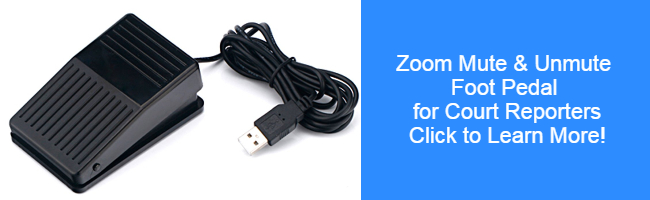
Zoom mute and unmute foot pedal for court reporters.Yes, we are excited about the new exclusive Martel mute and unmute foot pedal for court reporters click on the image below to learn more. |
 |
The Best Court Reporter Zoom Kit Just Got Even Better.
If you take remote depositions, hearings, or Zoom jobs, the Martel Zoom Kit gives you the easier path: hear clearly, record cleanly, keep your CAT AudioSync workflow moving, and get Martel help when you need it.
Specs + In the Box
- 2.0 Zoom Compatible Court Reporter Recording Connection & Teleconferencing kit includes:
- 2 Way USB Court Reporter USB adapter for laptops
- Mobile audio cable adapter for iPhones
- Mobile audio adapter cable for Google, Samsung Phones and all other phones
- Apple Zoom headphone adapter cable included
- Martel Zoom Microphone
- Zoom Spacial Room Analyzer
- Martel Under the chin lightweight court reporter headset with volume control
- Zoom Spacial Room Analyzer
- Live computer to a computer installation where needed