TIME IS RUNNING OUT FOR 2026 TAX WRITE-OFFS

Two Remote Depositions in One Day? How to Match Each Recording to the Right Job

Match each of two remote deposition recordings to the correct reporting job. Practice identifying a file by its opening, parts, and last exchange on Windows 11.
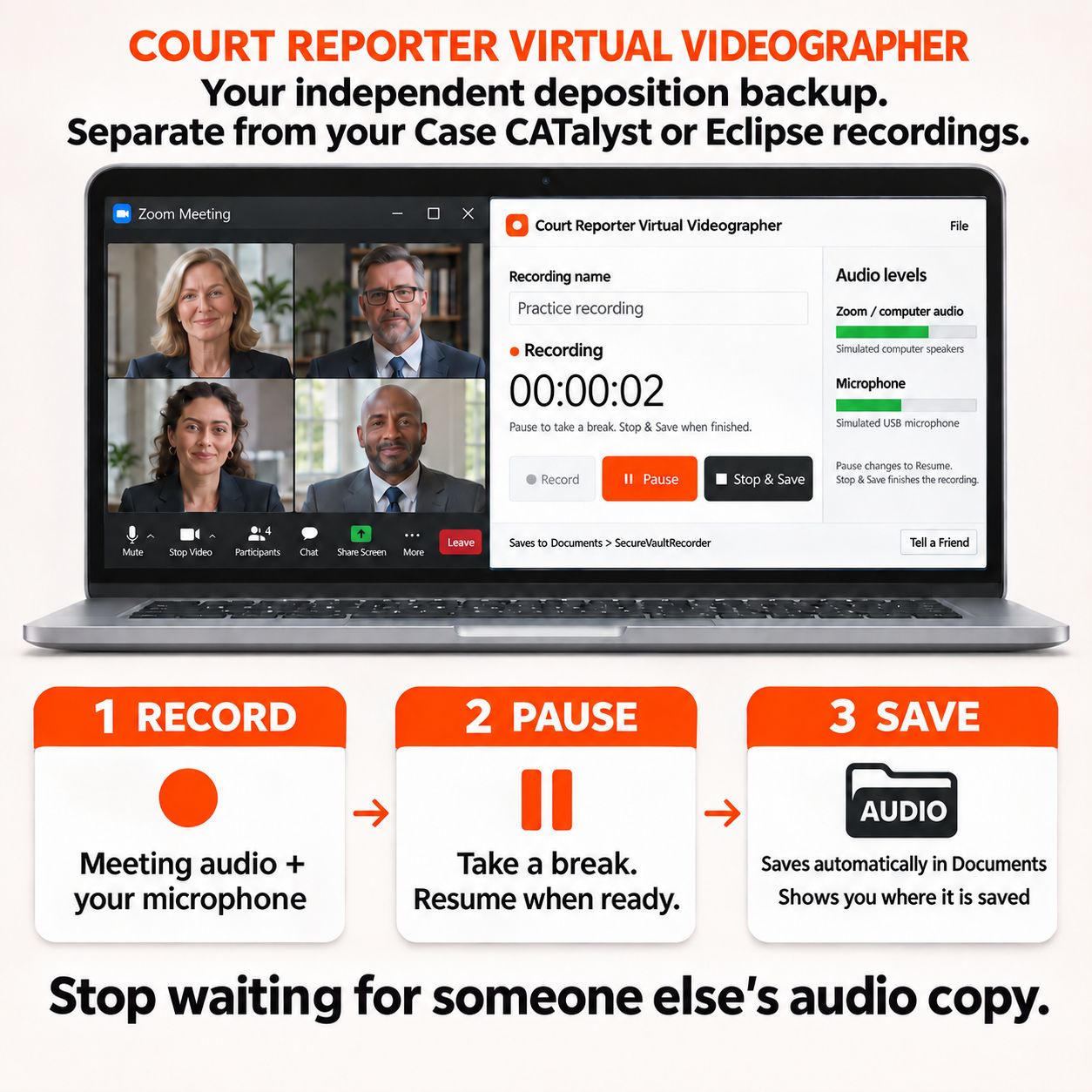
Martel’s graphic showing a deposition meeting and its recording software on a single laptop
Martel Court Reporter Zoom Deposition Audio Recorder Software. View Martel’s product details for SKU 3322.

Two depositions on the same day can leave a reporter with two perfectly audible recordings and a real identification problem. A recurring meeting title, the same examining attorney, and the same Windows computer give the files more in common than the calendar suggests. Give each job its own short identifier before the first session. Then establish which authorized recording belongs with which job by checking the actual opening, a distinguishing exchange and the end. A file name tells you where somebody intended to put the sound. The words inside can tell you whether that intention survived a busy changeover.

Decide what the identity of a recording has to answer

Picture a Friday on which the same law office books one witness in the morning and another after lunch. Both invitations display the firm's conference-room name. The reporter creates a new writing job for each appearance. At the end of the day a scopist receives two audio files and asks which goes with the second job. “It was the later meeting” gives the scopist little help if both copies were transferred together, the recipient sorts by file name, or a late morning restart placed the first job's last file after the second one's scheduled start.

Write down the two objects being matched. At one end is a particular reporting job, with the identifier the agency or reporter uses for that assignment. At the other is a particular saved file or group of related files. The meeting invitation, the computer running the call, the reporting application's job, and the audio recorder each serve a different purpose. The identifiers do not have to be the same everywhere. They do have to lead an authorized reviewer to the right material.

A useful check answers three questions. Which proceeding is represented? Which portion does this file contain? What observation connects the file to that portion of the job? Sometimes the opening answers all three. In another matter the approved introduction may be exactly the same until the second question, or a file may begin after a break. Leave space to record the evidence available in that situation instead of treating a weak opening as a failed job.

Create two similar mock bookings on purpose

Use invented matters that share enough details to make the exercise worthwhile. On paper, schedule Harbor Plan, west cabinet, with job code H17 and Harbor Plan, east cabinet, with job code H71. Both take place on a Tuesday. Both involve the same questioner. Make the mock invitations display “Harbor Plan conference” and keep the ordinary on-screen clock visible. A volunteer can play counsel in both sessions. Put a different practice witness in the second seat if one is available. A single volunteer using two scripts also works.

Give each witness an opening item, an interior item and a closing item on a card. The first card can refer to a copper clip, a panel marked W and a missing bottom drawer. The second can refer to a linen strap, a panel marked E and a notch on the top shelf. Those clues are cheap to reproduce and distinguish two discussions about cabinets without relying on recognizing anyone's voice. Mix in some deliberately common words such as hinge, inventory and inspection so that simply recognizing the topic will not pass the exercise.

Give the person preparing the files both job codes. Keep the witness cards with the person running the exercise until playback is complete. The exercise is stronger when the reviewer cannot guess every answer from the label on a folder. A reporter working alone can write the cards a day in advance, fold the answer key and make the two recordings in a different order from the order in which they will later be reviewed.

Choose file names a second person can read under pressure

Write your proposed name on a slip small enough to cover most of the screen. If the only distinguishing letters occur after a long shared firm name, a narrow file picker may hide precisely what you need to see. Put the approved job identifier early. Follow it with a role or segment designation whose meaning is already understood at your office. H17_reference_start and H71_reference_start are readable practice examples. A more formal office convention may fit better. The essential information should remain recognizable in both a file list and a brief handoff message.

Choose the level of identifying detail appropriate for the recipient and storage location. A unique internal code may be sufficient in a shared working folder. A witness's full name can create an unnecessary disclosure in a file picker, screen share or notification, and similar surnames can be surprisingly easy to transpose. Keep the authorized mapping between job code and assignment wherever the office normally keeps it. The exercise can use wholly invented codes from start to finish.

Decide how you will name two parts of one session before either job starts. For instance, a suffix can distinguish the first morning file from a morning continuation without making either look like the afternoon job. Use numbers with a consistent width if staff sort by name. If a device supplies its own file names and you must preserve them, create an index with the original names in one column and the job codes in another. Renaming is only one possible way to establish a link. A reliable index can do the same work when originals must keep their existing names.

Find the computer that actually creates each file

In one room, a laptop may display the meeting, receive the remote voices and also record them. Elsewhere the reporter writes on one Windows 11 computer while the videoconference runs on another. A writer may save a separate job recording regardless of what either computer does. Point to the device where the particular reference recording will be created. Then identify its application, its selected source and the place a finished practice file normally appears. This simple walk around the desk catches many mistaken assumptions before there are two matters to disentangle.

Martel's Court Reporter Zoom Deposition Audio Recorder Software, SKU 3322, runs alongside the meeting on the Windows computer receiving its audio. The current product page illustrates several desk arrangements. It describes selecting the speaker or headphones carrying the meeting playback and, when needed, adding an appropriate microphone source. If a second computer is only being used to write, naming a job on that computer is a different action from naming an audio recording on the meeting computer. Record both actions on your mock changeover card.

The ability to hear a call through headphones provides a convenient test of the listening path. It tells nobody which filename will be assigned later. For the practice, write a job code on paper at the computer with the recording controls. Have the local operator announce the fictional job in the practice room and a remote helper provide one of the witness clues. When you reopen the finished file, you can check its identity and whether the expected sources reached it. In an assignment, use the recording procedure and introductions authorized for that proceeding.

Build an opening check from words already in the record

An opening check works best when a reviewer can locate it without playing a long stretch. In the cabinet exercise, let counsel introduce the west-cabinet review, then ask which fastener held the label. The witness's reply supplies the copper clip. Begin the other practice session with the east-cabinet review and the linen strap. Save the cues in the job index after listening, with enough context to distinguish what was heard from what appeared on the schedule. A recollection of what someone intended to say is less useful than a description of what the file actually contains.

Real proceedings sometimes open with formal language common to the entire calendar. Do not direct counsel or a witness to change a proceeding solely for your filing system. Find an authorized, naturally occurring reference, such as the identification made on the record, the subject of a particular exhibit or a distinctive early question. Where names or case details require restricted handling, put only the necessary reference in the permitted location. A private personal notebook or an email subject line may have very different audiences from the official job file.

Try one practice run in which the beginning is intentionally generic. Both helpers say that they are ready. Both speakers acknowledge the same instruction. Only the next question distinguishes east from west. Have the reviewer mark the earliest point at which they can tell which job it is and what happened there. This teaches a more practical habit than signing off as soon as a file makes sound. It also shows how little listening may be necessary once the right distinguishing item is known.

Close the first job before preparing the second

Make the end of the morning a deliberate event. Follow the recording application's normal finalization procedure when authorized. The SKU 3322 page describes recording controls that include pause and a separate stop-and-save action. In practice, stop and save the morning recording, find the newly created audio and listen to the last meaningful exchange. Then check back near the opening while the morning paperwork is still on the desk. Record the original file name, the job code and any continuation part you actually see. Leave the authoritative source copy in the agreed location.

A pause followed by a resume may be entirely appropriate for part of one proceeding. It does not, by itself, assign a different identity to a new matter. Presentation, writing and recording software may each have a different idea of whether a job is open. Before setting up the afternoon, identify the state of the recording that was responsible for the morning. If staff changes or someone needs the computer immediately, arrange a clear handoff. A vague assurance that the call ended leaves an important question about the separate recording application unanswered.

At a training desk, place a card over the calendar after the first session closes. Ask the person running the exercise to recover the morning file from the agreed storage location and name its closing item without looking at the schedule. If the person finds the right folder but the wrong file, improve the local file index. If the matching file lacks its closing item, examine file boundaries or related parts before changing how the whole office names its recordings.

Restart the afternoon using fresh visual and spoken evidence

The desktop may still display the previous witness, the same meeting, an earlier folder or a recorder field filled with yesterday's choice. Look at the actual job name and selected recording source before creating the next sample. A reused meeting link does not justify appending to the earlier file. Conversely, obtaining a new meeting invitation does not automatically close the recorder. Identify the intended state of each application that participates in this exercise and who is responsible for setting it.

For the H71 trial, deliberately leave a harmless H17 document on the desktop. The helper should point to the reference that actually identifies H71 and ignore the unrelated file. Have the remote witness supply the east-cabinet opening clue. Near the middle, let counsel switch from labels to shelf markings. Close with the notched upper shelf. Each event offers a different way to recover identity, which is useful if a technical interruption creates an afternoon file without its original opening.

Before releasing the practice set, compare both openings in a single sitting. First play the file marked H17 and ask for the fastener. Then play the one marked H71 and ask for the same category of answer. If both give the copper clue, do not repair the mismatch by guessing at a new name. You may be playing the same file twice, looking at two copies of one job, or missing the second file. Record which item you actually opened and where the evidence ends.

Account for a split, a restart and two matching copies

One deposition can produce several files without becoming several jobs. The Martel software page says extended recordings can create additional audio parts. A manual restart after an approved interruption can also leave a second file to review. Inspect the actual names and order created by your configuration. A part number is meaningful in relation to its parent recording. Two different job folders can each contain something that looks like part two. Keep the original grouping intact when copying material for authorized review.

Use a second H17 exercise to practice a continuation. Close one practice file on the phrase “the west panel opens inward.” Begin the continuation with counsel's question about the drawer. Record a short note linking the ending of the first file to the beginning of the next. For automatic parts, use an actual test from your installed workflow if one is available. A manual two-file rehearsal demonstrates the indexing technique, while its names and boundaries provide no evidence about the application's automatic splitting interval.

Copied files create a different challenge. A download folder and a working folder can contain what appears to be the same recording. Inspect the approved source and the working copy separately. Matching names or durations alone are insufficient to prove they contain the same authorized material. Where stronger verification is needed, follow the office procedure for identifying exact copies. For the practical job match, listen to the relevant words and note which file the receiving person should actually open.

Test the handoff at the recipient's desk

Prepare a small delivery packet for a colleague using only the mock material. Include the two job codes, which recording is expected for each, and the original segment names where relevant. Ask the recipient to open the file through the ordinary receiving workflow on their Windows 11 workstation. A link that works while the sending reporter is signed into a network location may not open under another person's permissions. An attachment delivered without one continuation can give an accurate beginning and an incomplete ending.

Give the receiver three requests. Locate the morning witness's fastener. Find the afternoon closing object. Then identify which file carries the morning restart. Have the receiver return file names and their findings, without sending the full practice recordings back. The combination of tasks tests selection, listening and sequence. If the receiver can answer from a summary without opening any material, change the clues or omit the answer key from the delivery note. You want to learn what the transferred files support.

Keep corrected practice notes distinct from earlier notes. Suppose the first packet identified the correct afternoon file but gave the wrong part number for the morning drawer detail. Preserve the original file names while issuing a corrected written index through the accepted channel. The recipient should be able to tell which index is current and why. In live work, follow the responsible reporter's instructions for preserving originals, access and permitted distribution. The mock exercise gives staff a chance to practice that distinction without using an actual witness's testimony.

Decide when equipment or workflow needs to change

If the reference recorder produces both voices in both job files, and the only error is assigning the second file to the wrong matter, another microphone will not improve the filing decision. Change the point at which the job is named, the visibility of its code, the handoff note or the way a completed file is checked. If both files have clear local introductions but neither contains a remote witness, investigate the playback selection and the recording arrangement. Those two findings lead to different purchases.

Consider SKU 3322 where the job calls for a separate recording of meeting audio on the receiving Windows computer. Its current product details explain how to name a recording, select audio sources and save it. Check that the supported setup matches the computer running the meeting and that use is authorized for the assignment. A single application may be entirely adequate for file capture while an independent job register remains necessary for matching recordings.

Keep the result of the practice small enough to use between real hearings. The operator should know where to name each job, where to find the source files and how to verify one distinguishing event. The recipient should be able to answer the job-match question without recognizing the reporter's voice or guessing from a clock. Keep the worked H17 and H71 example available as a private training exercise. Refresh the fictional cues next time so the exercise continues to test what people actually hear.

32 questions and answers

1. Can the same recurring invitation be used for two distinct practice jobs?

Yes. Reusing the invitation makes the exercise more realistic for an office that schedules through one virtual room. Establish a separate reporting job and a separately identified recording for each mock proceeding. At the receiving desk, ask which piece of evidence distinguished the two meetings. If the only answer is the invitation title, you have discovered something to improve while working with fictional material. Try a short internal job code plus a recognizable spoken opening.

2. What should go first in a practice recording name?

Use whichever approved element distinguishes the job most reliably when only the beginning of the name is visible. In the Harbor exercise, H17 and H71 need to appear before a long shared description. Add a segment label if that recording is only part of an appearance. Try reading the names from an ordinary open-file dialog, a transfer list and the review player's recent-file menu. Those interfaces can show different amounts of the same name.

3. Should the test rely on the witness spelling their name?

For a fictional exercise you can use a spoken name, an object, a letter or a short phrase. Choose something the listener can verify without already knowing the speaker. On a real assignment, use the identification that belongs to the authorized proceeding. An equipment check provides no independent reason to direct a witness to repeat personal details into another file. A naturally occurring exchange shortly after a formal introduction may make a better reference.

4. Why do two files sometimes show the same meeting title?

A meeting title can describe a room or series of bookings instead of a particular job. Two sessions can therefore have the same perfectly legitimate visible title. An audio application might use a separate name field, and a download may acquire a generic name when someone saves it. Note which application assigned the label in your own practice. Then identify where the reporter controls a job code and how that code reaches the receiving person.

5. Is the Windows file creation time enough to identify the afternoon witness?

It can help narrow a search, especially when you know which device created the original. Copies, transfers and a folder sorted by some other time can change what appears first on your screen. A timestamp is also a poor way to distinguish two sessions that overlap or begin late. Check the relevant saved words, the reported job and the original sequence. Use the clock as supporting context for that comparison.

6. What if the morning matter runs into the scheduled afternoon slot?

Treat the calendar as a plan. Mark the first job's actual conclusion or authorized handoff, then document how the second job began. If another reporter takes the afternoon matter on a different computer, record that change in the assignment index. The receiver should be able to identify each job without assuming that a particular time belongs to a particular witness. A short note about the actual operator can resolve a surprising file sequence.

7. Can a recording have the right opening but the wrong ending?

It can contain the expected opening followed by an unintended continuation. In rehearsal, make a harmless example in which the morning mock file also picks up the first words of the afternoon exercise. Ask the receiver to check both ends. The correct opening alone will pass the first check. If an actual file contains material from two matters, keep the source intact and refer handling and access decisions to the responsible reporter or office before sharing it.

8. Does ending the online meeting stop a separate Martel recorder?

Treat these as separate controls on the Windows computer. Martel describes joining the meeting normally and operating the recording software alongside it. Use the recorder's own procedure for ending and saving the authorized recording, then identify the result by opening it. A closed meeting window gives a visual indication about the call. It does not tell a reviewer the name of the audio file, what closing words it contains or where it was saved.

9. Who should name the recording when somebody else hosts the meeting?

Assign the task to the person responsible for the authorized recording that will be transferred. The host may name the meeting for scheduling or manage its participants. The reporter or designated operator may maintain a different job identifier and a different file. Decide who will make the association before the session starts. A clear mock handoff states who names the Windows recording, who checks the source file and who tells the recipient which part to open.

10. If two witnesses sound alike, what can the reviewer use?

Use the information that legitimately distinguishes the proceedings. In the practice case, two similar voices discuss different cabinet labels and answer different opening questions. The listener can identify those details without guessing who spoke. In actual work, follow the reporter's approved identification and references. Tone, accent and perceived familiarity can suggest where to look, but they do not replace the evidence that links a particular saved recording to the intended reporting job.

11. What information belongs in a short index for a scopist?

Give the authorized job identifier, the original source or working-copy name, the relevant part sequence and one permitted reference the scopist can check. Include the specific question they are being asked to resolve if only part of a job is in scope. Do not burden the recipient with a complete scheduling history. A line referring to the opening identifier in one part and the adjoining restart in another can be considerably easier to use.

12. How can I prove a recording came from the meeting computer instead of my writing laptop?

Make a mock change that affects only the source you are examining. For example, use separate local and remote practice phrases and confirm which computer is running the meeting and receiving its playback. Open the named output at the recording application on that machine. Compare what you hear there with any separate writer file. The exercise identifies the visited devices and their outputs. It does not make a coincidentally matching file the authoritative version of somebody else's job.

13. Can the Martel recorder include the local reporter's microphone?

The SKU 3322 product page describes capturing the selected meeting playback and optionally including an appropriate local microphone on that Windows computer. Rehearse the actual choice on the machine receiving the meeting. If a local voice should be present, have a willing participant use one fictional cue, then ask a remote volunteer for another. Check both cues in the named job file. Correctly capturing both voices still leaves the separate task of assigning the right job identity.

14. Will a separate file for each job give me a separate channel for every person?

File separation and speaker separation answer different questions. Martel specifies a combined mono WAV for the meeting-audio recorder. One job can have its own file while several voices in that file share the same channel. For the job-matching exercise, a distinguishable sentence or phrase is enough. If a proposed assignment requires separate tracks, determine which equipment and recording procedure can actually supply them before relying on the files for that purpose.

15. Can a second physical recorder confirm the file assignment?

It can provide another authorized source when you know what it recorded. Compare a particular cue in the uncertain file with the same event in the verified source. Note which device created each file, and whether both received the same feed. The second recorder may confirm that the clue occurred in a particular session without resolving which folder was copied or which file was released to the recipient. Continue checking the transfer itself.

16. How do I handle two mock files with nearly identical lengths?

Treat duration as one descriptive feature and give the reviewer a more discriminating task. For example, both files might last two minutes, but only one contains a correction from linen to cotton near the end. Ask the reviewer to locate that correction and provide the associated job and part. This exercise makes it obvious why matching a duration on the sender's screen does not settle which conversation the recipient has opened.

17. What if the recorder creates a second part while the witness is still speaking?

Keep that part with the rest of the recording as the application created it. During authorized review, identify the ending of the preceding part and the beginning of the next. A continuation may open in the middle of an answer and have no formal introduction of its own. Index it with its confirmed parent job and sequence. Do not append an invented spoken identification to make the original sound as though it began differently.

18. Which file should I check after I use Stop & Save?

Check the actual saved audio associated with the recording you just finalized. The product page and your installed workflow can help locate it. Record the original name and enough of the intended path to distinguish it from a copy. Reopen it through the ordinary review route and listen to a distinguishing item. A highlighted recent filename or an application notification can guide you there, but neither reveals which voices actually made it into the file.

19. What if both jobs were booked under the same case number?

Assign a lower-level identifier your office permits, such as a witness-session code or an internal appearance number. Keep the two jobs associated with the same overall case where appropriate. The file index needs to distinguish the specific appearance being reviewed. A case-only label may be adequate for storage at the folder level while remaining insufficient for an individual recording. Try finding the correct witness from the recipient's view before adopting the new convention.

20. Is it better to put morning and afternoon in the names?

Those words can be useful descriptions when the participants share a location and schedule. Use an approved identifier that remains meaningful if the second deposition begins earlier, a cross-time-zone recipient opens the packet, or the first one resumes later in the day. A name can include the expected session and still identify the actual job. The spoken opening and verified sequence supply the evidence when the timetable changes.

21. Should I play the sample on the speaker other participants use?

When testing the audience experience, it makes sense to test the intended speaker or headset. When checking file identity, use the review path the recipient will actually use. File identification depends on what was saved and which source was opened. Hearing the witness during the meeting is a different observation. Before a live proceeding, arrange any practice audio in a way that respects the room and avoids exposing one matter to people attending another.

22. Can someone identify the correct job from a transcript excerpt alone?

A permitted excerpt can supply a specific comparison, especially if it contains a distinctive question and response. Compare it with the actual file and record where the match occurs. An excerpt common to both depositions provides weaker evidence than a unique subject or correction. If you are working from a draft that may change, identify its version. Leave responsibility for the official transcript and any corrections with the authorized reporting workflow.

23. Where should the exercise put a witness who rejoins after a connection loss?

Place the rejoin within whichever mock job the witness was already attending. Decide whether your authorized rehearsal keeps one recording running or starts another identified part. Use a returning question about the same cabinet to establish continuity. A new join notification, a new microphone selection or a changed display name does not by itself create another reporting job. Recheck the relevant audio sources if the connection change affected what the reporter could capture.

24. How do I recognize that one saved file is missing from the packet?

Start from the expected assignment index and write down which entries you can actually open. For each available part, identify an opening or adjoining cue and a closing or adjoining cue. If the note describes a separate continuation but no delivered source covers it, mark the gap precisely. Ask the sender for that part or clarification through the approved route. Do not fill it by assigning an unidentified file from another matter.

25. What should I do if the saved file opens silently?

First make sure you are listening to the intended file through a working output. Try a known practice file on the same review desk, then inspect the silent file's authorized source and selected recording inputs. Recovering sound and establishing identity are distinct jobs. Until a meaningful clue or another approved source links the file to the proceeding, mark the association unresolved. A file that is named H71 may still require a new capture-path diagnosis.

26. Can I send a sample to technical support to diagnose the naming problem?

Create a comparable problem with the cabinet exercise and the same computer arrangement. An invented recording and a redacted description of the naming sequence are usually enough to demonstrate a folder or selection issue. Include which application created the file, whether the name was entered before recording and what happened on stop and save. Follow your organization's approved support channel and permissions if an actual assignment ever becomes relevant.

27. How should I compare a recording copied to a secure transfer system?

Use the transfer procedure authorized for the office. Record what the sender placed in the packet and which copy the recipient opened. The exercise can deliberately put the two mock jobs in separate subfolders or send them separately. Compare the permitted opening and closing details after receipt. If a portal changes the download name, keep that name in the recipient's note alongside the original identifier instead of assuming that a changed name means changed audio.

28. What happens if the office assigns a different reporter for the second meeting?

The receiving person needs a new association among operator, job, recording system and destination. Another reporter may naturally save to a different location even if both use similar laptops. For the practice, have a colleague perform the afternoon stop-and-save sequence and fill out its index without coaching. Compare what the afternoon receiver needs with what the first reporter expected. This exposes unwritten steps that a single operator might perform from habit.

29. Should a morning and afternoon working copy go in the same review folder?

Choose the organization permitted for the two assignments and their authorized recipients. A training exercise can deliberately allow both in one folder to stress-test the names. In actual work, different access permissions or delivery instructions may require separate locations even when the jobs share counsel. Evaluate retrieval and access together. A folder that makes selection easy but exposes an unrelated assignment to a recipient does not meet the working requirement.

30. How do I score the cabinet exercise without making up results?

Write down the tasks before running it, then record the actual attempts. For each job, score whether the reviewer opened the intended file, recovered the expected cue and identified the correct part when there was a continuation. Mark an uncertain association as uncertain. You can record elapsed search time if it matters to your office, provided both trials use comparable materials. Publish a measured result only if you have performed and documented the exercise.

31. How do I decide whether the new naming convention is easier?

Use a second, fresh pair of mock jobs and keep the receiving task comparable. Let another person find a specified opening and closing clue through the ordinary folder view. Count incorrect opens, unresolved matches and requests for clarification. An improved convention should help someone who did not set up the files. If your colleague still needs to call the operator to identify every file, improve the information that travels with the work.

32. What is the last thing to check before delivering an identified recording?

Check the actual delivery item against the authorized job, intended recipient and requested scope. It is possible to finish a careful exercise and still attach the neighboring file in the final dialog. Reopen the selected working item where permitted, confirm its distinguishing cue, and inspect the part list if there is more than one. Record which verified version was sent using the office's established procedure so later questions refer to the same material.

Martel equipment and related guides

Martel Court Reporter Zoom Deposition Audio Recorder Software · SKU 3322

This article is for educational purposes only.