
Body Cameras for Security Guards: Buying Guide
Evaluate body camera equipment for security teams. Plan mounting, audio tests, charging, downloads, local storage and staff recording routines.
Build accurate timestamped transcripts with clear time references, speaker labels, foot-pedal playback and a repeatable review workflow.
Build accurate timestamped transcripts with clear time references, speaker labels, foot-pedal playback and a repeatable review workflow.
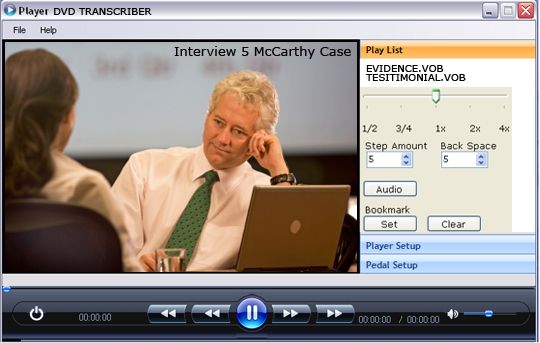
Transcription with timestamps connects written words to positions in a recording. A useful timestamp lets a reader return to the source and hear the passage being discussed. It is more than a decorative number at the start of a paragraph. The reference needs a defined recording, an understandable time format and a consistent rule for where it belongs in the text.
Start by identifying the person who will use the transcript. A researcher may want to inspect a quoted passage, a reviewer may need to resolve an uncertain name and a video editor may need to locate a short answer. Those tasks can require different timestamp density. Agree on the purpose before choosing an interval or promising a particular delivery format.
This guide develops an original manual workflow using supported playback software and a separate text document. Martel's All N One Audio & Video Transcription Kit is the product reference for foot-pedal playback of supported files. It should not be described as providing automatic timestamp insertion, caption export or speech recognition unless the current product information explicitly confirms that feature. The examples below are illustrative exercises, not transcripts of real clients or proceedings.
A time reference is incomplete when the reader cannot identify its source. Record the filename, session identifier and version you used. State that the timestamps refer to elapsed playback time from the beginning of that file. This simple note prevents confusion when a project contains a full recording, several clips, a later edit and a separately exported audio file.
Use a source register for a multi-file project. It can be a short document listing each recording, its duration and its place in the session sequence. Give each file a stable identifier such as Interview A, Part 1. Avoid relying only on a folder's current sort order, because files can be renamed or copied into a different arrangement.
If a recording starts before the conversation begins, keep the timestamp basis explicit. You may refer to the original file from its beginning or use a prepared working copy with a documented start. Choose one method deliberately. Do not let one transcriber start at the opening slate while another silently resets the clock at the first spoken answer.
An original example is a training session recorded in two parts. A reference of 00:12:10 could point to either part. Writing “Part 2, 00:12:10” removes that ambiguity. The additional file identifier is small, but it can save repeated searching and prevent a reader from assuming that a correct time number belongs to the wrong recording.
Elapsed time describes a position within a file. Clock time describes a time of day. A recording's creation date is another kind of information. These references should not be used interchangeably. A transcript marked 00:25:00 ordinarily needs an explanation of whether it means twenty-five minutes into the source or a particular clock time recorded by the device.
For ordinary manual transcripts, a format such as hours, minutes and seconds can be easy to read. For example, 01:07:12 identifies one hour, seven minutes and twelve seconds of elapsed time when that convention is stated. Use leading zeros consistently if the project requires them. Consistency helps readers distinguish a time reference from a list number or document section.
Frame-based production timecode introduces another specification. If an editor requests hours, minutes, seconds and frames, confirm the exact delivery requirement and appropriate tools. Do not append a frame-looking number to a manual seconds reference and imply precision that was never checked. The playback product and workflow must support the requested task, rather than merely producing text that resembles a specialized timecode format.
Do not infer real-world event time solely from elapsed playback when the source includes pauses, edits or sound-triggered recording. A file's playback timeline may not preserve every interval of the original event. Record what the reference actually establishes: a location in the identified file. Any claim about a separate clock or event chronology needs its own verified basis.
Decide whether timestamps appear at fixed intervals, speaker changes, topic changes, uncertain passages or another agreed point. Several rules can be combined, but they should be explained clearly. A transcript that switches among conventions without notice can look precise while leaving readers unsure what each number marks.
Fixed intervals can support general navigation through a long recording. Speaker-change timestamps can help with interview review. Additional references beside uncertain words can direct a second listener to a problem efficiently. Choose the density for the intended use, the number of speakers and the amount of review expected. There is no universal interval that makes every transcript equally useful.
Define whether a timestamp refers to the first audible word in the following passage, an approximate nearby location or a broader segment. A timestamp placed after text can be interpreted differently from one placed before it. Add a short notation guide rather than assuming the reader will guess your convention. When a client supplies a required style, follow that style consistently.
For an illustrative project rule, use a checked reference at each new speaker turn and an additional reference next to any unresolved phrase. State that each mark points to the beginning of the following audible turn in the identified source file. This is a practical example of a convention, not a claim that every research, legal or archival project should use that same rule.
Keep the original recording in its appropriate storage location and make a clearly identified working arrangement. Confirm that the source plays completely and that you have the files required for the session. If a client sends several versions, ask which one governs the transcript before spending time marking positions in an obsolete edit.
Open a representative file in the intended playback software and check the current supported format requirements. A small pilot is useful before accepting a large collection. Confirm that you can play, pause, navigate and read the position information needed for your chosen method. Do not assume a required feature from a general product label when the exact workflow depends on it.
Arrange the playback window and text document so the information you need is visible. Connect the compatible foot pedal and test its assigned actions. Keep the controls comfortable enough that a short pause to type does not become a long search for the previous word. Save the document in a clearly named project folder before beginning substantive work.
Martel's current Audio & Video kit page describes Windows playback software, a USB foot pedal and a headset for manual transcription. Its controls can support listening and replay while you prepare text separately. Read the current page for the exact offer and supported formats. This guide adds a manual notation and verification method around that playback task without inventing unlisted automation.
Begin with a small passage. Listen for the point your convention requires, pause near that point and identify the relevant playback position using the software's available display. Replay enough context to check the beginning. Enter the time reference in the document using the agreed format, then type the associated speech and speaker label as required.
Do not let the player's current position and the intended timestamp become different concepts without noticing. A foot pedal may return playback a short distance earlier when it resumes, depending on configuration. That feature can help recover context, but it means the position after a replay action may not be the position you first intended to mark. Check the reference at the relevant audible point.
Keep manual entry consistent. A text replacement or document template can help with punctuation and label format, but it should not fabricate the time value. Test any shortcut in a practice document first. Confirm the entire inserted result, including the timestamp digits, speaker label and spacing, before using it throughout an important transcript.
An original practice passage contains a greeting, a pause and a new answer. Mark the answer's start according to the project's rule, then use that reference to find it again from elsewhere in the recording. If the mark repeatedly lands well after the first words, revise the method before applying it to hundreds of entries. A short calibration exercise can prevent extensive later repair.
A timestamp identifies where speech occurs; it does not prove who spoke. Establish speaker labels from reliable information in the recording and project materials. An on-screen name, seat position or camera view may help, but it should not automatically override what the source actually supports. Use a consistent unknown-speaker label when identity remains unresolved.
For interviews, prepare a small speaker key. It might identify Interviewer and Participant A, or use another approved labeling scheme. Keep any confidential identity key in the appropriate separate location. A transcript can be useful for navigation without exposing names that the project has agreed to protect. The timing and identification decisions should both be documented.
For group discussions, use timestamped notes to flag difficult speaker transitions. If two voices overlap, mark the overlap according to the chosen notation rather than forcing a confident sequence that the audio does not establish. A second review can return to the same point and examine the uncertainty. The timestamp makes the question easier to inspect; it does not resolve it by itself.
An illustrative line might read “Participant B [00:14:26]: I thought the second delivery was earlier.” If the speaker is uncertain, change the label to the project's approved uncertain form and retain the reference. Do not fill the name from conversational context simply because one person seems likely. Keep the distinction between an audible passage and an inferred identity visible.
Unclear speech should have a consistent notation. Choose how to mark inaudible material, uncertain wording and overlapping voices before the detailed pass. Add the source identifier and a checked time location when that will help a second listener. Avoid replacing a difficult phrase with a plausible guess and then presenting the timestamp as proof of that invented wording.
Use surrounding context to understand the passage, but distinguish context from evidence. Replay at a comfortable speed and volume and return to ordinary playback when evaluating a candidate word. If the phrase remains unresolved, preserve the uncertainty. The transcript's job is to represent the source according to the agreed standard, not to make every sentence appear complete at the expense of accuracy.
Keep an uncertainty list for a longer project. Each entry can include source file, timestamp, short description and review status. This is more useful than scattering vague comments such as “check later” through a document. A reviewer should be able to open the identified file, go to the relevant area and understand the question without reconstructing your entire work session.
Use original, nonconfidential practice material to learn the process. For example, create a sample in which a volunteer deliberately speaks one unfamiliar term softly. Mark the uncertain passage and test whether another listener can find it from your reference. The exercise evaluates the notation and navigation method without turning private project audio into a training sample.
Editing changes the relationship between a working file and its original source. If you remove two minutes from the beginning, every later elapsed time in the shortened copy shifts by that amount. A transcript marked against the shortened file will not point to the same numbers in the untrimmed original unless the relationship is documented and applied correctly.
Consider this original arithmetic example. A passage begins at 00:18:20 in the original. A working clip removes exactly 00:02:00 from the beginning and contains no other edits before that passage. The same point is therefore at 00:16:20 in that clip. This simple offset applies only under the stated conditions; later cuts, inserted material or speed changes require a different mapping.
Keep the source version in the transcript header. If someone asks for references to the full recording, mark against that source or use a verified conversion method appropriate to the project. Do not mix original-file and clip-relative references in one document without clear labels. A correct number tied to the wrong version remains a misleading navigation instruction.
For a recording with many edits, a simple offset may not be enough. Preserve an edit record or work with the responsible editor to establish the required reference system. Confirm a few points near the beginning, middle and end. A relationship that works at the first passage can fail later if material was removed or inserted elsewhere in the file.
Long sessions may be delivered as several recordings. Determine whether each file starts its own elapsed clock or whether the project requires a continuous session reference. Either approach needs a clear rule and a source register. Avoid assuming that the next file begins immediately after the previous one without checking the available session information.
A file-relative approach can use references such as “Session 4, Part 2, 00:08:15.” This is straightforward when readers have the same files. A continuous session timeline may be convenient for another workflow, but it requires verified start relationships. If there are gaps, overlaps or unknown intervals, document them rather than manufacturing continuity from file order alone.
Check the end of one file and the beginning of the next during the initial source review. Note repeated material, an apparent break or a new session slate. Preserve what the recording establishes and ask for clarification where needed. The aim is a usable reference system, not an unsupported reconstruction of events between files.
When you deliver the transcript, include enough of the source register for the reader to use its references. A timestamping method is only as helpful as its connection to accessible source files. If the intended reader receives different names or a different edit, update the reference information deliberately. Do not assume the relationship will remain obvious after files have passed through several people.
A timestamped transcript can place occasional time references beside paragraphs or speaker turns. Captions have a different display purpose and commonly require timed segments with start and end information in a supported format. A transcript with bracketed times is not automatically a ready-to-upload caption file. Identify the required deliverable before promising compatibility with a video platform.
YouTube's official help describes caption creation and supported caption formats. Use those current requirements when preparing material for YouTube. If your playback product does not explicitly provide the required export, plan a separate supported caption preparation step. Do not claim that a manual transcription kit supplies automatic caption timing simply because it can play a video while you type.
The text also needs a purpose-specific review. A readable transcript paragraph and a caption segment are not always organized in the same way. Speaker changes, relevant non-speech sounds and timing need attention in the format intended for viewers. Keep the verified transcript as a reference while preparing the caption version, and check the final presentation against the video.
For an illustrative project, deliver two clearly named files: a reviewed transcript for reading and a separately prepared caption file for the platform. Record which video version each belongs to. This avoids treating one document as two interchangeable products and makes later revisions easier when an introduction or other part of the video changes.
A timing pass asks whether each reference lands at the intended source position. A wording pass asks whether the text represents the speech according to the selected style. A consistency pass asks whether labels, notation and formatting follow the project rule. Separating those questions can make review more focused than trying to inspect every detail simultaneously.
For timing, select references across the whole recording rather than checking only the opening minutes. Include the first mark, later transitions and points after any file split or edit. If the marks drift progressively, investigate the source version and timing basis. Do not correct a few numbers at random while leaving the underlying relationship unresolved.
For wording, listen to the referenced passages with their context. Check names, numbers, negatives and other details that can change meaning. A precise timestamp beside an incorrect word is still a problem. For consistency, inspect the document for missing source identifiers, mixed time formats and unexplained changes in notation. Fix the convention or explain an intentional exception.
Keep review status honest. A sample check of selected timestamps should be described as a sample check, not a complete verification of every entry. If the project requires every reference to be checked, plan time for that work. A clear record of what was reviewed is more useful than a broad quality label with no defined meaning.
Include the transcript title, source identifier, time basis, notation rule and version date. Identify any unresolved passages and explain the review status. If a reader needs a separate identity key or source register, state where the authorized version belongs in the project handoff. Keep private information out of a public filename or unnecessary document metadata.
For a manual workflow, describe timestamps as checked elapsed positions when that is what you created. Do not call them certified, frame-accurate or synchronized to a real-world clock without the required basis. Use plain language that tells the recipient how to return to a passage. The delivery note should clarify the limits of the reference system without becoming a long technical essay.
Maintain a clear version when revisions are requested. A wording correction may leave timestamps unchanged, while a new source edit can require a timing review. Record the nature of the change. This helps prevent a transcript from one version being paired accidentally with a video from another, especially when a project has several similarly named exports.
You can review Martel's Audio & Video Transcription Kit for supported playback and the included equipment. For related methods, see the video transcription software guide. Ask Martel about the exact recording and required controls before choosing software for a specialized timestamp or caption workflow.
It identifies a position in a specified recording according to an explained convention. The source file and time basis are part of the reference. A number alone can be ambiguous when a project contains several parts or edited versions. State what the mark points to, such as the beginning of the following speaker turn in elapsed playback time.
No. A creation date describes file or device information, while an elapsed timestamp locates a point within playback. A time of day is another reference again. Keep these concepts distinct in the transcript header and notes. Do not infer an event's real-world clock time from playback position alone when the recording's timing relationship has not been established.
Choose the frequency for the reader's task and any required project style. Fixed intervals, speaker changes and uncertain passages can all be useful points. Explain the rule before transcription begins and apply it consistently. There is no universal density suitable for every transcript, caption file, research project or review task, so avoid presenting one example interval as a general requirement.
Follow the agreed format and explain what the placement means. A mark before a speaker turn can identify that turn's beginning, while another project may use segment-ending marks. The important point is that the reader understands the relationship. Mixing placements without explanation can make correct time values difficult to interpret and use.
Do not assume that feature. The current product page is the authority for the software's listed capabilities. This guide describes a manual notation and checking process around supported playback. If automatic insertion, a particular shortcut or a timed export is essential, ask Martel to confirm the exact feature before buying or planning a large project around it.
Depending on its configuration, a playback action may return to an earlier point to restore context. That can help transcription, but you should check the displayed position at the audible point you intend to mark. Do not copy a time without noticing that a back-step or navigation action has changed the player's current position.
Confirm the governing source file, its version, supported playback and the intended notation. Make a short pilot transcript and test whether another reader can find its passages. Resolve the format and time-basis questions early. A small calibration exercise can prevent repeated corrections after hundreds of references have been entered using an unclear or inconsistent method.
No. A timestamped reading transcript and a platform-ready caption file can have different structure and timing requirements. Use the destination platform's current supported formats and preparation instructions. If a separate caption workflow is needed, plan it explicitly. Do not promise that a manual playback kit provides caption export or automatic synchronization unless that capability has been confirmed.
Use a stable part identifier with each file-relative reference, such as Part 1 or Part 2, and include a source register. If the project requires a continuous session clock, establish the relationship between parts carefully. Do not assume there are no gaps or overlaps merely because the files appear next to each other in a folder.
Only with a verified relationship and clear labeling. Removing material changes elapsed positions. A simple leading trim can create a simple offset, but other edits can make the mapping more complicated. State which version governs the transcript and check representative points. A correct clip-relative number is not automatically a correct reference to the full source.
If exactly two minutes are removed from the beginning and there are no other relevant edits, a point at 00:18:20 in the original appears at 00:16:20 in the shortened copy. The calculation applies only under those stated conditions. Preserve the source identities and verify the relationship instead of applying one offset to a recording with additional cuts or changes.
No. A timestamp locates speech but does not establish identity. Use reliable source information and the project's approved speaker key. If identity remains uncertain, apply the agreed uncertain-speaker notation and mark the location for review. On-screen names, seat positions and context can be clues, but they should not become unsupported attribution presented as fact.
Use the project's overlap notation and a checked location that lets a reviewer return to the passage. Do not force a confident sequence when the source does not support it. Explain how the mark relates to the overlap. The reference makes the problem easier to examine, while the notation preserves the uncertainty that remains in the spoken material.
Include the source identifier, checked time location, a brief description of the question and its review status. That gives another listener a practical route to the issue. Vague comments such as “check this” are less useful without a recording location. Keep the list consistent and distinguish a resolved correction from a passage that still needs attention.
No. Timing and wording are separate checks. A reference can land at the right passage while the text mishears a name, number or negative. Review the words against the source using the selected transcription style. Treat timestamp accuracy as one part of quality control, rather than a substitute for listening carefully to the represented speech.
Use the format required by the project and explain it. Hours, minutes and seconds can work well for ordinary elapsed references, while specialized production work may require another system. Do not imply frame precision from seconds-only notes. If the requested format exceeds your playback tools or verification method, confirm the appropriate workflow before promising that deliverable.
The playback timeline may omit intervals that occurred in the room. A reference can still identify a position within the file, but it does not automatically establish continuous real-world event time. Document what is known about the source and avoid reconstructing missing time from assumption. Use separate verified information if the project requires a clock-based chronology.
Opening references can be correct even when later references use the wrong edit or timing basis. Check points across the whole source, including after file boundaries and known edits. A progressive discrepancy suggests an underlying relationship that needs investigation. Do not patch isolated numbers without understanding why the references stop matching the intended passages.
Use the source position displayed by the playback software, and verify how its controls behave in the actual workflow. Do not substitute the amount of wall-clock time you spent listening. A slowed review session takes longer to perform, but the transcript should still identify the intended location in the stated source. Test the method with a short passage before applying it widely.
Only after confirming that the source version and convention match the current task. An older transcript may refer to a different edit, file order or time basis. Check representative passages and investigate discrepancies. Reusing a number without checking its relationship can preserve an old error or pair accurate words with an unusable navigation reference.
Give them distinguishable names that identify their purpose and source version. A reviewed transcript and a timed caption file can be related deliverables without being interchangeable. Clear names reduce confusion during upload, review and later revision. Keep the source register or delivery note explicit about which files belong to the same video version.
Include the project or session identifier, source file or part, time basis, notation convention and version information needed by the reader. Add the approved speaker-label explanation where appropriate. Keep confidential identity information in the authorized location. The header should make the transcript usable without forcing the recipient to guess what its time marks or labels mean.
Provide the identified source, notation rule and a small set of references spread across the recording. Ask the reviewer to locate the intended beginnings or segments. Record whether the check was a sample or a complete review. This creates useful feedback on the method while keeping the description of review coverage accurate.
A bookmark can be useful inside a particular playback system, but confirm whether the recipient can access it and whether it survives the intended handoff. A written reference tied to a source file has a different portability role. Do not assume that an internal navigation aid automatically becomes part of the delivered transcript or works in another person's software.
Identify the new source version and determine what changed before treating the old references as valid. A wording-only correction to the transcript differs from a cut or insertion in the media. Check timing relationships throughout the affected material and update the delivery note. Keep earlier versions clearly identified so files from different stages are not paired accidentally.
Use an honest approximate reference if the project permits it and label it accordingly. Explain the source or playback limitation and ask for the required file or tool if exact timing is necessary. Do not invent a precise-looking value. An acknowledged limitation is more useful than a number that sends the next reviewer to an unsupported location.
No. Adding checked navigation references does not establish a separate professional or legal certification. Describe the work actually performed, including its source and review method. If a project requires a formal certification or specialized standard, confirm who is qualified and responsible for that requirement. Do not use a quality label that the timestamping process alone cannot support.
Yes, if the chosen density supports the reader's task and any applicable project requirements. Strategic references at speaker turns, topic changes or uncertain passages may be useful in a reading document. Another deliverable may require denser marks. Explain the convention and test navigation with the intended reader rather than treating maximum timestamp density as the only measure of usefulness.
Describe the source format, recording length, computer, playback controls and exact timestamp or caption requirement. Ask whether any required automatic feature or export is actually included. A representative file and a clear deliverable description support a specific answer. Avoid planning around a shortcut, synchronization function or output format that has not been confirmed on the current product.
Martel's product page supports the equipment description, while official Smithsonian, UK Data Service and YouTube guidance provides context for transcription conventions and timed-media deliverables. The examples and comparison exercises here are original. Follow the requirements of your actual project and destination platform, and use the current linked instructions for product or format details that may change.