
Martel Video Transcriber Kit or Software Only: Choose the Right Setup
Compare Martel SKU 1515 with pedal and headset against SKU 1527 software with two licenses. Choose the setup that matches the equipment you already own.
Martel field guide · Timestamp essentials
Check source identity, timestamp meaning, playback navigation and document placement before handing off a video transcript or timed review notes.
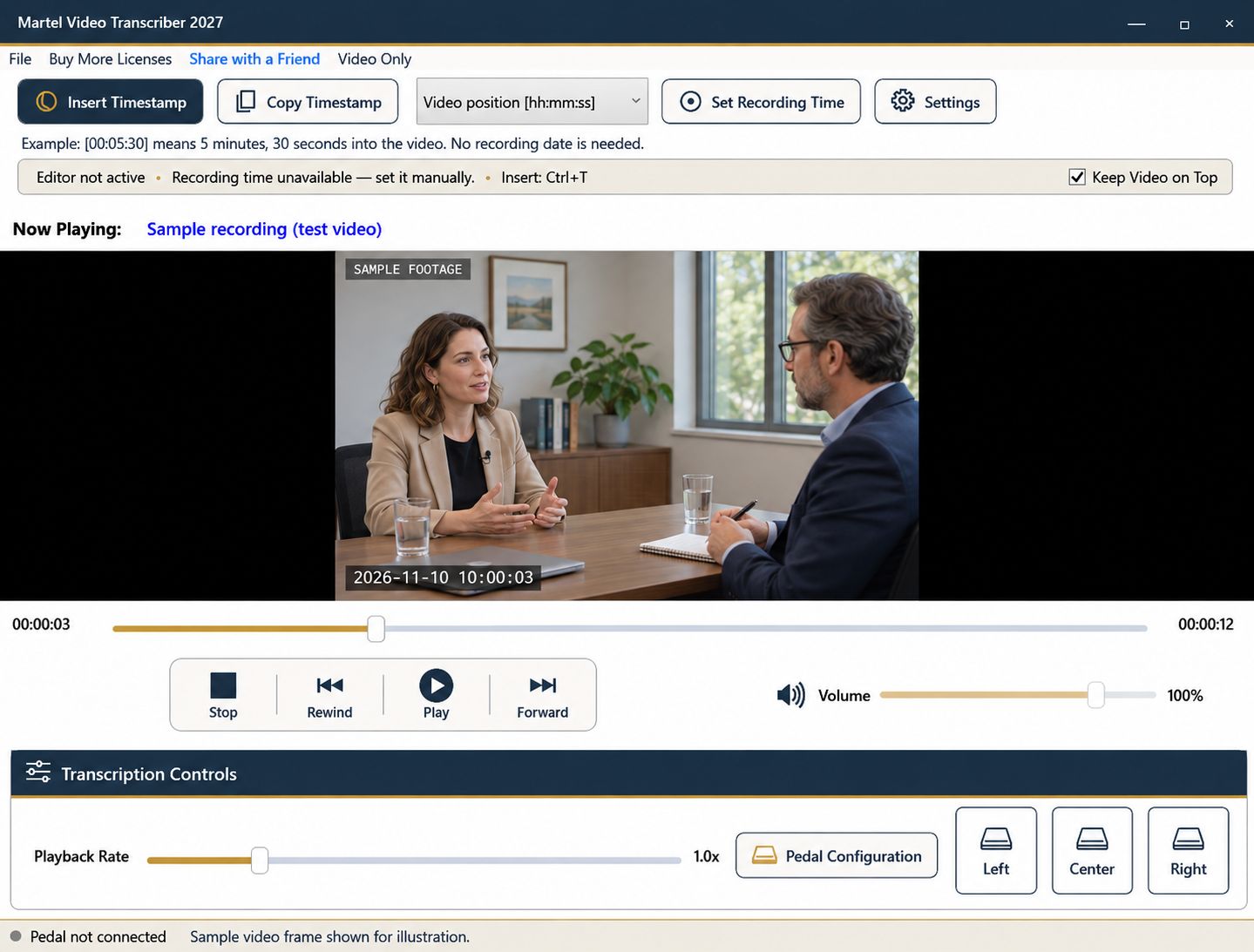
A transcript can contain neatly formatted timestamps that still point to the wrong file, use an unexplained clock, or appear in the wrong paragraph. Quality checking should therefore test the relationship between the document and the recording, not just whether every marker looks consistent.
Use a small set of deliberate checks at setup, after a workflow change, and before handoff. The purpose is to make the document understandable to someone who did not watch you create it.
Place the source filename or agreed identifier in the transcript header. If several files are involved, label the transition between them. Do not let the reader assume that 00:05:30 belongs to the same timeline throughout a document containing several clips.
Confirm that the reviewed file is the one named in the document. A trimmed export, a version with an added introduction, or a replacement download can shift elapsed positions. Keep the original source association clear even if the visible interview content appears similar.
State whether markers show elapsed video position, recording date/time, or both. For recording-clock values, record the known reference and whether the zone or UTC offset is specified. If the reference came from an on-screen clock, say so rather than implying independent synchronization.
Check one example manually. A first-frame reference of 00:10:00 should produce 00:15:30 at video position 00:05:30 on the same date. For footage crossing midnight, include the date so the rollover is visible.
Choose an early passage, a middle passage, and a late passage. Navigate to each elapsed timestamp and verify that the associated speech or event is nearby. Where precise event onset matters, inspect that onset explicitly rather than accepting a marker captured after the transcriber finished typing.
Repeat this check on both sides of an edit, file change, or clock jump. A reference that was correct at the beginning may not remain valid after removed footage. Resolve a mismatch before applying a broad correction to many paragraphs.
If you use Ctrl+T or a pedal assignment, confirm that one press produces one marker. Test a held press and a new press after release in a disposable line. If you use Copy Timestamp, verify that the pasted value is the intended one and that another clipboard operation did not replace it.
For automatic paragraphs, count the intentional Enter presses in a short test. For intervals, check the chosen spacing and remember that safe insertion can defer a marker. Neither mechanism automatically aligns every sentence to its first spoken word.
Look for markers inserted inside words, selected text that was accidentally replaced, duplicated speaker labels, and unexplained abbreviations. Check that uncertainty labels distinguish unclear speech from visual observations. Use a consistent style for pauses, overlaps, and relevant non-speech events according to the project's instructions.
Make sure the reader can tell where a source quote ends and your editorial note begins. A timestamp helps locate material; it does not turn an interpretation into a recorded statement.
Save the transcript in the required document format. Include its source identifier, timestamp convention, known reference information, and any unresolved timing limitations. If you provide multiple files, make their names correspond clearly.
Keep your source recording unchanged. Martel's player and timestamp features support review without re-encoding it. The final document remains a separate work product that should be saved, checked, and delivered through the appropriate workflow for the project.
Give the reviewer a copy that includes a source identifier, timing convention and unresolved-items list. Ask them to find one early, one middle and one late passage without help. In a bilingual assignment, specify whether a passage is the source-language transcript or its translation; a timestamp does not establish translation accuracy. Record each mismatch beside its source position so a correction can be checked without searching the entire recording again.
Sources and further reading: UK Data Service: preparing research files for reuse; U.S. Bureau of Labor Statistics: interpreters and translators. Sources explain professional tasks and editorial practice; the Martel workflow example is our own.
At minimum, sample the beginning, middle and end of each source, plus both sides of edits or clock changes. Increase checking where the task demands closer precision.
Include the source identifier, timestamp convention, and any recording-clock reference or unknown zone. Add the document purpose and relevant limitations.
No. Correct-looking markers can still refer to the wrong file or an unsupported clock reference. Check them against actual playback.
Yes. Trimming or editing can change the timeline. Verify references against the exact version being delivered or reviewed.
No. It helps locate a passage. The words, speaker attribution and context still need review against the recording.
Check source identity, timestamp meaning, playback navigation and document placement before handing off a video transcript or timed review notes.


