
Martel Video Transcriber Kit or Software Only: Choose the Right Setup
Compare Martel SKU 1515 with pedal and headset against SKU 1527 software with two licenses. Choose the setup that matches the equipment you already own.
Martel field guide · Automatic timestamps and workspace
Compare 10-second, 30-second, one-minute and custom timestamp intervals. Learn how pauses, seeks and safe insertion affect automatic video markers.
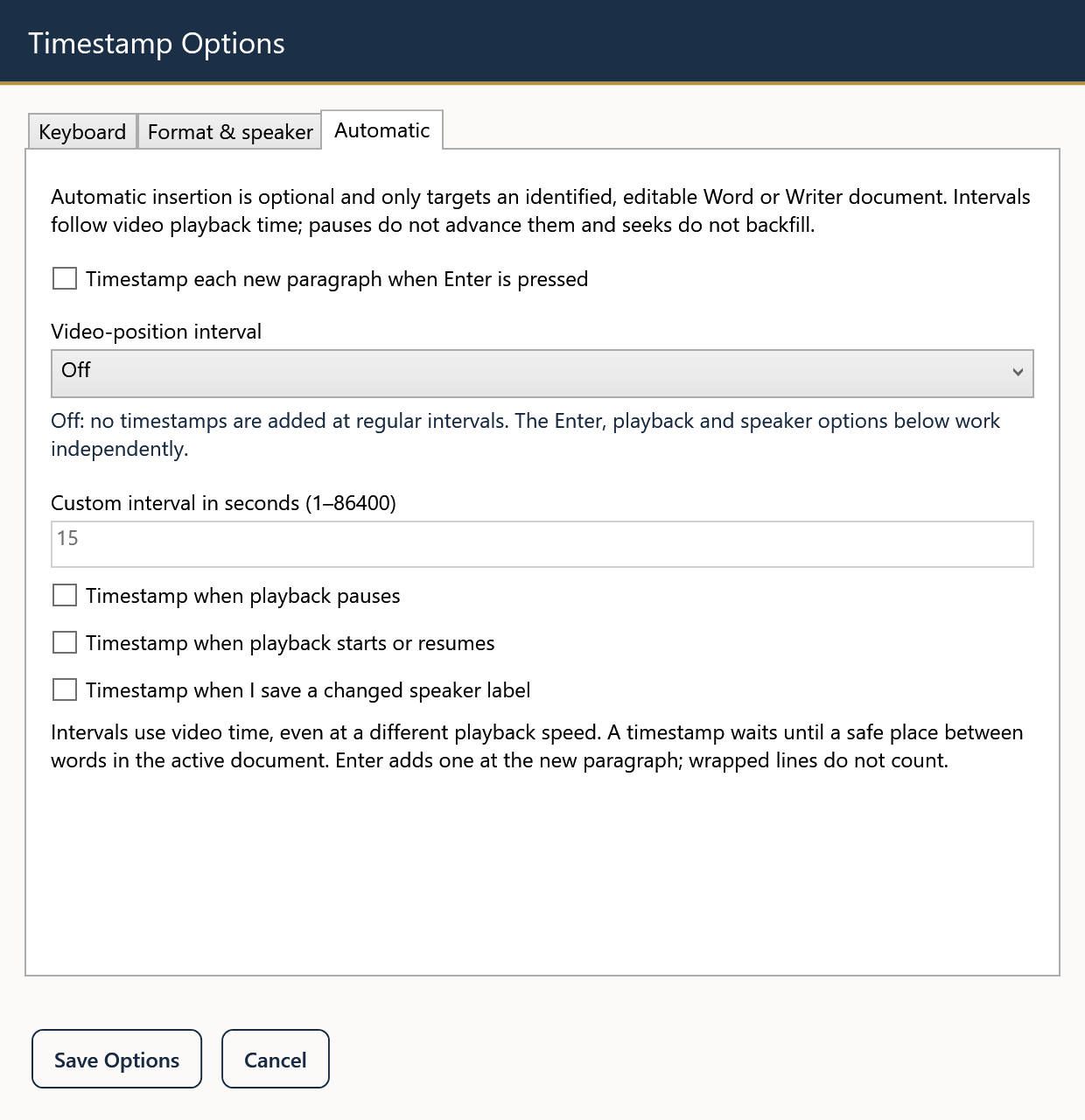
Automatic interval timestamps can make a long transcript easier to navigate without requiring a separate key press for every marker. Martel measures the interval against video playback time. A 10-second interval refers to ten seconds of media, not ten seconds on the clock beside your computer.
Choose an interval that helps the reader find material without burying the text in markers. There is no single spacing that suits a detailed interview, a topic index, and a meeting summary equally well.
Ten-second markers offer frequent navigation points for close review. Thirty seconds can suit longer blocks of speech. One-minute markers may be enough for a broad working transcript, while five-minute markers are more appropriate for a coarse index than precise quotation checking. Martel also provides a 15-second choice and a custom interval in seconds.
These are workflow choices, not statements about a universal transcription standard. Follow the required format when a client, research project, or internal process specifies one. If no format is prescribed, test a page and judge whether the markers help someone locate the passage.
Open Settings, choose Automatic, and select the desired Video-position interval. For a custom value, select the custom option and enter the number of seconds within the range shown in the interface. Save Options.
For a clean first test, disable the paragraph and playback-event triggers. Place the cursor at a suitable text boundary in a supported editable test document, start the recording near its beginning, and let it pass the first interval. Check the resulting timestamp before allowing a long session to run.
The insertion logic waits for a safe word boundary rather than forcing a marker into the middle of active typing. That can defer a marker. A change of document, cursor, or editing target can also prevent a pending insertion from being used. Do not interpret this as guaranteed insertion at every exact tenth second regardless of what you are doing.
Pausing stops media time from advancing, so waiting while you type does not create a succession of new interval positions. Changing speed changes how quickly the video passes a boundary in real time. The timestamp still comes from the media position, preserving its usefulness for navigation.
At twice normal speed, thirty seconds of video can pass in roughly fifteen seconds of listening. That does not turn a 30-second video interval into a 15-second timestamp. The recording timeline remains the reference.
Jumping from the beginning to minute ten should not dump every skipped interval into your document. Martel's automatic interval behavior does not backfill markers across a seek. After moving to a new passage, resume playback and check the next appropriate insertion.
If you replay a section for correction, review your existing markers before adding more. Repeated listening and transcript editing are separate actions; a document should not imply that repeated passes represent new recorded events.
Read a sample without watching the player. Can a reviewer quickly find the relevant passage? Are the timestamps separated from words and speaker labels? Would paragraph markers be clearer than fixed intervals for this material?
Adjust the convention before completing the whole recording. Keep a brief note in the transcript header identifying the interval policy and the exact source file, and use deliberate manual insertion when a specific event needs a more precise reference.
A researcher checking a dense interview may prefer frequent navigation markers, while a webinar producer building a topic list may insert only at topic changes. For a 10-second trial, start just before 00:00:10, keep the identified document ready, and play through that boundary. Confirm the resulting marker, pause, then seek forward. The application should not fill the document with markers for all the skipped seconds. Choose an interval based on the reader’s navigation needs, not a promised transcription-speed gain.
This practical example is based on the Martel controls described in this guide. Check your current settings and a sample document before using the workflow for an assignment.
The choices include Off, 10, 15 and 30 seconds, one minute, five minutes, and a custom interval in seconds within the range shown in Settings.
No. Automatic intervals do not backfill every boundary crossed by a seek. Check the next appropriate insertion after playback resumes.
Automatic insertion waits for a safe word boundary and a supported editing target. Typing or a target change can defer or prevent a pending insertion.
No. It follows the video timeline. A pause in playback stops media time even while you continue writing.
Use the Custom choice and enter the desired seconds within the permitted range shown in Settings, then test the result in your supported document.
Compare 10-second, 30-second, one-minute and custom timestamp intervals. Learn how pauses, seeks and safe insertion affect automatic video markers.


