HGM-2 Battery Microphone vs. HGMUSB: Choosing a Court Reporter Recording Path
Compare the Martel HGM-2 battery microphone and HGMUSB microphone. Choose a recording path, check inputs and power, and test the saved sound.
Test a 12- or 16-microphone conference system with practical seat, speech, echo and recording checks. Compare Martel packages for your meeting room.
Martel equipment guide · Conference and hybrid meeting audio
A practical acceptance test for long tables, boardrooms, and distributed discussion: prove that each speaking position reaches the remote listener, identify weak points, and preserve a setup another operator can repeat.
A successful conference microphone test ends with a useful decision. The organizer should know which seats are covered, how the room handles a quiet speaker, what happens when two people talk at once, and whether an ordinary employee can restore the working setup. A quick tap on a microphone establishes very little. It may prove that some sound enters the computer while leaving the actual conversation untested.
This guide offers an original evaluation plan for Martel's 12-microphone USB package, SKU 587, and 16-microphone USB package, SKU 429. The procedure is a proposed test, not a claim that Martel has performed a laboratory comparison in your room. Use the exact equipment, meeting software, furniture, and playback arrangement intended for your meetings. A result from a different installation cannot settle every question about yours.
Begin with a short acceptance statement written by the people who will use the room. For example: a remote board member should understand a normal contribution from every designated discussion seat, and the meeting operator should be able to restore the documented settings without a specialist. Add separate requirements for audience questions, a standing presenter, or a saved recording if those are part of the job. Do not quietly add them after the first test and then treat the changed task as a failure of the original plan.
Decide who can judge each requirement. The remote listener evaluates incoming intelligibility. The room operator evaluates setup and controls. A meeting owner decides whether the remaining limitations fit the event. For a recorded meeting, someone must also evaluate a saved file. These roles can be filled by a small group, but their observations should remain distinct. The person standing beside the microphones hears direct room sound and therefore cannot fully substitute for a remote listener.
Make a place for three outcomes: accepted, needs adjustment, and outside the tested scope. That last category is useful. If nobody tested the movable side table, its coverage is unknown, even when the main table passed. A precise boundary gives the next organizer more information than an enthusiastic statement that the system sounds great everywhere.
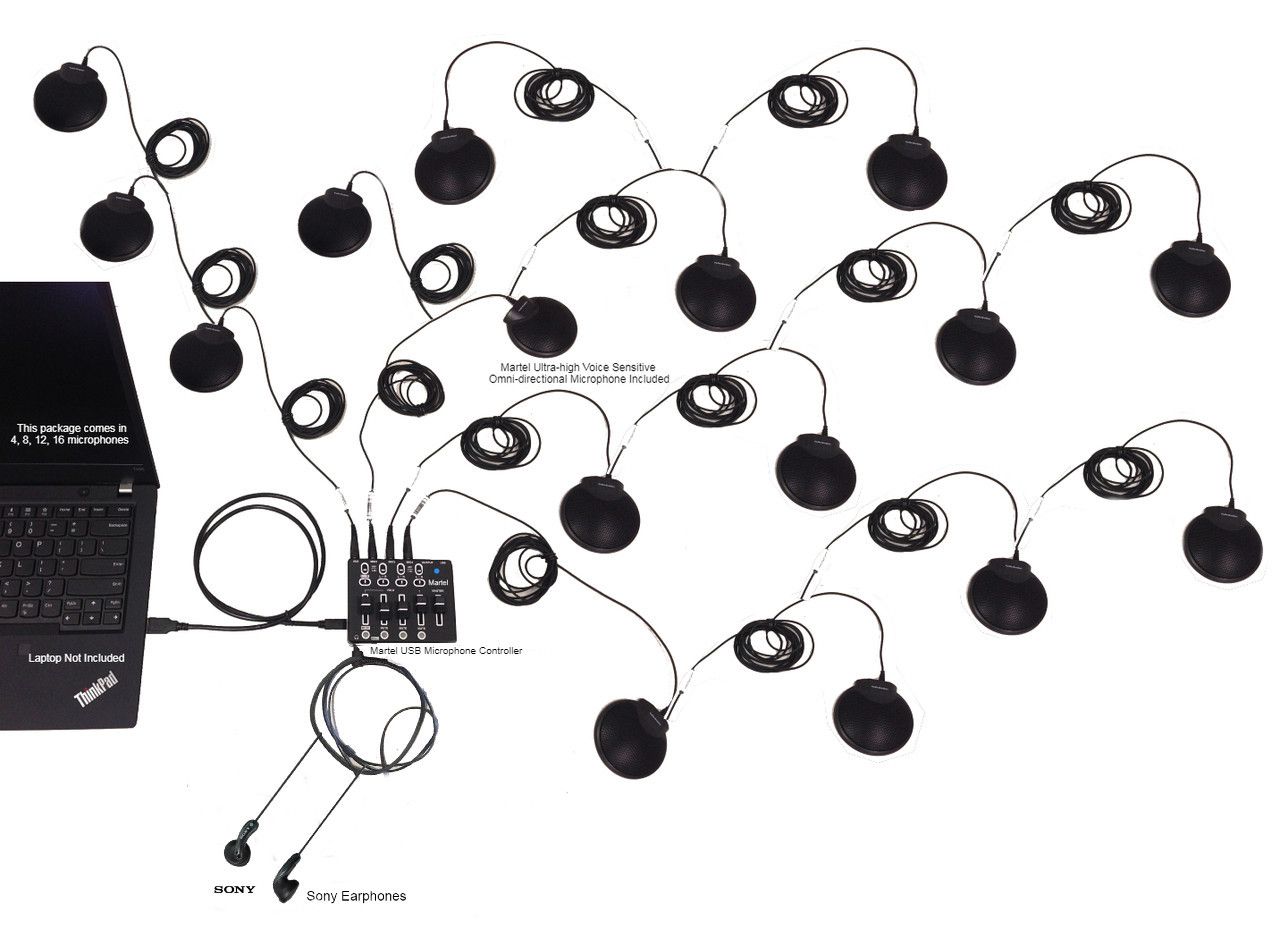
The Martel package listings describe multiple microphones feeding a combined USB microphone signal. Twelve or sixteen pickup points do not, by themselves, establish twelve or sixteen independently selectable recording tracks. Keep the hardware layout, the computer's selected input, and the saved file's channel arrangement as separate items on the test sheet. The SKU 587 listing is the product reference for the 12-microphone package; check the current configuration before ordering.
This distinction changes what you test. If the goal is a shared room contribution to a video meeting, the important result is whether the combined signal carries the discussion intelligibly. If the goal is to isolate individual microphones later, first establish that the entire recording path supports that requirement. A meeting application cannot be assumed to recover separate inputs after they have already been combined upstream.
Also distinguish the room microphone system from the room loudspeakers. One carries local speech toward the computer; the other reproduces remote speech for local listeners. Treat them as two connected responsibilities. A microphone package can be correctly connected while the remote participants remain inaudible locally because the wrong playback device was selected.
Label speaking positions with neutral identifiers such as A1 through A6 on one side and B1 through B6 on the other. Mark the chairperson, presenter, screen, room loudspeaker, controller, and computer. Include cable crossings and the positions where people normally set down papers or open laptops. A hand-drawn map is sufficient if a second person can use it. The objective is to make the tested arrangement reproducible, not to produce an architectural drawing.
Record positions relative to furniture that stays in place. “Near the middle” becomes ambiguous when a table is extended. “Between A3 and A4, away from the projector's fan” gives the next operator a better starting point. Use removable labels on equipment where appropriate, keeping them clear of openings and controls. A photograph of the empty setup can supplement the map, but do not make a photograph the only record of which cable serves which position.
Mark optional seats in a different way. A public-comment chair or side table may only appear during particular meetings. Test that arrangement when it is needed, and retain a separate layout record. When furniture changes, the operator can choose the relevant plan rather than extending cables at random and hoping the previous result still applies.
Use short original test passages that contain details a listener must distinguish. A sample might be: “The revised delivery is Tuesday, the smaller carton contains six pieces, and the reference ends in eighty-four.” A second passage should use different words and numbers. Have the remote listener write what they heard before anyone supplies the expected answer. This reduces the chance that familiarity with the sentence disguises missing syllables.
Do not describe the exercise as a standardized intelligibility measurement. It is a practical acceptance check designed for your meeting. Keep its limitations visible: different voices, languages, hearing needs, room occupancy, and network conditions can produce different outcomes. Include people whose speaking styles represent the participants, especially someone who normally speaks softly. Ask them to speak naturally rather than performing an exaggerated microphone demonstration.
Repeat the exercise at each required position. Record whether the listener understood the complete idea, whether a specific detail was uncertain, and whether another attempt was necessary. A simple record of the uncertain words is more actionable than a score with no explanation. It directs the adjustment toward the particular seat or behavior that caused trouble.
Before the group arrives, verify connections and use the manufacturer's supported wiring arrangement. Inspect the parts actually delivered rather than relying on a photograph of another package. Check that extension leads are fully seated, that cables do not place strain on sockets, and that the controller has the intended power supply. Do not add unrelated splitters or adapters during the baseline test. An unverified accessory introduces another variable before the basic system has been evaluated.
Choose the intended computer input and record its displayed device name. In Windows, Microsoft documents selecting an input and listening to a recorded microphone test through Sound settings. Use that basic check to establish that the computer receives the expected source. Then check the meeting application's own device selection. The two checks answer different questions. See Microsoft's microphone setup and test instructions.
Begin with an ordinary speaking position near the controller and a moderate, stable setting. Once that path works, evaluate the complete layout. If the baseline fails, stop the room trial and resolve it. A full-table demonstration is not useful while the computer is still listening to a webcam or another unintended device.
For Zoom, select the intended microphone and speaker and use the application's tests before inviting the remote evaluator. Zoom's official procedure includes recording and playing a microphone sample, and its test meeting provides a way to check the meeting environment. Those built-in checks are helpful starting points; the seat-by-seat exercise remains necessary for a large table. Use Zoom's audio testing guidance and test-meeting instructions for the current interface.
For Teams, confirm the selected devices in the desktop application's audio settings and use its available test-call option. Settings may depend on the installed version and organizational policy. Microsoft's current documentation distinguishes ordinary background-noise suppression from options intended to isolate one person's voice. A shared room has several intended talkers, so evaluate the selected processing with all of them. See Microsoft's Teams audio settings.
Record the actual selection rather than writing “default.” A default may change after a display, headset, or USB device is connected. If your organization regularly uses both platforms, complete a separate acceptance record for each. Success in one application does not demonstrate that the other application is receiving the same input or applying the same processing.
At each seat, ask the speaker to face the person they would normally address. Repeat a short contribution while they look at the wall display and while they read from a page. Those movements can be ordinary parts of a meeting, so they belong in the test. Avoid placing everyone in an ideal pose that disappears as soon as the agenda begins. If a particular posture consistently loses words, document it and decide whether equipment placement or the meeting routine should change.
Microphone distance and room sound matter even when there are many pickup points. Shure's conference-audio education explains the relationship between speech, background noise, and reflected sound. The practical implication for this trial is to place microphones around the actual conversation and evaluate the result before increasing gain indiscriminately. More level also raises unwanted sound already present in the input. See Shure's discussion of speech intelligibility.
Give the remote evaluator permission to report an uncomfortable listening experience. Words may technically be understandable while requiring constant concentration. Note repeated effort, sudden loud changes, or a need to increase playback volume substantially for one seat. These observations help select a balanced arrangement rather than a setup that merely passes a single loud sentence.
An empty, silent room is useful for finding a connection problem, but it should not be the only test environment. Repeat selected passages with normal ventilation running, the usual display active, and participants seated with their working materials. Have someone turn a page, type briefly, or set down a folder as they normally would. The objective is to learn which routine actions dominate the remote feed, not to stage an unrealistic worst-case noise contest.
Place the most disruptive activity on the map. A microphone next to the organizer's keyboard may need a different position. A stack of documents may be blocking the intended pickup point. If a particular chair is beside a noisy air outlet, moving the seat may be more useful than adjusting the whole system. Change one thing, repeat the same passage, and write down whether the listener's difficulty improved.
Keep temporary solutions visible. If the room passes only while a portable fan is switched off, that is a condition of the result. The person running the next meeting needs to know it. Likewise, if the demonstration omitted an audience area because construction noise was present, schedule a later test instead of describing that area as accepted.
Ask the remote listener to speak while local participants listen through the intended room playback device. Then alternate short statements across the connection. Include a brief, polite interruption so the test reflects a discussion rather than a sequence of isolated speeches. Note whether either side loses the first part of a reply, whether incoming speech becomes difficult to hear, and whether the remote person hears a delayed copy of their own voice.
Zoom identifies several echo causes, including nearby devices with active audio and excessive loudspeaker level. Its guidance also notes that muting a second device's microphone does not turn off that device's speaker. This matters when people bring laptops to the same conference table. Follow the room's chosen audio plan for secondary devices and consult Zoom's echo troubleshooting guidance.
If echo occurs, preserve the working microphone arrangement while identifying the return path. Check the extra devices and playback level before moving every microphone. Repeat the exchange after each change. A written sequence such as “second laptop disconnected from meeting audio, echo no longer reported” is much more useful for future support than “we changed settings until it sounded better.”
Two people speaking simultaneously present a different listening task from two people taking turns. Include a short overlap trial at positions far apart, then at adjacent positions. Ask the remote evaluator to describe what remained understandable. Do not require them to reconstruct two complete statements as if every conversational overlap were recoverable. The result should inform the chairperson's speaking routine and any need for reminders about taking turns.
A combined conference feed may contain both voices together. If preserving independent voices during overlap is a mandatory later-review requirement, investigate the recording architecture separately. The presence of additional tabletop microphones is not proof of isolated speaker tracks. The acceptance report should say exactly which file and playback controls were examined, rather than inferring channel separation from the number of microphones in the room.
Use a realistic intervention during the trial: the chair asks one speaker to finish, then invites the other. Confirm that this simple meeting behavior produces a clearer result. Equipment and meeting practice work together. An operator who understands the limitation can prevent avoidable ambiguity without presenting the microphone system as capable of reversing every simultaneous exchange.
If the meeting must be recorded, create an authorized sample using the actual recording route. Stop and save it, locate the resulting file, close the recording session, and play the saved copy. Listen to contributions from both the room and the remote participant. The live call might sound correct while the recording application is pointed at a different source. A moving meter and an elapsed-time display do not replace playback of the file that will be retained.
Record the file location, format, session identifier, and any processing or conversion step needed before playback. Check the beginning and the ending as well as a middle section. If the recording is split into parts, confirm the expected order and the transition between them. The exercise should reflect the routine an employee will use after a real meeting, including transferring the file to its approved destination.
Use invented discussion material for this trial. There is no reason to expose a confidential agenda merely to check sound. Keep the test file available long enough to compare later changes, label it clearly as a test, and handle it under the organization's ordinary file practices.
The useful comparison asks what the four additional pickup positions change. Start with a map of the actual room and its weak positions. If twelve microphones cover the required discussion well, sixteen may add flexibility for another arrangement. If four distinct speaking areas remain inadequately covered, the larger system may be worth testing. Count the places where speech originates rather than treating the largest attendance number as the only purchasing criterion.
Keep the comparison conditions consistent where practical: the same room, similar attendance, the same speaking passages, the same meeting computer, and the same remote evaluator. Record the controller and application settings for each trial. You do not have to pretend every variable is perfectly controlled, but you should identify material differences. A busy room tested on one day and a quiet room tested on another do not provide a clean comparison of microphone count alone.
Evaluate handling as well as sound. More components mean more positions to identify and more cables to route. Ask the operator to rebuild each accepted arrangement using the documentation. The 16-microphone product page provides the current package details; use your test record to decide which configuration serves the room.
| Check | Evidence to retain | Example decision |
|---|---|---|
| Every required seat | Seat identifier, passage, uncertain detail, repeat result | Accepted after moving microphone clear of papers |
| Remote-to-room speech | Playback device, usable volume, listener comments | Accepted at the documented speaker setting |
| Two-way exchange | Echo or missing-word observation, adjustment made | Retest after disconnecting secondary laptop audio |
| Saved recording | File reference, both directions heard, opening and ending checked | Accepted through the approved recording application |
| Setup by another operator | Time required, unclear step, assistance needed | Revise cable labels before routine use |
Keep scores understandable. “Two key details unclear at B5, improved after relocation” gives a future reviewer a specific problem and remedy. A percentage with no test method can imply a level of measurement the trial never provided. If an organization wants a formal acoustic specification, it should use an appropriately defined assessment. This worksheet serves a narrower purpose: deciding whether the documented meeting setup meets the team's practical needs.
Classify the symptom first. If no seat is audible, examine the common path: power, controller output, computer input, mute state, and meeting selection. If one position is poor while nearby positions work, inspect that microphone's location and connection. If local monitoring sounds good but the remote feed fails, investigate the computer and meeting path. If the live conversation works but the saved sample fails, investigate recording selection and saving.
Use a known working component only where the manufacturer supports the substitution. For example, a compatible lead from a working position may help distinguish a cable fault from a placement problem. Document the change and restore labels afterward. Do not keep introducing adapters, alternate computers, and new settings together. That can produce a working result whose cause nobody understands and whose original problem returns at the next meeting.
Collect a concise support record if the issue persists: product and controller identification, connection map, selected devices, affected positions, a description of the sound, and the steps already tried. Use an approved nonconfidential sample where a sample is needed. This gives Martel a focused starting point and avoids relying on a vague report that the room sounded bad.
Ask a second operator to set up the room using only the finished checklist. Stay available, but do not silently correct their device selection or move a microphone for them. The point is to discover missing instructions while there is still time to improve them. Note ambiguous labels, confusing controls, and steps that depend on the original installer's memory.
Then ask that person to respond to one harmless simulated problem, such as the meeting application selecting a different available microphone before a test session. They should identify the selected input and restore the documented choice. Do not disconnect equipment during a live meeting or deliberately risk damaging connectors. The exercise is an administrative rehearsal, not a stress test of the hardware.
Finish with a short daily checklist and a separate longer setup record. The daily version should fit the time available before an ordinary meeting. The longer record holds the map, settings, package information, test files, and adjustment history. This division helps employees perform the essential checks without having to reread the entire evaluation report every time.
In this hypothetical room, the chairperson and the middle seats are clear, but participants near the far end sound distant. The team first checks whether those participants are speaking from the positions shown on the map. It then moves the nearby pickup points clear of laptop screens and repeats the same passages. Only after evaluating that change does it compare a larger layout. The purchasing question becomes whether additional microphones solve identifiable remaining positions, rather than whether the largest package sounds more impressive in a description.
A horseshoe arrangement has a gap, several changes in direction, and sometimes a separate public-comment position. The test map must include these as distinct speaking areas. A pass from the center of the horseshoe cannot establish performance at the lectern. The operator also checks cable routes used by people entering and leaving the seating area. The accepted plan states which positions are part of the system and how the chair will handle comments from other locations.
The first half of this imagined event has one instructor; the second half has questions from several tables. Test both phases. During the first phase, verify the instructor's ordinary movements and screen-facing posture. During the discussion phase, use the actual participant positions and two-way exchange. If the room requires a layout change between phases, rehearse it. The plan should include who moves the equipment and how the changed arrangement is checked before discussion resumes.
Bring the acceptance record to the supplier with the room map attached. Organize the discussion around unresolved positions and operations. For example, explain that the chairperson and ten table seats passed, the public-comment position remains untested, and the second operator could not identify the correct input after reconnecting the computer. These are three different items. A larger microphone package might address a coverage requirement, while clearer setup instructions might address the operator's selection problem.
Ask the supplier to identify the proposed configuration in writing. Include the controller, microphone quantity, supported cable arrangement, computer connection, and any separately supplied playback equipment. Match that description to what was demonstrated. If the quoted package differs from the tested package, identify the difference and decide which check must be repeated. This avoids treating a successful demonstration of one arrangement as automatic acceptance of another.
Keep the original observations even when a later adjustment solves the problem. They explain why the final layout was chosen and help future staff avoid repeating the same failed arrangement. Record the accepted condition, the change that produced it, and the date. Where a problem remains outside the tested scope, assign an owner and a concrete next check. The purchasing record should leave the organization with an understandable room plan, not only a receipt and a collection of cables.
No. A tap only demonstrates that an impact may be reaching some part of the path. It does not establish normal speech clarity, remote playback, two-way conversation, or the saved recording. Use spoken passages from the intended seats and ask a remote listener to report uncertain details. A brief connection check can precede the real test, but it should not replace it.
An empty room is a useful starting point for connection checks. Complete the acceptance exercise with a realistic arrangement of participants, laptops, papers, and normal room equipment as well. Record material differences between trials. The final result should describe the conditions actually checked, including any audience area or optional seating that was omitted.
Choose someone who can listen carefully and describe missing words, uneven levels, or echo without being coached toward a positive result. They should use a normal listening arrangement suitable for the meeting. A second remote listener can help distinguish a room problem from a problem at one person's end. Keep each listener's observations separate before reconciling them.
You can evaluate each installation for its intended purpose, but differences between the rooms complicate a direct equipment comparison. Furniture, ventilation, surfaces, seating, and playback can all change the listening task. If the goal is to decide between twelve and sixteen microphones for one room, test both there under similar conditions and record the differences you could not control.
No. Microphone quantity describes pickup points, while track separation depends on the controller, connection, recording software, and saved format. The Martel conference packages discussed here are intended for a combined computer microphone path. If individual channel review is essential, establish that requirement before purchase and test a saved sample through the proposed playback workflow.
Start with the actual speaking layout and the supported package arrangement. Some nearby positions may share useful coverage; widely separated positions may need additional attention. The acceptance exercise determines whether the chosen arrangement works. Assigning one microphone per chair by rule can create unnecessary complexity while still overlooking a lectern or side table where someone must speak.
Include them in the trial using their ordinary speaking style. Check placement near that position before raising the entire system substantially. Ask the remote listener to compare the quiet contribution with the next normal contribution so you can hear whether the change creates a large imbalance. Record a practical arrangement that accommodates the participant without depending on exaggerated speech.
It is evidence that the selected input is receiving something. Another microphone, such as one in a camera, may also respond to speech in the room. Confirm the device name and perform a controlled speech check from the intended pickup positions. Verify the selection separately in the meeting application and any recording application used for the event.
Evaluate the setting available in your application with representative speakers and record the result. There is no need to make an unsupported universal rule for every room. If an automatic setting produces distracting changes in your trial, compare a supported alternative while keeping the other conditions stable. Preserve the setting that meets the acceptance goal and document why it was chosen.
No. A headset may be useful for the evaluator, but the local playback arrangement needs its own check. Test incoming speech through the device the room will actually use. Then test the return conversation with those speakers active. This exposes problems that remain hidden while all monitoring takes place through headphones.
The remote person hears the microphone feed rather than the same mixture of direct voices and room context heard by someone at the table. Locate the distracting activity and repeat a controlled sample after a placement or room change. A keyboard, folder, or ventilation outlet near a pickup point can deserve attention even when the local participants have learned to ignore it.
That is one variable to evaluate, but it should not be the first unquestioned response. Check the microphone's placement, obstructions, connection, and the speaker's normal direction. Raising a common level can make other positions excessively loud or increase unwanted room sound. Repeat the same passage after each adjustment and compare the effect across the table.
Follow the room's chosen audio plan so additional devices do not create unintended playback or return paths. They may still be used for meeting content where the platform and policy allow. Confirm their audio state during the test, especially when someone also connects by telephone. The room operator should know which device owns the live microphone and speaker path.
In your notes, describe what the listener hears before assigning a diagnosis. A delayed repetition of the remote person's speech suggests a return path worth checking. A hollow or lingering quality around local words points to a different listening problem. Save an authorized test sample and document the devices and settings. A clear symptom description helps support identify the cause.
Use invented material for setup and comparison whenever possible. Numbers, names, and short factual statements can be created solely for the exercise. This keeps the test easy to repeat and avoids distributing real meeting content unnecessarily. Label saved samples as tests so another operator does not mistake them for part of an actual proceeding or meeting record.
Yes, if both will be used. Keep the physical layout constant at first, then confirm the device choices and processing in each application. Use a short remote exchange and a saved sample if recording is required. Record which application and configuration passed so a later organizer does not assume a single successful call verified every platform.
Mark the affected seats and compare them with the nearest passing positions. Check whether furniture or work materials obscure the pickup points, whether connections are complete, and whether the speakers face away during contributions. Adjust that region and retest before changing the entire system. A local problem should receive a local investigation wherever the evidence supports it.
Use a planned short exchange between the remote listener and a local speaker. Briefly overlap one contribution, then have the chair restore turn taking. Ask both sides which words were lost or difficult. This is enough to expose the conversational behavior without staging a prolonged argument or pretending that every simultaneous statement must remain perfectly separable.
It includes opening the saved file, hearing the intended local and remote sources, and inspecting the beginning, middle, and ending. If the route creates several files, account for each segment. Record where the file was saved and how it reaches the approved destination. A recording indicator alone is not the completed check.
A different connection arrangement can introduce another variable, so test the actual hub, cables, and other connected devices intended for routine use. Do not generalize from an isolated laptop port to an untested workstation configuration. If a problem appears only with the hub arrangement, document that difference and ask about the supported connection before buying replacement microphones.
Avoid treating a live meeting as the main experiment. Resolve layout questions beforehand and document ordinary adjustments that the operator can make safely. If a problem develops, follow the agreed interruption routine and preserve the current record where required. Afterward, reproduce the issue with nonconfidential test material and update the plan based on the result.
Describe the condition and the missing evidence. For example, the side table was not occupied during the trial, or the remote listener lost connection halfway through its passage. Mark that requirement for retest. An honest open item is useful to the purchaser and next operator; an unsupported pass creates confusion when the same condition appears later.
The relevant question is what they improve in the proposed arrangement. Extra pickup points may serve uncovered speaking positions, but they also add placement and cable responsibilities. Compare the specific positions that need help and evaluate the combined result. Choose the package that supports the required discussion and can be set up reliably by the available staff.
Provide the room map, normal participant positions, meeting software, computer connections, playback arrangement, and any recording requirement. Identify the weak positions from an existing test if you have one. Ask for the exact package contents and supported arrangement. This is a more useful purchasing conversation than asking which microphone count is universally best for a large room.
Include the actual listening and participation needs identified by the organization. Ask participants how they will hear remote speech and contribute from their usual positions. A microphone acceptance test is only one part of an accessible meeting plan. Record issues outside the equipment test and direct them to the responsible staff instead of assuming a clear test sentence resolves every need.
Repeat the relevant portions after a meaningful change, such as furniture movement, new computer hardware, altered playback, software changes that affect audio, or a recurring complaint. Routine meetings can use the shorter documented preflight check. Keep the date and reason for each larger retest so the organization can distinguish a current accepted setup from an old experiment.
Find the missing instruction rather than blaming the operator. Check whether labels match the diagram, whether the device name is recorded, and whether a required setting is buried in memory rather than documentation. Revise the checklist and repeat the handoff. An installation that depends on one person's presence has not yet met a repeatable-operation requirement.
Only when its method and meaning are clear. For an informal room trial, written observations about misunderstood details and repeat attempts are often easier to interpret. Do not present a home-made score as a laboratory rating. If formal intelligibility measurements are required, define that assessment separately and use a suitable qualified process.
The microphone system and network are different parts of the call. Note whether dropouts affect everyone, one remote participant, or only local pickup positions. A good local saved sample alongside an interrupted remote feed is useful evidence, though it does not alone identify every cause. Investigate the affected path and avoid changing microphone placement to solve an unrelated connectivity problem.
Include the equipment identification, dated room map, selected devices, application settings, required positions, listening observations, recording result, operator handoff, and unresolved conditions. Name who approved the result. Keep the record where the people running the room can find it. It should help them recreate the accepted arrangement and recognize when a change needs a new check.
Open the 12-microphone SKU 587 page and the 16-microphone SKU 429 page. Compare the current package contents with the room's documented requirements, then confirm the proposed configuration with Martel. Use live product information for price and availability, and retain the acceptance plan alongside the purchasing decision.
The strongest buying decision names the problem solved. It might be clearer contributions from four previously weak speaking positions, a consistent remote return path, or a setup a second employee can operate. Preserve that evidence and the conditions under which it was obtained. Then select the 12-microphone system or 16-microphone system that meets those requirements. A careful trial turns a microphone count into a usable meeting plan.
