TIME IS RUNNING OUT FOR 2026 TAX WRITE-OFFS

Martel Electronics | 10 hours ago

Standalone Transcriber vs. Computer Transcription Kit

Choose where your audio playback should run. Compare no-PC transcriber arrangements and computer kits, with verified Martel package details, real photos and purchase links.

A standalone transcriber and a computer transcription kit solve the same listening problem through different equipment arrangements. One places audio playback on dedicated hardware. The other places it in a supported application on a workstation. The best purchase is the arrangement that receives your recordings reliably and lets the typist control them while preparing the document.

Start with where the recording will arrive and how the operator wants to listen. Martel offers no-PC recorder and transcriber arrangements as well as a lawyer recorder package with computer transcription equipment. This guide compares the practical decisions behind those routes: receiving audio, connecting the controller, preparing the desk, checking compatibility and choosing the complete package.
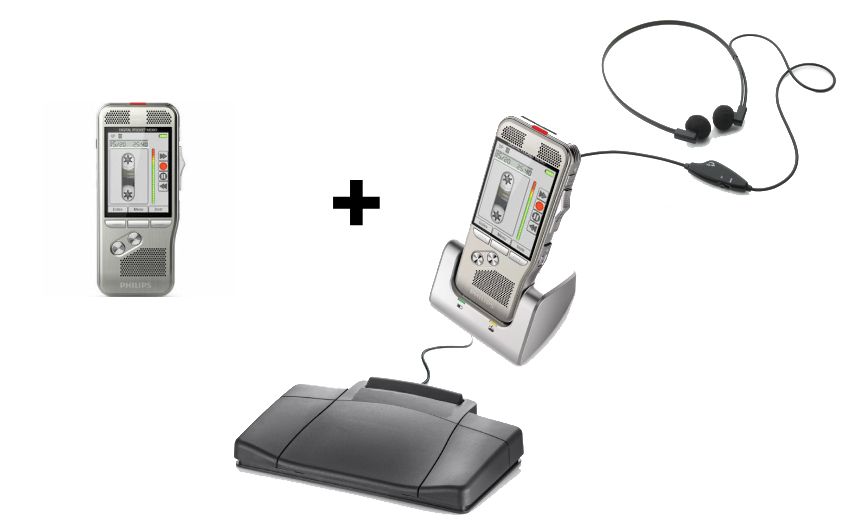
Martel Law Office Pro package showing separate recorder units, headset, cradle and foot pedal

No-PC Law Office Pro Set

SKU 1847

Separate units for the author and secretary, with recorded SD-card handoff. Review the supplied equipment and supported media plan for overlapping work.

View and Buy This Package
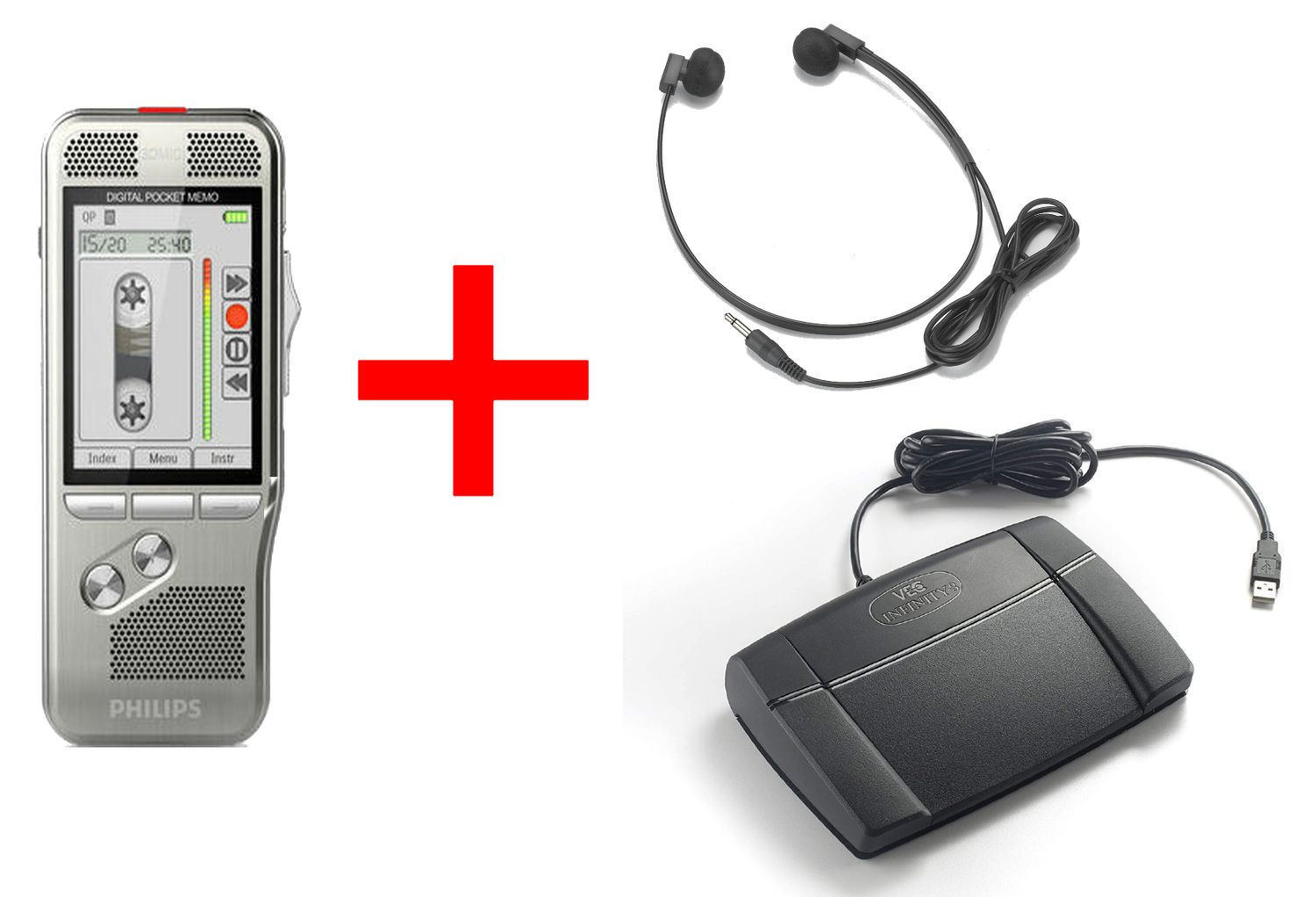
Martel lawyer recorder package with headset and foot control for computer transcription

Lawyer Recorder and Computer Transcriber

SKU 405

Author recording equipment together with computer transcription software, a USB foot control and a headset. Confirm the current software and receiving workstation requirements.

View and Buy This Package

Compare the two playback arrangements first

Buying questionStandalone audio playbackComputer transcription kit
What plays the recording?A compatible dedicated recorder or playback arrangementA supported computer application
How does work arrive?A shared recorder or supported removable media, depending on the packageAn audio file delivered by an approved route
What must the controller operate?The matched hardware arrangementThe supported application and its configured controls
Where is the document prepared?In the office’s chosen writing environment, which may be a computerIn the chosen document environment alongside the audio player
What deserves a pre-purchase check?Exact recorder, dock, controller, media and power arrangementExact software, operating system, recording format, controller and installation requirements

The distinction concerns playback. A person still listens and prepares the written document in both conventional arrangements. Automatic speech recognition is a separate function that must be specified explicitly. The presence of a USB pedal or a product called a transcriber does not establish automatic text generation.

What standalone transcription equipment does

A standalone listening position uses dedicated equipment to reproduce and control recorded audio. The operator hears the recording through the matched listening connection and uses the supported foot control. The recording may arrive in the author’s handheld unit or on compatible media moved to another unit.

This arrangement can appeal to an office that prefers a physical exchange. The secretary receives something identifiable at the desk, listens through the prepared station and returns the device or media according to the office’s procedure. The audio task is organized around that equipment.

A dedicated listening station still has compatibility requirements. The recorder, cradle, controller, connections and recording medium must support the intended operation. Standalone does not mean that any recorder can be turned into a transcriber by attaching a pedal or that every recording card will work in another device.

Plan the power arrangement as well. Identify what powers the playback equipment and where it will be placed. If the office wants audio listening to remain separate from workstation operation, verify that requirement for the actual supplied configuration. A clear description of the complete station is more useful than relying on the word standalone alone.

What a computer transcription kit does

A computer transcription kit provides a supported way to play recorded files and control them while a person types. The listening application opens the audio. A compatible controller supplies supported commands. The headset or selected audio output lets the operator hear the recording at a suitable level.

The file must reach that application before the listening work begins. It might be copied from a recorder or delivered through another approved office method. Confirm the route that will actually be used. Recognizing a recorder as connected storage does not by itself complete the job-delivery process.

Martel’s Lawyer Dictation Recorder and Secretary Transcriber package, SKU 405, is a package to investigate for this route. Its listing identifies a handheld recording arrangement together with transcription software, a USB foot control and a headset. Review the current configuration and workstation requirements before ordering.

A computer kit can fit an established file-based routine when its requirements are met. The important checks are specific: the supplied program runs on the intended system, the recording opens, audio reaches the selected listening output and the controller operates the player during ordinary typing.

Keep audio playback separate from document preparation in your planning

An office can use standalone audio playback while preparing documents on a computer. The secretary listens through the dedicated hardware and types into the usual writing application. Choosing a no-PC playback arrangement does not require abandoning the document templates and review procedures already in use.

Likewise, putting audio playback on the computer does not decide which document application the office should use. The player handles the recording, while the document environment handles the draft. These functions may sit beside each other on screen, but they remain different parts of the assignment.

This distinction helps a buyer explain the requirement accurately. “We want to type on our present computers but keep the audio on a dedicated unit” is a complete and understandable request. “We want recordings delivered as files to the typist’s workstation” describes another.

Decide where each task belongs before comparing extras. The selection becomes much clearer when the office has identified its audio player, writing environment and route for returning a reviewed draft. The package should support those decisions rather than leave them to be discovered after delivery.

Follow the connection chain from recording to the operator’s ears

For a standalone arrangement, identify the recording source, matched playback hardware, controller connection, listening output and power connection. Ask the supplier to explain how those components work together in the selected package. Keep the instructions for that arrangement with the station.

For a computer arrangement, identify the recording file, delivery location, installed player, controller configuration and audio output. A problem at any one of these points can appear to the operator as an inability to transcribe. Separating the points makes both buying questions and later troubleshooting more precise.

Do not let a shared connector shape settle a compatibility question. Two accessories can use familiar-looking plugs while serving different functions or supporting different equipment. A controller’s job is to operate the player; a headset’s job is to carry audio. Their requirements should be checked independently.

A matched complete package gives the buyer a defined combination to review. If the office intends to substitute an existing component, identify its model and confirm that substitution before ordering. That keeps the quotation connected to the station the office will actually assemble.

Compare foot controls by supported operation

The number of pedals is only part of the decision. The controller must operate the intended hardware or application, and the operator must understand the assigned actions. Start, pause, review and movement through the recording should be assessed in the supplied configuration.

Manufacturer documentation illustrates why the connection check matters. Philips describes a PocketMemo docking arrangement with compatibility requirements for specific recorder families and a matching pedal. Its USB foot-control documentation separately identifies supported software. Those are examples of defined combinations, not a statement that every Martel package contains those exact models.

When evaluating a package, use the actual supplied controller instructions. A typist accustomed to another system may expect a particular pedal to rewind, while the new configuration assigns another action. Learn and, where supported, configure the new arrangement before beginning important work.

The strongest practical check is to operate the controller while preparing a sample draft. Keep the writing application or document in its normal working state, then pause, revisit a phrase and resume. This verifies the control sequence in the context where the equipment will be used.

Make file delivery a defined part of a computer purchase

Before selecting a computer kit, describe where new recordings originate and who sends them. Identify the exact receiving location and the person responsible for checking incoming work. The route can use existing approved office tools; the important point is that it is both supported and understood.

Provide a representative recording when verifying compatibility. The receiving player should open the actual kind of file the office produces. Ask about the selected recorder format and current software requirements together. A label such as digital recording is too broad to establish the entire receiving arrangement.

Decide what happens after the file arrives. It needs an assignment reference and an understandable status. The typist should be able to distinguish new work from a completed recording, a revised instruction and an item awaiting clarification. Those distinctions keep file delivery connected to document preparation.

For more on receiving recordings, see Martel’s computer dictation setup guide for a lawyer and secretary. Choose the equipment and delivery route as one working arrangement, including the permissions needed to put it into daily use.
Decide whether the author and typist can share a device

Within the standalone category, there is another decision: one shared recorder or separate authoring and playback units. A shared arrangement can suit work that moves in batches. Separate equipment can suit periods when dictation continues while the secretary is still listening to earlier assignments.

The Dictaphone Machine, SKU 1843-2, describes the shared route. The author records, finishes the assignment and delivers the handheld unit to the secretary’s matched desktop arrangement. It is important to understand that the package does not provide a second independent recording unit for the author during that playback period.

The Law Office Pro set, SKU 1847, describes the separate-unit route. A card containing recorded work moves to the secretary’s unit while the author retains another recorder. Plan supported media availability so the next assignment can begin when the earlier card is still in use.

Do not decide solely from the size of the practice. A small office with frequent new instructions can have more overlap than a larger office that works in scheduled batches. Write down when each person needs the audio equipment and compare that schedule with the package arrangement.

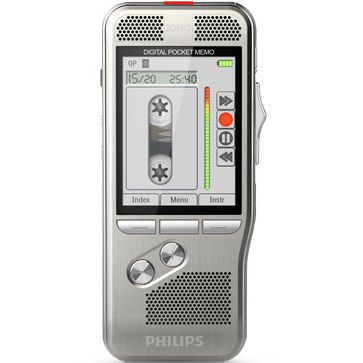
Front view of the handheld recorder in the Martel Dictaphone Machine listing
Actual Martel catalog photograph. Open the product listing for the current supplied configuration.

Compare the complete listening desk

For standalone playback, picture where the recorder or cradle will sit, how the headset will connect and where the controller will be placed. The operator should be able to see necessary information and reach ordinary controls without continually moving the document or tangling a cable.

For computer playback, picture the audio player and writing application during a normal assignment. Confirm the selected listening output and how the operator returns to an earlier passage. If several screens or windows are used, arrange them according to the task rather than leaving the player wherever installation happened to put it.

Consider the start of the day and the start of the next assignment. The operator needs to identify new work, open or load the correct recording and check a comfortable listening level. A station that is understandable at those moments is easier to use consistently than one requiring a different improvised sequence every morning.

Include the typist in this comparison. The buyer may concentrate on the author’s handheld recorder, while the listening desk is where the draft is actually prepared. A good equipment decision accounts for the person operating that station throughout the working day.

Evaluate the headset through the actual recording

A headset should be considered as part of the listening path. Confirm its connection to the supplied equipment and use a representative recording to assess it at the receiving position. A specification or photograph cannot demonstrate how clearly an unfamiliar name will be heard in the operator’s normal room.

Start at a comfortable level and play a short sample containing ordinary speech, a number and a correction. Check that the chosen audio output is the one the operator expects. In a computer arrangement, a selected output can differ from the headset physically resting beside the keyboard.

When the office already owns headsets, identify the actual models before planning reuse. Keep the supplied package configuration as the reference combination until any substitution has been confirmed. This avoids choosing equipment around an assumption that later turns into another accessory purchase.

Make room for shared use where needed. Another trained operator should be able to identify the station’s listening connection, set an appropriate level and return the equipment to its normal place. Small, clear conventions reduce the amount of informal knowledge required to cover an absence.

Confirm computer permissions before committing to a software route

Identify who can install and configure software on the receiving workstation. Some offices have managed computers, restricted accounts or an outside support provider. Include that environment in the purchasing discussion so the proposed kit can be checked against the real installation process.

Ask for the current supplied software name, version and license terms. Confirm its supported operating systems and the intended controller arrangement. Keep any installation or activation information with the office’s appropriate records. Avoid relying on a requirement quoted for an older package revision.

Perform the sample as the ordinary operator after the installation is complete. A program running under a technician’s account does not demonstrate that the typist’s normal account can receive files, open the player and operate its controls. The acceptance exercise should reflect the actual working session.

Describe remote or virtual desktop arrangements specifically. The receiving environment may handle USB devices and audio differently from an ordinary local workstation. Verify the full route for the proposed setup instead of treating the words computer compatible as a universal statement.

If the office prefers to keep playback on dedicated hardware, compare the no-PC packages against that preference. The point is to make the installation requirement explicit before buying, so the equipment can be chosen with the right people involved.

Include distance and temporary locations in the decision

A physical handoff is easy to explain when author and typist work nearby. The recorder or card reaches the listening station through an agreed exchange. If the two people usually work in separate locations, the purchase needs a delivery method suited to that distance.

A computer-file workflow may be relevant when the office already has an approved way to deliver recordings to a remote typist. Check access at the receiving end, the exact files produced and the supported player and controller. The existence of an internet connection alone does not establish that complete route.

Temporary work locations deserve the same attention. If a secretary covers another desk, can the receiving equipment be used there as intended? If an author dictates away from the office, how do completed recordings enter the normal queue on return? Choose from the situations that actually occur.

A useful purchase description includes one usual location and one realistic exception. For example, the ordinary desk may be in the office, with occasional coverage elsewhere. Explaining that exception early helps avoid buying an arrangement that only works comfortably in the quietest version of the schedule.

Plan for multiple authors without multiplying complete packages blindly

When several people dictate, identify how many need recording equipment simultaneously and how many people listen simultaneously. Those counts can differ. The office may need several authoring positions feeding one typist, or more than one receiving position for separate staff.

A recorder-and-transcriber package describes a particular starting arrangement. Do not assume that every additional author requires another complete receiving kit, or that one receiving kit automatically serves any number of simultaneous typists. Explain the intended roles and timing when discussing expansion.

Assignment identity becomes especially useful with multiple authors. The recipient needs to connect each recording with its source and requested document, even when jobs arrive close together. Agree how urgency and a correction will be communicated without depending only on the order of devices, cards or files.

Describe growth as a concrete next step. If another author may join later, ask which equipment would need to be added and how the receiving process would change. That creates a useful expansion question without buying unnecessary components for a hypothetical future office.

Compare power, readiness and the next morning’s restart

A listening system should be understood at the beginning of each session. Identify how its equipment is powered, where required components remain connected and how the operator knows it is ready. Use the supplied power and operating instructions for the selected arrangement.

For a standalone system, include the recorder or playback device, matching dock where used, controller, headset and media. For a computer system, include workstation access, the listening application, the selected output and the supported controller. These lists help the office check the intended station consistently.

Test more than first installation. Put the equipment away or close the session as instructed, then resume the sample later. Find the recording again and continue the draft. This shows whether the ordinary user understands the setup after the initial demonstration has ended.

Keep a short operating reference with the station. It can identify the components, where incoming work belongs and who handles a technical question. The most valuable reference is one that the actual operator can follow, including the person providing temporary coverage.

Price the authoring and listening arrangement at the same scope

A standalone package and a computer kit should be compared by the complete work they support. Include the recording equipment needed by the author, the receiving station, power and media, and any software or installation requirement. An isolated recorder price cannot represent the entire transcription route.

Next, identify confirmed reusable equipment. Add the exact model and its approved role to the comparison. A saving based on an unverified controller or headset can become an unexpected accessory purchase. Confirm reuse before reducing the equipment list.

Account for setup and learning in practical terms. Both arrangements need a short representative assignment and a clear receiving process. A computer route may involve installation permissions and a file-delivery check. A dedicated route involves matched connections and an understandable exchange of a recorder or card.

Use current linked listings for price and availability, and describe the same office requirement for each alternative. The comparison then answers a concrete question: which complete purchase gives these people a usable recording-to-draft process in their actual environment?

Apply the comparison to three fictional offices

A scheduled correspondence period at adjacent desks

In this fictional office, an attorney completes dictation before leaving for afternoon appointments. The secretary works through the recordings while the author is away. Both people prefer a physical exchange and already have a clear time when the recorder returns.

The shared Dictaphone Machine is a sensible package to examine against that schedule. The demonstration should include receiving the recorder, listening through the matched equipment and returning it ready for the next recording period. The purchasing question is whether the shared availability remains comfortable on an ordinary busy day.

New instructions arriving throughout the working day

In the second fictional office, the attorney records between calls while the secretary is continuously preparing drafts. Work arrives in short, separate assignments. The author does not want the secretary’s listening task to require possession of the only handheld recorder.

The Law Office Pro arrangement is worth evaluating because it provides separate recorder units with a card-based handoff. The office should demonstrate the compatible-card rotation, a new urgent job and the return of a completed assignment. Separate devices support equipment availability, while the office procedure keeps the queue understandable.

Recordings delivered to an established computer workstation

The third fictional office already receives audio through an approved file route. Its typist prefers to organize incoming recordings at a supported workstation and use a controller with the computer player. The author’s location can differ from the receiving desk.

A computer transcription package is an appropriate route to investigate. The demonstration needs the actual file, normal operator account, intended player, audio output and controller. The buying decision depends on that complete receiving environment rather than on the presence of a USB connector alone.

These examples are planning exercises, not customer testimonials or measured performance results. Change their assumptions to match your office. The point is to connect a package with a specific schedule and receiving method.

Write a short buying brief before requesting a quotation

A useful brief can fit into one paragraph: identify the authors, the people typing, their locations, the expected recording source and the preferred playback arrangement. Add any equipment that must be reused and the requirement for ordinary or occasional overlapping work.

For example, a fictional brief might describe one attorney and one secretary at adjacent desks, regular new dictation during typing, a preference for dedicated playback and a need to keep the present word processor. That tells the supplier much more than asking for the best transcriber without explaining the assignment.

List essential features separately from preferences. Supported audio, usable playback controls and a complete power arrangement may be requirements. Reusing an old headset may be a preference that depends on compatibility. This distinction allows the quotation to address the actual task clearly.

Ask for the complete current configuration by SKU. Keep the answer with the purchase record so the delivered equipment can be compared with what was selected. That gives both the purchaser and operator a clear reference when the package arrives.

Use an acceptance exercise that checks the whole station

Prepare a fictional recording containing a job reference, an unfamiliar surname, a number, one correction and a clear ending. Use the equipment and recording method that will produce everyday assignments. The sample should be short enough to repeat when a condition is changed.

  1. Deliver the recording through the planned route and confirm that the receiving person can identify it.
  2. Load or open it using the normal receiving equipment and ordinary account where a computer is involved.
  3. Check that audio reaches the intended listening output at a comfortable level.
  4. Use the supplied controller to pause, revisit the surname and continue through the number.
  5. Prepare a sample document while operating playback in the normal working arrangement.
  6. Return one clarification to the author and apply the answer to the correct draft.
  7. End the session as instructed, then resume the saved sample to check the next working session.

Record observations in plain language. State which actions worked and which requirement remains unresolved. A successful sample provides evidence about the selected equipment arrangement; it should not be turned into an unsupported promise about every future recording or every operator.

If an essential requirement remains open, resolve it before depending on the equipment for important work. The supplier needs the exact component, file type, receiving environment and symptom. A precise description makes that discussion more useful than changing several unrelated settings at once.

Distinguish audio, control and delivery difficulties

A receiving station can reproduce sound yet still have a controller problem. It can have a working controller yet receive the wrong assignment. Treat these as separate questions so that the office can investigate the appropriate part of the route.

Observed difficultyRelevant part of the arrangement
No recording reaches the typistJob completion, physical exchange or approved file delivery
The recording will not open or loadSupported media, recording format and receiving equipment
The recording runs but cannot be heard as expectedSelected output, listening connection and operating level
The pedal does not operate playbackController compatibility, connection and supported configuration
The wrong document is revisedAssignment reference, correction instructions and review procedure

Preserve important source recordings while investigating. Use a disposable sample for operating changes, and follow the instructions for the supplied equipment. Deleting files or preparing media again is not a substitute for identifying the stage where the difficulty appears.

Consider physical and digital handling with the same care

Dedicated equipment and computer playback place responsibility in different locations. A physical recording carrier needs a defined home and an understandable exchange. A computer file needs an approved destination, appropriate access and a clear relationship with the assignment being prepared.

Neither arrangement, by itself, decides records policy. The office should identify who authorizes reuse or removal and what happens while a draft awaits review. A secretary completing typing may not be the person who decides that the recording has served its final purpose.

Keep the audio path and document path visible. An offline listening station can sit beside a computer used for writing. A local computer player can receive recordings through a separately approved method. Avoid inferring the handling of the whole office from the label on one component.

If a particular encryption, retention or access-control capability is essential, verify it for the exact supplied configuration and intended process. Choose equipment from confirmed functions, then apply the office’s established responsibilities to the resulting arrangement.

If you already own a recorder, assess the receiving equipment separately

An office that already captures suitable digital recordings may be shopping primarily for a listening station. Identify the existing recorder, its selected recording method and a representative saved file before choosing another complete authoring package. This helps determine whether the purchase should focus on transcription equipment or replace a broader part of the routine.

For computer playback, provide the exact kind of recording the typist receives. The selected player and controller need to work with that source at the actual workstation. Browse Martel’s transcription kits and confirm the matched arrangement. A recording that plays in one ordinary application does not establish which foot-control kit is appropriate.

For a proposed standalone receiving position, ask whether the exact recording and media are supported by the dedicated equipment. Do not infer compatibility because two recorders both use memory cards. The format, operating arrangement and supplied accessories must support the intended handoff.

If the existing author’s equipment is also due for replacement, compare a complete recorder-and-transcriber package. The useful distinction is the scope of the purchase: retaining a verified capture device while adding listening equipment, or choosing a new connected arrangement for both roles. Describe that scope when asking about the order.

Compare quotations with a written equipment-to-task list

Put each quoted item beside its intended task. Identify what records the author, what receives the assignment, what plays it, what controls playback and what provides the listening output. Add the power, media and software requirements. This makes a missing component or an assumed existing accessory easier to notice.

Keep requirements specific. If two people need equipment at the same time, describe those simultaneous roles. If the typist must receive a particular recording format, state it. If installation requires another person’s approval, include that step. A quotation can then be assessed against the situation it is supposed to serve.

Ask what the supplied setup assistance covers and what information the office needs to provide. Have the normal computer environment, controller model where reused and sample recording available for the compatibility discussion. The goal is to settle the receiving arrangement before an important assignment is waiting.

Finally, compare the delivered package with the selected quotation and current listing. Keep its instructions with the equipment, and complete the acceptance sample at the receiving desk. That turns the written buying decision into a station the operator has actually used.

Questions about standalone transcribers and computer kits

Which arrangement is easier to use?

The easier arrangement is the one that fits the operator’s recording source and receiving routine. A prepared dedicated station can suit a physical handoff. A supported computer kit can suit files delivered to an established workstation. Demonstrate the ordinary assignment before deciding which feels more convenient for the people involved.

Can I use a computer for typing with a standalone transcriber?

Yes. Standalone audio playback concerns where the recording is controlled. The document can be prepared in the office’s usual computer writing environment. This is a useful choice to explain when the office likes its existing document process but wants dedicated equipment for the listening task.

Does a computer kit include the author’s recorder?

Check the exact listing. Some products describe listening equipment, while a recorder-and-transcriber package describes a broader purchase. Martel’s SKU 405 listing combines author recording equipment with a computer transcription arrangement. Compare the current supplied contents with what the office needs at both positions.

Will a standalone transcriber play every digital recording?

Verify the supported media and recording arrangement for the selected equipment. Digital audio is a broad description. The receiving device needs to reproduce the actual recording being delivered. Use a representative sample and the exact supplied instructions when confirming that requirement.

Will any USB pedal operate any computer player?

Confirm the controller model and the application’s supported configuration. USB connectivity does not establish every command or operating requirement. Test playback control while the typist works in the intended document environment. The supplied matched combination is the reference point when evaluating a complete kit.

Is automatic transcription included in these arrangements?

A conventional listening setup supports a person who prepares the document. Automatic text generation requires an explicitly supported recognition capability. Select the equipment described here for its verified recording, playback and control functions, and establish any separate automatic-text requirement before buying.

Can the author dictate while the secretary listens?

Check equipment availability and the delivery method. The shared Dictaphone Machine uses one handheld unit at different times. The Law Office Pro set provides separate units with a supported card exchange. A computer route needs the completed recording delivered to its player while the author has the necessary equipment for new work.

Can the computer arrangement be used by a remote secretary?

Describe the intended file-delivery method, receiving computer and supported controller setup before ordering. Location alone does not establish compatibility. The remote operator needs access to the correct recordings and a working listening station, demonstrated through the office’s approved process.

What if the office already owns a headset or controller?

Identify its model and confirm its role in the proposed station. Reuse can be useful when supported, but a familiar connector or appearance is not enough to settle the question. Keep the supplied package contents visible while checking any planned substitution.

What should we compare when the prices differ?

Compare complete working arrangements at the same scope. Include authoring equipment where needed, playback hardware or software, controller, headset, power, media and required setup. Use the linked current product descriptions and the same office requirement for each option so the comparison remains meaningful.

Choose the listening route, then the complete Martel package

Start with the recording source and receiving method. For a physical exchange with scheduled shared access, investigate the Dictaphone Machine. For separate dedicated audio positions, investigate the Law Office Pro set and its supported media plan. For recordings delivered to a compatible workstation, investigate the lawyer recorder and computer transcription package.

Use the purchase links to review current contents and ordering choices. Explain the author’s role, the typist’s role and the ordinary busy period, then check the complete station through a fictional sample assignment. That connects the purchase with the work the equipment is expected to support.

Review the package and place your order

Choose the arrangement that fits the author, the receiving station and the handoff. Each button opens the current Martel product listing with price, availability and ordering options.

Buy Dictaphone MachineBuy No-PC Law Office Pro SetBuy Lawyer Recorder and Computer Transcriber

Product information reviewed November 2, 2026, against the linked Martel listings for SKUs 1843-2, 1847 and 405. Product photographs come from those listings. See the current product page for supplied contents, price, availability and exact compatibility. Office examples in this guide are fictional planning exercises.

Martel Electronics