
Martel Video Transcriber Kit or Software Only: Choose the Right Setup
Compare Martel SKU 1515 with pedal and headset against SKU 1527 software with two licenses. Choose the setup that matches the equipment you already own.
Martel field guide · Review and choosing your setup
Use Martel to manually check an existing AI-generated transcript against video, correct wording and speakers, and add verified navigation timestamps.
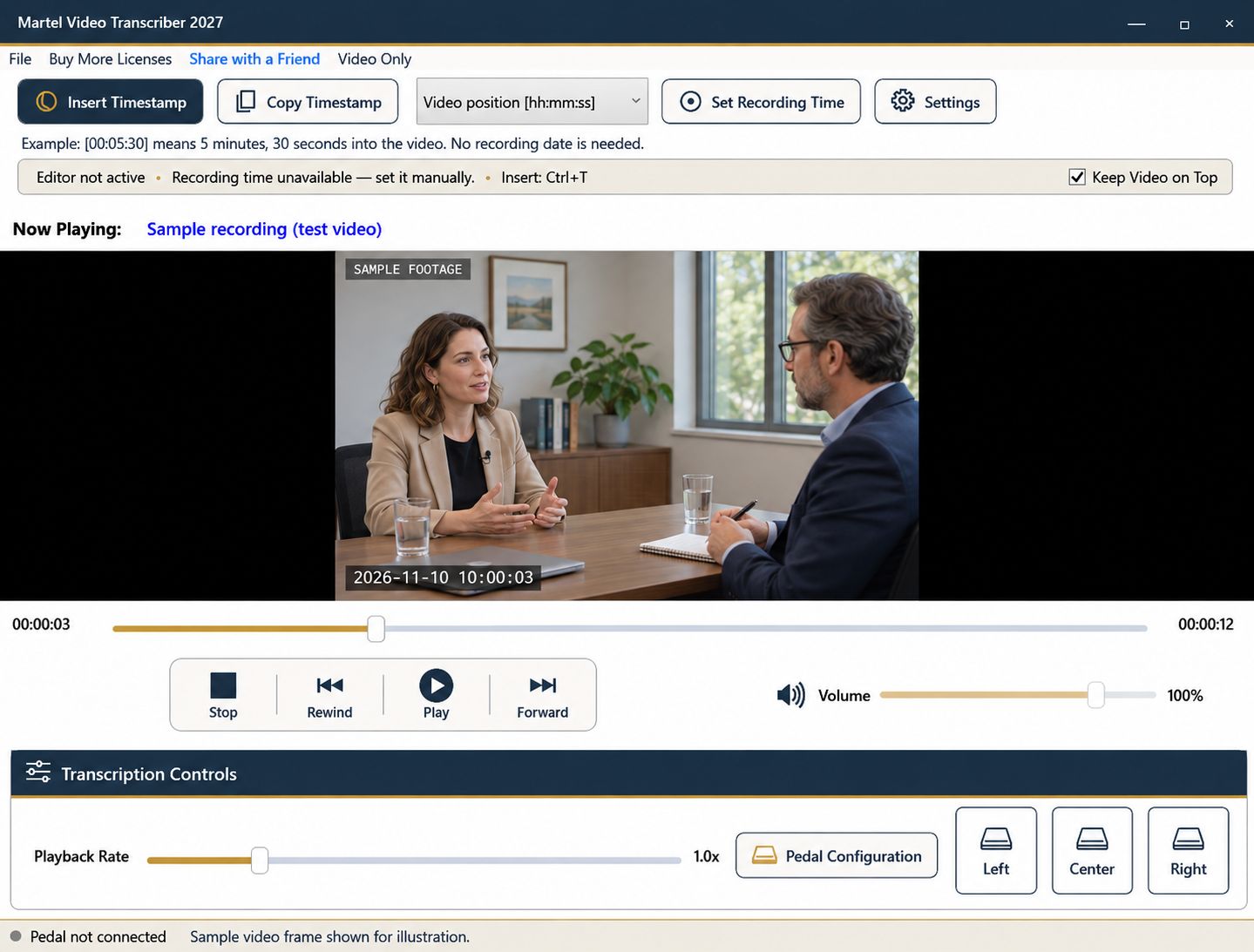
An automatically generated transcript can provide a starting draft, but it still needs review against the recording. Martel Video Transcriber supports that manual checking stage: play the video, control it with a pedal or shortcuts, edit your document, and insert timestamps. Martel does not generate the AI transcript itself.
Keep the original draft separate from the reviewed version when your workflow requires a record of changes. A clean-looking page is not evidence that its words, speaker labels, or timing are correct.
Check the source filename and version before editing. A draft generated from a shortened audio export may not align with the full video. Added introductions, removed silences, and combined clips can all affect elapsed references.
Open the transcript in the word processor you intend to use. Test a short passage with Martel before beginning the full review, including a timestamp insertion or Copy Timestamp and paste if that is your chosen workflow.
Pay close attention to names, numbers, dates, negatives, and specialized terms. A transcription error can produce a fluent sentence with a different meaning. Compare those items with the source and the project's authorized reference material rather than correcting them solely from context.
Keep uncertainty visible when the recording is unclear. Do not replace a doubtful word with a confident guess simply because the draft offers a plausible suggestion.
Automatic speaker labels can be useful starting points, but verify them. Similar voices, interruptions, and off-camera speakers may create mistakes. The person currently shown in the video is not always the voice being heard.
Use consistent labels throughout the document and review exchanges around a change in participants. Mark overlapping or unclear speech according to the project's convention instead of forcing it into a tidy sequence.
Play a manageable section, pause, correct it, and rewind enough to verify the transition into the next section. A pedal keeps your hands near the document. Set the rewind amount and playback speed so repeated review is comfortable without losing context.
Return difficult wording to normal speed for a final check. Slowing a passage can help listening, but it can also change your impression of rhythm, pauses, and emphasis.
Existing AI timestamps may follow a different source file or timing convention. Sample several points against the loaded video. Replace or clarify markers that do not help a reviewer find the intended passage.
Martel's inserted values follow actual media position. Automatic paragraph or interval markers are navigation aids, not automatic word alignment. For a precise quotation or event, seek to the intended moment and insert a deliberate reference.
Read the corrected document while listening to a longer passage. Check omitted phrases, duplicated words, speaker labels, and unresolved notes. Verify the beginning and end as well as difficult middle sections.
Save the reviewed document in the required format and retain its source identifier. If the draft came from an outside service, handle that service and the source material according to the project's own requirements. Martel's manual review workflow does not change those obligations or certify the final transcript automatically.
W3C warns that automatic transcription can introduce meaning-changing errors. A manual reviewer can compare a draft sentence containing a quantity or negative against the source, mark the correction, then replay the complete exchange. Freelance proofreaders, editorial assistants and caption preparers can follow that sequence with an existing draft. If captions are required, move the reviewed text into the appropriate caption-authoring workflow and verify synchronization separately; Martel does not export a caption file or align every word automatically.
Sources and further reading: W3C Web Accessibility Initiative: accurate transcription; W3C Web Accessibility Initiative: transcripts and visual information. Sources explain professional tasks and editorial practice; the Martel workflow example is our own.
No. It is a manual transcription and review player. You can use it to check a draft produced elsewhere against the source video.
Sample them against the exact video file. The draft may follow another export or a different timing convention.
Yes. Verify the source, particularly numbers, names, negatives and speaker changes. Fluency is not evidence of accuracy.
Use a supported direct-insertion workflow when available, or Copy Timestamp and paste. Test your exact editor and document before a long review.
Keep it flagged and compare it with the recording. Do not let a plausible generated sentence replace unresolved source information.
Use Martel to manually check an existing AI-generated transcript against video, correct wording and speakers, and add verified navigation timestamps.


