
Why Edited Video Clips Need a New Recording-Time Check
Learn how trimming, removed gaps and combined clips affect elapsed and recording-clock timestamps, and when to reset a Martel timing reference.
Martel field guide · Review and choosing your setup
Compare Martel SKU 1515 with pedal and headset against SKU 1527 software with two licenses. Choose the setup that matches the equipment you already own.
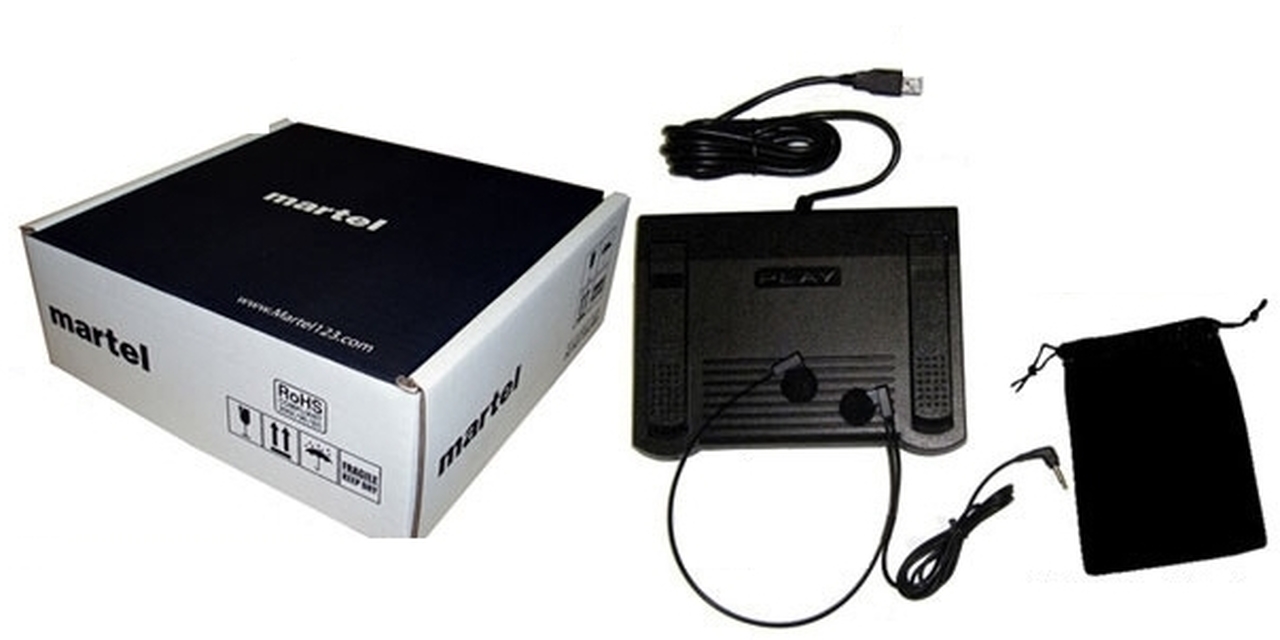
Martel offers two ways to build a video-transcription workstation. SKU 1515 combines the software with a USB foot pedal and headset. SKU 1527 provides the software with two licenses and leaves hardware separate. Both are intended for manual transcription and video review, including the updated timestamp tools.
The right choice depends mainly on what equipment you already have and which control workflow you want to use. Buying software alone is not the same as buying a complete pedal workstation.
The Martel Video Transcriber Kit, SKU 1515, includes downloadable video-transcription software, a USB foot pedal, a lightweight headset, and a manual. It is the straightforward option when you are setting up a desk and need the listening and playback equipment as well as the application.
A pedal lets you manage playback while your hands remain available for typing. The headset supports focused listening. Both offers include two software licenses for two separate computers, with a one-time purchase and no subscription. Confirm the listing for the physical equipment included.
SKU 1527 includes two software licenses. The pedal and headset are not included. It suits a buyer who already has compatible hardware or intends to begin with keyboard and on-screen controls.
If you are bringing a pedal, verify its exact model and connection. A USB plug alone does not establish application compatibility. The Infinity IN-USB-3 was used in hands-on testing of the updated timestamp workflow; ask Martel about other equipment before assuming it will behave identically.
The updated software provides a configurable Insert Timestamp shortcut, with Ctrl+T as the default, an on-screen insertion button, and a separate Copy Timestamp command. A pedal button can be explicitly assigned to timestamp insertion while the other buttons retain their selected playback actions.
Optional automatic timestamps can follow Enter paragraph breaks or media-time intervals. Keep Video on Top and Video Only mode help place the picture beside the document. Playback-position saving helps you resume a recording, while the word processor remains responsible for saving the transcript.
Elapsed video timestamps work from the player's current position. Original recording date/time requires a known reference entered through Set Recording Time. The software calculates later clock values from the difference in media position.
It does not automatically extract a camera date, read embedded frame timecode, or use the transcription computer's clock as the original recording time. If no reliable reference is available, keep using elapsed markers and identify the source file clearly.
The current product is for Windows. Direct timestamp insertion targets supported identified Word or Writer editing areas; test your exact editor and document configuration. Copy Timestamp and paste provide a separate workflow for other editors that accept text.
Martel is a manual transcription player, not an automatic speech-to-text service. It helps you listen, navigate, type, and verify. If you already have an AI-generated draft, you can review it in your word processor while controlling the source video with Martel.
Choose SKU 1515 if you need software, pedal, and headset together. Choose SKU 1527 if two software licenses fit your needs and your hardware is already suitable or will be purchased separately. Use the linked product pages for current prices and order details, and ask Martel about any specific pedal or file-format requirement before buying.
Both Martel offers include two software licenses for two separate computers, purchased once with no subscription. SKU 1515 adds the USB foot pedal and headset; SKU 1527 is software only. A new freelance transcriber may need the complete kit, while an archive team or legal office with suitable equipment may choose software. Base the choice on the actual computer, pedal, file and editing workflow you will use. Review the current product details and contact Martel if compatibility is uncertain.
This practical example is based on the Martel controls described in this guide. Check your current settings and a sample document before using the workflow for an assignment.
The kit includes downloadable video-transcription software, a USB foot pedal, a lightweight headset and a manual. Check its current listing for order details.
It is the software-only offer with two licenses. A pedal and headset are purchased separately or supplied from your compatible existing equipment.
Yes. Choose based on the package contents you need, then verify your editor, recording and any existing pedal with a short setup test.
The current offer is for Windows. Do not assume the Windows installer is a macOS application.
Keyboard and on-screen controls are available. A supported pedal adds hands-free playback and can receive an optional timestamp assignment.
Compare Martel SKU 1515 with pedal and headset against SKU 1527 software with two licenses. Choose the setup that matches the equipment you already own.


