
Martel Video Transcriber Kit or Software Only: Choose the Right Setup
Compare Martel SKU 1515 with pedal and headset against SKU 1527 software with two licenses. Choose the setup that matches the equipment you already own.
Martel field guide · Research, education and interviews
Verify interview quotations against video, retain context and source identifiers, and use timestamps to make editorial review easier to repeat.
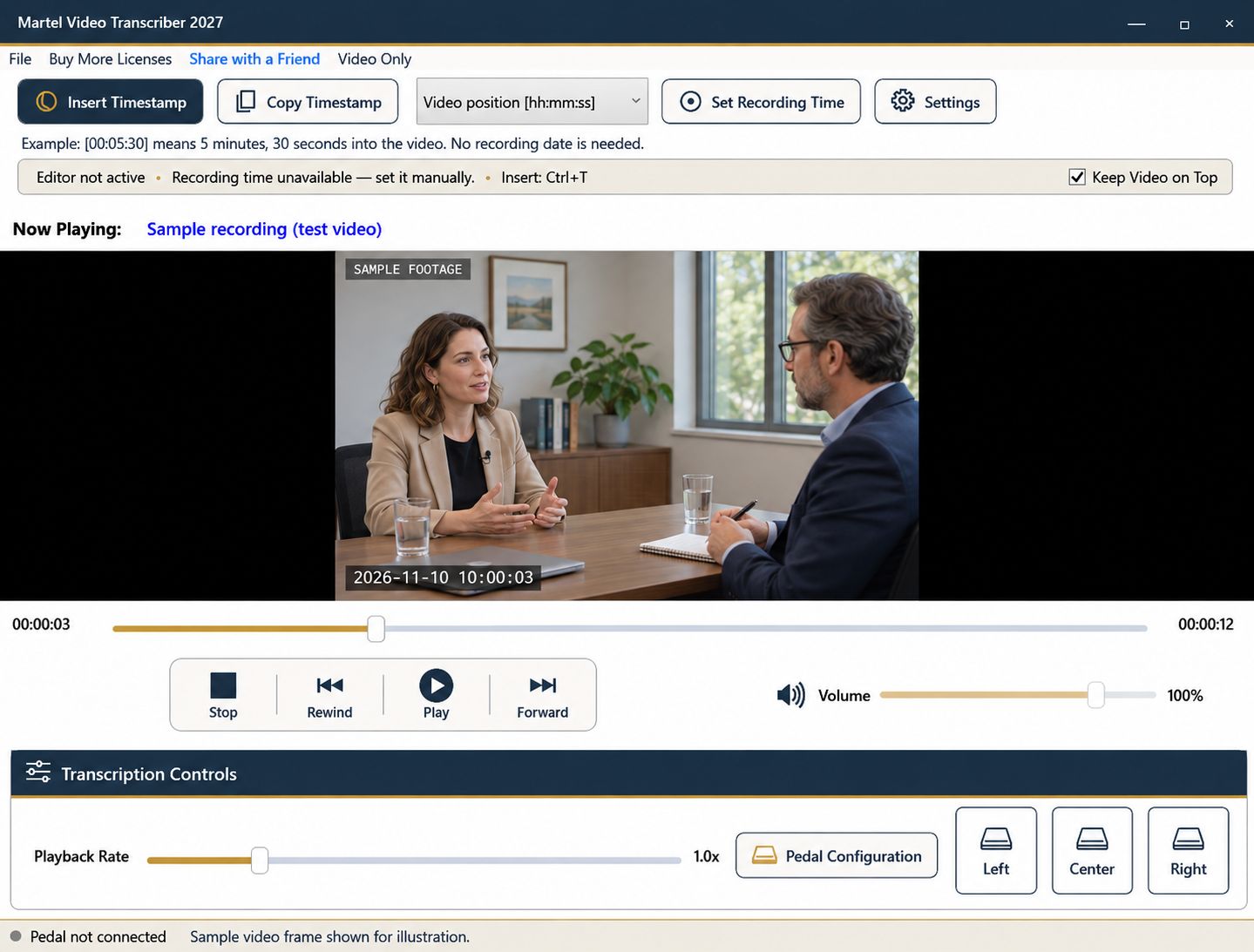
A transcript helps a writer find quotations, but the recording remains the source to check. A repeatable video-review workflow makes it easier to confirm wording, preserve context, and distinguish a direct quote from a paraphrase. Timestamps provide a route back to the passage for an editor or a later correction.
Use the recording you are authorized to review and apply your publication's editorial standards. Playback software assists verification; it does not decide whether a quotation is fair, complete, or ready to publish.
Record the interview file's exact name and an internal source identifier. If you receive a second export or an edited version, label it separately. A quotation marked at 00:14:20 in the original may occur at a different elapsed position in a shortened copy.
Create fields for the candidate quote, elapsed position, surrounding question, speaker, and unresolved checks. Keep working notes separate from finished copy so uncertainty does not accidentally disappear during editing.
Listen to the question or context before the selected statement. Rewind far enough to hear qualifications, corrections, and the subject being discussed. A sentence can be accurately transcribed yet misleading when separated from the exchange that gives it meaning.
Insert a deliberate timestamp at the useful start of that passage. If you need a precise reference to the quoted sentence itself, add a second marker. State which convention you are using rather than treating every marker as the first word of a quotation.
On one pass, check the words. On another, check names, numbers, dates, and negatives. Short words such as “not” can materially change meaning, while a plausible proper name can be an easy transcription error.
Use pedal pause and rewind controls for focused listening. Slower playback may help, but compare the finished wording again at normal speed. Keep unclear material marked for resolution instead of choosing the wording that best fits the planned story.
Video may help identify a speaker, a displayed object, or a gesture that affects interpretation. Enlarge it when detail matters. Do not attribute an off-camera voice solely to the person currently pictured, and keep visual observations distinct from spoken quotations.
If the interview references a document that is not readable in the recording, obtain and verify the appropriate source through the editorial workflow. A timestamp cannot supply content that the video does not reveal.
An elapsed position and exact file identifier are often enough for a colleague to find the quote. A recording date can be included in the source note without making every timestamp a calendar clock. If recording-clock values are used, establish and explain their reference rather than borrowing the computer's current time.
Martel inserts plain timestamp text into supported editing workflows or copies it for pasting. It does not create a public video link or automatically connect a word-processing document to a hosted replay.
When a quote is shortened or moved, recheck the final wording and surrounding explanation against the source. Retain the working reference even if the published article does not display timestamps. Save the verification document separately from the player's resume position so a future reviewer can understand what was checked and where to find it.
Reuters’ editorial guidance emphasizes quotation context and accuracy. A reporter or fact-checker can keep a private verification note with the exact file, the question’s start, the chosen quotation and any unresolved word. A documentary researcher or video-podcast editor can use that note to hand a candidate passage to an editor. Recheck the final shortened wording against the recording. Timestamp text helps locate the source; it does not itself create a clip, grant publication rights or approve the quotation.
Sources and further reading: Reuters: journalistic standards and quotation context; U.S. Bureau of Labor Statistics: film and video editors. Sources explain professional tasks and editorial practice; the Martel workflow example is our own.
Yes. The surrounding exchange can qualify or change the apparent meaning of an otherwise accurately transcribed sentence.
No. It inserts plain timestamp text or copies it for pasting. Public links require a separate authorized hosting workflow.
Names, numbers, dates, negatives, speaker labels and uncertain wording are common meaning-sensitive checks. Keep unresolved items visible until verified.
If that is the stated convention, seek to the beginning before inserting it. A marker captured after typing does not automatically align to the earlier words.
Yes. Recheck the final wording and surrounding explanation against the source so editing does not change the apparent meaning.

Verify interview quotations against video, retain context and source identifiers, and use timestamps to make editorial review easier to repeat.

