TIME IS RUNNING OUT FOR 2026 TAX WRITE-OFFS

Martel Electronics | 12 hours ago

Moving from digital court reporting to voice writing: which equipment can you keep?

Check which parts of your digital reporting setup can serve a voice-writing workflow. Work through the laptop, room microphone, recorder and personal mask.

Start with the jobs your equipment performs. A room microphone that captures a witness, a recorder that saves the required channels and a headset or pedal that supports review can continue to serve those roles in a voice writing setup. The new requirement is a reliable path for the reporter’s own dictation into a personal stenomask, followed by whatever recording, speech recognition and computer-aided transcription functions the assignment requires.

An existing laptop can sometimes cover the computer role. An existing room recorder can sometimes cover the reference-audio role. Decide each from its actual connections, supported applications and results with fictional testimony. Before buying a replacement system, draw your current equipment on one page and add the new microphone path in a different color. A visible gap between a personal stenomask and the intended computer or recorder is a more useful reason to purchase equipment than the general fact that you are changing reporting methods.

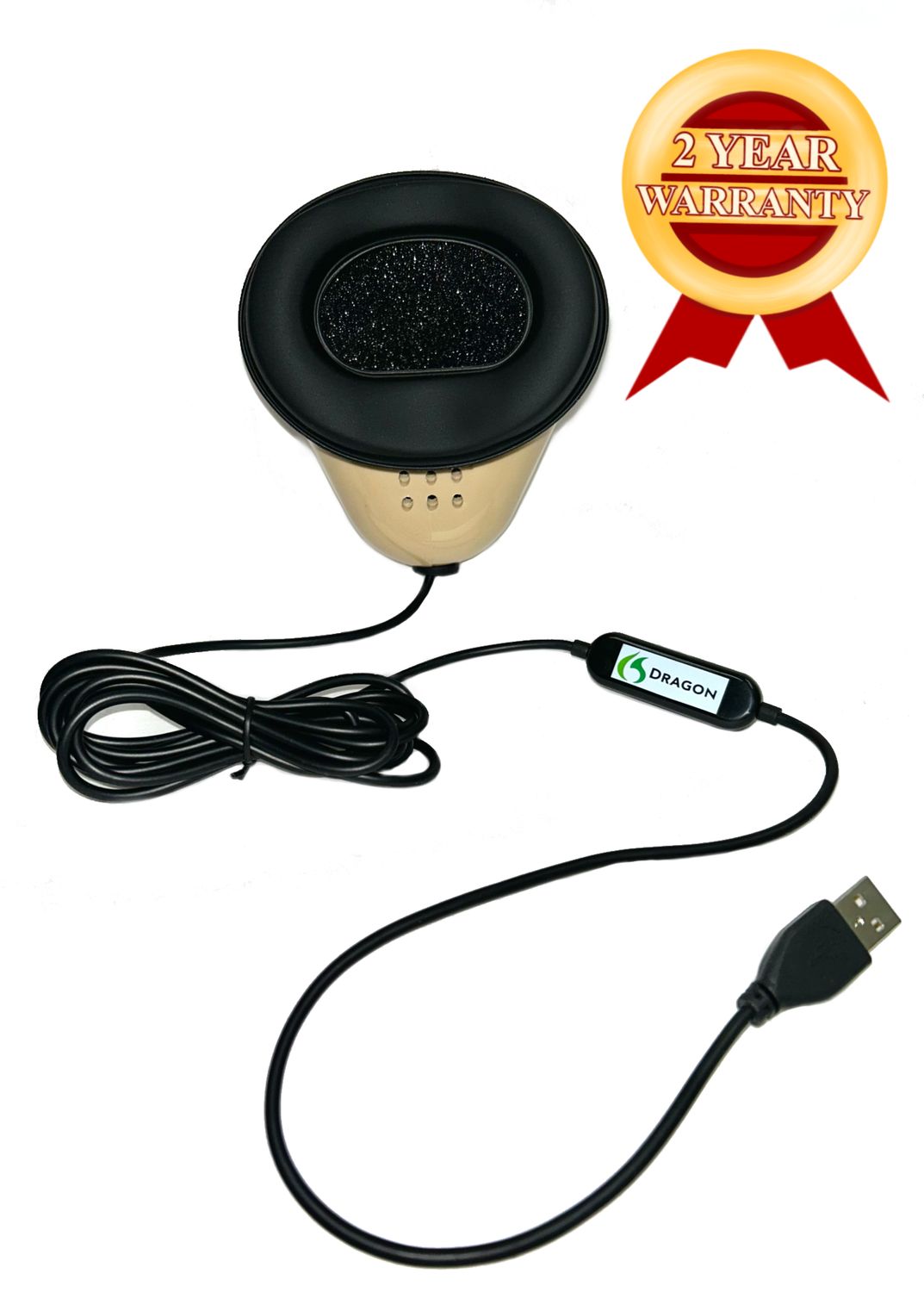
The Martel USB stenomask, SKU 1941, provides a direct computer microphone path for a compatible voice writing setup. Other Martel masks serve particular analog inputs or provide independent connections to two destinations. Choose the mask after you know what the rest of your equipment must receive.

Martel equipment in this guide
Separate the familiar room job from the new dictation job

A digital reporting station captures people speaking in a room or over an approved remote connection. Depending on the job, the reporter can monitor those sources, make notes, identify speakers and prepare audio for subsequent review. Voice writing adds a distinct activity. The reporter listens to the speaker and repeats the words into the personal stenomask according to the professional or training workflow. The original room speech and the reporter’s dictated version are different sources even when they contain the same words.

Imagine counsel asks, “Where did you put the signed drawing?” A room microphone is intended to capture counsel’s actual question from counsel’s position. The mask microphone is intended to capture you repeating that question from your reporting seat. If an application creates text, it can be configured to receive the mask input rather than counsel’s room microphone. If a recorder saves reference audio, its room channel may preserve what counsel actually said. A healthy signal on one path does not establish what happened on the other.

This distinction is often the reason a piece of digital equipment can be reused. The former room microphone still serves the rooms and speaker positions it was selected for. It has not become a personal mask microphone just because you are taking up voice writing. Likewise, the old room recorder may continue to provide authorized reference audio even if it cannot receive a new mask input. Preserving a known room path while building a separate computer mask path may require fewer changes than replacing every familiar device.

Write a separate sentence for each required source. “The witness at the end of the table must be intelligible in the authorized room recording.” “My practice dictation must reach the recognition application through the stenomask.” “My instructor requires a saved mask file for later comparison.” The third request does not automatically follow from the second. An application can receive sound and produce text without creating the particular independent audio deliverable your instructor expects.

Start with the deliverable, including where it will be reviewed

A school, employer or reporting assignment may ask for different combinations of room audio, mask audio, live text, a corrected transcript or practice readback. Ask the person who sets the requirement to describe what they need to receive and how it will be evaluated. A class may ask students to turn in their own masked dictation, while an agency may specify the recording workflow for an authorized job. Equipment terminology alone cannot settle that difference.

Write the destination of each deliverable before drawing any cables. A room file might stay on a standalone recorder until review. A live job might reside in CAT software on the laptop. A practice submission may require a particular audio format with a transcript attached. Identify when the item must be available. A text document required for later review is different from text that must be visible while the witness is speaking.

Now draw a box for the old digital workflow and a second box for the added voice writing workflow. Put each device into the box for the job it actually does. Equipment that crosses the boundary, such as a laptop running both recording and recognition functions, deserves a separate workload test. A device that remains in its established role may need much less work. This distinction keeps a promising old workstation from becoming a tangle of unexplained adapters and settings.

A useful goal for a first transition exercise is small and explicit. Capture counsel’s original question on the room path, capture the reporter’s repeated question through the mask path, and locate the result of the computer workflow. You can expand the exercise to multiple speakers and faster testimony after the paths are clear. If the earliest test includes every microphone, a remote call and a long excerpt, you may have impressive activity but little ability to explain a missing item.

Keep room microphones that still cover the people assigned to them

Set the existing room microphones in the positions you actually use. Have practice speakers sit where counsel and a witness would sit and read different original sentences. Listen to a saved room file and identify each person. Check whether moving the reporting seat to accommodate the mask changes the microphone positions or places a screen, binder or the reporter between a room source and its intended speaker.

Watch the hands as well as the voices. A reporter using a mask may interact with the desk differently than when monitoring digital audio and taking notes. The nearest room microphone may now sit beside the papers your free hand reaches for, or the mask cable may cross the area where counsel passes an exhibit. In a practice pass, move the paper and the cable as you would during an actual exchange. Listen for the resulting sound on the room path before deciding that the old placement still suits the new desk.

Record the type of connection, receiving input and any microphone power requirement for each source you intend to retain. Mark them with descriptive names such as “witness seat” or “near counsel,” alongside the input numbers. If the old recorder already produced clear separate channels, preserve that information when changing the computer setup. A working room connection is worth documenting because its setting may be affected when you add a different microphone to the system.

Use the old room microphones to solve coverage problems only within their verified capabilities. If your new reporting seat faces away from a quiet speaker or the conference arrangement changes, test the real new position. The fact that the microphone worked in yesterday’s room says something about yesterday’s placement. A transition does not erase its value, but the new layout still deserves a fresh fictional recording. Martel’s guide to the separate room and mask sources explains the roles these recordings serve.

Decide what the old recorder is capable of saving

Find your recorder’s external input descriptions and the recording modes you already use. List which room sources are connected, what appears in the saved file and whether they can be reviewed separately. A recorder with every required room input already occupied can still be a good room recorder. Adding a mask to that same device is a separate capacity question. Count available compatible recording channels after preserving the room coverage your assignment requires.

Suppose a fictional two-channel room setup has one input dedicated to the examiner and another to the witness. Reassigning either input to the mask changes the room plan. Putting the mask directly into a compatible computer input may let the reporter keep both room channels. If the school requires a separate standalone mask recording as well, identify an additional approved path. Distinguish what can be preserved from what the new assignment adds.

If your recorder has an available external microphone input, verify the connector size, signal and microphone power requirements for a candidate Martel mask. The words “recording input” do not imply universal compatibility. A headphone output sends playback toward the listener. A line input and a microphone input can have different requirements. A direct USB stenomask ordinarily belongs on its supported computer path in the plan; a recorder with an analog microphone input requires equipment suitable for that analog input.

Inspect how the recorder names and closes its files. During the transition rehearsal, stop, reopen and find the new fictional room sample without touching previous work. If the intended format has multiple channels, check that your existing review software can play the channels in a way that meets the assignment. A recorder that saves usable files but creates a review problem may still be kept if the review station can be adapted with documented compatible tools.

Test the computer under the new workload

List the applications the course or employer requires and the licenses you have for each. Identify which one receives the mask, which produces recognition output, which creates or manages the CAT job and which handles room audio or playback. Some arrangements combine functions; the application names and screens vary. Knowing the role is more durable than memorizing where one particular menu happens to be.

Review the published computer requirements for those actual applications and the audio equipment you plan to connect. An existing laptop can be adequate for capturing digital room sound and still need a compatibility or performance check for recognition and CAT use. The useful question is whether this computer can perform your complete assigned workload while receiving the correct audio sources. Avoid selecting a memory or processor specification solely because a different reporter described it as enough.

Test the mask input with a simple recording application first if that fits the manufacturer and instructor instructions. Speak a fictional exercise at normal working level and reopen the saved file. Afterward, select the same supported input in recognition or CAT software and evaluate its response. A computer-wide default can differ from the input explicitly selected in an individual application. Verify both where appropriate.

For a remote assignment, add the meeting and listening functions only after the local mask and room paths work. Use a practice participant with fictional material. Confirm what the remote listener can hear and what the reporter’s local recognition input receives. A computer that has enough processing capacity can still choose the wrong microphone for a meeting. A correct microphone choice can still leave performance questions during a long representative exercise. Evaluate routing and performance as distinct requirements.

Write down the ordinary work you expect to do at the same time. Adding a second screen, reviewing an exhibit or saving a practice job can change the experience of the session. Use the real sequence of tasks at a sensible pace and observe the delay between speech and visible text, the continuity of recordings, and whether saved jobs reopen as expected. Avoid promising a particular result from specifications alone. Those observations belong to the tested computer and configuration.

Choose the Martel mask around the receiving equipment

If the intended destination is one compatible computer input over USB, the Martel direct USB stenomask, SKU 1941, supplies a straightforward microphone path to investigate. Selecting a USB device in the computer or application is still required as appropriate to the setup. Purchasing the hardware does not add every recognition or CAT entitlement your course might need. Identify hardware, software and any services as separate line items when preparing a budget.

If you need the computer and a separate compatible recorder to receive your dictation, consider the Martel dual-output stenomask, SKU 1945. Its USB computer path and separate 3.5 mm microphone output have different destinations. Confirm that the recorder accepts the analog microphone signal. Live computer text and a separately saved recorder file require two actual working paths, including recorder and application settings.

When the existing equipment has a specific analog microphone input, compare the relevant Martel model with that input’s documented requirements. A single 3.5 mm model, a compatible quarter-inch model and a three-pin XLR model solve different connection problems. Some complete systems use modified mask configurations that differ from standalone models of a similar name. Use the Martel stenomask category to identify the current product and confirm its actual outputs before relying on old equipment lists.

Think about the reporter’s seating position during selection. The mask cable must reach the intended input without crossing the only place available for exhibits or disconnecting when the reporter addresses the room. A hands-free support is a separate equipment choice when the reporter wants assistance positioning the mask. It does not change the kind of microphone input needed. Choose optional accessories for an identified work problem, after settling the core signal paths.

Retain playback equipment only after reviewing a representative file

A headset that already helps you hear room audio may also serve a new review workflow. Check that it connects to the intended playback device and reproduces the selected room or mask source clearly. If you previously listened to one room mix, a new assignment requiring separate mask and room comparisons may use channel-selection controls you never needed. Work from the actual new file when testing the headset and player arrangement.

A foot pedal is a control device for supported playback functions. It does not contain the audio or transcript and it does not determine which recording channels are present. Verify each pedal action in the intended review application. Rehearse locating an original phrase, pausing, moving back and resuming. Check that the file position and channel selection remain understandable when you move from the transcript view to the player or switch between the mask and room sources.

Try a short example with a purposeful difference in the repeated wording. In fictional testimony the witness says, “There were six steps behind the landing.” The reporter intentionally dictates, “There were seven steps behind the landing,” for this practice exercise only. Find both utterances using the old headset and pedal. Write which file or channel contained the original and which contained the dictated difference. This shows whether your review station supports the comparison you need during training.

If you can hear the difference when someone selects the channels for you but cannot select them independently in the application, the playback equipment may be only partly verified. Check the file format and supported control functions. A new microphone would not remedy an inability to choose a saved channel at the review station. This is one reason to finish the review exercise before ordering hardware specifically to solve an assumed capture problem.

Build a transition worksheet you can take to class

Use six columns on paper. Write the required work product, the existing equipment that might serve it, the model or input, the new equipment or license required, the test and the outcome. Include separate lines for independently required room coverage, mask capture, live text and playback review. If the instructor asks for a particular file format or workflow, add that to the applicable line. This keeps the worksheet tied to what a reader needs to receive.

For a fictional setup, the first line might read, “Witness and counsel on two existing room channels, saved successfully in original practice recording.” The second might read, “Mask to computer, old laptop has available USB connection, test with approved personal USB mask.” The third might read, “Recognition and CAT submission, school specifies current licenses, confirm account entitlement and practice-job export.” A fourth could read, “Headset and pedal, confirm separate review of old room recording and new mask practice file.”

Date the worksheet and record exactly what you tested. A successful rehearsal before changing the computer, an adapter or a recording mode remains useful historical evidence, but should not be represented as a test of the changed setup. The worksheet is an aid for a specific training transition, not a permanent equipment approval. Its greatest value comes from the clear items left unresolved, since those tell you what to check before purchasing or accepting an assignment.

Rehearse one complete fictional proceeding before deciding what to replace

Arrange a short exercise with an examiner, a witness and the reporter. Use names and material invented for the exercise. Have the examiner ask about the location of a revision on a fictional diagram and the witness answer with a short phrase, a date and a geometric detail. Repeat the words into the mask according to your training. Use the required room recording and computer workflow, and make a note when the speaker changes.

Stop and evaluate the outputs in their natural order. Can you hear the original exchange from the room recording? Can you identify your dictated version from the required mask path? Is the practice text available when and where the instructor expects it? Can you locate a particular answer and the corresponding audio during review? Identify one testable problem at a time. A good room result lets you narrow the investigation if the new mask path is the only missing item.

Use Martel’s digital reporting equipment guide for the established room station and the Martel voice writing student guide for the new reporting requirements. When you contact Martel online, include your worksheet, model numbers and specific unanswered connection questions. The resulting purchasing list should explain which equipment you kept, which connection is new and which practice output proved each decision.

Questions and answers

Which existing item should a digital reporter evaluate first?

Start with the device that saves the original source audio, usually the room recorder or recording computer. Open a representative practice file and identify what it contains, which microphone supplied each required speaker and whether the sources remain separately reviewable. That tells you what the current station already accomplishes. Then add the reporter’s mask and computer requirements to the drawing. You can preserve an established recording path before making decisions about the new one.

Can I use a microphone I already use for digital reporting as the reporter’s stenomask?

A room microphone can remain a room source. A personal stenomask is a distinct piece of equipment designed to receive the reporter’s speech during voice writing. Ask your school or employer which personal mask and input path the workflow requires. An existing room microphone may be extremely useful for reviewing the speaker’s original words, but demonstrating room capture does not demonstrate that your dictated speech reached the intended mask input.

Can existing room audio help a newcomer to voice writing?

Yes, when the practice or assignment permits that source and the recording is intelligible. You can compare the original speaker with your own dictated version and the resulting text. Use fictional material when setting up equipment or diagnosing a problem. A short paired exercise with known wording helps you identify a missed phrase, a source-routing error or a text difference without assuming that every discrepancy originated at the microphone.

How do I decide whether the old room microphones still cover the job?

Test from the positions the speakers will actually occupy with the new reporting station in place. Have practice participants speak separately, then in a short exchange. Open the saved room file and identify both voices. Pay attention to the effect of rearranging the laptop or introducing a stenomask support near an existing microphone. A microphone that was well placed for a former seating plan can remain useful even if its new position needs adjustment.

If all the original recorder channels are full, do I have to replace the recorder?

You can often preserve the existing recorder for its verified room function and send your mask to another compatible destination, such as the reporting computer. The assignment determines whether that arrangement meets the complete requirement. If you also need independent standalone mask audio, plan an additional suitable path or compare equipment with enough appropriate inputs. Count the destinations you actually need before taking a working room recorder out of service.

Do two existing room channels mean I can automatically record a third mask source?

A device cannot preserve a third isolated source merely because another microphone is connected somewhere in the setup. Check available physical inputs, independent recording channels and the selected mode. If the original two channels are committed to necessary room sources, identify where the mask will be recorded or processed separately. A combined mix may have uses, but it is a different work product from a separately reviewable mask source.

If the laptop has a USB port, have I established that it is ready for voice writing?

A USB port can provide a physical route for suitable equipment such as Martel’s USB stenomask. The computer still needs to support the microphone, the applications, the required licenses and the full workload. Verify the actual microphone selection and open a practice job. Follow the complete session through saving and review. A port count establishes only part of the purchasing decision for a reporter moving from room capture to live mask dictation.

How can I test a laptop that worked well for digital audio?

Run the new assignment in stages. Capture a short fictional mask phrase, check the intended recognition and CAT response, and add simultaneous tasks such as authorized room recording or remote participation only as needed. Watch whether recordings stay complete, the correct input stays selected and the practice job reopens successfully. Workload and routing are separate observations. Good performance in the first stage does not remove the value of checking the complete representative assignment.

Should I replace the laptop before trying my first personal stenomask?

Compare the actual application requirements with the computer you own and settle any known incompatibility first. If the existing system is a supported candidate, a representative fictional exercise can provide better evidence than its age alone. If it fails a documented requirement, decide whether an appropriate change is possible or whether replacement better fits the whole workstation. Include licenses, input devices and review functions when comparing the practical effect of each option.

Does the personal USB mask include every program needed for court reporting?

The mask provides the microphone hardware path described in its product listing. Recognition, computer-aided transcription, playback and other required applications are separate purchasing or licensing questions unless a specific package expressly includes them. Ask the school which programs and entitlements the course requires on your own computer. A short saved microphone recording proves the audio reaches the receiver; it does not establish that the student holds a live-recognition or CAT license.

What is the advantage of selecting a direct USB mask for a retained room recorder setup?

The reporter can plan a dedicated computer microphone path while continuing to use the existing recorder for verified room coverage. This can reduce the need to reassign occupied analog recorder inputs. The benefit depends on the computer supporting the mask and the assignment accepting the resulting outputs. If an independent recorder copy of mask dictation is also required, identify a separate supported route instead of assuming the room recorder received the USB mask.

When is a dual-output mask worth considering during the transition?

Consider one when the workflow specifies two independent mask destinations, for example live computer dictation and a separately recorded copy of the reporter’s voice. Verify what each receiver accepts and how each starts, captures and saves its part. Martel’s SKU 1945 provides a USB computer path plus a separate 3.5 mm microphone output for a compatible receiver. The value comes from the job those two paths perform, rather than the word “dual” alone.

Can I use a room microphone connected to the computer and select the stenomask only in my reporting application?

Some configurations support different application inputs. Check the actual audio devices, application controls and operating-system settings for your environment. Test one function at a time with two distinct fictional phrases, then run the combined scenario. Verify what the reporting application received and what the room recording saved. An input selected in one application need not control another, and device defaults can affect a new session. Confirm the observed configuration.

Can I keep my existing foot pedal even if the new workflow uses different files?

Check the pedal in the exact review application and with the specific file type and channel arrangement you will use. Test start, pause, backward movement and any other function the course specifies. Verify that the expected source remains selected while you move through the file. A pedal that controls yesterday’s room playback can remain useful; the new question is whether it gives you effective control of today’s review task.

Does an older headset need to reproduce two independent channels by itself?

The headset reproduces what the playback system sends to it. The file, application and output configuration determine whether a mask channel, a room channel or a mix is selected. Confirm the headset works with the review device and that you can follow the intended source at an appropriate listening level. If the file contains only a mixed recording, a different headset cannot recreate isolated sources that were never recorded separately.

How do I decide whether I can keep an existing audio interface?

Identify its exact inputs, accepted signals, any microphone power requirements, available independent recording channels and computer compatibility. Mark the inputs already committed to room sources. Compare the candidate mask with the unused compatible path, or preserve the interface for room audio and add a separate mask connection. Verify the operating configuration by selecting and saving distinguishable practice sources. A panel full of available-looking connectors does not by itself establish resources for the new workflow.

Is a spare small recorder from my digital kit automatically a suitable mask backup?

Identify its microphone input, supported signal and recording controls, capacity and power provisions for the intended work. Compare them with the actual mask output. Then record and reopen an original mask sample. A small recorder can be excellent for one purpose and have only an internal microphone or an unsuitable external connection for another. Keep the spare in its verified role until the separate mask-backup function is established.

Will changing my reporting seat affect my room recording?

It can. The screen, mask stand, microphone cable or reporter’s papers may move into the original pickup area or alter the path from a speaker to the room microphone. Repeat a fictional two-seat exchange with the new seat and desk layout in place. Compare the saved audio and note any changed speaker positions. This small experiment identifies placement issues that can look like electronic faults when you judge only from the monitoring volume.

What do I tell the instructor if the old equipment covers some assignments and not others?

State exactly which work products you can produce and which one remains incomplete. For example, you can supply two clear room channels and a practice transcript but still need an independently saved mask channel. Include the current model numbers, input map and a fictional demonstration where helpful. Ask whether the missing function is required now or in a later course. This conversation is easier when everyone can identify the deliverable behind the equipment wording.

What if the school says I need “backup audio” without specifying the source?

Ask whether it means original room testimony, your mask dictation, a second independent copy or another defined recording. Each answer implies particular receiving equipment and verification. A reference file on the same computer can serve one instructional purpose, while a standalone receiver may be required for another. Write down the source, where it should be saved and how the instructor expects to review it before deciding whether your existing recorder is sufficient.

When should I evaluate recognition errors during a transition test?

First establish that the intended stenomask signal reaches the correct application and that you can hear an understandable original practice recording. Then compare the speaker’s words, your dictated words and the resulting text. A difference between the first two points may concern listening or dictation. A difference between the latter two can involve recognition settings, vocabulary or voiced delivery. Source verification makes the error analysis meaningful without requiring a microphone replacement as the first response.

Does a strong input meter mean that my available computer can do the complete job?

It means the selected meter shows activity under those conditions. It does not tell you which words were recognized, what was saved or whether the system remained usable through the complete assignment. Open the recorded audio and practice job, identify a particular phrase and confirm the required channel or text. A meter is a helpful signal-location clue when something goes wrong, but your purchasing decision should follow the actual deliverable.

Can I keep my remote deposition equipment when I add a personal stenomask?

Evaluate the meeting microphone, listening output and mask recognition input separately. Ask a remote practice participant to report what they hear when you address them and what they hear while you dictate privately under the intended configuration. Check the local practice text and recordings afterward. Your previous remote equipment may continue serving counsel or witness communications. The addition of a personal mask creates a second microphone-routing requirement to verify.

How do I keep the test realistic without real case audio?

Write an original exchange with a question, an answer, a pause and one detail that can be checked precisely. Use fictional speakers and a simple fictional exhibit such as a drawing with six marked steps. Repeat it at normal working volume and include a typical movement or readback transition. The content gives you known reference words and produces no need for actual testimony or client materials in a purchasing inquiry.

Which existing accessories are easy to overlook in a transition budget?

Consider the input adapter where required, enough suitable connections for the headset and pedal, the approved power supplies for each receiver, external display connections and any required standalone recording media. These matter only where the actual setup uses them. Describe each accessory by the role it fills and whether you already have a confirmed compatible item. A purchase list anchored to real paths avoids both overlooked small components and unnecessary add-ons.

Can an old playback license transfer to a new voice writing laptop?

Check the publisher’s current licensing terms and activation procedure for the exact entitlement you own. A working installation on an earlier computer does not establish the right or ability to activate it on a replacement. The same applies to recognition and CAT software. Record existing licenses, required versions and installation responsibilities as part of the equipment decision, and preserve the distinction between playback rights and authority to run the new reporting applications.

How do I decide whether to replace a complete system or just one device?

List the verified functions that would remain after replacing the single suspect item. If the old room path, review station and computer workload are sound and only the personal mask connection is missing, a targeted addition may solve the actual problem. If several required paths are incompatible or undocumented, compare a complete documented arrangement. Evaluate both options against the same required outputs, and include configuration and verification time in the decision.

Which information should go to Martel before buying?

Provide the required room and mask outputs, existing recorder and laptop models, available microphone inputs, recording mode and whether independent mask destinations are needed. Identify the Martel mask model under consideration. A panel photo or relevant manual description helps resolve connector questions. For a school purchase, include the specific equipment or work-product requirement. These facts allow Martel to address a defined system rather than guess what “moving into voice writing” means for your desk.

When can I say I have proved that a piece of digital reporting gear is reusable?

When it performs a required role under the new working conditions and produces the evidence that role calls for. A room mic should capture the assigned speaker in the saved room file. A pedal should navigate the actual review file in the supported application. A laptop should receive the chosen mask and manage the required workload. Keep the conclusion specific to that model, setup and tested role, especially when another task remains unverified.

What would a sensible first voice writing station look like for an experienced digital reporter?

It would preserve the established room equipment that still serves the job, add a documented personal stenomask path, run appropriately licensed supported applications and allow the reporter to check every required saved source or transcript. The particular devices depend on your existing inventory and the assignment. Finish with one short fictional proceeding whose original speech, dictated speech and resulting text you can locate and explain without ambiguity.

Sources

This article is for educational purposes only.