TIME IS RUNNING OUT FOR 2026 TAX WRITE-OFFS

Do You Need the 3.5 mm or XLR HGM-2 for Court Reporting?

Match the Martel HGM-2 plug to your steno writer, recorder, or interface. Compare SKUs 1773 and 1931 and test both sides of a mock deposition before buying.
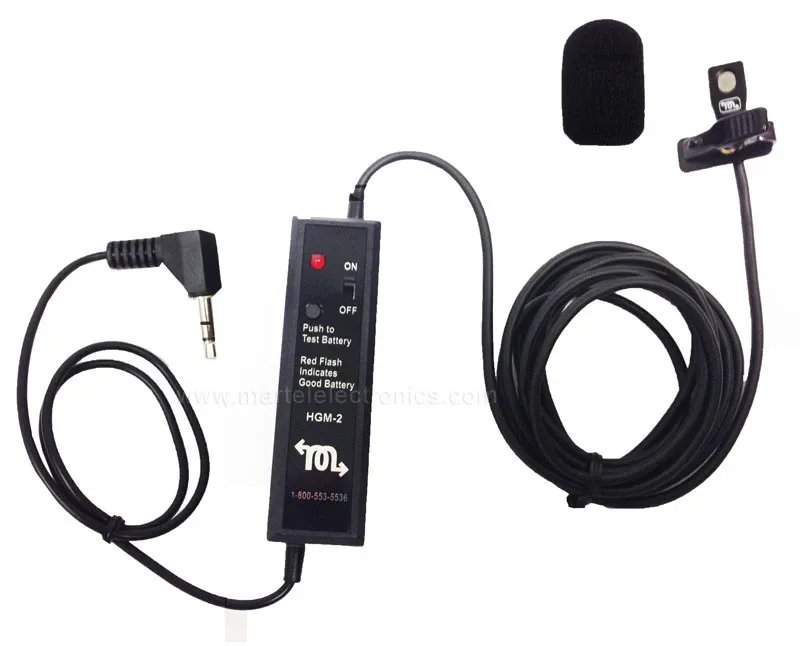
3.5 mm HGM-2 microphone, battery module, plug and windscreen
HGM-2 court reporter microphone with built-in battery tester. View Martel’s product details for SKU 1773.
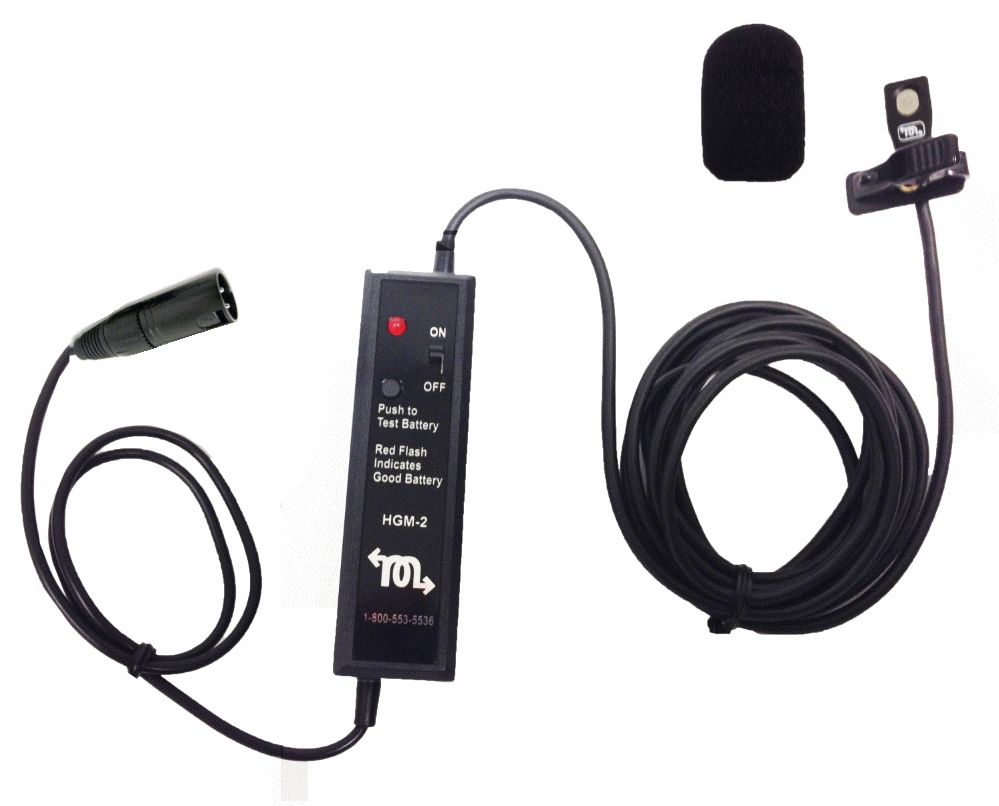
XLR HGM-2 microphone with its cable, battery module and removable windscreen
XLR HGM-2 court reporter microphone. View Martel’s product details for SKU 1931.

Start with the device that will save the testimony. If it accepts a compatible 3.5 mm microphone, look at Martel’s battery-powered HGM-2 with the built-in tester, SKU 1773. If your recorder or audio interface accepts the XLR microphone described by Martel, look at SKU 1931. Both carry the HGM-2 name. The writing on your input jack, the instructions for that input, and the job you expect the recording to do will tell you which listing deserves a closer look. Set the two product photos alongside the receiving device before placing an order.

Follow one answer from the witness to the saved job

Imagine a witness says, “The invoice in my left hand carries the blue stamp.” You want to be able to return to the word “blue” later. The voice first reaches a microphone. Its signal travels through a connection to a device that accepts microphone audio. That device or an attached computer makes the file. During review you open the file, find the passage, and listen through a speaker or headphones. Follow this route once with your finger on the actual equipment. A connector decision becomes much easier when you know where sound must enter.

There may be two paths on your desk. A writer might save audio with the steno notes while a digital recorder runs on its own. Write down the first receiving device for each path. A computer used to read the transcript later may have no part in recording the writer file. Conversely, a recorder lying beside a laptop may be the only device capturing a witness. Pick one destination for the proposed HGM-2. If you want two destinations, make two purchase decisions and verify the complete arrangement for each.

Tell the two listings apart at a glance

The product listing for SKU 1773 identifies a 3.5 mm connection and a built-in battery tester. Martel lists a cable length of five and a half feet and a pickup rating of 131 feet for this particular model. These measurements answer different questions. One helps you place the microphone relative to the jack. The other describes the vendor’s voice pickup claim. A microphone can be physically close enough to plug into the writer while still sitting in an unfortunate position for an answer coming from behind a stack of binders.

The XLR model has its own listing, SKU 1931, with a three-pin plug and a stated pickup reach of up to 75 feet. Martel describes it for digital recorders with an XLR microphone input and mentions XLR interfaces. Photograph the label or write down both the SKU and the connector when placing an order for someone else. A purchase request containing only “HGM-2 for deposition work” still leaves the person filling the order with two plausible choices. Include the destination as well, especially if an agency maintains similar-looking kits.

Read the receiver before choosing a microphone

Find the exact model designation on the writer, recorder, or interface. Open its input description and compare that description with the symbol next to the socket. A small round opening may serve headphones, a remote control, a microphone, or another input. On equipment with several round sockets, color can help locate one after you have identified the function. A word, symbol, or illustrated port diagram is a better reference when different devices use different colors. Include that evidence in your shopping notes.

Inspect an XLR unit with the same care. A recorder might provide several numbered inputs, an output to another device, and controls shared by pairs of channels. The documentation tells you which input can accept a microphone, which controls govern it, and how the recorder stores its signal. If the recorder belongs to the courtroom or a videographer, ask the person responsible about the connection assigned to the reporter. A socket close to your chair gives you a convenient physical location. Its function still has to match the intended use.

Decide whether the writer is the recorder for this purchase

A writer that supports audio can offer an attractive short path. The microphone leads to the writer, the writer saves the practice job, and the reporter can go back to the passage with the notes. For the 3.5 mm HGM-2, establish that the particular writer accepts the microphone’s connection and type. A clear statement of support for a compatible battery-powered external mic is useful evidence. Writer generations differ. Read the manual for the model on your desk even if an older machine from your office used a similar plug.

Check the writer’s audio setup before opening a practice job. On supported writers the recording option and monitoring controls have separate purposes. The manufacturer’s instructions for the Diamante, Luminex family, and NexGen explain these controls. Use the instructions for your own version. Write several strokes while a helper reads a short invented passage, close the practice job normally, and return to it through the usual review method. That exercise answers a more useful question than whether a light came on when you connected the microphone.

Decide what an XLR recorder or interface will contribute

With a standalone recorder, an XLR microphone can feed an assigned input while the recorder saves to its own medium. With an interface, the interface accepts the analog signal and a connected computer runs the application that captures it. Decide which arrangement you own by asking where yesterday’s practice file was created. If you can follow the cable to a small box but still have to press Record in software, add the application and its input selection to your equipment notes.

Before selecting SKU 1931, collect the recorder or interface model, the supported mic input, the chosen channel, and the manufacturer’s power instructions. Check the microphone documentation for matching requirements. An XLR plug alone leaves some electrical questions open, including whether a particular microphone calls for an input power option. Keep the receiving device at its documented settings for the matched equipment. Where the published information leaves a gap, ask Martel to identify the supported combination in writing. The answer can then travel with the kit when another reporter borrows the recorder.

Distinguish a microphone input from a supplied courtroom feed

Sometimes the sound available at the reporter’s station already comes from an installed sound system. A technician might offer an output carrying several microphones together. That changes the buying question. Identify whether you have been offered a feed from their equipment or permission to place a microphone for your own recorder. In the first case you need their output specifications and the matching input on your recorder. In the second case the HGM-2’s route begins with speech in the room.

For example, the Luminex writer guide draws attention to the difference between a typical videographer’s line-level feed and the writer’s microphone input. An input intended for a small microphone signal can be unsuitable for a stronger feed. Ask the technician which output they supply and follow the receiver manufacturer’s directions for connecting it. Avoid buying a microphone just to solve an unidentified feed problem. A reporter may still choose a separate room mic for a permitted backup path, in which case you can document and test that purchase independently.

Translate the pickup ratings into a seating decision

Start with an outline of the room. Mark the reporter’s permitted working position, the questioning attorney, the witness, and a person who might object from another seat. Draw the actual cable route from the receiving device to the proposed pickup position. Then draw a line from each speaker to that position. Those lines represent four different relationships. The short cable path can be easy to manage even when the farthest speaking position is difficult to hear.

The standard HGM-2’s published rating and the XLR HGM-2’s published rating each belong to a particular product. They offer a starting point for discussion with Martel. For a buying decision, take a helper to the seat you consider hardest and record ordinary speech from that seat in a practice setup. Ask for the same words with the speaker looking down at an exhibit. Compare the two saved takes at the same playback volume. If a closer mic position materially improves the words, include that placement requirement in the purchase decision. A room with a favorable layout may give you a different answer from a room of the same length with hard walls and a noisy air vent.

Interpret the battery tester as one piece of evidence

On SKU 1773 the built-in tester lets you check the microphone battery before work. Find the tester and learn its use from the instructions supplied with the microphone. Make it part of the travel routine at a time when you can address a battery question without delaying the session. Mark the date of a battery change on your own kit record if that helps you manage familiar equipment. The product page’s published life figure describes the model. Your last change date and a check of the actual battery describe the unit in hand.

A battery check answers a narrow question. The writer may still be set to another recording mode, the recorder may be listening to its internal microphone, or the application may be using an input you did not intend. Follow a satisfactory battery check with speech recorded to the intended destination. When you report a problem, state the two observations separately. “I used the tester according to the instructions” and “my saved practice file contains the person beside the writer and a very faint witness” tell a support specialist more than “the microphone has power.”

Evaluate every component that would travel in the bag

Lay out the equipment for a day when you would actually use the proposed microphone. For a writer-based setup that may include the microphone, its cable, any supported extension, the writer, the writer’s recording media, and headphones for checking the result. For an interface-based setup it can also include a computer connection, software, power for the equipment, and whatever lets you reopen the file at the end of the day. Look for a dependency that normally stays on your home desk.

One practical buying exercise is to assemble the kit on a different table using only what you plan to carry. Assume that the recorder must remain at the reporter’s station and that the witness cannot move closer for your convenience. See whether the connector reaches the intended input without pulling against it. A well-matched mic can still be an awkward choice if it forces the receiver into a walkway or crowds the writer’s keys. Record the missing part or placement limitation before deciding that the problem requires a different microphone.

Rehearse a voice distinction that matters to the transcript

Use an invented pair of exchanges that a single loud test count would miss. From the counsel position ask, “Did you send the draft on June thirteenth?” From the witness position answer, “I sent the chart on June thirtieth.” On a second take, ask about “four blue folders” and answer with “two blue folders.” These are practice lines. They give the listener named distinctions to recover from playback without relying on general impressions such as pleasant tone or ample volume.

Have one person run the recording and another write down the dates and quantities they actually heard. Keep the answer key out of view until the listener has finished. If the listener gets the near seat right and struggles with the far seat, preserve that observation. Repeat the exercise after changing one meaningful variable, perhaps moving the microphone from behind the laptop to a permitted open position. If both versions sound acceptable, add an ordinary interruption such as the attorney turning a page. The useful result is the equipment and position that let the listener recover the words needed for review in that rehearsal.

Compare complete setups fairly when you have both models

The two HGM-2 versions can require different receivers, so a comparison using them may be a comparison of two complete systems. Document that explicitly. Give each system a name that identifies its microphone and destination. Use the same passage, speakers, seats, room, and playback headphones. Keep a separate note of each receiver’s input mode and gain setting. Equal numbers on two scales have no established meaning unless the manufacturers define the scales the same way.

First listen to each file through the route you would use for real work. Then, if file handling permits, play both on the same review station and match comfortable listening levels. A louder file can seem clearer on a quick listen. Ask instead whether the question, answer, date, and last word remain distinguishable. If the results differ, describe the difference as belonging to the tested combinations. A change in recording mode, receiver, or microphone position gives you a new combination and a new observation. Labeling the files carefully will help you explain the choice to an office manager later.

Work through a purchase request from a reporting agency

Consider an agency assembling a kit for two reporters. One records on a compatible writer. The other brings a recorder that accepts microphones through XLR inputs. The agency wants the same familiar model name on its purchase paperwork. Start with two lines on the equipment list. The first line pairs the writer with a confirmed compatible 3.5 mm path. The second pairs the recorder’s named mic input with the XLR version. Add the SKU to each line and attach the product picture that shows the relevant connection.

If the office wants to buy just one unit at first, choose the assignment it must cover first and verify that route. Write down what evidence would be needed before lending it for the other arrangement. This prevents a calendar entry reading “mic available” from being mistaken for a tested system in either room. The office can now see the value of a second model, a supported interface, or a dedicated kit in concrete terms. Only the verified combinations belong on the checkout sheet used by reporters getting ready in the morning.

Diagnose the result before replacing equipment

A silent practice file, a faint distant speaker, and a distorted close speaker lead to different investigations. For silence throughout, confirm that the recording actually ran and that you reopened the right file. Identify the selected input and channel, verify the physical connection, and check any model-specific power requirement. For clear speech at the receiver but faint speech at the intended microphone, use two speaking positions to establish which pickup the receiver selected. A strong voice at the near seat combined with a weak witness can also reflect placement.

For harsh loud words, repeat a short practice sentence with a little more space between the loud speaker and the microphone or with the receiver gain adjusted according to its instructions. Change one item and replay the result. Reducing the volume of the headphones makes listening more comfortable but leaves the original recorded signal intact. When the first few checks identify a faulty accessory, test a known compatible replacement before assigning the fault to the HGM-2. A dated note of the combination that behaved correctly is worth keeping along with the invoice.

Bring Martel a question someone can answer precisely

A useful inquiry fits in a short paragraph. Identify the proposed SKU, the make and model of the receiving equipment, the printed label beside the input, and the job the recording will do. Say if the sound must live with the writer’s notes, on the recorder’s storage, or in an application on a laptop. If you already own an adapter or interface, give its exact model and explain where it would sit. A clear photo of the connection area helps when the equipment manual uses a symbol unfamiliar to you.

Here is an invented example of a buying note. “I am comparing Martel SKUs 1773 and 1931. My standalone recorder stays on the reporter’s table. The input I plan to use is marked XLR MIC 1. I need a file I can reopen on the recorder with headphones. Which HGM-2 and power arrangement does Martel support for my exact recorder?” Add the recorder model before sending it. The answer can settle both the purchase and the first rehearsal, because you have described an end result that you can actually check.

Decide what a change of room can tell you after purchase

Suppose the same HGM-2 and receiver produce an easy-to-follow practice file in the agency office and a difficult one in a second room. Retain both sample files. Carry the microphone, receiver, cable, and headphones together between rooms, and mark the positions of the two practice readers relative to the microphone each time. Start with the same input settings. If the second room requires a different arrangement, make that a third labeled sample instead of overwriting the second. You now have a fairer comparison of conditions and a working setup you can reproduce.

This is especially useful when the purchase serves a freelance reporter who has little say over room assignments. The question after delivery becomes which placements the kit allows, how to recognize a difficult seat early, and which accessory would solve the demonstrated limitation. A longer cable may be the practical next purchase if it puts the microphone near the witness. A different destination may be worth considering if the existing device cannot capture the approved signal at all. Those are different reasons for spending money, and your three files can help tell them apart.

30 questions and answers

1. What single detail should I look up first if I am buying tonight?

Look up the model and microphone input of the equipment that will receive the cable. If the manual identifies a compatible 3.5 mm microphone input, investigate SKU 1773. If the equipment accepts the microphone described on Martel’s XLR listing, investigate SKU 1931. When you find only a headphone output or a USB port, you still have a connection question to resolve. A photo of the label and the manual’s input description will let you ask it accurately before ordering.

2. How do I distinguish the two products on a quote that abbreviates their names?

Ask for the SKU, connector, and destination in the line description. For the small-plug model, the mention of a built-in battery tester is another useful identifier. For the XLR model, specify SKU 1931 even when the quote already says “HGM-2.” Save a copy of the matching product picture with the order. Someone receiving the shipment can compare the plug and item line directly, even if the person who selected the microphone is working in another courtroom that day.

3. Is a 3.5 mm socket on my laptop enough information to select the standard HGM-2?

Find out whether the socket accepts an external microphone and which wiring or headset arrangement the laptop supports. A port that provides headphone sound can look much like a separate microphone input. If your proposed setup uses an adapter, verify that exact adapter with the laptop and microphone. Then use your recording application to capture a short practice file from the intended position. An audible playback through the laptop’s speakers tells you about its output, while the practice file helps identify its input.

4. Can I connect the XLR HGM-2 to an interface instead of a standalone recorder?

Martel lists XLR interface use for the XLR model. Match the individual interface’s microphone input, power arrangement, and input selection to the microphone. The interface also needs a working route into the application that will save your audio. During a practice job, identify the selected device and channel, stop normally, and play the saved file. If you use the left input for the witness, check how the application presents that input during playback before taking the arrangement into a deposition.

5. What happens if a recorder has both a small mic socket and XLR inputs?

You have two potential routes to investigate. Check which modes let you select each input and where each route appears in the saved file. Think about the accessory you will actually carry and the position available to the microphone. One route may leave an input free for another approved source. If both meet your technical requirements, judge setup time and the clarity of a saved two-seat rehearsal. An unused connector adds flexibility only when you understand how to select it.

6. Does an XLR input automatically tell me which power switch to use?

Read the exact recorder or interface instructions together with the microphone’s requirements. An XLR connector describes a physical connection. Audio devices can provide different input and power options on sockets of that shape. The XLR HGM-2 product listing establishes the model to ask about, and Martel can confirm any unpublished requirement for your proposed receiver. Get a specific answer before enabling a switch simply because a different microphone used it at a previous assignment.

7. Can I identify the microphone input from a pink ring or a three-pin outline in a photo?

Use those clues to locate the port, then confirm the label and the model-specific port diagram. A photograph may omit the words printed just above a socket, and the same equipment family can have different connections across versions. A second photo taken square to the labeled panel is often helpful. For an agency purchase, keep the model designation in the same note as the picture so another employee can check the intended receiver without matching cases by appearance.

8. Why is it important to name the recording application in a hardware inquiry?

Consider a laptop attached both to an interface and to another USB device with a microphone. The interface can receive the HGM-2 while the application records a different input. Name the application and the audio destination so support can help you check the right route. You may ultimately use CAT software, a recorder utility, or another approved program. The practical test is the one performed in the application you will use when the reporter’s work is under way.

9. Could I use a passive adapter to make either version fit every job?

An adapter can change plug shape. Its description and the equipment instructions must also account for signal type, wiring, and any relevant power requirement. For a computer, the route may require an interface that converts analog audio into a computer input. List every piece between the HGM-2 and the recording destination. If you can confirm one complete combination, label it for that particular job. An assortment of physically matching plugs in the bag gives you little evidence about the resulting file.

10. Which microphone should I buy for a typical deposition room with six seats?

Six seats describe the room but leave the recording destination open. First identify the writer, recorder, or interface that will accept the microphone. Next decide which seat presents the hardest listening position. A soft-spoken witness looking down at a printed exhibit can be more demanding than an attorney seated farther away and speaking toward the table. With a suitable connector identified, rehearse both seats and let the saved exchange guide your position choice or the decision to consider another pickup point.

11. Will the 131-foot figure tell me how far I can run the cable?

The standard model’s cable length and its listed voice pickup rating are separate specifications. Use the cable measurement for the route between the mic and the receiver. Use the rating as context when asking about speech at different positions. Measure around the working layout, including the path past the writer and any area that must stay clear. If you need an extension, confirm the compatible type and test the completed run with speech before committing the kit to a proceeding.

12. How do I compare the two listed ranges when the rooms are different?

Keep a small record for each room. Note the microphone and receiver, the location of the far speaker, the seat the reporter had to occupy, and something concrete you could identify on playback. For example, record whether you could distinguish two similar exhibit numbers when a speaker looked toward the bench. Distances measured in two unlike rooms offer limited guidance by themselves. A reporter who will return to one room gains more from repeating that room’s hardest exchange under ordinary conditions.

13. Is a moving level meter enough to accept a microphone after delivery?

A meter can show that a selected part of the setup sees a signal. It cannot tell you which word the witness used, whether you accidentally selected an internal mic, or which channel will open in the review software. Save a small practice recording that includes two clearly different speaking positions. Close it, reopen it, and find a phrase from each speaker. That check uses the same sequence you expect to rely on after a real assignment.

14. What should I listen for besides loudness?

Listen for the ends of words, similar-sounding numbers, short responses while counsel looks away, and a question immediately following an exhibit being placed on the table. A helper can change one date in the script without announcing which one. Try writing it from the saved passage, then compare with the answer key. You now have a concrete observation you can repeat after moving the mic. “The last syllable of the date disappeared” is easier to act on than “the recording felt weak.”

15. What if the witness sounds clear but I miss the attorney’s objections?

Keep the witness arrangement in your notes and add a short trial from the attorney’s usual seat. Have the speaker make an ordinary objection while facing the direction they would normally address. Move the microphone to a permitted position that serves both voices and compare both takes. If the improvement for one person makes the other hard to understand, the remaining question concerns room coverage. That is useful information to take to Martel when considering a different layout or a compatible multi-microphone system.

16. How do I know whether my backup recorder used its built-in mic?

Place the proposed external microphone and the recorder far enough apart for a harmless practice comparison. Speak a different phrase near each position in turn at a normal level. Reopen the saved file and consider which phrase sounds as if the speaker was close. Check that observation against the recorder’s input indicator and manual. Avoid tapping connectors or striking the microphone as a signal test. Speech from two known positions tells you more about how the recorder will handle actual questions and answers.

17. What if the audio sounds fine in headphones during the job but the saved file is empty?

Determine what fed the headphones. An interface might let you hear its incoming signal while the recording application requires a separate input selection and a start command. A writer can also provide distinct recording and monitoring options. Reproduce the setup with an invented passage and look at the recorder or application that should be writing the file. Close the practice job normally and verify its duration and contents. You can then describe exactly where listening succeeded and where saving still needs attention.

18. Does a stereo file mean I can listen to each attorney separately?

Look at what independent signals actually entered the recorder and how it assigned those signals to channels. A file described as stereo can contain a single microphone on one side, the same mixed material on both sides, or two different signals. One room mic hears voices from its pickup area. To determine what the recording lets you isolate, make a seat-by-seat practice recording and play each available channel separately in the review tool you will actually use.

19. Can I use the same mic for my writer and my independent backup at the same time?

List the proposed signal paths and confirm any equipment used to distribute the microphone to two destinations. In particular, establish how both inputs and any power arrangements interact. A simple branch in a diagram does not establish compatibility. Also identify what both recordings depend on. If a single microphone or cable serves both files, a failure at that point can affect both. A backup intended to cover loss of the primary microphone calls for a second, separately verified source of sound.

20. Should I use the HGM-2 to pick up counsel joining only through my headphones?

A room microphone receives sound present in the room at the pickup point. A remote attorney heard only in your own headphones may have little or no audible presence there. Identify the computer or recording route that carries the remote side of the meeting. Test it using an authorized practice call and a distinct phrase from the remote participant. Verify that phrase alongside local speech in the saved file. The connector choice for the local mic solves only the local part of that assignment.

21. When is a weak battery a reasonable suspicion?

Give it attention when working with the battery-powered model, particularly if the condition of the battery is unknown or the built-in check indicates attention is needed according to its instructions. Change or service the battery as directed, then repeat the same practice passage through the original receiving device. If the issue persists, record the tester result and move on to input selection, cable condition, or microphone location. A change in symptom after a battery replacement is more informative than a guess based solely on calendar age.

22. Is an extension worth ordering at the same time as the microphone?

Measure first. Put the writer or recorder where it must stay and identify a useful microphone location outside the paper-handling area. Trace the complete route with enough room for ordinary chair and writer movement. If the supplied arrangement falls short, ask about a specific extension suitable for your model and length. Include it in your acceptance recording and listen while people perform ordinary work. The value of an extension comes from the placement it makes possible on a particular job.

23. My recorder has a socket marked LINE IN. Is that the one I should show support?

Yes, show the label, and photograph any other audio inputs on the same unit. Ask whether the recorder has a supported setting or a separate input for the HGM-2 version you are considering. A line input usually expects a different signal level from that of a microphone. The full panel and model number allow support to check the equipment you have. If the intended source is the courtroom’s existing output, include the technician’s description of that output in the same question.

24. What changes if the venue provides a microphone at the lectern?

Find out who controls the lectern system, where its signal goes, and whether a suitable output is available to your recording equipment. The room loudspeaker can make the lectern voice easy to hear in person even while your recorder follows its own local mic. Run a permitted practice line from the lectern and review your specific file. If you need a separate HGM-2 to cover a witness or counsel, document that distinct purpose before choosing its connection and position.

25. Is the standard HGM-2 a USB microphone for a reporting laptop?

SKU 1773 is the battery-powered model with the 3.5 mm connection. For a laptop with USB as the intended recording route, look at the laptop’s supported analog audio interface or a Martel USB microphone designed for that job. A USB cable to the writer might serve a different purpose such as realtime steno. Draw the intended audio route separately and verify it with an actual recorded phrase. That keeps two independent functions on the same desk from being confused during ordering.

26. What is the most useful photo to include when I ask about a used recorder?

Include a legible view of the model identification and a separate close-up of the entire input panel, with the port labels visible and personal markings covered if needed. A picture of the microphone plug alongside the panel may help. Also say whether the goal is standalone capture or recording through a connected computer. A general photograph from across the desk can show the condition of the case but leave precisely the electrical and recording details that determine microphone choice unreadable.

27. How can I verify an office purchase before sending it to a freelance reporter?

Have the office assemble the kit as promised, record a short role-labeled exchange, and reopen the intended output. Then have the reporter repeat the essential check on their own writer or approved equivalent if that device was absent during packing. Mark which part of the system each person verified. Keep the exact SKU, connector, receiver, and any included accessory together on the handoff note. That way the person accepting the kit knows which new connection still needs a practice recording.

28. Will changing the headphone volume fix a distorted recording I already made?

Turning the headphones down can make listening more comfortable. To locate the cause, listen to a short copy through another known working playback route, preserving the original. If harsh syllables are present in the same places, repeat a practice recording and examine input level and microphone distance during capture. If the original sounds clean elsewhere, investigate the first playback device. This division avoids buying a new microphone to correct a problem introduced only on the way from the file to the listener.

29. What should I write beside the SKU after a successful rehearsal?

Include the receiving device and input, the saved file or job name, the seating arrangement, and the date. Add one observation someone else can check. For instance, write that the listener recovered both dates from the far-seat passage when using the usual review headphones. Record any accessory essential to that result. A list containing the microphone alone can become misleading after an office swaps a recorder, moves the reporter’s table, or sends a shorter cable to a second location.

30. How do I make the final choice when both routes pass my practice test?

Choose the arrangement that fits your normal assignment with the fewest unresolved dependencies. Compare how you pack it, how quickly you can verify it, which recorder or software will receive it, and how you retrieve the saved passage afterward. For a purchase order, put the matching Martel SKU next to the destination and describe the practice condition that mattered most. You can then explain the choice in familiar reporting terms, such as keeping the witness intelligible from the seat you are actually assigned.

Martel equipment and related guides

HGM-2 court reporter microphone with built-in battery tester · SKU 1773

XLR HGM-2 court reporter microphone · SKU 1931

This article is for educational purposes only.