TIME IS RUNNING OUT FOR 2026 TAX WRITE-OFFS

Will Your Digital Courtroom Recorder Power a Battery-Free Microphone?

Check whether a courtroom recorder supplies the correct microphone power. Compare plug-in power, phantom power, battery-powered mics and matched packages.
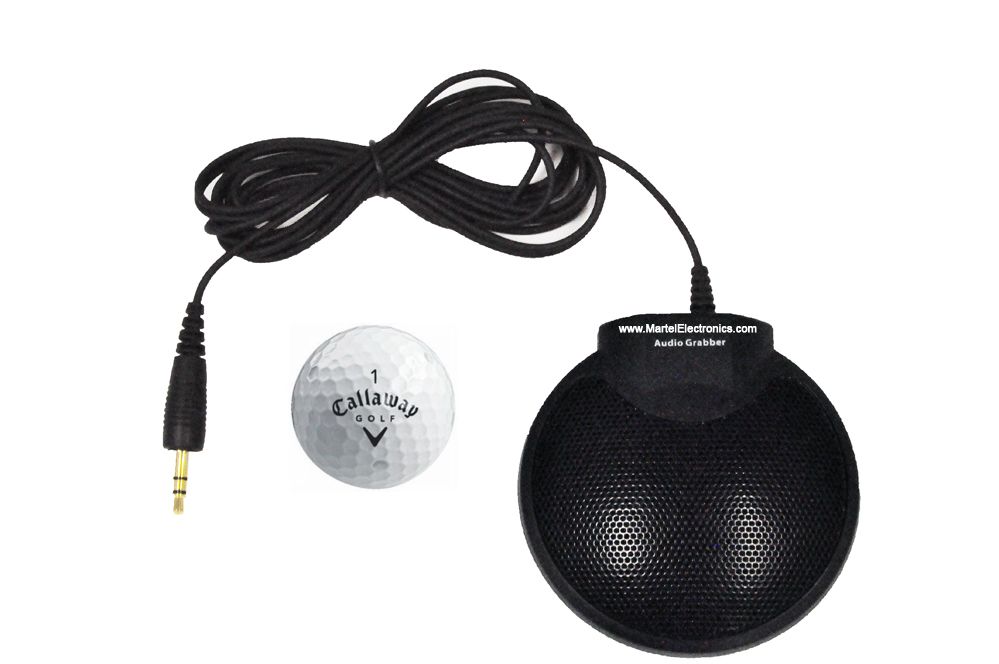
Audio Grabber microphone and 3.5 mm plug beside a golf ball for scale
Audio Grabber battery-free court reporter microphone. View Martel’s product details for SKU 310.

A battery-free microphone can be a good fit for a court reporter who wants fewer batteries to check before testimony. The buying question begins at the recorder. Which socket will the microphone use, what kind of power does that input supply, and does the microphone accept it? A plug that fits answers only the first part of that conversation. You can usually settle the rest by matching a few lines of documentation before buying anything. This guide walks through that comparison, including the Martel Audio Grabber, a self-powered alternative and a courtroom package sold with matching microphones.

Start with the equipment already on the reporter’s desk

A digital courtroom recorder might be a small handheld set beside a steno writer, a recorder wired to a mixer, or a unit that receives a courtroom sound feed. Each arrangement has a different device at the microphone end of the cable. Follow the lead from the proposed mic location until you reach its first input. If the lead stops at a mixer, that mixer is the device whose microphone power specification matters. A recording unit farther along the route may receive a finished mix through a line input. Its microphone power settings may play no part in that particular path.

Write down the make and full model on the receiving unit. Include model suffixes and the socket label as printed, especially if there are multiple inputs. Look up the manual for the exact unit. Find the connector diagram, the instructions for external microphones and the technical specifications. The connector diagram locates the right jack. The operating instructions explain any setting the user must select. The specifications describe the electrical connection. One of these sections alone may leave an important question unanswered.

Next identify the proposed microphone by model and connector version. A familiar family name may appear on products for a recorder, a writer and a laptop. Record whether the particular microphone uses a cell, draws power from an input or connects by USB. If the only evidence so far is a photo of a familiar plug, mark the power requirement as unknown. That is useful progress. It identifies the specific fact that must be confirmed before the microphone and recorder travel to a hearing together.

Understand what battery-free is telling you

The phrase describes what you will find inside the mic when you get ready for a job. It gives no universal answer about what the equipment at the other end of the cable must provide. One microphone may rely on low-voltage power from a recorder input. A different design may require phantom power from an appropriate professional input. A USB microphone typically obtains operating power through its intended USB host connection. Some microphone designs operate passively. They can all look attractive to someone who wants one less battery in the bag.

For the reporter, the important difference is visible on a setup sheet. “Audio Grabber plus a compatible powered 3.5 mm mic input” describes a combination. “Battery-free” describes just the microphone. If you change recorders for a four-day assignment, carry the combination forward in your notes. The new recorder must provide the conditions that made the prior pairing work. If it does, the convenience remains. If its only available jack takes an already amplified feed, the earlier successful job supplies little evidence about this one.

The word “condenser” gives design information but leaves the supply question open too. Two microphones with that description can expect very different connections. Product photographs can show the plug shape, the length of the usable lead or a battery housing. A product data sheet or manufacturer confirmation must supply the electrical requirement. Keep those pieces together so the person buying for a reporting team can distinguish an excellent photograph from an actual statement of compatibility.

Know what plug-in power supplies

On a compatible portable recording input, plug-in power provides a small DC supply for the circuitry in a microphone designed to use it. A recorder may refer to this as plug-in power, mic power or bias. Consult the description that accompanies the term. Some products make it available at a particular small microphone socket. Some require a menu choice. The manual should tell you whether the supply is available and which jack, accessory or operating mode the instructions describe.

The fact that power and audio travel through the microphone cable explains why the microphone can be battery-free. It also explains why a replacement lead with the same outside diameter can still be a poor choice if its contacts or wiring differ. Ring count and fit alone do not establish a full wiring match. Use the microphone’s supplied lead or a supported replacement and verify any extension called for by the room. An ordinary mechanical adapter provides no reliable answer about how the mic will receive the supply it expects.

A close reader may notice several voltages in the same recorder manual. Some describe a USB supply, an AC adapter, internal batteries or an optional accessory. Copy the figure attached to the actual microphone input, together with its socket label and operating mode. A supply powering the recorder body is one link in the overall system. The value at a particular microphone input is another. Confusing those values can produce a confident but incorrect answer to a simple purchasing question.

Keep balanced phantom power distinct

A common form of professional microphone power sends DC through a balanced XLR microphone connection. A recorder or mixer may offer a setting such as 48 V for equipment designed to accept it. The voltage and wiring arrangement matter. A small microphone intended for low-voltage plug-in power does not become a phantom-powered XLR microphone because someone can put a 3.5 mm socket on one end of an adapter. Follow the documented combination for the mic, the receiving input and any approved interface between them.

A useful way to read an equipment page is to circle the actual interface words and then underline the values. If one document calls something “microphone power” and another says “phantom,” compare the connector, supply type and stated requirement for the precise model. Ask for written clarification where those details differ. Avoid deciding from a marketing heading or assuming the larger voltage includes the smaller one. A setting that provides a different electrical supply serves a different purpose.

Professional inputs can have individual or grouped power controls. A courtroom mixer may already serve several microphones and belong to the facility. The building technician or authorized equipment operator can identify the available output and permitted configuration. For a reporter receiving a feed, request the connection details at the handoff point. When the facility provides a line signal, your job is to match that signal with a suitable receiving input. The facility’s handling of power for its own microphones is a separate part of the system.

Read a recorder specification as a complete sentence

Look at one socket at a time. Suppose an instruction says that a particular microphone/line jack supports plug-in power in its microphone mode. The statement identifies a location, a capability and a condition. If you copy only “supports power,” you lose most of the information that helps a reporter get the right result. Find how to select that mode, what microphones the maker describes, and whether the setting persists after restarting or loading a preset. Leave any missing detail open until it is confirmed.

Another socket on the same recorder might accept a professional microphone with selectable phantom power. Treat that as a second entry. In a team inventory it can be useful to give one physical recorder two lines, one for each input you might use. This arrangement makes it obvious that one machine can support multiple legitimate workflows without a particular microphone being compatible with every input it offers.

What if the specification says only “3.5 mm microphone input”? You know the approximate connector size and the intended signal category. You still lack confirmation of the power arrangement for an input-powered mic. Look for a model-specific external microphone list, a manual section on supplying power, or a direct pairing from the vendor. Ask with the recorder model, mic model and exact socket. “Will it work with recorders?” gives the seller too little detail to answer carefully.

Interpret the Audio Grabber listing for an actual purchase

Martel’s Audio Grabber, SKU 310, is a battery-free microphone with a 3.5 mm stereo plug. Its product page describes recorder and mixer arrangements that provide suitable plug-in power. Its specification table lists 1.5 V DC. That is the figure given for the product. Use the complete documentation or Martel’s confirmation to establish a pairing with the exact input you plan to use. A higher or lower number printed in a different recorder manual needs interpretation from the equipment makers, not a guess about tolerance.

The product listing uses the word phantom in places while describing low-voltage microphone power. For ordering purposes, keep the 3.5 mm connection and the stated low-voltage requirement associated with this model. The product description gives you no basis for feeding it ordinary 48 V XLR phantom power through a simple plug adapter. If your courtroom offers only a professional XLR connection, give Martel that information before choosing the microphone or any proposed interface.

The Audio Grabber can be used in supported daisy-chain arrangements. Martel lists configurations with compatible Luminex and NexGen writers and a separate configuration with its reporter mixer. Each expansion figure belongs to the named host and setup. It does not establish how many mics an arbitrary courtroom recorder can power. For a new receiver, first confirm the single microphone combination, then ask about the exact chain, supplied leads and number of heads you need. The extra pickup points also raise a second question about where their audio will be saved.

Compare a matched package with a microphone added to an existing recorder

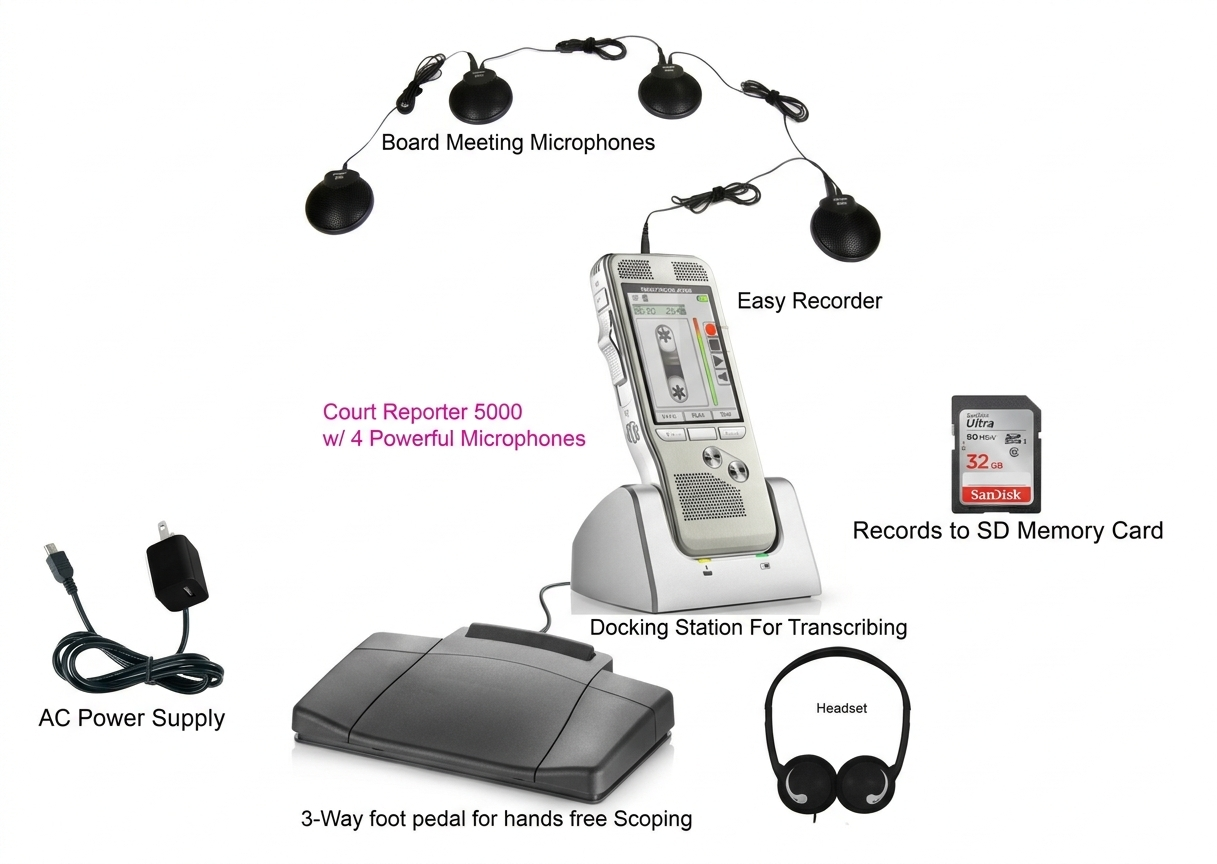
The Court Reporter 5000 courtroom package, SKU 1669, gives you a different kind of purchasing evidence. Martel lists the recorder and four battery-free Audio Grabber microphones as parts of the same package. That statement is valuable for someone building the entire setup. Review the included components and instructions for the package you will actually receive. Keep the original chains, leads and model information together so that a future reporter can reconstruct the intended arrangement.

A person who already owns a recorder faces another decision. A photo resembling the unit in a current package does not identify its exact model, sockets or accessories. Read the identification plate, inspect the input arrangement and check whether the vendor confirms the exact combination you already have. A single replacement microphone, a different-generation recorder and a new multi-mic kit are three different orders. Give the seller enough information to supply the right one.

When comparing prices, describe the destination of the audio. A reporter who wants independent recorder backup needs a path that still records when the reporting laptop is unavailable. A reporter who needs separate review of each position also needs the necessary track support. A kit may provide several physical microphone heads while the receiver saves a mix. Check that issue independently of power. Buying four correctly powered microphones helps little if the actual requirement was four independently selectable saved tracks and the chosen recorder saves a combined result.
Consider a battery-powered microphone when the host is uncertain

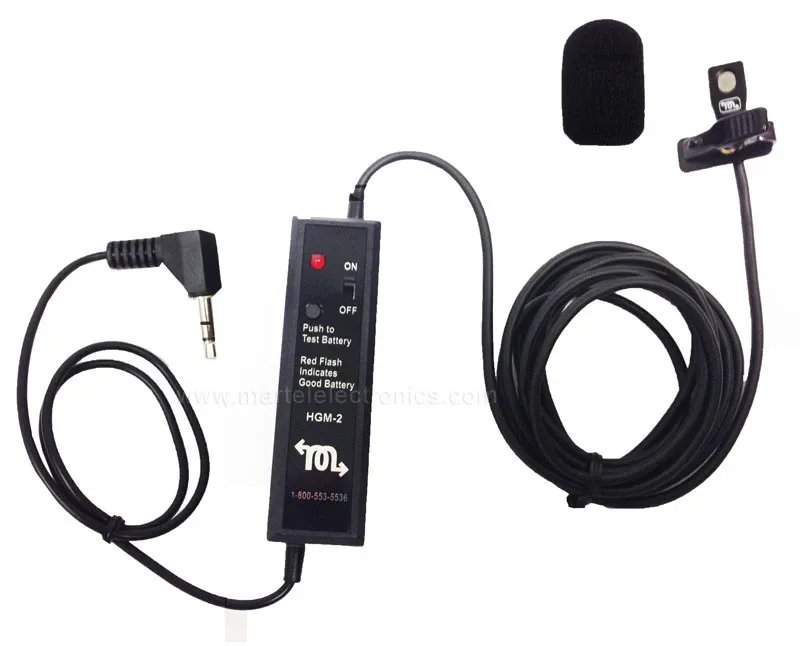
The 3.5 mm Martel HGM-2, SKU 1773, uses its own battery and has a built-in battery tester. That makes an internally powered microphone worth considering when an approved recording arrangement does not provide the supply required by a battery-free model. You still need to match signal type, connector and recorder input. Onboard power changes where the mic gets its operating energy. It cannot turn a recorder output into an input or make every powered socket suitable for the microphone.

Look up the recorder’s guidance for externally powered microphones, including what its own plug-in power setting should be for the equipment you use. Obtain confirmation for a model whose instructions are unclear. At the reporting desk, the battery test is a valuable first observation. The second is hearing a saved conversation from the seats the mic must serve. One checks the mic’s immediate readiness and the other checks the whole path. Keep both actions in the setup routine if this is the arrangement you select.

There are practical tradeoffs on either side. An input-powered mic reduces the number of microphone cells to manage, but the receiving device becomes part of the microphone power supply. A battery-powered mic requires a battery routine, yet may serve more than one compatible recorder without relying on each to provide the microphone’s operating supply. For work in several venues, make a table of confirmed pairings. A familiar mic with one clearly documented receiving path can be more useful than a collection of adapters with uncertain behavior.

Solve three purchasing examples on paper

First consider a reporting agency buying a complete deposition-room recorder and microphone package. It wants a recorder on the reporter’s desk and four battery-free pickups around the table. The product listing for the Court Reporter 5000 courtroom package specifically identifies those four Audio Grabbers. The next step is to identify the included leads, permitted arrangement and playback workflow. The agency can ask about the package as a whole. It need not deduce the input supply from a generic picture or add an unrelated external power box to the order.

In a second example, a freelance reporter owns a recorder whose manual confirms a microphone input and gives no further power specification on the page she has open. The proposed microphone requires power from the input. The sensible outcome of this document review is “information needed.” She can look for the external microphone chapter or ask whether the exact recorder model's named input supports the exact mic. Meanwhile, she can ask about a battery-operated option that suits the available input. Silence in a specification is an information gap, not permission to experiment with stronger supplies.

In a third example, a facility offers the reporter a single feed labeled line out. The word “line” changes the whole worksheet. The facility has already collected and processed its microphone signals. The reporter now needs an appropriate line input and a documented cable or interface. Buying a battery-free table microphone by itself will not accept that feed. If independent room capture is also required and permitted, make a second line in the plan describing which available device would power and record the separate microphone.

Put cables and extensions on the same order sheet

Power compatibility starts with the receiver and the mic, yet the actual route may include an extension, connector couple, mixer or interface. For a battery-free electret microphone, the supported connection must carry both the expected signal and the supply the mic requires. List the supplied lead first. Add any extension by its actual product or part identification. Ask whether the complete route remains supported at the intended length and number of connected heads.

A conference table can encourage an impractical solution. If the far witness seat is a few feet beyond the standard lead, the first idea may be to join whatever short cables are in the reporter’s bag. That changes several variables at once. Discuss a supported extension, moving the recorder within reach, or choosing a package designed for the layout. Draw the actual route around chairs and working surfaces. The straight distance between the reporter and witness does not tell you how much cable can be installed without interfering with normal movement.

When an agency orders a second set, preserve the component identities from the working first setup. The useful entry is “recorder model, input name, mic model, approved extension part, number of mics.” A purchasing description such as “two extension cords” may bring similar-looking items with different functions. Before accepting a replacement from stock, compare it with the named requirement and repeat the equipment check. Clear ordering language can prevent an unnecessary support call months after the initial purchase.

Verify receipt with a small, original speech exercise

Once the power, wiring and input mode are confirmed, set up one microphone in the supported arrangement using the shortest intended route. Use the manufacturer’s recommended connection and power sequence. Select the intended recording mode and start a new practice file. Put a small card in front of the practice speaker with three items, such as “Room 6B, item eleven, green cover.” Ask a second person to read the items back from the saved file. Those words are easy to score and hard to reconstruct if the recording contains only a distant murmur.

Add documented extensions or additional microphones in stages. For each stage, have the reader sit at the newly served position and say a different combination, such as “Room 3D, item twelve, tan cover.” Finish each file normally and write down which equipment was connected for that particular take. If everything worked with one microphone and a different combination fails, the earlier file gives you a useful return point. It does not grant permission to raise the power setting or exceed the supported number of mics.

Listening is a functional confirmation after compatibility has been established. It cannot measure the actual supply voltage or establish a permissible electrical range. Two words appearing faintly on a recording could even come from another active mic. Distinguish what the manual confirms, what the package provider confirms and what the saved practice file demonstrates. That three-part record is short enough for a second reporter to use and precise enough for someone ordering additional equipment.

Record a power decision another reporter can repeat

Put the decision in a sentence with a subject and a destination. For example, “The supplied battery-free microphones in the four-microphone courtroom package connect through the package arrangement to the designated recorder input.” Then add references to the product page and the applicable operating directions. For another desk the sentence might say, “The facility mixer powers its microphones and sends a line feed to the reporting recorder.” The two desks can use the same model of recording device while answering the purchase question differently.

Keep the current instructions with the equipment inventory. A handwritten note about menu positions can save setup time, but a firmware revision or loaner model can move a control or change the available modes. Include the date of the rehearsal and identify which parts were present. Anyone considering a new splitter, a replacement mixer or a longer mic chain will know which part of the documented configuration they propose to change.

For support, send a photo that shows the port labels and another that shows the full microphone connector, plus the exact model numbers and the relevant manual wording. Ask a narrow question about that pair. The other person should be able to tell whether you need input power, a different mic, a matched package or simply the correct existing socket. Keep identifying labels legible and omit any screen containing case material. The evidence needed to answer a power question usually fits on a single page.

Use the available answer to choose your buying path

You have a firm reason to buy a battery-free mic when the makers document the relevant pairing and it suits the number and locations of speakers you need. For a compatible portable input, the Audio Grabber offers an unobtrusive tabletop option. For a court reporter beginning with a complete recording desk, the four-microphone package puts the microphone and recorder decisions together. For a compatible recorder input where mic power remains a concern, examine the internally powered 3.5 mm HGM-2. Each choice solves a different equipment problem.

If the approval depends on a particular accessory, place that accessory in the same equipment record as the microphones. For example, an interface may take a mic-level input and send digital audio downstream to a laptop. A manual describing the laptop's USB port will tell you little about what the interface supplies at its analog microphone socket. Record the accessory model, the power setting called for by its maker and which recording device receives the resulting signal. This makes the setup portable as knowledge as well as hardware.

Before expanding from one reporting desk to several, give someone unfamiliar with the purchase the documentation and ask them to point to the receiving input and identify the source of microphone power. If they can only point to the recorder's battery compartment, improve the description. If they can point to the proper socket, name the required setting, and reopen the relevant saved voice exercise, the purchasing decision has become an arrangement the team can actually use.

32 questions and answers

1. What single question should I ask before buying a battery-free mic for an existing recorder?

Ask whether the exact recorder model, using the socket you name and the mode you plan to select, supports the exact microphone model with its supplied lead. Include the number of microphones if you need a chain. This wording gives a seller the information needed to distinguish a confirmed pairing from general statements about recording devices.

2. What does DC mean in a microphone specification?

It stands for direct current and identifies the kind of electrical supply involved. A value such as 1.5 V DC still needs to be read with the rest of the microphone data and the recorder input instructions. The number does not describe the microphone’s output volume, its recording distance or the level a listener should set on headphones.

3. Is plug-in power another name for a recorder running on batteries?

A recorder’s batteries supply the recorder as a whole. Plug-in power refers to a supply available at a specific microphone input for a suitable microphone. A battery-operated recorder may offer it, make it optional or lack it entirely. Find the electrical description of the microphone input before drawing a conclusion from how the recorder itself is powered.

4. Is a 48 V input an upgrade for a microphone calling for low-voltage power?

It is a different electrical arrangement. Match the microphone with the type of supply and wiring its manufacturer specifies. A 48 V phantom setting should be used only with equipment and connections documented for that arrangement. If the available port and the microphone belong to different systems, obtain a supported interface recommendation or choose a better matched microphone.

5. Does a 3.5 mm stereo plug guarantee two separately recordable microphones?

The plug describes the connector and its contacts. The microphone design, cable wiring and receiving device determine what reaches each channel. Several connected heads may be combined before the recorder saves a file. When independent channel review matters, ask for the recorder’s track assignment alongside the separate question about microphone power and check both in a rehearsal.

6. Is every small round socket on my recorder a microphone input?

Read the printed label and the manual diagram. Similar sockets can serve headphones, a line input, a line output or other functions. First identify where the signal should enter this recorder. Then check its level and any available mic power. This small amount of work is more reliable than plugging the new mic into the most convenient-looking opening.

7. Does “mic/line” beside a jack mean either setting will power my mic?

A shared physical socket can serve different roles depending on a switch or menu selection. Find the paragraph that describes each mode. If plug-in power is available for microphone use, the instructions should identify its conditions. Write the required mode next to the socket in your equipment notes so someone setting up tomorrow will have the full answer.

8. Why does the Audio Grabber description mention phantom power?

Read the product-specific details together. Martel describes a 3.5 mm battery-free microphone for compatible devices supplying plug-in power and lists 1.5 V DC in the specification table. Those details identify a low-voltage arrangement. Treat the broad marketing term in light of the connector and stated requirement, and ask Martel to verify any proposed recorder whose input differs.

9. If my recorder lists a different plug-in power voltage, can I use it with the Audio Grabber?

A single figure in one listing does not provide the complete allowed operating range for every pairing. Give Martel both model numbers, the recorder’s published supply information, and any extension or chain you plan to use. Wait for a documented match before relying on the combination. A guess based solely on which number is larger does not establish suitability.

10. Can I take microphone power from the headphone socket?

A headphone connection is designed to send audio to a listening device. It is a different function from receiving a microphone and supplying its operating power. Consult the recorder connection diagram for the designated external mic input. If the recorder only provides headphone output, consider a different supported recording path or a recorder designed for the microphone you want to use.

11. Does an AC-powered recorder always deliver more mic power?

The input circuit and its documented settings set the microphone supply. An AC adapter may power an entire recorder or dock without adding any new microphone input capabilities. Use the model-specific input specification when choosing a microphone. If the owner’s manual gives different operating conditions for external or battery power, include those conditions on the equipment sheet.

12. Will a USB-to-mini-plug adapter automatically solve a mismatch?

First identify what the adapter is designed to do. An audio interface can receive a supported analog microphone and provide a digital audio connection to a suitable host. A plug adapter may simply change the connector shape. Neither description establishes the power supplied to your mic or whether the intended recorder can act as the required host. Verify both ends.

13. What if the only courtroom connection available is a line output?

Ask the person responsible for the room to identify the signal level, connector and permitted handoff. The recorder then needs an appropriate receiving input for that feed. The microphones upstream obtain their power elsewhere in the facility system. If you also need an independent room mic, describe and confirm that separate capture arrangement with the responsible people.

14. Can plug-in power cure a low line-level feed?

A microphone operating supply is intended for microphone circuitry that requires it. It is a different issue from the level of a supplied audio signal. Match the source output and the recorder’s input mode, then follow the operating instructions for gain or level. If the facility controls the source, ask its operator to verify the supplied feed.

15. Will a passive 3.5 mm-to-XLR cable convert both signal and power?

A passive cable connects conductors according to its wiring. Do not rely on it to provide the voltage conversion, isolation, signal handling or load compatibility a particular paired system may need. A documented powered adapter can serve a specific purpose, but it must list the appropriate microphone side and receiver side. Ask for those details by exact part number.

16. Why might an identical-looking spare extension behave differently?

The outside appearance can conceal differences in wiring, connector contacts or construction. Some leads are sold for listening accessories rather than a particular mic-power path. Work from the manufacturer’s approved extension or a documented specification for the system. Validate the complete arrangement after installing it and keep its part identification with the microphone so replacements are ordered correctly.

17. How many battery-free microphones can one recorder power?

Use the limit documented for the exact mic, host and wiring arrangement. The number of plugs you can physically join is not a current or compatibility specification. Martel publishes different arrangements for its compatible writers and its reporter mixer. For an unlisted recorder and chain, provide both model names and the proposed number of heads before deciding on an order.

18. If two tables each need a microphone, do they need separate batteries?

An approved input-powered system can supply its microphones through their connections. That can remove individual microphone battery changes while still leaving a battery or AC routine for the receiver. A battery-powered microphone has its own routine. Inventory the devices that actually need attention so a support person can prepare the room without relying on a vague description of “wireless power” or “battery-free equipment.”

19. Does a mixed feed let me turn off one witness mic during later review?

Once multiple sources have been combined into one recorded signal, independent microphone controls used during capture do not recreate isolated original tracks. If separate review is important, select equipment and a recording mode designed to save the necessary individual channels. Confirm power arrangements first, then run a spoken identification test on each saved channel before committing to the system.

20. What if a recorder menu offers phantom power for a pair of inputs?

Read which sockets that control affects and whether other connected equipment shares the setting. Follow the recorder and microphone instructions for connections and power changes. In a facility-owned rack, let the responsible operator handle the configuration. For a reporter selecting portable hardware, note whether individual control is needed for the microphones you intend to use together.

21. Is a microphone with its own battery compatible with any microphone jack?

Its onboard battery addresses its internal operating power. The receiving input still must accept the microphone’s signal and connector arrangement. Check the recorder’s instructions for externally powered microphones and the mic’s documented uses. A battery-powered choice can be practical when the receiving device does not provide suitable plug-in power, provided the rest of the connection meets specifications.

22. What does the HGM-2 battery tester tell me?

It offers a local check of the battery in the battery-powered model. Treat that indication according to the product instructions. It does not establish that a recorder selected its microphone input, that a particular cable is sound or that the witness will be intelligible. Pair the battery check with a saved spoken practice file through the intended receiver.

23. Can a borrowed recorder from the same manufacturer use my existing setup?

Look at the full model and the relevant connector diagrams for both devices. Manufacturers can change input arrangements, menu options and supported accessories within a family. Reuse a prior configuration only when documented for the borrowed model. Keep a note of its input settings and make a fresh acceptance recording before taking that combination to a proceeding.

24. How do I identify what a docking station contributes?

Trace the recording connection while the recorder is in the exact arrangement you plan to use. A dock may support power, transfer, charging, playback controls or particular connections depending on the design. Find the instructions that describe recording through the relevant jack. The presence of a powered dock or a foot pedal does not itself establish support for a battery-free microphone.

25. Should I test a questionable power match by plugging in briefly?

Resolve the electrical match from documentation or the makers first. A brief sound through an uncertain arrangement will not establish the correct operating conditions, and a silent trial will not tell you what was missing. Once compatibility is established, use a short saved practice exchange to test the actual setup. That order gives both the paperwork and the recording a useful role.

26. Why does a barely audible voice sometimes appear even when the external mic seems unpowered?

A recorder could still be receiving sound from another selected input, a built-in microphone or the room through an upstream feed. A very faint signal alone cannot reveal which path supplied it or establish an appropriate operating voltage. Review the selected input and model documentation, then repeat a location-specific practice test once the power combination is known to be suitable.

27. Can a louder gain setting substitute for supplying the mic correctly?

Gain controls how much an incoming signal is amplified. An input-powered microphone also needs the correct operating supply. Increasing gain can bring up background noise or a signal from an unintended source without fixing the original equipment match. Establish the power arrangement first and adjust levels for speech as a separate step using the recorder’s own instructions.

28. What should I check if the connection works alone but fails after a mixer is added?

Draw the revised route and identify the first input the mic now reaches. The mixer may have become the device responsible for microphone power, while the recorder now receives the mixer output. Check the input supply, the output type and the recorder receiving mode as separate connections. Restore the confirmed simple configuration for comparison whenever appropriate.

29. Is a four-microphone courtroom package a sensible way to reduce guesswork?

It can be useful when the package explicitly includes the recorder, microphones and connection arrangement you require. Martel’s SKU 1669 includes four Audio Grabber microphones with its courtroom recorder package. Compare kit contents and saved-audio capabilities with the assignment. A documented bundle can simplify the buying decision while leaving room placement and saved-file verification for the actual reporting environment.

30. What should the person ordering equipment for a school put on the purchase description?

Include recorder model, microphone model or Martel SKU, receiving socket, approved accessories and the number of stations. Distinguish a spare microphone from a complete recording package. Keep operating instructions and the outcome of a practice recording with the school's equipment inventory. This gives the next instructor a better starting point than a purchasing line that says only “microphones for recorders.”

31. When should we confirm compatibility again?

Revisit it when a recorder, interface, power setting, microphone version, extension or intended chain changes. Review the exact change alongside the documentation that supported the original purchase. A person moving a known kit to another room mainly needs a practical audio check. A person changing the receiving equipment may also need a fresh electrical compatibility decision.

32. What if the best answer from the current information is “unknown”?

Identify the missing piece in one line. For instance, “The recorder has a 3.5 mm mic input, but I cannot find whether this model supplies the low-voltage power needed by this mic.” Attach the model details when contacting Martel or the recorder manufacturer. A well-defined open question gives the buyer a clear next action and avoids an unnecessary accessory order.

Martel equipment and related guides

Audio Grabber battery-free court reporter microphone · SKU 310

3.5 mm HGM-2 microphone, battery module, plug and windscreen
3.5 mm HGM-2 Court Reporter Microphone with Built-In Battery Tester. View Martel’s product details for SKU 1773.

3.5 mm HGM-2 Court Reporter Microphone with Built-In Battery Tester · SKU 1773

Court Reporter 5000 courtroom package with four Audio Grabber microphones
Court Reporter 5000 four-microphone courtroom package. View Martel’s product details for SKU 1669.

Court Reporter 5000 four-microphone courtroom package · SKU 1669

This article is for educational purposes only.