HGM-2 Battery Microphone vs. HGMUSB: Choosing a Court Reporter Recording Path
Compare the Martel HGM-2 battery microphone and HGMUSB microphone. Choose a recording path, check inputs and power, and test the saved sound.
Learn when four separate courtroom audio channels help review. Compare microphone routing, playback checks, interface systems and DM246/T147 options.
Martel equipment guide · Courtroom recording and review
Preserved microphone channels can give a reviewer another useful listening perspective. Their value depends on what was captured, how the files were retained, and whether the playback workflow supports them.
A difficult word can have several causes. The person may have spoken softly, a nearby microphone may have captured a chair scrape, two people may have overlapped, or the supplied file may be a combined copy of a more detailed recording. Turning up the volume treats all those situations alike. Four-channel review gives the listener a more targeted question: did another recorded input preserve a clearer view of this particular passage?
The answer is sometimes useful and sometimes disappointing. A clean microphone near a witness can help when another input contains distracting movement. It cannot reconstruct words that no microphone captured intelligibly. This guide explains when separate courtroom audio channels are worth preserving, how to demonstrate their practical value, and how to choose among a computer interface, a complete recording package, and a supported playback kit. Its examples and review worksheets are original and use invented situations.
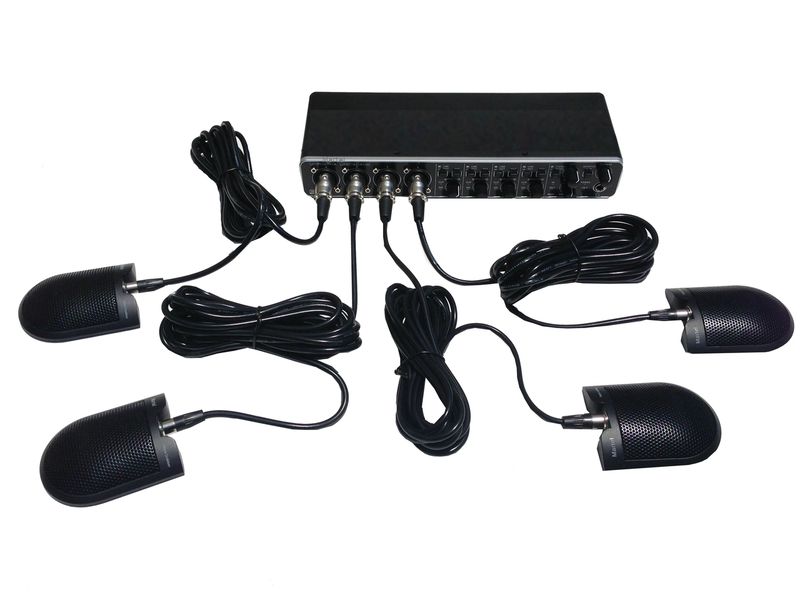
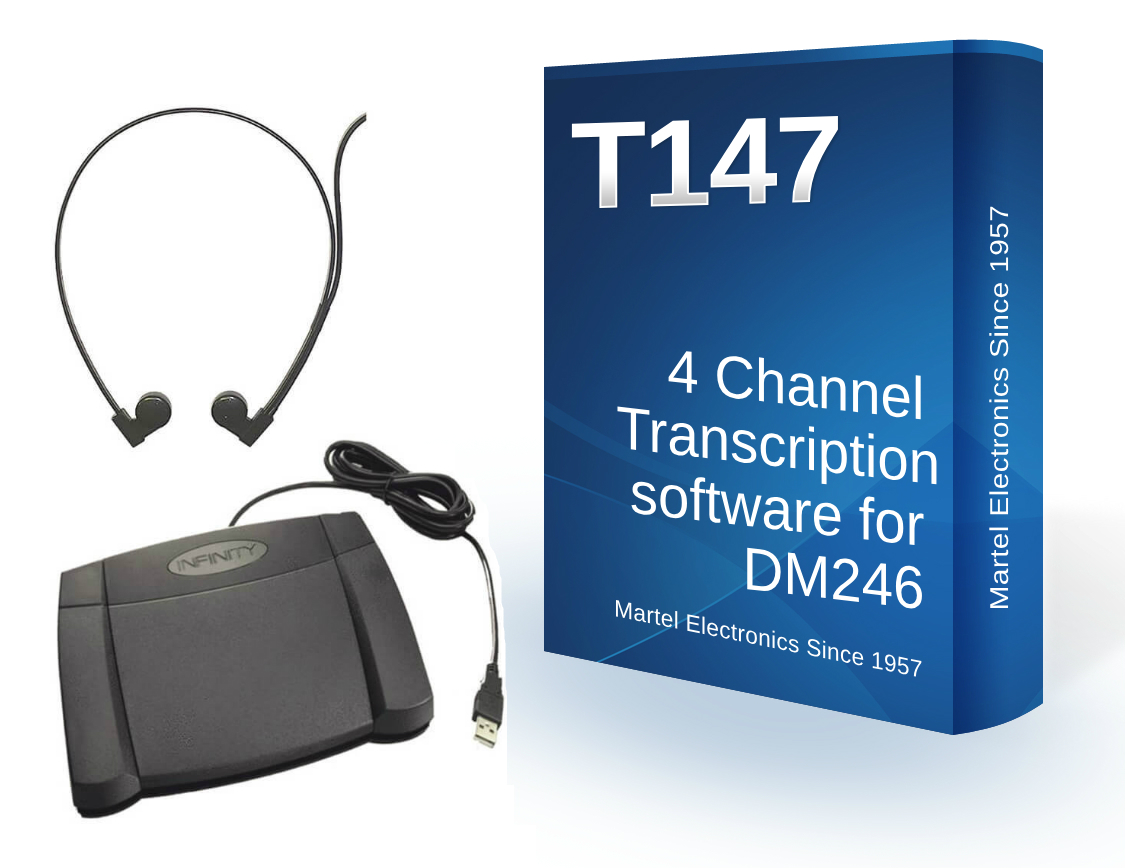
For a supported CAT recording route, examine Martel's four-channel USB interface package, SKU 2065. For a computer-based courtroom recorder and transcriber package, review the DM4 package, SKU 870. Owners of supported DM246 recordings can examine the T147 playback kit. These are different workflows; their names do not establish interchangeable files or software.
Describe the review problem before selecting equipment. Does the office regularly need to hear a quiet answer beneath movement at counsel table? Does it need to compare a bench microphone with a witness microphone? Does it receive only one mixed recording from another source? The first two questions suggest a reason to preserve separate inputs during capture. The third raises an intake question: whether a channel-preserving original exists and can be supplied through the authorized process.
Choose an observable goal. For example, the reviewer should be able to select the witness-area input without simultaneously hearing a distracting input across the room. That goal can be demonstrated with a practice file. A promise to make every difficult word clear cannot. The distinction matters when buying a system: the equipment supplies particular recording and playback functions, while the outcome still depends on the source and the person reviewing it.
Separate the everyday task from exceptional forensic questions. Routine channel review can compare available recorded sound and support transcription work. It does not, by itself, establish voice identity, authenticate a disputed file, or determine what was said when the source remains unclear. Keep those questions with the appropriate process and qualified people.
A microphone is a physical pickup device. A channel is a path of audio preserved by the recording arrangement. A speaker is a person. One microphone can receive several people's voices, and one person's voice can reach several microphones. A label such as “witness input” is helpful for finding an intended recording position, but it is not a guarantee that everything heard there belongs to the witness.
Use physical descriptions in the recording map: bench microphone, witness stand, left counsel table, and right counsel table, for example. Add any known changes during the session through the approved documentation process. If a person leaves a seat or speaks near another microphone, the map remains a description of the equipment. It should not silently become a claim about the identity of each sound.
Technical file channels are also not automatically courtroom roles. Microsoft's multichannel audio documentation describes channel count and channel mapping as properties of an audio stream. Those data structures do not identify legal participants. The recording operator's verified setup information and the context of the proceeding supply a different kind of information.
Channel selection is most useful when the inputs contain meaningfully different balances of useful speech and distracting sound. A microphone near one participant may receive that voice more clearly than a microphone across the room. A paper movement beside another microphone may dominate that second input. If both are preserved separately, the reviewer can compare them without always accepting the balance of the combined mix.
Microphone placement still matters at capture. Shure's educational material explains how distance, noise, and reflected room sound affect intelligibility. A practical consequence is that a channel label alone tells you little about the quality actually recorded at that position. The intended pickup point needs a spoken test in the room. See Shure's explanation of speech intelligibility for the underlying acoustic considerations.
If every microphone is clustered in the same place and receives nearly the same mixture, separate channels may offer less useful contrast. More tracks are not automatically more informative. Evaluate whether the layout captures different speaking areas in a way the later reviewer can use, and document limitations before the first important session.
A combined listening copy can be convenient for ordinary review or distribution. It may place several inputs into one practical playback stream. That convenience does not mean it preserves the same ability to choose the original inputs later. If channel comparison matters, retain the appropriate source through the organization's approved process and distinguish it from any derivative mix.
Ask the person delivering a recording what export they supplied. Do not infer the answer from the filename extension alone. A familiar file type can be used for different channel arrangements, and a delivery application may create a convenience copy. Identify the recorder or recording program, the export process, and the playback method expected for the supplied material.
Where only a mix is available, say so. A channel-selection product does not restore the original independent inputs simply because it has four buttons or track controls. The useful next step is to determine whether an authorized channel-preserving version exists. If it does not, review the supplied recording within its actual limits rather than describing absent tracks as a software fault.
Martel offers several ways to build a multichannel workflow. The correct choice depends on whether the organization is recording new material, reviewing existing material, or doing both. A computer interface needs a compatible recording application and settings that retain the intended inputs. A complete software-and-hardware package addresses more of that setup. A playback kit is selected around the recordings it is designed to open.
| Martel route | Purpose to evaluate | Check before purchase |
|---|---|---|
| Four-channel USB interface package, SKU 2065 | A supported multitrack CAT recording setup | Exact CAT edition, computer, driver, input selection, and saved-file behavior |
| DM4 package, SKU 870 | Computer-based courtroom recording and transcription | Compatible Windows computer and a complete record-save-playback demonstration |
| DM246 recorder family | Standalone multichannel recording | Exact recorder package, microphone arrangement, source files, and transfer procedure |
| T147 kit for DM246 | Review of supported DM246 recordings | Representative source file and channel controls on the intended playback station |
The current DM4 listing describes software, a USB four-channel mixer, four microphones, cables, stands, monitoring headphones, and a carrying case; the computer is separate. It also specifies selecting the four-channel input when independent tracks are required. Confirm the current package and configuration with Martel. Do not assume a general-purpose recording program will retain every input just because the interface is connected.
The supported DM246/T147 pairing is a defined purchasing and review path. Martel's T147 kit page identifies the intended recorder family. That is a useful starting point for someone receiving those recordings. It is not a statement that T147 opens every file from DM4, every four-channel USB interface, or every CAT application.
For a different source, provide Martel with a representative nonconfidential sample and its recording and export details before buying playback equipment. Ask for a demonstration of the actual functions you need: opening the file, selecting each preserved channel, choosing combinations, and returning to the normal listening arrangement. A successful launch of the application is not the same as successful support for your source.
Keep the buying record tied to that verified use. If the office later changes recorders or export formats, repeat the compatibility check. Reusing a familiar kit is sensible only when it continues to support the material being supplied.
Before a real proceeding, make a practice recording in which a person speaks at each intended position in turn. Use a distinct invented phrase and identify the physical location. Save the recording, reopen it through the intended review workflow, and select each channel. Match what you hear with the connection map. This catches a swapped input or an incorrect assumption that may not be obvious from looking at the cables.
Record both the intended map and the verified result. A label on the mixer establishes what the operator meant to connect; saved playback establishes what the recording actually retained. If they differ, correct the setup and repeat the rehearsal. The finished map should use the numbering shown by the supported software or recorder so the reviewer does not have to translate an undocumented convention.
Keep the rehearsal short enough to repeat after a significant change. Include the exact microphones, supported power settings, cables, and recording application used for the job. If another operator rebuilds the installation, have them reproduce the same test. A map that depends on remembering last month's arrangement is less useful than one backed by an identifiable current sample.
When a passage needs review, mark the source file and elapsed position. Listen to enough surrounding conversation to understand the sequence. Then compare the relevant channel selections over that same interval. Keep the playback location stable so you are comparing recorded perspectives on one event rather than unrelated fragments that merely sound similar.
Write a short observation for each useful selection. For example, one channel may preserve the beginning of an answer more distinctly while another carries the following question. A third may contain no useful contribution during the interval. These notes need not become a complicated analysis, but they should identify what changed and why a selection helped.
Return to the surrounding conversation after focusing on a small passage. An isolated word can be easier to hear while its conversational role remains uncertain. The broader exchange helps confirm the timing and sequence. If the source still supports more than one interpretation, keep that uncertainty in the assigned review process instead of choosing the wording that seems most convenient.
In this invented rehearsal, the witness says a delivery arrived “before the morning inspection.” At the same moment, someone at the opposite table places a folder beside that table's microphone. The combined recording makes the beginning of the answer difficult to follow. The reviewer compares the witness-area channel with the opposite-table channel over the same interval.
If the witness-area recording contains the phrase clearly and the folder noise is mainly on the other input, selecting the witness-area channel may provide a better listening view. The reviewer then checks the preceding question and following response in the broader conversation. The useful conclusion concerns this particular captured passage. It does not prove that the witness channel is always the best choice or that the system can remove every future table noise.
If the folder impact reached all microphones strongly, channel comparison may not resolve the phrase. Record that result honestly. It can still inform a later placement improvement, such as moving a microphone away from a routine document-handling area, without changing the meaning of the existing recording.
In a second fictional exercise, one attorney begins a question while another person briefly interjects from a different table. If their nearest microphones retained different balances of the voices, a reviewer may hear part of the exchange more clearly by comparing those channels. The benefit comes from the differences already captured. It does not arise simply because the software displays four tracks.
Review the interval with both relevant channels and with the normal combined arrangement. Note whether the order is clear and whether either voice remains obscured. Do not assign an identity solely because one voice is louder on the input named for a particular table. People can turn, move, or speak near another microphone, and room sound can reach several inputs.
When overlap remains unresolved, follow the applicable transcription or review procedure. Selecting a channel is a way to examine the source, not authority to complete a sentence from expectation. Preserve the exact passage reference so a second authorized reviewer can listen to the same material.
Now imagine two people standing beside the same lectern. Both speak into its pickup area at once. Even if the recorder has four channels, the lectern input already contains the overlapping voices together. Other channels may offer a different perspective if they captured the event, but the label “four channel” does not guarantee a clean individual track for each person.
This example is useful during procurement because it exposes a misleading expectation. Channels organize retained inputs; they do not automatically divide a room into one isolated recording per person. A buyer should ask which positions the proposed microphones cover and how those positions relate to the proceeding. If frequent shared-position overlap is a central problem, it deserves a deliberate capture and speaking plan.
The review record should state what is available. If only the lectern channel captured the exchange and it remains unclear, leave the uncertainty intact. Adding another playback product cannot retroactively provide a microphone perspective that was never recorded.
In a fourth hypothetical case, the courtroom used a multichannel system, but an office sends the reviewer a convenient combined copy. The reviewer opens it and sees no independent inputs. That observation does not establish that the original recording failed. It may indicate that the delivery version was created for general listening rather than channel-specific review.
Return to the source inventory and ask which export was supplied. If an authorized channel-preserving version exists, obtain it through the approved process and test it in the supported player. Keep the combined copy clearly identified as a different version. Do not overwrite the intake record or pretend the two files are identical merely because they cover the same proceeding.
If the original channels are unavailable, the review must proceed with the material actually supplied. The purchasing decision should reflect that fact. A specialized player is worthwhile when it supplies a function the source can support, not when its name creates an expectation the file cannot meet.
A preserved channel can be quiet because nobody spoke near its microphone during the interval. It can also be silent because an input was not connected or enabled. A missing channel can result from a recording or export configuration. These possibilities call for different checks. Start with the source description, the verified channel map, and a known practice sample from the same supported workflow.
If the practice sample exposes the expected channels but the new file does not, examine the new recording and export process. If neither file behaves as expected, check the playback configuration and supported source requirements. If the channel exists but has no useful speech at the relevant moment, compare other inputs and session notes. Avoid replacing a microphone before you know whether the problem occurred at capture, export, or playback.
Keep the report descriptive. “Channel three is present but silent from the marked interval through the next response” provides a testable observation. “The recorder lost everything” may be inaccurate and can send support toward the wrong problem. A precise description helps the responsible person reproduce what you found.
First establish a comfortable listening level on a known clear portion. Then use the supported playback controls to compare the difficult passage. Avoid immediately increasing every control to its maximum. That can make noise and abrupt sounds uncomfortable without providing new information. The goal is to inspect the captured material, not to produce the loudest possible version.
If speed adjustment helps, compare the passage again at normal speed before deciding that the wording is resolved. Keep enough context to hear the relationship between speakers. Record useful settings in working notes only when they help another reviewer reproduce the observation. Do not imply that a particular setting proves the meaning of a disputed sound.
Distinguish ordinary listening adjustments from creating an altered derivative file. If an exported or processed version is used, identify it separately and preserve the appropriate source under the organization's procedure. A reviewer should be able to tell which version supplied a conclusion and what steps produced that version.
The recording handoff should identify the session, the complete set of files, their sequence, the recording route, and any accompanying channel map. Include known restarts or changes relevant to the setup. Do not depend on a folder's automatic sort order to explain the proceeding. An office receiving several similar filenames needs enough context to distinguish parts, versions, and test material.
Have the receiving workstation open a representative authorized sample before a large assignment is committed to a particular playback package. Confirm the expected channels and basic controls. If the sender normally delivers a combined listening file, agree on how a channel-preserving source will be supplied when the review requires it. This prevents the need for a rushed format investigation halfway through transcription.
For a passage referred to another reviewer, include the exact source reference, elapsed position, useful channel selection, and the question that remains. Keep the note neutral. Asking someone to compare a phrase is different from telling them which wording they should hear. The handoff should make the same evidence accessible without predetermining its interpretation.
Separate channels are most compelling when the organization has a recurring reason to compare microphone perspectives and can preserve them through capture and review. A single clearly recorded speaker in a quiet interview may not need the same workflow. An assignment supplied only as a mixed file may not gain channel-selection capabilities from a new kit. Choose the function around the work rather than treating every additional feature as an improvement.
Account for staff time as well as equipment. Someone must label the inputs, verify the recording, retain the correct files, and teach the reviewer how to select channels. That work can be justified by a useful review capability, but it should be part of the decision. A system installed without those routines may deliver less practical value than its feature list suggests.
Use a sample from the intended workflow to settle the purchase. Ask the evaluator to identify a passage, compare the relevant inputs, and leave a reference another person can follow. If this solves a real recurring task, the multichannel route has a concrete purpose. If it adds no useful information, reconsider what problem the purchase is intended to address.
A buying demonstration can be short while still exposing the important distinctions. Prepare an invented exchange in which four positions contribute in a known order. Give each position a different neutral sentence. Record the sequence, save it normally, and move it through the proposed transfer process. The first question is whether the receiving workstation can identify and play the expected material at all. Resolve that before evaluating advanced controls.
The second question is whether the intended inputs remain independently selectable. Have the evaluator select them in an order different from the order of the spoken contributions. This makes it harder to confuse a remembered sequence with the actual channel result. Record the input number and the phrase heard. If the player exposes only a combined source, investigate whether the recording settings, export, or playback path caused the difference.
The third question is whether a separate input helps a realistic review task. Repeat a brief invented answer while another person makes ordinary paper movement at a different microphone. Keep the activity modest and the material disposable. Compare the saved result with the normal mix and with the relevant input selected. The purpose is to show how the workflow behaves in one controlled example, not to advertise a guaranteed noise-removal capability or a universal performance score.
The fourth question is whether another authorized employee can repeat the review from the notes. Give that person the file inventory and a neutral passage reference. Ask them to locate the interval and compare the recorded perspectives. Note any ambiguity in the source names, channel numbering, or instructions. A handoff that requires the demonstrator to explain every click reveals an unfinished operating procedure even if the equipment itself performs correctly.
Use the results to define the purchase precisely. Identify the recording application, interface or recorder, microphones, playback product, and support needed for the verified workflow. Where an existing computer or accessory will be reused, include its exact role. If a product is being considered only for a different recorder's files, leave that compatibility question open until a representative sample passes. Keep the demonstration file and the agreed configuration together so later setup can be compared with what was actually evaluated.
Do not turn the rehearsal into a claim that every future unclear passage will be resolved. It establishes that the proposed system retains and exposes the required recorded inputs and that staff can use them. The intelligibility of each later proceeding still depends on capture conditions and the material available for review. A purchase supported by those specific observations is easier to explain and maintain than one supported only by the phrase four-channel recording.
It is useful when different preserved inputs contain different balances of speech and distracting sound. One microphone may provide a clearer view of a particular answer than the combined mix. Compare the same interval and return to the surrounding exchange. The benefit comes from information already captured, so its value depends on the original placement and recording.
No. A channel describes retained audio from the configured input arrangement. Several voices and room sounds may reach one microphone, and one voice may appear on several channels. Use the channel map to find relevant inputs, but establish speaker identity from the available context and approved information rather than treating an input label as proof.
It cannot restore original independent microphone inputs that are absent from the supplied mix merely by selecting channels. Ask whether a channel-preserving source is available and authorized for the task. If only the mix exists, review it within its actual limits. Choose playback equipment for the material you have rather than for an assumed hidden structure.
Placement affects what each channel captured in the first place. The reviewer can compare the resulting perspectives but cannot move the original microphone afterward. A well-documented practice recording helps the operator understand the useful coverage of each position. If recurring review problems reveal a weak area, use that evidence to improve future capture without overstating the existing recording.
The SKU 2065 package is a product to evaluate for a supported CAT multitrack recording setup. Confirm the exact CAT edition, computer, device configuration, and saved-file behavior with Martel. Do not assume that every program receiving a USB input will preserve the same independent channels.
The DM4 SKU 870 listing describes a computer-based courtroom recorder and transcriber package with its associated hardware. Evaluate the complete recording and review workflow on a compatible computer. Keep that purchase distinct from an interface intended for an existing CAT installation and from a separate playback kit for previously recorded files.
No. Martel identifies T147 with the supported DM246 workflow. For another recorder, interface, CAT application, or DM4 export, confirm compatibility using a representative sample and current product guidance. A shared channel count is insufficient evidence that different systems produce interchangeable files.
Describe the actual input and physical microphone position first, following the organization's documentation practice. People can move or speak near another pickup point. A position-based map preserves what is known about the equipment without implying that every voice on that channel belongs to one person. Add relevant verified session information through the approved process.
Make a saved practice recording with distinct spoken material at each intended position. Reopen it through the proposed review setup and select the channels in turn. Compare the result with the connection labels. Correct any mismatch and repeat the test. The map should reflect saved playback, not only the operator's intended cable arrangement.
Begin with enough of the normal conversation to understand the sequence, then narrow the selection when a specific passage needs attention. A single input may make one phrase clearer while omitting useful surrounding contributions. After comparing the relevant channels, return to the broader exchange and check whether the interpretation still fits what the recording establishes.
A channel helpful for one answer may be unhelpful for the next speaker. Use a deliberate listening routine and recognize when a narrow selection remains active. Compare passages as needed and restore the normal arrangement for general review. Avoid letting a successful local choice quietly become an assumption about every later contribution.
Their voices may already be combined on that input. Other retained channels might offer a useful perspective if they captured the event, but that possibility must be checked. Four recording paths do not guarantee one clean track per person. If the exchange remains unclear, preserve the uncertainty and use the appropriate review procedure.
Another input may contain less of the scrape and enough speech to be useful. Compare the same interval rather than assuming the noise belongs exclusively to one microphone. If it dominates every recorded perspective, channel selection may not resolve the passage. The observation can still help improve future microphone placement or room routines.
No. It may contain little activity during that interval, or it may reflect an unconnected or disabled input. Use the verified map, session context, other intervals, and a known working practice sample to investigate. Describe what is present and silent separately from channels that do not appear at all. Those observations point toward different causes.
No. Identify the source and inspect the supported playback result. A filename extension does not establish the channel arrangement, export choices, or compatibility with a particular application. Ask which recording and export process produced the file, and test a representative sample before selecting a playback product for a large assignment.
They are different delivery structures and should not be treated as interchangeable without checking the recording system and supported workflow. Separate files may require a known timing relationship and a specific import method. Establish how the source was created and supplied. Do not infer synchronization or player compatibility from the number of filenames in a folder.
Ask whether an authorized channel-preserving version exists and whether the task requires it. Keep the received mix identified in the source inventory. If another version is supplied, document its relationship to the first. If no original channels are available, work with the actual source and avoid promising separation that the file no longer contains.
Follow the organization's retention and handling process. A combined listening copy does not preserve the same future opportunity to select original inputs. Verify required retained copies and keep originals and derivatives distinguishable. Do not make a retention decision solely because one version is easier to open or takes fewer steps to distribute.
Include the source file, elapsed position, relevant channel selection, and the specific uncertainty. Provide enough surrounding context for the person to locate the same exchange. Keep the wording neutral so the note does not coach a particular interpretation. Follow the approved sharing process for the source and associated review materials.
No. It also raises distracting sound already present in the selected source and may create uncomfortable peaks. Establish a comfortable baseline, compare relevant channels, and use supported controls with a specific purpose. If the source remains unclear, greater loudness does not turn uncertainty into evidence. Preserve the limitation for the assigned review process.
A supported speed adjustment may be useful for some passages, but compare the result with normal playback and the surrounding conversation. Use the control as a listening aid rather than proof of a particular word. Record useful settings only when they help reproduce the observation. Avoid treating one preferred speed as a universal answer.
They identify the intended recording arrangement when the map is reliable. They do not independently establish a person's identity. A speaker may move, another voice may reach the same input, or a label may be wrong. Use the available context and approved identification information, and retain uncertainty where the source does not resolve it.
Investigate the new source, export, and delivery version before assuming the playback station failed. Compare the recording system, available channels, file structure, and expected sequence. A known working sample provides a useful reference. Explain the difference precisely when contacting support so the investigation focuses on the material that changed.
Confirm that the samples preserve the intended inputs and that the playback application supports their source. Then check the application's configuration using current instructions. A connected foot control or working headset does not establish channel compatibility. Resolve the record-save-playback path with a representative practice file before relying on it for a proceeding.
The recording hardware, software, selected input mode, and saved format must preserve the tracks. Four microphones can also be combined before recording in some arrangements. Ask for a saved demonstration that lets you select each intended input. Judge the actual output rather than counting microphones or relying on a general package description.
No. Some arrangements combine several microphones into fewer recording paths. Determine how each microphone is assigned and what the recorder retains. A later player cannot separate microphones that were combined onto one channel simply by selecting that channel. The connection map and a saved practice sample should make the relationship clear.
Record the existing accepted arrangement, then test the revised positions before using them for an important proceeding. Changes in furniture, speaking positions, or microphone location can change what each input captures. Update the map and preserve a new practice sample. Avoid treating an old result as proof for a materially different installation.
A compatible mask can be one source within an appropriately supported multichannel setup, while room audio requires its own capture plan. Confirm connections, input settings, and microphone power with the specific product instructions. Do not assume the mask records everyone else in the room or that a room microphone substitutes for the reporter's intended mask path.
Use the proposed microphones and recording route, save a practice session, transfer it through the normal process, and review it on the intended workstation. Select every required channel and compare a deliberately challenging invented passage. Include an operator handoff. A demonstration should prove the task the office wants to perform, not merely show that the equipment powers on.
It may be appropriate when the assignment contains a supported mixed recording and does not require selecting preserved original channels. Identify the actual file and review task first. Specialized channel controls are valuable when they expose useful source information; they are not automatically necessary for every clear single-speaker recording or ordinary mixed file.
Start with the four-channel USB interface package for the supported CAT route, the DM4 package for computer-based recording and transcription, and T147 for supported DM246 review. Give Martel a representative source and the exact task so the proposed purchase can be checked against it.
Four separate courtroom audio channels are valuable when they preserve different useful views of the proceeding and those views remain available to the reviewer. The complete plan includes microphone placement, correct recording configuration, saved-file verification, an intelligible channel map, and compatible playback. Choose the interface route, DM4 package, or supported T147 playback kit around that purpose. Keep the source's limitations as clear as the features that help you review it.
