TIME IS RUNNING OUT FOR 2026 TAX WRITE-OFFS

Direct-Plug Mic or Cabled HGM-USB for a Crowded Deposition Table?

Compare two Martel USB microphones for a deposition laptop. Test port clearance, movement, live listening and the voices at the far end before choosing.
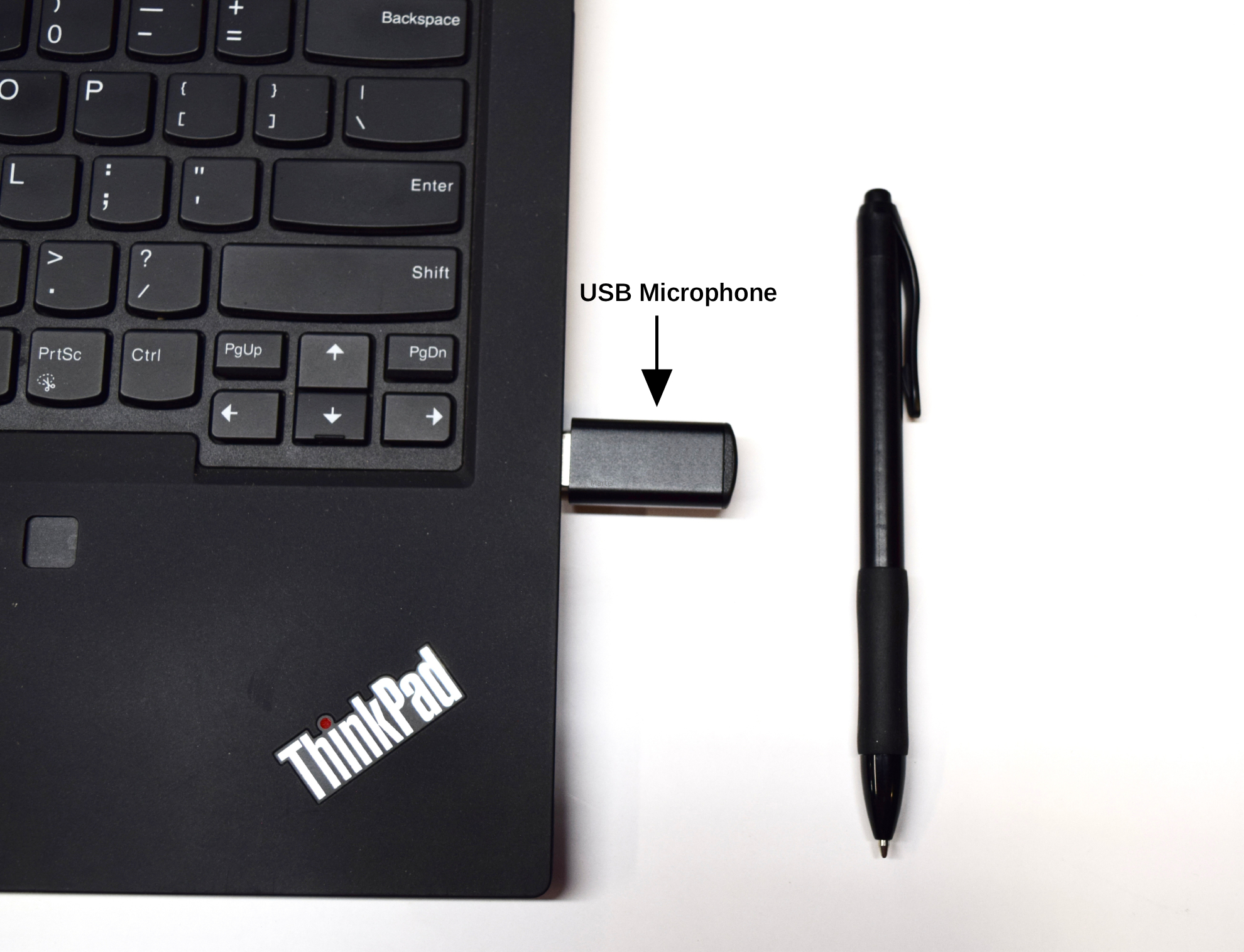
Direct-plug Court Reporter USB Micro Microphone beside a pen for scale
Court Reporter USB Micro Microphone. View Martel’s product details for SKU 22551.

A court reporter can have enough space for a laptop and still have nowhere sensible to put a microphone. The witness may be close to one side of the computer. The only available USB port may open toward an exhibit binder on the other side. In that room, two microphones that both connect to Windows can give the reporter quite different choices. The Martel Court Reporter USB Micro Microphone stays at the laptop port. The Elite HGM-USB lets the microphone head occupy a different part of the table. Decide where the voices will be, where a microphone can stay for the whole deposition, and how you intend to listen. Those three decisions usually narrow the purchase before you compare other specifications.

Start with the last ordinary thing the table must accommodate

At home, clear a table until you have approximately the space you expect in the deposition room. Set out the writer if you use one, the laptop in its working position, power and writer leads, headphones, and the papers you usually need. Now add the item that normally arrives after you finish setting up. It might be an attorney’s exhibit notebook, the witness’s document stand or the narrow tray on which someone places the originals. Try opening the notebook and turning three pages. An empty square beside the computer at setup may be the space a folder needs whenever counsel changes exhibits.

Mark the seats with slips of paper. Include where the questioning attorney expects the witness to look. A microphone directly beside one elbow can have an easy path to the attorney who faces it and a difficult path to a witness looking into the binder. Having the laptop and the witness on the same side of the table is not sufficient information. Sit where the witness will sit, lower your head as if reading and look toward counsel to answer. Observe which part of the setup now lies between your mouth and the possible microphone positions. Before buying, identify the spaces people can leave clear and determine which of those spaces give the microphone a useful position near the people speaking.

What each Martel model allows you to move

The Court Reporter USB Micro Microphone, SKU 22551, is a compact USB-A device. Martel describes it as less than two inches long. It draws power from the computer and does not require a loose microphone head on the table. Once seated in a port, the laptop determines the pickup location. A laptop move also moves the microphone. For a reporter working from a small side desk with a clear outward-facing port, those facts can make setup quite simple. Check the full length that protrudes on your particular computer, including any supported adapter you intend to use.

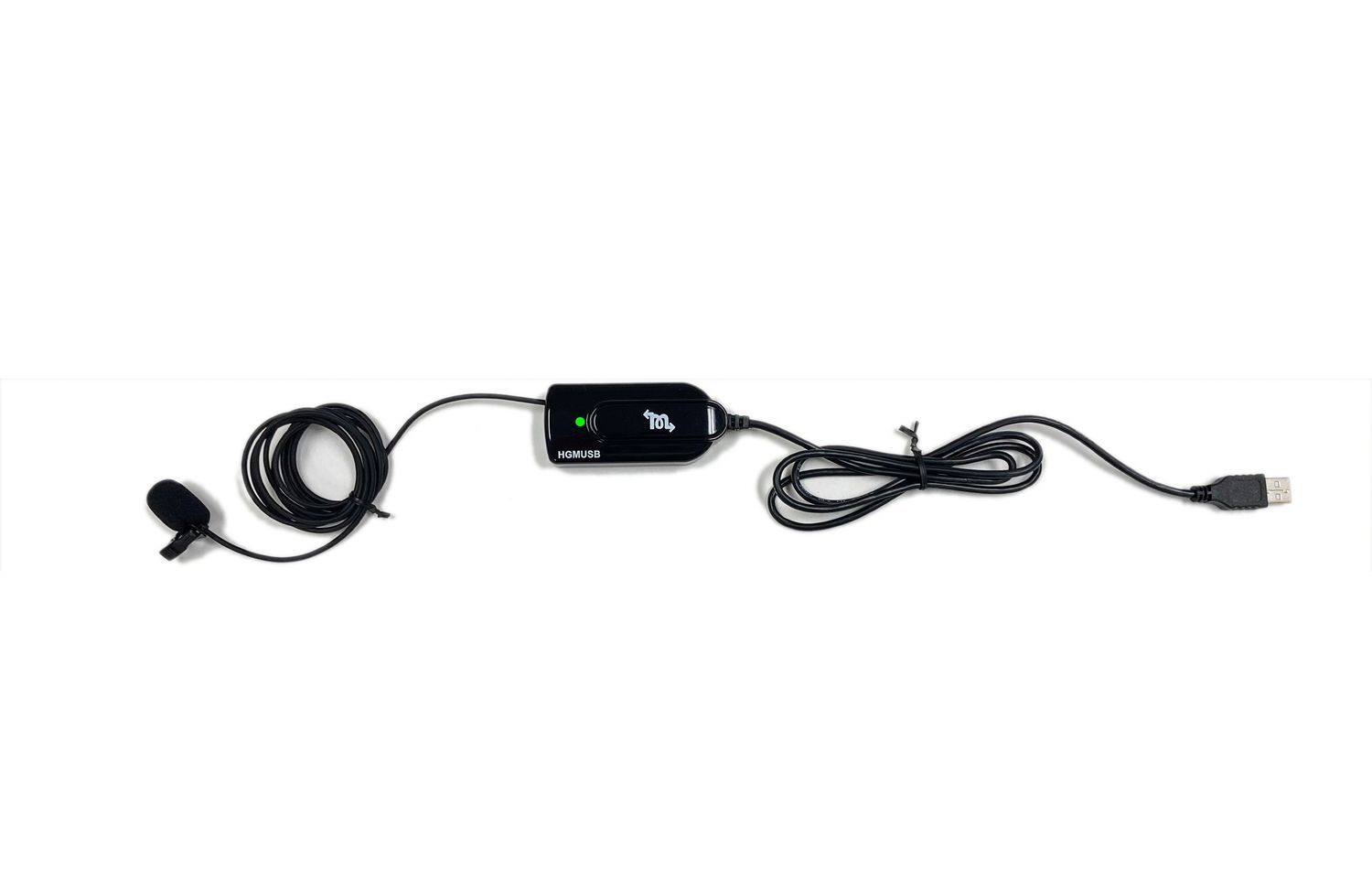
The Elite Court Reporter USB Microphone HGM-USB, SKU 1277, is also powered by USB. Martel lists a three-foot cable and describes the HGM-USB as supporting live listening with the appropriate computer audio setup. Its movable head can sit on the witness side of a laptop that the reporter needs on the attorney side. Three feet is a cable specification. A turn around a monitor base or a little slack near the connector reduces the straight-line distance available. Before treating a spot as reachable, lay a length of string along the intended route. Allow the laptop screen to open and the attorney’s exhibit pad to move. Measure the route left over after these normal movements. That usable distance is the one that helps you buy.

Look at the sides of the laptop, not just its footprint

Open the computer to the angle you use while writing. Face the front edge and identify the ports that are actually available after your essential equipment is connected. A direct-plug device may be compact yet occupy the only port on the side pressed against the wall. A free port near the power connector can appear ample until the charging plug is inserted. With a cabled microphone, a small connector still occupies a port, but the sound pickup can move away. A separate requirement is enough unstrained space for the plug itself, regardless of where the microphone listens.

Check port access again after plugging in the writer’s normal connection. Can you reach the microphone to disconnect it without disturbing the writer? Would a protruding device be near a chair arm or in the path of someone reaching for the exhibit book? Those are practical buying criteria. A direct-plug mic fits a sheltered edge well. If both edges are routinely exposed to contact, look for a layout in which ordinary movement cannot push on either connector. Never use the projecting microphone as a handle to shift the computer. When a laptop must move to another room, disconnect the mic before putting the computer in its case. Martel’s product guidance makes that last point particularly relevant to a short device that is easy to overlook.

Map the open route from each mouth to the proposed position

Set a small marker where the direct-plug microphone would be. Put a second marker where you could place the HGM-USB head. From the witness’s seat, look toward the two markers at normal eye level, then lower your head to read a document. Next, sit where opposing counsel would raise an objection. Between those seats and each marker, note tall screens, piles of folders or a partition. These observations do not predict the exact recording. They tell you which seated directions are important to include in a trial and prevent you from giving one mic an unrealistically easy test.

The moment worth reproducing is a turn in conversation. Counsel asks about a line in a document, the witness looks down to find it, and a second attorney speaks before the witness is facing forward again. If you test only a reporter saying the microphone name while leaning over it, both positions may sound perfectly serviceable. Neither result answers the question that made the purchase important. Invite two colleagues to alternate a short question and answer, then have a third give a brief correction from the side. Write down the words that distinguish the correction, such as a revised room number. You can then check on playback whether the microphone delivered that change in meaning.

Three deposition tables that favor different choices

Imagine a square table where the reporter and witness sit on adjoining sides. The reporter’s outward USB port faces the open center. Counsel has a thin notepad, and the witness uses a document stand that stays well away from the port. A direct-plug mic has an obvious place to try. Ask the witness to read a figure with the stand in its final position. If you understand the figure and the attorney’s question on the saved file, moving the microphone head adds a lead to manage without addressing an observed weakness. The direct-plug choice earns its place by passing the difficult exchange.

Now picture a narrow room where the laptop needs to stay on a small return beside the main table. The laptop screen protects the reporter’s sightline yet shields part of the path from the witness. Mark a point near the end of the main table within the actual cable route. A cabled HGM-USB candidate can use that point while the laptop remains on the return. Include the attorney at the reporter’s end in the test. A position that greatly improves the witness and loses the attorney’s first question is an unfinished setup.

A third room has a large central monitor on a stand that nobody can move. The laptop port faces it and the cabled head, even at full useful reach, would stay on the same side. In this case the purchase decision may depend on an alternative seat or a microphone system that supplies pickup on both sides. Ask about permitted furniture arrangements before ordering a longer chain of accessories. Write down the obstacle and the destinations available on each side. That gives Martel something concrete to evaluate if the two one-mic layouts leave an unresolved seat.

Compare the recordings at the same listening volume

Prepare two short practice exchanges. In the first, the attorney says, “Turn to card seven and read the last two words.” The witness says, “The entry says copper handle.” In the second, counsel asks, “Which envelope holds the photograph?” The answer is, “The one marked east stair.” These phrases were written for practice. Replace them if your helper knows the answers in advance. Give the listener only the question. A listener who already knows the phrase can fill in a missing syllable without realizing the recording was ambiguous.

Make a direct-plug sample with the laptop in its working spot. Record the same speaking positions with the cabled head at its proposed position, using the same application and preserving a similar speaking effort. Label the two saved files with plain identifiers. Listen through the same headphones at one comfortable setting. Write down the two target words or exhibit label before anyone reveals the script. An initial comparison can favor a louder file simply because it takes less effort. If the quieter file is understandable after a modest playback adjustment, record that fact separately. You have learned something about listening level. If an important word is still buried under paper or another voice, write down the specific collision. That points toward a placement decision you can change.

Check Windows and the reporting application separately

On Windows 11, open Settings, then System and Sound. Under Input, identify the external device that corresponds to the microphone you connected. Depending on the device and system, the label may describe a USB audio device rather than displaying the name printed on the box. Use the selected input’s test control and play its sample. If you are uncertain which device name belongs to the external microphone, compare the visible device list before connection and after connection while no job is open. Keep the label in your equipment notes. This gives you a reference if the reporting application presents a list of similar names.

Next make a new practice job in the CAT software you use for depositions. Select the supported input in that program and record two short remarks from opposite ends of the table. Close or finish the test according to the program’s instructions, reopen it, and listen where you expect to review a passage during transcript work. Windows may have captured its own test while the reporting program was using another input, or the program may have captured audio that you first tried to play through the wrong headphones. Separate those observations. A successful purchase means the expected recording is available at the point in your work where you need it.

Decide what live listening must do for you

Some reporters listen to the room with their own ears and check a short saved practice recording before starting. Some want to hear the microphone feed through headphones as they work. The direct-plug Micro Microphone has no headphone jack and Martel does not list live listening as a feature of that model. It still makes sense to listen to a saved file afterward through the computer’s normal playback device. If hearing the mic during testimony is part of your working method, give Martel that requirement before choosing. The HGM-USB supports a live-listening workflow. Check the connection diagram for the version you will receive and rehearse with your laptop.

Listen for something a colleague says across the table, then for the same words in the saved practice job. A monitoring path can sound different from playback because the two use different controls. Headphone volume is a listening adjustment. Changing it does not establish that the recorded signal has become stronger. If you hear a delayed version of your own voice, remove the headphones to compare direct room sound, then review one captured sentence. Resolve monitoring behavior with the exact equipment before the proceeding. It is a poor buying experience to discover after a full day that the feature you expected belonged to a different USB mic or a different software setting.
Give each cable a job and a place

A cabled mic solves a particular problem when you need to put the listening point somewhere other than the USB socket. Route its lead along a stable part of the table so both ends are relaxed. Place the microphone where you can describe it to a colleague, such as beside the front corner of the witness’s document pad. Have someone slide the pad toward the witness and return it to counsel. A neat-looking cable path under that pad can drag the head or transmit a scrape precisely while the witness reads. The route deserves the same trial as the original pickup position.

With the direct-plug mic, remove the cable route from the drawing and add a small clearance zone around the laptop edge. Ask yourself who can reach across that zone during normal use. A small notebook to the side may serve as a visual reminder if the mic remains exposed and the notebook has a legitimate place there. A stack of folders blocking the microphone to protect it defeats the buying reason. If you cannot reserve safe clearance, the short device can still be the wrong physical fit. Conversely, if nobody can give a cable a reliable path, the cabled model can be a fine microphone for a different room.

Test ordinary interruptions during a practice exchange

Set a clean printed exhibit in front of your helper. Have counsel ask when an imaginary package was received. As the witness replies, turn the page exactly as a person searching for a date might turn it. Ask two listeners to write down the date, then compare what they heard. In a second take, move the paper instead of moving the microphone. If both listeners recover the date, arranging the documents may solve the problem at that table. In a third take leave the paper where the witness needs it and move only the cabled head within reach. You now have evidence about which change is practical when people need to keep using an exhibit.

Try one more ordinary action from the reporter’s seat. Write or type at the pace you expect while the helper speaks. Listen for the amount of the answer masked by the action. A brief clear tap between words is different from a run of sounds that hides a surname. The direct-plug device is mechanically attached to the computer. The cabled head lets you try another surface or location supported by its design. Neither fact proves the result in advance. Use the actual typed and spoken practice passage to find out whether separating the microphone from your work area buys clearer words.

Work out the useful reach before choosing an accessory

Suppose the available path goes 13 inches along the rear edge of the computer, another 10 inches around a monitor base, and 8 inches toward the proposed space. That is a 31-inch route before allowing for relaxed connectors. Against a three-foot reference, the remaining five inches are a small allowance. These are invented dimensions to illustrate a visit with a tape measure. Measure from the actual connection points and allow the device to sit naturally. If a cable pulls when someone nudges the table or adjusts the laptop angle, call that location out of reach for your layout and try a closer one.

Changing to a hub or extension also changes the equipment being evaluated. A short adapter on a USB-C-only laptop may make a compatible USB-A device usable, yet adds physical projection at the side. The current HGM-USB listing describes USB and USB-C arrangements. Check the supplied parts for your exact package. For a new accessory, record a short file using the final chain, reopen it, and repeat after reconnecting before travel. If an accessory introduces an intermittent problem, compare a supported direct connection as a diagnostic step. Purchasing the least complicated arrangement that reaches the microphone’s useful position saves time every time the laptop is unpacked.

Leave the decision with a reason someone else can understand

Write one sentence about the direct-plug candidate and one about the cabled candidate. A useful direct-plug note might read, “Left port faces the witness, binder clears it, and three spoken exhibit labels remained understandable when I typed.” A useful cabled note might read, “The reporter’s side table is behind the monitor, so the head must sit on the main table near the witness.” Both notes identify what the buyer wants to repeat next time. A conclusion such as “The larger one sounded professional” gives you no test to reproduce in another room.

When you contact Martel through the relevant product page, supply your laptop’s available port type, the expected seating, the reachable microphone position and whether live listening is essential. If several reporters share a deposition room, describe how their laptops differ. For the reporter who repeatedly sits near the witness and values quick packing, compare the USB Micro Microphone first. For the reporter whose laptop position is dictated by the writer, display or power supply, compare the HGM-USB where its head can reach a better seat. If neither arrangement passes the speech test at every required position, explain which seat failed before choosing a more distributed setup.

32 questions and answers

1. Which one would you try first for a reporter who always has the same seat?

Inspect that seat with the actual laptop open. If an available port faces an unobstructed speaking area, the direct-plug Micro Microphone is a sensible first trial. Include the quietest expected witness position and the attorney who sits beside you. If the port ends up behind a display every time, try the cabled HGM-USB at the first open position within reach. Predictability helps only after you identify what that fixed seat actually offers.

2. What if I alternate between a large conference table and a tiny side table?

Write down a separate minimum test for each space. The conference table might require speech from a person across the exhibits. The side table might require a route around a screen with no loose cable across a walkway. Ask whether the same microphone setup passes both tests. If you can adjust the HGM-USB head for each room, document both positions. If the direct-plug unit happens to work in both, your packing routine can stay simpler.

3. Is the USB Micro Microphone built into the laptop once I plug it in?

It remains a separate external input. That distinction matters if Windows or your reporting software lists both the laptop’s built-in microphone and the external one. Use a disposable recording, select the external device and make a sample near the side port. Give the built-in microphone a different device name in your notes if the system identifies it clearly. You should be able to say which input a saved practice job was intended to use.

4. Does a direct-plug mic need a tabletop stand?

The Martel Micro Microphone is designed to plug directly into a compatible computer port. Its stable position comes from the supported connection. If the purchase depends on placing it in the middle of the table while the laptop remains elsewhere, you are describing a different arrangement. Compare the cabled model and its supported reach. An improvised stand and a pile of adapters can consume the space you wanted to save.

5. Would a left-hand USB port make the audio come out of only my left headphone?

The side of the computer describes the physical position of the microphone. Headphone channel behavior is determined elsewhere in the recording and playback path. If a practice file plays through one ear, first try a known recording on the same headphones. Then test the job in the intended player. Keep notes on both results. Moving the laptop to the other end of the table will not address the channel assignment of an existing file.

6. Can I use either of these USB mics directly in my steno writer?

These two products serve a computer USB recording path. A writer’s microphone socket is a different destination with its own requirements. Identify the receiving device before ordering. Reporters who write on a machine while recording on a Windows laptop can use a laptop microphone for that computer recording. If you also want a recording saved on the writer, check its model-specific microphone options and test that separate recording path independently.

7. Can two people compare the same file without sitting together?

Yes. For a rehearsal, give both listeners the same authorized practice file and a sheet with two blank answer spaces. Ask them independently to write the exhibit label and the correction at ordinary playback speed. Comparing answers is particularly useful when the recorder operator also wrote the practice script and knows what to expect. If the other listener hears a different number, repeat the passage with fresh wording and a small placement change.

8. What if the laptop runs with an external keyboard and sits on a stand?

Put the laptop stand at its real height and open the screen to its working angle. A port that would face the witness at table level may sit behind a display or above a seated speaker on the stand. Test with the external keyboard operating at normal speed. Also allow for the keyboard lead or receiver. The cabled head can occupy a lower position if that location is suitable, stable and within its usable reach.

9. Does the HGM-USB’s cable give me three feet in every direction?

Three feet describes the listed cable length. Intermediate turns, the position of the interface and slack take part of that length. Try a piece of string along the permitted route and mark where it ends with relaxed connectors. If the only workable position would require pulling against a port, moving a monitor or crossing an active writing area, measure another path. Cable length does not by itself create an acceptable spot for a microphone.

10. If a microphone says it hears all directions, why does it matter which way counsel faces?

A person turning toward another attorney changes the sound reaching the mic. A screen, book or partition can alter that path, and other sounds keep arriving at the same time. The pickup description concerns the microphone’s response around its location. A practice sentence spoken toward the reporter and another spoken toward a document can sound quite different. Use the second, more difficult direction when checking whether a particular setup suits your jobs.

11. Is the smallest model also the quietest around a keyboard?

Physical size does not establish the relationship between keyboard noise and speech. A small device attached to the laptop may sit near a source of typing noise. A cabled head can move away from the keyboard, although a poor new position beside an attorney’s papers may replace one disturbance with another. Listen to a recorded answer while typing as you normally do. Choose the position where you can recover the answer reliably.

12. What should I do if a deposition table has a cable well in the middle?

Find out whether that space is available for portable equipment and whether people open the lid or move cables during use. A microphone recessed in a compartment may have a very different acoustic path from one sitting in the clear. Try a supported position beside the well instead, subject to the room’s rules. Record from both ends of the table after placing the exhibit binders. Account for anything that could pinch the mic lead when the cover closes.

13. Should an agency buy the same model for every reporter who uses one room?

Start with the room and the mix of computers. Staff may use different port types, laptop stands or writer connections. Ask each representative setup to complete the same short deposition practice scene. One direct-plug unit can be very convenient for one screen orientation and inaccessible for another. If the agency selects a cabled mic, leave a photo or sketch of its tested head position and a note indicating which input the reporter should verify.

14. How do I compare setups if the reporter is the only person available today?

Record a practice job with pauses long enough to walk to three marked seats. At each, face the direction its occupant would face and say a different pair of invented words. Then listen at your desk. This first pass reveals obvious obstructions and distance problems. Schedule a second trial with someone typing or turning pages while another person speaks. One person alone cannot recreate the simultaneous activity that often distinguishes the two layouts.

15. Can I infer placement from the loudest recording?

A loud voice at one seat can dominate your impression of a file. Write down whether a quieter answer from another seat remains understandable, especially a final consonant, number or correction. If you must turn playback very high, bring it back to a comfortable level before the closer person speaks. A layout that obliges you to chase the headphone volume from one speaker to another may warrant a better physical position.

16. How would a clear protective partition change this purchase?

Include the partition in the decision from the beginning. A direct-plug microphone stays on the laptop’s side. A cabled head might be permitted on a different side, but its cable route and the position of the questioning attorney still matter. Test a full exchange across the barrier with normal seated voices. If no permitted single position captures both sides adequately, record exactly which voice needs another pickup point and discuss the room with Martel.

17. How can I distinguish a noisy room from a problem caused by an exhibit binder?

Make a short sample while people are silent, then a spoken sample without moving the binder. In a third take, have someone turn its pages during a different spoken line. Listen for the timing of the interference. A steady background present before a page turns points toward a different change than a scrape exactly on a date. Try moving only the suspected item or the microphone. Keep the surrounding conditions as similar as possible.

18. Do I have to use maximum input volume to give the direct-plug model a fair trial?

Use a reasonable operating level for the actual device and application, with room for a nearby attorney to speak emphatically. An extreme setting can make a close voice unpleasant while preserving the basic distance problem at the far seat. If you change recording gain for a second trial, identify it in the file name or in your notes. A comparison is easier to interpret when you know whether location, input level or both changed.

19. What does a green indicator on the HGM-USB establish?

The product listing identifies a green recording indicator. Use it as an observation about the connected equipment. To establish that an attorney’s answer reached the job you will review, reopen a saved practice recording and find that answer. A reporting application can have a different source selected even when connected hardware is powered. The useful note is the conjunction of a visible indication, the intended input selection and intelligible saved speech.

20. Why should I try the laptop on its charger as well as on battery?

Many reporters use the wall supply for long sessions and unplug temporarily during setup or a room change. The charger, cable and nearby power outlet also occupy space that may have seemed available for a microphone. Test your usual powered arrangement with all ordinary connections fitted. If you hear a disturbance only under one arrangement, write that down and use supported equipment for further diagnosis. Keep charger behavior separate from a microphone’s model rating.

21. What if I can hear live speech but the saved job is silent?

Return to the recording application and verify that its practice job had audio recording enabled and used the intended source. Check that playback is going through the headphones or speakers you selected. Use a newly named, short file with an unmistakable spoken phrase. If Windows captures that phrase but the job does not, the microphone has demonstrated a working path into Windows. The remaining question concerns capture, saving or playback in the job.

22. If both microphones use USB, will my meeting app automatically send the correct audio?

Each application can have its own microphone selection. For a hybrid proceeding, check what the remote participant hears in a mock call, as well as what your recording program saves. A room mic can capture local speech beautifully while a remote voice delivered only to headphones follows another path. Comparing these two laptop mics addresses local pickup. Document the remote return path separately if a hybrid deposition is part of your normal workload.

23. Can I keep a direct-plug mic in the port between jobs if the laptop stays on its cart?

Look at how the cart moves. A short projecting device can catch a doorway, cable or operator’s hand even if the laptop is never carried in a bag. Disconnect it for moves where the connector could take a sideways load, then reconnect and identify the input before the next practice check. For a stationary desk, keep the port clear and give the microphone an open path to the people speaking.

24. How do I compare the two with a witness who reads quietly from a screen?

Ask a helper to read a short line from the screen at a comfortable level, then answer a separate question while facing counsel. Use the same screen height and seating direction for both microphone arrangements. Listen for endings and numbers in the reading as well as clarity in the spoken answer. A mic position can work well for face-to-face answers and poorly for a person looking down. Both are ordinary deposition behaviors.

25. What does a court reporter gain by using matched practice files?

A pair of comparable files lets you revisit a buying decision after the equipment has been put away. Use short, invented material and meaningful file labels. Include the microphone model, the position and what changed between takes. Months later, if you receive a different room assignment, the files can remind you that a cabled head helped when the monitor blocked the port, or that the direct-plug sample was clear at your regular side desk.

26. Should I select the cabled model solely because I might need more microphones later?

Read the exact product and expansion options with your destination in mind. This comparison concerns how a single laptop microphone occupies the reporting desk. A future system with several heads introduces equipment, connection and recording questions of its own. Write down how many separated speaking positions need coverage, whether the computer must see one input and how you expect playback to work. Use that description to compare actual supported packages.

27. How can I avoid confusing a mic’s size with privacy?

Choose equipment visibility to suit the authorized working environment and explain the recording arrangement through the normal proceedings workflow. A small plug is convenient around a crowded desk, but a microphone’s appearance says nothing about what is captured, where the file goes or who can hear a live monitor. For your own setup notes, describe its recording destination and the checked seats. Those facts remain important whatever the device looks like on the table.

28. The second attorney usually sits beside me. Is the far-end witness the only meaningful test?

Include the nearby attorney as well. A position directed toward the witness may leave a close voice very loud, particularly during an objection. Ask the nearby helper to interject one short phrase at normal emphatic volume, then have the witness finish a sentence. Listen for the start of the interjection and the return to the quiet voice. A layout that preserves both transitions is easier to review than one evaluated solely on a distant phrase.

29. Does a more expensive microphone automatically justify rearranging the reporting desk?

Price tells you little about whether the head can occupy a better position in this room. Identify the present failure in specific terms first. If the witness’s answer disappears whenever an exhibit comes between the laptop and the witness, a supported remote head position is a valuable feature. If all voices are already clear with an unobstructed direct-plug trial, the remaining decision may turn on live listening, available ports and daily packing time.

30. Which measurements are worth sending with an online product question?

Include the distance along the usable cable path, the side and type of the free laptop port, and the location of the quietest required speaking position. State whether the laptop can move and whether you need live listening. A simple room sketch made with invented labels often explains more than the statement “the room is small.” Leave out testimony and personal details. The purpose is to identify the physical configuration of the reporter’s equipment.

31. What if both microphones sound fine to me?

Return to handling and repetition. Time how long it takes to set up and safely pack each model, see how easily the connector clears a nearby port, and check whether you need to hear the feed live. Repeat the harder speaking position once with someone handling papers. If the saved speech remains acceptable on both, prefer the arrangement that fits your actual desk routine. You have evidence for that choice even without an audible winner.

32. What single question best settles the buying decision?

Ask where the pickup point must stay while you do everything else a deposition requires. If the answer is “right beside the laptop port,” the Micro Microphone deserves a close look. If the answer is “on the witness’s side of the screen while the computer stays here,” try the HGM-USB and measure its path. The place that passes a realistic saved-file test gives the product choice a practical purpose.

Martel equipment and related guides

Court Reporter USB Micro Microphone · SKU 22551

HGM-USB microphone with its USB interface and connecting cables
Elite Court Reporter USB Microphone HGM-USB. View Martel’s product details for SKU 1277.

Elite Court Reporter USB Microphone HGM-USB · SKU 1277

This article is for educational purposes only.