TIME IS RUNNING OUT FOR 2026 TAX WRITE-OFFS

The Judge Sounds Clear Over the PA. Is Your Courtroom Mic Recording the Bench?

Trace an authorized bench voice through the courtroom loudspeaker, reporter microphone, recorder and saved file. Diagnose missing words before changing equipment.
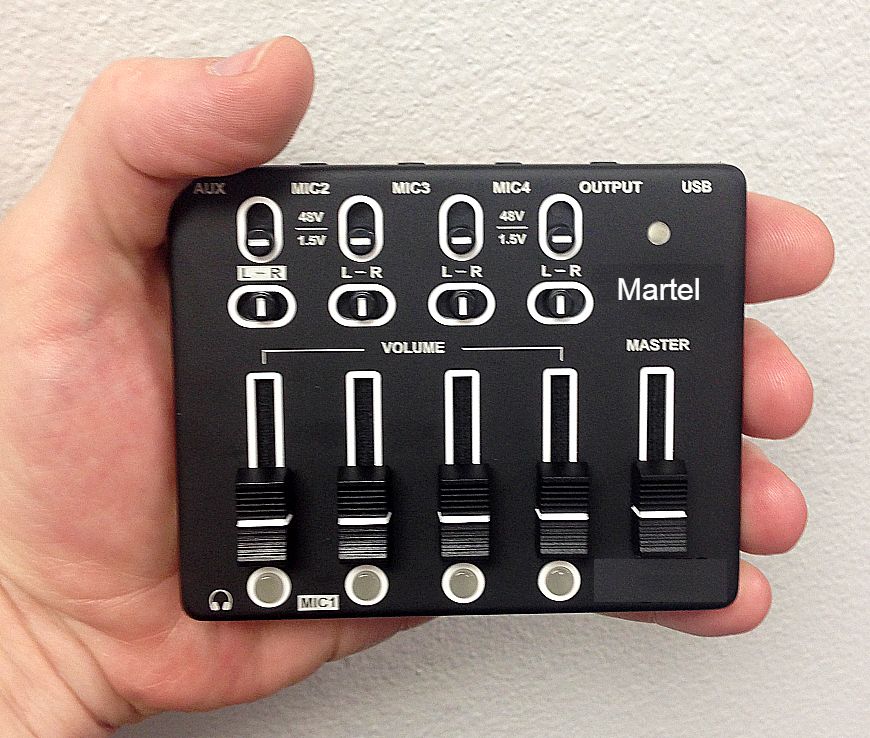
A hand holding Martel’s four-input Ultimate Court Reporter Microphone Mixer
Ultimate Court Reporter Microphone Mixer. View Martel’s product details for SKU 1179.

You can sit through an entire hearing hearing the judge clearly and still open a recording in which the bench sounds distant or absent. The courtroom loudspeakers deliver sound to listeners. Your recorder saves whatever reaches its selected input. To answer whether the judge reaches both, use an authorized practice statement at the bench, a different statement at counsel's position, and a saved file you can reopen at the reporter's desk. The difference between those two voices tells you where to look next.

Draw two paths beginning at the judge

On one line, write how the judge's voice reaches the people in the room. That might include an installed bench microphone, a court-controlled audio system, loudspeakers and the air between a loudspeaker and the reporter. Add a question mark wherever staff have yet to identify a component. The reporter usually needs to understand the service available at the desk far more than the model number of the equipment in a locked cabinet.

On a second line, write how bench speech reaches the reporter's file. Possibilities include a court-approved feed, a supported connection from the reporter's own microphone mixer, or an approved room microphone collecting speech from its physical position. Finish the line with the actual receiving application or recorder and the saved job you expect to review. Note which parts, if any, are shared with the first line. The same bench microphone can be part of both paths while subsequent routing differs.

The Central District of California's descriptions of its courtrooms identify microphone positions at places such as the bench, witness stand, lectern and counsel tables. A Minneapolis federal courtroom manual describes voice reinforcement equipment and several installed microphone locations. Those descriptions show the kinds of arrangements a reporter can ask about. Obtain the details for the specific room from its own designated staff. A public description of a building does not establish which feed has been assigned to your desk today.

Give each speaking position a reference that can survive review

Use two different, neutral practice statements for the initial check. For the bench position, try a short direction about an imaginary file. For the counsel position, use a response with a date or a color. Give one person an ordinary voice at the approved bench speaking point and another a normal reply from counsel's area. Arrange any test involving court fixtures through staff. An unassigned reporter should not sit at the bench or operate installed controls to stage a demonstration.

An example sequence is “Place the yellow sheet under the map” from the designated bench source, followed by “Counsel has the blue sheet dated Friday” from the second position. A listener should be able to distinguish the directions, color words and date. Write down the exact cues before listening. This prevents someone from interpreting an indistinct word as yellow simply because that was the expected color.

Finish with a short return to the bench source. This reveals an arrangement that works once and then drops the bench after a different speaker takes the floor. Keep the artificial labels in practice material only. The point is to reproduce the sequence of a bench direction, a response and a follow-up without using an actual proceeding for experimentation. A test that verifies both voices tells you more than letting a meter run while one person speaks beside the laptop.

Determine what the reporter actually hears in the room

From the assigned seat, notice whether the judge seems to come from the bench, an overhead loudspeaker, a wall speaker or a personal listening device. The same listener may hear a mixture of direct and reinforced speech. A volunteer close to the bench may report excellent clarity even though the reporter at the far side depends largely on room amplification. Ask staff for the location and function of any designated reporter audio output rather than inferring it from the seat with the loudest sound.

When allowed, listen to the practice phrase through the reporter's approved headphones as well as in the room. Record which device drives those headphones. A connection to a mixer, a receiving interface, a computer and a separate recorder can yield different listening results. If headphones are monitoring an input before the application saves it, a clear headphone signal supports that particular part of the path and leaves the later stages to be checked.

Keep the room's sound controls in their established state. The person assigned to operate a court system can arrange a suitable test of an available feed if needed. Work on the controls that actually belong to your setup. A successful diagnosis can be as simple as discovering that the clear voice in the reporter's ears is coming from the installed PA while the portable recorder has only its internal microphone selected.

Reopen the precise file the job created

An open recording window, elapsed timer or saved filename can all be genuine, yet none identifies by itself which voices were captured. End the authorized practice recording using the normal method for that device. Reopen the file or practice job in the tool used for review. Use the first few words to distinguish the new take from a training file with a similar name. If the system records within a reporting job, check from that job as well as from any separately exported audio you intend to use.

Play the bench cue, counsel cue and bench return at a consistent, comfortable volume. Write a simple finding for each. Useful findings include “full sentence and final direction clear,” “speech present but color uncertain” and “no recognizable response in expected interval.” Those statements preserve an important distinction between a missing signal and speech that is present but difficult to decode. Keep any uncertainty explicit.

If the file opens with the wrong cues, resolve file identification before changing hardware. A backup recording or an older export can have a different input and creation time from the active job. Check its beginning, its end and an internal reference point. The aim is to establish the contents of one known file. A microphone purchase made to correct a recording from yesterday's setup cannot improve an otherwise working arrangement at today's desk.

Work through four different findings

If both bench and counsel are clear, note their positions and recording paths. This is a useful baseline for a comparable setup. Include any tested return after a pause. If the bench is clear but counsel is weak, examine the answering location and its relationship to the receiving microphones. A reporter who looks only at the strongest bench speech may miss exactly the voice the opposing side needs to hear on review.

If counsel is clear but the bench is absent, ask which authorized input carries the bench and whether that input reaches your recorder. A personal mic near counsel can account for this result without a fault in the courtroom PA. An authorized mix might also include some voices and omit others depending on how the system is operated. State what the file contains and ask the responsible staff about the available source. A good first question concerns the missing voice, rather than a diagnosis about a broken amplifier.

If both voices are present but the bench sounds far away or doubled, consider the acoustic path between a loudspeaker and the reporter's mic and any additional source of the same voice. Ask whether the recording receives direct speech, reinforced speech, an authorized electrical feed or some combination. Compare permitted arrangements individually with neutral material. Treat the latter findings as possibilities until the comparisons show which path produces the effect.

Establish whether a court-provided feed is appropriate

Identify the person responsible for the available output, the intended recipient and the approved use. Ask which voices the feed contains during the portion you are assigned to report. Ask whether its state changes when the room changes modes. If an electrical connection is appropriate, obtain the output characteristics and connector requirements from the staff or documentation that governs the system. The plug's shape by itself does not tell you the signal level, permitted load or compatible recording input.

Compare those requirements with your recorder or interface. A mic input, line input and headphone output perform different functions. A cable that fits at both ends is insufficient evidence that the signal is suitable. Do not attach equipment to court speaker wiring or an unassigned panel. Staff can provide a designated output or direct the reporter to an alternative. A clean, authorized source and a compatible input are worth far more than a collection of unknown adapters.

Once a suitable connection is agreed, settle the destination question with the two-voice test. Check for the complete bench cue, counsel reply and bench follow-up in the final file. Record whether the same source also drives a monitor. If the feed provides only the bench, the reporter may still need an approved method of collecting counsel and witness speech. Decide how the assigned system will receive those voices before assuming the remaining problem is solved.

Test a portable mic as an acoustic pickup

When a reporter uses an approved room microphone, identify what face or loudspeaker serves as the main sound source for that mic. A tabletop pickup near the reporter may hear the furniture, nearby counsel, HVAC noise and the room's loudspeaker at different strengths. It can produce a lively file without delivering crisp speech from the bench. Position it as allowed and check a complete sentence spoken from the authorized bench position.

Compare two permitted microphone locations using the same pair of cues. In one, the mic may be nearer the questioner but farther from the answering attorney. In another, a loudspeaker may be prominent enough to cover a quiet local reply. Give each take its own file or clear working label. Do not turn the courtroom system up and down yourself to find a desired result. A reporter's physical placement test can often isolate the decision without involving court amplification controls.

If a location closer to a loudspeaker helps the judge but makes nearby consonants harder to distinguish, document the tradeoff. A separate approved pickup for local speech may be appropriate. So may an authorized feed for one part and a local source for another, if the equipment and staffing support that arrangement. Evaluate the full combined output before calling it an improvement. Two individually clear sample paths can sound different when both enter one recording.
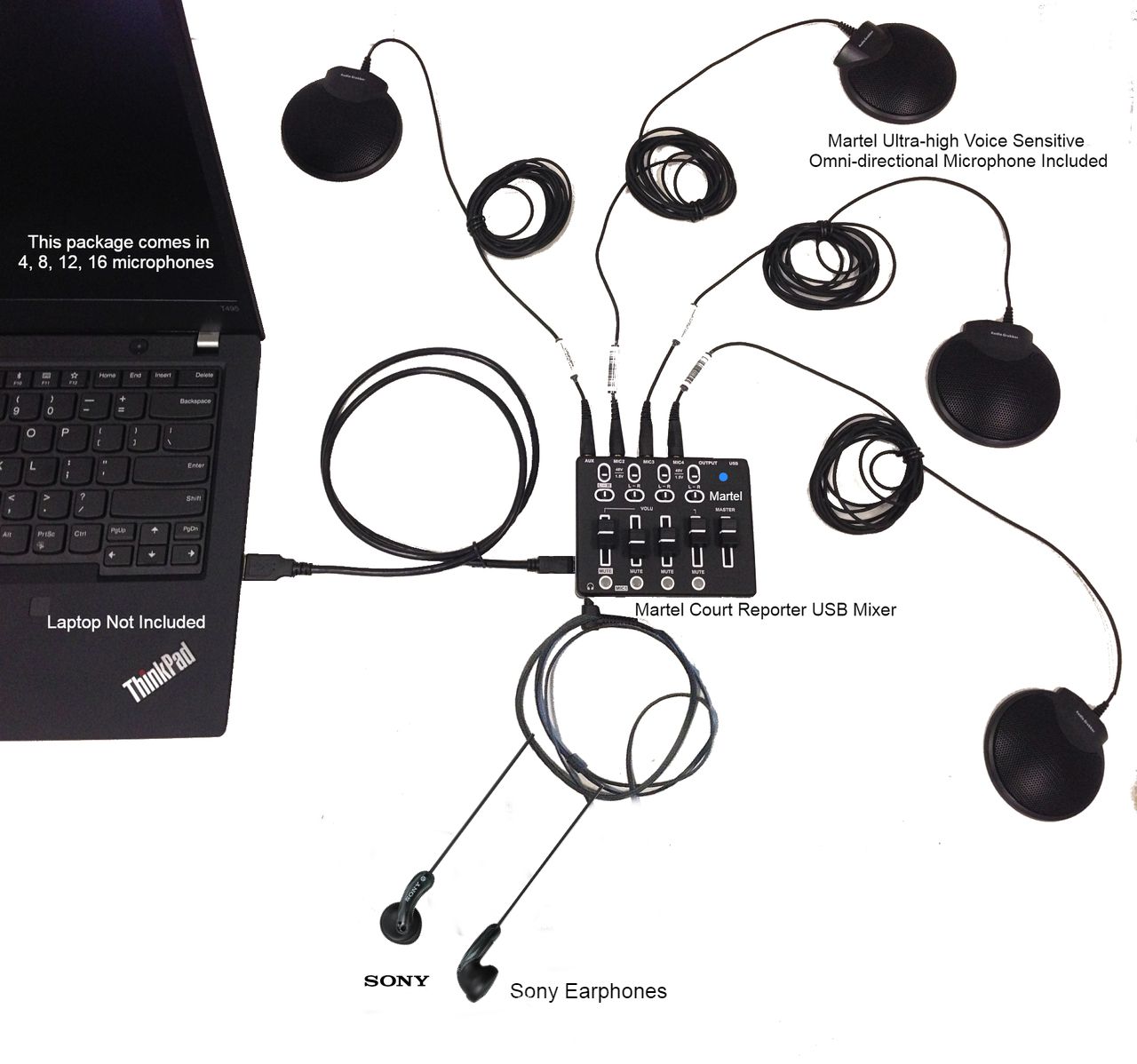
Evaluate a Martel mixer in the actual signal chain

Martel's Ultimate Court Reporter Microphone Mixer, SKU 1179, lists four microphone inputs, monitoring and outputs for a suitable laptop and recorder arrangement. It is useful to consider when the reporter needs to combine several compatible microphones and send their sound to the recording equipment. It is not a universal converter for every court-installed feed. Establish the match between the proposed source and the mixer's supported inputs before assigning that source to a channel.

The Martel Court Reporter Mixer Recording System with microphones, SKU 12, includes a microphone arrangement in addition to the mixer. Its listing describes individual mic-level adjustments, a USB output and an output for a compatible backup recorder. Compare actual package contents and selected options before ordering. A reporter with suitable room microphones already in service may need different components from a reporter who has no approved pickups for the necessary positions.

In a rehearsal, label an input by the speaking area it is intended to serve. Confirm by listening to a distinctive voice there. Then check what the computer saves through USB and what a second permitted recorder saves through its own connection. Do this independently at each endpoint. A four-input physical mixer need not create four independently selectable recorded tracks. A second output need not preserve a missing upstream source. Buy for the path you can trace from the bench to the actual file you will use.

Interpret loudness, distortion and echo as separate observations

A low voice is not necessarily distorted. A file can contain quiet but intelligible words that play back more comfortably at a modestly higher listening level. A harsh, flattened or broken-sounding peak may remain difficult to understand even when playback is turned down. Record descriptions separately. “Only the bench's loudest syllables sound rough” is a different observation from “the whole bench sentence is faint while counsel is clear.”

Compare the earliest accessible authorized monitoring point with the saved output. If the rough sound already occurs before the reporter's recorder, changing playback software may have little effect. If the early monitor is clean while the recording is harsh, check the output-to-input match and levels on the equipment you administer. Work at ordinary practice speech levels and make one documented adjustment at a time. Setting everything to maximum creates an uncertain starting point for diagnosis.

A faint second version of speech suggests another line of investigation. A local microphone can hear sound from a speaker after the same words have arrived through a separate route. Software monitoring or an unintended duplicate source can create other effects. Listen to a short, sharply articulated practice phrase on permitted sources separately and together. Record which configuration introduces the duplicate. Avoid claiming a precise cause on the basis of a single memorable echo in the live room.

Check what happens at the start and end of a bench remark

A short ruling can begin while counsel is finishing or just after a pause. Include both timings in the rehearsal. After a brief silence, have the bench volunteer start a new sentence with an unexpected word such as “eleven.” Later, have counsel finish a question and the bench source respond promptly with a different number. The listener identifies both numbers and the last part of the preceding sentence, using only the recording.

If the first cue after silence is weak, investigate whether an input state, voice-activated function where present, or operator change may be involved. Use the instructions for the particular equipment to verify which functions are active. Do not adjust an unfamiliar court-controlled processor. If the difficulty occurs only during overlapping turns, examine pickup position, relative level and whether a spoken interruption can reasonably be distinguished from the other voice.

Keep a note of which timing condition caused the problem. A technician who hears that every sentence after a long pause loses its first syllable can try to reproduce something specific. A general complaint that the judge is quiet all day is less useful if the rest of each sentence was clear. The written observation should describe what you heard in a known playback file, how the test was arranged and which authorized route it used.

Preserve a separate account of each destination

Make a small endpoint inventory. A practice job on a laptop might have one file, a standalone recorder another, and an export for an authorized reviewer a third. Give each a distinct label showing where it came from. A computer receiving its signal from the mixer and a recorder fed by a second mixer output can save different results if their input choices differ. They can also share the exact same upstream fault.

Listen independently to the bench and counsel cues in each file you intend to rely on. If the primary job lacks the bench while a backup contains it, record the difference as a finding. Do not overwrite the original job or silently substitute an edited copy. Use the applicable practice or court procedures for how authorized recordings are identified, preserved or supplied. A technical comparison can be completed using copied neutral test material without changing any actual proceeding.

When a colleague is reviewing, send only material permitted for that purpose and specify which endpoint to use. A clear bench sentence in the operator's backup is of little help to someone assigned a different file containing only counsel. Verify that the receiving person opens the intended item and can reach the marked practice interval. Their successful playback narrows the remaining questions to hearing conditions or editing workflow rather than whether the source voice was present in that file.

Write a fault description that staff can act on

State the expectation, the observation and the point where the comparison changes. An example for a neutral test might read, “Bench, counsel and bench return audible in the room. Approved receiver monitor carries all three. Laptop job contains counsel and room noise. Handheld recorder on its separate connection contains all three.” That description directs attention to the laptop branch and its input. It does not claim to diagnose the sound system for the entire courtroom.

Identify what you changed since the last verified setup. Possibilities include a different USB connection, a recorder returned to its internal mic, a new application profile or an unfamiliar court feed. Some possibilities can be checked from your own equipment. Others require the court technician. Separating observed changes from suspected causes avoids unnecessary work and gives the next person a reproducible starting point.

Keep the approved setup note as a practical buying record as well. If the limiting factor is a missing authorized bench source, purchasing a mixer alone cannot supply that voice. If several suitable microphones already cover the speakers but there is no supported way to bring their signals into the reporter's laptop and backup recorder, comparing the Martel mixer may directly address the gap. The right recommendation depends on both the working sound path and the destination the reporter needs.

33 questions and answers

1. If everyone can hear the judge, why would the reporter's recording miss the bench?

The installed system can send a strong voice to the audience while the reporter's device records from a separate microphone or a different input. A personal mic may favor people near the reporter even when a loudspeaker makes the judge sound close to human listeners. Identify where the bench signal enters the reporter's own equipment and verify a distinct bench phrase in a saved file from that equipment.

2. What is a courtroom PA in this guide?

PA refers to the sound reinforcement arrangement that helps people in the room hear voices. Its source, controls, loudspeakers and other destinations depend on the courtroom. Some installed systems also provide a recording feed to the assigned reporter. Ask staff which functions and outputs are available. The aim is to establish whether the path serving the audience and the path serving the reporting job share any particular piece of equipment.

3. Which test should I do first if I can record only a brief sample?

With staff approval, obtain one distinctive phrase from the bench position and another from counsel, then save and reopen that practice take. Choose cues with a definite answer, such as two different colors or a distinctive date. A sentence spoken beside the laptop checks only that the laptop can save some sound. The two distant cues test the source distinction that matters for this particular problem.

4. Is a clear hearing from the reporter's seat evidence of a clean file?

It establishes how the reporter heard that remark from that seat in those room conditions. The saved file depends on the selected microphone, connections and recording application. If the reporter wore a headset, identify the device driving it before drawing conclusions about the recorder. A simple written comparison between room sound, desk monitor and file playback keeps these observations available without turning one into a claim about the others.

5. How can I check a court-provided output without changing court equipment?

Ask the designated person to identify the reporter output, its intended use and the sources it carries. Verify the signal requirements and connect only the receiving equipment approved for it. Use an agreed neutral speaking test and report what comes through your own monitor and saved file. If an installed route needs adjustment, the responsible operator can decide how to test or change it.

6. Why include counsel if my question is about the bench?

Counsel provides a reference that helps locate the fault. If counsel is strong while the bench is missing, the recorder is evidently capable of saving some useful speech. Investigation can focus on the particular source and route serving the bench. If both are poor, a common input selection, connection or file problem becomes worth checking. One reference alone cannot make that distinction nearly as reliably.

7. What if the court provides a feed containing the bench but no counsel?

Ask staff whether that is the intended output for the authorized assignment. Determine how counsel is supposed to enter the reporter's recording and verify that second source separately. The eventual setup might use an additional permitted microphone or a different designated mix. After staff and reporter confirm the arrangement, run the full question-and-answer test. A strong bench-only feed is a valuable observation and an incomplete two-speaker recording.

8. Can I use a courtroom loudspeaker connection as an input to a personal recorder?

Use only the connection designated and approved by courtroom staff for the purpose. Loudspeaker wiring, headphone connections, line outputs and microphone inputs perform different electrical jobs. A connector fitting physically is no assurance of suitability. Ask for the documented output characteristics and compare them with the receiving device instructions. If an appropriate output is unavailable, discuss the court's approved alternate method instead of adapting an unidentified connection.

9. Does an external microphone near the reporter capture the PA electronically?

A room microphone normally captures acoustic sound at its physical position. An electrical feed from a court system uses a distinct connection. A portable microphone may pick up reinforced speech from the loudspeaker along with local voices and room noise. Trace which route the recorder currently receives before comparing the results. Moving the mic changes its acoustic position. It does not create a designated electrical connection from the court sound system.

10. My headphones plug into a mixer. Which part of the recording does that prove?

They tell you about the signal available at that mixer's monitoring point. Consult the device instructions to understand what that point represents. The USB recording application or separate recorder may still use a different input downstream. Reopen a known job made during the headphone check and listen for the identical bench phrase. Agreement between the two provides a stronger basis for describing both stages of the setup.

11. How do I tell if the laptop is recording through its internal microphone?

Check the named input selected in the actual recording application and compare it with the device you connected. During rehearsal use one spoken cue near the approved external source and another near the reporter's desk. Record at ordinary levels without touching microphone capsules. A large difference between the expected and saved cues prompts an input check. Reopen a fresh take after correcting the selection rather than evaluating a file made before the change.

12. Could the recorder save the wrong source even though I hear the mixer?

Yes. A separate recorder can have an external connection and an input arrangement that still needs to be selected or configured. Check the exact recorder instructions, the cable path and the approved signal level. Use a fresh practice file at the recorder and another at the laptop. Label the endpoints. A good laptop recording or a good mixer monitor cannot establish what the independent recorder actually stored.

13. Is the HGM or mixer model enough to recommend a cable?

Identify both ends and the function of each connection. A mixer's mic input, USB connection and analog output are different routes even on the same product. The receiving writer, laptop interface or recorder adds its own requirements. Give Martel both exact model names, the authorized source description and the recording task. That information allows a more useful compatibility discussion than calling everything a courtroom audio jack.

14. What does the Ultimate Court Reporter Microphone Mixer provide?

Martel's SKU 1179 listing describes a multi-input microphone mixer with USB and 3.5 mm output options and a monitoring arrangement. It is worth comparing when you have multiple compatible reporter microphones and need an appropriate route to a recording computer or recorder. Verify inputs, cables and supported levels for the exact equipment. If the desired voice is missing from every approved source, a mixer cannot generate it.

15. When should I consider the mixer package that comes with microphones?

The Martel system listed under SKU 12 is relevant when both the microphones and the mixer are part of the gap. Map which benches or tables may host permitted pickups and where their signals must go. Compare the selected package configuration and current contents with that map. A kit that supplies several useful room locations can be a better match than a single replacement mic if the problem involves multiple separate speaking areas.

16. Does simultaneous USB and recorder output give me an independent backup of the bench?

It can provide recordings at two destinations. If both take the same mixer output arrangement, they may still share the bench microphone, its cable and the mixer. A failure before the split can affect both files. Verify a separate bench cue at each destination and document those common elements. That record helps the reporter decide whether the degree of independence actually meets the intended backup requirement.

17. Can I solo the judge after the hearing if there was a separate bench mic?

That depends on the recording hardware, application, routing and saved format. A physical mixer may have several inputs and controls even when the resulting file contains a combined mix. During practice, reopen a representative file and try the precise selection you need for review. If separate channel playback matters, make that a stated equipment requirement and verify it before relying on a particular arrangement.

18. What does it mean if the bench recording sounds far away?

A distant-sounding voice may be arriving acoustically from a room loudspeaker or an unfavorably located mic. It might also be present at a low relative level in a mix. Listen to other voices in the same file and check the approved source route. Test a different permitted position or appropriate source separately. A subjective impression of distance helps identify the problem to investigate but does not identify its electrical cause.

19. How can I distinguish a faint voice from a damaged loud peak?

In a practice copy, listen at a comfortable level and compare quiet and louder words. If speech remains recognizable when playback is raised modestly, the immediate issue may be relative level. If louder syllables sound rough even when played softly, investigate the signal earlier in the recording path. Preserve the original file and use observable descriptions when asking for technical help. One harsh syllable alone is insufficient to identify the stage responsible.

20. Why would I hear two versions of the judge at slightly different times?

The same voice could reach the recorder through both a direct source and acoustic pickup from a loudspeaker. Other routing or monitoring arrangements can produce similar impressions. With permission and support for the equipment, test the candidate recording sources separately using a short reference phrase and then in combination. Note exactly which configuration introduces the second sound. Avoid adjusting court-controlled systems on the basis of unconfirmed speculation.

21. Should I raise the gain until the judge sounds equally loud as nearby counsel?

First find how each voice enters the recording and compare the two in the same representative practice file. Adjusting a shared gain control raises any room noise and other voices on that path as well. A different approved mic position or separate input adjustment may better suit the setup. Retest both a quiet bench instruction and a louder ordinary response after each change. Equal loudness is less important than understandable words at both positions.

22. What if only the first word after a pause disappears?

Run a practice sequence with different opening numbers after short periods of silence and compare it with a continuous exchange. Confirm that the pattern appears in the saved file and identify whether a live monitoring point also loses the word. Review voice-activated or state-changing features only where the exact equipment provides them and you are authorized to do so. Report an installed-system pattern to the designated court operator.

23. Can I test by tapping the bench microphone?

Use permitted spoken reference material coordinated with courtroom staff. A tap, even if allowed, produces a sound with a different character from ordinary speech and may be unpleasant in headphones or the room. It also tells you little about whether the end of a sentence is intelligible. A short, distinctive phrase from the expected speaking position is better matched to the decision the reporter needs to make.

24. How does exhibit playback affect the bench microphone comparison?

A court system can route presentation audio and live speech differently. Hearing a video clip over the room speakers or in a saved file does not establish that a bench instruction immediately after it arrived by the same path. Use separate practice references for the clip, the bench voice and counsel's reply where that is relevant to the assignment. Describe the missing source precisely rather than grouping every sound heard in the room together.

25. What if the judge turns away from the installed microphone?

Note whether the problem occurs at that specific change of posture and whether it also appears in the designated reporter feed. At an appropriate practice opportunity, ask staff for an authorized comparison from a similar direction of speech. If a remark during a proceeding is hard to understand, follow the court's procedure for clarification. A later equipment test can show a repeatable coverage issue but cannot reconstruct words nobody captured.

26. A colleague says the exported copy is weak, yet the job plays clearly. What should I check?

Identify the exact export, its source job and a shared practice cue. Reopen both in the normal review software and compare the same point using consistent listening conditions. Channel selection, export choices or a file from another device can explain a difference. Verify the authorized reviewer actually received the intended version. Changing the court microphone based solely on a problem in one exported copy may introduce an unrelated new variable.

27. Does a clear authorized courtroom feed mean I can connect a second recording device?

Use the court's direction about additional equipment and destinations. Permission and compatibility for one input do not automatically extend to another device or to a new cable split. If a backup is approved, check that it receives a suitable source, then save and reopen its own practice file. Maintain the file identification and handling required for each authorized destination so the reviewer can tell which recording was supplied.

28. How can I handle a different courtroom the next day?

Carry the inventory for your own equipment and a blank copy of the two-path diagram. Ask staff about the actual room's bench microphones, assigned feed, recording method and available listening output. Recreate a short practice comparison if authorized. A known-good mixer, laptop and cable reduce the number of unknowns on your side, but a matching connector or similar courtroom layout does not prove the bench source follows yesterday's route.

29. How should the practice room be labeled during a training exercise?

Use roles and physical positions, such as bench position A, counsel position B and recording destination one. Keep real case names and materials out of reusable training files. Supply an answer sheet with the invented reference words and let someone other than the operator listen before seeing it. This structure teaches the distinction between being in a room where speech is clear and verifying a known voice in a particular saved file.

30. What should I report if only the jury-box loudspeaker seems clear?

Describe exactly where the speech is audible and which assignment-specific recording point is uncertain. Ask the responsible staff about the designated reporter output or approved microphone positions. A clear sound from one public speaker does not by itself say where the reporter may place equipment or what will be recorded. Rehearse the approved alternative from the actual reporter's position and listen to both bench and counsel cues.

31. What detail is most useful when asking Martel about a missing bench voice?

State which known bench phrase survived in the room, mixer monitor, laptop job and separate recorder file. Identify the exact mixer or microphone, receiving device and connection in each path. Indicate whether counsel survived in the same recording. These details tell a support person where the signal was last confirmed and what product or connection may need investigation. A neutral practice cue is sufficient for that equipment conversation.

32. How do I know whether the next purchase should be a microphone or a mixer?

A mic addresses a speaking area that lacks a suitable approved pickup. A mixer may address multiple compatible sources that need to reach the recorder together. An interface or different approved output may be needed if the source exists but is electrically unsuitable for the receiving input. Describe what your saved practice file proves about each stage. Buy the item tied to the missing stage and verify the complete arrangement again after installation.

33. What qualifies as a good result for the final check?

A listener can reopen the file intended for review and identify the bench instruction, the response and the return to the bench without consulting the prompt sheet. The reporter knows which authorized input supplied each voice, which device recorded it, and what the alternate destination captured if one is in use. Preserve that practical comparison so a later change in room sound can be investigated against a known working arrangement.

Martel equipment and related guides

Ultimate Court Reporter Microphone Mixer · SKU 1179

Four wired court reporter microphones and a four-input mixer laid out beside a laptop
4-Microphone Court Reporter Mixer System. View Martel’s product details for SKU 12.

4-Microphone Court Reporter Mixer System · SKU 12

This article is for educational purposes only.