TIME IS RUNNING OUT FOR 2026 TAX WRITE-OFFS

How Can a Court Reporter Cover an On-the-Record Sidebar From a Fixed Seat?

Follow an authorized bench conference from the bench-side mic to the reporter’s saved audio. Compare Martel sidebar receivers and rehearse the return to open court.
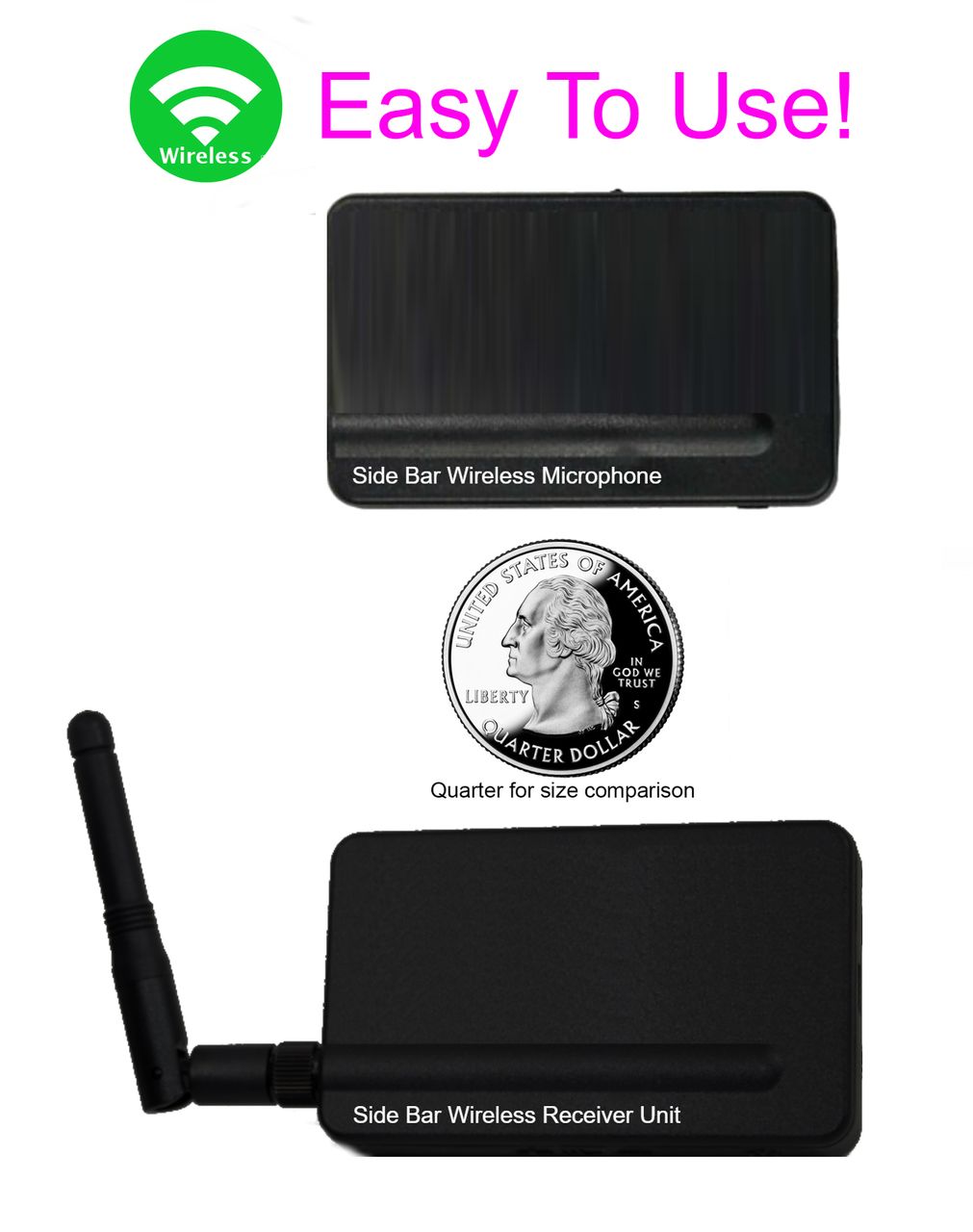
The Martel Sidebar wireless transmitter and receiver shown with a quarter for scale
Sidebar Wireless Microphone for Court Reporters. View Martel’s product details for SKU 1974.

A reporter assigned to remain at a writer can cover an on-the-record sidebar through the bench audio arrangement the court authorizes. First establish how the court wants that conference reported. Then follow an approved practice phrase from the bench microphone to the receiving equipment at the reporter's seat and into a reopened file. A wireless bench microphone can bridge a physical distance if the court permits it and the receiver matches the recorder. It cannot decide which conversations belong in the record or where the audio may be heard.

Find out what happens at the bench in this room

Ask the courtroom contact how a reporter at a fixed seat receives an on-the-record conference. Some rooms have a court-operated system. Others may permit an identified portable microphone at a designated position. A court may direct another arrangement altogether. Establish where each participant is expected to stand, whether someone operates a control at the bench, and how the shift from the open room is communicated to the reporter. Keep the answers specific to the current assignment.

A published example illustrates why this conversation comes before a purchase. The District of Minnesota's Minneapolis courtroom technology manual describes a system that sends masking noise into the courtroom during sidebars. The active setting for the public room and the arrangement for the responsible reporter serve different purposes. Ask staff about the approved reporter connection. Leave masking, room reinforcement and court routing controls to the people designated to operate them.

Find out who provides the direction that a particular conference is on the record and what to do when its status is uncertain. The federal judiciary's reporting program describes the framework for officially designated reporting methods. Local practice and the instructions of the presiding court govern the assigned work. A microphone located near the bench has no discretion to distinguish an authorized discussion from another conversation. That decision belongs with the court and its established procedures.

Assign a person to each action the setup requires

A portable system has two ends even when it travels in one case. The bench end needs an approved location and a person authorized to place or move it. The reporter's end needs a receiver, a suitable listening path where applicable and a connection to the destination that creates the recording. At a fixed seat, the reporter should know who can attend to a physical problem at the bench without an unexpected departure from the writer.

List the actions on a small practice sheet. Someone confirms the assignment. Someone positions the court-supplied or approved portable mic. Someone verifies the receiver or designated feed at the reporter's desk. Someone gives the cue for the return to ordinary proceedings. One individual can hold more than one of those roles. A role that nobody can fulfill is a gap even if the electronics are working perfectly.

Rehearse the sequence with neutral phrases. The person at the bench can say “practice conference begins” and the person at the usual open-room speaking position can later say “practice hearing resumes.” Those are training cues for testing the setup, not suggested formulas for the court to use. The operator checks whether the first and last words survive the changes in microphone state. If it takes a walk across the room to remedy a predictable issue, redesign the preparation with staff before the proceeding.

Locate the moment a voice changes paths

In the open room, an attorney may be clearly heard at the lectern. As counsel goes to the bench, the attorney leaves that pickup area. During an on-the-record conference the participants may speak more quietly and stand close together. The useful path may now be an installed bench mic, a court-provided feed, or an authorized transmitter near the speakers. When counsel goes back, the ordinary room setup must serve again. The transition deserves as much attention as the steady middle of the conference.

Draw three boxes on a practice sheet and name them open room, approved bench conference and open room again. Under each, describe the speaking position, the input expected at the writer or laptop, and the listening point available to the reporter. Circle any field whose answer is merely assumed. This map identifies the simplest question to settle before you test. It can also show when a single listening device stays connected while its underlying source changes.

Include a very short phrase just before the transition and another just after it. For example, use “folder nine stays here” at the open-room position and “folder eight opens first” at the bench. Put both in the same practice job if that matches the intended workflow. Hearing a clear bench conversation in isolation leaves open whether the first bench words, or the first open-room words afterward, disappear during the change.

Identify the destination before choosing a Martel receiver

Start at the piece of equipment that must produce a usable file. Is it a compatible steno writer, a standalone recorder with an appropriate input, or a reporting application on a laptop? Write down the model and the name of the physical recording input. On a laptop, also record the input selected inside the actual application. A USB socket can power an accessory or accept audio in a supported configuration. The presence of that socket alone does not describe the path the job will use.

Martel lists its Sidebar Wireless Microphone for Court Reporters as SKU 1974. Its product page describes a transmitter, receiver, monitoring connection and a recording cable. Compare the supplied connection with the input on the proposed destination. Confirm any required adapter for that exact setup. The common label “sidebar microphone” identifies the job it is meant to do. It does not guarantee that every recorder, writer or combination laptop socket accepts the same signal.

Martel also lists the Bench Conference Microphone, SKU 2001, as a USB version for laptop recording. The listing describes a USB interface and receiver monitoring. This is a useful comparison if the intended endpoint is a laptop reporting job. Check the actual sound input chosen by the application after the hardware has connected. If the reporter needs a second destination as well, sketch and verify that route separately before choosing either kit.

Choose a bench position around actual speakers and documents

When a portable mic is authorized, have staff identify the permitted surface and who may put it there. Establish the approximate gathering point of the people whose speech is on the record. The chosen position should be usable when participants bring papers forward, rest a file on the ledge or turn to address another person. Keep bench controls, staff documents and working space accessible. An unobstructed spot in an empty courtroom does not prove it will stay clear during a conference.

In practice, ask three people to use a permitted mock bench position. Give each a different invented item, such as a blue tab, an empty envelope and a page marked C. Have the first person ask about the tab, the second answer about the envelope, and the third correct the page label. Then change the order of speakers. Listening to three short turns exposes a pickup that favors only the person directly in front of it.

Compare another approved position if one exists. Avoid moving the mic during speech simply to chase each voice. A stable setup that consistently serves the group is easier for the reporter to evaluate. If a particular corner remains indistinct even at the best permitted position, give staff the observation. The court may have an established speaking arrangement for that space. A microphone adjustment cannot substitute for directions about how the conference will be conducted.

Understand the two jobs at the receiver

The receiver's first job is to receive the bench microphone's transmission. A recording destination then has to accept the receiver's output and store it. A monitoring jack may let the reporter listen at the receiving stage. Those functions are related but distinct. On Martel's standard sidebar product page, the recording connection is described separately from the receiver's headphone monitoring. The laptop USB model also describes live monitoring. Confirm the connections against the actual equipment supplied.

At the reporter's seat, trace one approved test phrase through each point available to you. If the receiver monitoring carries the phrase but the laptop job does not, start the investigation after the point where the signal was heard. Was the application listening to its internal microphone? Did a separate recorder expect another input? Did the operator reopen the file from an earlier test? This sequence lets you check a few plausible causes before blaming reception at the bench.

When the microphone at the bench and the reporter's regular room mic are both used in an approved arrangement, check both of their routes as configured. A good receiver signal can coexist with a missing room mic. A room recording can sound lively even when the bench path is absent. Use an exclusive reference phrase at each speaking position to distinguish them in the file. Do not assume that the two sources will appear on individually selectable tracks.

Plan how to hear the conference from the assigned seat

Identify the legitimate listening output intended for the reporter. A headphone plugged into the wrong socket may give silence, room playback or a different microphone. Follow the product labels and the court's routing instructions. If the reporter uses one device to monitor and another to record, label those functions in the practice notes. The recorder's apparent activity, including elapsed time or a moving meter, still needs a saved spoken reference before it tells you much about content.

Check listening level using neutral material before the conference and keep it comfortable. Ask whether the reporter must hear ordinary room instructions as well as the designated monitor. The balance will depend on the room, the approved equipment and the work method. Raising headphone level to compensate for a missing bench source can make the next loud room cue uncomfortable without bringing the desired words into the job.

Check the way live listening ends when the conference closes. Some reporters find a successful bench test followed by a missing courtroom question more disruptive than the original problem. Have a volunteer ask the first returning question promptly in the rehearsal. Then listen back to its first few words. If the operator needs to make a manual change, include that operation in the test while seated at the actual working position. A setup that requires three hands merits another look.
Conduct a short conference exercise with useful listening cues

Use an invented issue that nobody needs to recognize from memory. One helper says, “The plain folder belongs in tray two.” Another says, “Please move the striped folder to tray three.” A third asks whether the blue slip stays, and the reply is “only the yellow slip.” The listener's task is to recover two destinations and the correction without seeing the prompts. Give each person an ordinary conversational delivery and a natural direction of address.

Run the exercise from the court-authorized arrangement, or run an equivalent training version away from proceedings. Label the job and write down which input was active at the reporter's seat. Begin with a spoken cue at the regular room position, conduct the mock exchange, then restore the regular source and close with a different room cue. Reopen the recording and mark each expected voice, destination and change of speaker. Include a genuine “uncertain” option on the exercise sheet.

On a second pass, change one important detail. Swap the order of folders or put the third speaker at a different approved side of the mock bench. A listener who already knows the answer can unwittingly reconstruct words that were weak in the recording. A new prompt helps determine whether a slight equipment move really improved recovery. This is a comparison you can reproduce without using protected material or pretending a demonstration file is a court record.

Prepare the wireless components for the particular day

Check the supplied charging equipment, the transmitter and receiver condition, and the current product instructions before you travel. Begin with each component charged for the assignment and learn how its available indicators behave. Compare the approved positions with the usable path demonstrated in a practice room and again at the actual permitted location. Furniture, equipment placement and building arrangements differ. Treat a product's published range and battery descriptions as planning information rather than a promise about the next session.

Mark the case or equipment checklist with the model, its receiver, the supported recording cable and the correct charging accessories. Distinguish the charging connection from the audio connection. A receiver can appear powered with the recording lead still in the case. A laptop can have an attached cable while its software remains on a different input. A setup sheet that pairs each component with its task helps a new operator catch both errors.

If a receiver or transmitter appears unreliable during a permitted test, use your authorized fallback and report the observed symptom. Moving equipment around an operating court system without direction is an unsuitable way to investigate a suspected radio issue. Give the proper staff the time, position and working state you observed. A practical question is whether an approved alternative captured the same neutral phrase successfully while the portable setup did not.

Preserve the separation between reporter audio and room sound

Establish which recipients are authorized for the conference. In a courtroom that uses a special arrangement for sidebar, the reporter's ability to hear at an assigned seat and the audience's access to room sound can be intentionally different. Keep the reporter's monitor local and use the destinations approved for the assignment. Do not send a receiver into a room loudspeaker, conference call, public stream or screen-sharing device simply to test whether it makes sound.

If ordinary proceedings also involve remote participants, identify with court staff who operates each route and what the court directs during a bench conference. The reporter's relationship to those routes can be as simple as receiving an existing authorized feed. Keep a neutral practice exercise within the destinations approved for testing. A personal ability to hear a phrase through a headset supplies no information about who else should receive it.

When direction changes, follow the court's procedure for the authorized listening and recording state. If any point is unclear, seek instruction through the established channel. The reporter can describe exactly which input is active and which destination is saving it without interpreting the status of a conversation independently. Organized routing notes make this easier. A record reading “USB bench input into practice job, local headset monitoring” describes concrete equipment functions rather than relying on an ambiguous label such as “mic on.”

Decide what to do when one participant becomes indistinct

Describe the timing and position of the problem precisely. Did a particular voice disappear only when someone stepped behind another person? Was a whole bench exchange missing from the job while the room mic continued? Did the receiver monitor carry speech until the regular hearing resumed? These symptoms point to different parts of the arrangement. In actual proceedings use the court's method of raising an audibility problem at the appropriate time.

At the next authorized practice opportunity, test the smallest relevant piece. For a single weak position, try two helpers at that position in turn while keeping other equipment fixed. For a missing section of the saved file, run a short neutral phrase through the intended receiver and job after confirming the input. For a state change problem, try the return-to-room cue without changing the bench placement. Document which element was tested and what was observed.

Use an observation rather than a diagnosis when speaking with staff or Martel. A statement that the middle speaker was clear in the receiver but missing from the recorded practice job directs attention downstream. Saying that the wireless gear “cut out” invites speculation. If a passage during an actual proceeding remains unclear, follow the assigned procedure. Practice material helps diagnose equipment. It cannot supply words that were missed in the proceeding.

Prepare a one-page handoff for the next reporter

Describe the room, the assigned reporter position, the approved bench source and the authorized receiving device. Include who operates the room's own bench mode and who physically handles portable gear. Make the first test a short bench phrase bracketed by ordinary room phrases. A relief reporter who can perform that exercise understands the system more thoroughly than one who has merely matched a diagram of cable ends.

Add the exact kit number when a Martel system is part of the agreed setup. Record which connector or interface took signal into the device, where the receiver monitor was heard and which software or recorder produced the practice file. Note whether the regular room source remained present and whether either source was separately selectable in the recording. These details prevent “we used a sidebar mic” from becoming the entire operating history.

Finish the handoff with the court's directions for returning the gear and handling the files. Keep reusable training notes focused on equipment, not the content of bench conferences. If an assignment moves to another courtroom, treat the prior note as an inventory and a list of questions. The new room may have a different installed system, a different authorized destination, or a different procedure about a reporter at a fixed seat.

33 questions and answers

1. Does being assigned to the hearing authorize me to place a separate mic at the bench?

Ask the person responsible for the proceeding about that specific placement, destination and manner of reporting. A courtroom may already have an assigned bench source and an operator who controls it. The reporter's assignment and the equipment a reporter owns are different pieces of information. Use the directions for the actual proceeding to determine whether any portable system is appropriate and who may set it in place.

2. What is the simplest setup for a reporter who must remain at the writer?

The simplest workable choice is often the court-provided path already intended for that reporter's position. Verify it with staff and a permitted practice exchange. Where the court directs use of a portable mic instead, plan for a permitted bench location and a compatible receiver connection at the writer. Also identify who can attend to the bench end while the reporter remains at the assigned work position.

3. How does a bench conference microphone differ from my regular room microphone?

Its intended speaking area is the small group at the authorized bench position. Your regular room microphone may continue to serve counsel, the witness or other open-room positions through a different input. A reporter can own suitable equipment for both duties and still have only one source arriving in the file. Select and verify the complete bench path and the regular room path under the actual recording arrangement.

4. Which Martel product should I compare for a compatible writer microphone input?

Start with the Sidebar Wireless Microphone for Court Reporters, SKU 1974, and compare its receiver output and recording cable with the input the writer manual specifies. Have the exact writer model, receiver version and necessary cable information available when checking the match. A colored socket or similar-looking plug is only a starting clue. Confirm that the writer accepts the signal and actually saves the neutral bench test.

5. What does the USB bench version do for a reporting laptop?

Martel describes SKU 2001 as a bench conference microphone arrangement with a USB interface for laptop recording. After connecting a supported setup, identify the device in the application used for the reporting job. Check the receiver's available monitoring path and then reopen a recording made by the application. This verifies both the hardware comparison you made before purchase and the input selection on the actual computer.

6. Is a charging cable the same thing as the sound connection?

Consult the exact kit instructions. The standard sidebar listing describes USB charging and a separate recording connection, while the laptop bench kit describes a USB audio interface. Label what each cable actually does in your configuration. A powered device can still have no audio connection to the writer, and a laptop can still record from another input. A short spoken test at the bench end settles the working arrangement.

7. Why can I hear the bench in headphones while my job contains only room audio?

Your headphones may be monitoring the receiver directly while the application records another source. Check the receiving device selected inside the job and identify the recording cable or interface connected to it. Make a new practice file that starts with a room cue and includes a unique bench cue. Use the reopened result to locate which part is absent before changing the transmitter or repositioning the bench mic.

8. Can I rely on the writer's moving meter to prove that the bench is connected?

A moving meter shows activity at the point the device monitors. The regular room microphone, nearby speech or some other input can also provide that activity. Ask a practice volunteer to say a distinctive phrase at the approved bench position while the regular room position is quiet. Reopen the file and listen for that phrase. Pair the observation with the known cable and input, so you can reproduce it at the next setup.

9. Should the room's white noise be audible to the reporter?

The courtroom's intended routing and the places the reporter listens must be explained by its staff. A published Minneapolis courtroom manual gives an example of white noise supplied over the room system during sidebars. That example describes a local design. Seek the specifically authorized reporter audio path and leave the court's masking arrangements under court control. If the assigned source is difficult to hear, report the symptom through the established procedure.

10. If the bench is on the record, can I send it to the courtroom speakers for a quick test?

Use only the listening and recording destinations authorized by the court. The fact that a responsible reporter may receive a conference does not make every audience or output an appropriate destination. Staff can arrange a neutral test to the proper endpoint at the reporter's position. A local headset or designated test device can often verify reception without changing the distribution of audio in the room.

11. Can I include someone on a remote call in the bench audio?

That is a question of authorized participation and routing for the court to determine. Identify who controls the remote connection and which existing path, if any, the reporter is supposed to receive. Keep the portable microphone attached only to the confirmed destinations. In a rehearsal, use fictional phrases with the people approved for that rehearsal. A successful test to one endpoint provides no direction about adding a new recipient.

12. What does the Y cable listed with a sidebar package establish?

Martel's listings describe an arrangement for using a regular microphone and the sidebar system together. Check the included parts and the instructions for the exact kit and receiving device. Rehearse a separate reference from each source. Also open the resulting file to see how it is stored. A cable that allows two sources to contribute to a recording does not itself create two separately selectable playback tracks.

13. How can I tell whether the start of each bench exchange is being lost?

Run a short sequence in which the opening word changes each time. Use one-word colors or fictional folder numbers that the listener cannot anticipate. Record the transition from the normal room source into the approved bench test and have the listener write down the very first cue. Missing “green” while the rest of the sentence is clear points to a different issue from sustained weak reception throughout the example.

14. How should I check a group with people standing on different sides?

Give each practice speaker a different brief instruction containing an easily checked detail. One may say which drawer opens, another which tab goes inside, and a third whether a label stays or moves. Record the turns in a single short sequence using the approved mic location. Rotate the volunteers around the mock bench. If the weak turn stays with the same physical side, review the available placement or speaking arrangement there.

15. What if the microphone is close to the judge but a lawyer is difficult to hear?

Describe the lawyer's normal speaking direction and the position of papers or other people between the speaker and the approved microphone. A bench location that favors one position may give less useful speech from another. At an appropriate rehearsal, compare a second permitted location or the court's own designated arrangement. During proceedings use the established way to raise the immediate difficulty, rather than trying to solve it by adjusting equipment from the bench.

16. How long should a wireless system run before I recharge?

Use the instructions and observable status of your exact transmitter and receiver, and prepare a charging routine that fits the assignment. Published runtime descriptions can differ by version or appear differently within a listing, so a single advertised number is a poor basis for a guarantee. Check both components and the available authorized fallback. If sustained operation is critical, evaluate it with neutral practice material before a demanding assignment.

17. What should I do when the receiver loses its bench signal in a practice session?

Document whether power indicators changed, whether receiver monitoring stopped and whether the regular room source survived in the recording. Check the supported power, connections and operating instructions with the designated staff as appropriate. A symptom isolated to the receiver is different from receiving audio clearly but losing it after the output cable. Recheck with harmless practice words after each relevant change so you know which step restored the path.

18. How far away may I sit from the portable bench transmitter?

Begin with the court's fixed position for the reporter and permitted location for the transmitter. Compare that layout with the current product requirements and a test in the actual room. Distance on a floor plan omits equipment, furniture and building conditions. A published range describes the equipment under stated conditions. If you cannot verify a dependable authorized path from the assigned seat, discuss the existing court feed or another permitted arrangement.

19. What if the bench microphone has to be put away between conferences?

Agree with staff who handles that task and when. Identify an approved resting place and the orientation or support needed when it returns. In a rehearsal, have the designated person carry out the normal procedure and check a fresh phrase immediately afterward. A saved test from the previous placement cannot confirm that a connection remained secure or that the next speaker will address the mic from the same position.

20. Is a tabletop stand useful for this assignment?

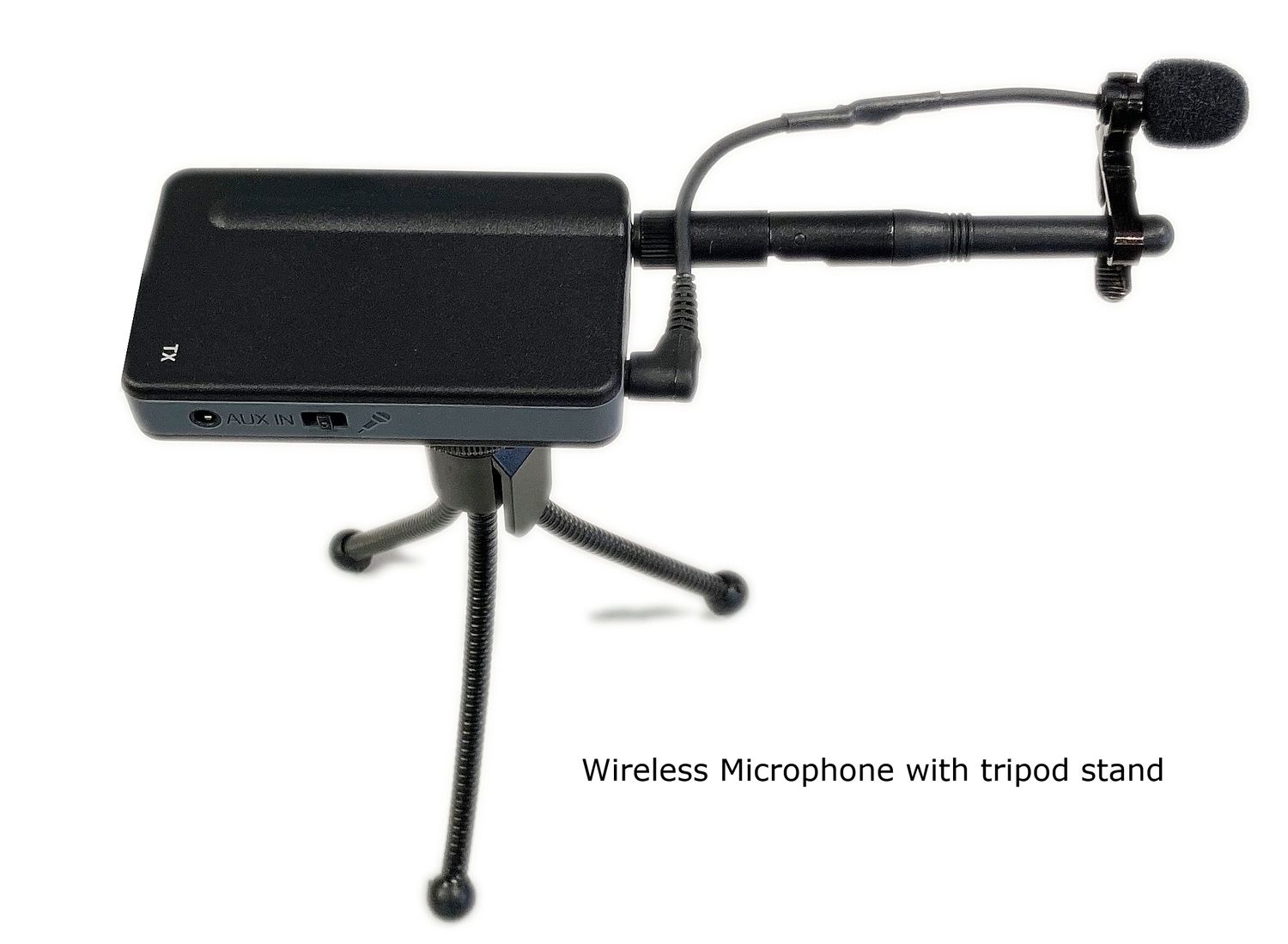
Martel describes a holder or tripod with its sidebar packages. The useful question is whether the court permits that support on an appropriate surface and whether it leaves room for documents and people. Check how it sits with the actual microphone and ordinary handling around it. A stable stand can make a position repeatable. An occupied ledge or unsupported mounting arrangement remains unsuitable even if it brings equipment closer to a speaker.

21. Why test the first open-room question after the sidebar?

Returning to the open room can require a different input or monitoring state. A reporter may correctly capture the entire bench exchange yet miss the first question from the lectern after everyone returns. In training, have the volunteer at counsel's position begin promptly with a distinctive question, and check its opening and ending in playback. This verifies the second transition that an isolated bench-only demonstration would skip.

22. How do I distinguish a muted source from selecting the wrong file?

Use a new neutral reference and a known practice job. A fresh, distinctive cue can establish whether the file being examined is the one made during that test. Once the correct file is identified, inspect the selected input, receiver output and available authorized monitor stages. Preserve both observations in your notes. A recording from the wrong time and a recording containing the wrong source can sound similarly unhelpful.

23. Can a backup recorder guarantee I have the bench conference?

A second recorder can provide a distinct file, but its usefulness depends on the authorized source and signal reaching it. Two devices connected after the same missing input can both preserve silence at the bench. Check the backup with a unique neutral phrase and reopen its file independently of the primary system. State whether the two share a receiver, cable arrangement or other dependency when describing what the backup covers.

24. What is an appropriate response when the conference status is unclear?

Seek the court's direction using the procedure established for the assignment. Give the responsible person a factual description of the equipment state if needed, such as which feed is available and whether the reporting job is active. The availability of a strong microphone signal does not resolve the question. In a training exercise you can rehearse the communication pathway without making any assumption about how the court will direct a real discussion.

25. How can a reporter with limited desk space keep cables understandable?

Group the receiver, the recording connection and the listening lead within the area available to you. Mark their functions with removable labels where allowed, leaving controls and connectors accessible. Note which cable can be disconnected without interrupting the recording path and confirm that in practice, if relevant. A simple desk arrangement is especially valuable when the reporter needs to remain at the writer as the conference begins or ends.

26. Does an independent wireless link produce an independent recording track?

That depends on the receiver configuration, input hardware, application and saved format. A separate transmitter can supply an audio source that the receiving equipment then mixes with other sources. Test the actual review operation in a practice file if separate bench playback is required. The ability to physically identify two pieces of hardware gives you a troubleshooting advantage. The reopened file shows how the software actually stored the channels.

27. What if a live monitor makes it hard to hear room instructions?

Discuss the authorized monitoring arrangements at the reporter's station and use a comfortable level during a neutral test. Practise the move back to ordinary room instructions to see how easily the reporter can follow both states. Identify which legitimate source contains those instructions and what change is needed to hear it. A monitor turn-up alone may increase the wrong sound and make the change back more difficult.

28. How can an agency train a second reporter without using case material?

Prepare a short invented bench exchange, an ordinary room question and a simple list of expected cues. One person operates the assigned recording setup, another provides bench speech and a third speaks from the normal room position. Swap operator roles and change the details on the cue cards. The exercise teaches the order of operations and file check while keeping the content of real bench discussions entirely outside the training materials.

29. What if the reporter can hear the first and last speakers but misses the middle turn?

Inspect the arrangement of the speakers and identify any change in speaking direction during that middle turn. Try the same location with another volunteer and a new cue. If the difficulty follows the position, compare a different authorized mic location. If it follows a particular receiver or file state, trace the connection instead. A repeatable observation carries more weight than an assumption that one speaker was simply too soft.

30. Should I make adjustments to court-installed audio controls if the bench disappears?

Contact the person assigned to operate those controls. You can help by describing whether the reporter's designated feed is absent, whether an approved portable receiver still monitors clearly, and which neutral test file shows the problem. Staff can decide how to check an installed route. Keeping the roles distinct helps the reporter diagnose their own receiving equipment without unintentionally changing sound elsewhere in the courtroom.

31. What does a useful support request to Martel include?

Provide the exact Martel kit, the receiving device model, the expected recording connection and the point at which a neutral practice phrase disappears. Mention whether the phrase remains audible at the receiver and whether the ordinary room microphone still records. These details can distinguish model compatibility, cable routing and application input selection. There is generally no need to supply the actual content of a bench conference to describe an equipment fault.

32. What should I compare before buying an additional microphone for this purpose?

First establish whether a court-provided bench feed already meets the assigned need and whether a portable system is permitted. Then compare endpoints, the number of people and positions to serve, the supported monitoring path and the reporter's ability to operate everything from the fixed seat. List the exact physical connection that remains unserved. That directs the purchase toward an identifiable routing problem rather than toward a product name alone.

33. What evidence tells me the practice setup is ready to use?

A useful record of the exercise identifies the court-approved arrangement, the speaking positions, the actual input, and a reopened practice file containing the two room cues and all expected bench turns. The reporter can describe how the conference starts, who manages the bench equipment and how ordinary proceedings resume. That is a practical baseline for the upcoming assignment. Changes in directions, room configuration or recording destination call for their own confirmation.

Martel equipment and related guides

Sidebar Wireless Microphone for Court Reporters · SKU 1974

Martel’s Bench Conference wireless microphone on its small tabletop tripod
Bench Conference Microphone for laptop USB recording. View Martel’s product details for SKU 2001.

Bench Conference Microphone for laptop USB recording · SKU 2001

This article is for educational purposes only.