

Courtroom Recording Software
Professional Courtroom Recording Software for Courts, Hearings & Multi-Microphone Recording
Shop Martel courtroom recording software, 4-channel court recording systems, courtroom microphone packages, backup audio tools, and voice writing recording solutions. These systems are built for courtrooms, hearings, depositions, court reporters, court administrators, and legal recording workflows that need clear multi-channel audio from the judge, witness, attorneys, podium, and courtroom participants.

DM4 4-Channel Courtroom Recording Software
Turn a Windows computer into a 4-channel courtroom recorder with separate audio tracks for review and transcription.
Start with the Recording Job You Need to Solve
Different courtrooms and court reporters need different recording paths. Some need a full 4-microphone courtroom recording system, some need software and mixer only, some need multitrack recording into CAT software, and others need backup audio protection.
DM4 with 4 Microphones
Complete 4-channel courtroom recording software package with hardware and microphones for courts that need a ready-to-build recording setup.

DM4 Mixer Only
A DM4 software and mixer option for buyers who already have part of the courtroom microphone setup and need the recording system core.

4-Channel USB Interface
A multitrack USB interface package for court reporters who want separate microphone tracks in Eclipse, Case CATalyst, or other CAT software workflows.
Mask Scribe
A 4-channel recording and transcription system designed for stenomask voice writers who want room microphones and voice writing workflow support.
AudioSync Secure Vault
Backup recording software for court reporters who want a separate recording path independent of their CAT software.
Courtroom Recording Software Comparison Chart
Use this chart to choose the right courtroom recording software or court reporter recording system for your workflow.
| Feature | DM4 with 4 Mics |
DM4 Mixer Only |
4-Channel USB |
Secure Vault |
|---|---|---|---|---|
| Best For | Best complete courtroom recording package for courts that need software, mixer, and microphones. | Best for buyers who need the recording software and mixer core. | Best for court reporters who want separate tracks inside CAT software workflows. | Best for court reporters who want independent backup recording protection. |
| Recording Type | 4-channel courtroom recording and playback | 4-channel courtroom recording and playback | 4-channel multitrack USB recording | Independent .WAV backup recording |
| Microphones | Includes 4 microphones | Use with your microphone setup | Includes 4 microphones | Works with current microphone and CAT software workflow |
| Channel Isolation | Designed to isolate separate courtroom participants during playback | Designed to isolate separate courtroom participants during playback | Designed for separate tracks in CAT software | Backup recording, not a courtroom channel-isolation system |
| Best Buyer | Courts, court administrators, hearing rooms, and legal recording buyers | Courts upgrading an existing setup | Court reporters using Eclipse, Case CATalyst, or similar CAT software | Court reporters who want a safety recording |
| Product Link | Open DM4 Package | Open DM4 Mixer | Open USB Interface | Open Secure Vault |
Build the Complete Court Recording Setup
Court recording systems work best when the software, microphones, backup recording, and court reporter workflow all fit together. These related Martel pages help connect buyers to the rest of the recording path.
Courtroom Recording Software FAQs
What is courtroom recording software?
Courtroom recording software is used to record, play back, isolate, and manage courtroom audio from multiple microphones placed near the judge, witness, attorneys, podium, or other courtroom participants.
Which Martel courtroom recording system should I start with?
Most buyers should start with the DM4 4-Channel Courtroom Recorder Software with 4 Microphones if they want a complete computer-based courtroom recording package.
Can the DM4 record separate courtroom microphone channels?
Yes. The DM4 is designed for 4-channel recording and playback so courtroom participants can be recorded on separate channels and isolated during review or transcription.
Do court reporters need backup recording software?
Many court reporters use backup recording software as a separate safety recording in case CAT software, a computer, or a primary recording workflow has a problem.
Ready to Choose a Courtroom Recording Software System?
Start with the complete DM4 package if you need a courtroom-ready 4-channel system with microphones. Choose the mixer-only or interface options if you are upgrading an existing setup or connecting into court reporter CAT software.
-
On Sale#1 ZOOM Court Reporter Kit#1 Order item for Court Reporters
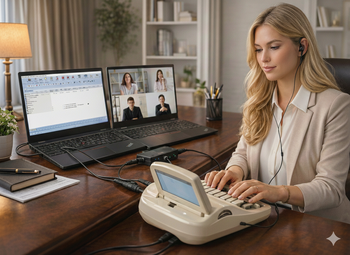
Zoom Compatible Court Reporter Teleconference and Recording Kit - Compatible with all CAT programs
Martel Electronics
MSRP: $499.99Now: $249.99Was: $299.99Exclusive Martel Court Reporter Accessory Indulge Yourself in Comfort — Your Arms Will Thank You A premium hands-free stenomask stand for court reporters who want less strain, better posture, and a more comfortable workday. The...403MSRP: $499.99Now: $249.99Was: $299.99 -
#1 Ordered Accessory to Court Reporters 2019

AudioSync Secure Vault Backup Recording Software for all Court Reporters
Martel Electronics
Sale Price $199.99AudioSync Secure Vault Backup Recording Software Never Lose Your Audio Again Protect every deposition with a secure backup recording that runs independently of your CAT software. If your system crashes, freezes, or fails, your audio is still safely...2075Sale Price $199.99 -
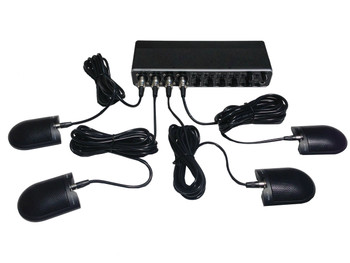
4 channel Multi-track USB interface for Court Reporters using Eclipse real-time software with 4 microphones included
Martel Electronics
MSRP: $1,599.99Sale Price $1,099.994 channel Multi-track USB interface for Court Reporters using Eclipse. 4 Channel multi-track USB interface. Connect up to 4 microphones and live listen. Now you can record all 4 microphones on 4 separate tracks in Eclipse or Case Catalyst...2065MSRP: $1,599.99Sale Price $1,099.99 -
On SaleIntroductory Price!Best New Product for Voice Writers
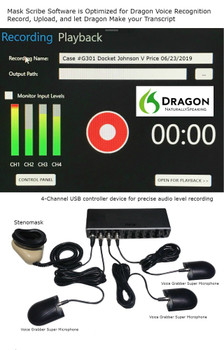
Mask Scribe 4-Channel Digital Recording System software designed for stenomask voice writers
Martel Electronics
MSRP: $2,499.99Now: $1,699.99Was: $1,999.99Mask Scribe 4 channel Digital Turnkey Affordable Recording System Software designed for steno mask voice writers. Mask Scribe is an easy 4-Channel digital recording system software designed for steno mask voice writers. The Mask Scribe software is...2067MSRP: $2,499.99Now: $1,699.99Was: $1,999.99 -
On SaleReplaces DM246 Court recorder

4 Channel Courtroom Recorder Software hardware - DM4 with 4 Microphones package
Martel Electronics
MSRP: $3,999.99Now: $1,499.99Was: $2,499.994 Channel\Track Courtroom Recording Software Turn your computer into a 4 channel courtroom recorder. Easy as 1,2,3 with Martel no recorder needed! The DM4 is 4-Channel Digital Recording Software designed to run on any Windows computer. The DM4 can...870MSRP: $3,999.99Now: $1,499.99Was: $2,499.99 -

DM4 - 4 Channel Courtroom Recorder Software-Mixer Only
Martel Electronics
Sale Price $1,499.99Professional Dictation Workflow DM4 - 4 Channel Courtroom Recorder Software-Mixer Only Built for offices that need easier playback, file control, and more efficient dictation and transcription workflow management. Serving...926Sale Price $1,499.99