TIME IS RUNNING OUT FOR 2026 TAX WRITE-OFFS

Martel Electronics | yesterday

Conference Microphones for a Divisible Training Room

Plan and test combined and divided conference rooms with separate meeting hosts, microphones and return speakers. Includes a six-source routing exercise.

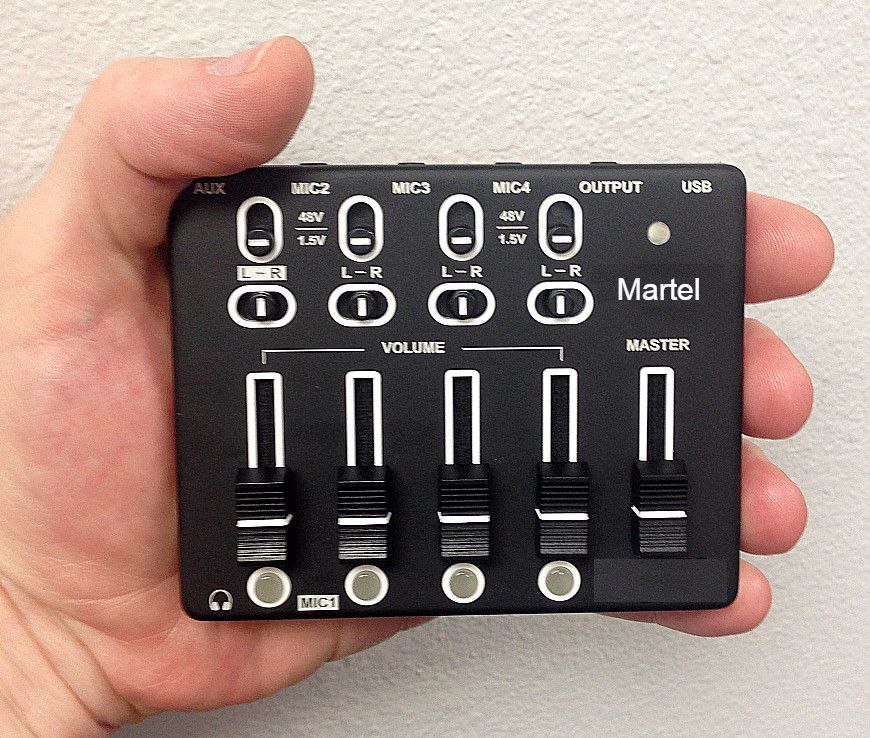
Four-channel control panel held in a hand in the Martel four-microphone conference kit gallery
Martel four-microphone USB controller, SKU 565. The controller photo identifies a component for one meeting host. The split-room test uses two independent paths.
In this guide

Walk the room with the partition both open and closed before choosing microphones. In the open configuration one instructor may address the whole group. In the closed configuration two independent groups may need different meeting hosts, participants and return speakers. The ability to move a table microphone does not establish the ability to divide a complete audio system between two live calls.

Start with a booking that the room actually has to support

A partition changes a building's floor plan in a few minutes. The meeting calendar tells you whether the audio also has to change. Read two recent bookings or ask the training coordinator for two realistic examples. An all-hands orientation might have one remote presenter and employees seated on both sides of the open wall. The next afternoon, an instructor in the front half may teach a hybrid class while a second instructor uses only a whiteboard in the back half. Another day both rooms might host paid online courses for completely different groups. Those are three different jobs for the equipment.

Give the halves names that staff can see at their entrances. This guide uses Oak and Ash. A note that says “select the left microphone” becomes ambiguous when somebody faces the screen in the other direction. A note that says “Oak host at the cabinet beside the Oak entrance” will still make sense when the tables have been turned around. Name the remote groups as well. A remote student in the Oak class must be able to hear a local student in Oak. A remote student in the Ash class has no reason to receive Oak's lesson.

Ask what a visitor actually brings. A trainer who brings slides on a flash drive can use the room computer. A trainer whose slides and meeting credentials stay on a managed laptop may need an approved way to connect that laptop. Someone joining as an ordinary remote attendee can listen without exercising all the controls available to an instructor. Name the role used for each test. Give the person who creates the booking a way to distinguish “two classes” from “two simultaneous online meetings” when requesting the room. That one field can prevent an otherwise careful equipment order from answering the wrong question.

This is a useful place to decide what counts as a completed session. Perhaps both ends need only a live conversation. Perhaps a remote training supervisor also has to reopen a saved class recording. Or perhaps the second room must hear a local instructor and must have no audio connection to the other session. Write those outcomes in words. They become the acceptance test, and they set limits on what the team should promise when someone books the space.

Draw the open and closed layouts at the same scale

Start with one copy of the floor plan for each configuration. Put the door swing, display, instructor's normal position, movable lectern, table groups and divider on both copies. Mark the fixed meeting computer and speaker if there is one. Draw the divider as its physical position when closed and mark the place where it stacks when open. A stack of panels can occupy the space where a drawing made from memory puts a table microphone. Check that the drawing represents the room after chairs have been set out and people have opened their laptops.

Add a dot for each position from which someone is expected to contribute. An instructor at the lectern and the same instructor answering questions at a whiteboard are two positions. A participant who normally faces a display can speak away from a microphone that looks close on the drawing. Give each position a short name, such as Oak screen, Oak door or Ash window. If a row only listens, record that assumption. When a trainer later tells you that every row takes part in a discussion, you will know which part of the plan needs a new test.

Draw intended microphone runs in one pass and return-speaker locations in a second pass. A cable could reach across the floor in a straight line yet fail to reach along the path the facility actually permits. Trace the path around the tables, around the door and back to the correct host. Record where the real connector will be accessible for a changeover. Give facilities staff the chance to identify moving components, power points and permitted floor routes. Leave installation work to the people assigned to it. The purpose of the drawing is to eliminate guesswork for the trainer.

Photograph the two approved layouts from the same doorway for a private room binder when your facility allows photography. Frame the equipment and its location without capturing a class, names on a screen or information on a whiteboard. A drawing answers where a component belongs. A photograph answers practical questions such as which side of the cabinet has the accessible connection. Update both if a new display changes the table arrangement. A timestamped note beside the drawing lets an instructor tell whether it represents this month's room or an arrangement that facilities has since replaced.

Allocate a complete audio path to each active meeting

Follow one participant's question from the chair to the outside listener. The voice reaches a microphone, enters a supported input arrangement, reaches the host computer, and passes into the meeting application. The remote participant hears it on a separate device. Now follow the answer back. The remote participant speaks, the meeting delivers the signal to the host, the selected output drives the room's playback equipment, and the local group hears it. These paths involve different equipment and independent selections. A successful microphone check accounts for only the outward trip.

The Martel four-microphone USB system brings four conference microphones to one meeting computer. Its product page shows the controller and explains operation of the microphone chains. Think of it as a candidate for one defined meeting input. The number four describes the microphones. It does not establish four separate computer feeds, two simultaneous group calls, separate individual recording tracks, or automatic responses to a moving wall. If independent groups sometimes meet at the same time, ask Martel to confirm the full proposed arrangement for each host. Put that confirmation with the order.

For a large combined group, the Martel eight-microphone package is a candidate when there are more speaking positions to serve. Put the additional proposed microphone locations on the drawing and give each a reason. One might serve a discussion table that rotates away from the instructor. Another might cover the second lectern during panel sessions. A purchase justified by specific seats is easier to evaluate than a purchase described only as “a bigger kit.” Confirm the package contents and supported connections on the product listing and in the proposed room design.

For two independent calls, identify the owner of each input and each playback path while the room is divided. If a shared device must move from Oak to Ash, record how Oak's session continues after it moves. If the answer is that Oak's session has to end first, this is a sequential-use arrangement. That may work perfectly for the booking calendar. It is a material detail when someone asks whether two separate webinars can begin at nine o'clock. Give the scheduler that answer before a date has been promised to a visiting group.

Use a mode card that leaves no connection implicit

A mode card is a short reference kept beside the host station. Give each approved layout its own row. The example below assumes two independently supported host and playback paths are available when both rooms meet online. It also includes a training day when just one room uses a call. Replace every generic device label with the actual name staff can recognize on the Windows 11 computer and in the meeting application. If two devices display the same name, include their physical location or an approved label beside the connection.

BookingComputer with meeting audioPlanned microphone inputReturn pathPerson who confirms it
Partition open, whole-room orientationOak house hostCombined-room input shown on the open planCombined-room playbackRemote helper plus a person at the far Ash seat
Partition closed, Oak hybrid and Ash local onlyOak house hostOak inputOak playbackOak remote helper and Ash instructor
Partition closed, separate online classesOak host and Ash host, each in its assigned callIndependent Oak and Ash inputsIndependent Oak and Ash playbackOne helper in each outside call
Partition reopened after two classesHost named for the combined sessionRestored combined-room inputRestored combined playbackStaff member at each former half

Leave a space on the card for a known limitation. A combined configuration may support the audience tables yet still require the mobile instructor to return to a marked place for online questions. Or the setup may accommodate a visiting Windows laptop only when the trainer has brought the specified computer adapter. Record the gap and the workable action. A trainer who can read that before the lesson has useful information. A trainer who learns it while a remote participant is waiting may reasonably conclude the system failed.

Add a small return-to-service field. Which computer should remain connected when the room has no booking? Where do portable items belong? Who receives a note if an item moves between rooms? Without this entry, one instructor may leave the best arrangement for Thursday's divided classes while Monday's orientation expects combined mode. Neither instructor made an unreasonable choice. A written default allows a third person opening the room to identify the starting condition without remembering either event.

Run a combined-room speech and playback rehearsal

Use a staff practice call with an outside listener in a separate, quiet location. Give the listener a blank sheet. Keep the answer key with the person running the room. Assign a different phrase to each speaking position, including at least one seat near the divider line and one at the far end of each half. For example, Oak door reads “five copper tickets,” Oak screen reads “aisle seven,” Ash window reads “the last bus leaves at four,” and Ash lectern reads “return the blue folder.” First ask the listener to write what they actually heard.

Have the local speakers use the voice, orientation and work materials they normally use. Somebody who would ask a question while facing the whiteboard should do exactly that during practice. Try the session with the instructor's laptop and display turned on. A closed computer or an empty table is a poor stand-in for the room during a lesson. If an item blocks a speaking position, move it only when the group could live with that change during an ordinary class. Record which layout produced the improvement.

Ask the remote listener to send a fresh return phrase after hearing the room. Have one person at each far position write it down. Staff sitting beside the display may hear a line clearly while people at the rear cannot identify the time or number mentioned. If the group relies on the screen's built-in speakers, confirm that they remain the selected output after connecting the display. If staff use a separate sound system, record its selection and which local control they can adjust. Recheck the outside listener's experience after changing playback volume.

A green level meter gives the person at the host evidence that a device received some audio. The remote transcription of “five copper tickets” provides a different, more useful result. A voice can activate the meter while a fan, a closed laptop lid near a pickup, or the input selection still leaves the words unclear. Keep the actual written return beside the cue until you have compared them. If a phrase fails, use new words for the retest so the listener cannot supply the missing detail from memory.

When a single endpoint is responsible for room audio, staff and students may still use other computers for slides, chat or attendance. Establish how those devices should join under your organization's meeting settings. Zoom identifies multiple active audio paths in one conference room as a common cause of echo. Muting a participant's microphone can leave its loudspeaker active. Have a helper listen for repeated words after the other devices join. Document which machine owns the room's microphone and speaker so a trainer can reproduce that arrangement with a different class.

Check two separate meetings with a routing exercise

In divided mode recruit two outside helpers, one in each practice call, and a person on each side of the wall. Each person should have access only to their own phrase card and a blank results form. Have the Oak host name the call on its display, then do the same in Ash. The test leader maintains the expected assignments. Equal-looking calls and familiar helper voices can conceal a wrong meeting invitation. Naming rooms, hosts and calls separately makes it possible to explain a wrong result later.

Here is a worked exercise we made for this guide. It uses six written source reports and a comparison of their destinations. No room, microphone or sound-isolation rating was measured. Four sources represent an instructor and a door-side participant in each local class. Each should reach only its own remote helper. Two more sources represent the outside helpers sending speech back to their rooms. Each should reach its own local playback path. The group reports what it actually heard, including anything heard by an unintended listener.

Source and practice wordsExpected reportReport indicating a problem
Oak instructor, “cedar fourteen”Oak remote helper records the phraseAsh remote helper records all four syllables clearly
Oak door, “four green folders”Oak remote helper identifies the count and colorNeither helper identifies the count
Ash instructor, “willow forty”Ash remote helper identifies both wordsOak remote helper identifies them too
Ash door, “bring the atlas”Ash remote helper hears the instructionThe instruction appears in Oak's practice recording
Oak remote helper, “open drawer seven”Oak local listener records sevenAsh local listener records seven
Ash remote helper, “close the blue case”Ash local listener records blueThe Ash group hears no return while Oak hears the phrase

We checked four invented sets of reports against those six assignments. A correct split produced six exact matches. Routing both Oak local sources to the Ash call produced four exact matches out of six, with two expected deliveries missing and two unexpected deliveries. In another case every expected listener received their phrase, but the Ash door phrase also reached the Oak helper. Five of six assignments matched. A check limited to “did my helper hear me?” would have passed the entire exercise and missed that extra listener.

In the fourth case, crossing only the two return speakers again produced four exact matches out of six. The outward calls were correct throughout. Replacing all the table microphones would give the team little direction in that case. The written report points to the playback selections and physical destinations. Conversely, a correct final score of six can summarize the planned routing exercise while saying little about exact word clarity. Record both the destination and the words understood, then interpret the entries in that order.

A missed word at the far table and a fully intelligible sentence delivered to another class deserve different descriptions. Avoid the single note “audio bad.” Write “Oak helper wrote fourteen correctly from the instructor and heard no answer from the door seat” or “the other call's helper wrote the complete Ash sentence.” If an unintended call receives words, hold use of that divided configuration for independent sessions until the assignment is corrected and retested. Tell the room coordinator exactly which other configurations were checked and can still be used.

Separate sound through the wall from a feed to the wrong computer

A movable partition changes what people in the room can hear directly. Its seams, openings and construction belong to the facility. Meeting software also creates an entirely different route that can take one group's microphone signal to another meeting. The remedies involve different people. Start with ordinary conversation on each side while approved meeting playback is stopped. Ask the local observer whether the other voice is merely noticeable or whether the observer can repeat a new phrase. Record their words and where they stood. This is a practical observation from that room and time.

Next run one practice call and one local-only class. The group on the local side reads a fresh marker while the active room listens normally. Ask the local observer and the outside helper for separate reports. If the active room's people can already understand the local-only marker, a microphone on that side could capture the same acoustic leakage. If the local observer heard very little and a distant computer delivered a clear direct feed, inspect which microphone and meeting each host selected. Neither observation by itself identifies a failed component.

Repeat with the two calls independent and with the expected microphone input explicitly selected on each computer. Keep the adjacent instructor, seating and playback level as steady as possible. Change one approved setting or one supported connection and give the helpers new words. An otherwise tempting fix is to reduce every microphone and both speaker levels at once. It may suppress the unwanted room and also silence the last local participant. Logging the effect of each change preserves the ability to restore a working outward or return path.

Some layouts have an operable partition plus a passage door that instructors leave open between sessions. Write down the condition of the door when recording observations. The team may accept occasional room noise for an open joint workshop and require much clearer separation for independent sessions. Give the coordinator a way to match the booking to the tested condition. Where the room has special privacy requirements, refer the acceptance decision to the person responsible for those requirements. An informal speech rehearsal supplies observations, not a building or privacy certification.

Check the instructor's actual lesson, including transitions

An opening announcement and a discussion place talkers in different parts of the room. Use a short rehearsal that mirrors the teaching sequence. Begin at the main display with a spoken date, turn toward the screen to name a graphic, move to the whiteboard for a numbered instruction and finish by inviting a question from the door-side table. The remote helper records which part becomes difficult. If only the whiteboard instruction disappears, test that position again before reconsidering every purchase. A proximity change there could solve a much narrower problem than the original complaint suggested.

Include the moment when the instructor plays approved training media if the group needs remote attendees to hear it. The meeting application's shared computer audio may follow a different path from room speech. Test the file with an ordinary sample sound and confirm it using the outside helper. Then stop sharing and ask for a new spoken question. A remote listener hearing a slide's soundtrack tells you nothing about how the door-side participant's next question will arrive. On the mode card, record any separate application selection the trainer actually needs.

A brief period of silence also reveals problems. Have both local groups pause while the remote participants remain connected. Ask each outside helper whether they hear a loudspeaker repeating their own voice, a neighboring lesson, or only the expected background. Then let the two instructors speak at approximately the same time with different markers. A quiet-room trial with one person reciting every phrase leaves out the very condition that makes the booking divisible. A result from a quiet practice morning should identify what remains to be checked at normal occupancy.

If the trainer changes computers at lunch, run the essential outward and return checks on the replacement. The printed name on the microphone controller stays the same while the new laptop may choose its internal microphone. A familiar-looking meeting on a familiar screen is not proof of the selected hardware. Read the device name, speak from the furthest required seat, ask for a response, and restore the prior room host if the visitor is only borrowing the connection temporarily. Record which part of this sequence belongs to the visiting trainer and which belongs to room staff.

Verify a saved practice recording when classes must be recorded

Ask first who has authority to create a training recording and who will need to read or hear it later. Use fictional phrases in an approved practice session. Give it a recognizable title that includes the room and the test portion, such as Oak divided morning practice. Do the same independently for Ash. Avoid collecting an actual employee training class merely to check the equipment. A short recording made with volunteers and an agreed access method can supply a cleaner answer.

Reopen the recording in the way the downstream user will use it. If a remote administrator reviews saved sessions, ask an authorized person in that role to open the test. Have them locate the first local marker, the remote response and the last local marker without sharing the answer key. Change from the Oak recording to the Ash recording and repeat. If both files contain a convincing lesson, the names and test markers still matter. One file could be an accidental second copy of Oak while the Ash practice never reached storage.

When a remote participant heard a clear call but the saved example misses a source, preserve the observation from both stages. Note the application, selected recording method, local or remote source involved and how the file was opened. A laptop setting that affects the speaker heard in the room may have no bearing on which sources the approved meeting recording captures. Ask the meeting administrator to confirm the supported recording behavior before promising isolated participants, independent channels or a particular layout in an export.

Decide where the approved handoff note belongs. A room binder might contain the procedure and labels while access to recordings stays inside your organization's existing training system. For the practice record, identify the configuration, reviewer, date and outcome using the identifiers allowed locally. Give the reviewer a way to say “not tested” if the recording feature is outside their role. Leaving a blank next to “Ash recording reviewed” can easily be misread as success by the person who approves the room six weeks later.

Make the next changeover possible for someone else

Ask a staff member who did not draw the plan to switch from the approved combined setup to the approved divided setup using the room card. The original operator can observe quietly and intervene if a connection or facility procedure is unclear. Note the first point at which the second person has to ask for help. If they know which meeting to open but cannot identify a nearly identical cable, a simple label at both accessible ends may solve the problem. If they can identify the cable but have no guidance on which instructor is using which host, the booking sheet needs attention.

Reverse the exercise after the split-room test. Close the practice calls under the approved procedure, restore the approved position of the divider, return the required tables and equipment, and have both ends identify a fresh combined-room marker. A mobility cart that now sits against another wall can shorten the available route; a display microphone might have become the default; an instructor may have left their borrowed adapter in a bag. Each is easier to discover with a two-minute exercise before classes begin than through a complaint from an audience already assembled.

Write an equipment question that Martel can answer from the room evidence. Include the two drawings, which bookings overlap, the names of host connections, how many speaking groups need coverage, the facility-approved cable routes, and how remote speech reaches each local group. State whether the facility already has speakers or existing equipment it wants to keep. Request the current package contents, supported layout, required independent components and any proposed accessories in writing. A room labeled “seats forty” supplies much less information than a drawing that identifies four lively discussion groups and two simultaneous outside meetings.

The conference microphone category brings together Martel options for a range of room arrangements. For a room that uses one open U-shaped table, use the U-shaped table layout guide to examine speaking positions along the sides and open ends. For a discussion in two independently booked rooms, keep the separate input, playback and destination checks in this guide. The buying decision is complete when the organization can name the equipment it intends to use, show how each booking will work and hand the approved arrangement to the person who opens the room tomorrow.

Practical questions and answers

1. What is the first decision for a divisible training room?

Ask whether the separated rooms must host simultaneous independent calls or whether only one side uses the equipment at a time. Those requirements change the number of host computers, inputs and return paths you must plan.

2. Can one USB connection be assumed to supply two meeting computers?

Plan each computer's supported input explicitly. The presence of a USB room kit does not establish simultaneous connections to both hosts. Give Martel the exact combined and divided requirements and verify the proposed arrangement before ordering.

3. Where should the partition appear on the equipment drawing?

Mark the closed partition line, storage pocket, approved cable crossings and the speaking positions that change sides. Include who operates the partition. A connection that is accessible with the divider open may be unreachable or unsuitable when it is closed.

4. How do I test the combined room?

Use one authorized practice meeting. Seat people in both former halves and have a remote listener identify an unfamiliar phrase from each. Test a return phrase at both ends, then check any required recording. Document the host computer and selected input.

5. What changes in the divided-room exercise?

Give each practice room a different fictional meeting and distinct spoken markers. Verify which remote group heard each local marker and which room heard each return phrase. A person on one side hearing their own instructor does not verify isolation between meetings.

6. Should both rooms use the same practice phrase?

Use different identifiers. If both instructors say the same words, a remote listener may mistake leakage from the other room for the intended source. Short pairs such as Cedar fourteen and Willow forty make the assignment easier to check.

7. Can physical sound leakage through a divider be distinguished from an electronic routing problem?

First identify what each local room can hear with the call playback stopped. Then check what each remote listener receives with the intended sources active. Document both observations. An audible voice through a partition and a full-strength feed delivered to the wrong call require different investigations.

8. What if only one room needs remote participation?

Make that the stated configuration and verify the other room's ordinary use. Mark the location of the active host and any equipment stored for the second side. Test the position adjacent to the partition where nearby room activity is most likely to be distracting.

9. Where should the room speaker be placed?

Choose an approved location that serves the local participants who need remote playback. Then evaluate what the meeting microphones pick up and whether an outside listener hears distracting return audio. The speaker decision belongs in both room drawings.

10. Should I unplug a cable whenever the wall moves?

Use the facility's approved process and the equipment's supported routing. Identify which connections actually change and who makes each change. Avoid routing a temporary cable through a moving partition or relying on a staff member to notice a hidden cable.

11. What should be included in a room-mode label?

Name the intended layout, host computer, selected room input, selected return speaker and the first quick test. Use plain room names understood by instructors. A color can help recognition, but the label should remain meaningful without color.

12. Can a four-microphone kit cover one side by default?

The four-microphone system is a starting option for a defined group of speaking areas. Verify the actual side's occupied seats, instructor position and remote result. The size of half a room is not a product coverage measurement.

13. When does the eight-microphone package enter the discussion?

Consider it when additional speaking areas in the intended working layout need supported pickup positions. Show which seats motivate them. The presence of eight microphones does not imply automatic partition sensing, automatic room combining or two independent USB outputs.

14. How do I identify a noisy or unused microphone after division?

Speak from the required positions with an operator following the documented source assignment. Note which input and controls are in use and what the remote person hears during quiet intervals. Use the product's supported controls when comparing one planned change.

15. What if the two trainers use different meeting applications?

Verify input and output selection in each application as actually configured. Include the app name with each room-mode note. A combination that works when both instructors use the same platform may require another setup step when the workflow changes.

16. How should I check a visiting trainer's laptop?

Identify its compatible connection, the instructor's ability to select the intended input and output, and the display or dock used. Rehearse a short call before the session. Recheck the house computer afterward if the room normally returns to it.

17. What should the recorded sample contain?

Use fresh nonconfidential phrases from each required source and a short return phrase if remote participation must be captured. Reopen the actual authorized test recording. Live intelligibility and saved source routing are separate acceptance questions.

18. How does the room return to combined mode?

Follow the approved physical process, restore the intended host and input, and run a new combined-room test from both far ends. Update the drawing if any microphone moved. A successful split-room call says nothing about a changed combined setup.

19. What should purchasing ask Martel to confirm in writing?

Provide the two plans, number of simultaneous sessions, computer connections, required pickup and return areas, cable limits, and any extra hardware proposed. Identify which pieces can move between configurations and which must be independent.

20. Who should perform the final rehearsal?

Include the person who normally moves the partition, the instructors responsible for each room and an outside listener for each required call. Ask someone who did not design the installation to switch configurations using only the handoff note.