TIME IS RUNNING OUT FOR 2026 TAX WRITE-OFFS

Moving From a Diamante to a NexGen Writer? Can You Keep Your Microphone?

Identify your Diamante microphone, check the NexGen input and rehearse a writer change with a saved practice job. Compare Martel kits 2031 and 351.
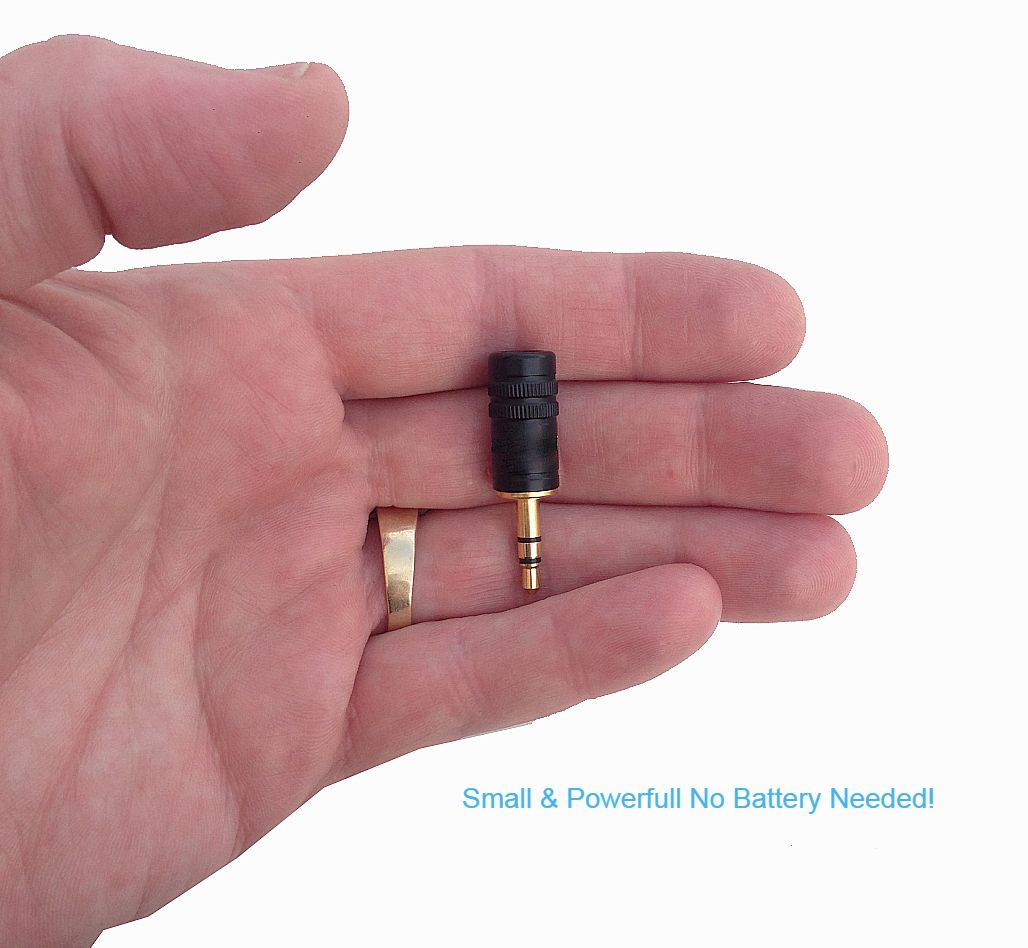
The small plug-in microphone from Martel’s Diamante kit shown in an open hand
Diamante AudioSync microphone kit. View Martel’s product details for SKU 2031.
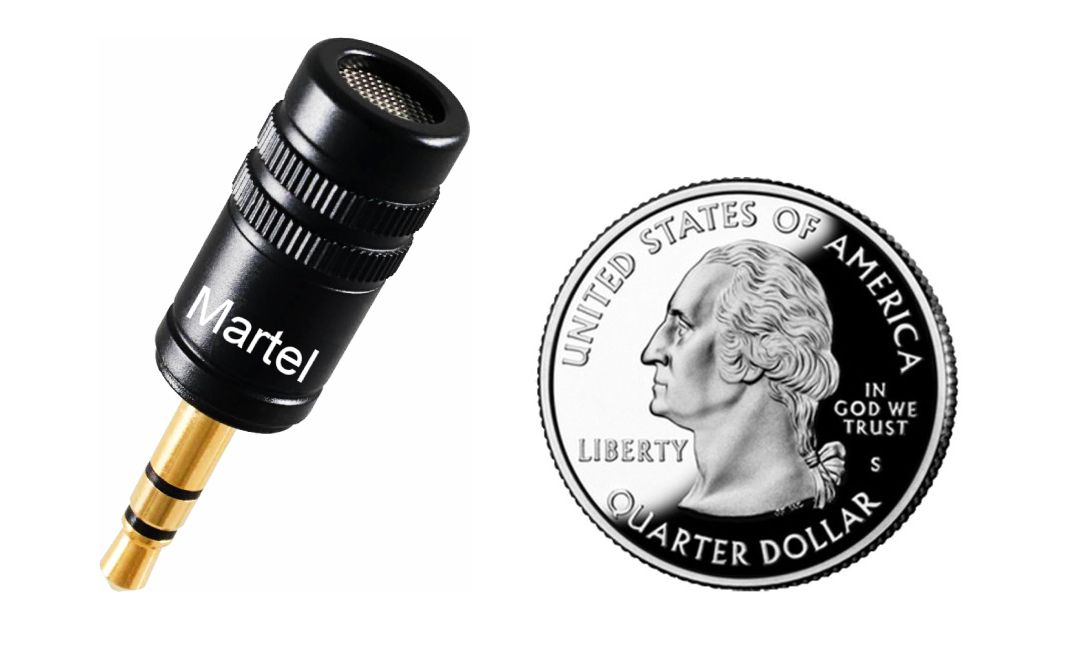
Martel NexGen plug-in writer microphone beside a quarter for scale
NexGen steno writer microphone kit. View Martel’s product details for SKU 351.

You may be able to keep the microphone you used with a Diamante. First identify the exact mic, confirm that it is supported on the NexGen, and make a practice job that you can reopen with its audio. The Diamante and NexGen manuals both describe external microphones for writer recording. Martel also sells a kit specifically listed for each writer, the Diamante kit under SKU 2031 and the NexGen kit under SKU 351. Those facts give you a way to investigate a particular microphone. A familiar plug and two similar product photographs leave too much unanswered to decide the purchase by themselves.

Begin with the part of the old setup you want to keep

Set the Diamante on the desk as you used it. Start at the microphone and follow its connection with your hand. It might plug straight into the writer. There may be a short extension between them. In some reporting setups the microphone actually leads to the computer or a separate recorder while the writer sends steno to the laptop. Write down the device that receives the sound first. If it has always been the laptop, changing the writer may leave the physical microphone connection untouched and change only how you open and review the job.

Place the parts involved in writer audio together on a sheet of paper. Write a plain description under each, such as “microphone with a fixed plug,” “extension with an identification tag,” or “headphones for checking the writer.” Add a photograph from the back of the complete working setup and another showing the product label. This is a useful time to find the invoice or product page for an older mic. A replacement decision gets expensive quickly when a name remembered from the box actually belonged to the extension or to a second microphone in the same case.

Give the old and new writers different assignments on paper

Define what a successful move means for your work. One reporter wants the NexGen to save speech with the steno so that a passage can be located on the writer. Another needs to transfer the material to a particular version of CAT software and listen there. A third leaves the writer’s sound in reserve and works from a separate recorder. Each has a different final check. Specify yours now and identify what opportunity you have to check it before an assignment. A few minutes at the new writer can establish that it heard speech. It may take a second session at your editing desk to establish that you can actually use the result.

Beside the new writer, list the parts whose status is already known. A set of headphones might work on the Diamante, a practice-card reader might work with your computer, and your usual software might open old jobs reliably. Those are worthwhile starting facts. Mark new questions separately, such as which card the NexGen uses for the current job, which audio format your installed software reads, and what power arrangement the old microphone expects. This keeps a missing file on the editing desk from being mistaken for proof that the mic itself must be replaced.

Identify the two current Martel listings

Martel describes SKU 2031 as a battery-free microphone kit for the Diamante. The product page describes connection to the writer’s pink microphone socket. That is useful identifying information if the invoice is still in your files. It does not date your own unit or tell you whether a previous owner changed the mic in the case. Match the actual component as well as the label on the bag. If the unit has no readable identifier, take photos of its body and both ends of the connection before contacting Martel.

SKU 351 is Martel’s NexGen kit. The listing describes a compact microphone that plugs directly into the writer, with a separate three-foot extension that lets the mic sit elsewhere. It takes no separate mic battery. These details offer two specific reasons to evaluate the kit. It provides a model sold for that writer, and it offers a choice of pickup location without a cable permanently attached to the mic. Whether your old mic can serve the same assignment depends on its identity, supported fit, and recorded result. The two SKU numbers make that a precise product inquiry.

Ask for a compatibility answer that identifies the actual combination

Imagine the question arriving at a support desk as “Will my old mic work on my new machine?” Someone answering it would have to guess what you own. Instead give the model or SKU of the mic, the full name of the new writer, whether a separate accessory sits between them, and what the mic did on the Diamante. If the invoice shows a bundle, identify which piece of the bundle you are transferring. A photograph of a recognized microphone with a permanently attached cable can answer a different question from a photograph of a small direct-plug model taken out of its extension.

Ask separately about a supported direct connection and your proposed extension. A microphone could be suitable for a writer while an accessory still needs confirmation. Request the recommended starting arrangement and which control on the writer affects incoming speech. Keep the response along with the equipment record. It gives the person conducting the test a defensible starting point. If the model remains unidentified, keep it with the old proven setup while considering the NexGen-listed kit for the new writer. This preserves a working reference while you resolve the open question.

Make a Diamante practice job you can listen to again

Before dismantling a reliable desk, write a short invented exchange on the Diamante with the established configuration. Mention the day of the rehearsal and identify the speaker positions. Include a number, a short answer, and a slightly hesitant correction. For example, have one speaker ask about “the box with the green tab,” then have the other answer, “I mean the gray tag, on the lower shelf.” A correction gives you several nearby words to compare without using any client material. Leave a little silence so that background sounds can be heard separately.

Finish the job normally. Reopen it using the method you count on in practice and see whether you can locate the correction. Keep that sample under a descriptive practice name with your record of the mic and extension. This is your reference for the migration. If the reference is already missing the far speaker, fix or document that limitation before expecting the NexGen to improve it. You may discover that the old configuration suited a smaller office or an earlier seating arrangement. That is valuable information even if the microphone is electrically suitable for both machines.

Prepare the NexGen as a recording writer before judging the mic

The NexGen manual places the microphone input and headphone connection on the back of the writer and identifies each by its own symbol. Match the symbol to the manual, confirm the supported microphone connection, and install the recording media the writer requires. Check actual available space using the writer’s instructions. Then set its job audio option before opening the practice file. Both the audio format and the option to record during the job are setup decisions the manual places before the start of the job.

In the first run, keep the audio route simple. Use the confirmed mic connection and the intended review headphones. Leave optional extensions out when the microphone can be positioned appropriately without one. Write an unmistakable trial label into the practice notes and have a helper say it aloud. Later you will be able to distinguish this file from the Diamante reference and any retest. A writer that takes steno correctly has demonstrated its steno function. The spoken label provides a separate check on the writer’s recorded audio and on your ability to open the correct test.

Treat gain, headphone level, and recording format as three decisions

People sometimes write down the old gain percentage and try to enter that number on the new writer. The published Diamante and NexGen guides show different gain scales. Start from the NexGen instructions for the microphone type you have confirmed. Use normal speech, then a stronger voice, to refine the input setting. Record the outcome. A setting that makes a quiet speaker intelligible while preserving a nearby louder phrase is more useful than a number carried over from another model. The microphone and position still matter even when the number looks familiar.

Headphone volume changes what the reporter hears during review. Recording format affects how the writer saves the audio and how a later program may read it. Choose a format supported by the equipment and CAT software you will use to review the practice job. Document the format separately from the input gain and headphone setting. When a colleague tells you that the new writer “sounds quieter,” ask where they listened and which control they changed. Their answer may point to playback loudness even where the stored recording contains clear speech.

Use three short takes to separate migration questions

For take one, use the Diamante reference arrangement and a passage you can replay. For take two, use the NexGen with the same identified microphone on its documented, supported route. Set up the two speaker positions as nearly alike as the different physical writers allow. For take three, change just the item that seems most important. You might add the supported extension to position the pickup away from the keyboard or compare the NexGen-specific microphone if you have one. Label each take before leaving the desk. You want to be able to tell a change of writer from a change of microphone or location.

Suppose the first and second takes include the speaker at your left but the second take misses soft speech from across the table. That observation alone leaves several possibilities. The new writer may sit higher, the microphone body may now face a folder, or the new input gain may need adjustment. Before replacing anything, choose a third take that tests one explanation. Move the folder or adjust the supported setting, then have the speaker repeat the same phrase from the same place. A meaningful difference between those takes narrows the task considerably.

Try the direct position and the separate extension as different working arrangements

A direct-plug microphone moves with the writer. Set the writer to the height and angle you actually use, open the screen to its usual position, and see where the mic now sits relative to the person answering. A position that looks exposed on a bare desk can wind up behind the top edge of a screen or next to a large exhibit once the reporter starts work. Listen to a saved phrase with the normal desk arrangement in place. A photograph of the complete setup may explain the result more clearly than a close-up of the jack alone.

With the NexGen-specific kit, the separate extension makes another position possible. Keep the writer where the reporter can write comfortably and choose a permitted, stable place for the mic. Give each end of the cable adequate clearance without obstructing the writer’s movement. Record the same two voices, including a phrase spoken while counsel turns toward the witness. If the extension position wins, place that accessory on the list that must travel with the writer. If the direct position wins, the shorter setup may be appealing on a small desk. The decision rests on the recording and the available space in that setting.

Check the words tied to the steno as well as the sound

You may be able to hear practice speech at the new writer and still need to confirm how it lines up with a useful place in your notes. Choose three memorable points in the rehearsal, perhaps the first question, a correction in the middle, and the last exhibit reference. Write a distinctive word for each as you normally would in a practice job. Then return to those positions using the writer’s supported review procedure. Verify which piece of the recorded exchange starts there. An excellent-sounding file is less useful if the person reviewing it has not learned where to find the right passage.

Next exercise the ordinary computer workflow with the same short job. Follow the documented transfer or read process for your writer and installed CAT software. Open the practice job on the computer and locate each marker again. If a marker sounds right on the writer and fails on the computer, preserve the original writer job and investigate the transfer or file handling. Changing the microphone at this point would change tomorrow’s input while leaving today’s computer review problem unresolved. The paired checks give you a specific place to begin.

Account for pauses and different writing habits

A continuous stream of practice strokes can hide a setting that becomes important during a deposition. The NexGen manual describes an option that can pause audio after a selected period without steno and resume with writing. Check the current setting in your configuration. Decide how an authorized rehearsal should handle a pause, then include one in your test. Have a speaker identify a page, allow the agreed interval while an exhibit is examined, and speak another identified phrase. Use the writer’s indicated state and the saved audio to learn how your arrangement behaves.

This test can prevent a false microphone diagnosis. If the beginning and end of the job are clear but a phrase is missing around a pause, look at the timing of writing and the recording state. A change of microphone has no direct control over the writer’s decision to pause. A change of audio setting can affect how later jobs behave, so follow your established procedure, the manual, and the requirements of the assignment. Learn the behavior with disposable practice material when you are free to stop, replay, and start a fresh job.

Prepare for a failure without putting old jobs at risk

Keep the original Diamante sample and the new NexGen samples in separately named locations. New practice media or an approved, adequately prepared card is preferable to trying experiments on the only copy of a job. The two writers’ manuals describe their media arrangements, and the NexGen instructions call for the correct data microSD card with room available. Confirm media type and capacity with the appropriate writer guidance. A recording warning related to space gives you a media question to solve before blaming a newly connected microphone.

Use an extra piece of paper to keep a change log. Write the trial name, writer, mic, optional extension, input setting, and where the job was replayed. If something fails, circle the last step that worked and begin there. A retest with new media, a different mic, a higher input level, and different headphones all at once can produce a good recording without explaining which change helped. Retaining the known working old job means the reporter can also distinguish a new problem from a preexisting limitation in the review station.

Make the keep-or-buy decision on a working reporter’s terms

Keep the old mic in service on the NexGen when you can identify it, confirm the supported combination, and recover the required speech through the completed job workflow. If electrical compatibility is established but your witness position suffers on the new writer, consider whether a supported extension or a different permitted location solves the practical problem. If the microphone must stay with the old writer for a backup or second operator, a new NexGen kit may make sense even though the old one performs well. Those are three different purchasing decisions.

When the old unit is unidentified or its present condition remains uncertain, a model-specific kit can remove one unknown from the new configuration. Martel’s NexGen kit also provides a direct body and an optional extension, so you can judge whether those physical choices fit your work. Keep the model-specific page and your short recording notes with the order. The goal at handoff is simple to describe. A reporter receiving the new writer should know which microphone to attach, where to put it in the practice arrangement, how audio will be saved, and which sample demonstrates the accepted result.

Give the next person a compact transfer record

For an agency or school lab, label the writer first and then label the microphone as a distinct piece of equipment. Record who verified the arrangement and on which writer, with permission to maintain that equipment record. Store an invented test exchange and its written key in the training folder. A returning reporter can use the same passage in a new room without opening an attorney’s file. Preserve any written compatibility reply for an older microphone alongside its identification photograph. This is particularly useful when two cases contain similar black mics and only one has a legible model mark.

A practical handoff includes a short demonstration by the person receiving the writer. Let them connect the correct mic, make a few strokes with a helper speaking, stop the trial, then locate a specified line on the equipment they intend to use. Ask what item they would check first if that line disappeared during computer transfer. That final explanation shows whether the person understands the recording path or merely watched someone else set it up. It is much easier to correct a mistaken assumption in a training room than between two sessions of testimony.

31 questions and answers

1. Does moving to NexGen automatically require a new microphone?

A change of writer gives you a reason to verify compatibility and recording behavior. Purchase a replacement when the existing microphone cannot be confirmed for the new input, fails a properly set up rehearsal, must remain with the old writer, or does not fit the new work arrangement. If it is supported and gives you intelligible, retrievable audio in a complete practice job, you have evidence for keeping it. Record the model and test conditions so you can repeat that decision later.

2. What does the Diamante kit number tell me about an older mic?

SKU 2031 identifies Martel’s Diamante microphone kit. A matching invoice is useful when you contact the seller, especially if it identifies the kit originally supplied with the writer. Open the case and compare the physical mic with the available listing and photographs. Accessories can be changed while an item is in use. The combination of an invoice, a clear picture of the actual plug and body, and your account of how you used it is stronger evidence than an unmarked carrying case.

3. Does the NexGen kit include a mic that always sits on a cable?

Martel describes SKU 351 as a compact mic that plugs directly into the NexGen and includes a separate three-foot extension. You can evaluate a direct position and a position away from the writer. Check the current product listing for the package you are ordering, especially when buying a used unit or comparing an older invoice with current pictures. An extension shown with a kit is particularly relevant if your microphone needs to sit closer to counsel while the writer stays beside you.

4. The microphone has no battery. Does that establish compatibility?

It tells you something useful about how the mic is powered. Determine the specific microphone type and the input requirements as well. The writer manuals discuss suitable externally powered or writer-powered microphone arrangements, and the two Martel listings identify kits intended for their respective writers. If you have an unidentified battery-free mic, take its model information to Martel before plugging it into a new writer. An original accessory description may resolve the type more readily than a photo of a bare plug.

5. Can I buy a NexGen writer and decide about the microphone later?

You can keep the microphone decision open while you gather the old mic’s identification, the specifications of the new writer, and a realistic opportunity to rehearse. Plan the timing around the first assignment that requires recorded audio. If the writer arrives late in the afternoon and you need the equipped setup early the next morning, identify the supported fallback in advance. The amount of time available for a complete saved-job check belongs in the purchasing decision alongside the cost of the microphone.

6. How should I ask about a mic from a writer I bought secondhand?

State that it came with a used Diamante, describe any marks, and say whether you can demonstrate it working directly in that writer. Include the mic body, plug, and any separate adapter in photographs. Ask for identification and a supported recommendation for the exact NexGen model. Being explicit about what you inherited avoids accidentally attributing it to Martel or to the original writer manufacturer. If it cannot be identified confidently, keep it documented as an unknown accessory until you choose a supported route.

7. What is the difference between transferring an old job and transferring a mic?

Transferring a microphone concerns the physical recording input for future work. Transferring an old job concerns the writer files and the software used to read them. Keep the original Diamante job and follow the appropriate procedure for reading its audio. For the equipment migration, create new NexGen practice material. Success in playing yesterday’s Diamante audio on the laptop does not examine today’s NexGen input. A fresh spoken label recorded with a new practice file gives the new arrangement its own evidence.

8. Why do I need the old writer if the mic is the only part I am moving?

A working Diamante lets you establish how the mic and extension perform before the change. If the new arrangement produces a weak speaker, the old sample can show whether that seat was already difficult. If the old writer has already been returned, look for a permissible, clearly identified practice sample made with the same equipment, or arrange a new supported comparison. You can still test the NexGen independently. Just document that the old arrangement was unavailable for a side-by-side check.

9. May I use the same gain percentage I wrote down for the Diamante?

Read the scale and starting guidance in the NexGen manual. The two writer guides describe different ranges, so copying a percentage can give you a very different result. Select the starting approach appropriate to the microphone type, record both ordinary speech and a nearby stronger voice, and review the saved sample. Write down the position and outcome beside the setting. That pair of observations has more value on your next NexGen assignment than a number separated from the room and microphone used.

10. Is my old headset part of the microphone compatibility question?

A headset used only to listen has a playback role. A headset with a built-in microphone can introduce another recording route when connected through supported equipment. Identify which connection provided the microphone and which provided listening on the old setup. On the new writer use the documented mic and headphone connections for their intended purposes. If audio is hard to hear, try the saved job with known working playback equipment before concluding that a supported external microphone captured it poorly.

11. Where should I connect the microphone on the NexGen?

Consult the diagram and microphone icon on the back of your exact writer. The NexGen guide identifies separate microphone and headphone jacks and shows their positions. In a training run, have the reporter identify each one while the equipment is on the table, then attach the confirmed microphone to the mic input. A photo of your own writer with the two labels visible is useful reference material for a shared kit. Keep the photo with the writer model so an operator can recognize future changes.

12. Can I use a spare audio cable that happens to fit the ends?

For the first trial, use the documented arrangement for the mic you have identified. With SKU 351, the product listing identifies the separate extension included in that kit. Check any borrowed cable for suitability before introducing it. Even a working replacement of a different length can move the mic to a different place and change the result. Identify the cable used in the successful test so the person packing the new writer can reproduce the setup without relying on the cable’s color alone.

13. Why would a direct-plug mic produce different audio after I raise the writer?

The writer is also the physical support for a directly attached mic. Raising the writer, rotating it toward counsel, or changing the screen angle can change the pickup’s surroundings. Observe the path from the speaker’s mouth to the mic with the screen and exhibits in their normal positions. Test a phrase after setting the writer to your comfortable height. If the pickup position has become awkward, evaluate the supported extension while keeping the writer itself comfortable and stable for the reporter.

14. How should a reporter who changes rooms frequently test a retained microphone?

Choose two representative rehearsals. One might be a compact deposition table where the witness sits close. Another might place both attorneys across a wider space. Use the same identified mic and writer in both, then record the practical adjustments required. If one room requires the extension, label the complete configuration for that job type. A retained mic that works in only one tested arrangement may still be valuable, provided the reporter can recognize when a different arrangement deserves its own check.

15. Which parts of a saved practice recording should I actually review?

Listen to the opening phrase to verify the start, a middle reference to test navigation, and a later correction or number that would be difficult to recover from context alone. Reopen the closed job before reviewing at least one passage. If another person will perform the later scoping, let them locate one practice marker through their usual software and headphones. This checks whether the recorded material and its association with the job survive the complete route from the new writer to the listener.

16. I can hear sound on the writer. Why run another test in CAT software?

The recording stage may be successful while the transfer method, file format, or review application still needs configuration. Checking both stages helps you direct the next question to the right source. If the word “gray” is audible at the selected place on the writer, preserve that file and ask why the computer copy behaves differently. If it is missing on the writer as well, investigate the writer’s capture settings and microphone position first. These findings lead to materially different corrective steps.

17. What should I do if the practice job contains notes and no audible speech?

Verify the selected practice job, recording status, media availability, and microphone connection. The writer can create notes even where recording did not begin. Check the manual for the model’s recording-state indications and any displayed storage warning. Use a new practice job after setting the writer appropriately, and speak an obvious identifier while making strokes. If the writer still yields no audible speech through a known working review route, test one supported alternative or contact support with those observations.

18. Does a saved file with a nonzero size prove that the transferred microphone works?

A file’s presence and size tell you that the writer created data. The NexGen guide explains that enabling audio uses additional storage even when an external microphone does not provide usable speech. Listen to identifiable words from the setup you are evaluating. A minute-long practice file with both speakers and a spoken correction is usually more informative for this purpose than a much larger file whose source and contents are unknown. Preserve the corresponding steno so you can locate the same passages again.

19. Can a change of audio format look like a microphone failure?

It can look that way at the editing desk when a file plays on the writer but the chosen program cannot use it in the expected way. Check the NexGen recording format and the published read instructions for your software version. Work with the original practice files and a separate copy for any trial. A different microphone influences incoming audio in a future recording. It cannot change how a program interprets an already saved file, so use the location of the failure to guide your next step.

20. Should I move the Diamante’s recording card directly into the new writer?

Follow the specific instructions for each writer and keep original jobs protected. The NexGen manual identifies data and backup microSD media, while the Diamante guide describes its own card arrangement. The names “data” and “backup” describe roles and do not establish that an existing card is suitable for a different machine. Set up supported media for the NexGen transition and make a new practice file. Handle any separate transfer of old jobs through their established reading and backup workflow.

21. What does a clear recording with weak synchronization tell me?

You have evidence that some microphone and capture path delivered speech. Now investigate what your review procedure uses to associate that speech with the steno. Compare several intended markers on the writer with the same markers in the computer copy. Make sure both files came from the same test and that the person reviewing them opened the corresponding job. A mix-up between nearly identical filenames can make a working microphone appear responsible for words that arrive at entirely different points.

22. How do I distinguish low input gain from low headphone volume?

Record a short practice file once and preserve it. Play that same file through the normal review setup and then through another known working playback route if available. If the underlying speech is usable at comfortable levels elsewhere, investigate the first headphone path. For input gain, change the supported writer setting and make a new, distinctly named recording. Compare the two files with the playback setting held steady. This method distinguishes a change made during recording from one made afterward.

23. What if the voice is clear until the speaker turns toward a document?

Recreate that precise movement in a practice run. Ask the helper to read the same short line first toward counsel and then toward the document in its ordinary position. Check whether moving the microphone on its supported extension gives the second line a clearer path. A direct-plug mic on the new writer may occupy a different position from the old setup, even when the writers stand at the same spot. Record the physical arrangement so a later change of folder or screen position can be considered.

24. How do I check a delayed answer after a pause in the practice exchange?

Have the speaker wait a known interval before saying a line you can identify, and note what the reporter does at the keys during that interval. Review the recording status indication together with the resulting passage. Consult the writer’s pause and resume settings where appropriate. If the issue appears only after inactivity, capture that pattern in the support note. It gives support a concrete timing condition to reproduce and helps them assess whether the current recording state contributed to the missing audio.

25. If a comparison sounds different, should I trust the louder of the two takes?

Level affects how easy it is to hear on a quick listen. Match playback to a comfortable level for each take and ask a helper to recover a date, proper name, or correction from the same passage. Record the recovered words before discussing sound quality. If both takes preserve the words, you can weigh physical convenience and operating routine. If one take obscures specific syllables, check whether placement or recording gain explains the result before assigning it to a difference between writer models.

26. Do I still need a labeled microphone if I’m the only person using the equipment?

A label is useful for your own future decisions, particularly if the two writers remain in service or a kit is sent in for support. Use a removable case label or inventory record that identifies the mic without covering its opening, controls, or connection. Name the verified writer and accessory in the record. Six months later, you can evaluate a change of cable or room against the right combination instead of reconstructing the setup from memory at the start of a job.

27. Should a student practice on the new writer with an actual class or client file?

A short invented practice exchange gives the student control over the speakers, wording, pauses, and answer key. The exercise can be repeated and shared with an instructor without needing real testimony. Choose phrases the student can readily write so a writing challenge does not mask an audio problem. Verify that the student can reopen the file and locate a known line independently. Use any school or workplace recording arrangements only in accordance with the instructions for that setting.

28. How do I decide whether to keep the old mic with the Diamante as a backup?

Consider whether the Diamante may need to function as a complete ready-to-use alternative. A backup writer sitting in the case without the only microphone you use for its audio may require extra setup when you need it. Price and test the two workable arrangements, one transferable mic or two equipped writers. Include time to move and identify the right accessory. If another reporter might use the Diamante while you use the NexGen, schedule and rehearse both complete kits at the same time.

29. If support confirms compatibility, why does a rehearsal still matter?

Confirmation addresses the intended pairing of models. Your rehearsal examines the particular mic, extension, recording media, settings, speaker positions, and review software that will go to work. An established accessory can develop a loose connection, or an unfamiliar writer can be left at its initial recording settings. A successful test ties the support answer to your actual working equipment. Save the identification and a brief result so you can revisit the arrangement if a later software update or repair changes it.

30. Which small detail makes a written handoff most useful to another reporter?

Give the next person a specific place to find and listen to a practice result. A line such as “open the job labeled NexGen window-seat trial and listen at the green-tab correction” turns a general assurance into a repeatable check. Add the microphone’s identification, whether it was directly attached or on the kit extension, and which device produced the file. Someone taking the writer to a different room can then repeat the same meaningful check with that room’s seating and background conditions.

31. What would justify buying the dedicated NexGen kit even when my existing mic passes?

A second equipped writer, a need for a documented direct-plug arrangement, or the flexibility of the supplied extension may justify the purchase. Compare those concrete needs with what the retained microphone already does in a saved job. A reporter with one proven mic and plenty of setup time may choose to keep it. An agency dispatching two writers to separate proceedings might value having a known kit in each case. Use the Martel NexGen listing and the specific workflow to make that choice.

Martel equipment and related guides

Diamante AudioSync microphone kit · SKU 2031

NexGen steno writer microphone kit · SKU 351

This article is for educational purposes only.